Get ready for Windows 11 version 26H2


 Windows IT Pro Blog:

The next annual update for Windows 11 is coming soon and is already available to Windows Insiders! Windows 11, version 26H2 continues our focus on delivering a predictable, low-disruption update experience for organizations and IT professionals.

For devices already running recent versions of Windows 11, this release should be easy to adopt. It builds on the same platform and servicing approach introduced in prior releases, while continuing to improve how updates are delivered, tested, and deployed.

In this post, we'll walk through how to prepare for Windows 11, version 26H2.

A familiar update experience, refined​

Windows 11, version 26H2 uses the same shared servicing model as recent releases available annually in the second half of the calendar year. Supported devices get this feature update as a small enablement package instead of a full OS replacement.

If your organization is already on Windows 11, version 24H2 or 25H2, the update to 26H2 is similar to a regular monthly update in most environments:
  • A small, quick installation
  • Minimized disruption to users
  • No need for full reimaging or complex deployment motions
Note: Devices running Windows 11, version 26H1 won't be able to update to version 26H2. Instead, they'll have a path to update to a future Windows release. This is because Windows 11, version 26H1 is based on a different Windows core than Windows 11, versions 24H2, 25H2, and 26H2. Here's What to know about Windows 11, version 26H1.

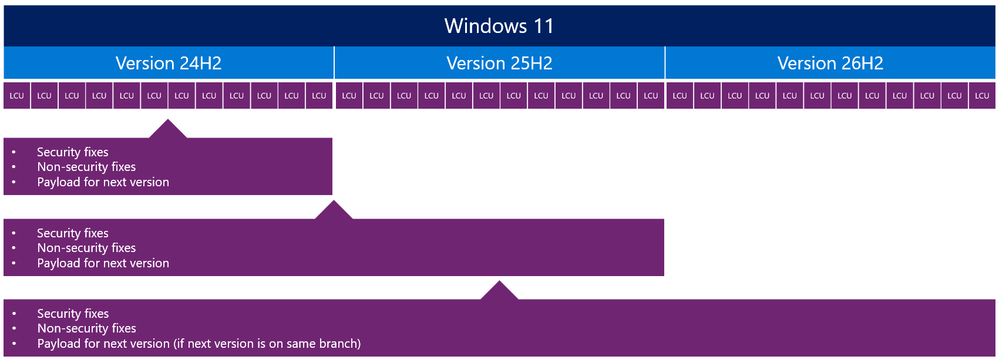
This is possible because multiple versions of Windows 11 share a common servicing branch, including:
  • The same source code base
  • The same security and quality updates
  • The same compatibility validation
The difference between versions is simply which features are enabled.

Diagram showing the steps when new features are enabled when versions share a servicing branch

Shared servicing branch progression

Why this matters for IT organizations​

The shared servicing model isn't just a technical detail. It directly impacts how you manage updates across your environment. Compared to full OS upgrades of the past, Windows 11, version 26H2 comes with reduced deployment complexity, improved compatibility confidence, and faster time to value.

Reduced deployment complexity​

Because features are delivered continuously and enabled later, there's no large "upgrade event." This makes planning easier and reduces operational overhead.

Improved compatibility confidence​

Devices moving between versions on the same servicing branch typically benefit from:
  • Existing application compatibility validation
  • Lower risk of regressions
  • Fewer surprises during rollout

Faster time to value​

With smaller updates and faster installations, organizations can move more quickly to the most current release. New features reach you without lengthy deployment cycles.

Support lifecycle considerations​

As with previous annual feature updates, moving to Windows 11, version 26H2 resets the Windows support lifecycle for your devices.

This provides:
  • 24 months of support for Home, Pro, Pro EDU, and Pro for Workstations editions
  • 36 months of support for Enterprise, Education, IoT Enterprise, and Enterprise Multi-session editions
What does it mean for your servicing strategy? The annual update becomes a key milestone for maintaining a supported and secure environment.

How to prepare for Windows 11, version 26H2​

Already managing Windows 11 in your organization? Preparing for 26H2 should align with your existing update processes.

1. Validate today​

Begin testing with devices running recent versions of Windows 11 to confirm compatibility with your apps, policies, and infrastructure.

If you'd like to get a peak of what's coming and begin previewing version 26H2 on devices now, the update is available through the Windows Insider Program in the Experimental channel. Otherwise, your organization might prefer to wait for the update to become available in Release Preview before doing more extensive testing. At that stage, the experience is closer to final shipping quality. We'll have more information to share when version 26H2 is in Release Preview.

2. Use your existing deployment tools​

Windows 11, version 26H2 will be available through familiar channels, including:
  • Windows Autopatch
  • Microsoft Intune
  • Windows Server Update Services (WSUS)

3. Plan your rollout rings​

Use your standard deployment rings to:
  1. Pilot the update with a small group of devices.
  2. Expand gradually based on validation results.

4. Stay current​

Windows features are delivered continuously. Stay up to date with monthly updates to help ensure a smoother transition when the feature update becomes available.
Timeline showing features delivered monthly and enabled together in a feature update

Feature delivery over time with enablement moment

Looking ahead and staying informed​

Windows 11, version 26H2 continues the move toward a more predictable and efficient servicing model. This model helps reduce disruption while helping your organization stay secure and up to date. By building on a shared platform and delivering innovation continuously, Windows enables you to focus less on large upgrade projects and more on delivering value to your users.

We'll continue to share updates and guidance as Windows 11, version 26H2 becomes available. In the meantime, test it in the Windows Insider Program's Experimental channel and use the updated plan-prepare-deploy learning path to get ready.


 Source:

 
Last edited:
The apps ask Google and be specific about the versions of each app you are concerned about.
E.G. No good just asking about Word and Google says yes and you running an Ancient Version.
Google is only going to be as good as the Data you input.
What I want is to upgrade my Windows 11 version (from 24H2 to 25H2) WITHOUT all my apps being wiped out. Can I do the upgrade in such a way that my apps will REMAIN in my system and won't need to be re-installed?
 

My Computer My Computer

At a glance

Windows 11
OS
Windows 11
Last edited:

My Computer My Computer

At a glance

Windows 11 Pro 25H2 (Build 26200.9168)Intel Core Ultra 9 285 5.6 GHz32.00 GBIntel Integrated Graphics (128 MB)
OS
Windows 11 Pro 25H2 (Build 26200.9168)
Computer type
PC/Desktop
Manufacturer/Model
Dell Pro Max Tower T2 FCT2250
CPU
Intel Core Ultra 9 285 5.6 GHz
Motherboard
64-bit operating system, x64-based processor
Memory
32.00 GB
Graphics Card(s)
Intel Integrated Graphics (128 MB)
Sound Card
Realtek Audio
Monitor(s) Displays
Dell P2714H Monitor
Screen Resolution
1920 x 1080
Hard Drives
1 x 512GB M.2 XG10d SED KIOXIA PCIe solid state drive (Internal)
1 x 2TB Seagate ST2000DM008-2UB102 HDD (Internal)
1 x 4TB Seagate STGX4000400 External HDD
1 x 6TB WD Elements AE 2689 External HDD
PSU
500 Watts
Cooling
Air
Keyboard
Microsoft Wired Keyboard 600
Mouse
Microsoft USB Basic Optical Mouse v2.0
Browser
Firefox
Antivirus
Windows Defender + Malwarebytes Premium
Other Info
BaseBoard Manufacturer Dell Inc.
BaseBoard Product 022RY57
BaseBoard Version A01
What I want is to upgrade my Windows 11 version (from 24H2 to 25H2) WITHOUT all my apps being wiped out. Can I do the upgrade in such a way that my apps will REMAIN in my system and won't need to be re-installed?
There are so many variables in your question.
You maybe running an App that is incompatible with 25H2, sometimes you things can go wrong during an upgrade.
You need a proper backup system so if things go pear shaped you can roll back to your status at the time of the backups.
 

My Computer My Computer

At a glance

Windows 11AMD Ryzen 8700G64 GBOnboard
OS
Windows 11
Computer type
PC/Desktop
Manufacturer/Model
Generic
CPU
AMD Ryzen 8700G
Motherboard
Gigabyte B650 UD AC
Memory
64 GB
Graphics Card(s)
Onboard
Sound Card
Onboard
Monitor(s) Displays
Del U2723QE
Screen Resolution
3840 x 2160
Hard Drives
Corsiar MP600 1TB
PSU
Silverstone 750 GOLD
Case
Silverstone FARA 513
What I want is to upgrade my Windows 11 version (from 24H2 to 25H2) WITHOUT all my apps being wiped out. Can I do the upgrade in such a way that my apps will REMAIN in my system and won't need to be re-installed?
A repair install is overkill. 24H2 and 25H2 share a common set of system files. If your 24H2 is up to date then Cumulative Updates have already installed the 25H2 features in a dormant state. All you have to do is install a small Enablement Package that turns them on. This installs like a CU and makes no system checks, no workaround needed for unsupported devices. In particular, it makes no checks on your installed apps.

Links for the 25H2 Enablement Package are here:


26H2, when it is released, will also be an update by Enablement Package - expected to be released publicly in September/October.
 

My Computers My Computers

  • At a glance

    Windows 11 HomeAMD Athlon Silver 3050U8GBRadeon Graphics
    OS
    Windows 11 Home
    Computer type
    Laptop
    Manufacturer/Model
    Acer Aspire 3 A315-23-R9VY
    CPU
    AMD Athlon Silver 3050U
    Memory
    8GB
    Graphics Card(s)
    Radeon Graphics
    Monitor(s) Displays
    laptop screen
    Screen Resolution
    1366x768 native resolution, up to 2560x1440 with Radeon Virtual Super Resolution
    Hard Drives
    1TB Samsung EVO 870 SSD (from April 2026: 250GB EVO 850)
    Internet Speed
    150 Mbps
    Browser
    Edge, Firefox
    Antivirus
    Defender
    Other Info
    UPDATE - 11 April 2026: due to lid hinges starting to break up this laptop has been retired from active duty. The OS with all software and files has been migrated to my System Seven in 'Other systems' to carry on as my general purpose 'main machine'.

    I've now clean installed 25H2 and used Garlin's scripts to update Secure Boot to CA 2023 and revoke the PCA 2011 certificates. It's new role is to test secure boot issues.

    Info for 2021-2026:
    fully 'Windows 11 ready' laptop. Windows 10 C: partition migrated from my old unsupported 'main machine' then upgraded to 11. A test migration ran Insider builds for 2 months. When 11 was released on 5th October 2021 it was re-imaged back to 10 and was offered the upgrade in Windows Update on 20th October. Windows Update offered the 22H2 Feature Update on 20th September 2022. It got the 23H2 Feature Update on 4th November 2023 through Windows Update, 24H2 on 3rd October 2024 through Windows Update by setting the Target Release Version for 24H2, and 25H2 on 30th September 2025 through Windows Update by setting the Target Release Version for 25H2.
  • At a glance

    Windows 11 ProIntel® Core™ i5-520M8GB(integrated graphics) Intel HD Graphics
    Operating System
    Windows 11 Pro
    Computer type
    Laptop
    Manufacturer/Model
    Dell Latitude E4310
    CPU
    Intel® Core™ i5-520M
    Motherboard
    0T6M8G
    Memory
    8GB
    Graphics card(s)
    (integrated graphics) Intel HD Graphics
    Screen Resolution
    1366x768
    Hard Drives
    500GB Crucial MX500 SSD
    Browser
    Firefox, Edge
    Antivirus
    Defender
    Other Info
    unsupported machine: Legacy bios, MBR, TPM 1.2, upgraded from W10 to W11 using W10/W11 hybrid install media workaround.

    In-place upgrade to 22H2 using ISO and a workaround.
    Feature Update to 23H2 by manually installing the Enablement Package.
    In-place upgrade to 24H2 using hybrid 23H2/24H2 install media.
    Upgraded to 25H2 by Enablement Package.

    Also running Insider Dev, and Canary builds and Windows 10 as native boot .vhdx.
  • My SYSTEM THREE is a Dell Latitude 5410, i7-10610U, 32GB RAM, 512GB NVMe ssd, supported device running Windows 11 Pro.

    My SYSTEM FOUR was a 2-in-1 convertible Lenovo Yoga 11e (1st gen) type 20DA, Celeron N2930, 8GB RAM, 256GB ssd. Unsupported device. This has now been sold. It has been replaced by my System Eight.

    My SYSTEM FIVE is a Dell Latitude 3190 2-in-1, Pentium Silver N5030, 8GB RAM, 1TB NVMe ssd, supported device running Windows 11 Pro, plus Insider Beta, Dev, and Canary builds (and a few others) as a native boot .vhdx.

    My SYSTEM SIX is a Dell Latitude 5550, Core Ultra 7 165H, 64GB RAM, 1TB NVMe SSD, supported device, Windows 11 Pro, Hyper-V host machine. Updated to 25H2 on 30th September 2025.

    My SYSTEM SEVEN is a Lenovo Thinkpad T580, 1920x1080 touchscreen, Intel Core i7-8650U, 16GB RAM, 512GB NVMe SSD + 2nd 512GB NVMe SSD, a supported device for Windows 11. This is my current general purpose 'main machine'. The installed Windows 11 Home from my System One has been migrated to this machine. As its new home has an existing digital licence for Pro I've been able to upgrade the migrated OS from Home to Pro.

    My SYSTEM EIGHT is a 2-in-1 convertible Lenovo Yoga 11e (5th gen) type 20LN, Celeron N4120, 8GB RAM, 512GB NVMe ssd, a supported device for Windows 11. Currently running Windows 11 Pro, plus Insider Dev, Beta, and Canary builds as native boot vhdx.

Latest Support Threads

Back
Top Bottom