Ghosting strategy?


Jose Hidalgo

Active member
Member
Local time
7:24 PM
Posts
150
Location
France
OS
Windows 11
Hi guys. This one is for ghosting specialists. Be advised that I have NO experience in ghosting. Thanks in advance 😉

I now have 2 x 2 TB M.2 SSDs in my desktop PC.
- SSD 1 is my system drive. It has Windows 11, Apps, Games (data is on a separate HDD). Currently the occupied space is 250 GB, so there's about 1.38 TB free (+ overprovisioning).
- SSS 2 is my backup drive. It's empty right now.

I'd like to to backup (well, ghost) SSD 1 onto SSD 2, and keep SSD 2 bootable at all times in case of SSD 1 failure. Currently I have no secondary boot solution at all. 😅

At first I thought of RAID 1 (mirroring), but I figured that if I ever get a malware on SSD 1, SSD 2 would immediately get infected too. 😱

So I'm rather thinking of automatic ghosting once a week or so. That way if I get something on SSD 1, I could quickly boot on SSD 2 and ghost it back to SSD 1. I will have lost less than a week of Windows, Apps, Games (no data).

My other concern is wear and tear. Ghosting 250 GB per week on a SSD is already "not great" (especially if only a few files have changed). But 250 GB is only the current state. Once I start installing games, the occupied space is going to go up dramatically. Ghosting 1.5 TB per week would be even less reasonable, my SSD 2 wouldn't last very long.

Bottom line: what would you do? Thank you. 🙂
 

My Computer

System One

  • OS
    Windows 11
    Computer type
    PC/Desktop
    Manufacturer/Model
    Personal build
    CPU
    AMD Ryzen 7700
    Motherboard
    Asus TUF Gaming B650M-Plus WiFi
    Memory
    DDR5 = 32 GB = 2x16 GB (Corsair Dominator - DDR5 RGB - 6000 MT/s)
    Graphics Card(s)
    Not yet
    Sound Card
    No
    Monitor(s) Displays
    Philips BDM3270QP2
    Screen Resolution
    2560x1440
    Hard Drives
    M.2 = 2 TB (Samsung 990 Pro)
    SATA = 12 TB (Western Digital Red - WD120EFAX - 5400 rpm)
    PSU
    Corsair RM850e (850W - ATX 3.0)
    Case
    Corsair Crystal 280X TG (White, RGB)
    Cooling
    Intake = 2x120mm fans (Corsair LL120 RGB) / Exhaust = 2x120mm AIO (Aerocool Mirage L240)
    Keyboard
    Corsair K55 RGB
    Mouse
    Vertical mouse from AliExpress, very good for the price and a lifesaver for my wrist :)
    Internet Speed
    Fiber
    Browser
    Firefox, Brave, Tor
    Antivirus
    Windows Defender
    Other Info
    UPS = 1000VA (Nitram PB1000 LCD), protecting PC + Monitor + Speakers
If you are going to use Ghost to perform an exact clone of the original drive, then you need to be cautious of getting a signature collision as a result of two drives having identical signatures.

As for the wear on the SSD, I think that you may be overthinking it.

Let's take an example:

I have a 1TB SSD that has a 1,600 TBW rating. So if I were to write 250 GB to that drive once a week that would give me 1600TB / 250GB = 6,400 backups. With 52 backups a year that gives us 6,400 / 52 = 123 years worth of backups. At 1.5 TB per week you would still be able to accommodate 20 years of backups. NOTE: Yes, I realize that you would need an SSD larger than 1 TB to accommodate the 1.5TB of data, but that would also give you an even higher TBW rating. Check your specific SSD. Different models have different TBW ratings.
 

My Computers

System One System Two

  • OS
    Win11 Pro 25H2 (RTM+)
    Computer type
    PC/Desktop
    Manufacturer/Model
    Acemagic
    CPU
    Intel i7-14650HX
    Memory
    32 GB
    Graphics Card(s)
    No GPU - Built-in Intel Graphics
    Sound Card
    Integrated
    Monitor(s) Displays
    Varies as machine will often be moved to locations with different monitors
    Screen Resolution
    Varies
    Hard Drives
    1 x 1TB Gen 4 NVMe SSD
    PSU
    120W Power Brick
    Keyboard
    Corsair K70 Max RGB Magnetic Keyboard
    Mouse
    Logitech MX Master 3
    Internet Speed
    1Gb Up / 1 Gb Down
    Browser
    Edge
    Antivirus
    Windows Defender
  • Operating System
    Win11 Pro 25H2 (RTM+)
    Computer type
    Laptop
    Manufacturer/Model
    Lenovo ThinkBook 13x Gen 2
    CPU
    Intel i7-1255U
    Memory
    16 GB
    Graphics card(s)
    Intel Iris Xe Graphics
    Sound Card
    Realtek® ALC3306-CG codec
    Monitor(s) Displays
    13.3-inch IPS Display
    Screen Resolution
    WQXGA (2560 x 1600)
    Hard Drives
    2 TB 4 x 4 NVMe SSD
    PSU
    USB-C / Thunderbolt 4 Power / Charging
    Keyboard
    Backlit, spill resistant keyboard
    Mouse
    Buttonless Glass Precision Touchpad
    Internet Speed
    1Gb Up / 1Gb Down
    Browser
    Edge
    Antivirus
    Windows Defender
    Other Info
    WiFi 6e / Bluetooth 5.1 / Facial Recognition / Fingerprint Sensor / ToF (Time of Flight) Human Presence Sensor
Some possible alternatives:

I have not used Ghost Solution Suite in years, but with many disk imaging programs you can instantly boot a backup so there is no need to do a full image every time. Do your full backup, then do a series of differential and/or incremental backups and eventually do a new full backup. That would make your backups much faster and require a lot less data to be written.

Even if the solution that you use does not allow for instant boot of a backup, since you are using SSDs both as source and destination, you should be able to restore a backup within minutes and be up and running again.
 

My Computers

System One System Two

  • OS
    Win11 Pro 25H2 (RTM+)
    Computer type
    PC/Desktop
    Manufacturer/Model
    Acemagic
    CPU
    Intel i7-14650HX
    Memory
    32 GB
    Graphics Card(s)
    No GPU - Built-in Intel Graphics
    Sound Card
    Integrated
    Monitor(s) Displays
    Varies as machine will often be moved to locations with different monitors
    Screen Resolution
    Varies
    Hard Drives
    1 x 1TB Gen 4 NVMe SSD
    PSU
    120W Power Brick
    Keyboard
    Corsair K70 Max RGB Magnetic Keyboard
    Mouse
    Logitech MX Master 3
    Internet Speed
    1Gb Up / 1 Gb Down
    Browser
    Edge
    Antivirus
    Windows Defender
  • Operating System
    Win11 Pro 25H2 (RTM+)
    Computer type
    Laptop
    Manufacturer/Model
    Lenovo ThinkBook 13x Gen 2
    CPU
    Intel i7-1255U
    Memory
    16 GB
    Graphics card(s)
    Intel Iris Xe Graphics
    Sound Card
    Realtek® ALC3306-CG codec
    Monitor(s) Displays
    13.3-inch IPS Display
    Screen Resolution
    WQXGA (2560 x 1600)
    Hard Drives
    2 TB 4 x 4 NVMe SSD
    PSU
    USB-C / Thunderbolt 4 Power / Charging
    Keyboard
    Backlit, spill resistant keyboard
    Mouse
    Buttonless Glass Precision Touchpad
    Internet Speed
    1Gb Up / 1Gb Down
    Browser
    Edge
    Antivirus
    Windows Defender
    Other Info
    WiFi 6e / Bluetooth 5.1 / Facial Recognition / Fingerprint Sensor / ToF (Time of Flight) Human Presence Sensor
Thank you @hsehestedt . OK, please explain to me like I'm a complete beginner in this. 😅

You say that there's no need to do a full image every time. Well, I'm all for that! 👍 My first thought was about differential or incremental backups (for wear and tear reasons, but also for speed and efficiency reasons since only a few files change between two backups).

But I've been told that if I do that, my backup drive wouldn't be bootable anymore. Is there a way? I would be very happy if you or somebody else could recommend an imaging software capable of achieving that!

I really am lost here. I already have the backup drive installed, so I'm looking for the best way to use it. ☺️
 

My Computer

System One

  • OS
    Windows 11
    Computer type
    PC/Desktop
    Manufacturer/Model
    Personal build
    CPU
    AMD Ryzen 7700
    Motherboard
    Asus TUF Gaming B650M-Plus WiFi
    Memory
    DDR5 = 32 GB = 2x16 GB (Corsair Dominator - DDR5 RGB - 6000 MT/s)
    Graphics Card(s)
    Not yet
    Sound Card
    No
    Monitor(s) Displays
    Philips BDM3270QP2
    Screen Resolution
    2560x1440
    Hard Drives
    M.2 = 2 TB (Samsung 990 Pro)
    SATA = 12 TB (Western Digital Red - WD120EFAX - 5400 rpm)
    PSU
    Corsair RM850e (850W - ATX 3.0)
    Case
    Corsair Crystal 280X TG (White, RGB)
    Cooling
    Intake = 2x120mm fans (Corsair LL120 RGB) / Exhaust = 2x120mm AIO (Aerocool Mirage L240)
    Keyboard
    Corsair K55 RGB
    Mouse
    Vertical mouse from AliExpress, very good for the price and a lifesaver for my wrist :)
    Internet Speed
    Fiber
    Browser
    Firefox, Brave, Tor
    Antivirus
    Windows Defender
    Other Info
    UPS = 1000VA (Nitram PB1000 LCD), protecting PC + Monitor + Speakers
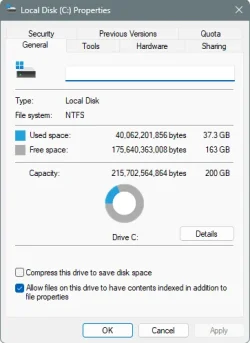
Personally, I cheat.
I keep the used space on my C:\ drive under 40gb.

Then... a full backup takes me only a minute and a half.
Full restore from bootable rescue media, takes two minutes.

Most folks have to get into complex methods because the used space on the C:\ drive is so big, and backups take forever.

I install large games and large programs on a storage drive, and back those up randomly.

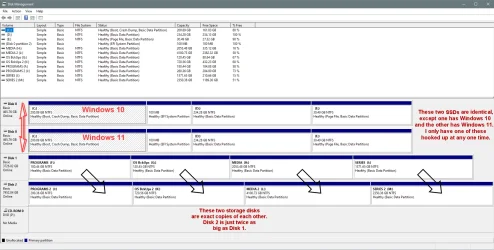
I use Karen's Replicator to copy Disk 1 to Disk 2.

000000 Disk Management.webp
 

My Computers

System One System Two

  • OS
    Win 11 Home ♦♦♦26200.8457 ♦♦♦♦♦♦♦25H2
    Computer type
    PC/Desktop
    Manufacturer/Model
    Built by Ghot® [May 2020]
    CPU
    AMD Ryzen 7 3700X
    Motherboard
    Asus Pro WS X570-ACE (BIOS 5302)
    Memory
    G.Skill (F4-3200C14D-16GTZKW)
    Graphics Card(s)
    EVGA RTX 2070 (08G-P4-2171-KR)
    Sound Card
    Realtek ALC1220P / ALC S1220A
    Monitor(s) Displays
    Dell U3011 30"
    Screen Resolution
    2560 x 1600
    Hard Drives
    2x Samsung 860 EVO 500GB,
    WD 4TB Black FZBX - SATA III,
    WD 8TB Black FZBX - SATA III,
    DRW-24B1ST CD/DVD Burner
    PSU
    PC Power & Cooling 750W Quad EPS12V
    Case
    Cooler Master ATCS 840 Tower
    Cooling
    CM Hyper 212 EVO (push/pull)
    Keyboard
    Ducky DK9008 Shine II Blue LED
    Mouse
    Logitech Optical M-100
    Internet Speed
    300/300
    Browser
    Firefox (latest)
    Antivirus
    Bitdefender Total Security
    Other Info
    Speakers: Klipsch Pro Media 2.1
  • Operating System
    Windows XP Pro 32bit w/SP3
    Computer type
    PC/Desktop
    Manufacturer/Model
    Built by Ghot® (not in use)
    CPU
    AMD Athlon 64 X2 5000+ (OC'd @ 3.2Ghz)
    Motherboard
    ASUS M2N32-SLI Deluxe Wireless Edition
    Memory
    TWIN2X2048-6400C4DHX (2 x 1GB, DDR2 800)
    Graphics card(s)
    EVGA 256-P2-N758-TR GeForce 8600GT SSC
    Sound Card
    Onboard
    Monitor(s) Displays
    ViewSonic G90FB Black 19" Professional (CRT)
    Screen Resolution
    up to 2048 x 1536
    Hard Drives
    WD 36GB 10,000rpm Raptor SATA
    Seagate 80GB 7200rpm SATA
    Lite-On LTR-52246S CD/RW
    Lite-On LH-18A1P CD/DVD Burner
    PSU
    PC Power & Cooling Silencer 750 Quad EPS12V
    Case
    Generic Beige case, 80mm fans
    Cooling
    ZALMAN 9500A 92mm CPU Cooler
    Keyboard
    Logitech Classic Keybooard 200
    Mouse
    Logitech Optical M-BT96a
    Internet Speed
    300/300
    Browser
    Firefox 3.x ??
    Antivirus
    Symantec (Norton)
    Other Info
    Still assembled, still runs. Haven't turned it on for 15 years?
Thank you @hsehestedt . OK, please explain to me like I'm a complete beginner in this. 😅

You say that there's no need to do a full image every time. Well, I'm all for that! 👍 My first thought was about differential or incremental backups (for wear and tear reasons, but also for speed and efficiency reasons since only a few files change between two backups).

But I've been told that if I do that, my backup drive wouldn't be bootable anymore. Is there a way? I would be very happy if you or somebody else could recommend an imaging software capable of achieving that!

I really am lost here. I already have the backup drive installed, so I'm looking for the best way to use it. ☺️

People here use various backup solutions. My personal favorite is Macrium Reflect so I'll just comment on that one.

Reflect uses something called Viboot to run your backup as a Virtual Machine. You can read more about it here:


My Computers

System One System Two

  • OS
    Win11 Pro 25H2 (RTM+)
    Computer type
    PC/Desktop
    Manufacturer/Model
    Acemagic
    CPU
    Intel i7-14650HX
    Memory
    32 GB
    Graphics Card(s)
    No GPU - Built-in Intel Graphics
    Sound Card
    Integrated
    Monitor(s) Displays
    Varies as machine will often be moved to locations with different monitors
    Screen Resolution
    Varies
    Hard Drives
    1 x 1TB Gen 4 NVMe SSD
    PSU
    120W Power Brick
    Keyboard
    Corsair K70 Max RGB Magnetic Keyboard
    Mouse
    Logitech MX Master 3
    Internet Speed
    1Gb Up / 1 Gb Down
    Browser
    Edge
    Antivirus
    Windows Defender
  • Operating System
    Win11 Pro 25H2 (RTM+)
    Computer type
    Laptop
    Manufacturer/Model
    Lenovo ThinkBook 13x Gen 2
    CPU
    Intel i7-1255U
    Memory
    16 GB
    Graphics card(s)
    Intel Iris Xe Graphics
    Sound Card
    Realtek® ALC3306-CG codec
    Monitor(s) Displays
    13.3-inch IPS Display
    Screen Resolution
    WQXGA (2560 x 1600)
    Hard Drives
    2 TB 4 x 4 NVMe SSD
    PSU
    USB-C / Thunderbolt 4 Power / Charging
    Keyboard
    Backlit, spill resistant keyboard
    Mouse
    Buttonless Glass Precision Touchpad
    Internet Speed
    1Gb Up / 1Gb Down
    Browser
    Edge
    Antivirus
    Windows Defender
    Other Info
    WiFi 6e / Bluetooth 5.1 / Facial Recognition / Fingerprint Sensor / ToF (Time of Flight) Human Presence Sensor
@Ghot Oh boy. I have no idea how you do that, but OK 😂

@hsehestedt Aside from the fact that I can barely understand anything on your link 😅 , the fact is that I'm trying to imagine the worst possible scenario here. In my head, that scenario could be my PC crashing and not wanting to boot anymore on SSD 1 because of a drive failure. In that case, I need to be able to boot on SSD 2 instantly, because I won't have access to Windows anymore: no Macrium, no nothing. That's why SSD 2 needs to be directly bootable.
 

My Computer

System One

  • OS
    Windows 11
    Computer type
    PC/Desktop
    Manufacturer/Model
    Personal build
    CPU
    AMD Ryzen 7700
    Motherboard
    Asus TUF Gaming B650M-Plus WiFi
    Memory
    DDR5 = 32 GB = 2x16 GB (Corsair Dominator - DDR5 RGB - 6000 MT/s)
    Graphics Card(s)
    Not yet
    Sound Card
    No
    Monitor(s) Displays
    Philips BDM3270QP2
    Screen Resolution
    2560x1440
    Hard Drives
    M.2 = 2 TB (Samsung 990 Pro)
    SATA = 12 TB (Western Digital Red - WD120EFAX - 5400 rpm)
    PSU
    Corsair RM850e (850W - ATX 3.0)
    Case
    Corsair Crystal 280X TG (White, RGB)
    Cooling
    Intake = 2x120mm fans (Corsair LL120 RGB) / Exhaust = 2x120mm AIO (Aerocool Mirage L240)
    Keyboard
    Corsair K55 RGB
    Mouse
    Vertical mouse from AliExpress, very good for the price and a lifesaver for my wrist :)
    Internet Speed
    Fiber
    Browser
    Firefox, Brave, Tor
    Antivirus
    Windows Defender
    Other Info
    UPS = 1000VA (Nitram PB1000 LCD), protecting PC + Monitor + Speakers
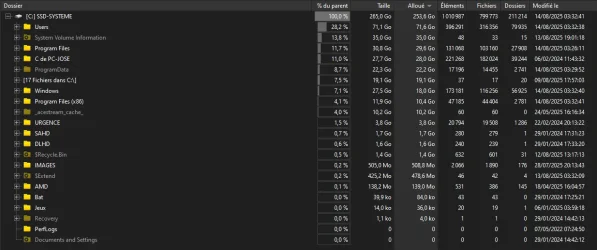
BTW, here's my current C: drive according to WizTree, if that can be any useful.


2025.08.14 - 03.36.06.webp
 

My Computer

System One

  • OS
    Windows 11
    Computer type
    PC/Desktop
    Manufacturer/Model
    Personal build
    CPU
    AMD Ryzen 7700
    Motherboard
    Asus TUF Gaming B650M-Plus WiFi
    Memory
    DDR5 = 32 GB = 2x16 GB (Corsair Dominator - DDR5 RGB - 6000 MT/s)
    Graphics Card(s)
    Not yet
    Sound Card
    No
    Monitor(s) Displays
    Philips BDM3270QP2
    Screen Resolution
    2560x1440
    Hard Drives
    M.2 = 2 TB (Samsung 990 Pro)
    SATA = 12 TB (Western Digital Red - WD120EFAX - 5400 rpm)
    PSU
    Corsair RM850e (850W - ATX 3.0)
    Case
    Corsair Crystal 280X TG (White, RGB)
    Cooling
    Intake = 2x120mm fans (Corsair LL120 RGB) / Exhaust = 2x120mm AIO (Aerocool Mirage L240)
    Keyboard
    Corsair K55 RGB
    Mouse
    Vertical mouse from AliExpress, very good for the price and a lifesaver for my wrist :)
    Internet Speed
    Fiber
    Browser
    Firefox, Brave, Tor
    Antivirus
    Windows Defender
    Other Info
    UPS = 1000VA (Nitram PB1000 LCD), protecting PC + Monitor + Speakers
Here's ten points for filling out your computer specs. :-)


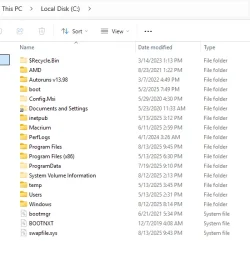
Here's my C:\ drive...

Image1.webp Image1.webp
 

My Computers

System One System Two

  • OS
    Win 11 Home ♦♦♦26200.8457 ♦♦♦♦♦♦♦25H2
    Computer type
    PC/Desktop
    Manufacturer/Model
    Built by Ghot® [May 2020]
    CPU
    AMD Ryzen 7 3700X
    Motherboard
    Asus Pro WS X570-ACE (BIOS 5302)
    Memory
    G.Skill (F4-3200C14D-16GTZKW)
    Graphics Card(s)
    EVGA RTX 2070 (08G-P4-2171-KR)
    Sound Card
    Realtek ALC1220P / ALC S1220A
    Monitor(s) Displays
    Dell U3011 30"
    Screen Resolution
    2560 x 1600
    Hard Drives
    2x Samsung 860 EVO 500GB,
    WD 4TB Black FZBX - SATA III,
    WD 8TB Black FZBX - SATA III,
    DRW-24B1ST CD/DVD Burner
    PSU
    PC Power & Cooling 750W Quad EPS12V
    Case
    Cooler Master ATCS 840 Tower
    Cooling
    CM Hyper 212 EVO (push/pull)
    Keyboard
    Ducky DK9008 Shine II Blue LED
    Mouse
    Logitech Optical M-100
    Internet Speed
    300/300
    Browser
    Firefox (latest)
    Antivirus
    Bitdefender Total Security
    Other Info
    Speakers: Klipsch Pro Media 2.1
  • Operating System
    Windows XP Pro 32bit w/SP3
    Computer type
    PC/Desktop
    Manufacturer/Model
    Built by Ghot® (not in use)
    CPU
    AMD Athlon 64 X2 5000+ (OC'd @ 3.2Ghz)
    Motherboard
    ASUS M2N32-SLI Deluxe Wireless Edition
    Memory
    TWIN2X2048-6400C4DHX (2 x 1GB, DDR2 800)
    Graphics card(s)
    EVGA 256-P2-N758-TR GeForce 8600GT SSC
    Sound Card
    Onboard
    Monitor(s) Displays
    ViewSonic G90FB Black 19" Professional (CRT)
    Screen Resolution
    up to 2048 x 1536
    Hard Drives
    WD 36GB 10,000rpm Raptor SATA
    Seagate 80GB 7200rpm SATA
    Lite-On LTR-52246S CD/RW
    Lite-On LH-18A1P CD/DVD Burner
    PSU
    PC Power & Cooling Silencer 750 Quad EPS12V
    Case
    Generic Beige case, 80mm fans
    Cooling
    ZALMAN 9500A 92mm CPU Cooler
    Keyboard
    Logitech Classic Keybooard 200
    Mouse
    Logitech Optical M-BT96a
    Internet Speed
    300/300
    Browser
    Firefox 3.x ??
    Antivirus
    Symantec (Norton)
    Other Info
    Still assembled, still runs. Haven't turned it on for 15 years?
I need to be able to boot on SSD 2 instantly, because I won't have access to Windows anymore: no Macrium, no nothing.

Every disk imaging program allows you to create "rescue media". This is a bootable CD, DVD, thumb drive, etc. that will allow you to recover if the OS is not bootable.

Imagine for a second that you own only one computer. You do your backups regularly, but what good are those backups if your computer fails to the point where Windows is no longer bootable? That is where the rescue disk is used. You boot from that disk and it runs Macrium Reflect (or whatever program it is that you are using). From there, you can access all of your drives, including the location where your backups are located. You can now restore your backup to either the original drive or a different drive.

If you need more info about this, just let me know.
 

My Computers

System One System Two

  • OS
    Win11 Pro 25H2 (RTM+)
    Computer type
    PC/Desktop
    Manufacturer/Model
    Acemagic
    CPU
    Intel i7-14650HX
    Memory
    32 GB
    Graphics Card(s)
    No GPU - Built-in Intel Graphics
    Sound Card
    Integrated
    Monitor(s) Displays
    Varies as machine will often be moved to locations with different monitors
    Screen Resolution
    Varies
    Hard Drives
    1 x 1TB Gen 4 NVMe SSD
    PSU
    120W Power Brick
    Keyboard
    Corsair K70 Max RGB Magnetic Keyboard
    Mouse
    Logitech MX Master 3
    Internet Speed
    1Gb Up / 1 Gb Down
    Browser
    Edge
    Antivirus
    Windows Defender
  • Operating System
    Win11 Pro 25H2 (RTM+)
    Computer type
    Laptop
    Manufacturer/Model
    Lenovo ThinkBook 13x Gen 2
    CPU
    Intel i7-1255U
    Memory
    16 GB
    Graphics card(s)
    Intel Iris Xe Graphics
    Sound Card
    Realtek® ALC3306-CG codec
    Monitor(s) Displays
    13.3-inch IPS Display
    Screen Resolution
    WQXGA (2560 x 1600)
    Hard Drives
    2 TB 4 x 4 NVMe SSD
    PSU
    USB-C / Thunderbolt 4 Power / Charging
    Keyboard
    Backlit, spill resistant keyboard
    Mouse
    Buttonless Glass Precision Touchpad
    Internet Speed
    1Gb Up / 1Gb Down
    Browser
    Edge
    Antivirus
    Windows Defender
    Other Info
    WiFi 6e / Bluetooth 5.1 / Facial Recognition / Fingerprint Sensor / ToF (Time of Flight) Human Presence Sensor
I get what rescue media are. Booting on a USB flash drive, etc. And yes, I can create a rescue media for me in the near future.
But I was envisioning a different case with this topic. "SSD 1 doesn't work? OK, let's just boot directly on SSD 2".
If I didn't want that,I wouldn't have bought a second 2 TB SSD just for that purpose.

At the very least, here's what I think I could do (please confirm):
  • Ghost entirely SSD 1 on SSD 2, so that SSD 2 is bootable
  • Then using my backup software (SyncBackPro), backup regularly at least my user folder (the rest of C: hardly ever changes). Only backupping my user folder shouldn't affect the bootability of the drive, right?

Or if it's all too complicated, then I can just mirror SSD 1 (RAID 1). That won't protect me against malware or data corruption, but it will solve everything else, right ?

The ideal for me (which doesn't exist presumably) would be "Delayed RAID 1": RAID 1 with a 24h delay. That would be perfect for me! 😂
 

My Computer

System One

  • OS
    Windows 11
    Computer type
    PC/Desktop
    Manufacturer/Model
    Personal build
    CPU
    AMD Ryzen 7700
    Motherboard
    Asus TUF Gaming B650M-Plus WiFi
    Memory
    DDR5 = 32 GB = 2x16 GB (Corsair Dominator - DDR5 RGB - 6000 MT/s)
    Graphics Card(s)
    Not yet
    Sound Card
    No
    Monitor(s) Displays
    Philips BDM3270QP2
    Screen Resolution
    2560x1440
    Hard Drives
    M.2 = 2 TB (Samsung 990 Pro)
    SATA = 12 TB (Western Digital Red - WD120EFAX - 5400 rpm)
    PSU
    Corsair RM850e (850W - ATX 3.0)
    Case
    Corsair Crystal 280X TG (White, RGB)
    Cooling
    Intake = 2x120mm fans (Corsair LL120 RGB) / Exhaust = 2x120mm AIO (Aerocool Mirage L240)
    Keyboard
    Corsair K55 RGB
    Mouse
    Vertical mouse from AliExpress, very good for the price and a lifesaver for my wrist :)
    Internet Speed
    Fiber
    Browser
    Firefox, Brave, Tor
    Antivirus
    Windows Defender
    Other Info
    UPS = 1000VA (Nitram PB1000 LCD), protecting PC + Monitor + Speakers
Ghost entirely SSD 1 on SSD 2, so that SSD 2 is bootable
I would suggest doing it slightly differently:

Perform a full backup and then restore that backup to the new drive. Why? Because if you do a clone operation directly you will end up with two drives that have the same signature causing a possible failure to be able to boot.

As an alternative, you could still do your clone but then leave the second SSD disconnected.
 

My Computers

System One System Two

  • OS
    Win11 Pro 25H2 (RTM+)
    Computer type
    PC/Desktop
    Manufacturer/Model
    Acemagic
    CPU
    Intel i7-14650HX
    Memory
    32 GB
    Graphics Card(s)
    No GPU - Built-in Intel Graphics
    Sound Card
    Integrated
    Monitor(s) Displays
    Varies as machine will often be moved to locations with different monitors
    Screen Resolution
    Varies
    Hard Drives
    1 x 1TB Gen 4 NVMe SSD
    PSU
    120W Power Brick
    Keyboard
    Corsair K70 Max RGB Magnetic Keyboard
    Mouse
    Logitech MX Master 3
    Internet Speed
    1Gb Up / 1 Gb Down
    Browser
    Edge
    Antivirus
    Windows Defender
  • Operating System
    Win11 Pro 25H2 (RTM+)
    Computer type
    Laptop
    Manufacturer/Model
    Lenovo ThinkBook 13x Gen 2
    CPU
    Intel i7-1255U
    Memory
    16 GB
    Graphics card(s)
    Intel Iris Xe Graphics
    Sound Card
    Realtek® ALC3306-CG codec
    Monitor(s) Displays
    13.3-inch IPS Display
    Screen Resolution
    WQXGA (2560 x 1600)
    Hard Drives
    2 TB 4 x 4 NVMe SSD
    PSU
    USB-C / Thunderbolt 4 Power / Charging
    Keyboard
    Backlit, spill resistant keyboard
    Mouse
    Buttonless Glass Precision Touchpad
    Internet Speed
    1Gb Up / 1Gb Down
    Browser
    Edge
    Antivirus
    Windows Defender
    Other Info
    WiFi 6e / Bluetooth 5.1 / Facial Recognition / Fingerprint Sensor / ToF (Time of Flight) Human Presence Sensor
Only backupping my user folder shouldn't affect the bootability of the drive, right?
Sorry, forgot to answer this one in my last post.

Yes, you can backup your user data separately with no problems.
 

My Computers

System One System Two

  • OS
    Win11 Pro 25H2 (RTM+)
    Computer type
    PC/Desktop
    Manufacturer/Model
    Acemagic
    CPU
    Intel i7-14650HX
    Memory
    32 GB
    Graphics Card(s)
    No GPU - Built-in Intel Graphics
    Sound Card
    Integrated
    Monitor(s) Displays
    Varies as machine will often be moved to locations with different monitors
    Screen Resolution
    Varies
    Hard Drives
    1 x 1TB Gen 4 NVMe SSD
    PSU
    120W Power Brick
    Keyboard
    Corsair K70 Max RGB Magnetic Keyboard
    Mouse
    Logitech MX Master 3
    Internet Speed
    1Gb Up / 1 Gb Down
    Browser
    Edge
    Antivirus
    Windows Defender
  • Operating System
    Win11 Pro 25H2 (RTM+)
    Computer type
    Laptop
    Manufacturer/Model
    Lenovo ThinkBook 13x Gen 2
    CPU
    Intel i7-1255U
    Memory
    16 GB
    Graphics card(s)
    Intel Iris Xe Graphics
    Sound Card
    Realtek® ALC3306-CG codec
    Monitor(s) Displays
    13.3-inch IPS Display
    Screen Resolution
    WQXGA (2560 x 1600)
    Hard Drives
    2 TB 4 x 4 NVMe SSD
    PSU
    USB-C / Thunderbolt 4 Power / Charging
    Keyboard
    Backlit, spill resistant keyboard
    Mouse
    Buttonless Glass Precision Touchpad
    Internet Speed
    1Gb Up / 1Gb Down
    Browser
    Edge
    Antivirus
    Windows Defender
    Other Info
    WiFi 6e / Bluetooth 5.1 / Facial Recognition / Fingerprint Sensor / ToF (Time of Flight) Human Presence Sensor
'Perform a full backup and then restore that backup to the new drive". I can do that 🙂 Well, at least for now. I can backup my SSD to my HDD if it's only 250 GB, but I won't be able to backup it anymore once it's 1.5 TB. 😅

I'm surprised though: don't full backup apps have any option to "not have the exact same signature" on the backup drive to prevent that kind of issue? Ghosting has been around for quite a long time now.
 

My Computer

System One

  • OS
    Windows 11
    Computer type
    PC/Desktop
    Manufacturer/Model
    Personal build
    CPU
    AMD Ryzen 7700
    Motherboard
    Asus TUF Gaming B650M-Plus WiFi
    Memory
    DDR5 = 32 GB = 2x16 GB (Corsair Dominator - DDR5 RGB - 6000 MT/s)
    Graphics Card(s)
    Not yet
    Sound Card
    No
    Monitor(s) Displays
    Philips BDM3270QP2
    Screen Resolution
    2560x1440
    Hard Drives
    M.2 = 2 TB (Samsung 990 Pro)
    SATA = 12 TB (Western Digital Red - WD120EFAX - 5400 rpm)
    PSU
    Corsair RM850e (850W - ATX 3.0)
    Case
    Corsair Crystal 280X TG (White, RGB)
    Cooling
    Intake = 2x120mm fans (Corsair LL120 RGB) / Exhaust = 2x120mm AIO (Aerocool Mirage L240)
    Keyboard
    Corsair K55 RGB
    Mouse
    Vertical mouse from AliExpress, very good for the price and a lifesaver for my wrist :)
    Internet Speed
    Fiber
    Browser
    Firefox, Brave, Tor
    Antivirus
    Windows Defender
    Other Info
    UPS = 1000VA (Nitram PB1000 LCD), protecting PC + Monitor + Speakers
I'm surprised though: don't full backup apps have any option to "not have the exact same signature" on the backup drive to prevent that kind of issue?

Bingo - that is precisely the point. Doing a backup and restore does exactly that while perform a CLONE creates an exact duplicate including the disk signature.

Again, it has been years since I used Ghost solution suite - there is a possibility that it does it differently. You would have to consult the documentation to be sure.
 

My Computers

System One System Two

  • OS
    Win11 Pro 25H2 (RTM+)
    Computer type
    PC/Desktop
    Manufacturer/Model
    Acemagic
    CPU
    Intel i7-14650HX
    Memory
    32 GB
    Graphics Card(s)
    No GPU - Built-in Intel Graphics
    Sound Card
    Integrated
    Monitor(s) Displays
    Varies as machine will often be moved to locations with different monitors
    Screen Resolution
    Varies
    Hard Drives
    1 x 1TB Gen 4 NVMe SSD
    PSU
    120W Power Brick
    Keyboard
    Corsair K70 Max RGB Magnetic Keyboard
    Mouse
    Logitech MX Master 3
    Internet Speed
    1Gb Up / 1 Gb Down
    Browser
    Edge
    Antivirus
    Windows Defender
  • Operating System
    Win11 Pro 25H2 (RTM+)
    Computer type
    Laptop
    Manufacturer/Model
    Lenovo ThinkBook 13x Gen 2
    CPU
    Intel i7-1255U
    Memory
    16 GB
    Graphics card(s)
    Intel Iris Xe Graphics
    Sound Card
    Realtek® ALC3306-CG codec
    Monitor(s) Displays
    13.3-inch IPS Display
    Screen Resolution
    WQXGA (2560 x 1600)
    Hard Drives
    2 TB 4 x 4 NVMe SSD
    PSU
    USB-C / Thunderbolt 4 Power / Charging
    Keyboard
    Backlit, spill resistant keyboard
    Mouse
    Buttonless Glass Precision Touchpad
    Internet Speed
    1Gb Up / 1Gb Down
    Browser
    Edge
    Antivirus
    Windows Defender
    Other Info
    WiFi 6e / Bluetooth 5.1 / Facial Recognition / Fingerprint Sensor / ToF (Time of Flight) Human Presence Sensor
Yes, I have to admit that I have trouble understanding the difference between a full backup and a clone.

My point is that I need the backup drive (SSD 2) to be bootable, that's all. It should be simple to achieve, I don't know why it's so complicated. :(
 

My Computer

System One

  • OS
    Windows 11
    Computer type
    PC/Desktop
    Manufacturer/Model
    Personal build
    CPU
    AMD Ryzen 7700
    Motherboard
    Asus TUF Gaming B650M-Plus WiFi
    Memory
    DDR5 = 32 GB = 2x16 GB (Corsair Dominator - DDR5 RGB - 6000 MT/s)
    Graphics Card(s)
    Not yet
    Sound Card
    No
    Monitor(s) Displays
    Philips BDM3270QP2
    Screen Resolution
    2560x1440
    Hard Drives
    M.2 = 2 TB (Samsung 990 Pro)
    SATA = 12 TB (Western Digital Red - WD120EFAX - 5400 rpm)
    PSU
    Corsair RM850e (850W - ATX 3.0)
    Case
    Corsair Crystal 280X TG (White, RGB)
    Cooling
    Intake = 2x120mm fans (Corsair LL120 RGB) / Exhaust = 2x120mm AIO (Aerocool Mirage L240)
    Keyboard
    Corsair K55 RGB
    Mouse
    Vertical mouse from AliExpress, very good for the price and a lifesaver for my wrist :)
    Internet Speed
    Fiber
    Browser
    Firefox, Brave, Tor
    Antivirus
    Windows Defender
    Other Info
    UPS = 1000VA (Nitram PB1000 LCD), protecting PC + Monitor + Speakers
Yes, I have to admit that I have trouble understanding the difference between a full backup and a clone.

My point is that I need the backup drive (SSD 2) to be bootable, that's all. It should be simple to achieve, I don't know why it's so complicated. :(

Maybe a good way to simplify this is to just try it in your environment. Clone the drive as you originally intended. Reboot. Does it cause any problems? If not, great. If it does, power down and disconnect that second SSD temporarily. You can then simply change the disk signature on the drive.

But be cautious and make sure that Windows is really running from the drive that you expect it to be running from.

Bottom line is simply to test your ideas carefully to make sure it all behaves as expected.
 

My Computers

System One System Two

  • OS
    Win11 Pro 25H2 (RTM+)
    Computer type
    PC/Desktop
    Manufacturer/Model
    Acemagic
    CPU
    Intel i7-14650HX
    Memory
    32 GB
    Graphics Card(s)
    No GPU - Built-in Intel Graphics
    Sound Card
    Integrated
    Monitor(s) Displays
    Varies as machine will often be moved to locations with different monitors
    Screen Resolution
    Varies
    Hard Drives
    1 x 1TB Gen 4 NVMe SSD
    PSU
    120W Power Brick
    Keyboard
    Corsair K70 Max RGB Magnetic Keyboard
    Mouse
    Logitech MX Master 3
    Internet Speed
    1Gb Up / 1 Gb Down
    Browser
    Edge
    Antivirus
    Windows Defender
  • Operating System
    Win11 Pro 25H2 (RTM+)
    Computer type
    Laptop
    Manufacturer/Model
    Lenovo ThinkBook 13x Gen 2
    CPU
    Intel i7-1255U
    Memory
    16 GB
    Graphics card(s)
    Intel Iris Xe Graphics
    Sound Card
    Realtek® ALC3306-CG codec
    Monitor(s) Displays
    13.3-inch IPS Display
    Screen Resolution
    WQXGA (2560 x 1600)
    Hard Drives
    2 TB 4 x 4 NVMe SSD
    PSU
    USB-C / Thunderbolt 4 Power / Charging
    Keyboard
    Backlit, spill resistant keyboard
    Mouse
    Buttonless Glass Precision Touchpad
    Internet Speed
    1Gb Up / 1Gb Down
    Browser
    Edge
    Antivirus
    Windows Defender
    Other Info
    WiFi 6e / Bluetooth 5.1 / Facial Recognition / Fingerprint Sensor / ToF (Time of Flight) Human Presence Sensor
Given the relatively low price of disk storage, I think all the gymnastics of keeping your boot drive artificially small is just a bit pointless. I also make only full images of my boot drive when I do my weekly backup, and I keep seven images so I can go back in time up to seven weeks in my images. My data drive is backed up daily using a differential backup, and I have daily images that go back four months.

But wait... I also have two off-line backup drives that alternate every two weeks and does a backup of everything on the system to a 4TB drive. So, I have two copies of everything that are the most two weeks old that go back for seven months! The data drive backup on each of those goes back in time as well.
 

My Computers

System One System Two

  • OS
    Win 11 Pro 25H2, Build 26200.8524
    Computer type
    PC/Desktop
    Manufacturer/Model
    Home Brew
    CPU
    Intel Core i5 14500
    Motherboard
    Gigabyte B760M G P WIFI
    Memory
    64GB DDR4
    Graphics Card(s)
    GeForce RTX 4060
    Sound Card
    Chipset Realtek
    Monitor(s) Displays
    LG 45" Ultragear, Acer 24" 1080p
    Screen Resolution
    5120x1440, 1920x1080
    Hard Drives
    Crucial P310 2TB 2280 PCIe Gen4 3D NAND NVMe M.2 SSD (O/S)
    Silicon Power 2TB US75 NVMe PCIe Gen4 M.2 2280 SSD (backup)
    Crucial BX500 2TB 3D NAND (2nd backup)
    Seagate 4TB Ironwolf, rotating HDD archive files
    External off-line backup Drives: 2 NVMe 4TB drives in external enclosures
    PSU
    Thermaltake Toughpower GF3 750W
    Case
    LIAN LI LANCOOL 216 E-ATX PC Case
    Cooling
    Lots of fans!
    Keyboard
    Microsoft Comfort Curve 2000
    Mouse
    Logitech G305
    Internet Speed
    Verizon FiOS 1GB
    Browser
    Firefox
    Antivirus
    Malware Bytes & Windows Defender Security
  • Operating System
    Win 11 Pro 25H2, Build 26200.8524
    Computer type
    PC/Desktop
    Manufacturer/Model
    Home Brew
    CPU
    Intel Core i5 14400
    Motherboard
    Gigabyte B760M DS3H AX
    Memory
    32GB DDR5
    Graphics card(s)
    Intel 700 Embedded GPU
    Sound Card
    Realtek Embedded
    Monitor(s) Displays
    27" HP 1080p
    Screen Resolution
    1920x1080
    Hard Drives
    Crucial P310 2TB 2280 PCIe Gen4 eD NAND PCIe SSD
    Samsung EVO 990 2TB NVMe Gen4 SSD
    Samsung 2TB SATA SSD
    PSU
    Thermaltake Smart BM3 650W
    Case
    Okinos Micro ATX Case
    Cooling
    Fans
    Keyboard
    Microsoft Comfort Curve 2000
    Mouse
    Logitech G305
    Internet Speed
    Verizon FiOS 1GB
    Browser
    Firefox
    Antivirus
    Malware Bytes & Windows Defender Security
For the record, I need a bootable backup drive because my Windows 11 is heavily customized. I have spent a lot of time to tune it just right for me, so it would be way too much work (possibly weeks) to reinstall it and get it to the same point. I need to backup it "as is" while it's perfectly stable, and be able to boot from the backup drive. Maybe I should have mentioned that from the start.

As for disk signatures, I have learned that it could be very easily fixed with Disk Management utility. Right-click on the disk, if it's offline turn it online and Windows 10/11 will automatically generate a new signature. If it's online, turn it offline then back online just to make sure its signature changes. And voilà. :)
 

My Computer

System One

  • OS
    Windows 11
    Computer type
    PC/Desktop
    Manufacturer/Model
    Personal build
    CPU
    AMD Ryzen 7700
    Motherboard
    Asus TUF Gaming B650M-Plus WiFi
    Memory
    DDR5 = 32 GB = 2x16 GB (Corsair Dominator - DDR5 RGB - 6000 MT/s)
    Graphics Card(s)
    Not yet
    Sound Card
    No
    Monitor(s) Displays
    Philips BDM3270QP2
    Screen Resolution
    2560x1440
    Hard Drives
    M.2 = 2 TB (Samsung 990 Pro)
    SATA = 12 TB (Western Digital Red - WD120EFAX - 5400 rpm)
    PSU
    Corsair RM850e (850W - ATX 3.0)
    Case
    Corsair Crystal 280X TG (White, RGB)
    Cooling
    Intake = 2x120mm fans (Corsair LL120 RGB) / Exhaust = 2x120mm AIO (Aerocool Mirage L240)
    Keyboard
    Corsair K55 RGB
    Mouse
    Vertical mouse from AliExpress, very good for the price and a lifesaver for my wrist :)
    Internet Speed
    Fiber
    Browser
    Firefox, Brave, Tor
    Antivirus
    Windows Defender
    Other Info
    UPS = 1000VA (Nitram PB1000 LCD), protecting PC + Monitor + Speakers
I need a bootable backup drive because my Windows 11 is heavily customized.
Making your other disk bootable or not has zero bearing on this. You can make a backup, or series of backups, and when restored to either the same or a different drive, that drive will be bootable with all your customizations in place. There is absolutely no benefit to making the destination bootable other than it will save you the few minutes to do the restore, but that comes with the risk of causing more problems than it solves if you don't know what you are doing by making two bootable drives with potential signature collisions.

There is a reason (in my opinion) why so few people do it that way and why I have never seen that as a recommended best practice for any backup schemes.

I'm not trying to tell you not to do it that way - just want you to have all the info.

There is a lot more that I want to say but I fear that I may overload you by unleashing it all in one shot.

Best advice I can give is to research the issue (which you are doing here!) and do some testing. If you have the resources to do so, maybe setup Windows to a VM and test your backup ideas that way.

I like the fact that you are looking for info because so many people throw together backup plans with no testing only to discover the flaws when it is too late. I personally worked with a major bank years ago that had a huge flaw in their backup plan. That flaw cost them several million dollars when they could not recover lost data.

BTW, just out of curiosity, what version of Ghost Solution Suite are you running?
 

My Computers

System One System Two

  • OS
    Win11 Pro 25H2 (RTM+)
    Computer type
    PC/Desktop
    Manufacturer/Model
    Acemagic
    CPU
    Intel i7-14650HX
    Memory
    32 GB
    Graphics Card(s)
    No GPU - Built-in Intel Graphics
    Sound Card
    Integrated
    Monitor(s) Displays
    Varies as machine will often be moved to locations with different monitors
    Screen Resolution
    Varies
    Hard Drives
    1 x 1TB Gen 4 NVMe SSD
    PSU
    120W Power Brick
    Keyboard
    Corsair K70 Max RGB Magnetic Keyboard
    Mouse
    Logitech MX Master 3
    Internet Speed
    1Gb Up / 1 Gb Down
    Browser
    Edge
    Antivirus
    Windows Defender
  • Operating System
    Win11 Pro 25H2 (RTM+)
    Computer type
    Laptop
    Manufacturer/Model
    Lenovo ThinkBook 13x Gen 2
    CPU
    Intel i7-1255U
    Memory
    16 GB
    Graphics card(s)
    Intel Iris Xe Graphics
    Sound Card
    Realtek® ALC3306-CG codec
    Monitor(s) Displays
    13.3-inch IPS Display
    Screen Resolution
    WQXGA (2560 x 1600)
    Hard Drives
    2 TB 4 x 4 NVMe SSD
    PSU
    USB-C / Thunderbolt 4 Power / Charging
    Keyboard
    Backlit, spill resistant keyboard
    Mouse
    Buttonless Glass Precision Touchpad
    Internet Speed
    1Gb Up / 1Gb Down
    Browser
    Edge
    Antivirus
    Windows Defender
    Other Info
    WiFi 6e / Bluetooth 5.1 / Facial Recognition / Fingerprint Sensor / ToF (Time of Flight) Human Presence Sensor
Back
Top Bottom