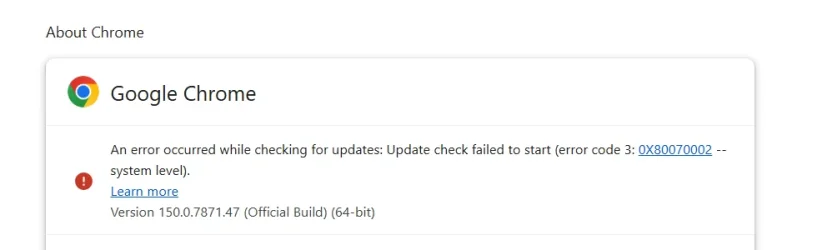
Solved Google Chrome An error occurred while checking for updates: Update check failed to start (error code 3: 0X80070002 -- system level).


xomuz

Member
Member
Local time
5:52 PM
Posts
53
OS
Windows 11
Periodically, a few times a month, I get this error when checking for Google Chrome browser update. The only way to fix it is to download and run the Google Chrome installer.
Has anybody else experienced this, and what could be causing it?
1.webp
 

My Computer My Computer

At a glance

Windows 11
OS
Windows 11
Periodically, a few times a month, I get this error when checking for Google Chrome browser update. The only way to fix it is to download and run the Google Chrome installer.
Has anybody else experienced this, and what could be causing it?

View attachment 175999
Have you tried the troubleshooting steps with regards to Google Update Services?
 

My Computer My Computer

At a glance

Windows 11AMD Ryzen 8700G64 GBOnboard
OS
Windows 11
Computer type
PC/Desktop
Manufacturer/Model
Generic
CPU
AMD Ryzen 8700G
Motherboard
Gigabyte B650 UD AC
Memory
64 GB
Graphics Card(s)
Onboard
Sound Card
Onboard
Monitor(s) Displays
Del U2723QE
Screen Resolution
3840 x 2160
Hard Drives
Corsiar MP600 1TB
PSU
Silverstone 750 GOLD
Case
Silverstone FARA 513
I would use export my Chrome bookmarks (unless you are syncing to your Google account in which case they should come back) Make note of your installed extensions.
End ALL running Chrome tasks in task manager.
I would then use Revo Uninstaller Free to uninstall Chrome. Make sure to use Revo's SCAN feature to find & delete all remaining remnants.
Restart and reinstall Chrome.
 

My Computers My Computers

  • At a glance

    Windows 11 Pro 25H2 26200.8737i9-10900 10 core 20 threads32 gbnone-Intel UHD Graphics 630
    OS
    Windows 11 Pro 25H2 26200.8737
    Computer type
    PC/Desktop
    Manufacturer/Model
    Dell Optiplex 7080
    CPU
    i9-10900 10 core 20 threads
    Motherboard
    DELL 0J37VM
    Memory
    32 gb
    Graphics Card(s)
    none-Intel UHD Graphics 630
    Sound Card
    Integrated Realtek
    Monitor(s) Displays
    Benq 27
    Screen Resolution
    2560x1440
    Hard Drives
    2x1tb Solidigm m.2 nvme /External drives 512gb Samsung m.2 sata+2tb Kingston m2.nvme
    PSU
    500w
    Case
    MT
    Cooling
    Dell Premium
    Keyboard
    Logitech wired
    Mouse
    Logitech wireless
    Internet Speed
    so slow I'm too embarrassed to tell
    Browser
    #1 Edge #2 Firefox
    Antivirus
    Defender+MWB Premium
  • At a glance

    Windows 11 Pro 24H2 26200.8737AMD Ryzen 7 6800U32 gbintegrated
    Operating System
    Windows 11 Pro 24H2 26200.8737
    Computer type
    PC/Desktop
    Manufacturer/Model
    Beelink Mini PC SER5
    CPU
    AMD Ryzen 7 6800U
    Memory
    32 gb
    Graphics card(s)
    integrated
    Sound Card
    integrated
    Monitor(s) Displays
    Benq 27
    Screen Resolution
    2560x1440
    Hard Drives
    1TB Crucial nvme
    Keyboard
    Logitech wired
    Mouse
    Logitech wireless
    Internet Speed
    still too embarrassed to tell
    Browser
    Firefox
    Antivirus
    Defender
    Other Info
    System 3 is non compliant Dell 9020 i7-4770/24gb ram Win11 PRO 26200.8457
.................what could be causing it?
It's probably a services thing. I need another screenshot:

Type services.msc into the Windows Run box. Scroll down to the Google entries, make sure that the "Startup type" column is visible ,then take a screenshot.
 

My Computer My Computer

At a glance

Windows 11
OS
Windows 11
I would use export my Chrome bookmarks (unless you are syncing to your Google account in which case they should come back) Make note of your installed extensions.
End ALL running Chrome tasks in task manager.
I would then use Revo Uninstaller Free to uninstall Chrome. Make sure to use Revo's SCAN feature to find & delete all remaining remnants.
Restart and reinstall Chrome.
I'm afraid of things like Revo Uninstaller :/
 

My Computer My Computer

At a glance

Windows 11
OS
Windows 11
It's probably a services thing. I need another screenshot:

Type services.msc into the Windows Run box. Scroll down to the Google entries, make sure that the "Startup type" column is visible ,then take a screenshot.
11.webp
 

My Computer My Computer

At a glance

Windows 11
OS
Windows 11
Have you tried the troubleshooting steps with regards to Google Update Services?
I don't know exactly what should I do
 

My Computer My Computer

At a glance

Windows 11
OS
Windows 11
I don't know exactly what should I do
Glasskuter's advice is good and maybe the quickest fix.
I use Revo Uninstaller Free and find it great.
Search Google for your issue and see what steps are recommended.
There is a Google Chrome Community.
 

My Computer My Computer

At a glance

Windows 11AMD Ryzen 8700G64 GBOnboard
OS
Windows 11
Computer type
PC/Desktop
Manufacturer/Model
Generic
CPU
AMD Ryzen 8700G
Motherboard
Gigabyte B650 UD AC
Memory
64 GB
Graphics Card(s)
Onboard
Sound Card
Onboard
Monitor(s) Displays
Del U2723QE
Screen Resolution
3840 x 2160
Hard Drives
Corsiar MP600 1TB
PSU
Silverstone 750 GOLD
Case
Silverstone FARA 513
Have you check your Event Logs?

Try clicking Start and type in RELIABILITY and see if that lists the date, time of the error and more details.
 

My Computer My Computer

At a glance

Windows 11 Pro build 25H2 x64Intel i9-13900K64GBNvidia GeForce RTX-3090 Ti
OS
Windows 11 Pro build 25H2 x64
Computer type
PC/Desktop
Manufacturer/Model
ASUS Custom build
CPU
Intel i9-13900K
Motherboard
Asus ROG STRIX Z790 E GAMING WIFI 11
Memory
64GB
Graphics Card(s)
Nvidia GeForce RTX-3090 Ti
Internet Speed
1 Gbps
Browser
Firefox
Antivirus
Malwarebytes
2.webp

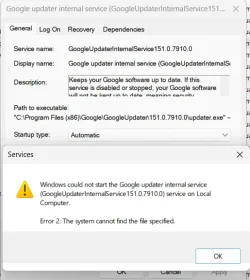
The question is why this file gets deleted by itself after some time. I don't have any antivirus installed.
 

My Computer My Computer

At a glance

Windows 11
OS
Windows 11
I sense you are not comfortable dealing with software troubleshooting. Sometimes there is no quick, obvious fix. The most probable fix is the one I offered in post #3. Maybe you should seek a friend or relative who can help you. One can uninstall and reinstall Chrome in less than 15 minutes.
Just export your bookmarks to a file first and then import them once Chrome is reinstalled.
The question is why this file gets deleted by itself after some time.
There are many reasons how Software can get corrupted and rarely can it be fixed other than uninstalling and re-installing it..
 

My Computers My Computers

  • At a glance

    Windows 11 Pro 25H2 26200.8737i9-10900 10 core 20 threads32 gbnone-Intel UHD Graphics 630
    OS
    Windows 11 Pro 25H2 26200.8737
    Computer type
    PC/Desktop
    Manufacturer/Model
    Dell Optiplex 7080
    CPU
    i9-10900 10 core 20 threads
    Motherboard
    DELL 0J37VM
    Memory
    32 gb
    Graphics Card(s)
    none-Intel UHD Graphics 630
    Sound Card
    Integrated Realtek
    Monitor(s) Displays
    Benq 27
    Screen Resolution
    2560x1440
    Hard Drives
    2x1tb Solidigm m.2 nvme /External drives 512gb Samsung m.2 sata+2tb Kingston m2.nvme
    PSU
    500w
    Case
    MT
    Cooling
    Dell Premium
    Keyboard
    Logitech wired
    Mouse
    Logitech wireless
    Internet Speed
    so slow I'm too embarrassed to tell
    Browser
    #1 Edge #2 Firefox
    Antivirus
    Defender+MWB Premium
  • At a glance

    Windows 11 Pro 24H2 26200.8737AMD Ryzen 7 6800U32 gbintegrated
    Operating System
    Windows 11 Pro 24H2 26200.8737
    Computer type
    PC/Desktop
    Manufacturer/Model
    Beelink Mini PC SER5
    CPU
    AMD Ryzen 7 6800U
    Memory
    32 gb
    Graphics card(s)
    integrated
    Sound Card
    integrated
    Monitor(s) Displays
    Benq 27
    Screen Resolution
    2560x1440
    Hard Drives
    1TB Crucial nvme
    Keyboard
    Logitech wired
    Mouse
    Logitech wireless
    Internet Speed
    still too embarrassed to tell
    Browser
    Firefox
    Antivirus
    Defender
    Other Info
    System 3 is non compliant Dell 9020 i7-4770/24gb ram Win11 PRO 26200.8457
Portable sürüm mü?
 

My Computer My Computer

At a glance

Windows 11 Home Single Language 24H2 26100.289412
OS
Windows 11 Home Single Language 24H2 26100.2894
Computer type
PC/Desktop
Manufacturer/Model
Casper
Memory
12
Internet Speed
100 Mbpz
Browser
Vivaldi Firefox Crome
Antivirus
Defender
Brave has a portable version. I'm not personally familiar if the others have portable or not. But if one is going to use an alternate browser all the time,, I would install whichever browser you choose and make it default.
 

My Computers My Computers

  • At a glance

    Windows 11 Pro 25H2 26200.8737i9-10900 10 core 20 threads32 gbnone-Intel UHD Graphics 630
    OS
    Windows 11 Pro 25H2 26200.8737
    Computer type
    PC/Desktop
    Manufacturer/Model
    Dell Optiplex 7080
    CPU
    i9-10900 10 core 20 threads
    Motherboard
    DELL 0J37VM
    Memory
    32 gb
    Graphics Card(s)
    none-Intel UHD Graphics 630
    Sound Card
    Integrated Realtek
    Monitor(s) Displays
    Benq 27
    Screen Resolution
    2560x1440
    Hard Drives
    2x1tb Solidigm m.2 nvme /External drives 512gb Samsung m.2 sata+2tb Kingston m2.nvme
    PSU
    500w
    Case
    MT
    Cooling
    Dell Premium
    Keyboard
    Logitech wired
    Mouse
    Logitech wireless
    Internet Speed
    so slow I'm too embarrassed to tell
    Browser
    #1 Edge #2 Firefox
    Antivirus
    Defender+MWB Premium
  • At a glance

    Windows 11 Pro 24H2 26200.8737AMD Ryzen 7 6800U32 gbintegrated
    Operating System
    Windows 11 Pro 24H2 26200.8737
    Computer type
    PC/Desktop
    Manufacturer/Model
    Beelink Mini PC SER5
    CPU
    AMD Ryzen 7 6800U
    Memory
    32 gb
    Graphics card(s)
    integrated
    Sound Card
    integrated
    Monitor(s) Displays
    Benq 27
    Screen Resolution
    2560x1440
    Hard Drives
    1TB Crucial nvme
    Keyboard
    Logitech wired
    Mouse
    Logitech wireless
    Internet Speed
    still too embarrassed to tell
    Browser
    Firefox
    Antivirus
    Defender
    Other Info
    System 3 is non compliant Dell 9020 i7-4770/24gb ram Win11 PRO 26200.8457

My Computer My Computer

At a glance

Windows 11 Pro build 25H2 x64Intel i9-13900K64GBNvidia GeForce RTX-3090 Ti
OS
Windows 11 Pro build 25H2 x64
Computer type
PC/Desktop
Manufacturer/Model
ASUS Custom build
CPU
Intel i9-13900K
Motherboard
Asus ROG STRIX Z790 E GAMING WIFI 11
Memory
64GB
Graphics Card(s)
Nvidia GeForce RTX-3090 Ti
Internet Speed
1 Gbps
Browser
Firefox
Antivirus
Malwarebytes
Xomuz, thanks for the extra screenshots. The error code in your first screenshot in post #1 is a generic "file not found" message. Here's what's happening:

Chrome tries to check for updates, asks the Windows service to run, and the service crashes immediately because its core files are gone. Re-running the standalone Chrome installer fixes it because it recreates those missing files, but then something on your PC deletes them sometime later.

Third-party "optimisation", "tune up", or "junk cleaner" utilities are the likely culprits. Do you have anything like CCleaner or Advanced SystemCare etc installed?
 

My Computer My Computer

At a glance

Windows 11
OS
Windows 11
Brave has a portable version. I'm not personally familiar if the others have portable or not. But if one is going to use an alternate browser all the time,, I would install whichever browser you choose and make it default.
Hepsinin var.
 

My Computer My Computer

At a glance

Windows 11 Home Single Language 24H2 26100.289412
OS
Windows 11 Home Single Language 24H2 26100.2894
Computer type
PC/Desktop
Manufacturer/Model
Casper
Memory
12
Internet Speed
100 Mbpz
Browser
Vivaldi Firefox Crome
Antivirus
Defender
Have you check your Event Logs?

Try clicking Start and type in RELIABILITY and see if that lists the date, time of the error and more details.
There is nothing in event viewer and reliability monitor
I'd offer some suggestions of clean up but some forums don't like using Farbar and other type clean up tools

If you want to post on our forums I can assist you in scanning for potential issues.

I really doubt that I'm infected and that this problem is related to a virus.
 

My Computer My Computer

At a glance

Windows 11
OS
Windows 11
Xomuz, thanks for the extra screenshots. The error code in your first screenshot in post #1 is a generic "file not found" message. Here's what's happening:

Chrome tries to check for updates, asks the Windows service to run, and the service crashes immediately because its core files are gone. Re-running the standalone Chrome installer fixes it because it recreates those missing files, but then something on your PC deletes them sometime later.

Third-party "optimisation", "tune up", or "junk cleaner" utilities are the likely culprits. Do you have anything like CCleaner or Advanced SystemCare etc installed?
Yeah, you explained it perfectly. I don't use any type of those applications. I'm not even using the built in windows disk clean-up.
 

My Computer My Computer

At a glance

Windows 11
OS
Windows 11
I really doubt that I'm infected and that this problem is related to a virus.

Didn't say you were infected, but I have never seen a single computer log that didn't have some type of issue that might possibly be corrected.
 

My Computer My Computer

At a glance

Windows 11 Pro build 25H2 x64Intel i9-13900K64GBNvidia GeForce RTX-3090 Ti
OS
Windows 11 Pro build 25H2 x64
Computer type
PC/Desktop
Manufacturer/Model
ASUS Custom build
CPU
Intel i9-13900K
Motherboard
Asus ROG STRIX Z790 E GAMING WIFI 11
Memory
64GB
Graphics Card(s)
Nvidia GeForce RTX-3090 Ti
Internet Speed
1 Gbps
Browser
Firefox
Antivirus
Malwarebytes
Xomuz, deleting those Google services, then re-registering them may help fix this:

Open a Command Prompt window as Administrator then issue this command:

sc delete GoogleUpdaterInternalService151.0.7910.0

You should get a success message. Issue this second command:

sc delete GoogleUpdaterService151.0.7910.0
Finally, issue this command:

"C:\Program Files (x86)\Google\Update\GoogleUpdate.exe" /regserver

Restart your computer. Manually check Chrome updates again.

PS: I forgot to say that it'll be better and quicker if you copy 'n' paste those commands.
 
Last edited:

My Computer My Computer

At a glance

Windows 11
OS
Windows 11
Back
Top Bottom