My Computer
At a glance
Windows 11
- OS
- Windows 11
Follow along with the video below to see how to install our site as a web app on your home screen.
Note: This feature may not be available in some browsers.
Have you tried the troubleshooting steps with regards to Google Update Services?Periodically, a few times a month, I get this error when checking for Google Chrome browser update. The only way to fix it is to download and run the Google Chrome installer.
Has anybody else experienced this, and what could be causing it?
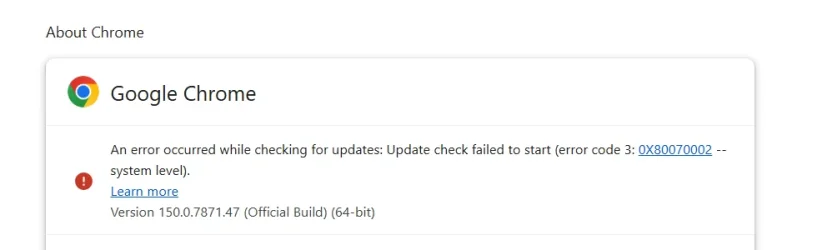
View attachment 175999
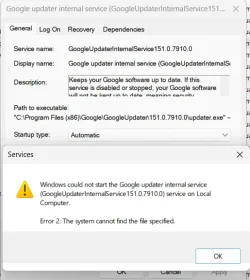
It's probably a services thing. I need another screenshot:.................what could be causing it?
I'm afraid of things like Revo Uninstaller :/I would use export my Chrome bookmarks (unless you are syncing to your Google account in which case they should come back) Make note of your installed extensions.
End ALL running Chrome tasks in task manager.
I would then use Revo Uninstaller Free to uninstall Chrome. Make sure to use Revo's SCAN feature to find & delete all remaining remnants.
Restart and reinstall Chrome.
![]()
Download Revo Uninstaller Free - Remove unwanted programs easily
Download Revo Uninstaller Free helps you to uninstall software and remove unwanted programs easily. Remove all uninstall leftovers and traceswww.revouninstaller.com![]()
Google Chrome - The Fast & Secure Web Browser Built to be Yours
Chrome is the official web browser from Google, built to be fast, secure, and customizable. Download now and make it yours.www.google.com
I don't know exactly what should I doHave you tried the troubleshooting steps with regards to Google Update Services?
Glasskuter's advice is good and maybe the quickest fix.I don't know exactly what should I do
There are many reasons how Software can get corrupted and rarely can it be fixed other than uninstalling and re-installing it..The question is why this file gets deleted by itself after some time.
Hepsinin var.Brave has a portable version. I'm not personally familiar if the others have portable or not. But if one is going to use an alternate browser all the time,, I would install whichever browser you choose and make it default.
There is nothing in event viewer and reliability monitorHave you check your Event Logs?
Try clicking Start and type in RELIABILITY and see if that lists the date, time of the error and more details.
I really doubt that I'm infected and that this problem is related to a virus.I'd offer some suggestions of clean up but some forums don't like using Farbar and other type clean up tools
If you want to post on our forums I can assist you in scanning for potential issues.
Yeah, you explained it perfectly. I don't use any type of those applications. I'm not even using the built in windows disk clean-up.Xomuz, thanks for the extra screenshots. The error code in your first screenshot in post #1 is a generic "file not found" message. Here's what's happening:
Chrome tries to check for updates, asks the Windows service to run, and the service crashes immediately because its core files are gone. Re-running the standalone Chrome installer fixes it because it recreates those missing files, but then something on your PC deletes them sometime later.
Third-party "optimisation", "tune up", or "junk cleaner" utilities are the likely culprits. Do you have anything like CCleaner or Advanced SystemCare etc installed?
I really doubt that I'm infected and that this problem is related to a virus.