Solved GP Syntax for Windows 10 version of Update "Notify for Download and Install"


jdUnionngarden

Well-known member
Member
Local time
9:39 PM
Posts
60
Location
Denver, CO
OS
Windows 11 Pro
PowerSpec G355 Gaming Desktop PC
Windows 11 Pro, Ver. 24H2 (OS Build 26100.1742)

Howdy Folks! :-)
I'm settling-In with Windows 11; still tweaking ...

Quick question on the proper Windows 11 Group Policy version of holding updates until I'm ready to say "Okay, do it!"
(If you'd like to offer a better/different way to do this, please advise.)

TIA to all who take a look here!

Cheer!
:cool:
 

My Computer My Computer

At a glance

Windows 11 ProIntel Core i7-9700KF Processor 3.6GHz16GB DDR4-3000 RAMNVIDIA GeForce RTX 2060 6GB GDDR6
OS
Windows 11 Pro
Computer type
PC/Desktop
Manufacturer/Model
PowerSpec G355 Gaming Desktop PC
CPU
Intel Core i7-9700KF Processor 3.6GHz
Motherboard
ASUS Z390-P Prime Intel LGA 1151 ATX Motherboard
Memory
16GB DDR4-3000 RAM
Graphics Card(s)
NVIDIA GeForce RTX 2060 6GB GDDR6
Sound Card
Realtek High Definition Audio
Monitor(s) Displays
Dell SE2717HR RVJXC 27" Full HD 1920 X 1080 Monitor
Screen Resolution
Full HD 1920 X 1080, 96 dpi
Hard Drives
Primary: 500GB M.2 SSD
Data: 1TB HDD
PSU
600 Watt 80 Plus Power Supply
Case
(?) Open Front, Top, Bottom & Back
Cooling
3 Case Fans, 2 Graphics Card Fans, 1 CPU Fan
Keyboard
HP Wireless
Mouse
Logitech M510 Wireless
Internet Speed
Average 150 to 200+ Mbps via Xfinity xFi Pod to Ethernet cable
Browser
Firefox (Chrome Alternate rarely used)
Antivirus
Bitdefender
Other Info
Comcast Wi-Fi Router (~15 Ft. & 1 Floor below) runs 600+ Mbps
Group Policy version of holding updates until I'm ready to say "Okay, do it!
Exactly what you want to do is unclear.
To answer your question about where windows update options are in group policy, those settings are here
Computer Configuration > Administrative Templates > Windows Components > Windows Update.

If you are referring to receiving feature upgrades (upgrading from one version to another ex:23h2 to 24h2) I believe this is what you want

If you are referring to disabling all updates it's this

If you do not want to get preview updates go to settings>windows update> toggle off
"Get latest updates as soon as they are available."
Note: this disables preview updates only. Once an update comes out of preview (usually one month later) You will get the update during the regular update cycle.
 

My Computers My Computers

  • At a glance

    Windows 11 Pro 25H2 26200.9457i9-10900 10 core 20 threads32 gbnone-Intel UHD Graphics 630
    OS
    Windows 11 Pro 25H2 26200.9457
    Computer type
    PC/Desktop
    Manufacturer/Model
    Dell Optiplex 7080
    CPU
    i9-10900 10 core 20 threads
    Motherboard
    DELL 0J37VM
    Memory
    32 gb
    Graphics Card(s)
    none-Intel UHD Graphics 630
    Sound Card
    Integrated Realtek
    Monitor(s) Displays
    Benq 27
    Screen Resolution
    2560x1440
    Hard Drives
    2x1tb Solidigm m.2 nvme /External drives 512gb Samsung m.2 sata+2tb Kingston m2.nvme
    PSU
    500w
    Case
    MT
    Cooling
    Dell Premium
    Keyboard
    Logitech wired
    Mouse
    Logitech wireless
    Internet Speed
    so slow I'm too embarrassed to tell
    Browser
    #1 Edge #2 Firefox
    Antivirus
    Defender+MWB Premium
  • At a glance

    Windows 11 Pro 24H2 26200.9457AMD Ryzen 7 6800U32 gbintegrated
    Operating System
    Windows 11 Pro 24H2 26200.9457
    Computer type
    PC/Desktop
    Manufacturer/Model
    Beelink Mini PC SER5
    CPU
    AMD Ryzen 7 6800U
    Memory
    32 gb
    Graphics card(s)
    integrated
    Sound Card
    integrated
    Monitor(s) Displays
    Benq 27
    Screen Resolution
    2560x1440
    Hard Drives
    1TB Crucial nvme
    Keyboard
    Logitech wired
    Mouse
    Logitech wireless
    Internet Speed
    still too embarrassed to tell
    Browser
    Firefox
    Antivirus
    Defender
  • System 3 is non compliant Dell 9020 i7-4770/24gb ram Win11 PRO 26200.9457
@glasskuter
Thanks for your detailed reply. :)
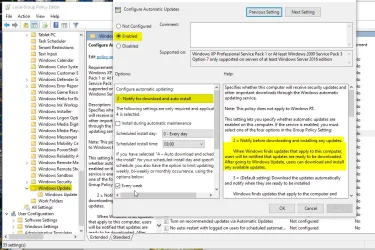
I was trying to keep my question simple, though a brief search of my data disk came up with the attached Group Policy setting in short order.
The attached .jpg shows the setting in Windows 10 that I hope to be able to achieve in Windows 11.
I found the available terminology in Windows 11 to be different enough to be worth checking with the guru's here.
Please let me know if you can offer a suggestion.
Thanks again :cool:
/jdU
 

Attachments

  • Windows Updates and Group Policy Issue #2.webp
    Windows Updates and Group Policy Issue #2.webp
    134.8 KB · Views: 1

My Computer My Computer

At a glance

Windows 11 ProIntel Core i7-9700KF Processor 3.6GHz16GB DDR4-3000 RAMNVIDIA GeForce RTX 2060 6GB GDDR6
OS
Windows 11 Pro
Computer type
PC/Desktop
Manufacturer/Model
PowerSpec G355 Gaming Desktop PC
CPU
Intel Core i7-9700KF Processor 3.6GHz
Motherboard
ASUS Z390-P Prime Intel LGA 1151 ATX Motherboard
Memory
16GB DDR4-3000 RAM
Graphics Card(s)
NVIDIA GeForce RTX 2060 6GB GDDR6
Sound Card
Realtek High Definition Audio
Monitor(s) Displays
Dell SE2717HR RVJXC 27" Full HD 1920 X 1080 Monitor
Screen Resolution
Full HD 1920 X 1080, 96 dpi
Hard Drives
Primary: 500GB M.2 SSD
Data: 1TB HDD
PSU
600 Watt 80 Plus Power Supply
Case
(?) Open Front, Top, Bottom & Back
Cooling
3 Case Fans, 2 Graphics Card Fans, 1 CPU Fan
Keyboard
HP Wireless
Mouse
Logitech M510 Wireless
Internet Speed
Average 150 to 200+ Mbps via Xfinity xFi Pod to Ethernet cable
Browser
Firefox (Chrome Alternate rarely used)
Antivirus
Bitdefender
Other Info
Comcast Wi-Fi Router (~15 Ft. & 1 Floor below) runs 600+ Mbps

I believe this is what you want.
Open group policy, then go to
Computer Configuration -> Administrative Templates -> All Settings.
Scroll down to Configure Automatic Updates. Right click on it and select edit.
Set it to enabled (NOT DISABLED), then in the dropdown below pick option 2, notify for download and auto install.

Now, when new updates are pending, Windows will give you the icon in the system tray but they won't run until you go in and start the process, so you can do it whenever you want.
 

My Computers My Computers

  • At a glance

    Windows 11 Pro 25H2 26200.9457i9-10900 10 core 20 threads32 gbnone-Intel UHD Graphics 630
    OS
    Windows 11 Pro 25H2 26200.9457
    Computer type
    PC/Desktop
    Manufacturer/Model
    Dell Optiplex 7080
    CPU
    i9-10900 10 core 20 threads
    Motherboard
    DELL 0J37VM
    Memory
    32 gb
    Graphics Card(s)
    none-Intel UHD Graphics 630
    Sound Card
    Integrated Realtek
    Monitor(s) Displays
    Benq 27
    Screen Resolution
    2560x1440
    Hard Drives
    2x1tb Solidigm m.2 nvme /External drives 512gb Samsung m.2 sata+2tb Kingston m2.nvme
    PSU
    500w
    Case
    MT
    Cooling
    Dell Premium
    Keyboard
    Logitech wired
    Mouse
    Logitech wireless
    Internet Speed
    so slow I'm too embarrassed to tell
    Browser
    #1 Edge #2 Firefox
    Antivirus
    Defender+MWB Premium
  • At a glance

    Windows 11 Pro 24H2 26200.9457AMD Ryzen 7 6800U32 gbintegrated
    Operating System
    Windows 11 Pro 24H2 26200.9457
    Computer type
    PC/Desktop
    Manufacturer/Model
    Beelink Mini PC SER5
    CPU
    AMD Ryzen 7 6800U
    Memory
    32 gb
    Graphics card(s)
    integrated
    Sound Card
    integrated
    Monitor(s) Displays
    Benq 27
    Screen Resolution
    2560x1440
    Hard Drives
    1TB Crucial nvme
    Keyboard
    Logitech wired
    Mouse
    Logitech wireless
    Internet Speed
    still too embarrassed to tell
    Browser
    Firefox
    Antivirus
    Defender
  • System 3 is non compliant Dell 9020 i7-4770/24gb ram Win11 PRO 26200.9457
@glasskuter

Exactly what I was looking for! Boy, did they find a great place to hide it. :dizzy:
Thank you kindly for pointing me to it!
Cheers!
:cool:

/jdU
 

My Computer My Computer

At a glance

Windows 11 ProIntel Core i7-9700KF Processor 3.6GHz16GB DDR4-3000 RAMNVIDIA GeForce RTX 2060 6GB GDDR6
OS
Windows 11 Pro
Computer type
PC/Desktop
Manufacturer/Model
PowerSpec G355 Gaming Desktop PC
CPU
Intel Core i7-9700KF Processor 3.6GHz
Motherboard
ASUS Z390-P Prime Intel LGA 1151 ATX Motherboard
Memory
16GB DDR4-3000 RAM
Graphics Card(s)
NVIDIA GeForce RTX 2060 6GB GDDR6
Sound Card
Realtek High Definition Audio
Monitor(s) Displays
Dell SE2717HR RVJXC 27" Full HD 1920 X 1080 Monitor
Screen Resolution
Full HD 1920 X 1080, 96 dpi
Hard Drives
Primary: 500GB M.2 SSD
Data: 1TB HDD
PSU
600 Watt 80 Plus Power Supply
Case
(?) Open Front, Top, Bottom & Back
Cooling
3 Case Fans, 2 Graphics Card Fans, 1 CPU Fan
Keyboard
HP Wireless
Mouse
Logitech M510 Wireless
Internet Speed
Average 150 to 200+ Mbps via Xfinity xFi Pod to Ethernet cable
Browser
Firefox (Chrome Alternate rarely used)
Antivirus
Bitdefender
Other Info
Comcast Wi-Fi Router (~15 Ft. & 1 Floor below) runs 600+ Mbps
Back
Top Bottom