Hard Disk failure - need help


lgpratap

New member
Local time
10:18 AM
Posts
1
OS
Windows 11 PRO
Hello,

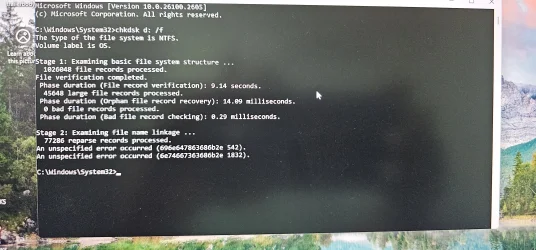
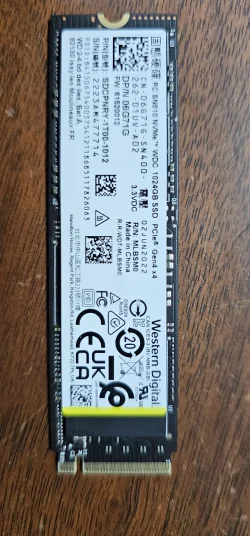
My main hard drive is not accessible and need help immediately. It was the only hard disk on my laptop and was unable to start one day. I removed the hard drive and tried to read it through an enclosure, by connecting it to another computer. It started reading but said that it would take 72 days to copy to another hard drive. I disconnected and tried to read again, but this time it wouldn't open the file explorer. I ran CHKDSK with different options. Please see the report attached. Years of my personal and professional photos and documents are on this drive and I need help in retrieving them one way or another. Please guide me in the right direction. 20241220_160902.webp
20241202_200844.webp
 
Windows Build/Version
Windows 11 PRO (all updates are installed)

My Computer My Computer

At a glance

Windows 11 PRO
OS
Windows 11 PRO
Computer type
Laptop
Manufacturer/Model
Dell Precision 5570

If this were an actual 'hard drive" as in spinning disk type drive I might have had some suggestions. But since this is an SSD about your only option is to send the drive to a Professional Recovery type facility. And my advice is to quit messing with it. The more you mess with things the more chances are you might overwrite some data you might want to recover.
Western Digital may be able to help. This is an electronic issue at this point.
 

My Computer My Computer

At a glance

Win 7/10/11
OS
Win 7/10/11
Computer type
PC/Desktop
Other Info
I'm a computer enthusiast so have quite a few systems that I run. More like an advanced hobby.
Please perform the following steps:

1) Find one or two flash drives that you can format

2) Find a working Windows computer

3) On the working Windows computer create tools that can be used on the problematic computer


4) Create a bootable Ubuntu / Linux flash drive


5) Create a Windows 11 Media Creation Tool (MCT) (Windows 11 iso)


6) Boot to the bootable Ubuntu flash drive

Attempt to read / backup important files


7) Boot to the bootable Windows 11 MCT flash drive

Attempt to read / backup important files


If files are available other options are:

a) using a HD enclosure attached to a working Windows computer

b) using Testdisk


c) using Recoverit


d) others:


My Computer My Computer

At a glance

Windows 10Intel(R) Core(TM) i7-4800MQ CPU @ 2.70GHz16 GB Total: Manufacturer : Samsung MemoryTyp...NVIDIA Quadro K3100M; Intel(R) HD Graphics 4600
OS
Windows 10
Computer type
Laptop
Manufacturer/Model
HP
CPU
Intel(R) Core(TM) i7-4800MQ CPU @ 2.70GHz
Motherboard
Product : 190A Version : KBC Version 94.56
Memory
16 GB Total: Manufacturer : Samsung MemoryType : DDR3 FormFactor : SODIMM Capacity : 8GB Speed : 1600
Graphics Card(s)
NVIDIA Quadro K3100M; Intel(R) HD Graphics 4600
Sound Card
IDT High Definition Audio CODEC; PNP Device ID HDAUDIO\FUNC_01&VEN_111D&DEV_76E0
Hard Drives
Model Hitachi HTS727575A9E364
Antivirus
Microsoft Defender
Other Info
Mobile Workstation

Latest Support Threads

Back
Top Bottom