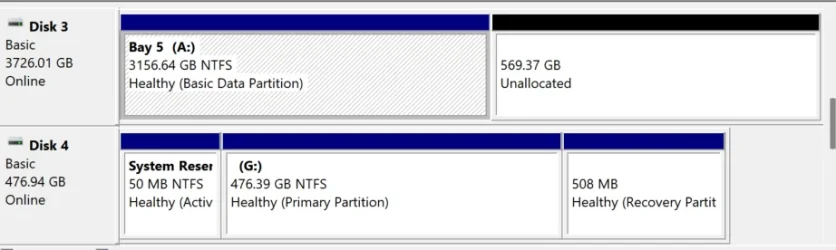
I am just setting up an external drive for the first time. I have a 4TB sata ssd in a 5 bay external drive enclosure.
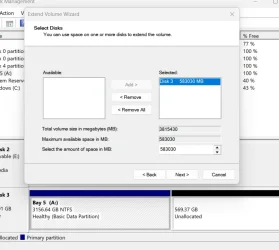
Haven't done this before. I forgot to convert TB to GB and then to MB so I ended up waay over provisioning. I need to extend the volume and would like to allocate 3.2 TB of space in the volume. But the numbers in the fields seem weirdly large and I'm just a bit confused.
What number amount do I enter into the field to allocate the equivalent of 3.2 TB of space for disk 3?
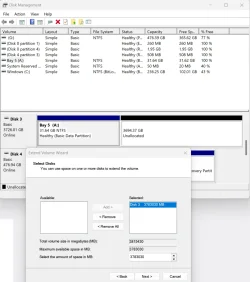
Haven't done this before. I forgot to convert TB to GB and then to MB so I ended up waay over provisioning. I need to extend the volume and would like to allocate 3.2 TB of space in the volume. But the numbers in the fields seem weirdly large and I'm just a bit confused.
What number amount do I enter into the field to allocate the equivalent of 3.2 TB of space for disk 3?
- Windows Build/Version
- 11 25H2 26200.9168
My Computers
-
At a glance
Windows 11 Pro. Version 25H2 (build 26200.7462)- OS
- Windows 11 Pro. Version 25H2 (build 26200.7462)
- Computer type
- Laptop
- Manufacturer/Model
- Lenovo T16 AMD Gen 2
-
At a glance
Windows 118GBonboard- Operating System
- Windows 11
- Computer type
- PC/Desktop
- Manufacturer/Model
- Old HTPC custom build (2009)
- Memory
- 8GB
- Graphics card(s)
- onboard