

I installed build 26300.9550 and Office worked fine, but now it found a lot of Office 2010 updates. For the worst case scenario I will install them all and see if Office 2010 still works and if the copy/paste functionality is affected as discussed on another thread. I will post back later, it will take much time to finish.
OK, it finished, it installed every single Microsoft Office 2010 update, nothing newer found. As you can see on the screenshot below Microsoft Office 2010 still works fine on Windows 11 26H2 build 26300.9550 and all the available Office 2010 updates installed. So there must be something else that deleted Microsoft Office in OP's case. Probably there was some prompt to download Office 365 or he accidentally loaded Office 365 and downloaded it. That would explain removing Office 2010 because like I said you cannot mix two versions. You either have Office 365 or a standalone version. You must remove one to install the other.
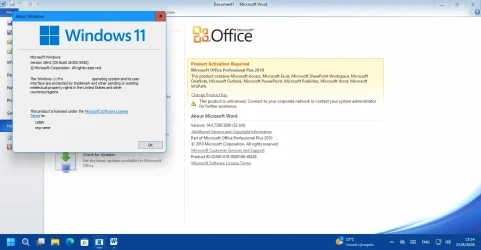
Conclusion: Whatever happened in OP's case and Microsoft Office was removed, the cure is to remove everything related to standalone version and Office 365, even individual applications from the Installed Apps list. Make sure there is nothing left, not even the Office one-click. Then restart the computer and reinstall the desired standalone version. Make sure to right-click on Setup and Run as Administrator for best compatibility.
OK, it finished, it installed every single Microsoft Office 2010 update, nothing newer found. As you can see on the screenshot below Microsoft Office 2010 still works fine on Windows 11 26H2 build 26300.9550 and all the available Office 2010 updates installed. So there must be something else that deleted Microsoft Office in OP's case. Probably there was some prompt to download Office 365 or he accidentally loaded Office 365 and downloaded it. That would explain removing Office 2010 because like I said you cannot mix two versions. You either have Office 365 or a standalone version. You must remove one to install the other.
Conclusion: Whatever happened in OP's case and Microsoft Office was removed, the cure is to remove everything related to standalone version and Office 365, even individual applications from the Installed Apps list. Make sure there is nothing left, not even the Office one-click. Then restart the computer and reinstall the desired standalone version. Make sure to right-click on Setup and Run as Administrator for best compatibility.
Last edited:
My Computers
-
At a glance
Windows 11 Pro 23H2 (7582), 25H2 (9457)Mobile DualCore Intel Core 2 Duo T7250, 2000 MHz4GBMobile Intel(R) GMA 4500M (Mobile 4 series)- OS
- Windows 11 Pro 23H2 (7582), 25H2 (9457)
- Computer type
- Laptop
- Manufacturer/Model
- Acer Extensa 5630EZ
- CPU
- Mobile DualCore Intel Core 2 Duo T7250, 2000 MHz
- Motherboard
- Acer Extensa 5630
- Memory
- 4GB
- Graphics Card(s)
- Mobile Intel(R) GMA 4500M (Mobile 4 series)
- Sound Card
- Realtek ALC268 @ Intel 82801IB ICH9 - High Definition Audio Controller
- Monitor(s) Displays
- 1
- Screen Resolution
- 1280x800
- Hard Drives
- Samsung SSD 850 EVO 250GB SATA Device (250 GB, SATA-III)
- Internet Speed
- 802.11g wireless 54 Mbps
- Browser
- MICROSOFT EDGE
- Antivirus
- WINDOWS DEFENDER
- Other Info
- Legacy MBR installation, no TPM, no Secure Boot, no WDDM 2.0 graphics drivers, no SSE4.2, cannot get more unsupported ;) This is only my test laptop. I had installed Windows 11 here before upgrading my main PC. For my main PC I use everyday see my 2nd system specs.
-
At a glance
Windows 11 Pro 25H2 (build 26200.9457)Intel Core-i7 3770 3.40GHz s1155 (3rd generat...2x Kingston Hyper-X Blu 8GB DDR3-1600GIGABYTE GeForce RTX 3050 WINDFORCE OC V2 6GB...- Operating System
- Windows 11 Pro 25H2 (build 26200.9457)
- Computer type
- PC/Desktop
- Manufacturer/Model
- Custom-built PC
- CPU
- Intel Core-i7 3770 3.40GHz s1155 (3rd generation)
- Motherboard
- Asus P8H61 s1155 ATX
- Memory
- 2x Kingston Hyper-X Blu 8GB DDR3-1600
- Graphics card(s)
- GIGABYTE GeForce RTX 3050 WINDFORCE OC V2 6GB (GV-N3050WF2OCV2-6GD)
- Sound Card
- Realtek HD audio (ALC887)
- Monitor(s) Displays
- Sony Bravia KDL-19L4000 19" LCD TV via VGA
- Screen Resolution
- 1440x900 32-bit 60Hz
- Hard Drives
- WD Blue SA510 2.5 1000GB SSD as system disk, Western Digital Caviar Purple 4TB SATA III (WD40PURZ) as second
- PSU
- Thermaltake Litepower RGB 550W Full Wired
- Case
- SUPERCASE MIDI-TOWER
- Cooling
- Deepcool Gamma Archer CPU cooler, 1x 8cm fan at the back
- Keyboard
- Mitsumi 101-key PS/2
- Mouse
- Microsoft Compact Optical Mouse
- Internet Speed
- 802.11ac 5GHz wireless 260Mpbs
- Browser
- Microsoft Edge, Mozilla Firefox
- Antivirus
- Microsoft Windows Defender
- Other Info
- Legacy BIOS (MBR) installation, no TPM, no Secure Boot, WDDM 3.0 graphics drivers, WEI score 7.4






