Hasleo Backup Suite


My Computers My Computers

System One System Two

  • OS
    Win7,Win11
    Computer type
    PC/Desktop
    CPU
    i7-9700
    Motherboard
    gigabyte b365m ds3h
    Memory
    2x16gb 3600mhz
    Monitor(s) Displays
    benq gw2480
    PSU
    bequiet pure power 11 400CM
    Cooling
    cryorig m9i
  • Operating System
    win7,win11
    Computer type
    PC/Desktop
    CPU
    i5-8400
    Motherboard
    gigabyte b365m ds3h
    Memory
    2x8gb 3200
    PSU
    xfx pro 450

My Computer My Computer

OS
W11 Pro and Insider Dev
Computer type
PC/Desktop
Manufacturer/Model
Home brewed
CPU
AMD Ryzen 9 7900x
Motherboard
ASROCK b650 PRO RS
Memory
2x16GB Kingston 6000MHz, Cl 32 @ 6200MHz Cl30
Graphics Card(s)
Gigabyte Rx 6600XT Gaming OC 8G Pro
Sound Card
MB, Realtek Ac1220p
Monitor(s) Displays
3 x 27"
Screen Resolution
1080p
Hard Drives
Kingston KC3000. 1TBSamsung 970 evo Plus 500GB, Crucial P1 NVMe 1TB, Lexar NVMe 2 TB, Silicon Power M.2 SATA 500GB
PSU
Seasonic 750W
Case
Custom Raidmax
Cooling
Arctic Liquid Freezer III 360mm
Internet Speed
20/19 mbps
1739488360925.webp
 

My Computer My Computer

OS
W11 Pro and Insider Dev
Computer type
PC/Desktop
Manufacturer/Model
Home brewed
CPU
AMD Ryzen 9 7900x
Motherboard
ASROCK b650 PRO RS
Memory
2x16GB Kingston 6000MHz, Cl 32 @ 6200MHz Cl30
Graphics Card(s)
Gigabyte Rx 6600XT Gaming OC 8G Pro
Sound Card
MB, Realtek Ac1220p
Monitor(s) Displays
3 x 27"
Screen Resolution
1080p
Hard Drives
Kingston KC3000. 1TBSamsung 970 evo Plus 500GB, Crucial P1 NVMe 1TB, Lexar NVMe 2 TB, Silicon Power M.2 SATA 500GB
PSU
Seasonic 750W
Case
Custom Raidmax
Cooling
Arctic Liquid Freezer III 360mm
Internet Speed
20/19 mbps
I just installed, backed-up, and restored on my test pc and it does a fine job! (y)
 

My Computer My Computer

OS
Windows 11 pro
Computer type
PC/Desktop
Manufacturer/Model
custom build
CPU
AMD Ryzen 7 5700X
Motherboard
AMD ROG STRIX B550-F
Memory
G.SKILL Ripjaws V Series (Intel XMP) DDR4 RAM 32GB (2x16GB)
Graphics Card(s)
ASUS Dual GeForce RTX™ 4060 White Edition
Sound Card
on-board
Monitor(s) Displays
SAMSUNG 32-Inch Odyssey G50D Series
Screen Resolution
2560 x 1440
Hard Drives
Samsung 990 EVO Plus 1TB, ssd INTEL SSD 730 series 240 GB, and Samsung 840 Evo ssd 500 GB.
PSU
CORSAIR - RMe Series 1000W 80 PLUS Gold Fully Modular ATX Power Supply
Case
Antec 900 Nine Hundred ATX Mid Tower Computer Gaming Case
Cooling
ID-COOLING SE-214-XT Black CPU Cooler All-Black Layout
Keyboard
Logitech 520
Mouse
Logitech 310
Browser
Google Chrome
Antivirus
Windows Defender
Found the problem
1739497862605.webp
 

My Computer My Computer

OS
W11 Pro and Insider Dev
Computer type
PC/Desktop
Manufacturer/Model
Home brewed
CPU
AMD Ryzen 9 7900x
Motherboard
ASROCK b650 PRO RS
Memory
2x16GB Kingston 6000MHz, Cl 32 @ 6200MHz Cl30
Graphics Card(s)
Gigabyte Rx 6600XT Gaming OC 8G Pro
Sound Card
MB, Realtek Ac1220p
Monitor(s) Displays
3 x 27"
Screen Resolution
1080p
Hard Drives
Kingston KC3000. 1TBSamsung 970 evo Plus 500GB, Crucial P1 NVMe 1TB, Lexar NVMe 2 TB, Silicon Power M.2 SATA 500GB
PSU
Seasonic 750W
Case
Custom Raidmax
Cooling
Arctic Liquid Freezer III 360mm
Internet Speed
20/19 mbps
Made enough space on destination disk and merge failed again while locking windows for a few minutes.
 

My Computer My Computer

OS
W11 Pro and Insider Dev
Computer type
PC/Desktop
Manufacturer/Model
Home brewed
CPU
AMD Ryzen 9 7900x
Motherboard
ASROCK b650 PRO RS
Memory
2x16GB Kingston 6000MHz, Cl 32 @ 6200MHz Cl30
Graphics Card(s)
Gigabyte Rx 6600XT Gaming OC 8G Pro
Sound Card
MB, Realtek Ac1220p
Monitor(s) Displays
3 x 27"
Screen Resolution
1080p
Hard Drives
Kingston KC3000. 1TBSamsung 970 evo Plus 500GB, Crucial P1 NVMe 1TB, Lexar NVMe 2 TB, Silicon Power M.2 SATA 500GB
PSU
Seasonic 750W
Case
Custom Raidmax
Cooling
Arctic Liquid Freezer III 360mm
Internet Speed
20/19 mbps
Made enough space on destination disk and merge failed again while locking windows for a few minutes.
Here is a thread about merge on the Hasleo forum so perhaps it will help you.
 

My Computer My Computer

OS
Windows 11 Pro
I cannot fathom why you would want to merge rather than just use the most recent. Seems like a good way to mess things right up!
 

My Computer My Computer

OS
Windows 10 22H2
Computer type
PC/Desktop
Manufacturer/Model
Custom
CPU
Ryzen 7 5800XT
Motherboard
Asrock B550 Pro4
Memory
4x8=32 GB DDR4 3200
Graphics Card(s)
Radeon RX 6750 XT
Sound Card
Syba Sonic DAC SD-DAC63118
Screen Resolution
2560x1080
Hard Drives
2 NVME M.2, 1 SATA SSD
PSU
XPG Core Reactor 750w
Case
Phanteks Enthoo Pro
Cooling
Air
Antivirus
nope
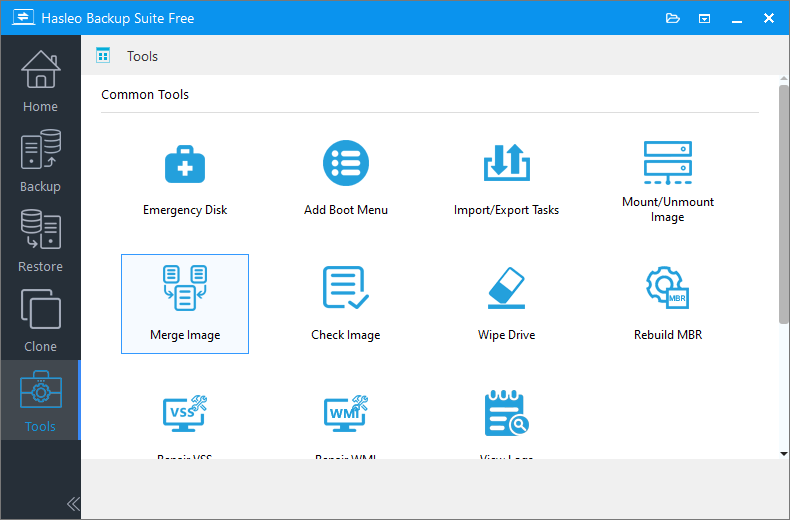
I've now tested this additional "Merge" tool in Hasleo v5.0.3.

It does work ok and saves some significant space (7 - 8% on my tests).

But what was I merging ? Since I use Incremental backup every fortnight, I'd arbitrarily decided to delete all the incremental files past six in sequence (ie. about 3 months), leaving the original Full backup as a base to accumulate another 3 months of Incremental on. So it made sense to me to test the new Merge facility on accumulated Incrementals which had reached four (4) in number at the the point of testing.

Merge did what it was supposed to. Tested both by simply merging all the Incrementals into one (1) Incremental, and also tested merging all Incrementals plus the Full original into one (1) Full file. Then I used the "Check Image" tool to test the validity of all the newly merged files. No issues there either. Using Merge will reduce the space necessary to store backup images quite significantly. (I also had both Macrium and Aomei backups if this Merge thingie should fall over).

Never something for nothing, though. The price for saving disk space with Merge is time. The Merge process is very slow (on a 200Gb Full base plus four Incrementals, this took over two hours). Merging four Incrementals of about 20 Gb each into just one Incremental took about 40 minutes. Obviously smaller Incrementals or Full base images will use pro rata less time, but nonetheless the Merge process is slow. So is the Check Image process.

Still worth having in hand is my view.
 

My Computer My Computer

OS
Windows 11
Computer type
Laptop
Manufacturer/Model
HP 15s_du1xxx
CPU
Intel i5 10210U
Motherboard
85F1
Memory
16Gb
Graphics Card(s)
Intel UHD
Sound Card
Realtek
Screen Resolution
1920 x 1080
I cannot fathom why you would want to merge rather than just use the most recent. Seems like a good way to mess things right up!

I agree, also, it makes creating incremental backups pointless, in my opinion.
There’s a reason I make incremental backups and it isn’t to save time.

Install Windows: Backup.
Apply Tweaks: Incremental.
Install Software: Incremental.
Etc
 

My Computers My Computers

System One System Two

  • OS
    Windows 11 Pro 25H2 Build 26200.8655
    Computer type
    PC/Desktop
    Manufacturer/Model
    Sin-built 2013
    CPU
    Intel(R) Core(TM) i7-4770K CPU @ 3.50GHz
    Motherboard
    ASUS ROG Maximus VI Formula
    Memory
    32.0 GB of I forget and the box is in storage.
    Graphics Card(s)
    Gigabyte nVidia GeForce GTX 1660 Super OC 6GB
    Sound Card
    Onboard thingy
    Monitor(s) Displays
    5 x LG 25MS500-B - 1 x 24MK430H-B - 1 x Wacom Pro 22" Touch Screen Tablet
    Screen Resolution
    All over the place
    Hard Drives
    Too many to list.
    OS on Samsung 1TB 870 QVO SATA
    PSU
    Silverstone 1500
    Case
    NZXT Phantom 820 Full-Tower Case
    Cooling
    Noctua NH-D15 Elite Class Dual Tower CPU Cooler / 6 x EziDIY 120mm / 2 x Corsair 140mm somethings / 1 x 140mm Thermaltake something / 2 x 200mm Corsair.
    Keyboard
    Corsair K95 / Logitech diNovo Edge Wireless
    Mouse
    Logitech: G402 / G502 / Mx Masters / Mx Air Cordless
    Internet Speed
    2000/500Mbps
    Browser
    All sorts
    Antivirus
    Kaspersky Premium
    Other Info
    ㅤㅤㅤㅤㅤㅤㅤㅤㅤㅤㅤㅤㅤㅤㅤㅤㅤㅤㅤㅤㅤㅤㅤㅤㅤㅤㅤㅤㅤㅤㅤㅤㅤㅤㅤㅤㅤㅤㅤㅤ⠀⠀⠀⠀⠀⠀⠀⠀⠀⠀
    TP-Link BE9300 WiFi 7 Bluetooth 5.4 (Archer TBE550E)
    TP-Link TX201 V1 2.5GB Lan

    Grandstream HT812 - VoIP
    ASUS DSL-AX82U - Mesh
    ASUS RT-AC68U - Mesh
    ASUS RT-BE88U Router

    Brother MFC-L2880DW Printer

    I’m on a horse.
  • Operating System
    Windows 11 Pro 25H2 Build 26200.8655
    Computer type
    Laptop
    Manufacturer/Model
    LENOVO Yoga 7 14IRL8 - 7i EVO OLED 14" Touchscreen i5 12 Core 16GB/512GB
    CPU
    Intel Core 12th Gen i5-1240P Processor (1.7 - 4.4GHz)
    Memory
    16GB LPDDR5 RAM
    Graphics card(s)
    Intel Iris Xe Graphics Processor
    Sound Card
    Optimized with Dolby Atmos®
    Screen Resolution
    QHD 2880 x 1800 OLED
    Hard Drives
    M.2 512GB
    Antivirus
    Defender / Malwarebytes
    Other Info
    …still on a horse.
@antspants

" ... it makes creating incremental backups pointless, in my opinion.
There’s a reason I make incremental backups ..."


Wonderfully contradictory. But that's the value of website comments ...

I use Incrementals to save time and space over a 3 month period, then renewal of that 3 month cycle. Reiterating a Full or Differential backup each time does not do that. Daily or so small backups is done of emails. finance spreadsheets, ongoing edited maps and reports, executables of any new programmes (rare) - all stuff that is changing constantly. I had wondered if the new Merge tool would save time with accumulating Incrementals, but since the Merge process is currently so slow, the answer at the moment is no.
 

My Computer My Computer

OS
Windows 11
Computer type
Laptop
Manufacturer/Model
HP 15s_du1xxx
CPU
Intel i5 10210U
Motherboard
85F1
Memory
16Gb
Graphics Card(s)
Intel UHD
Sound Card
Realtek
Screen Resolution
1920 x 1080
... it makes creating incremental backups pointless, in my opinion.
There’s a reason I make incremental backups ..."


Wonderfully contradictory. But that's the value of website comments ...

Incremental backups, in my opinion, are pointless if you're just going to end up merging them.
(y)

Other than that, welcome to my ignore list.
 

My Computers My Computers

System One System Two

  • OS
    Windows 11 Pro 25H2 Build 26200.8655
    Computer type
    PC/Desktop
    Manufacturer/Model
    Sin-built 2013
    CPU
    Intel(R) Core(TM) i7-4770K CPU @ 3.50GHz
    Motherboard
    ASUS ROG Maximus VI Formula
    Memory
    32.0 GB of I forget and the box is in storage.
    Graphics Card(s)
    Gigabyte nVidia GeForce GTX 1660 Super OC 6GB
    Sound Card
    Onboard thingy
    Monitor(s) Displays
    5 x LG 25MS500-B - 1 x 24MK430H-B - 1 x Wacom Pro 22" Touch Screen Tablet
    Screen Resolution
    All over the place
    Hard Drives
    Too many to list.
    OS on Samsung 1TB 870 QVO SATA
    PSU
    Silverstone 1500
    Case
    NZXT Phantom 820 Full-Tower Case
    Cooling
    Noctua NH-D15 Elite Class Dual Tower CPU Cooler / 6 x EziDIY 120mm / 2 x Corsair 140mm somethings / 1 x 140mm Thermaltake something / 2 x 200mm Corsair.
    Keyboard
    Corsair K95 / Logitech diNovo Edge Wireless
    Mouse
    Logitech: G402 / G502 / Mx Masters / Mx Air Cordless
    Internet Speed
    2000/500Mbps
    Browser
    All sorts
    Antivirus
    Kaspersky Premium
    Other Info
    ㅤㅤㅤㅤㅤㅤㅤㅤㅤㅤㅤㅤㅤㅤㅤㅤㅤㅤㅤㅤㅤㅤㅤㅤㅤㅤㅤㅤㅤㅤㅤㅤㅤㅤㅤㅤㅤㅤㅤㅤ⠀⠀⠀⠀⠀⠀⠀⠀⠀⠀
    TP-Link BE9300 WiFi 7 Bluetooth 5.4 (Archer TBE550E)
    TP-Link TX201 V1 2.5GB Lan

    Grandstream HT812 - VoIP
    ASUS DSL-AX82U - Mesh
    ASUS RT-AC68U - Mesh
    ASUS RT-BE88U Router

    Brother MFC-L2880DW Printer

    I’m on a horse.
  • Operating System
    Windows 11 Pro 25H2 Build 26200.8655
    Computer type
    Laptop
    Manufacturer/Model
    LENOVO Yoga 7 14IRL8 - 7i EVO OLED 14" Touchscreen i5 12 Core 16GB/512GB
    CPU
    Intel Core 12th Gen i5-1240P Processor (1.7 - 4.4GHz)
    Memory
    16GB LPDDR5 RAM
    Graphics card(s)
    Intel Iris Xe Graphics Processor
    Sound Card
    Optimized with Dolby Atmos®
    Screen Resolution
    QHD 2880 x 1800 OLED
    Hard Drives
    M.2 512GB
    Antivirus
    Defender / Malwarebytes
    Other Info
    …still on a horse.
I cannot fathom why you would want to merge rather than just use the most recent. Seems like a good way to mess things right up!
I need space on that disk and I already have MR backup of same disk so Hasleo is only a spare and for testing it.
The other reason is quite specific. One of my M.2 SSDs, only one of 5 that's SATA and not NVMe is going nuts (probably control chip or firmware) and can't delete anything from it, every time I restart PC files are back. Both, Hasleo and MR can't produce full disk backup, always ends up with error but folders and most files in them can be copied one by one which takes a lot of time. That's technical part.
What I wanted is to create backups of some folders separately in different places ad then merge them in one file. Then I'll have to flash new firmware and that will erase whole disk and hopefully repair it
 

My Computer My Computer

OS
W11 Pro and Insider Dev
Computer type
PC/Desktop
Manufacturer/Model
Home brewed
CPU
AMD Ryzen 9 7900x
Motherboard
ASROCK b650 PRO RS
Memory
2x16GB Kingston 6000MHz, Cl 32 @ 6200MHz Cl30
Graphics Card(s)
Gigabyte Rx 6600XT Gaming OC 8G Pro
Sound Card
MB, Realtek Ac1220p
Monitor(s) Displays
3 x 27"
Screen Resolution
1080p
Hard Drives
Kingston KC3000. 1TBSamsung 970 evo Plus 500GB, Crucial P1 NVMe 1TB, Lexar NVMe 2 TB, Silicon Power M.2 SATA 500GB
PSU
Seasonic 750W
Case
Custom Raidmax
Cooling
Arctic Liquid Freezer III 360mm
Internet Speed
20/19 mbps
Incremental backups, in my opinion, are pointless if you're just going to end up merging them.
(y)

Other than that, welcome to my ignore list.
I haven't tried the merge thing. I expect the idea is that the single file it creates takes up less space than all the smaller files.

Presumably it is possible to select any of the incremental points to restore from the single large file.

e.g. full image Sun incremental Mon, Tue, Wed

squeeze the Mon, Tue Wed into one merged file

when loaded by the program can select either Mon or Tue or Wed to restore.

I presume that is what it does but I cba to try it out.
 
Last edited:

My Computers My Computers

System One System Two

  • OS
    Win7,Win11
    Computer type
    PC/Desktop
    CPU
    i7-9700
    Motherboard
    gigabyte b365m ds3h
    Memory
    2x16gb 3600mhz
    Monitor(s) Displays
    benq gw2480
    PSU
    bequiet pure power 11 400CM
    Cooling
    cryorig m9i
  • Operating System
    win7,win11
    Computer type
    PC/Desktop
    CPU
    i5-8400
    Motherboard
    gigabyte b365m ds3h
    Memory
    2x8gb 3200
    PSU
    xfx pro 450
The single file is basically just like a Macrium REFLECT merge... it's almost as big as the sum of the (3).

No, the restoration point becomes the date of the closest incremental merged... again, same as Macrium.
 

My Computer My Computer

OS
Windows 10, Linux MINT (Guests 7, 11, ZorinOS)
Computer type
PC/Desktop
Manufacturer/Model
HP Z2 G5 Workstation
CPU
Intel Core i7-10700
Motherboard
HP Model# 8751
Memory
32gB (DDR4)
Graphics Card(s)
Intel UHD Graphics 630
Sound Card
Realtek basic audio
Monitor(s) Displays
32" (Viewsonic) UHD
Screen Resolution
3840 x 2160
Hard Drives
2-NvME (mainboard), 1-NvME (PCIe), 1-SATA3 SSD
The single file is basically just like a Macrium REFLECT merge... it's almost as big as the sum of the (3).

No, the restoration point becomes the date of the closest incremental merged... again, same as Macrium.
What does closest mean? Does it mean the last or the nearest to full ( i.e. the first )

If you can't select any of them it is a bit limiting.
 

My Computers My Computers

System One System Two

  • OS
    Win7,Win11
    Computer type
    PC/Desktop
    CPU
    i7-9700
    Motherboard
    gigabyte b365m ds3h
    Memory
    2x16gb 3600mhz
    Monitor(s) Displays
    benq gw2480
    PSU
    bequiet pure power 11 400CM
    Cooling
    cryorig m9i
  • Operating System
    win7,win11
    Computer type
    PC/Desktop
    CPU
    i5-8400
    Motherboard
    gigabyte b365m ds3h
    Memory
    2x8gb 3200
    PSU
    xfx pro 450
The merge moves all the merged days changes into the newer image, allowing the selection of the newer image only as a time point... the other individual day changes get absorbed into the newest day. Kinda like a DIFF of the image prior to the beginning of the merged selections (or a new INC from that date).

REFLECT has also always worked this way when merging for any reason.
 

My Computer My Computer

OS
Windows 10, Linux MINT (Guests 7, 11, ZorinOS)
Computer type
PC/Desktop
Manufacturer/Model
HP Z2 G5 Workstation
CPU
Intel Core i7-10700
Motherboard
HP Model# 8751
Memory
32gB (DDR4)
Graphics Card(s)
Intel UHD Graphics 630
Sound Card
Realtek basic audio
Monitor(s) Displays
32" (Viewsonic) UHD
Screen Resolution
3840 x 2160
Hard Drives
2-NvME (mainboard), 1-NvME (PCIe), 1-SATA3 SSD
They are both extremely fast. What Hasleo seems to have an edge for compared to Macrium is the standard volume produced, 95 GB for Hasleo and 113 GB for Macrium. Not a hugedifference, but a significant one. What I think is great with Hasleo, it is still free for now and the procedure to start a backup is very simple compared to Macrium. I will keep Hasleo for extra security.

I would like to correct my statement about Hasleo creating a smaller volume than Macrium with the same default compression in both programs. It is actually exactly the same, the reason of my incorrect statement was due to the fact that Macrium by default will include a recovery partition of about 17 GB and a Dell Support partition of almost 2 GB, whereas Hasleo by default doesn’t. It explains the differenceof almost 20GB between the two programs. I stand corrected as the two programs only differ slightly in the time of execution, and we are talking about a minute or less, which is basically irrelevant.
 

My Computers My Computers

System One System Two

  • OS
    Windows 11 PRO 25H2
    Computer type
    Laptop
    Manufacturer/Model
    Dell XPS 15 9520
    CPU
    i7 12700H 4.7 GHz
    Motherboard
    Dell 0YD3W1
    Memory
    16 GB, DDR5, 4800
    Graphics Card(s)
    NVIDIA GeFORCE RTX 3050 Ti 4 GB GDDR6 45W - INTEL IRIS Xe Graphics
    Sound Card
    Realtek and NVIDIA WDM
    Monitor(s) Displays
    15.6"
    Screen Resolution
    3840X2400 @ 60 Hz ANTIREFLECT 500 nit infinity edge
    Hard Drives
    1 TB M.2 PCle NVMe SSD
    PSU
    Dell
    Case
    Standard case
    Cooling
    Laptop cooling pad
    Keyboard
    Standard
    Mouse
    LOGITECH G304
    Internet Speed
    DOWN 94.75 Mbps up 94.83 Mbps
    Browser
    CHROME
    Antivirus
    MICROSOFT DEFENDER
    Other Info
    Imaging program: Macrium Reflect X Home , and Hasleo Backup Suite
    Google Chrome
    Browser content filter: uBlock Origin and SpywareBlaster
    Heavy programs in use: Photoshop 2025 Beta
  • Operating System
    Windows 11 Home 24H2
    Computer type
    Laptop
    Manufacturer/Model
    Samsung series 7 CHRONOS 15" NT770Z5E-S78
    CPU
    i7 3630QM @ 2.40 GHz
    Motherboard
    Samsung NT770Z5E-S78
    Memory
    8 GB dual DDR3
    Graphics card(s)
    Intel HD graphics 4000 and ATI AMD Radeon HD 8800
    Sound Card
    Realtek HD
    Monitor(s) Displays
    Generic PnP monitor
    Screen Resolution
    1920 X 1080 @ 60 Hz
    Hard Drives
    Samsung SSD 860 EVO 500 GB
    PSU
    Samsung
    Case
    standard
    Cooling
    Fans
    Keyboard
    Standard
    Mouse
    Logitech M221
    Internet Speed
    96 down 97 up
    Browser
    Chrome
    Antivirus
    MS Defender
    Other Info
    Imaging program: Macrium Reflect free edition
    Browser content filter: uBlock Origin
I would like to correct my statement about Hasleo creating a smaller volume than Macrium with the same default compression in both programs. It is actually exactly the same, the reason of my incorrect statement was due to the fact that Macrium by default will include a recovery partition of about 17 GB and a Dell Support partition of almost 2 GB, whereas Hasleo by default doesn’t. It explains the differenceof almost 20GB between the two programs. I stand corrected as the two programs only differ slightly in the time of execution, and we are talking about a minute or less, which is basically irrelevant.
I thought that both include all partitions when "Full disk backup" is selected ?
 

My Computer My Computer

OS
W11 Pro and Insider Dev
Computer type
PC/Desktop
Manufacturer/Model
Home brewed
CPU
AMD Ryzen 9 7900x
Motherboard
ASROCK b650 PRO RS
Memory
2x16GB Kingston 6000MHz, Cl 32 @ 6200MHz Cl30
Graphics Card(s)
Gigabyte Rx 6600XT Gaming OC 8G Pro
Sound Card
MB, Realtek Ac1220p
Monitor(s) Displays
3 x 27"
Screen Resolution
1080p
Hard Drives
Kingston KC3000. 1TBSamsung 970 evo Plus 500GB, Crucial P1 NVMe 1TB, Lexar NVMe 2 TB, Silicon Power M.2 SATA 500GB
PSU
Seasonic 750W
Case
Custom Raidmax
Cooling
Arctic Liquid Freezer III 360mm
Internet Speed
20/19 mbps
I thought that both include all partitions when "Full disk backup" is selected ?
Macrium will check all partitions (including a recovery partition of 17 GB + Dell support partition of 2 GB) to 'create an image of the partitions required to backup and restore Windows'. Hasleo will check all partitions less the recovery and Dell support partitions, for a system backup. These operations are set by default and the difference is about 20GB. Since I'm aware of this, when I backup with Macrium I uncheck the 2 partitions which in my context are not needed.
 

My Computers My Computers

System One System Two

  • OS
    Windows 11 PRO 25H2
    Computer type
    Laptop
    Manufacturer/Model
    Dell XPS 15 9520
    CPU
    i7 12700H 4.7 GHz
    Motherboard
    Dell 0YD3W1
    Memory
    16 GB, DDR5, 4800
    Graphics Card(s)
    NVIDIA GeFORCE RTX 3050 Ti 4 GB GDDR6 45W - INTEL IRIS Xe Graphics
    Sound Card
    Realtek and NVIDIA WDM
    Monitor(s) Displays
    15.6"
    Screen Resolution
    3840X2400 @ 60 Hz ANTIREFLECT 500 nit infinity edge
    Hard Drives
    1 TB M.2 PCle NVMe SSD
    PSU
    Dell
    Case
    Standard case
    Cooling
    Laptop cooling pad
    Keyboard
    Standard
    Mouse
    LOGITECH G304
    Internet Speed
    DOWN 94.75 Mbps up 94.83 Mbps
    Browser
    CHROME
    Antivirus
    MICROSOFT DEFENDER
    Other Info
    Imaging program: Macrium Reflect X Home , and Hasleo Backup Suite
    Google Chrome
    Browser content filter: uBlock Origin and SpywareBlaster
    Heavy programs in use: Photoshop 2025 Beta
  • Operating System
    Windows 11 Home 24H2
    Computer type
    Laptop
    Manufacturer/Model
    Samsung series 7 CHRONOS 15" NT770Z5E-S78
    CPU
    i7 3630QM @ 2.40 GHz
    Motherboard
    Samsung NT770Z5E-S78
    Memory
    8 GB dual DDR3
    Graphics card(s)
    Intel HD graphics 4000 and ATI AMD Radeon HD 8800
    Sound Card
    Realtek HD
    Monitor(s) Displays
    Generic PnP monitor
    Screen Resolution
    1920 X 1080 @ 60 Hz
    Hard Drives
    Samsung SSD 860 EVO 500 GB
    PSU
    Samsung
    Case
    standard
    Cooling
    Fans
    Keyboard
    Standard
    Mouse
    Logitech M221
    Internet Speed
    96 down 97 up
    Browser
    Chrome
    Antivirus
    MS Defender
    Other Info
    Imaging program: Macrium Reflect free edition
    Browser content filter: uBlock Origin
Back
Top Bottom