Hasleo Backup Suite


If your Recovery Media is built using the System resident WinRE.wim (offered by many imaging apps), local wireless support will be available in the build. If the media is built with the basic WinPE.wim (offered by the ADK building mechanism), wireless support is not available in the build.

Hasleo , when building with the basic WinPE (yours <downloaded from MicroSloth> or theirs <offered OPE from their site>), offers the option "Automatic Driver Injection" (ON by default, fairly recent option addition) to add additional LIVE drivers that they find to the WinPE build. This is why Hasleo works out of the box, with wireless, with a WinPE built Recovery Media. I don't know whether this is true for Bluetooth devices... never checked it.

As far as this Hasleo feature is concerned, all imaging apps should approach Recovery Media building in the same way so users don't have to learn, the hard way, all about these Recovery Media anomalies... it should just work (which Hasleo's Recovery Media does).
 
Last edited:

My Computer My Computer

At a glance

Windows 10, Linux MINT (V-guests 7, 11, ZorinOS)Intel Core i7-1070032gB (DDR4)Intel UHD Graphics 630
OS
Windows 10, Linux MINT (V-guests 7, 11, ZorinOS)
Computer type
PC/Desktop
Manufacturer/Model
HP Z2 G5 Workstation
CPU
Intel Core i7-10700
Motherboard
HP Model# 8751
Memory
32gB (DDR4)
Graphics Card(s)
Intel UHD Graphics 630
Sound Card
Realtek basic audio
Monitor(s) Displays
32" (Viewsonic) UHD
Screen Resolution
3840 x 2160
Hard Drives
2-NvME (mainboard), 1-NvME (PCIe), 1-SATA3 SSD
This was not a usage error.

With both Acronis True Image and Macrium Reflect, the issue was the boot environment:
in WinPE, my mouse and keyboard did not work because I use wireless peripherals.
On this specific hardware (AMD B650), it was therefore impossible to continue with the restore due to missing / incompatible drivers.

So the problem was not the restore process itself, but boot media compatibility.

For comparison: Hasleo Backup Suite worked without any issues in the same boot environment, including full support for the wireless mouse and keyboard.

I’m not disputing that it worked fine for others – in my case, this was a technical compatibility issue, not user error.
That makes sense. I have a Logitech G305 wireless mouse, it works fine in my BIOS and for any other boot drive, including stuff like Acronis, Rufus, etc. My keyboard is a wired USB keyboard. The mouse is easy to address, I have several USB mice around, I would use one of those if the wireless mouse stopped working or didn't work for a specific boot environment.
 

My Computers My Computers

  • At a glance

    Win 11 Pro 25H2, Build 26200.8894Intel Core i5 1450064GB DDR4GeForce RTX 4060
    OS
    Win 11 Pro 25H2, Build 26200.8894
    Computer type
    PC/Desktop
    Manufacturer/Model
    Home Brew
    CPU
    Intel Core i5 14500
    Motherboard
    Gigabyte B760M G P WIFI
    Memory
    64GB DDR4
    Graphics Card(s)
    GeForce RTX 4060
    Sound Card
    Chipset Realtek
    Monitor(s) Displays
    LG 45" Ultragear, Acer 24" 1080p
    Screen Resolution
    5120x1440, 1920x1080
    Hard Drives
    Crucial P310 2TB 2280 PCIe Gen4 3D NAND NVMe M.2 SSD (O/S)
    Silicon Power 2TB US75 NVMe PCIe Gen4 M.2 2280 SSD (backup)
    Crucial BX500 2TB 3D NAND (2nd backup)
    Seagate 4TB Ironwolf, rotating HDD archive files
    External off-line backup Drives: 2 NVMe 4TB drives in external enclosures
    PSU
    Thermaltake Toughpower GF3 750W
    Case
    LIAN LI LANCOOL 216 E-ATX PC Case
    Cooling
    Lots of fans!
    Keyboard
    Microsoft Comfort Curve 2000
    Mouse
    Logitech G305
    Internet Speed
    Verizon FiOS 1GB
    Browser
    Firefox
    Antivirus
    Malware Bytes & Windows Defender Security
  • At a glance

    Win 11 Pro 25H2, Build 26200.8894Intel Core i5 1440032GB DDR5Intel 700 Embedded GPU
    Operating System
    Win 11 Pro 25H2, Build 26200.8894
    Computer type
    PC/Desktop
    Manufacturer/Model
    Home Brew
    CPU
    Intel Core i5 14400
    Motherboard
    Gigabyte B760M DS3H AX
    Memory
    32GB DDR5
    Graphics card(s)
    Intel 700 Embedded GPU
    Sound Card
    Realtek Embedded
    Monitor(s) Displays
    27" HP 1080p
    Screen Resolution
    1920x1080
    Hard Drives
    Crucial P310 2TB 2280 PCIe Gen4 eD NAND PCIe SSD
    Samsung EVO 990 2TB NVMe Gen4 SSD
    Samsung 2TB SATA SSD
    PSU
    Thermaltake Smart BM3 650W
    Case
    Okinos Micro ATX Case
    Cooling
    Fans
    Keyboard
    Microsoft Comfort Curve 2000
    Mouse
    Logitech G305
    Internet Speed
    Verizon FiOS 1GB
    Browser
    Firefox
    Antivirus
    Malware Bytes & Windows Defender Security
  • Nimo N171 17" Laptop, (Intel i3-1215U, 16GB RAM, 2TB NVMe, Win11 Pro)
    Acemagic Vista Mini PC V1 (Intel N150, 16GB RAM, 1TB NVMe, Win11 Pro)
    HP ENVY h8-1540t, (24GB RAM, 2TB SSD, 2TB HDD, Win11 Pro)
If your Recovery Media is built using the System resident WinRE.wim (offered by many imaging apps), local wireless support will be available in the build. If the media is built with the basic WinPE.wim (offered by the ADK building mechanism), wireless support is not available in the build.

Hasleo , when building with the basic WinPE (yours <downloaded from MicroSloth> or theirs <offered OPE from their site>), offers the option "Automatic Driver Injection" (ON by default, fairly recent option addition) to add additional LIVE drivers that they find to the WinPE build. This is why Hasleo works out of the box, with wireless, with a WinPE built Recovery Media. I don't know whether this is true for Bluetooth devices... never checked it.

As far as this Hasleo feature is concerned, all imaging apps should approach Recovery Media building in the same way so users don't have to learn, the hard way, all about these Recovery Media anomalies... it should just work (which Hasleo's Recovery Media does).
Understood, thanks for the clarification.

This is exactly the point – standard WinPE recovery media (Acronis, Macrium) don’t include wireless support, so on my AMD B650 setup, the mouse and keyboard didn’t work.
Hasleo uses Automatic Driver Injection, which adds the necessary drivers into the WinPE build, so peripherals work immediately.

So the issue wasn’t the procedure, but the different construction of the recovery media. I agree – ideally all recovery tools should support wireless peripherals out of the box.
 

My Computer My Computer

At a glance

Windows 11 Pro 25H2 build 26200.8894AMD Ryzen 7 7700XRAM: 64 GB DDR5AMD Radeon RX 7800 XT (16 GB)
OS
Windows 11 Pro 25H2 build 26200.8894
Computer type
PC/Desktop
Manufacturer/Model
Custom build (Gigabyte)
CPU
AMD Ryzen 7 7700X
Motherboard
Gigabyte B650M GAMING X AX
Memory
RAM: 64 GB DDR5
Graphics Card(s)
AMD Radeon RX 7800 XT (16 GB)
Sound Card
Realtek (onboard)
Monitor(s) Displays
Samsung
Screen Resolution
1920 x 1080
Hard Drives
Samsung 990 PRO 1 TB (NVM-e),
Keyboard
Logitech MX Master
Mouse
Logitech
Internet Speed
13ms/250Mbps/25Mbps
Browser
Microsoft Edge
Antivirus
Bitdefender
Other Info
UEFI, Secure Boot ON, TPM 2.0 ON

Hasleo Backup Suite Free 5.6.2.0​

What's new in this version:
1. Improved the performance of checking image files
2. Resolved the performance regression issue compared to V5.4
3. Allows performing integrity checks only on newly generated image file(s) upon backup completion
4. Enhanced backup scheduling by adding an option to perform a full backup after executing a specified number of incremental/differential backups
5. Right-click an image file in File Explorer to mount it or perform a restore
6. Added a simple file explorer and screenshot tool to WinPE
7. Added support for the ISO 8601 date/time format
8. Automatically synchronize date/time format and keyboard layout to WinPE
9. Added Arabic language support
10. Various minor bug fixes and small feature improvements


My Computer My Computer

At a glance

Windows 11 ProIntel Core i9 12900KFCorsair 64GB DDR5 Vengeance C40 5200MhzASUS GeForce RTX 3090 ROG Strix OC 24GB
OS
Windows 11 Pro
Computer type
PC/Desktop
Manufacturer/Model
Custom Build
CPU
Intel Core i9 12900KF
Motherboard
ASUS ROG Maximus Z690 Hero
Memory
Corsair 64GB DDR5 Vengeance C40 5200Mhz
Graphics Card(s)
ASUS GeForce RTX 3090 ROG Strix OC 24GB
Sound Card
OnBoard
Monitor(s) Displays
Acer Predator XB323UGP 32" QHD G-SYNC-C 144Hz 1MS IPS LED
Screen Resolution
2560 x 1440
Hard Drives
1x Samsung 980 Pro Series Gen4 250GB M.2 NVMe
1x Samsung 980 Pro Series Gen4 500GB M.2 NVMe
2x Samsung 980 Pro Series Gen4 2TB M.2 NVMe
PSU
Corsair AX1200i 1200W 80PLUS Titanium Modular
Case
Corsair 4000D Black Case w/ Tempered Glass Side Panel
Cooling
Noctua NH-U12A Chromax Black CPU Cooler, 4x Noctua 120mm Fans
Keyboard
Logitech MK545
Mouse
Logitech MX Master 3
Internet Speed
Fixed Wireless 150mbps/75mbps
Browser
Firefox
Antivirus
Kaspersky
Other Info
Thrustmaster TS-PC RACER
Fanatec CSL Elite Pedals with the Load Cell Kit
Yamaha Amp with Bose Speakers

Hasleo Backup Suite Free 5.6.2.0​

What's new in this version:
1. Improved the performance of checking image files
2. Resolved the performance regression issue compared to V5.4
3. Allows performing integrity checks only on newly generated image file(s) upon backup completion
4. Enhanced backup scheduling by adding an option to perform a full backup after executing a specified number of incremental/differential backups
5. Right-click an image file in File Explorer to mount it or perform a restore
6. Added a simple file explorer and screenshot tool to WinPE
7. Added support for the ISO 8601 date/time format
8. Automatically synchronize date/time format and keyboard layout to WinPE
9. Added Arabic language support
10. Various minor bug fixes and small feature improvements

Good job. Thank you very much for the information. For me, it's one of the best programs out there. I have a lifetime license. The program has helped me out of trouble more than once.
 

My Computer My Computer

At a glance

Windows 11 Pro 25H2 build 26200.8894AMD Ryzen 7 7700XRAM: 64 GB DDR5AMD Radeon RX 7800 XT (16 GB)
OS
Windows 11 Pro 25H2 build 26200.8894
Computer type
PC/Desktop
Manufacturer/Model
Custom build (Gigabyte)
CPU
AMD Ryzen 7 7700X
Motherboard
Gigabyte B650M GAMING X AX
Memory
RAM: 64 GB DDR5
Graphics Card(s)
AMD Radeon RX 7800 XT (16 GB)
Sound Card
Realtek (onboard)
Monitor(s) Displays
Samsung
Screen Resolution
1920 x 1080
Hard Drives
Samsung 990 PRO 1 TB (NVM-e),
Keyboard
Logitech MX Master
Mouse
Logitech
Internet Speed
13ms/250Mbps/25Mbps
Browser
Microsoft Edge
Antivirus
Bitdefender
Other Info
UEFI, Secure Boot ON, TPM 2.0 ON
Good job. Thank you very much for the information. For me, it's one of the best programs out there. I have a lifetime license. The program has helped me out of trouble more than once.
Do you think its better ( more reliable) compared with Macrium, AoMEI..........? 🛠️
 

My Computers My Computers

  • At a glance

    Windows11 Pro 25H2i732GBnVidia
    OS
    Windows11 Pro 25H2
    Computer type
    PC/Desktop
    Manufacturer/Model
    Asus
    CPU
    i7
    Motherboard
    z97k
    Memory
    32GB
    Graphics Card(s)
    nVidia
    Sound Card
    Realtek
    Hard Drives
    3
    Cooling
    air
    Browser
    Edge
    Antivirus
    ESET
  • At a glance

    Windows11 ProIntel i516GBIntel
    Operating System
    Windows11 Pro
    Computer type
    PC/Desktop
    Manufacturer/Model
    ASUS
    CPU
    Intel i5
    Motherboard
    ASUS Basic
    Memory
    16GB
    Graphics card(s)
    Intel
    Sound Card
    Realtek
    Monitor(s) Displays
    Samsung
    Hard Drives
    one intern , 0ne extern, OS on SSD
    Cooling
    air
    Keyboard
    wireless Logitech
    Mouse
    wireless Logitech
    Internet Speed
    1GB
    Browser
    Edge
    Antivirus
    ESET
Myslíš, že je lepší (spolehlivější) ve srovnání s Macrium, AoMEI..........? 🛠️
Měl jsem velmi špatnou zkušenost s Macriem. Ano, záloha proběhla hladce, ale ani myš, ani klávesnice se nenačítaly v boot sektoru. Podpora mi nepomohla, tak jsem Macrium smazal a koupil Hasleo. Je to jasné, jednoduché a spolehlivé. Pro mě je to stoprocentně.
Acronis – proč jsem odešel. Nekompatibilita spouštěcího média (WinPE) s AMD B650
 

My Computer My Computer

At a glance

Windows 11 Pro 25H2 build 26200.8894AMD Ryzen 7 7700XRAM: 64 GB DDR5AMD Radeon RX 7800 XT (16 GB)
OS
Windows 11 Pro 25H2 build 26200.8894
Computer type
PC/Desktop
Manufacturer/Model
Custom build (Gigabyte)
CPU
AMD Ryzen 7 7700X
Motherboard
Gigabyte B650M GAMING X AX
Memory
RAM: 64 GB DDR5
Graphics Card(s)
AMD Radeon RX 7800 XT (16 GB)
Sound Card
Realtek (onboard)
Monitor(s) Displays
Samsung
Screen Resolution
1920 x 1080
Hard Drives
Samsung 990 PRO 1 TB (NVM-e),
Keyboard
Logitech MX Master
Mouse
Logitech
Internet Speed
13ms/250Mbps/25Mbps
Browser
Microsoft Edge
Antivirus
Bitdefender
Other Info
UEFI, Secure Boot ON, TPM 2.0 ON
I have had a very bad experience with Macrium. Yes, the backup went smoothly, but neither the mouse nor the keyboard loaded in the boot sector. Support was unable to help me, so I deleted Macrium and bought Hasleo. It is clear, simple, and reliable. For me, it's 100%.
Looks very good , will try also........... :wink:
 

My Computers My Computers

  • At a glance

    Windows11 Pro 25H2i732GBnVidia
    OS
    Windows11 Pro 25H2
    Computer type
    PC/Desktop
    Manufacturer/Model
    Asus
    CPU
    i7
    Motherboard
    z97k
    Memory
    32GB
    Graphics Card(s)
    nVidia
    Sound Card
    Realtek
    Hard Drives
    3
    Cooling
    air
    Browser
    Edge
    Antivirus
    ESET
  • At a glance

    Windows11 ProIntel i516GBIntel
    Operating System
    Windows11 Pro
    Computer type
    PC/Desktop
    Manufacturer/Model
    ASUS
    CPU
    Intel i5
    Motherboard
    ASUS Basic
    Memory
    16GB
    Graphics card(s)
    Intel
    Sound Card
    Realtek
    Monitor(s) Displays
    Samsung
    Hard Drives
    one intern , 0ne extern, OS on SSD
    Cooling
    air
    Keyboard
    wireless Logitech
    Mouse
    wireless Logitech
    Internet Speed
    1GB
    Browser
    Edge
    Antivirus
    ESET

My Computer My Computer

At a glance

Windows 11 Pro 25H2 build 26200.8894AMD Ryzen 7 7700XRAM: 64 GB DDR5AMD Radeon RX 7800 XT (16 GB)
OS
Windows 11 Pro 25H2 build 26200.8894
Computer type
PC/Desktop
Manufacturer/Model
Custom build (Gigabyte)
CPU
AMD Ryzen 7 7700X
Motherboard
Gigabyte B650M GAMING X AX
Memory
RAM: 64 GB DDR5
Graphics Card(s)
AMD Radeon RX 7800 XT (16 GB)
Sound Card
Realtek (onboard)
Monitor(s) Displays
Samsung
Screen Resolution
1920 x 1080
Hard Drives
Samsung 990 PRO 1 TB (NVM-e),
Keyboard
Logitech MX Master
Mouse
Logitech
Internet Speed
13ms/250Mbps/25Mbps
Browser
Microsoft Edge
Antivirus
Bitdefender
Other Info
UEFI, Secure Boot ON, TPM 2.0 ON
Yes, the backup went smoothly, but neither the mouse nor the keyboard loaded in the boot sector.

That was a known bug that an Out of band update was released for.


[USB] Fixed: After installing the Windows security update released on October 14, 2025 (KB5066835), USB devices, such as keyboards and mice, do not function in the Windows Recovery Environment (WinRE). This issue prevents navigation of any of the recovery options within WinRE. Note that the USB devices continue to work normally within the Windows operating system.
 

My Computers My Computers

  • At a glance

    Windows 11 Pro 25H2 Build 26200.8894Intel(R) Core(TM) i7-4770K CPU @ 3.50GHz32.0 GB of I forget and the box is in storage.Gigabyte nVidia GeForce GTX 1660 Super OC 6GB
    OS
    Windows 11 Pro 25H2 Build 26200.8894
    Computer type
    PC/Desktop
    Manufacturer/Model
    Sin-built 2013
    CPU
    Intel(R) Core(TM) i7-4770K CPU @ 3.50GHz
    Motherboard
    ASUS ROG Maximus VI Formula
    Memory
    32.0 GB of I forget and the box is in storage.
    Graphics Card(s)
    Gigabyte nVidia GeForce GTX 1660 Super OC 6GB
    Sound Card
    ROG SupremeFX Formula 8-Channel High Definition Audio
    Monitor(s) Displays
    5 x LG 25MS500-B - 1 x 24MK430H-B - 1 x Wacom Pro 22" Touch Screen Tablet
    Screen Resolution
    All over the place
    Hard Drives
    Too many to list. OS on Samsung 1TB 870 QVO SATA
    PSU
    Silverstone 1500
    Case
    NZXT Phantom 820 Full-Tower Case
    Cooling
    Noctua NH-D15 Elite Class Dual Tower CPU Cooler / 6 x EziDIY 120mm / 2 x Corsair 140mm somethings / 1 x 140mm Thermaltake something / 2 x 200mm Corsair.
    Keyboard
    Corsair K95 / Logitech diNovo Edge Wireless
    Mouse
    Logitech: G402 / G502 / Mx Masters / Mx Air Cordless
    Internet Speed
    2000/500Mbps
    Browser
    All sorts
    Antivirus
    Kaspersky Premium
    Other Info
    ㅤㅤㅤㅤㅤㅤㅤㅤㅤㅤㅤㅤㅤㅤㅤㅤㅤㅤㅤㅤㅤㅤㅤㅤㅤㅤㅤㅤㅤㅤㅤㅤㅤㅤㅤㅤㅤㅤㅤㅤ⠀⠀⠀⠀⠀⠀⠀⠀⠀⠀
    TP-Link BE9300 WiFi 7 Bluetooth 5.4 (Archer TBE550E)
    TP-Link TX201 V1 2.5GB Lan

    Grandstream HT812 - VoIP
    ASUS DSL-AX82U - Mesh
    ASUS RT-AC68U - Mesh
    ASUS RT-BE88U Router

    Brother MFC-L2880DW Printer

    I’m on a horse.
  • At a glance

    Windows 11 Pro 25H2 Build 26200.8894 (Wifes)13th Generation Intel® Core™ i5-1340P Process...16GB LPDDR5-52001x Intel® Iris® Xe Graphics
    Operating System
    Windows 11 Pro 25H2 Build 26200.8894 (Wifes)
    Computer type
    Laptop
    Manufacturer/Model
    LENOVO Yoga 7 14IRL8 - Type 82YL
    CPU
    13th Generation Intel® Core™ i5-1340P Processor(Core™ i5-1340P)
    Memory
    16GB LPDDR5-5200
    Graphics card(s)
    1x Intel® Iris® Xe Graphics
    Sound Card
    Optimized with Dolby Atmos®
    Screen Resolution
    QHD 2880 x 1800 OLED
    Hard Drives
    M.2 512 GB SSD PCIe
    Mouse
    Logiteck MX Master 3S
    Internet Speed
    2000/500
    Antivirus
    Defender / Malwarebytes
    Other Info
    …still on a horse.


    Wireless Network: Wi-Fi 6E 2x2 AX; Bluetooth® 5.1 or above
    Ports: 1x 1 Novo button; 2 in 1 Audio Combo jack; Micro SD Card Reader; HDMI 1.4b; 2 x USB Type-C (TBT4)
    USB 3.2 Gen 2 DP 1.4a
    PD 3.0); 1 x USB 3.2 Gen1 Type A
    Camera
    1x 1080P FHD IR/RGB Hybrid with Privacy Shutter and Dual Array Microphone
    Graphics
    1x Intel® Iris® Xe Graphics
    Monitor
    14" WUXGA
    Form Factor
    Convertible Notebook
  • Windows 11 Pro 25H2 Build 26200.8894 (Wifes)

    Yoga 7 2-in-1 14IML9 - Type 83DJ

    Processor: Intel® Core™ Ultra 7 155H Processor(Core™ Ultra 7 155H)

    Memory: 32GB LPD5X-7467

    Hard Drive: 1 TB SSD PCIe

    Wireless Network: 1x Wi-Fi 6E 2x2 AX; Bluetooth® 5.1 or above

    Ports: 1 x HDMI 2.1 TMDS; 1 x Novo Button; 1 x Combo Audio Jack
    2 x USB-C (USB 4.0)
    1 x USB-A 3.2 Gen 1

    Camera: 1080P FHD IR Hybrid with Dual Microphone

    Graphics: Intel® Arc™ Graphics

    Monitor: 14" 2.8K

    ...Where's my horse?
Měl jsem velmi špatnou zkušenost s Macriem. Ano, záloha proběhla hladce, ale ani myš, ani klávesnice se nenačítaly v boot sektoru. Podpora mi nepomohla, tak jsem Macrium smazal a koupil Hasleo. Je to jasné, jednoduché a spolehlivé. Pro mě je to stoprocentně.
Acronis – proč jsem odešel. Nekompatibilita spouštěcího média (WinPE) s AMD B650
That's easily fixed; use a USB mouse.
 

My Computers My Computers

  • At a glance

    Windows 11 Pro 25H2 26200.8894AMD Ryzen 7 5825U with Radeon Graphics16GB
    OS
    Windows 11 Pro 25H2 26200.8894
    Computer type
    Laptop
    Manufacturer/Model
    Acemagic LX15PRO
    CPU
    AMD Ryzen 7 5825U with Radeon Graphics
    Motherboard
    BIOS CT_BI_AMI_LX15PRO_AB8139_A-004
    Memory
    16GB
    Screen Resolution
    1920 x 1080
    Hard Drives
    SSD 2TB
    Internet Speed
    30 Mbps
    Browser
    Brave
    Antivirus
    Webroot SecureAnywhere Complete beta
  • At a glance

    Windows 11 Pro 23H2 22631.2506Atom N450 1.66GHz2GB
    Operating System
    Windows 11 Pro 23H2 22631.2506
    Computer type
    Laptop
    Manufacturer/Model
    HP Mini 210-1090NR PC (bought in late 2009!)
    CPU
    Atom N450 1.66GHz
    Memory
    2GB
    Browser
    Brave
    Antivirus
    Webroot
  • Acer Swift SF114-34 laptop
    OS Windows 11 Pro 26200.8894
    CPU Pentium Silver N6000
    RAM 4GB
    BIOS v1.17
    SSD Samsung 970 EVO Plus SSD 2TB (an upgrade)
Do you think its better ( more reliable) compared with Macrium, AoMEI..........? 🛠️
I can only talk about Macrium and Hasleo which are active on my system. I’ve used Macrium for many years, and have performed hundreds of restores without a single problem, it is very reliable indeed. I’ve had Hasleo for about a year, I only did about 10 restores without a single issue.

I think they are both very reliable on a standard system. The reason I have 2 imaging programs is basically for redundancy, if one fails, the other one will take over, although I really think there is no reason to fail if the system is working properly. Macrium in the past refused to back up my system once notifying an error.
The reason after investigating was the hard drive (a mechanical one at the time) was failing and Macrium did not proceed with the backup operation. Remarkable.
 

My Computers My Computers

  • At a glance

    Windows 11 PRO 25H2i7 12700H 4.7 GHz16 GB, DDR5, 4800NVIDIA GeFORCE RTX 3050 Ti 4 GB GDDR6 45W - I...
    OS
    Windows 11 PRO 25H2
    Computer type
    Laptop
    Manufacturer/Model
    Dell XPS 15 9520
    CPU
    i7 12700H 4.7 GHz
    Motherboard
    Dell 0YD3W1
    Memory
    16 GB, DDR5, 4800
    Graphics Card(s)
    NVIDIA GeFORCE RTX 3050 Ti 4 GB GDDR6 45W - INTEL IRIS Xe Graphics
    Sound Card
    Realtek and NVIDIA WDM
    Monitor(s) Displays
    15.6"
    Screen Resolution
    3840X2400 @ 60 Hz ANTIREFLECT 500 nit infinity edge
    Hard Drives
    1 TB M.2 PCle NVMe SSD
    PSU
    Dell
    Case
    Standard case
    Cooling
    Laptop cooling pad
    Keyboard
    Standard
    Mouse
    LOGITECH G304
    Internet Speed
    DOWN 94.75 Mbps up 94.83 Mbps
    Browser
    CHROME
    Antivirus
    MICROSOFT DEFENDER
    Other Info
    Imaging program: Macrium Reflect X Home , and Hasleo Backup Suite
    Google Chrome
    Browser content filter: uBlock Origin and SpywareBlaster
    Heavy programs in use: Photoshop 2025 Beta
  • At a glance

    Windows 11 Home 24H2i7 3630QM @ 2.40 GHz8 GB dual DDR3Intel HD graphics 4000 and ATI AMD Radeon HD ...
    Operating System
    Windows 11 Home 24H2
    Computer type
    Laptop
    Manufacturer/Model
    Samsung series 7 CHRONOS 15" NT770Z5E-S78
    CPU
    i7 3630QM @ 2.40 GHz
    Motherboard
    Samsung NT770Z5E-S78
    Memory
    8 GB dual DDR3
    Graphics card(s)
    Intel HD graphics 4000 and ATI AMD Radeon HD 8800
    Sound Card
    Realtek HD
    Monitor(s) Displays
    Generic PnP monitor
    Screen Resolution
    1920 X 1080 @ 60 Hz
    Hard Drives
    Samsung SSD 860 EVO 500 GB
    PSU
    Samsung
    Case
    standard
    Cooling
    Fans
    Keyboard
    Standard
    Mouse
    Logitech M221
    Internet Speed
    96 down 97 up
    Browser
    Chrome
    Antivirus
    MS Defender
    Other Info
    Imaging program: Macrium Reflect free edition
    Browser content filter: uBlock Origin
Do you think its better ( more reliable) compared with Macrium, AoMEI..........? 🛠️
I have and use both Macrium 8.1 and X along with Hasleo Free now. Only reason I got X was 8.1 doesn't support my ARM 64 machine. I then tried Hasleo as well because I hate subscription software and my X version expires in a month and I don't intend to renew it. I really like what I see from Hasleo as it's very intuitive and easy to use. Some will say simplicity is a bad thing but I like it and it's great for easy basic backups which is all I need and want. I schedule the Macriums for Mondays and the Hasleo for Thursdays. Course the big test is doing actual restorations and I have only done those with Macrium 8.1 thus far which are flawless. Hopefully Hasleo will be as well if the time comes.
 

My Computers My Computers

  • At a glance

    Windows 11 25H2Intel Core Ultra 9 275HX (24-Core)64GB DDR5 6400MT/sNVIDIA GeForce RTX 5080 and Intel UHD Graphics
    OS
    Windows 11 25H2
    Computer type
    Laptop
    Manufacturer/Model
    Alienware 18 Area-51
    CPU
    Intel Core Ultra 9 275HX (24-Core)
    Motherboard
    Alienware
    Memory
    64GB DDR5 6400MT/s
    Graphics Card(s)
    NVIDIA GeForce RTX 5080 and Intel UHD Graphics
    Sound Card
    Onboard, Realtek high-performance Audio chips (ALC3329 & ALC1708))
    Monitor(s) Displays
    300HZ 18-inch QHD 500 nit Comfort View+
    Screen Resolution
    2560 x 1600
    Hard Drives
    2TB NVMe M.2 PCIe Gen 5 SSD
    Case
    Magnesium Alloy
    Cooling
    Advanced Cryo-Tech Quad-Fan Cooling system & large vapor chamber
    Keyboard
    Cherry MX ultra low profile mechanical keyboard with per key AlienFX RGB lighting
    Mouse
    Logitech MX Master 4
    Browser
    Vivaldi (main), Firefox, Chrome, Edge
    Antivirus
    MS Defender and Malwarebytes Free
  • At a glance

    Windows 11 25H2Qualcomm Snapdragon X Elite (12 Core) ARM bas...16GB LPDDR5Qualcomm Adreno X1-85
    Operating System
    Windows 11 25H2
    Computer type
    Laptop
    Manufacturer/Model
    Microsoft Surface Laptop 7
    CPU
    Qualcomm Snapdragon X Elite (12 Core) ARM based CPU
    Motherboard
    Microsoft Corp.
    Memory
    16GB LPDDR5
    Graphics card(s)
    Qualcomm Adreno X1-85
    Sound Card
    Omnisonic speakers with Dolby Atmos spatial sound
    Monitor(s) Displays
    120 Hz 13.8-inch 600 nit PixelSense Flow touchscreen
    Screen Resolution
    2304x1536
    Hard Drives
    1TB NVMe Gen 4 SSD
    Case
    Anodized Aluminum
    Cooling
    Traditional active cooling fan system
    Keyboard
    Mechanical QWERTY, backlit when in use
    Mouse
    Logitech MX Master 4 and Surface Arc Mouse
    Browser
    Vivaldi (main), Firefox, Chrome, Edge
    Antivirus
    MS Defender and Malwarebytes Free
With HASLEO, you shouldn't wait until you need it... you need to know that it works when it's needed. You have (2) different image backups, test it ;-)

If it helps, I have used HASLEO, as my primary imaging tool, for image restoration for 18-mo now... many, many restores, no issues (that weren't part of active development, AKA Alpha testing).
 

My Computer My Computer

At a glance

Windows 10, Linux MINT (V-guests 7, 11, ZorinOS)Intel Core i7-1070032gB (DDR4)Intel UHD Graphics 630
OS
Windows 10, Linux MINT (V-guests 7, 11, ZorinOS)
Computer type
PC/Desktop
Manufacturer/Model
HP Z2 G5 Workstation
CPU
Intel Core i7-10700
Motherboard
HP Model# 8751
Memory
32gB (DDR4)
Graphics Card(s)
Intel UHD Graphics 630
Sound Card
Realtek basic audio
Monitor(s) Displays
32" (Viewsonic) UHD
Screen Resolution
3840 x 2160
Hard Drives
2-NvME (mainboard), 1-NvME (PCIe), 1-SATA3 SSD
With HASLEO, you shouldn't wait until you need it... you need to know that it works when it's needed. You have (2) different image backups, test it ;-)

If it helps, I have used HASLEO, as my primary imaging tool, for image restoration for 18-mo now... many, many restores, no issues (that weren't part of active development, AKA Alpha testing).
Good to know you haven't had any issues. Your not the first to say test it lol. I'm just of the mindset of it ain't broke don't fix it. Next time I do need a restore I'll grab the Hasleo first though as I have it on all three machines.
 

My Computers My Computers

  • At a glance

    Windows 11 25H2Intel Core Ultra 9 275HX (24-Core)64GB DDR5 6400MT/sNVIDIA GeForce RTX 5080 and Intel UHD Graphics
    OS
    Windows 11 25H2
    Computer type
    Laptop
    Manufacturer/Model
    Alienware 18 Area-51
    CPU
    Intel Core Ultra 9 275HX (24-Core)
    Motherboard
    Alienware
    Memory
    64GB DDR5 6400MT/s
    Graphics Card(s)
    NVIDIA GeForce RTX 5080 and Intel UHD Graphics
    Sound Card
    Onboard, Realtek high-performance Audio chips (ALC3329 & ALC1708))
    Monitor(s) Displays
    300HZ 18-inch QHD 500 nit Comfort View+
    Screen Resolution
    2560 x 1600
    Hard Drives
    2TB NVMe M.2 PCIe Gen 5 SSD
    Case
    Magnesium Alloy
    Cooling
    Advanced Cryo-Tech Quad-Fan Cooling system & large vapor chamber
    Keyboard
    Cherry MX ultra low profile mechanical keyboard with per key AlienFX RGB lighting
    Mouse
    Logitech MX Master 4
    Browser
    Vivaldi (main), Firefox, Chrome, Edge
    Antivirus
    MS Defender and Malwarebytes Free
  • At a glance

    Windows 11 25H2Qualcomm Snapdragon X Elite (12 Core) ARM bas...16GB LPDDR5Qualcomm Adreno X1-85
    Operating System
    Windows 11 25H2
    Computer type
    Laptop
    Manufacturer/Model
    Microsoft Surface Laptop 7
    CPU
    Qualcomm Snapdragon X Elite (12 Core) ARM based CPU
    Motherboard
    Microsoft Corp.
    Memory
    16GB LPDDR5
    Graphics card(s)
    Qualcomm Adreno X1-85
    Sound Card
    Omnisonic speakers with Dolby Atmos spatial sound
    Monitor(s) Displays
    120 Hz 13.8-inch 600 nit PixelSense Flow touchscreen
    Screen Resolution
    2304x1536
    Hard Drives
    1TB NVMe Gen 4 SSD
    Case
    Anodized Aluminum
    Cooling
    Traditional active cooling fan system
    Keyboard
    Mechanical QWERTY, backlit when in use
    Mouse
    Logitech MX Master 4 and Surface Arc Mouse
    Browser
    Vivaldi (main), Firefox, Chrome, Edge
    Antivirus
    MS Defender and Malwarebytes Free
That screenshot tool might come in handy.

Snipaste_2026-01-27_21-39-06.webp
 

My Computers My Computers

  • At a glance

    Win 11 ProAMD Ryzen™ 7 7730U24GB Dual-Channel DDR4 @ 1596MHz (22-22-22-52)512MB ATI AMD Radeon Graphics (ASUStek Comput...
    OS
    Win 11 Pro
    Computer type
    Laptop
    Manufacturer/Model
    ASUS Vivobook
    CPU
    AMD Ryzen™ 7 7730U
    Motherboard
    M1605YA
    Memory
    24GB Dual-Channel DDR4 @ 1596MHz (22-22-22-52)
    Graphics Card(s)
    512MB ATI AMD Radeon Graphics (ASUStek Computer Inc)
    Monitor(s) Displays
    Generic PnP Monitor (1920x1200@60Hz) - P1 PLUS (1920x1080@59Hz)
    Screen Resolution
    1920 X 1200
    Hard Drives
    953GB Western Digital WD
    PSU
    45 Watts
    Mouse
    Lenovo Bluetooth.
    Internet Speed
    500 Mbps
    Browser
    Edge
    Antivirus
    Defender
  • At a glance

    Windows 11AMD Ryzen 7 5800H / 3.2 GHz32 GB DDR4 SDRAM 3200 MHzNVIDIA GeForce RTX 3060 6 GB GDDR6 SDRAM
    Operating System
    Windows 11
    Computer type
    Laptop
    Manufacturer/Model
    ACER NITRO
    CPU
    AMD Ryzen 7 5800H / 3.2 GHz
    Motherboard
    CZ Scala_CAS (FP6)
    Memory
    32 GB DDR4 SDRAM 3200 MHz
    Graphics card(s)
    NVIDIA GeForce RTX 3060 6 GB GDDR6 SDRAM
    Sound Card
    Realtek Audio. NVIDIA High Definition Audio
    Monitor(s) Displays
    15.6" LED backlight 1920 x 1080 (Full HD) 144 Hz
    Screen Resolution
    1920 x 1080 (Full HD)
    Hard Drives
    Samsung 970 Evo Plus 2TB NVMe M.2
    PSU
    180 Watt, 19.5 V
    Mouse
    Lenovo Bluetooth
    Internet Speed
    500 Mbps
    Browser
    Edge
    Antivirus
    Defender

My Computer My Computer

At a glance

Windows 11 Pro 25H2 build 26200.8894AMD Ryzen 7 7700XRAM: 64 GB DDR5AMD Radeon RX 7800 XT (16 GB)
OS
Windows 11 Pro 25H2 build 26200.8894
Computer type
PC/Desktop
Manufacturer/Model
Custom build (Gigabyte)
CPU
AMD Ryzen 7 7700X
Motherboard
Gigabyte B650M GAMING X AX
Memory
RAM: 64 GB DDR5
Graphics Card(s)
AMD Radeon RX 7800 XT (16 GB)
Sound Card
Realtek (onboard)
Monitor(s) Displays
Samsung
Screen Resolution
1920 x 1080
Hard Drives
Samsung 990 PRO 1 TB (NVM-e),
Keyboard
Logitech MX Master
Mouse
Logitech
Internet Speed
13ms/250Mbps/25Mbps
Browser
Microsoft Edge
Antivirus
Bitdefender
Other Info
UEFI, Secure Boot ON, TPM 2.0 ON
Could you please tell me where I can find the "Screenshot Tool"? I have Hasleo 5.6.2.0 updated and I can't see it anywhere. Or maybe I misunderstood. Thank You.
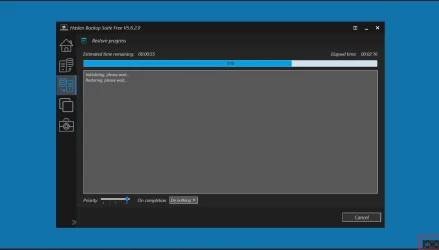
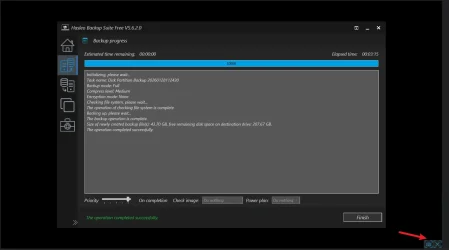
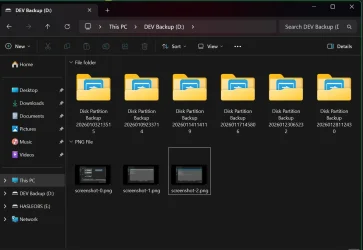
It shows up during the restore process. Bottom right. Handy to show errors if the restore failed for some reason. The screen shot is saved on the USB drive that has the images saved.
 

My Computers My Computers

  • At a glance

    Win 11 ProAMD Ryzen™ 7 7730U24GB Dual-Channel DDR4 @ 1596MHz (22-22-22-52)512MB ATI AMD Radeon Graphics (ASUStek Comput...
    OS
    Win 11 Pro
    Computer type
    Laptop
    Manufacturer/Model
    ASUS Vivobook
    CPU
    AMD Ryzen™ 7 7730U
    Motherboard
    M1605YA
    Memory
    24GB Dual-Channel DDR4 @ 1596MHz (22-22-22-52)
    Graphics Card(s)
    512MB ATI AMD Radeon Graphics (ASUStek Computer Inc)
    Monitor(s) Displays
    Generic PnP Monitor (1920x1200@60Hz) - P1 PLUS (1920x1080@59Hz)
    Screen Resolution
    1920 X 1200
    Hard Drives
    953GB Western Digital WD
    PSU
    45 Watts
    Mouse
    Lenovo Bluetooth.
    Internet Speed
    500 Mbps
    Browser
    Edge
    Antivirus
    Defender
  • At a glance

    Windows 11AMD Ryzen 7 5800H / 3.2 GHz32 GB DDR4 SDRAM 3200 MHzNVIDIA GeForce RTX 3060 6 GB GDDR6 SDRAM
    Operating System
    Windows 11
    Computer type
    Laptop
    Manufacturer/Model
    ACER NITRO
    CPU
    AMD Ryzen 7 5800H / 3.2 GHz
    Motherboard
    CZ Scala_CAS (FP6)
    Memory
    32 GB DDR4 SDRAM 3200 MHz
    Graphics card(s)
    NVIDIA GeForce RTX 3060 6 GB GDDR6 SDRAM
    Sound Card
    Realtek Audio. NVIDIA High Definition Audio
    Monitor(s) Displays
    15.6" LED backlight 1920 x 1080 (Full HD) 144 Hz
    Screen Resolution
    1920 x 1080 (Full HD)
    Hard Drives
    Samsung 970 Evo Plus 2TB NVMe M.2
    PSU
    180 Watt, 19.5 V
    Mouse
    Lenovo Bluetooth
    Internet Speed
    500 Mbps
    Browser
    Edge
    Antivirus
    Defender
It also available when booting up from the 'emergency' disk to create a backup.

Snipaste_2026-01-28_11-35-23.webp


The saved screenshots I've selected to save to the USB drive with the saved images,


Snipaste_2026-01-28_11-33-35.webp
 

My Computers My Computers

  • At a glance

    Win 11 ProAMD Ryzen™ 7 7730U24GB Dual-Channel DDR4 @ 1596MHz (22-22-22-52)512MB ATI AMD Radeon Graphics (ASUStek Comput...
    OS
    Win 11 Pro
    Computer type
    Laptop
    Manufacturer/Model
    ASUS Vivobook
    CPU
    AMD Ryzen™ 7 7730U
    Motherboard
    M1605YA
    Memory
    24GB Dual-Channel DDR4 @ 1596MHz (22-22-22-52)
    Graphics Card(s)
    512MB ATI AMD Radeon Graphics (ASUStek Computer Inc)
    Monitor(s) Displays
    Generic PnP Monitor (1920x1200@60Hz) - P1 PLUS (1920x1080@59Hz)
    Screen Resolution
    1920 X 1200
    Hard Drives
    953GB Western Digital WD
    PSU
    45 Watts
    Mouse
    Lenovo Bluetooth.
    Internet Speed
    500 Mbps
    Browser
    Edge
    Antivirus
    Defender
  • At a glance

    Windows 11AMD Ryzen 7 5800H / 3.2 GHz32 GB DDR4 SDRAM 3200 MHzNVIDIA GeForce RTX 3060 6 GB GDDR6 SDRAM
    Operating System
    Windows 11
    Computer type
    Laptop
    Manufacturer/Model
    ACER NITRO
    CPU
    AMD Ryzen 7 5800H / 3.2 GHz
    Motherboard
    CZ Scala_CAS (FP6)
    Memory
    32 GB DDR4 SDRAM 3200 MHz
    Graphics card(s)
    NVIDIA GeForce RTX 3060 6 GB GDDR6 SDRAM
    Sound Card
    Realtek Audio. NVIDIA High Definition Audio
    Monitor(s) Displays
    15.6" LED backlight 1920 x 1080 (Full HD) 144 Hz
    Screen Resolution
    1920 x 1080 (Full HD)
    Hard Drives
    Samsung 970 Evo Plus 2TB NVMe M.2
    PSU
    180 Watt, 19.5 V
    Mouse
    Lenovo Bluetooth
    Internet Speed
    500 Mbps
    Browser
    Edge
    Antivirus
    Defender
It appears in recovery media with the command "%SYSTEMDRIVE%\Program Files\Hasleo Backup Suite\bin\AppLoader.exe"
you could do it separately with "%programfiles%\Hasleo Backup Suite\bin\screenshotlite.exe"

I use the tiny Imagine in my simple pe builds, it has more options than the hasleo screenshotlite but is not really necessary. The hasleo thing is good enough for most purposes
 

My Computers My Computers

  • At a glance

    Win7,Win11i7-97002x16gb 3600mhz
    OS
    Win7,Win11
    Computer type
    PC/Desktop
    CPU
    i7-9700
    Motherboard
    gigabyte b365m ds3h
    Memory
    2x16gb 3600mhz
    Monitor(s) Displays
    benq gw2480
    PSU
    bequiet pure power 11 400CM
    Cooling
    cryorig m9i
  • At a glance

    win7,win11i5-84002x8gb 3200
    Operating System
    win7,win11
    Computer type
    PC/Desktop
    CPU
    i5-8400
    Motherboard
    gigabyte b365m ds3h
    Memory
    2x8gb 3200
    PSU
    xfx pro 450

Latest Support Threads

Back
Top Bottom