
Solved having trouble with adobe reader


caffeine

Well-known member
Member
Local time
12:11 PM
Posts
75
OS
windows 11 home 64bit 24H2 (OS Build 26100.7992)
I'm needing a fix pretty quick! While doing tax filing preparation AdobeReader did not allow me to download a .pdf file to my computer that I needed. I googled fixes and performed a variety of tasks including, but not limited to: changing permissions, updating adobe. All attempts failed miserably; so, I opted for the nuclear option of using Revo uninstaller to remove it. Then my attempt to install a fresh version of AdobeReader was thwarted. The official website would not allow me to download either the free version nor the free trial. The web page froze on install. What can I do? As expected, all my .pdf files are set to open with Firefox in the absence of Adobe.
How can I resolve this issue?
Thanks in advance for all helpful replies.
Regards,
caffeine
 

My Computer

System One

  • OS
    windows 11 home 64bit 24H2 (OS Build 26100.7992)
    Computer type
    Laptop
    Manufacturer/Model
    Lenovo ideapad 5
    CPU
    AMD RYZEN 5 8645HS, base 4.3GHz- up tp 5 GHz
    Memory
    16GB DDR5
    Monitor(s) Displays
    2
    Screen Resolution
    1920x1200
    Hard Drives
    512 GB SSD
    PSU
    65W
    Case
    military grade (mil-std 810h), color-abyss blue
    Keyboard
    backlit, light blue
    Mouse
    Logitech M100
    Internet Speed
    SLOOOOOOOW
    Antivirus
    Windows Defender & MBAM
    Other Info
    novabench score 2443
You can download an offline installer for Adobe Acrobat Reader from Adobe.
Just do a search for Adobe Acrobat Reader Offline Installer.
 

My Computer

System One

  • OS
    Windows 11
    Computer type
    PC/Desktop
    Manufacturer/Model
    Generic
    CPU
    AMD Ryzen 8700G
    Motherboard
    Gigabyte B650 UD AC
    Memory
    64 GB
    Graphics Card(s)
    Onboard
    Sound Card
    Onboard
    Monitor(s) Displays
    Del U2723QE
    Screen Resolution
    3840 x 2160
    Hard Drives
    Corsiar MP600 1TB
    PSU
    Silverstone 750 GOLD
    Case
    Silverstone FARA 513
Thanks EB2XR6. That worked great. It automatically set the various types of .pdf files as default opening by adobe.
How do I give you "great support"?
 

My Computer

System One

  • OS
    windows 11 home 64bit 24H2 (OS Build 26100.7992)
    Computer type
    Laptop
    Manufacturer/Model
    Lenovo ideapad 5
    CPU
    AMD RYZEN 5 8645HS, base 4.3GHz- up tp 5 GHz
    Memory
    16GB DDR5
    Monitor(s) Displays
    2
    Screen Resolution
    1920x1200
    Hard Drives
    512 GB SSD
    PSU
    65W
    Case
    military grade (mil-std 810h), color-abyss blue
    Keyboard
    backlit, light blue
    Mouse
    Logitech M100
    Internet Speed
    SLOOOOOOOW
    Antivirus
    Windows Defender & MBAM
    Other Info
    novabench score 2443
No worries, thank you for the feedback and enjoy the rest of your day.
 

My Computer

System One

  • OS
    Windows 11
    Computer type
    PC/Desktop
    Manufacturer/Model
    Generic
    CPU
    AMD Ryzen 8700G
    Motherboard
    Gigabyte B650 UD AC
    Memory
    64 GB
    Graphics Card(s)
    Onboard
    Sound Card
    Onboard
    Monitor(s) Displays
    Del U2723QE
    Screen Resolution
    3840 x 2160
    Hard Drives
    Corsiar MP600 1TB
    PSU
    Silverstone 750 GOLD
    Case
    Silverstone FARA 513
Unfortunately you'll now be pestered no-end with popup ads exhorting you to update to the paid version of Adobe

When you've a mind to ...
- uninstall Adobe Reader using RevoUninstaller (freeware), including the Revo "Advanced" option to remove all leftover files/folders/registry entries that the default Windows uninstall doesn't remove (I can give you the special steps if you're uncertain)
- download and install Foxit Reader and (re)set the pdf defaults to that
 

My Computers

System One System Two

  • OS
    Windows 11 2xH2 (latest update ... forever anal)
    Computer type
    PC/Desktop
    Manufacturer/Model
    HP Slim S01
    CPU
    Intel i5-12400
    Memory
    8GB
    Graphics Card(s)
    NVIDIA GeForce GT730
    Sound Card
    OOBE
    Monitor(s) Displays
    Acer 32"
    Screen Resolution
    1920x1080
    Hard Drives
    512GB KIOXIA NVMe
    1TB SATA SSD
    PSU
    OOBE
    Case
    OOBE
    Cooling
    OOBE
    Keyboard
    BT
    Mouse
    BT
    Browser
    Brave FFox Chrome Opera
    Antivirus
    KIS
  • Operating System
    Windows 11 Pro 2xH2 (latest update ... 4ever anal)
    Computer type
    Laptop
    Manufacturer/Model
    HP Pavillion 15
    CPU
    i7-1165G7 @ 2.80GHz
    Graphics card(s)
    Intel Iris Xe Graphics
    Hard Drives
    Samsung NVMe 512GB
    + numerous/multiple SSD Type C USB enclosures
    Internet Speed
    NBN FTTN 50
    Browser
    Brave
    Antivirus
    KIS
Unfortunately you'll now be pestered no-end with popup ads exhorting you to update to the paid version of Adobe

When you've a mind to ...
- uninstall Adobe Reader using RevoUninstaller (freeware), including the Revo "Advanced" option to remove all leftover files/folders/registry entries that the default Windows uninstall doesn't remove (I can give you the special steps if you're uncertain)
- download and install Foxit Reader and (re)set the pdf defaults to that
That's strange. :unsure: I have been using the free Adobe Acrobat Reader for maybe 30 years and have never seen a popup ad when viewing a pdf document. Of course if you have the Adobe Acrobat Reader open without opening a document you will see some ads. That makes no difference to me because I spend no time in that mode.
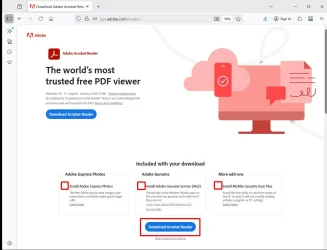
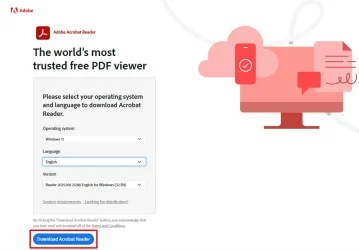
Adobe Acrobat Reader (web)

File: Reader_en_install.exe | Size: 1.56 MB

Adobe Acrobat Reader (offline)

File: AcroRdrDC2500121288_en_US.exe | Size: 576 MB

Adobe Acrobat Reader (web).
Note: make sure you uncheck the boxes or the the setup program will install "extra" programs you might not want!

Download Adobe Reader Web.webp

Download Adobe Acrobat Reader (offline)

Download Adobe Reader Offline.webp
 
Last edited:

My Computers

System One System Two

  • OS
    Windows 11 Pro 25H2 (26200.6901)
    Computer type
    Laptop
    Manufacturer/Model
    ASUS TUF Gaming A15 (2022)
    CPU
    AMD Ryzen 7 6800H with Radeon 680M GPU (486MB RAM)
    Memory
    Crucial DDR5-4800 (2400MHz) 32GB (2 x 16GB)
    Graphics Card(s)
    NVIDIA RTX 3060 Laptop (6GB RAM)
    Sound Card
    n/a
    Monitor(s) Displays
    15.6-inch
    Screen Resolution
    1920x1080 300Hz
    Hard Drives
    2 x Samsung 990 Evo Plus (2TB M.2 NVME SSD)
    PSU
    n/a
    Mouse
    Wireless Mouse M510
    Internet Speed
    2100Mbps/300Mbps
    Browser
    Firefox
    Antivirus
    Malwarebytes
  • Operating System
    Windows 11 Pro 25H2 (26200.8246)
    Computer type
    PC/Desktop
    Manufacturer/Model
    Custom build
    CPU
    AMD Ryzen 7 5700X3D
    Motherboard
    ASUS ROG Strix B550-F Gaming WiFi II
    Memory
    G.SKILL Flare X 32GB (2x16GB) DDR4
    Graphics card(s)
    ASUS ROG-STRIX-RTX3060TI-08G-V2-GAMING (RTX 3060-Ti, 8GB RAM)
    Monitor(s) Displays
    Samsung G50D IPS 27"
    Screen Resolution
    1440p/180Hz
    Hard Drives
    SAMSUNG 990 EVO Plus (2TB] M.2 NVME SSD
    SAMSUNG 990 EVO Plus (4TB) M.2 NVME SSD
    PSU
    Corsair RM750x (750 watts)
    Case
    Cooler Master MasterCase 5
    Cooling
    Scythe Mugen 6
    Keyboard
    Logitech K520 (MK540 keyboard/mouse combo)
    Mouse
    Logitech M310 (MK540 keyboard/mouse combo)
    Internet Speed
    2100 Mbps down / 300 Mbps up
    Browser
    Firefox, Edge, Chrome
    Antivirus
    Malwarebytes (Premium)
    Other Info
    ASUS Blu-ray Burner BW-16D1HT (SATA) || Western Digital Easystore 20TB USB 3.0 external hard drive used with Acronis True Image 2025 backup software || HP OfficeJet Pro 6975 Printer/Scanner
Just modify the registry to disable acrobat pro ads
 

My Computer

System One

  • OS
    Windows 11 Pro
I'm needing a fix pretty quick! While doing tax filing preparation AdobeReader did not allow me to download a .pdf file to my computer that I needed. I googled fixes and performed a variety of tasks including, but not limited to: changing permissions, updating adobe. All attempts failed miserably; so, I opted for the nuclear option of using Revo uninstaller to remove it. Then my attempt to install a fresh version of AdobeReader was thwarted. The official website would not allow msn games me to download either the free version nor the free trial. The web page froze on install. What can I do? As expected, all my .pdf files are set to open with Firefox in the absence of Adobe.
How can I resolve this issue?
Thanks in advance for all helpful replies.
Regards,
caffeine
An effective solution is to use Adobe Cleaner Tool to completely delete any remaining files, then download the offline installer from Adobe's Enterprise website and run it with administrator privileges. While waiting for the reinstallation, you can still open PDFs using Firefox, or install alternative readers like SumatraPDF or Foxit Reader to continue your work. Additionally, temporarily disabling your antivirus or trying a different browser can also help the installation process go more smoothly.
 

My Computer

System One

  • OS
    Windows 10
    Computer type
    Laptop
    Manufacturer/Model
    hp
An effective solution is to use Adobe Cleaner Tool to completely delete any remaining files,
Can't say I'd be trusting any so-called removal tool from a software distributor whose vested interested would be to leave traces of their software on a device, "just in case"
 

My Computers

System One System Two

  • OS
    Windows 11 2xH2 (latest update ... forever anal)
    Computer type
    PC/Desktop
    Manufacturer/Model
    HP Slim S01
    CPU
    Intel i5-12400
    Memory
    8GB
    Graphics Card(s)
    NVIDIA GeForce GT730
    Sound Card
    OOBE
    Monitor(s) Displays
    Acer 32"
    Screen Resolution
    1920x1080
    Hard Drives
    512GB KIOXIA NVMe
    1TB SATA SSD
    PSU
    OOBE
    Case
    OOBE
    Cooling
    OOBE
    Keyboard
    BT
    Mouse
    BT
    Browser
    Brave FFox Chrome Opera
    Antivirus
    KIS
  • Operating System
    Windows 11 Pro 2xH2 (latest update ... 4ever anal)
    Computer type
    Laptop
    Manufacturer/Model
    HP Pavillion 15
    CPU
    i7-1165G7 @ 2.80GHz
    Graphics card(s)
    Intel Iris Xe Graphics
    Hard Drives
    Samsung NVMe 512GB
    + numerous/multiple SSD Type C USB enclosures
    Internet Speed
    NBN FTTN 50
    Browser
    Brave
    Antivirus
    KIS

Latest Support Threads

Back
Top Bottom


