Solved HDD spikes to 100% usage activity and video freezes


imeem

Well-known member
Member
Local time
6:22 AM
Posts
34
OS
11, (10 as a test secondary)
I was watching a .mkv video using VLC media player. On several occasions the video paused on its own and didn't want to play.

When this happened, I notice my new HDD that I bought a couple weeks ago (WD Black 6TB WD6004FZBX) reached 100% usage, when it did resume the HDD usage dropped back to 0%

I close the player and retried to recreate the problem, but it couldn't make it happened at the same timestamp.

What's the chance that it's VLC, or could it be my new HDD faulty?

Other than that, I don't think I notice any day to day issues. HDD passed all SMART tests and error checking on Windows.

Steps i tried:

  • plug and replug psu and sata cables
  • swap the sata cable with a difference one
  • Updated my VLC player
  • tried a different movie

I can try playing the video on a different HDD/SSD to further rule it out.
 

My Computer

System One

  • OS
    11, (10 as a test secondary)
    Computer type
    PC/Desktop
    CPU
    AMD Ryzen 9 7950X3D
    Motherboard
    MSI MPG X670E CARBON WIFI
    Memory
    Kingston FURY Beast 32 GB (2 x 16 GB) DDR5-5600 CL36
    Graphics Card(s)
    RTX 5080
    Hard Drives
    C drive: Samsung SSD 870 EVO 4TB (win 11)
    C Drive: Hitachi HTS545032B9A300 (win 10)
    -WD WD1002FAEX 1tb
    -Seagate ST3160812AS 160 gb
    PSU
    SeaSonic PRIME 1300 Gold 1300 W 80+ Gold
    Case
    Phanteks Enthoo Pro Tempered Glass ATX Full Tower Case
    Cooling
    Noctua NH-D15S
Have you checked Task Manager for a process that is utilizing CPU more than others?
 

My Computer

System One

  • OS
    Windows 11
    Computer type
    PC/Desktop
    Manufacturer/Model
    HP Pavilion
    CPU
    AMD Ryzen 7 5700G
    Motherboard
    Erica6
    Memory
    Micron Technology DDR4-3200 16GB
    Graphics Card(s)
    NVIDIA GeForce RTX 3060
    Sound Card
    Realtek ALC671
    Monitor(s) Displays
    Samsung SyncMaster U28E590
    Screen Resolution
    3840 x 2160
    Hard Drives
    SAMSUNG MZVLQ1T0HALB-000H1
 

My Computer

System One

  • OS
    Microsoft Windows 11 Home
    Computer type
    PC/Desktop
    Manufacturer/Model
    MSI MS-7D98
    CPU
    Intel Core i5-13490F
    Motherboard
    MSI B760 GAMING PLUS WIFI
    Memory
    2 x 16 Patriot Memory (PDP Systems) PSD516G560081 6400MT (32-37-37-74); 1.35V)
    Graphics Card(s)
    GIGABYTE GeForce RTX 4070 WINDFORCE OC 12G (GV-N4070WF3OC-12GD)
    Sound Card
    Bluetooth Аудио
    Monitor(s) Displays
    INNOCN 15K1F
    Screen Resolution
    1920 x 1080
    Hard Drives
    WD_BLACK SN770 250GB
    KINGSTON SNV2S1000G (ELFK0S.6)
    PSU
    Thermaltake Toughpower GF3 1000W
    Case
    CG560 - DeepCool
    Cooling
    ID-COOLING SE-224-XTS / 2 x 140Mm Fan - rear and top; 3 x 120Mm - front
    Keyboard
    Corsair K70 RGB TKL
    Mouse
    Corsair KATAR PRO XT
    Internet Speed
    100 Mbps
    Browser
    Firefox
    Antivirus
    Microsoft Defender Antivirus
    Other Info
    https://www.userbenchmark.com/UserRun/66553205
I have experienced the same problem you describe since the days of Windows 7, at least with mechanical hard drives. I suppose with an SSD this problem is not so serious. Sometimes the video playback is smooth and other times I notice as if the video were stuttering because the hard drive was doing God knows what. My only theory is that the antivirus software decides to scan the contents of the disk just as you play the video, or there is another background task doing something similar. To guarantee 100% smooth playback, my only solution is to restart the computer and not run anything, especially the internet browser.

Of course, to rule out any problems with your disk, try running a surface scan. On one occasion, I found a hard disk full of bad sectors. Obviously, that disk should be discarded.
 

My Computer

System One

  • OS
    Win 11 Pro 23H2
    Computer type
    PC/Desktop
    CPU
    13700K
    Motherboard
    MAG Z790 TOMAHAWK WIFI (7D91vHH - 0x12F)
    Memory
    32GB DDR5 Kingston Fury Renegade @6400
    Graphics Card(s)
    MSI GeForce RTX 4070 Ti Gaming X Slim White 12G
    Sound Card
    Creative Sound Blaster Z SE
    Monitor(s) Displays
    ASUS VA24DQ
    Hard Drives
    WD Black SN850X 2TB (main)
    SAMSUNG SSD 990 Pro 2TB
    WD Blue 1TB 7200rpm
    PSU
    Corsair RM1000x SHIFT
    Case
    DeepCool CH560 WH
    Cooling
    Noctua NH-D15S
    Keyboard
    Ducky One 3 Pro Nazca Line
    Mouse
    Logitech G403 HERO
Also this can happen if the video has too high bitrate and the computer tries to play it without hardware acceleration, or if the disk is fragmented and needs defragmentation. However I would also blame Windows Defender or Windows Update since a new disk is unlikely to be faulty or fragmented.
 

My Computers

System One System Two

  • OS
    Windows 11 Pro 23H2 (5699), 25H2 (8655)
    Computer type
    Laptop
    Manufacturer/Model
    Acer Extensa 5630EZ
    CPU
    Mobile DualCore Intel Core 2 Duo T7250, 2000 MHz
    Motherboard
    Acer Extensa 5630
    Memory
    4GB
    Graphics Card(s)
    Mobile Intel(R) GMA 4500M (Mobile 4 series)
    Sound Card
    Realtek ALC268 @ Intel 82801IB ICH9 - High Definition Audio Controller
    Monitor(s) Displays
    1
    Screen Resolution
    1280x800
    Hard Drives
    Samsung SSD 850 EVO 250GB SATA Device (250 GB, SATA-III)
    Internet Speed
    VDSL 50 Mbps
    Browser
    MICROSOFT EDGE
    Antivirus
    WINDOWS DEFENDER
    Other Info
    Legacy MBR installation, no TPM, no Secure Boot, no WDDM 2.0 graphics drivers, no SSE4.2, cannot get more unsupported ;) This is only my test laptop. I had installed Windows 11 here before upgrading my main PC. For my main PC I use everyday see my 2nd system specs.
  • Operating System
    Windows 11 Pro v25H2 (build 26200.8655)
    Computer type
    PC/Desktop
    Manufacturer/Model
    Custom-built PC
    CPU
    Intel Core-i7 3770 3.40GHz s1155 (3rd generation)
    Motherboard
    Asus P8H61 s1155 ATX
    Memory
    2x Kingston Hyper-X Blu 8GB DDR3-1600
    Graphics card(s)
    GIGABYTE GeForce RTX 3050 WINDFORCE OC V2 6GB (GV-N3050WF2OCV2-6GD)
    Sound Card
    Realtek HD audio (ALC887)
    Monitor(s) Displays
    Sony Bravia KDL-19L4000 19" LCD TV via VGA
    Screen Resolution
    1440x900 32-bit 60Hz
    Hard Drives
    WD Blue SA510 2.5 1000GB SSD as system disk, Western Digital Caviar Purple 4TB SATA III (WD40PURZ) as second
    PSU
    Thermaltake Litepower RGB 550W Full Wired
    Case
    SUPERCASE MIDI-TOWER
    Cooling
    Deepcool Gamma Archer CPU cooler, 1x 8cm fan at the back
    Keyboard
    Mitsumi 101-key PS/2
    Mouse
    Sunnyline OptiEye PS/2
    Internet Speed
    100Mbps
    Browser
    Microsoft Edge, Mozilla Firefox
    Antivirus
    Microsoft Windows Defender
    Other Info
    Legacy BIOS (MBR) installation, no TPM, no Secure Boot, WDDM 3.0 graphics drivers, WEI score 7.4
Buy an SSD as OS drive and use HDD as second drive. Problem solved.
 

My Computer

System One

  • OS
    Windows 11 Pro + Win11 Canary VM.
    Computer type
    Laptop
    Manufacturer/Model
    ASUS Zenbook 14
    CPU
    I9 13th gen i9-13900H 2.60 GHZ
    Motherboard
    Yep, Laptop has one.
    Memory
    16 GB soldered
    Graphics Card(s)
    Integrated Intel Iris XE
    Sound Card
    Realtek built in
    Monitor(s) Displays
    laptop OLED screen
    Screen Resolution
    2880x1800 touchscreen
    Hard Drives
    1 TB NVME SSD (only weakness is only one slot)
    PSU
    Internal + 65W thunderbolt USB4 charger
    Case
    Yep, got one
    Cooling
    Stella Artois (UK pint cans - 568 ml) - extra cost.
    Keyboard
    Built in UK keybd
    Mouse
    Bluetooth , wireless dongled, wired
    Internet Speed
    900 mbs (ethernet), wifi 6 typical 350-450 mb/s both up and down
    Browser
    Edge
    Antivirus
    Defender
    Other Info
    TPM 2.0, 2xUSB4 thunderbolt, 1xUsb3 (usb a), 1xUsb-c, hdmi out, 3.5 mm audio out/in combo, ASUS backlit trackpad (inc. switchable number pad)

    Macrium Reflect Home V8
    Office 365 Family (6 users each 1TB onedrive space)
    Hyper-V (a vm runs almost as fast as my older laptop)
Buy an SSD as OS drive and use HDD as second drive. Problem solved.
Not it's not if the problem is related to high bitrate or fragmented disk.
 

My Computers

System One System Two

  • OS
    Windows 11 Pro 23H2 (5699), 25H2 (8655)
    Computer type
    Laptop
    Manufacturer/Model
    Acer Extensa 5630EZ
    CPU
    Mobile DualCore Intel Core 2 Duo T7250, 2000 MHz
    Motherboard
    Acer Extensa 5630
    Memory
    4GB
    Graphics Card(s)
    Mobile Intel(R) GMA 4500M (Mobile 4 series)
    Sound Card
    Realtek ALC268 @ Intel 82801IB ICH9 - High Definition Audio Controller
    Monitor(s) Displays
    1
    Screen Resolution
    1280x800
    Hard Drives
    Samsung SSD 850 EVO 250GB SATA Device (250 GB, SATA-III)
    Internet Speed
    VDSL 50 Mbps
    Browser
    MICROSOFT EDGE
    Antivirus
    WINDOWS DEFENDER
    Other Info
    Legacy MBR installation, no TPM, no Secure Boot, no WDDM 2.0 graphics drivers, no SSE4.2, cannot get more unsupported ;) This is only my test laptop. I had installed Windows 11 here before upgrading my main PC. For my main PC I use everyday see my 2nd system specs.
  • Operating System
    Windows 11 Pro v25H2 (build 26200.8655)
    Computer type
    PC/Desktop
    Manufacturer/Model
    Custom-built PC
    CPU
    Intel Core-i7 3770 3.40GHz s1155 (3rd generation)
    Motherboard
    Asus P8H61 s1155 ATX
    Memory
    2x Kingston Hyper-X Blu 8GB DDR3-1600
    Graphics card(s)
    GIGABYTE GeForce RTX 3050 WINDFORCE OC V2 6GB (GV-N3050WF2OCV2-6GD)
    Sound Card
    Realtek HD audio (ALC887)
    Monitor(s) Displays
    Sony Bravia KDL-19L4000 19" LCD TV via VGA
    Screen Resolution
    1440x900 32-bit 60Hz
    Hard Drives
    WD Blue SA510 2.5 1000GB SSD as system disk, Western Digital Caviar Purple 4TB SATA III (WD40PURZ) as second
    PSU
    Thermaltake Litepower RGB 550W Full Wired
    Case
    SUPERCASE MIDI-TOWER
    Cooling
    Deepcool Gamma Archer CPU cooler, 1x 8cm fan at the back
    Keyboard
    Mitsumi 101-key PS/2
    Mouse
    Sunnyline OptiEye PS/2
    Internet Speed
    100Mbps
    Browser
    Microsoft Edge, Mozilla Firefox
    Antivirus
    Microsoft Windows Defender
    Other Info
    Legacy BIOS (MBR) installation, no TPM, no Secure Boot, WDDM 3.0 graphics drivers, WEI score 7.4
Have you checked Task Manager for a process that is utilizing CPU more than others?
Yes. Under Processes, there was nothing, it show disk usage there 0%. I was doing my troubleshooting and my computer was mostly unresponsive during File Explorer (showing not responding), and I saw my HDD (F drive in photos) showing 100% as well with nothing in processes. I had to hold the shut down button since it also was slow on shutting down.


See pictures on task manager.

This drive I cloned my old secondary drive on it (1 TB) using Marcum Reflect and defragged it recently btw.

Buy an SSD as OS drive and use HDD as second drive. Problem solved.
The HDD is my secondary and SSD is primary. I never had issue playing videos on a HDD before. But also this 6TB is the largest one I have so idk if it's just the cost of larger drives.
 

My Computer

System One

  • OS
    11, (10 as a test secondary)
    Computer type
    PC/Desktop
    CPU
    AMD Ryzen 9 7950X3D
    Motherboard
    MSI MPG X670E CARBON WIFI
    Memory
    Kingston FURY Beast 32 GB (2 x 16 GB) DDR5-5600 CL36
    Graphics Card(s)
    RTX 5080
    Hard Drives
    C drive: Samsung SSD 870 EVO 4TB (win 11)
    C Drive: Hitachi HTS545032B9A300 (win 10)
    -WD WD1002FAEX 1tb
    -Seagate ST3160812AS 160 gb
    PSU
    SeaSonic PRIME 1300 Gold 1300 W 80+ Gold
    Case
    Phanteks Enthoo Pro Tempered Glass ATX Full Tower Case
    Cooling
    Noctua NH-D15S
I didn't comment because I don't use VLC media player.

But, if I play 4k HDR video from my 18TB HD using Media Player Classic, the disk activity as shown by Task Manager stays below 4MB/s. Less than 1% disk utilization. (I don't know how to reconcile those numbers.)
 

My Computers

System One System Two

  • OS
    Windows 11 26200.8728
    Computer type
    PC/Desktop
    Manufacturer/Model
    homebuilt
    CPU
    Amd Threadripper 7970X
    Motherboard
    Gigabyte TRX50 Aero D Rev. 1.0
    Memory
    128GB (4 X 32) G.Skill DDR5 6400 (RDIMM)
    Graphics Card(s)
    Gigabyte RTX 4090 OC
    Sound Card
    none (USB to speakers), Realtek
    Monitor(s) Displays
    Innocn 32" OLED
    Screen Resolution
    3840 X 2160 @ 60Hz
    Hard Drives
    Crucial T700 2TB M.2 NVME SSD
    WD 4TB Blue SATA SSD
    Seagate 18TB IronWolf Pro
    PSU
    BeQuiet! Straight Power 12 1500W
    Case
    Lian Li 011 Dynamic Evo XL
    Cooling
    SilverStone Technology XE360-TR5, with 3 Phanteks T30 fans
    Keyboard
    Cherry KC 500 MX LP (mechanical)
    Mouse
    Logitech M500s (wired)
    Internet Speed
    2000/250 Mbps (down/up)
    Other Info
    xFinity gateway
  • Operating System
    windows 11 26200.8728
    Computer type
    PC/Desktop
    Manufacturer/Model
    homebuilt
    CPU
    Intel I9-13900K
    Motherboard
    Asus RoG Strix Z690-E
    Memory
    64GB G.Skill DDR5-6000
    Graphics card(s)
    Gigabyte RTX 3090 ti
    Sound Card
    built in Realtek
    Monitor(s) Displays
    Philips 27E1N8900 27" OLED
    Screen Resolution
    3840 X 2160 @60Hz
    Hard Drives
    WDC SN850 1TB
    8TB Seagate Ironwolf
    4TB Seagate Ironwolf
    PSU
    eVGA SuperNOVA 1300 GT
    Case
    Lian Li 011 Dynamic Evo
    Cooling
    Corsair iCUE H150i ELITE CAPELLIX Liquid CPU Cooler
    Keyboard
    Cherry Streaming (wired)
    Mouse
    Logitech M500s (wired)
I didn't comment because I don't use VLC media player.

But, if I play 4k HDR video from my 18TB HD using Media Player Classic, the disk activity as shown by Task Manager stays below 4MB/s. Less than 1% disk utilization. (I don't know how to reconcile those numbers.)
I may consider using MPC and klite media codec as a troubleshooting method if the issue occurs on different storages that I have.

I was able to exchange the HDD. Just in the process of cloning things over and seeing if the issue occurs again..
 

My Computer

System One

  • OS
    11, (10 as a test secondary)
    Computer type
    PC/Desktop
    CPU
    AMD Ryzen 9 7950X3D
    Motherboard
    MSI MPG X670E CARBON WIFI
    Memory
    Kingston FURY Beast 32 GB (2 x 16 GB) DDR5-5600 CL36
    Graphics Card(s)
    RTX 5080
    Hard Drives
    C drive: Samsung SSD 870 EVO 4TB (win 11)
    C Drive: Hitachi HTS545032B9A300 (win 10)
    -WD WD1002FAEX 1tb
    -Seagate ST3160812AS 160 gb
    PSU
    SeaSonic PRIME 1300 Gold 1300 W 80+ Gold
    Case
    Phanteks Enthoo Pro Tempered Glass ATX Full Tower Case
    Cooling
    Noctua NH-D15S
Yes. Under Processes, there was nothing, it show disk usage there 0%. I was doing my troubleshooting and my computer was mostly unresponsive during File Explorer (showing not responding), and I saw my HDD (F drive in photos) showing 100% as well with nothing in processes. I had to hold the shut down button since it also was slow on shutting down.


See pictures on task manager.

This drive I cloned my old secondary drive on it (1 TB) using Marcum Reflect and defragged it recently btw.


The HDD is my secondary and SSD is primary. I never had issue playing videos on a HDD before. But also this 6TB is the largest one I have so idk if it's just the cost of larger drives.
First I would check disk F health with Hard Disk Sentinel or Crystal Disk Info. If the health is 100%, then probably needs defragmentation.
 

My Computers

System One System Two

  • OS
    Windows 11 Pro 23H2 (5699), 25H2 (8655)
    Computer type
    Laptop
    Manufacturer/Model
    Acer Extensa 5630EZ
    CPU
    Mobile DualCore Intel Core 2 Duo T7250, 2000 MHz
    Motherboard
    Acer Extensa 5630
    Memory
    4GB
    Graphics Card(s)
    Mobile Intel(R) GMA 4500M (Mobile 4 series)
    Sound Card
    Realtek ALC268 @ Intel 82801IB ICH9 - High Definition Audio Controller
    Monitor(s) Displays
    1
    Screen Resolution
    1280x800
    Hard Drives
    Samsung SSD 850 EVO 250GB SATA Device (250 GB, SATA-III)
    Internet Speed
    VDSL 50 Mbps
    Browser
    MICROSOFT EDGE
    Antivirus
    WINDOWS DEFENDER
    Other Info
    Legacy MBR installation, no TPM, no Secure Boot, no WDDM 2.0 graphics drivers, no SSE4.2, cannot get more unsupported ;) This is only my test laptop. I had installed Windows 11 here before upgrading my main PC. For my main PC I use everyday see my 2nd system specs.
  • Operating System
    Windows 11 Pro v25H2 (build 26200.8655)
    Computer type
    PC/Desktop
    Manufacturer/Model
    Custom-built PC
    CPU
    Intel Core-i7 3770 3.40GHz s1155 (3rd generation)
    Motherboard
    Asus P8H61 s1155 ATX
    Memory
    2x Kingston Hyper-X Blu 8GB DDR3-1600
    Graphics card(s)
    GIGABYTE GeForce RTX 3050 WINDFORCE OC V2 6GB (GV-N3050WF2OCV2-6GD)
    Sound Card
    Realtek HD audio (ALC887)
    Monitor(s) Displays
    Sony Bravia KDL-19L4000 19" LCD TV via VGA
    Screen Resolution
    1440x900 32-bit 60Hz
    Hard Drives
    WD Blue SA510 2.5 1000GB SSD as system disk, Western Digital Caviar Purple 4TB SATA III (WD40PURZ) as second
    PSU
    Thermaltake Litepower RGB 550W Full Wired
    Case
    SUPERCASE MIDI-TOWER
    Cooling
    Deepcool Gamma Archer CPU cooler, 1x 8cm fan at the back
    Keyboard
    Mitsumi 101-key PS/2
    Mouse
    Sunnyline OptiEye PS/2
    Internet Speed
    100Mbps
    Browser
    Microsoft Edge, Mozilla Firefox
    Antivirus
    Microsoft Windows Defender
    Other Info
    Legacy BIOS (MBR) installation, no TPM, no Secure Boot, WDDM 3.0 graphics drivers, WEI score 7.4
I didn't comment because I don't use VLC media player.

But, if I play 4k HDR video from my 18TB HD using Media Player Classic, the disk activity as shown by Task Manager stays below 4MB/s. Less than 1% disk utilization. (I don't know how to reconcile those numbers.)
Like I said watching video in high bitrate without hardware acceleration will hardly be a smooth experience. My previous graphics card, nVidia GTX 1050 Ti would struggle to play 4K videos. The only way to watch such a video was by using MPC-HC with LAV filters and MADVR renderer and as simple as possible resizing algorithm. Needless to say I shouldn't do anything else in the background. This card didn't support hardware acceleration for the HEVC codec, so it was up to my 3rd generation Intel Core-i7 CPU to play the video. My new card, nVidia RTX 3050 supports hardware acceleration for the HEVC codec, so I can play 4K videos more easily with better resizing algorithm and without having to close all other applications. Of course occasionally I need to defragment my VIDEOS disk (mechanical SATA III 6TB HDD). To make it easier for your computer to play such a video, you can try converting from 4K HEVC to 4K AVC with a little higher bitrate than the original file. Of course the quality will degrade a little, but it will play smoother than the original video. Even better, if you convert it to 1080p. A good utility for conversion that also supports hardware acceleration is Handbrake and Avidemux.
 

My Computers

System One System Two

  • OS
    Windows 11 Pro 23H2 (5699), 25H2 (8655)
    Computer type
    Laptop
    Manufacturer/Model
    Acer Extensa 5630EZ
    CPU
    Mobile DualCore Intel Core 2 Duo T7250, 2000 MHz
    Motherboard
    Acer Extensa 5630
    Memory
    4GB
    Graphics Card(s)
    Mobile Intel(R) GMA 4500M (Mobile 4 series)
    Sound Card
    Realtek ALC268 @ Intel 82801IB ICH9 - High Definition Audio Controller
    Monitor(s) Displays
    1
    Screen Resolution
    1280x800
    Hard Drives
    Samsung SSD 850 EVO 250GB SATA Device (250 GB, SATA-III)
    Internet Speed
    VDSL 50 Mbps
    Browser
    MICROSOFT EDGE
    Antivirus
    WINDOWS DEFENDER
    Other Info
    Legacy MBR installation, no TPM, no Secure Boot, no WDDM 2.0 graphics drivers, no SSE4.2, cannot get more unsupported ;) This is only my test laptop. I had installed Windows 11 here before upgrading my main PC. For my main PC I use everyday see my 2nd system specs.
  • Operating System
    Windows 11 Pro v25H2 (build 26200.8655)
    Computer type
    PC/Desktop
    Manufacturer/Model
    Custom-built PC
    CPU
    Intel Core-i7 3770 3.40GHz s1155 (3rd generation)
    Motherboard
    Asus P8H61 s1155 ATX
    Memory
    2x Kingston Hyper-X Blu 8GB DDR3-1600
    Graphics card(s)
    GIGABYTE GeForce RTX 3050 WINDFORCE OC V2 6GB (GV-N3050WF2OCV2-6GD)
    Sound Card
    Realtek HD audio (ALC887)
    Monitor(s) Displays
    Sony Bravia KDL-19L4000 19" LCD TV via VGA
    Screen Resolution
    1440x900 32-bit 60Hz
    Hard Drives
    WD Blue SA510 2.5 1000GB SSD as system disk, Western Digital Caviar Purple 4TB SATA III (WD40PURZ) as second
    PSU
    Thermaltake Litepower RGB 550W Full Wired
    Case
    SUPERCASE MIDI-TOWER
    Cooling
    Deepcool Gamma Archer CPU cooler, 1x 8cm fan at the back
    Keyboard
    Mitsumi 101-key PS/2
    Mouse
    Sunnyline OptiEye PS/2
    Internet Speed
    100Mbps
    Browser
    Microsoft Edge, Mozilla Firefox
    Antivirus
    Microsoft Windows Defender
    Other Info
    Legacy BIOS (MBR) installation, no TPM, no Secure Boot, WDDM 3.0 graphics drivers, WEI score 7.4
I just remembered something that might help you.

I usually use SMPlayer. In the preferences for this player, I can choose between two engines: MPLAYER and MPV. It even gives you the option to add more engines. For a long time, I didn't think much about which engine to choose and assumed that my computer wasn't capable of playing content with a high bitrate. However, when I decided to change engines (I can't remember now which one I had before and which one I put in afterwards), the problems were solved. Suddenly, I was able to play that content without any problems.

Try this player (it is opensource) and try to change the engine.
 

My Computer

System One

  • OS
    Win 11 Pro 23H2
    Computer type
    PC/Desktop
    CPU
    13700K
    Motherboard
    MAG Z790 TOMAHAWK WIFI (7D91vHH - 0x12F)
    Memory
    32GB DDR5 Kingston Fury Renegade @6400
    Graphics Card(s)
    MSI GeForce RTX 4070 Ti Gaming X Slim White 12G
    Sound Card
    Creative Sound Blaster Z SE
    Monitor(s) Displays
    ASUS VA24DQ
    Hard Drives
    WD Black SN850X 2TB (main)
    SAMSUNG SSD 990 Pro 2TB
    WD Blue 1TB 7200rpm
    PSU
    Corsair RM1000x SHIFT
    Case
    DeepCool CH560 WH
    Cooling
    Noctua NH-D15S
    Keyboard
    Ducky One 3 Pro Nazca Line
    Mouse
    Logitech G403 HERO
so i replaced the HDD and tried a third SATA cable for good measure. Like my previous drive, this one is 0% fragmented & passed both Extended test (SMART and Media Scan) on WD Kitfox.

Watching the same movie using VLC (did not change anything compare to before), no issue so far... I think it was the drive's fault.

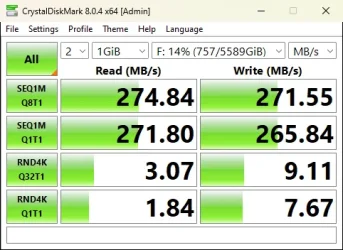
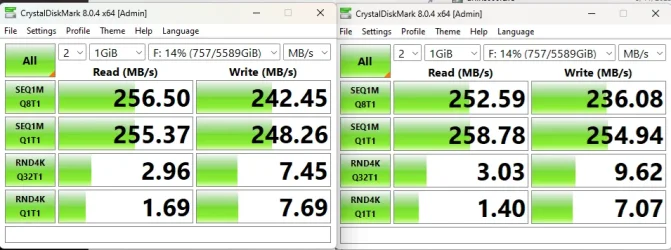
on an unrelated note, I find it interesting my original drive was actually faster in benchmarks (rated above advertised speeds of 267MB/s). My replacement drive is within the specs technically.

Original:
original drive.webp

Replacement:
replacement.webp
 

My Computer

System One

  • OS
    11, (10 as a test secondary)
    Computer type
    PC/Desktop
    CPU
    AMD Ryzen 9 7950X3D
    Motherboard
    MSI MPG X670E CARBON WIFI
    Memory
    Kingston FURY Beast 32 GB (2 x 16 GB) DDR5-5600 CL36
    Graphics Card(s)
    RTX 5080
    Hard Drives
    C drive: Samsung SSD 870 EVO 4TB (win 11)
    C Drive: Hitachi HTS545032B9A300 (win 10)
    -WD WD1002FAEX 1tb
    -Seagate ST3160812AS 160 gb
    PSU
    SeaSonic PRIME 1300 Gold 1300 W 80+ Gold
    Case
    Phanteks Enthoo Pro Tempered Glass ATX Full Tower Case
    Cooling
    Noctua NH-D15S
I have seen drives with 100% health that are faulty and slow due to age or some mechanical shock or other reason. Even if Hard Disk Sentinel or Crystal Disk Info report 100% health they are far from perfect. The most common symptoms are too slow and constantly busy.
 

My Computers

System One System Two

  • OS
    Windows 11 Pro 23H2 (5699), 25H2 (8655)
    Computer type
    Laptop
    Manufacturer/Model
    Acer Extensa 5630EZ
    CPU
    Mobile DualCore Intel Core 2 Duo T7250, 2000 MHz
    Motherboard
    Acer Extensa 5630
    Memory
    4GB
    Graphics Card(s)
    Mobile Intel(R) GMA 4500M (Mobile 4 series)
    Sound Card
    Realtek ALC268 @ Intel 82801IB ICH9 - High Definition Audio Controller
    Monitor(s) Displays
    1
    Screen Resolution
    1280x800
    Hard Drives
    Samsung SSD 850 EVO 250GB SATA Device (250 GB, SATA-III)
    Internet Speed
    VDSL 50 Mbps
    Browser
    MICROSOFT EDGE
    Antivirus
    WINDOWS DEFENDER
    Other Info
    Legacy MBR installation, no TPM, no Secure Boot, no WDDM 2.0 graphics drivers, no SSE4.2, cannot get more unsupported ;) This is only my test laptop. I had installed Windows 11 here before upgrading my main PC. For my main PC I use everyday see my 2nd system specs.
  • Operating System
    Windows 11 Pro v25H2 (build 26200.8655)
    Computer type
    PC/Desktop
    Manufacturer/Model
    Custom-built PC
    CPU
    Intel Core-i7 3770 3.40GHz s1155 (3rd generation)
    Motherboard
    Asus P8H61 s1155 ATX
    Memory
    2x Kingston Hyper-X Blu 8GB DDR3-1600
    Graphics card(s)
    GIGABYTE GeForce RTX 3050 WINDFORCE OC V2 6GB (GV-N3050WF2OCV2-6GD)
    Sound Card
    Realtek HD audio (ALC887)
    Monitor(s) Displays
    Sony Bravia KDL-19L4000 19" LCD TV via VGA
    Screen Resolution
    1440x900 32-bit 60Hz
    Hard Drives
    WD Blue SA510 2.5 1000GB SSD as system disk, Western Digital Caviar Purple 4TB SATA III (WD40PURZ) as second
    PSU
    Thermaltake Litepower RGB 550W Full Wired
    Case
    SUPERCASE MIDI-TOWER
    Cooling
    Deepcool Gamma Archer CPU cooler, 1x 8cm fan at the back
    Keyboard
    Mitsumi 101-key PS/2
    Mouse
    Sunnyline OptiEye PS/2
    Internet Speed
    100Mbps
    Browser
    Microsoft Edge, Mozilla Firefox
    Antivirus
    Microsoft Windows Defender
    Other Info
    Legacy BIOS (MBR) installation, no TPM, no Secure Boot, WDDM 3.0 graphics drivers, WEI score 7.4
I just remembered something that might help you.

I usually use SMPlayer. In the preferences for this player, I can choose between two engines: MPLAYER and MPV. It even gives you the option to add more engines. For a long time, I didn't think much about which engine to choose and assumed that my computer wasn't capable of playing content with a high bitrate. However, when I decided to change engines (I can't remember now which one I had before and which one I put in afterwards), the problems were solved. Suddenly, I was able to play that content without any problems.

Try this player (it is opensource) and try to change the engine.

so i replaced the HDD and tried a third SATA cable for good measure. Like my previous drive, this one is 0% fragmented & passed both Extended test (SMART and Media Scan) on WD Kitfox.

Watching the same movie using VLC (did not change anything compare to before), no issue so far... I think it was the drive's fault.

on an unrelated note, I find it interesting my original drive was actually faster in benchmarks (rated above advertised speeds of 267MB/s). My replacement drive is within the specs technically.

Original:

So today it's happening again. I checked my HDD and it was only 1% fragmented. I will try SMPlayer and report back..
Apart from that, i am wondering do larger HDDs and the 256 mb cache causing a problem..?
 

My Computer

System One

  • OS
    11, (10 as a test secondary)
    Computer type
    PC/Desktop
    CPU
    AMD Ryzen 9 7950X3D
    Motherboard
    MSI MPG X670E CARBON WIFI
    Memory
    Kingston FURY Beast 32 GB (2 x 16 GB) DDR5-5600 CL36
    Graphics Card(s)
    RTX 5080
    Hard Drives
    C drive: Samsung SSD 870 EVO 4TB (win 11)
    C Drive: Hitachi HTS545032B9A300 (win 10)
    -WD WD1002FAEX 1tb
    -Seagate ST3160812AS 160 gb
    PSU
    SeaSonic PRIME 1300 Gold 1300 W 80+ Gold
    Case
    Phanteks Enthoo Pro Tempered Glass ATX Full Tower Case
    Cooling
    Noctua NH-D15S
I run 4k HDR video off an 18TB HDD fairly often. I've never experienced your issue. (Media Player Classic.)
 

My Computers

System One System Two

  • OS
    Windows 11 26200.8728
    Computer type
    PC/Desktop
    Manufacturer/Model
    homebuilt
    CPU
    Amd Threadripper 7970X
    Motherboard
    Gigabyte TRX50 Aero D Rev. 1.0
    Memory
    128GB (4 X 32) G.Skill DDR5 6400 (RDIMM)
    Graphics Card(s)
    Gigabyte RTX 4090 OC
    Sound Card
    none (USB to speakers), Realtek
    Monitor(s) Displays
    Innocn 32" OLED
    Screen Resolution
    3840 X 2160 @ 60Hz
    Hard Drives
    Crucial T700 2TB M.2 NVME SSD
    WD 4TB Blue SATA SSD
    Seagate 18TB IronWolf Pro
    PSU
    BeQuiet! Straight Power 12 1500W
    Case
    Lian Li 011 Dynamic Evo XL
    Cooling
    SilverStone Technology XE360-TR5, with 3 Phanteks T30 fans
    Keyboard
    Cherry KC 500 MX LP (mechanical)
    Mouse
    Logitech M500s (wired)
    Internet Speed
    2000/250 Mbps (down/up)
    Other Info
    xFinity gateway
  • Operating System
    windows 11 26200.8728
    Computer type
    PC/Desktop
    Manufacturer/Model
    homebuilt
    CPU
    Intel I9-13900K
    Motherboard
    Asus RoG Strix Z690-E
    Memory
    64GB G.Skill DDR5-6000
    Graphics card(s)
    Gigabyte RTX 3090 ti
    Sound Card
    built in Realtek
    Monitor(s) Displays
    Philips 27E1N8900 27" OLED
    Screen Resolution
    3840 X 2160 @60Hz
    Hard Drives
    WDC SN850 1TB
    8TB Seagate Ironwolf
    4TB Seagate Ironwolf
    PSU
    eVGA SuperNOVA 1300 GT
    Case
    Lian Li 011 Dynamic Evo
    Cooling
    Corsair iCUE H150i ELITE CAPELLIX Liquid CPU Cooler
    Keyboard
    Cherry Streaming (wired)
    Mouse
    Logitech M500s (wired)
If we rule out the disk, then most likely your media player settings are not optimal and the videos play through the CPU, that is with software decoding without hardware acceleration from the graphics card. The CPU cannot cope and stutters. Are you sure Windows Update is not working in the background? Maybe Windows Defender does some scan? Disable both and check again. Last suspect some spyware consuming resources. Check with Superantispyware and remove all results.
 

My Computers

System One System Two

  • OS
    Windows 11 Pro 23H2 (5699), 25H2 (8655)
    Computer type
    Laptop
    Manufacturer/Model
    Acer Extensa 5630EZ
    CPU
    Mobile DualCore Intel Core 2 Duo T7250, 2000 MHz
    Motherboard
    Acer Extensa 5630
    Memory
    4GB
    Graphics Card(s)
    Mobile Intel(R) GMA 4500M (Mobile 4 series)
    Sound Card
    Realtek ALC268 @ Intel 82801IB ICH9 - High Definition Audio Controller
    Monitor(s) Displays
    1
    Screen Resolution
    1280x800
    Hard Drives
    Samsung SSD 850 EVO 250GB SATA Device (250 GB, SATA-III)
    Internet Speed
    VDSL 50 Mbps
    Browser
    MICROSOFT EDGE
    Antivirus
    WINDOWS DEFENDER
    Other Info
    Legacy MBR installation, no TPM, no Secure Boot, no WDDM 2.0 graphics drivers, no SSE4.2, cannot get more unsupported ;) This is only my test laptop. I had installed Windows 11 here before upgrading my main PC. For my main PC I use everyday see my 2nd system specs.
  • Operating System
    Windows 11 Pro v25H2 (build 26200.8655)
    Computer type
    PC/Desktop
    Manufacturer/Model
    Custom-built PC
    CPU
    Intel Core-i7 3770 3.40GHz s1155 (3rd generation)
    Motherboard
    Asus P8H61 s1155 ATX
    Memory
    2x Kingston Hyper-X Blu 8GB DDR3-1600
    Graphics card(s)
    GIGABYTE GeForce RTX 3050 WINDFORCE OC V2 6GB (GV-N3050WF2OCV2-6GD)
    Sound Card
    Realtek HD audio (ALC887)
    Monitor(s) Displays
    Sony Bravia KDL-19L4000 19" LCD TV via VGA
    Screen Resolution
    1440x900 32-bit 60Hz
    Hard Drives
    WD Blue SA510 2.5 1000GB SSD as system disk, Western Digital Caviar Purple 4TB SATA III (WD40PURZ) as second
    PSU
    Thermaltake Litepower RGB 550W Full Wired
    Case
    SUPERCASE MIDI-TOWER
    Cooling
    Deepcool Gamma Archer CPU cooler, 1x 8cm fan at the back
    Keyboard
    Mitsumi 101-key PS/2
    Mouse
    Sunnyline OptiEye PS/2
    Internet Speed
    100Mbps
    Browser
    Microsoft Edge, Mozilla Firefox
    Antivirus
    Microsoft Windows Defender
    Other Info
    Legacy BIOS (MBR) installation, no TPM, no Secure Boot, WDDM 3.0 graphics drivers, WEI score 7.4
Apart from that, i am wondering do larger HDDs and the 256 mb cache causing a problem..?

SMR drive? I intensely hate their mere existence, but Idk if they're prone to experience problems watching video, that doesn't involve writing. They're structurally bad at recording disk images. These drives should be happier with an assorted and "random" writing load (at least not a lot worse than normal HDDs, all are slow in random loads by nature), but writing an entire track and just afterwards the contiguous one time after time thousands or millions of times in a row isn't their thing.

At reading I wouldn't expect differences with a normal drive (I believe SMR is just as "fine" reading as CMR), and the video playing bar is very low for any modern disk.
 

My Computer

System One

  • OS
    Windows 11
    Manufacturer/Model
    MeLE Quieter 2Q (fanless miniPC)
    CPU
    Celeron J4125 (10th gen)
    Memory
    8GB DDR4
    Monitor(s) Displays
    Samsung SyncMaster T260
    Screen Resolution
    1920x1200
    Hard Drives
    256GB eMMC (Windows)
    2TB USB3 HDD Toshiba (Data)
If the disk can cope with the video data rate, then see if something is running in the background consuming resources. I would also scan for viruses and spyware. Also make sure you enable hardware acceleration in the media player, playing in software (CPU) can freeze and stutter.
 

My Computers

System One System Two

  • OS
    Windows 11 Pro 23H2 (5699), 25H2 (8655)
    Computer type
    Laptop
    Manufacturer/Model
    Acer Extensa 5630EZ
    CPU
    Mobile DualCore Intel Core 2 Duo T7250, 2000 MHz
    Motherboard
    Acer Extensa 5630
    Memory
    4GB
    Graphics Card(s)
    Mobile Intel(R) GMA 4500M (Mobile 4 series)
    Sound Card
    Realtek ALC268 @ Intel 82801IB ICH9 - High Definition Audio Controller
    Monitor(s) Displays
    1
    Screen Resolution
    1280x800
    Hard Drives
    Samsung SSD 850 EVO 250GB SATA Device (250 GB, SATA-III)
    Internet Speed
    VDSL 50 Mbps
    Browser
    MICROSOFT EDGE
    Antivirus
    WINDOWS DEFENDER
    Other Info
    Legacy MBR installation, no TPM, no Secure Boot, no WDDM 2.0 graphics drivers, no SSE4.2, cannot get more unsupported ;) This is only my test laptop. I had installed Windows 11 here before upgrading my main PC. For my main PC I use everyday see my 2nd system specs.
  • Operating System
    Windows 11 Pro v25H2 (build 26200.8655)
    Computer type
    PC/Desktop
    Manufacturer/Model
    Custom-built PC
    CPU
    Intel Core-i7 3770 3.40GHz s1155 (3rd generation)
    Motherboard
    Asus P8H61 s1155 ATX
    Memory
    2x Kingston Hyper-X Blu 8GB DDR3-1600
    Graphics card(s)
    GIGABYTE GeForce RTX 3050 WINDFORCE OC V2 6GB (GV-N3050WF2OCV2-6GD)
    Sound Card
    Realtek HD audio (ALC887)
    Monitor(s) Displays
    Sony Bravia KDL-19L4000 19" LCD TV via VGA
    Screen Resolution
    1440x900 32-bit 60Hz
    Hard Drives
    WD Blue SA510 2.5 1000GB SSD as system disk, Western Digital Caviar Purple 4TB SATA III (WD40PURZ) as second
    PSU
    Thermaltake Litepower RGB 550W Full Wired
    Case
    SUPERCASE MIDI-TOWER
    Cooling
    Deepcool Gamma Archer CPU cooler, 1x 8cm fan at the back
    Keyboard
    Mitsumi 101-key PS/2
    Mouse
    Sunnyline OptiEye PS/2
    Internet Speed
    100Mbps
    Browser
    Microsoft Edge, Mozilla Firefox
    Antivirus
    Microsoft Windows Defender
    Other Info
    Legacy BIOS (MBR) installation, no TPM, no Secure Boot, WDDM 3.0 graphics drivers, WEI score 7.4

Latest Support Threads

Back
Top Bottom