Help finding mobo audio drivers (offline install)


You do not have your specifications filled out so we have absolutely no idea what you are working with.
If there is a hardware id assigned as @suatcini54 so correctly advised you can go to Microsoft update catalog and search for that hardware id to find any driver windows update has.

From the sound of it, there's no telling how many Realtek drivers you have installed. Realtek is one of those that does not uninstall old drivers when installing new ones.
I'd first use DDU in safe mode to uninstall Realtek drivers and Software (Yes, I know DDU is for dealing with GPU driver, but it will also deal with Realtek)
Restart

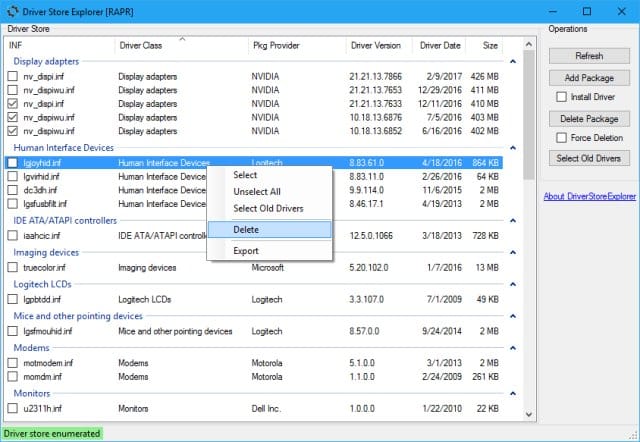
I'd then use Driver Store Explorer to make sure ALL old unused Realtek drivers were removed. Scan for unused drivers and delete ALL for Realtek. Restart

Then use whatever driver package you found on Windows update site. If none were found there go to manufacturer or mobo site and download latest Realtek Windows 10 drivers. If the driver package comes as an .exe, run the exe in compatibility mode for Windows 10.
 

My Computers

System One System Two

  • OS
    Windows 11 Pro 25H2
    Computer type
    PC/Desktop
    Manufacturer/Model
    Dell Optiplex 7080
    CPU
    i9-10900 10 core 20 threads
    Motherboard
    DELL 0J37VM
    Memory
    32 gb
    Graphics Card(s)
    none-Intel UHD Graphics 630
    Sound Card
    Integrated Realtek
    Monitor(s) Displays
    Benq 27
    Screen Resolution
    2560x1440
    Hard Drives
    2x1tb Solidigm m.2 nvme /External drives 512gb Samsung m.2 sata+2tb Kingston m2.nvme
    PSU
    500w
    Case
    MT
    Cooling
    Dell Premium
    Keyboard
    Logitech wired
    Mouse
    Logitech wireless
    Internet Speed
    so slow I'm too embarrassed to tell
    Browser
    #1 Edge #2 Firefox
    Antivirus
    Defender+MWB Premium
  • Operating System
    Windows 11 Pro 24H2 26200.8457
    Computer type
    PC/Desktop
    Manufacturer/Model
    Beelink Mini PC SER5
    CPU
    AMD Ryzen 7 6800U
    Memory
    32 gb
    Graphics card(s)
    integrated
    Sound Card
    integrated
    Monitor(s) Displays
    Benq 27
    Screen Resolution
    2560x1440
    Hard Drives
    1TB Crucial nvme
    Keyboard
    Logitech wired
    Mouse
    Logitech wireless
    Internet Speed
    still too embarrassed to tell
    Browser
    Firefox
    Antivirus
    Defender
    Other Info
    System 3 is non compliant Dell 9020 i7-4770/24gb ram Win11 PRO 26200.8457
You do not have your specifications filled out so we have absolutely no idea what you are working with.
If there is a hardware id assigned as @suatcini54 so correctly advised you can go to Microsoft update catalog and search for that hardware id to find any driver windows update has.

From the sound of it, there's no telling how many Realtek drivers you have installed. Realtek is one of those that does not uninstall old drivers when installing new ones.
I'd first use DDU in safe mode to uninstall Realtek drivers and Software (Yes, I know DDU is for dealing with GPU driver, but it will also deal with Realtek)
Restart

I'd then use Driver Store Explorer to make sure ALL old unused Realtek drivers were removed. Scan for unused drivers and delete ALL for Realtek. Restart

Then use whatever driver package you found on Windows update site. If none were found there go to manufacturer or mobo site and download latest Realtek Windows 10 drivers. If the driver package comes as an .exe, run the exe in compatibility mode for Windows
Ok so here it is. I though just mobo model will suffice:

OS: WIN11 Enterprise LTSC
24H2 (build 26100.712)

Monitor: ACER VG240Y
Mobo: Gigabyte GA-Z270P-D3
GPU: Zotac Geforce GTX 1060 6GB
CPU: Intel i5-7600K
PSU: Chieftec GPS700-A8
 

My Computer

System One

  • OS
    W11 24H2 26100.712
    Other Info
    Updates are disease.
Why not put 10 back on it since it will never be used online?
because there is some software that I periodically use and turned out to be stable only on win11.
 

My Computer

System One

  • OS
    W11 24H2 26100.712
    Other Info
    Updates are disease.
now no sound at all

Also check at Setting > System > Sound as Win 11 may change it to Nvidia or your monitor output.

I have AE7 card but I have had times like after an update where Windows will change it to the LG monitor and I have to change it back to AE7.

Screenshot 2025-08-10 083104.webp
 

My Computer

System One

  • OS
    Windows 11 Pro
You do not have your specifications filled out so we have absolutely no idea what you are working with.
If there is a hardware id assigned as @suatcini54 so correctly advised you can go to Microsoft update catalog and search for that hardware id to find any driver windows update has.

From the sound of it, there's no telling how many Realtek drivers you have installed. Realtek is one of those that does not uninstall old drivers when installing new ones.
I'd first use DDU in safe mode to uninstall Realtek drivers and Software (Yes, I know DDU is for dealing with GPU driver, but it will also deal with Realtek)
Restart

I'd then use Driver Store Explorer to make sure ALL old unused Realtek drivers were removed. Scan for unused drivers and delete ALL for Realtek. Restart

Then use whatever driver package you found on Windows update site. If none were found there go to manufacturer or mobo site and download latest Realtek Windows 10 drivers. If the driver package comes as an .exe, run the exe in compatibility mode for Windows 10.
did as adviced....still no luck.
Also check at Setting > System > Sound as Win 11 may change it to Nvidia or your monitor output.

I have AE7 card but I have had times like after an update where Windows will change it to the LG monitor and I have to change it back to AE7.

View attachment 141899
I check periodically for that but I dont have switching by itself...

I am even towards modded or custom drivers at this point or any unusual solution.
 

My Computer

System One

  • OS
    W11 24H2 26100.712
    Other Info
    Updates are disease.
The 8703 driver is the latest in windows update catalog and the latest on Gigabyte site. Microsoft Update Catalog
Neither uses an .exe to install the driver so attempting to install in compatibility mode is out. @MoKiChU I know you're an Asus guy but do you have any idea if there is a modded Realtek driver this poster could try?

Have you considered disabling current sound controller and using a usb audio interface to handle your sound?
 
Last edited:

My Computers

System One System Two

  • OS
    Windows 11 Pro 25H2
    Computer type
    PC/Desktop
    Manufacturer/Model
    Dell Optiplex 7080
    CPU
    i9-10900 10 core 20 threads
    Motherboard
    DELL 0J37VM
    Memory
    32 gb
    Graphics Card(s)
    none-Intel UHD Graphics 630
    Sound Card
    Integrated Realtek
    Monitor(s) Displays
    Benq 27
    Screen Resolution
    2560x1440
    Hard Drives
    2x1tb Solidigm m.2 nvme /External drives 512gb Samsung m.2 sata+2tb Kingston m2.nvme
    PSU
    500w
    Case
    MT
    Cooling
    Dell Premium
    Keyboard
    Logitech wired
    Mouse
    Logitech wireless
    Internet Speed
    so slow I'm too embarrassed to tell
    Browser
    #1 Edge #2 Firefox
    Antivirus
    Defender+MWB Premium
  • Operating System
    Windows 11 Pro 24H2 26200.8457
    Computer type
    PC/Desktop
    Manufacturer/Model
    Beelink Mini PC SER5
    CPU
    AMD Ryzen 7 6800U
    Memory
    32 gb
    Graphics card(s)
    integrated
    Sound Card
    integrated
    Monitor(s) Displays
    Benq 27
    Screen Resolution
    2560x1440
    Hard Drives
    1TB Crucial nvme
    Keyboard
    Logitech wired
    Mouse
    Logitech wireless
    Internet Speed
    still too embarrassed to tell
    Browser
    Firefox
    Antivirus
    Defender
    Other Info
    System 3 is non compliant Dell 9020 i7-4770/24gb ram Win11 PRO 26200.8457
Have you considered disabling current sound controller and using a usb audio interface to handle your sound?
no cuz I dont have any. pretty sute it would work out in the end. but if nothing helps then thats last solution huh?
 

My Computer

System One

  • OS
    W11 24H2 26100.712
    Other Info
    Updates are disease.
shows nothing like in screenshot.
written:
MMDEVAPI\AudioEndpoints
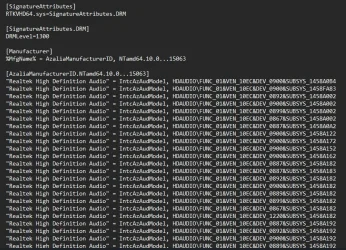
I just downloaded audio drivers fro Gigabyte Support for your M/B and looked into the .inf file. The hardware ids are all like the one in my sample screenshot. So I believe you are looking somewhere different.

Below is the audio .inf file for Windows 10 drivers.

Ekran görüntüsü 2025-08-10 201747.webp

You must see HDAUDIO\FUNC_01&VEN_10EC&DEV_0900 in Device Identification in Device Manager.

Here VEN is VENDOR for Microsoft. It is 10EC for Realtek. DEV is device 0900 the chipset ID code.

Hope this helps.
 

My Computers

System One System Two

  • OS
    Windows 11 Pro build 26200.8524
    Computer type
    PC/Desktop
    Manufacturer/Model
    Home Built
    CPU
    Intel i7-4790
    Motherboard
    Asus H97 Pro Gamer with add-on TPM1.2 module
    Memory
    Teams DDR3-1600 4x4 GB
    Graphics Card(s)
    MSI Nvidia GeForce GTX 1050Ti
    Sound Card
    Realtek ALC1150
    Monitor(s) Displays
    Dell P2425D
    Screen Resolution
    2560 by 1440 pixels
    Hard Drives
    Corsair NVMe M.2 Core XT 1000 GB (Windows 11 v.25H2); Samsung SATA Evo 870 500 GB (Windows 11 v.25H2);
    PSU
    Corsair HX850
    Case
    Gigabyte Solo 210
    Cooling
    Zalman CNPS7X Tower
    Keyboard
    Microsoft AIO Wireless (includes touchpad)
    Mouse
    HP S1000 Plus Wireless
    Internet Speed
    500 Mb fiber optic
    Browser
    Chrome; MS Edge
    Antivirus
    Windows Defender
  • Operating System
    MacOS 12 Monterey
    Computer type
    Laptop
    Manufacturer/Model
    Apple Macbook Air
    CPU
    Intel Core i5
    Memory
    8 GB
    Graphics card(s)
    Intel integrated
    Screen Resolution
    1440 by 900 pixels
    Hard Drives
    128 GB
    Keyboard
    Built-in
    Mouse
    Microsoft Wireless
    Internet Speed
    802.11 ac
    Browser
    Chrome; Safari
    Antivirus
    N/A
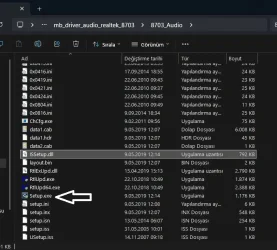
O.K. I think I found out your problem. You are looking into Audio input output branch in Device Manager. I said expand Audio, Video Controllers branch and find Realtek High Definition Audio. Now Switch to Driver tab and click update driver and point to the folder of downloaded audio drivers. In Realtek drivers folder, there is also the setup.exe file. You can use that, too.

Ekran görüntüsü 2025-08-10 203734.webp
 

My Computers

System One System Two

  • OS
    Windows 11 Pro build 26200.8524
    Computer type
    PC/Desktop
    Manufacturer/Model
    Home Built
    CPU
    Intel i7-4790
    Motherboard
    Asus H97 Pro Gamer with add-on TPM1.2 module
    Memory
    Teams DDR3-1600 4x4 GB
    Graphics Card(s)
    MSI Nvidia GeForce GTX 1050Ti
    Sound Card
    Realtek ALC1150
    Monitor(s) Displays
    Dell P2425D
    Screen Resolution
    2560 by 1440 pixels
    Hard Drives
    Corsair NVMe M.2 Core XT 1000 GB (Windows 11 v.25H2); Samsung SATA Evo 870 500 GB (Windows 11 v.25H2);
    PSU
    Corsair HX850
    Case
    Gigabyte Solo 210
    Cooling
    Zalman CNPS7X Tower
    Keyboard
    Microsoft AIO Wireless (includes touchpad)
    Mouse
    HP S1000 Plus Wireless
    Internet Speed
    500 Mb fiber optic
    Browser
    Chrome; MS Edge
    Antivirus
    Windows Defender
  • Operating System
    MacOS 12 Monterey
    Computer type
    Laptop
    Manufacturer/Model
    Apple Macbook Air
    CPU
    Intel Core i5
    Memory
    8 GB
    Graphics card(s)
    Intel integrated
    Screen Resolution
    1440 by 900 pixels
    Hard Drives
    128 GB
    Keyboard
    Built-in
    Mouse
    Microsoft Wireless
    Internet Speed
    802.11 ac
    Browser
    Chrome; Safari
    Antivirus
    N/A
no cuz I dont have any. pretty sute it would work out in the end. but if nothing helps then thats last solution huh?
well Im gonna straighten out that answer. dunno if that counts but Ive plugged in my ps4 controller through usb and controllers mucrophone was outpuitting sound from front panel...so....kinda counts right?

O.K. I think I found out your problem. You are looking into Audio input output branch in Device Manager. I said expand Audio, Video Controllers branch and find Realtek High Definition Audio. Now Switch to Driver tab and click update driver and point to the folder of downloaded audio drivers. In Realtek drivers folder, there is also the setup.exe file. You can use that, too.

View attachment 141920
ive installed with setup all those drivers ive tried no luck....both methods and even tried all rmb - install clicking .ini files

I just downloaded audio drivers fro Gigabyte Support for your M/B and looked into the .inf file. The hardware ids are all like the one in my sample screenshot. So I believe you are looking somewhere different.

Below is the audio .inf file for Windows 10 drivers.

View attachment 141918

You must see HDAUDIO\FUNC_01&VEN_10EC&DEV_0900 in Device Identification in Device Manager.

Here VEN is VENDOR for Microsoft. It is 10EC for Realtek. DEV is device 0900 the chipset ID code.

Hope this helps.

ok my mistake here I was looking into wrong section
hardware IDS:
HDAUDIO\FUNC_01&VEN_10EC&DEV_0887&SUBSYS_1458A182&REV_1003
HDAUDIO\FUNC_01&VEN_10EC&DEV_0887&SUBSYS_1458A182
 

My Computer

System One

  • OS
    W11 24H2 26100.712
    Other Info
    Updates are disease.
Your audio chipset 0887 is included in the inf file. Therefore, it should install. There may be another problem. Your Windows is too outdated. The current build is 26100.4770.

You should update to this build. Windows 10 drivers should not be a problem for Windows 11, I guess. I used the same driver and then used the one I downloaded from Realtek itself.

Microsoft does not release iso files often. Therefore, I ( and most members here in this reputable forum ) download iso files from UUPDUMP.

Use this link to download the latest iso for Windows 11 and upgrade to it by running setup.exe over the current installation. This is my suggestion.

Hope this helps.
 

My Computers

System One System Two

  • OS
    Windows 11 Pro build 26200.8524
    Computer type
    PC/Desktop
    Manufacturer/Model
    Home Built
    CPU
    Intel i7-4790
    Motherboard
    Asus H97 Pro Gamer with add-on TPM1.2 module
    Memory
    Teams DDR3-1600 4x4 GB
    Graphics Card(s)
    MSI Nvidia GeForce GTX 1050Ti
    Sound Card
    Realtek ALC1150
    Monitor(s) Displays
    Dell P2425D
    Screen Resolution
    2560 by 1440 pixels
    Hard Drives
    Corsair NVMe M.2 Core XT 1000 GB (Windows 11 v.25H2); Samsung SATA Evo 870 500 GB (Windows 11 v.25H2);
    PSU
    Corsair HX850
    Case
    Gigabyte Solo 210
    Cooling
    Zalman CNPS7X Tower
    Keyboard
    Microsoft AIO Wireless (includes touchpad)
    Mouse
    HP S1000 Plus Wireless
    Internet Speed
    500 Mb fiber optic
    Browser
    Chrome; MS Edge
    Antivirus
    Windows Defender
  • Operating System
    MacOS 12 Monterey
    Computer type
    Laptop
    Manufacturer/Model
    Apple Macbook Air
    CPU
    Intel Core i5
    Memory
    8 GB
    Graphics card(s)
    Intel integrated
    Screen Resolution
    1440 by 900 pixels
    Hard Drives
    128 GB
    Keyboard
    Built-in
    Mouse
    Microsoft Wireless
    Internet Speed
    802.11 ac
    Browser
    Chrome; Safari
    Antivirus
    N/A
Back
Top Bottom