My Computer
At a glance
Windows 11 Pro
- OS
- Windows 11 Pro

Follow along with the video below to see how to install our site as a web app on your home screen.
Note: This feature may not be available in some browsers.

oh WELL I didnt....forgot about it completely
and here comes struggle...downloaded sound drivers from there to test out....but DISM error....0x80070002 (RMB install this update)



Why not put 10 back on it since it will never be used online?no it never was used online and never will be.
Ok so here it is. I though just mobo model will suffice:You do not have your specifications filled out so we have absolutely no idea what you are working with.
If there is a hardware id assigned as @suatcini54 so correctly advised you can go to Microsoft update catalog and search for that hardware id to find any driver windows update has.
From the sound of it, there's no telling how many Realtek drivers you have installed. Realtek is one of those that does not uninstall old drivers when installing new ones.
I'd first use DDU in safe mode to uninstall Realtek drivers and Software (Yes, I know DDU is for dealing with GPU driver, but it will also deal with Realtek)
RestartDownload Display Driver Uninstaller (DDU) Official Latest Version
Download Display Driver Uninstaller (DDU) free from Wagnardsoft, the official source. Remove NVIDIA, AMD, Intel drivers cleanly.www.wagnardsoft.com
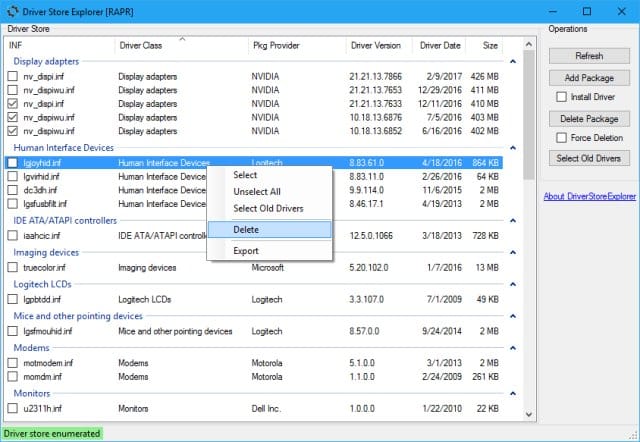
I'd then use Driver Store Explorer to make sure ALL old unused Realtek drivers were removed. Scan for unused drivers and delete ALL for Realtek. Restart
Download DriverStore Explorer 1.0.26 - MajorGeeks
DriverStore Explorer is a free and Open Source utility that makes it easier to deal with the Windows driver store. Supported operations include enumeration, adding a driver package, adding & installing, deletion, and force deletion. DriverStore Explorer allows you to enumerate or list all the...www.majorgeeks.com
Then use whatever driver package you found on Windows update site. If none were found there go to manufacturer or mobo site and download latest Realtek Windows 10 drivers. If the driver package comes as an .exe, run the exe in compatibility mode for Windows
because there is some software that I periodically use and turned out to be stable only on win11.Why not put 10 back on it since it will never be used online?
now no sound at all

did as adviced....still no luck.You do not have your specifications filled out so we have absolutely no idea what you are working with.
If there is a hardware id assigned as @suatcini54 so correctly advised you can go to Microsoft update catalog and search for that hardware id to find any driver windows update has.
From the sound of it, there's no telling how many Realtek drivers you have installed. Realtek is one of those that does not uninstall old drivers when installing new ones.
I'd first use DDU in safe mode to uninstall Realtek drivers and Software (Yes, I know DDU is for dealing with GPU driver, but it will also deal with Realtek)
RestartDownload Display Driver Uninstaller (DDU) Official Latest Version
Download Display Driver Uninstaller (DDU) free from Wagnardsoft, the official source. Remove NVIDIA, AMD, Intel drivers cleanly.
I'd then use Driver Store Explorer to make sure ALL old unused Realtek drivers were removed. Scan for unused drivers and delete ALL for Realtek. Restart
Download DriverStore Explorer 1.0.26 - MajorGeeks
DriverStore Explorer is a free and Open Source utility that makes it easier to deal with the Windows driver store. Supported operations include enumeration, adding a driver package, adding & installing, deletion, and force deletion. DriverStore Explorer allows you to enumerate or list all the...www.majorgeeks.com
Then use whatever driver package you found on Windows update site. If none were found there go to manufacturer or mobo site and download latest Realtek Windows 10 drivers. If the driver package comes as an .exe, run the exe in compatibility mode for Windows 10.
I check periodically for that but I dont have switching by itself...Also check at Setting > System > Sound as Win 11 may change it to Nvidia or your monitor output.
I have AE7 card but I have had times like after an update where Windows will change it to the LG monitor and I have to change it back to AE7.
View attachment 141899
no cuz I dont have any. pretty sute it would work out in the end. but if nothing helps then thats last solution huh?Have you considered disabling current sound controller and using a usb audio interface to handle your sound?

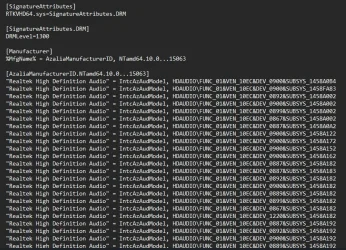
I just downloaded audio drivers fro Gigabyte Support for your M/B and looked into the .inf file. The hardware ids are all like the one in my sample screenshot. So I believe you are looking somewhere different.shows nothing like in screenshot.
written:
MMDEVAPI\AudioEndpoints
well Im gonna straighten out that answer. dunno if that counts but Ive plugged in my ps4 controller through usb and controllers mucrophone was outpuitting sound from front panel...so....kinda counts right?no cuz I dont have any. pretty sute it would work out in the end. but if nothing helps then thats last solution huh?
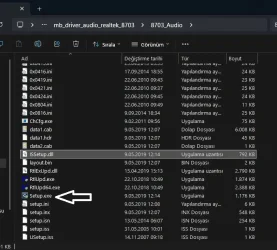
ive installed with setup all those drivers ive tried no luck....both methods and even tried all rmb - install clicking .ini filesO.K. I think I found out your problem. You are looking into Audio input output branch in Device Manager. I said expand Audio, Video Controllers branch and find Realtek High Definition Audio. Now Switch to Driver tab and click update driver and point to the folder of downloaded audio drivers. In Realtek drivers folder, there is also the setup.exe file. You can use that, too.
View attachment 141920
ok my mistake here I was looking into wrong sectionI just downloaded audio drivers fro Gigabyte Support for your M/B and looked into the .inf file. The hardware ids are all like the one in my sample screenshot. So I believe you are looking somewhere different.
Below is the audio .inf file for Windows 10 drivers.
View attachment 141918
You must see HDAUDIO\FUNC_01&VEN_10EC&DEV_0900 in Device Identification in Device Manager.
Here VEN is VENDOR for Microsoft. It is 10EC for Realtek. DEV is device 0900 the chipset ID code.
Hope this helps.






