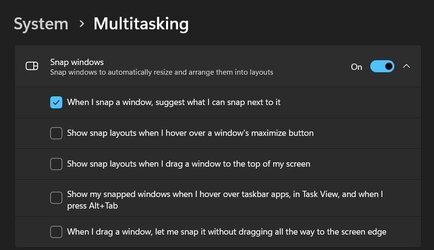
Solved Help me find the setting please


LAPIII

Well-known member
Local time
10:22 PM
Posts
63
OS
Windows 11
In Settings, isn't there an equivalent to Prevent windows from being automatically arranged when moved to the edge of the screen from
Control Panel\All Control Panel Items\Ease of Access Center\Make the mouse easier to use?
 
Windows Build/Version
Windows 11 Pro 10.0.22621

My Computer My Computer

At a glance

Windows 11AMD Ryzen 7 5700U16.0GB Dual-Channel Unknown @ 1596MHz (22-22-...512MB ATI AMD Radeon Graphics (HP)
OS
Windows 11
Computer type
Laptop
CPU
AMD Ryzen 7 5700U
Motherboard
HP 887A (FP6)
Memory
16.0GB Dual-Channel Unknown @ 1596MHz (22-22-22-52)
Graphics Card(s)
512MB ATI AMD Radeon Graphics (HP)
Monitor(s) Displays
Generic PnP Monitor
Screen Resolution
1920x1080
Hard Drives
238GB KBG40ZNV256G KIOXIA (Unknown (SSD))
Mouse
Razer Naga Pro
Internet Speed
424.4 Mbps download 230.5 Mbps upload
Browser
Microsoft Edge
Antivirus
Bitdefender Total Security
Hello, :alien:

That would be the same as the Snap windows setting in option one of the tutorial below.


My Computers My Computers

  • At a glance

    Windows 11 Pro for WorkstationsIntel i7-8700K 5 GHz64 GB (4x16GB) G.SKILL TridentZ RGB DDR4 3600...ASUS ROG-STRIX-GTX1080TI-O11G-GAMING (11GB GD...
    OS
    Windows 11 Pro for Workstations
    Computer type
    PC/Desktop
    Manufacturer/Model
    Custom self build
    CPU
    Intel i7-8700K 5 GHz
    Motherboard
    ASUS ROG Maximus XI Formula Z390
    Memory
    64 GB (4x16GB) G.SKILL TridentZ RGB DDR4 3600 MHz (F4-3600C18D-32GTZR)
    Graphics Card(s)
    ASUS ROG-STRIX-GTX1080TI-O11G-GAMING (11GB GDDR5X)
    Sound Card
    Integrated Digital Audio (S/PDIF)
    Monitor(s) Displays
    2 x Samsung Odyssey G75 27"
    Screen Resolution
    2560x1440
    Hard Drives
    1TB Samsung 990 PRO M.2,
    4TB Samsung 990 PRO M.2,
    TerraMaster F8 SSD Plus NAS
    PSU
    Seasonic Prime Titanium 850W
    Case
    Thermaltake Core P3 wall mounted
    Cooling
    Corsair Hydro H115i
    Keyboard
    Amazon Basics Wired Full Keyboard MD005
    Mouse
    Logitech MX Master 4
    Internet Speed
    2 Gbps Download and 100 Mbps Upload
    Browser
    Chrome and Edge
    Antivirus
    Microsoft Defender
    Other Info
    Logitech Z625 speaker system,
    Logitech BRIO 4K Pro webcam,
    HP Color LaserJet Pro MFP M477fdn,
    CyberPower CP1500PFCLCD
    Galaxy S23 Plus phone
  • At a glance

    Windows 11 ProSnapdragon X Elite (12 core) 3.42 GHz16 GB LPDDR5x-7467 MHz
    Operating System
    Windows 11 Pro
    Computer type
    Laptop
    Manufacturer/Model
    Surface Laptop 7 Copilot+ PC
    CPU
    Snapdragon X Elite (12 core) 3.42 GHz
    Memory
    16 GB LPDDR5x-7467 MHz
    Monitor(s) Displays
    15" HDR
    Screen Resolution
    2496 x 1664
    Hard Drives
    1 TB SSD
    Internet Speed
    Wi-Fi 7 and Bluetooth 5.4
    Browser
    Chrome and Edge
    Antivirus
    Microsoft Defender
There is definitely a glitch if both are enabled. After restart then one your both disable themselves. What I wanted to do is have snap on but not start to show me to maximize the window when I drag it to the top. Is there a solution to this? I'm pretty sure I had Snap on while not having this happen..
 

Attachments

  • Settings 04_07_23 02⦂58⦂28⦂791 PM.jpg
    Settings 04_07_23 02⦂58⦂28⦂791 PM.jpg
    34.1 KB · Views: 1

My Computer My Computer

At a glance

Windows 11AMD Ryzen 7 5700U16.0GB Dual-Channel Unknown @ 1596MHz (22-22-...512MB ATI AMD Radeon Graphics (HP)
OS
Windows 11
Computer type
Laptop
CPU
AMD Ryzen 7 5700U
Motherboard
HP 887A (FP6)
Memory
16.0GB Dual-Channel Unknown @ 1596MHz (22-22-22-52)
Graphics Card(s)
512MB ATI AMD Radeon Graphics (HP)
Monitor(s) Displays
Generic PnP Monitor
Screen Resolution
1920x1080
Hard Drives
238GB KBG40ZNV256G KIOXIA (Unknown (SSD))
Mouse
Razer Naga Pro
Internet Speed
424.4 Mbps download 230.5 Mbps upload
Browser
Microsoft Edge
Antivirus
Bitdefender Total Security
I'm afraid that's part of the Snap windows setting. :(
 

My Computers My Computers

  • At a glance

    Windows 11 Pro for WorkstationsIntel i7-8700K 5 GHz64 GB (4x16GB) G.SKILL TridentZ RGB DDR4 3600...ASUS ROG-STRIX-GTX1080TI-O11G-GAMING (11GB GD...
    OS
    Windows 11 Pro for Workstations
    Computer type
    PC/Desktop
    Manufacturer/Model
    Custom self build
    CPU
    Intel i7-8700K 5 GHz
    Motherboard
    ASUS ROG Maximus XI Formula Z390
    Memory
    64 GB (4x16GB) G.SKILL TridentZ RGB DDR4 3600 MHz (F4-3600C18D-32GTZR)
    Graphics Card(s)
    ASUS ROG-STRIX-GTX1080TI-O11G-GAMING (11GB GDDR5X)
    Sound Card
    Integrated Digital Audio (S/PDIF)
    Monitor(s) Displays
    2 x Samsung Odyssey G75 27"
    Screen Resolution
    2560x1440
    Hard Drives
    1TB Samsung 990 PRO M.2,
    4TB Samsung 990 PRO M.2,
    TerraMaster F8 SSD Plus NAS
    PSU
    Seasonic Prime Titanium 850W
    Case
    Thermaltake Core P3 wall mounted
    Cooling
    Corsair Hydro H115i
    Keyboard
    Amazon Basics Wired Full Keyboard MD005
    Mouse
    Logitech MX Master 4
    Internet Speed
    2 Gbps Download and 100 Mbps Upload
    Browser
    Chrome and Edge
    Antivirus
    Microsoft Defender
    Other Info
    Logitech Z625 speaker system,
    Logitech BRIO 4K Pro webcam,
    HP Color LaserJet Pro MFP M477fdn,
    CyberPower CP1500PFCLCD
    Galaxy S23 Plus phone
  • At a glance

    Windows 11 ProSnapdragon X Elite (12 core) 3.42 GHz16 GB LPDDR5x-7467 MHz
    Operating System
    Windows 11 Pro
    Computer type
    Laptop
    Manufacturer/Model
    Surface Laptop 7 Copilot+ PC
    CPU
    Snapdragon X Elite (12 core) 3.42 GHz
    Memory
    16 GB LPDDR5x-7467 MHz
    Monitor(s) Displays
    15" HDR
    Screen Resolution
    2496 x 1664
    Hard Drives
    1 TB SSD
    Internet Speed
    Wi-Fi 7 and Bluetooth 5.4
    Browser
    Chrome and Edge
    Antivirus
    Microsoft Defender
I think that I wasn't that clear. I attached a screenshot of what I see and don't want happening.
 

Attachments

  • sVsrHOLRvq.jpg
    sVsrHOLRvq.jpg
    64 KB · Views: 1

My Computer My Computer

At a glance

Windows 11AMD Ryzen 7 5700U16.0GB Dual-Channel Unknown @ 1596MHz (22-22-...512MB ATI AMD Radeon Graphics (HP)
OS
Windows 11
Computer type
Laptop
CPU
AMD Ryzen 7 5700U
Motherboard
HP 887A (FP6)
Memory
16.0GB Dual-Channel Unknown @ 1596MHz (22-22-22-52)
Graphics Card(s)
512MB ATI AMD Radeon Graphics (HP)
Monitor(s) Displays
Generic PnP Monitor
Screen Resolution
1920x1080
Hard Drives
238GB KBG40ZNV256G KIOXIA (Unknown (SSD))
Mouse
Razer Naga Pro
Internet Speed
424.4 Mbps download 230.5 Mbps upload
Browser
Microsoft Edge
Antivirus
Bitdefender Total Security
Yep, that's part of the Snap windows setting itself. You would need to turn it off for what you want.

There's not a separate setting to only stop the snap to maximize when dragged to the top.
 

My Computers My Computers

  • At a glance

    Windows 11 Pro for WorkstationsIntel i7-8700K 5 GHz64 GB (4x16GB) G.SKILL TridentZ RGB DDR4 3600...ASUS ROG-STRIX-GTX1080TI-O11G-GAMING (11GB GD...
    OS
    Windows 11 Pro for Workstations
    Computer type
    PC/Desktop
    Manufacturer/Model
    Custom self build
    CPU
    Intel i7-8700K 5 GHz
    Motherboard
    ASUS ROG Maximus XI Formula Z390
    Memory
    64 GB (4x16GB) G.SKILL TridentZ RGB DDR4 3600 MHz (F4-3600C18D-32GTZR)
    Graphics Card(s)
    ASUS ROG-STRIX-GTX1080TI-O11G-GAMING (11GB GDDR5X)
    Sound Card
    Integrated Digital Audio (S/PDIF)
    Monitor(s) Displays
    2 x Samsung Odyssey G75 27"
    Screen Resolution
    2560x1440
    Hard Drives
    1TB Samsung 990 PRO M.2,
    4TB Samsung 990 PRO M.2,
    TerraMaster F8 SSD Plus NAS
    PSU
    Seasonic Prime Titanium 850W
    Case
    Thermaltake Core P3 wall mounted
    Cooling
    Corsair Hydro H115i
    Keyboard
    Amazon Basics Wired Full Keyboard MD005
    Mouse
    Logitech MX Master 4
    Internet Speed
    2 Gbps Download and 100 Mbps Upload
    Browser
    Chrome and Edge
    Antivirus
    Microsoft Defender
    Other Info
    Logitech Z625 speaker system,
    Logitech BRIO 4K Pro webcam,
    HP Color LaserJet Pro MFP M477fdn,
    CyberPower CP1500PFCLCD
    Galaxy S23 Plus phone
  • At a glance

    Windows 11 ProSnapdragon X Elite (12 core) 3.42 GHz16 GB LPDDR5x-7467 MHz
    Operating System
    Windows 11 Pro
    Computer type
    Laptop
    Manufacturer/Model
    Surface Laptop 7 Copilot+ PC
    CPU
    Snapdragon X Elite (12 core) 3.42 GHz
    Memory
    16 GB LPDDR5x-7467 MHz
    Monitor(s) Displays
    15" HDR
    Screen Resolution
    2496 x 1664
    Hard Drives
    1 TB SSD
    Internet Speed
    Wi-Fi 7 and Bluetooth 5.4
    Browser
    Chrome and Edge
    Antivirus
    Microsoft Defender

Latest Support Threads

Back
Top Bottom