HELP! - My laptop is now a Paper Weight


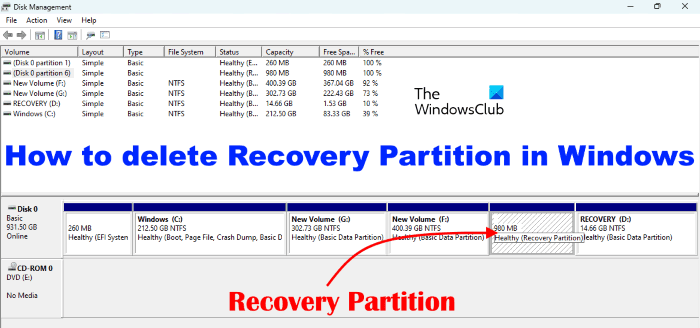
Looking at your disk management screenshot, I think I would want to set back to AHCI, do a full clean install, reinstall programs, do all windows settings - then make a new system image - which can be kept as a "factory restore" image. Then re-add your files. A pain but then you have a good image. Unless @zbook can help you sort out the partitions .........
 

My Computers My Computers

  • At a glance

    Windows 11 Home 25H2Core i5-1035G132gb
    OS
    Windows 11 Home 25H2
    Computer type
    Laptop
    Manufacturer/Model
    HP Pavilion 14-ce3606sa
    CPU
    Core i5-1035G1
    Memory
    32gb
    Hard Drives
    Samsung 870 evo sata ssd
    Cooling
    Could be better
    Internet Speed
    50 mbps Starlink
    Browser
    Firefox
    Other Info
    Originally came installed with a 500gb H10 Optane ssd
  • At a glance

    Windows 11 HomeIntel Core i5-1035G116gb
    Operating System
    Windows 11 Home
    Computer type
    Laptop
    Manufacturer/Model
    HP Pavilion ce3606sa
    CPU
    Intel Core i5-1035G1
    Memory
    16gb
    Hard Drives
    Hynix Gold P31 2TB
    Internet Speed
    200mbps Starlink
    Browser
    Firefox
    Antivirus
    Defender
What a collosal pain in the ***

So I THINK I'm successful, not sure yet. When system image was finally done and computer restarted, I got the following screen (which did NOT restart automatically)


View attachment 155093

So I decided to experiment, and went into bios, and changed back to RAID mode, and now it works lol. I don't even want to know why I had to change from RAID to AHCI in order to access the system image and recover from it, but then had to switch back to RAID. Is that a DELL-specific thing?

Please assess the following (disk management readout). Tell me if it looks normal or not. I also just ran sfc /scannow and it found no integrity violations. THANKS EVERYONE for all the input, suggestions.
I'll never play around with "safe mode" boot ever again lol.

View attachment 155094
Dell Hard Drive mode by Default is always RAID, instead of AHCI, even if you only have one drive, we don't know why.
You don't need two Recovery Partitions, but this is fine and you can leave it this way thee is no harm
 

My Computer My Computer

At a glance

Windows 11 Pro Insider 64 bit 25H2 26200.5742Intel Core i7 9700K 3.6016 GBnVidia GEForce RTX 2060 Super
OS
Windows 11 Pro Insider 64 bit 25H2 26200.5742
Computer type
PC/Desktop
Manufacturer/Model
Gigabyte Z390 UD
CPU
Intel Core i7 9700K 3.60
Motherboard
Gigabyte Z390 UD
Memory
16 GB
Graphics Card(s)
nVidia GEForce RTX 2060 Super
Sound Card
onboard
Monitor(s) Displays
Two 27" Dell 4K monitors
Screen Resolution
3840 x 2160
Hard Drives
M.2 NVME SSD, 500 GB; Two 2TB Mechanical HDD's
PSU
850w PSU
Case
Cyberpower PC
Cooling
Water cooled
Keyboard
Backlit Cyberpower gaming keyboard
Mouse
Backlit Cyberpower gaming mouse
Internet Speed
1 GB mbps
Browser
Brave
Antivirus
Windows Security
Would it make a difference if he booted from a recovery drive made on the machine, rather than a windows install usb? I've wondered if the recovery drive contains more from Win PE?
The last time I looked which was a while ago the recovery drive thing uses winre.wim. It depends if that has the drivers added already
 

My Computers My Computers

  • At a glance

    Win7,Win11i7-97002x16gb 3600mhz
    OS
    Win7,Win11
    Computer type
    PC/Desktop
    CPU
    i7-9700
    Motherboard
    gigabyte b365m ds3h
    Memory
    2x16gb 3600mhz
    Monitor(s) Displays
    benq gw2480
    PSU
    bequiet pure power 11 400CM
    Cooling
    cryorig m9i
  • At a glance

    win7,win11i5-84002x8gb 3200
    Operating System
    win7,win11
    Computer type
    PC/Desktop
    CPU
    i5-8400
    Motherboard
    gigabyte b365m ds3h
    Memory
    2x8gb 3200
    PSU
    xfx pro 450
The Recovery Partition is used to Restore your computer from inside Windows (ie) Settings/System/Recovery.
You cannot boot from it.

You can leave the partitions the way they are

if you need to clean it up
Press the Windows key +X and choose Terminal (Admin) Type
reagentc /info
This will tell you what recovery partition is needed.
you then can delete the recovery partitions that are not needed. Be sure to do an Image Backup of your computer before attempting.

 
Last edited:

My Computer My Computer

At a glance

Windows 11 Pro Insider 64 bit 25H2 26200.5742Intel Core i7 9700K 3.6016 GBnVidia GEForce RTX 2060 Super
OS
Windows 11 Pro Insider 64 bit 25H2 26200.5742
Computer type
PC/Desktop
Manufacturer/Model
Gigabyte Z390 UD
CPU
Intel Core i7 9700K 3.60
Motherboard
Gigabyte Z390 UD
Memory
16 GB
Graphics Card(s)
nVidia GEForce RTX 2060 Super
Sound Card
onboard
Monitor(s) Displays
Two 27" Dell 4K monitors
Screen Resolution
3840 x 2160
Hard Drives
M.2 NVME SSD, 500 GB; Two 2TB Mechanical HDD's
PSU
850w PSU
Case
Cyberpower PC
Cooling
Water cooled
Keyboard
Backlit Cyberpower gaming keyboard
Mouse
Backlit Cyberpower gaming mouse
Internet Speed
1 GB mbps
Browser
Brave
Antivirus
Windows Security
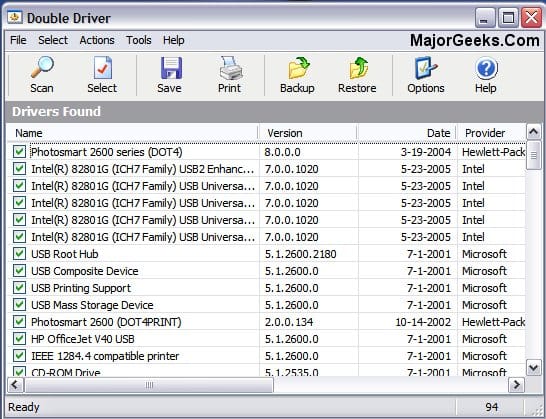
But how did an extra recovery partition get there in the first place? That's what I'm wondering. Maybe I'm OCD but I'd want to do a clean install and a new image! However, at least backup all drivers installed before doing that (if deciding to).

Double driver is easy to use.


Also make a recovery usb - type "Recovery Drive" in the search box - you might need to run as administrator. It makes a recovery drive which contains the environment for and "might" contain the Windows PE drivers for restoring from a Windows Image Backup in future (in case they start deprecating them in a Windows usb install (if they haven't already). The recovery drive will always work on that particular computer for restoring an image or going into recovery tools area. I did look into this a bit recently and I think there are more options in the recovery drive. With a recovery drive, you don't need to boot a windows 11 usb.
 

My Computers My Computers

  • At a glance

    Windows 11 Home 25H2Core i5-1035G132gb
    OS
    Windows 11 Home 25H2
    Computer type
    Laptop
    Manufacturer/Model
    HP Pavilion 14-ce3606sa
    CPU
    Core i5-1035G1
    Memory
    32gb
    Hard Drives
    Samsung 870 evo sata ssd
    Cooling
    Could be better
    Internet Speed
    50 mbps Starlink
    Browser
    Firefox
    Other Info
    Originally came installed with a 500gb H10 Optane ssd
  • At a glance

    Windows 11 HomeIntel Core i5-1035G116gb
    Operating System
    Windows 11 Home
    Computer type
    Laptop
    Manufacturer/Model
    HP Pavilion ce3606sa
    CPU
    Intel Core i5-1035G1
    Memory
    16gb
    Hard Drives
    Hynix Gold P31 2TB
    Internet Speed
    200mbps Starlink
    Browser
    Firefox
    Antivirus
    Defender
@Hazel123 I suspect the OP did not do a Clean install.
He left the partitions the way they were and just formatted the C: partition and installed Windows to that.
The computer is working. Techies will want to clean it up, but for a Noobie, this is a Win.
 

My Computer My Computer

At a glance

Windows 11 Pro Insider 64 bit 25H2 26200.5742Intel Core i7 9700K 3.6016 GBnVidia GEForce RTX 2060 Super
OS
Windows 11 Pro Insider 64 bit 25H2 26200.5742
Computer type
PC/Desktop
Manufacturer/Model
Gigabyte Z390 UD
CPU
Intel Core i7 9700K 3.60
Motherboard
Gigabyte Z390 UD
Memory
16 GB
Graphics Card(s)
nVidia GEForce RTX 2060 Super
Sound Card
onboard
Monitor(s) Displays
Two 27" Dell 4K monitors
Screen Resolution
3840 x 2160
Hard Drives
M.2 NVME SSD, 500 GB; Two 2TB Mechanical HDD's
PSU
850w PSU
Case
Cyberpower PC
Cooling
Water cooled
Keyboard
Backlit Cyberpower gaming keyboard
Mouse
Backlit Cyberpower gaming mouse
Internet Speed
1 GB mbps
Browser
Brave
Antivirus
Windows Security
Quick and easy with 7-zip

View attachment 155119


View attachment 155120

Drag the pedrivers folder onto the 7-zip window with the mouse

View attachment 155121


View attachment 155123

7-zip packs it into the wim in a couple of seconds and
like magic


View attachment 155125

Click down to \windows\system32

and drag in the other 2 files winpeshl.ini and startnet.cmd

View attachment 155126

job done in a few seconds
I have just tested the above and it works the drivers and inf file are there even though there are no matching devices because I havent got a machine that needs them


My Computers My Computers

  • At a glance

    Win7,Win11i7-97002x16gb 3600mhz
    OS
    Win7,Win11
    Computer type
    PC/Desktop
    CPU
    i7-9700
    Motherboard
    gigabyte b365m ds3h
    Memory
    2x16gb 3600mhz
    Monitor(s) Displays
    benq gw2480
    PSU
    bequiet pure power 11 400CM
    Cooling
    cryorig m9i
  • At a glance

    win7,win11i5-84002x8gb 3200
    Operating System
    win7,win11
    Computer type
    PC/Desktop
    CPU
    i5-8400
    Motherboard
    gigabyte b365m ds3h
    Memory
    2x8gb 3200
    PSU
    xfx pro 450

Latest Support Threads

Back
Top Bottom