Solved Help with Intel integrated GPU in ASUS motherboard / Bios


THiBOR69

Active member
Member
Local time
10:35 AM
Posts
32
OS
Win 11
I recently built a PC with the following information/specs:

MB : ASUS ROG STRIX Z790-A GAMING WIFI bios 18.01
CPU : Intel Core i7-14700K w/ (Integrated Intel UHD Graphics 770)
GPU : ASUS DUAL RTX 4070 SUPER OC

I have 2 monitors. I want to use BOTH GPU's ( Integrated AND Slotted ) .... The Integrated is Intel UHD Graphics 770. At first, everything was ok. I could see both gpu's in bios and Windows 11. Now for some reason the integrated Intel 770 does not show at all. I did change a setting in the bios that I think is maybe the problem, but I can not find that setting again anywhere in the bios. It said something about what is your primary GPU and do you want the internal GPU descret. ??? I can't find that anywhere, and the intel gpu is also not listed in win11 device manager.

How can I fix this so that my PC will have access to both GPU's again. Or why can't I find the setting in the BIOS to turn the Intell GPU on or off ??

Thank you for any thoughts ....
 

My Computer My Computer

At a glance

Win 11Intel Core i7-14700K64 GB DDR5-7000 SDRAMASUS TUF Gaming GeForce RTX 4080 OC Edition
OS
Win 11
Computer type
PC/Desktop
Manufacturer/Model
HYTE Y70 Dual Chamber Mid-Tower ATX Case
CPU
Intel Core i7-14700K
Motherboard
ASUS ROG STRIX Z790-A GAMING WIFI
Memory
64 GB DDR5-7000 SDRAM
Graphics Card(s)
ASUS TUF Gaming GeForce RTX 4080 OC Edition
Sound Card
Intel Raptor Lake-S PCH - cAVS
Monitor(s) Displays
BenQ GW2780 x ( 3 )
Screen Resolution
1920 x 1080
Hard Drives
WD_BLACK 2TB SN850X NVMe Gen4 PCIe, M.2 2280 x ( 2 )
PSU
Thermaltake Toughpower GF3 1350W
Case
HYTE Y70 Dual Chamber Mid-Tower ATX Case
Cooling
Corsair iCUE H170i Elite LCD XT
Keyboard
K95 RGB PLATINUM SE Mechanical Gaming Keyboard
Mouse
LOGi MX 3S
Internet Speed
1.5 GB
My old ASUS didn't have the onboard video, used an Nvideo add-in PCIe X16 card. For the BIOS I'd log into it then see if there's a Default setting that will return it to as-shipped settings.
 

My Computers My Computers

  • At a glance

    Win11 Pro RTM Version 24H2 Build 26100.4202Intel Core i5 11th Gen. 2.40GHz12GB
    OS
    Win11 Pro RTM Version 24H2 Build 26100.4202
    Computer type
    Laptop
    Manufacturer/Model
    Dell Vostro 3400
    CPU
    Intel Core i5 11th Gen. 2.40GHz
    Memory
    12GB
    Hard Drives
    256GB SSD NVMe M.2
  • At a glance

    Win11 Pro RTM Version 24H2 Build 26100.4202Intel Core i5 10th Gen. 2.90GHz16GBOnboard, no VGA, using a DisplayPort-to-VGA a...
    Operating System
    Win11 Pro RTM Version 24H2 Build 26100.4202
    Computer type
    PC/Desktop
    Manufacturer/Model
    Dell Vostro 5890
    CPU
    Intel Core i5 10th Gen. 2.90GHz
    Memory
    16GB
    Graphics card(s)
    Onboard, no VGA, using a DisplayPort-to-VGA adapter
    Monitor(s) Displays
    24" Dell
    Hard Drives
    512GB SSD NVMe, 4TB Seagate HDD
    Browser
    Firefox, Edge
    Antivirus
    Windows Defender/Microsoft Security
My old ASUS didn't have the onboard video, used an Nvideo add-in PCIe X16 card. For the BIOS I'd log into it then see if there's a Default setting that will return it to as-shipped settings.

Well I have made a lot of changes in the bios and I don't want to reset it really. I guess the bottom line is I need to figure out how to turn the GPU ON and OFF..... o_O
 

My Computer My Computer

At a glance

Win 11Intel Core i7-14700K64 GB DDR5-7000 SDRAMASUS TUF Gaming GeForce RTX 4080 OC Edition
OS
Win 11
Computer type
PC/Desktop
Manufacturer/Model
HYTE Y70 Dual Chamber Mid-Tower ATX Case
CPU
Intel Core i7-14700K
Motherboard
ASUS ROG STRIX Z790-A GAMING WIFI
Memory
64 GB DDR5-7000 SDRAM
Graphics Card(s)
ASUS TUF Gaming GeForce RTX 4080 OC Edition
Sound Card
Intel Raptor Lake-S PCH - cAVS
Monitor(s) Displays
BenQ GW2780 x ( 3 )
Screen Resolution
1920 x 1080
Hard Drives
WD_BLACK 2TB SN850X NVMe Gen4 PCIe, M.2 2280 x ( 2 )
PSU
Thermaltake Toughpower GF3 1350W
Case
HYTE Y70 Dual Chamber Mid-Tower ATX Case
Cooling
Corsair iCUE H170i Elite LCD XT
Keyboard
K95 RGB PLATINUM SE Mechanical Gaming Keyboard
Mouse
LOGi MX 3S
Internet Speed
1.5 GB
Keep in mind that the OS reads the BIOS first so as to know what resources are available to work with and sets up accordingly, if something is turned off/disabled the OS can't use it.
 

My Computers My Computers

  • At a glance

    Win11 Pro RTM Version 24H2 Build 26100.4202Intel Core i5 11th Gen. 2.40GHz12GB
    OS
    Win11 Pro RTM Version 24H2 Build 26100.4202
    Computer type
    Laptop
    Manufacturer/Model
    Dell Vostro 3400
    CPU
    Intel Core i5 11th Gen. 2.40GHz
    Memory
    12GB
    Hard Drives
    256GB SSD NVMe M.2
  • At a glance

    Win11 Pro RTM Version 24H2 Build 26100.4202Intel Core i5 10th Gen. 2.90GHz16GBOnboard, no VGA, using a DisplayPort-to-VGA a...
    Operating System
    Win11 Pro RTM Version 24H2 Build 26100.4202
    Computer type
    PC/Desktop
    Manufacturer/Model
    Dell Vostro 5890
    CPU
    Intel Core i5 10th Gen. 2.90GHz
    Memory
    16GB
    Graphics card(s)
    Onboard, no VGA, using a DisplayPort-to-VGA adapter
    Monitor(s) Displays
    24" Dell
    Hard Drives
    512GB SSD NVMe, 4TB Seagate HDD
    Browser
    Firefox, Edge
    Antivirus
    Windows Defender/Microsoft Security
How can I fix this so that my PC will have access to both GPU's again. Or why can't I find the setting in the BIOS to turn the Intell GPU on or off ?

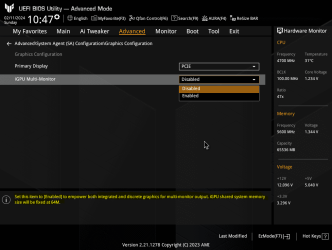
Here it is in my Asus Z690 UEFI. Your UEFI may be similar.

Advanced\System Agent (SA) Configuration\Graphics Configuration

1707684950483.png
 

My Computers My Computers

  • At a glance

    Win 11 Pro 26H2 26300.9550Intel® Core™ i7-14700KG.SKILL Ripjaws S5 Series 64GB (2 x 32GB) DDR5ASUS GeForce RTX 4070 Super 12GB
    OS
    Win 11 Pro 26H2 26300.9550
    Computer type
    PC/Desktop
    Manufacturer/Model
    Self Built
    CPU
    Intel® Core™ i7-14700K
    Motherboard
    ASUS TUF Z690-PLUS WIFI (BIOS 4505)
    Memory
    G.SKILL Ripjaws S5 Series 64GB (2 x 32GB) DDR5
    Graphics Card(s)
    ASUS GeForce RTX 4070 Super 12GB
    Sound Card
    Sound Blaster AE-5 Plus
    Monitor(s) Displays
    ASUS TUF Gaming 27" 2K HDR Gaming
    Screen Resolution
    2560 x 1440
    Hard Drives
    Samsung 990 Pro 1TB NVMe (Win 11 25H2)
    SK hynix P41 500GB NVMe
    SK hynix P41 2TB NVMe (x3)
    Crucial P3 Plus 4TB
    PSU
    Corsair RM850x Shift
    Case
    Antec Dark Phantom DP502 FLUX
    Cooling
    Corsair Nautilus 360 RS AIO
    Keyboard
    Logitech MK 320
    Mouse
    Razer Basilisk V3
    Internet Speed
    750Mbs
    Browser
    Firefox
    Antivirus
    Winows Security
    Other Info
    MR 8.1 Home
  • At a glance

    Win 11 Pro 25H2 26200.9550Intel Core i5-1140064 GB DDR4MSI GeForce RTX 3060 Ventus 2X 12GB
    Operating System
    Win 11 Pro 25H2 26200.9550
    Computer type
    PC/Desktop
    Manufacturer/Model
    Self Built
    CPU
    Intel Core i5-11400
    Motherboard
    Asus TUF Gaming Z590 Plus WiFi (BIOS 2803)
    Memory
    64 GB DDR4
    Graphics card(s)
    MSI GeForce RTX 3060 Ventus 2X 12GB
    Sound Card
    SoundBlaster Audigy Fx V2
    Monitor(s) Displays
    Samsung F27T350
    Screen Resolution
    1920x1080
    Hard Drives
    Samsung 980 Pro 1TB
    Samsung 970 EVO Plus 2TB
    Samsung 870 EVO 500GB SSD
    PSU
    Corsair HX750
    Case
    Cougar MX330-G Window
    Cooling
    Thermalright Frozen Edge 240 Black AIO
    Internet Speed
    350Mbps
    Browser
    Firefox
    Antivirus
    Windows Security
  • System Three
    Win 11 Pro 25H2 26200.9550
    ASUS PRIME Z370-P II BIOS 3004 7/12/21
    Intel Core i7-8700 CPU @ 3.20GHz
    32GB DDR4 RAM (4x8)
    EVGA RTX 2060 (used)
    iGPU Intel UHD Graphics 630 (backup)
    Cooler Master Hyper 212
    Mid-Tower Desktop
did you read the mobo manual ?

found this in that model of yours

Graphics ConfigurationThe items in this submenu allow you to select a primary display from CPU Graphics, PEG Graphics devices, or PCIe Graphics devices.Primary DisplayAllows you to select the primary display from CPU Graphics / PEG Graphics / PCIe Graphics device.Configuration options: [Auto] [CPU Graphics] [PEG Slot] [PCIE]iGPU Multi-MonitorSet this item to [Enabled] to empower both integrated and discrete graphics for multimonitor output. iGPU shared system memory size will be fixed at 64M.Configuration options: [Disabled] [Enabled]
 

My Computer My Computer

At a glance

windows 11 proIntel Core i9-9900KCorsair Vengeance LPX 32gb ddr4ASUS ROG-STRIX-RTX3080-O10G-WHITE 10GB
OS
windows 11 pro
Computer type
PC/Desktop
Manufacturer/Model
selfbuild
CPU
Intel Core i9-9900K
Motherboard
Asus ROG STRIX Z390-H
Memory
Corsair Vengeance LPX 32gb ddr4
Graphics Card(s)
ASUS ROG-STRIX-RTX3080-O10G-WHITE 10GB
Sound Card
onboard
Monitor(s) Displays
ROG Strix XG349C
Screen Resolution
3440*1440
Hard Drives
windows 11 64 bit => Samsung 970 EVO Plus 500GB m2 drive
Steam: Client on drive I (1tb Samsung m2-ssd 960 pro 1tb M2 SSD)

steamlibrary 01 on drive G (500gb samsung 850 EVO 500gb SataSSD)
steamlibrary 02 on drive J (3tb western digital wd30ezrx-00azb0 Sata)
steamlibrary 03 on drive H (2tb samsung 850 EVO SataSSD)
steamlibrary 04 on drive F (2tb samsung 850 EVO SataSSD)
steamlibrary 05 on drive E (1tb samsung 860 EVO MSataSSD)
PSU
Seasonic Prime Ultra 1000 Titanium
Case
Cooler Master MasterCase H500M
Cooling
NZXT Kraken X72 RGB
Keyboard
corsair k95 rgb platinum
Mouse
roccat burst core
Browser
edge chromium
Antivirus
microsoft
From your online manual:

1707685198093.png
 

My Computers My Computers

  • At a glance

    Win 11 Pro 26H2 26300.9550Intel® Core™ i7-14700KG.SKILL Ripjaws S5 Series 64GB (2 x 32GB) DDR5ASUS GeForce RTX 4070 Super 12GB
    OS
    Win 11 Pro 26H2 26300.9550
    Computer type
    PC/Desktop
    Manufacturer/Model
    Self Built
    CPU
    Intel® Core™ i7-14700K
    Motherboard
    ASUS TUF Z690-PLUS WIFI (BIOS 4505)
    Memory
    G.SKILL Ripjaws S5 Series 64GB (2 x 32GB) DDR5
    Graphics Card(s)
    ASUS GeForce RTX 4070 Super 12GB
    Sound Card
    Sound Blaster AE-5 Plus
    Monitor(s) Displays
    ASUS TUF Gaming 27" 2K HDR Gaming
    Screen Resolution
    2560 x 1440
    Hard Drives
    Samsung 990 Pro 1TB NVMe (Win 11 25H2)
    SK hynix P41 500GB NVMe
    SK hynix P41 2TB NVMe (x3)
    Crucial P3 Plus 4TB
    PSU
    Corsair RM850x Shift
    Case
    Antec Dark Phantom DP502 FLUX
    Cooling
    Corsair Nautilus 360 RS AIO
    Keyboard
    Logitech MK 320
    Mouse
    Razer Basilisk V3
    Internet Speed
    750Mbs
    Browser
    Firefox
    Antivirus
    Winows Security
    Other Info
    MR 8.1 Home
  • At a glance

    Win 11 Pro 25H2 26200.9550Intel Core i5-1140064 GB DDR4MSI GeForce RTX 3060 Ventus 2X 12GB
    Operating System
    Win 11 Pro 25H2 26200.9550
    Computer type
    PC/Desktop
    Manufacturer/Model
    Self Built
    CPU
    Intel Core i5-11400
    Motherboard
    Asus TUF Gaming Z590 Plus WiFi (BIOS 2803)
    Memory
    64 GB DDR4
    Graphics card(s)
    MSI GeForce RTX 3060 Ventus 2X 12GB
    Sound Card
    SoundBlaster Audigy Fx V2
    Monitor(s) Displays
    Samsung F27T350
    Screen Resolution
    1920x1080
    Hard Drives
    Samsung 980 Pro 1TB
    Samsung 970 EVO Plus 2TB
    Samsung 870 EVO 500GB SSD
    PSU
    Corsair HX750
    Case
    Cougar MX330-G Window
    Cooling
    Thermalright Frozen Edge 240 Black AIO
    Internet Speed
    350Mbps
    Browser
    Firefox
    Antivirus
    Windows Security
  • System Three
    Win 11 Pro 25H2 26200.9550
    ASUS PRIME Z370-P II BIOS 3004 7/12/21
    Intel Core i7-8700 CPU @ 3.20GHz
    32GB DDR4 RAM (4x8)
    EVGA RTX 2060 (used)
    iGPU Intel UHD Graphics 630 (backup)
    Cooler Master Hyper 212
    Mid-Tower Desktop
In the Bios/UEFI look under Advanced --> System Agent (SA) Configuration --> Graphics Configuration. Select Primary Display to Auto. That should work, But you might have to set iGPU Multi-Monitor to Enabled.
I need to check mine to see if it's showing up. I hardly ever mess with the iGPU. Matter of fact what purpose do you need to use the iGPU? You have multi-monitor support from your regular GPU. Unless you want to use it for streaming, graphics, etc.
 

My Computer My Computer

At a glance

Win 7/10/11
OS
Win 7/10/11
Computer type
PC/Desktop
Other Info
I'm a computer enthusiast so have quite a few systems that I run. More like an advanced hobby.
I recently built a PC with the following information/specs:

MB : ASUS ROG STRIX Z790-A GAMING WIFI bios 18.01
CPU : Intel Core i7-14700K w/ (Integrated Intel UHD Graphics 770)
GPU : ASUS DUAL RTX 4070 SUPER OC

I have 2 monitors. I want to use BOTH GPU's ( Integrated AND Slotted ) .... The Integrated is Intel UHD Graphics 770. At first, everything was ok. I could see both gpu's in bios and Windows 11. Now for some reason the integrated Intel 770 does not show at all. I did change a setting in the bios that I think is maybe the problem, but I can not find that setting again anywhere in the bios. It said something about what is your primary GPU and do you want the internal GPU descret. ??? I can't find that anywhere, and the intel gpu is also not listed in win11 device manager.

How can I fix this so that my PC will have access to both GPU's again. Or why can't I find the setting in the BIOS to turn the Intell GPU on or off ??

Thank you for any thoughts ....
Maybe this is a stupid question, but I have to ask it.

Why would you want to use the (potentially substandard) Intel 770 graphics when the RTX 4070 probably outperforms it in every way? The 4070 can drive up to four monitors if I am not mistaken. Why not run both your monitors from the 4070?
 

My Computers My Computers

  • At a glance

    Win 11 Pro 25H2Intel i7 13700KF32 GB Team Group DDR5 - 6000 CL 30ASUS TUF GAMING RTX 3070 Ti
    OS
    Win 11 Pro 25H2
    Computer type
    PC/Desktop
    Manufacturer/Model
    Self build
    CPU
    Intel i7 13700KF
    Motherboard
    Gigabyte Z790 UD AC
    Memory
    32 GB Team Group DDR5 - 6000 CL 30
    Graphics Card(s)
    ASUS TUF GAMING RTX 3070 Ti
    Sound Card
    On board Realtek
    Monitor(s) Displays
    ACER 34 inch
    Screen Resolution
    Not 4K like I thought. 35" wide though.
    Hard Drives
    1 TB Samsung 980 Pro Nvme, 1 TB Samsung 970 EVO Nvme, 2 x Samsung 970 2TB SSD SATA
    PSU
    EVGA 1000Q
    Case
    Rosewill something or other
    Cooling
    Noctua NH-D15. A whole schwak of Noctua case fans. $$$
    Keyboard
    Logitech G815
    Mouse
    Logitech G502 Hero
    Internet Speed
    700 up, 600 down
    Browser
    Firefox
    Antivirus
    MalwareBytes
  • At a glance

    Widows 11 ProRyzen 2700X32 GB DDR4XFX Radeon R9 280
    Operating System
    Widows 11 Pro
    Computer type
    PC/Desktop
    Manufacturer/Model
    Self build
    CPU
    Ryzen 2700X
    Motherboard
    MSI X470 Gaming Plus Max
    Memory
    32 GB DDR4
    Graphics card(s)
    XFX Radeon R9 280
    Sound Card
    Onboard
    Monitor(s) Displays
    Two 27 inch Acer monitors
    Screen Resolution
    1920 x 1080
    Hard Drives
    One 1 TB NVME (Samsung)
    PSU
    Corsair 750 Watt
    Case
    HAF 912
    Cooling
    Wraith cooler and case fans
    Keyboard
    Logitech G710+
    Mouse
    Generic
    Internet Speed
    700 down, 650 up
    Browser
    Firefox, Chrome
    Antivirus
    Malware bytes
In the Bios/UEFI look under Advanced --> System Agent (SA) Configuration --> Graphics Configuration. Select Primary Display to Auto. That should work, But you might have to set iGPU Multi-Monitor to Enabled.
I need to check mine to see if it's showing up. I hardly ever mess with the iGPU. Matter of fact what purpose do you need to use the iGPU? You have multi-monitor support from your regular GPU. Unless you want to use it for streaming, graphics, etc.
Here it is in my Asus Z690 UEFI. Your UEFI may be similar.

Advanced\System Agent (SA) Configuration\Graphics Configuration

View attachment 86809
BamalanArK & Scott - Thank you for that. The thing is, I have NO option for iGPU Multi Monitor like you do ... but I did find the section to change from PCIe to PEG and that did fix my main issue... I wonder why I dont see that option for 2 displays though ... mmm


did you read the mobo manual ?

found this in that model of yours

Graphics ConfigurationThe items in this submenu allow you to select a primary display from CPU Graphics, PEG Graphics devices, or PCIe Graphics devices.Primary DisplayAllows you to select the primary display from CPU Graphics / PEG Graphics / PCIe Graphics device.Configuration options: [Auto] [CPU Graphics] [PEG Slot] [PCIE]iGPU Multi-MonitorSet this item to [Enabled] to empower both integrated and discrete graphics for multimonitor output. iGPU shared system memory size will be fixed at 64M.Configuration options: [Disabled] [Enabled]
Stexred: Thank you. I found that now. :)

Thanks all !!
 

My Computer My Computer

At a glance

Win 11Intel Core i7-14700K64 GB DDR5-7000 SDRAMASUS TUF Gaming GeForce RTX 4080 OC Edition
OS
Win 11
Computer type
PC/Desktop
Manufacturer/Model
HYTE Y70 Dual Chamber Mid-Tower ATX Case
CPU
Intel Core i7-14700K
Motherboard
ASUS ROG STRIX Z790-A GAMING WIFI
Memory
64 GB DDR5-7000 SDRAM
Graphics Card(s)
ASUS TUF Gaming GeForce RTX 4080 OC Edition
Sound Card
Intel Raptor Lake-S PCH - cAVS
Monitor(s) Displays
BenQ GW2780 x ( 3 )
Screen Resolution
1920 x 1080
Hard Drives
WD_BLACK 2TB SN850X NVMe Gen4 PCIe, M.2 2280 x ( 2 )
PSU
Thermaltake Toughpower GF3 1350W
Case
HYTE Y70 Dual Chamber Mid-Tower ATX Case
Cooling
Corsair iCUE H170i Elite LCD XT
Keyboard
K95 RGB PLATINUM SE Mechanical Gaming Keyboard
Mouse
LOGi MX 3S
Internet Speed
1.5 GB
Maybe this is a stupid question, but I have to ask it.

Why would you want to use the (potentially substandard) Intel 770 graphics when the RTX 4070 probably outperforms it in every way? The 4070 can drive up to four monitors if I am not mistaken. Why not run both your monitors from the 4070?

Oh yes I realize that. I just have a specific situation here that will run a lot better for me if I can use iGPU only for that situation/application and use my RTX for everything else.
 

My Computer My Computer

At a glance

Win 11Intel Core i7-14700K64 GB DDR5-7000 SDRAMASUS TUF Gaming GeForce RTX 4080 OC Edition
OS
Win 11
Computer type
PC/Desktop
Manufacturer/Model
HYTE Y70 Dual Chamber Mid-Tower ATX Case
CPU
Intel Core i7-14700K
Motherboard
ASUS ROG STRIX Z790-A GAMING WIFI
Memory
64 GB DDR5-7000 SDRAM
Graphics Card(s)
ASUS TUF Gaming GeForce RTX 4080 OC Edition
Sound Card
Intel Raptor Lake-S PCH - cAVS
Monitor(s) Displays
BenQ GW2780 x ( 3 )
Screen Resolution
1920 x 1080
Hard Drives
WD_BLACK 2TB SN850X NVMe Gen4 PCIe, M.2 2280 x ( 2 )
PSU
Thermaltake Toughpower GF3 1350W
Case
HYTE Y70 Dual Chamber Mid-Tower ATX Case
Cooling
Corsair iCUE H170i Elite LCD XT
Keyboard
K95 RGB PLATINUM SE Mechanical Gaming Keyboard
Mouse
LOGi MX 3S
Internet Speed
1.5 GB
BamalanArK & Scott - Thank you for that. The thing is, I have NO option for iGPU Multi Monitor like you do ... but I did find the section to change from PCIe to PEG and that did fix my main issue... I wonder why I dont see that option for 2 displays though ... mmm
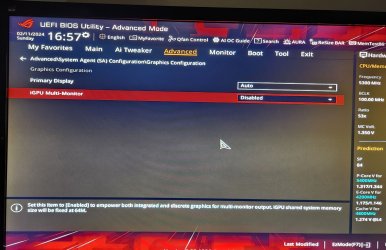
You don't see this setting in the Bios/UEFI? Same motherboard as yours except it's DDR4.

iGPU.jpg
 

My Computer My Computer

At a glance

Win 7/10/11
OS
Win 7/10/11
Computer type
PC/Desktop
Other Info
I'm a computer enthusiast so have quite a few systems that I run. More like an advanced hobby.

My Computers My Computers

  • At a glance

    Windows 11 26300.9278Amd Threadripper 7970X128GB (4 X 32) G.Skill DDR5 6400 (RDIMM)Gigabyte RTX 4090 OC
    OS
    Windows 11 26300.9278
    Computer type
    PC/Desktop
    Manufacturer/Model
    homebuilt
    CPU
    Amd Threadripper 7970X
    Motherboard
    Gigabyte TRX50 Aero D Rev. 1.0
    Memory
    128GB (4 X 32) G.Skill DDR5 6400 (RDIMM)
    Graphics Card(s)
    Gigabyte RTX 4090 OC
    Sound Card
    none (USB to speakers), Realtek
    Monitor(s) Displays
    Innocn 32" OLED
    Screen Resolution
    3840 X 2160 @ 60Hz
    Hard Drives
    Crucial T700 2TB M.2 NVME SSD
    WD 4TB Blue SATA SSD
    Seagate 18TB IronWolf Pro
    PSU
    BeQuiet! Straight Power 12 1500W
    Case
    Lian Li 011 Dynamic Evo XL
    Cooling
    SilverStone Technology XE360-TR5, with 3 Phanteks T30 fans
    Keyboard
    Cherry KC 500 MX LP (mechanical)
    Mouse
    Logitech M500s (wired)
    Internet Speed
    2000/250 Mbps (down/up)
    Other Info
    xFinity gateway
  • At a glance

    windows 11 26300.9278Intel I9-13900K64GB G.Skill DDR5-6000Gigabyte RTX 3090 ti
    Operating System
    windows 11 26300.9278
    Computer type
    PC/Desktop
    Manufacturer/Model
    homebuilt
    CPU
    Intel I9-13900K
    Motherboard
    Asus RoG Strix Z690-E
    Memory
    64GB G.Skill DDR5-6000
    Graphics card(s)
    Gigabyte RTX 3090 ti
    Sound Card
    built in Realtek
    Monitor(s) Displays
    Philips 27E1N8900 27" OLED
    Screen Resolution
    3840 X 2160 @60Hz
    Hard Drives
    WDC SN850 1TB
    8TB Seagate Ironwolf
    4TB Seagate Ironwolf
    PSU
    eVGA SuperNOVA 1300 GT
    Case
    Lian Li 011 Dynamic Evo
    Cooling
    Corsair iCUE H150i ELITE CAPELLIX Liquid CPU Cooler
    Keyboard
    Cherry Streaming (wired)
    Mouse
    Logitech M500s (wired)
You don't see this setting in the Bios/UEFI? Same motherboard as yours except it's DDR4.

View attachment 86815

No sir. Mine does have Primary Display ------ Auto but NOTHING else. Nothing that says iGPU Multi-Monitor. I am on 18.01 Bios are you ?
 

My Computer My Computer

At a glance

Win 11Intel Core i7-14700K64 GB DDR5-7000 SDRAMASUS TUF Gaming GeForce RTX 4080 OC Edition
OS
Win 11
Computer type
PC/Desktop
Manufacturer/Model
HYTE Y70 Dual Chamber Mid-Tower ATX Case
CPU
Intel Core i7-14700K
Motherboard
ASUS ROG STRIX Z790-A GAMING WIFI
Memory
64 GB DDR5-7000 SDRAM
Graphics Card(s)
ASUS TUF Gaming GeForce RTX 4080 OC Edition
Sound Card
Intel Raptor Lake-S PCH - cAVS
Monitor(s) Displays
BenQ GW2780 x ( 3 )
Screen Resolution
1920 x 1080
Hard Drives
WD_BLACK 2TB SN850X NVMe Gen4 PCIe, M.2 2280 x ( 2 )
PSU
Thermaltake Toughpower GF3 1350W
Case
HYTE Y70 Dual Chamber Mid-Tower ATX Case
Cooling
Corsair iCUE H170i Elite LCD XT
Keyboard
K95 RGB PLATINUM SE Mechanical Gaming Keyboard
Mouse
LOGi MX 3S
Internet Speed
1.5 GB
Yes, on 1801. You should be seeing that there unless some other bios/UEFI setting has removed it from view.
 

My Computer My Computer

At a glance

Win 7/10/11
OS
Win 7/10/11
Computer type
PC/Desktop
Other Info
I'm a computer enthusiast so have quite a few systems that I run. More like an advanced hobby.
Can you screen shot? bios setting.
 

My Computer My Computer

At a glance

Windows 11 Pro 25H2Intel Alder lake i7 12700K32 Gb Corsair Vengeance LPX DDR4 3200 XMP2EVGA 3070ti FTW3 Ultra Gaming & Intel Arc
OS
Windows 11 Pro 25H2
Computer type
PC/Desktop
Manufacturer/Model
My Self
CPU
Intel Alder lake i7 12700K
Motherboard
Asus z690 Gaming WiFi D4, Bios Ver 4505
Memory
32 Gb Corsair Vengeance LPX DDR4 3200 XMP2
Graphics Card(s)
EVGA 3070ti FTW3 Ultra Gaming & Intel Arc
Sound Card
Via Display port
Monitor(s) Displays
Dell AW2723DF
Screen Resolution
2560 x 1440 @ 280Hz G-Sync mode
Hard Drives
WD Black SN850 1Tb NVME (Boot Drive)
WD BLACK SN850X + Heatsink 1Tb NVME
Samsung 870 Qvo 1Tb SSD,
Pioneer DVD-RW DVR-219L
WD Black SN850x NVME 2Tb x2
PSU
Corsair RM850
Case
Phanteks Enthoo Pro M Tempered Glass
Cooling
Be Quiet Shadow Rock 3
Keyboard
Logitech G Pro
Mouse
Logitech G903, Lightspeed + Powerplay Mat
Internet Speed
900Mb/900Mb Fritz!Box 7590ax v2
Browser
Firefox
Antivirus
MS Defender
Other Info
Logitech C930e webcam
Synology DS218 play 2 x 4Tb Synology HAT3300-4T
FYI...discovered this topic here on the Forum. May or may not help in your specific case however.


My Computer My Computer

At a glance

Win 7/10/11
OS
Win 7/10/11
Computer type
PC/Desktop
Other Info
I'm a computer enthusiast so have quite a few systems that I run. More like an advanced hobby.
Back
Top Bottom