Personalization Hide or Show Notification Icons on Taskbar System Tray in Windows 11


Tasbar_corner_banner.png

This tutorial will show you how to show or hide notification icons that appear in the taskbar corner overflow menu or system tray for your account in Windows 11.

The taskbar corner overflow menu (Show hidden icons menu) in Windows 11 shows the hidden notification icons on the system tray for apps.

You can turn on or off system tray icons to appear either on the system tray (on) or in the taskbar corner overflow menu (off).

If you turn off an app's notification icon, its icon will show in the taskbar corner overflow menu and not on the taskbar system tray.

If you turn on an app's notification icon, its icon will show on the taskbar system tray and not in the taskbar corner overflow menu.

Starting with Windows 11 build 22621.1344, you can move icons to rearrange them in the “Show hidden icons” flyout menu.


Contents

  • Option One: Hide System Tray Icons in Taskbar Corner Overflow Menu via Drag and Drop
  • Option Two: Show System Tray Icons in Taskbar Corner Overflow Menu via Drag and Drop
  • Option Three: Hide or Show System Tray Icons in Taskbar Corner Overflow Menu in Settings


EXAMPLE: System tray icons and taskbar corner overflow menu

Taskbar_corner_notification_icons_Windows11.png
Taskbar_corner_notification_icons_off_Windows11.png


Option One

Hide System Tray Icons in Taskbar Corner Overflow Menu via Drag and Drop


1 Drag a system tray icon you want to move to the overflow menu above the taskbar, and drop the icon. (see screenshot below)

Drag-2.png


Option Two

Show System Tray Icons in Taskbar Corner Overflow Menu via Drag and Drop


1 Click/tap on the overflow menu arrow to open it. (see screenshot below).

2 Drag an icon from the overflow menu to the taskbar system tray, and drop the icon on the system tray.

Drag-1.png


Option Three

Hide or Show System Tray Icons in Taskbar Corner Overflow Menu in Settings


1 Open Settings (WIn+I).

2 Click/tap on Personalization on the left side, and click/tap on Taskbar on the right side. (see screenshot below)


Taskbar_corner_overflow_Windows11-1.png

3 Click/tap on Other system tray icons on the right side to expand it open. (see screenshot below step 4)

4 Turn On (show) or Off (hide) notification icons for apps you want. (see screenshot below)

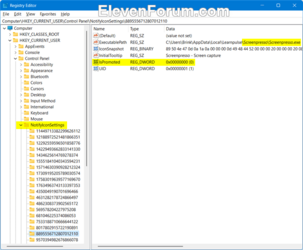
These settings are saved to the registry key below:

HKEY_CURRENT_USER\Control Panel\NotifyIconSettings\<ID for app>

IsPromoted
DWORD

0 = Off
1 = On
IsPromoted.png


Taskbar_corner_overflow_Windows11-2.png

5 You can now close Settings if you like.


That's it,
Shawn Brink


Last edited:

Tutorial updated to add options 1, 2, and 4. :-)
 

My Computers My Computers

  • At a glance

    Windows 11 Pro for WorkstationsIntel i7-8700K 5 GHz64 GB (4x16GB) G.SKILL TridentZ RGB DDR4 3600...ASUS ROG-STRIX-GTX1080TI-O11G-GAMING (11GB GD...
    OS
    Windows 11 Pro for Workstations
    Computer type
    PC/Desktop
    Manufacturer/Model
    Custom self build
    CPU
    Intel i7-8700K 5 GHz
    Motherboard
    ASUS ROG Maximus XI Formula Z390
    Memory
    64 GB (4x16GB) G.SKILL TridentZ RGB DDR4 3600 MHz (F4-3600C18D-32GTZR)
    Graphics Card(s)
    ASUS ROG-STRIX-GTX1080TI-O11G-GAMING (11GB GDDR5X)
    Sound Card
    Integrated Digital Audio (S/PDIF)
    Monitor(s) Displays
    2 x Samsung Odyssey G75 27"
    Screen Resolution
    2560x1440
    Hard Drives
    1TB Samsung 990 PRO M.2,
    4TB Samsung 990 PRO M.2,
    TerraMaster F8 SSD Plus NAS
    PSU
    Seasonic Prime Titanium 850W
    Case
    Thermaltake Core P3 wall mounted
    Cooling
    Corsair Hydro H115i
    Keyboard
    Amazon Basics Wired Full Keyboard MD005
    Mouse
    Logitech MX Master 4
    Internet Speed
    2 Gbps Download and 100 Mbps Upload
    Browser
    Chrome and Edge
    Antivirus
    Microsoft Defender
    Other Info
    Logitech Z625 speaker system,
    Logitech BRIO 4K Pro webcam,
    HP Color LaserJet Pro MFP M477fdn,
    CyberPower CP1500PFCLCD
    Galaxy S23 Plus phone
  • At a glance

    Windows 11 ProSnapdragon X Elite (12 core) 3.42 GHz16 GB LPDDR5x-7467 MHz
    Operating System
    Windows 11 Pro
    Computer type
    Laptop
    Manufacturer/Model
    Surface Laptop 7 Copilot+ PC
    CPU
    Snapdragon X Elite (12 core) 3.42 GHz
    Memory
    16 GB LPDDR5x-7467 MHz
    Monitor(s) Displays
    15" HDR
    Screen Resolution
    2496 x 1664
    Hard Drives
    1 TB SSD
    Internet Speed
    Wi-Fi 7 and Bluetooth 5.4
    Browser
    Chrome and Edge
    Antivirus
    Microsoft Defender
Thanks for the option 4. They should bring this option back to the basic settings.
 

My Computer My Computer

At a glance

Windows 11Intel Core i9nVidia Geforce RTX 2080 Super
OS
Windows 11
Computer type
Laptop
Manufacturer/Model
Asus ROG G732
CPU
Intel Core i9
Graphics Card(s)
nVidia Geforce RTX 2080 Super
How to create shortcut from option four ?
 

My Computer My Computer

At a glance

Windows 11
OS
Windows 11
How to create shortcut from option four ?

You could create a shortcut using: :-)

explorer shell:::{05d7b0f4-2121-4eff-bf6b-ed3f69b894d9}
 

My Computers My Computers

  • At a glance

    Windows 11 Pro for WorkstationsIntel i7-8700K 5 GHz64 GB (4x16GB) G.SKILL TridentZ RGB DDR4 3600...ASUS ROG-STRIX-GTX1080TI-O11G-GAMING (11GB GD...
    OS
    Windows 11 Pro for Workstations
    Computer type
    PC/Desktop
    Manufacturer/Model
    Custom self build
    CPU
    Intel i7-8700K 5 GHz
    Motherboard
    ASUS ROG Maximus XI Formula Z390
    Memory
    64 GB (4x16GB) G.SKILL TridentZ RGB DDR4 3600 MHz (F4-3600C18D-32GTZR)
    Graphics Card(s)
    ASUS ROG-STRIX-GTX1080TI-O11G-GAMING (11GB GDDR5X)
    Sound Card
    Integrated Digital Audio (S/PDIF)
    Monitor(s) Displays
    2 x Samsung Odyssey G75 27"
    Screen Resolution
    2560x1440
    Hard Drives
    1TB Samsung 990 PRO M.2,
    4TB Samsung 990 PRO M.2,
    TerraMaster F8 SSD Plus NAS
    PSU
    Seasonic Prime Titanium 850W
    Case
    Thermaltake Core P3 wall mounted
    Cooling
    Corsair Hydro H115i
    Keyboard
    Amazon Basics Wired Full Keyboard MD005
    Mouse
    Logitech MX Master 4
    Internet Speed
    2 Gbps Download and 100 Mbps Upload
    Browser
    Chrome and Edge
    Antivirus
    Microsoft Defender
    Other Info
    Logitech Z625 speaker system,
    Logitech BRIO 4K Pro webcam,
    HP Color LaserJet Pro MFP M477fdn,
    CyberPower CP1500PFCLCD
    Galaxy S23 Plus phone
  • At a glance

    Windows 11 ProSnapdragon X Elite (12 core) 3.42 GHz16 GB LPDDR5x-7467 MHz
    Operating System
    Windows 11 Pro
    Computer type
    Laptop
    Manufacturer/Model
    Surface Laptop 7 Copilot+ PC
    CPU
    Snapdragon X Elite (12 core) 3.42 GHz
    Memory
    16 GB LPDDR5x-7467 MHz
    Monitor(s) Displays
    15" HDR
    Screen Resolution
    2496 x 1664
    Hard Drives
    1 TB SSD
    Internet Speed
    Wi-Fi 7 and Bluetooth 5.4
    Browser
    Chrome and Edge
    Antivirus
    Microsoft Defender
You could create a shortcut using: :)

explorer shell:::{05d7b0f4-2121-4eff-bf6b-ed3f69b894d9}

Thanks! BTW I have to run this in a command prompt with Administrator privileges. Only then I am able to toggle the "Always show All icons" switch (otherwise the switch is stuck).
 

My Computers My Computers

  • At a glance

    Windows 11 ProIntel® Core™ i9-10940X - 14 CoresKingston HyperX Fury RGB 64GB DDR4-3200NVIDIA RTX 3060 Ti 8GB
    OS
    Windows 11 Pro
    Computer type
    PC/Desktop
    Manufacturer/Model
    Sharkoon SGC1 - RGB
    CPU
    Intel® Core™ i9-10940X - 14 Cores
    Motherboard
    Asus Prime X299-A II
    Memory
    Kingston HyperX Fury RGB 64GB DDR4-3200
    Graphics Card(s)
    NVIDIA RTX 3060 Ti 8GB
    Monitor(s) Displays
    LG Ultra HD
    Screen Resolution
    3840 x 2160
    Hard Drives
    SSD 4000GB Samsung 870 QVO SSD 500GB Crucial MX500 PSSD 2T Samsung T7 SCSI
    PSU
    850W Cooler Master
    Case
    Sharkoon SGC1 - RGB
    Cooling
    Cooler Master H412R
    Keyboard
    Corsair Vengeance-K70-RGB
    Mouse
    CONTUS Gaming Mouse
    Internet Speed
    1000/1000 (Mbps)
    Browser
    Chrome
    Antivirus
    Windows Defender
    Other Info
    CPU: Intel Core i9-10940X (Cascade Lake-X, L1)
    3300 MHz (33.00x100.0) @ 1183 MHz (12.00x98.6)
    Motherboard: ASUS PRIME X299-A II
    BIOS: 2001, 11/06/2024
    Chipset: Intel X299 (Kaby Lake)
    Memory: 65536 MBytes @ 1190 MHz, 17-17-17-39
    - 16384 MB PC25600 DDR4 SDRAM - Kingston KHX3200C16D4/16GX
    - 16384 MB PC25600 DDR4 SDRAM - Kingston KHX3200C16D4/16GX
    - 16384 MB PC25600 DDR4 SDRAM - Kingston KHX3200C16D4/16GX
    - 16384 MB PC25600 DDR4 SDRAM - Kingston KHX3200C16D4/16GX
    Graphics: NVIDIA GeForce RTX 3060 Ti
    NVIDIA GeForce RTX 3060 Ti, 8192 MB GDDR6 SDRAM
    Drive: CT500MX500SSD1, 488.4 GB, Serial ATA 6Gb/s @ 6Gb/s
    Drive: Samsung SSD 870 QVO 4TB, 3907.0 GB, Serial ATA 6Gb/s @ 6Gb/s
    Drive: Samsung SSD 860 QVO 4TB, 3907.0 GB, Serial ATA 6Gb/s @ 6Gb/s <-> USB
    Drive: Samsung SSD 860 EVO 4TB, 3907.0 GB, Serial ATA 6Gb/s @ 6Gb/s <-> USB
    Drive: Samsung Portable SSD T7, 1953.5 GB, NVMe
    Drive: Samsung Portable SSD T9, 3907.0 GB, NVMe
    Sound: Intel Kaby Lake - High Definition Audio / cAVS (Audio, Voice, Speech) [A0]
    Sound: NVIDIA GA104 - High Definition Audio Controller
    Network: Intel Ethernet Connection I219-V
    OS: Microsoft Windows 11 Professional (x64) Build 26200.8655 (25H2)


    MY THIRD DESKTOP SYSTEM
    ===================
    Computer: PCSpecialist Amd Trx50
    CPU: AMD Ryzen Threadripper 9980X (Shimada Peak, SHP-C1)
    3200 MHz (32.00x100.0) @ 2481 MHz (24.86x99.8)
    Motherboard: ASUS Pro WS TRX50-SAGE WIFI
    BIOS: 1203, 07/18/2025
    Chipset: AMD TRX50 (Promontory PROM21L.1)
    Memory: 262144 MBytes @ 3200 MHz, 52-52-52-103
    - 65536 MB PC51200 DDR5 SDRAM - Kingston 9965844-002.A01G
    - 65536 MB PC51200 DDR5 SDRAM - Kingston 9965844-002.A01G
    - 65536 MB PC51200 DDR5 SDRAM - Kingston 9965844-002.A01G
    - 65536 MB PC51200 DDR5 SDRAM - Kingston 9965844-002.A01G
    Graphics: Palit GeForce RTX 5080
    NVIDIA GeForce RTX 5080, 16303 MB GDDR7 SDRAM
    Drive: Samsung SSD 9100 PRO 4TB, 3907.0 GB, NVMe
    Drive: Corsair MP600 PRO NH, 7814.0 GB, NVMe
    Drive: CT2000T705SSD3, 1953.5 GB, NVMe
    Sound: NVIDIA GB203 - High Definition Audio Controller
    Sound: AMD Stones/Breithorn - HD Audio Controller (AZ)
    Network: Aquantia/Marvell AQC113 FastLinQ Edge 10Gbit Network Adapter
    Network: Intel Ethernet Controller I226-LM
    OS: Microsoft Windows 11 Professional (x64) Build 26200.8655 (25H2)
  • At a glance

    Windows 11 ProIntel® Core™ i5-12600KF - 10 CoresRAIDER GAMING 64GB DDR4-3200MSI GeForce RTX 4060 Ventus 2X Black 8G OC
    Operating System
    Windows 11 Pro
    Computer type
    PC/Desktop
    Manufacturer/Model
    MSI Intel
    CPU
    Intel® Core™ i5-12600KF - 10 Cores
    Motherboard
    MSI Pro B660M-G DDR4
    Memory
    RAIDER GAMING 64GB DDR4-3200
    Graphics card(s)
    MSI GeForce RTX 4060 Ventus 2X Black 8G OC
    Monitor(s) Displays
    Odyssey G70NC
    Screen Resolution
    3840 x 2160, 120 Hz - (HDR)
    Hard Drives
    MSI Spatium M371 500GB + 7x SSD 4TB
    PSU
    550 Watt MSI
    Case
    MSI MAG Forge 112R
    Cooling
    Watercooling MSI MAG CoreLiquid 240R V2 Black
    Internet Speed
    1000/1000 (Mbps)
    Browser
    Brave
    Antivirus
    Windows Defender
    Other Info
    Computer: MSI MS-7D45
    CPU: Intel Core i5-12600KF (Alder Lake-S 640, C0)
    3700 MHz (37.00x100.0) @ 798 MHz (8.00x99.8)
    Motherboard: MSI PRO B660M-G DDR4 (MS-7D45)
    BIOS: 1.O0, 08/07/2025
    Chipset: Intel B660 (Alder Lake-S PCH)
    Memory: 65536 MBytes @ 1596 MHz, 22-22-22-52
    - 32768 MB PC25600 DDR4 SDRAM - Crucial Technology CT32G4DFD832A.C16FF
    - 32768 MB PC25600 DDR4 SDRAM - Crucial Technology CT32G4DFD832A.C16FF
    Graphics: MSI RTX 4060 Ventus 2X Black OC
    NVIDIA GeForce RTX 4060, 8188 MB GDDR6 SDRAM
    Drive: MSI M371 500GB, 488.4 GB, NVMe
    Drive: Samsung SSD 870 QVO 8TB, 7814.0 GB, Serial ATA 6Gb/s @ 6Gb/s <-> USB
    Drive: Samsung SSD 870 QVO 8TB, 7814.0 GB, Serial ATA 6Gb/s @ 6Gb/s <-> USB
    Drive: Samsung Portable SSD T9, 3907.0 GB, NVMe
    Drive: Samsung Portable SSD T9, 3907.0 GB, NVMe
    Sound: Intel Alder Lake-S PCH - cAVS (Audio, Voice, Speech)
    Sound: NVIDIA AD106 - High Definition Audio Controller
    Network: RealTek Semiconductor RTL8125 Gaming 2.5GbE Family Ethernet Controller
    OS: Microsoft Windows 11 Professional (x64) Build 26200.8655 (25H2)
You could create a shortcut using: :)

explorer shell:::{05d7b0f4-2121-4eff-bf6b-ed3f69b894d9}
In order for this option 4 (old Control Panel) to work, the EnableAutoTray must be enabled.

Code:
[HKEY_CURRENT_USER\Software\Microsoft\Windows\CurrentVersion\Explorer]
"EnableAutoTray"=dword:00000001

The problem is that Explorer resets it back to disabled every time you check the box, so we have to redo these steps every time Explorer restarts. It seems to be an Explorer bug.
 

My Computer My Computer

At a glance

Windows 11
OS
Windows 11
Finding that Option 2 (click and drag overflow icons into the SysTray) works on all devices (about 11-12 so far), and has stayed as set.

PIA to have to do with every install, but it works, and more importantly, stays working.
 

My Computers My Computers

  • At a glance

    Windows 11 2xH2 (latest update ... forever anal)Intel i5-124008GBNVIDIA GeForce GT730
    OS
    Windows 11 2xH2 (latest update ... forever anal)
    Computer type
    PC/Desktop
    Manufacturer/Model
    HP Slim S01
    CPU
    Intel i5-12400
    Memory
    8GB
    Graphics Card(s)
    NVIDIA GeForce GT730
    Sound Card
    OOBE
    Monitor(s) Displays
    Acer 32"
    Screen Resolution
    1920x1080
    Hard Drives
    512GB KIOXIA NVMe
    1TB SATA SSD
    PSU
    OOBE
    Case
    OOBE
    Cooling
    OOBE
    Keyboard
    BT
    Mouse
    BT
    Browser
    Brave FFox Chrome Opera
    Antivirus
    KIS
  • At a glance

    Windows 11 Pro 2xH2 (latest update ... 4ever ...i7-1165G7 @ 2.80GHzIntel Iris Xe Graphics
    Operating System
    Windows 11 Pro 2xH2 (latest update ... 4ever anal)
    Computer type
    Laptop
    Manufacturer/Model
    HP Pavillion 15
    CPU
    i7-1165G7 @ 2.80GHz
    Graphics card(s)
    Intel Iris Xe Graphics
    Hard Drives
    Samsung NVMe 512GB
    + numerous/multiple SSD Type C USB enclosures
    Internet Speed
    NBN FTTN 50
    Browser
    Brave
    Antivirus
    KIS
Fast forward to Mar '22... Has anyone found a way to do this with Group Policy yet?
 

My Computer My Computer

At a glance

Windows 11
OS
Windows 11
Computer type
PC/Desktop
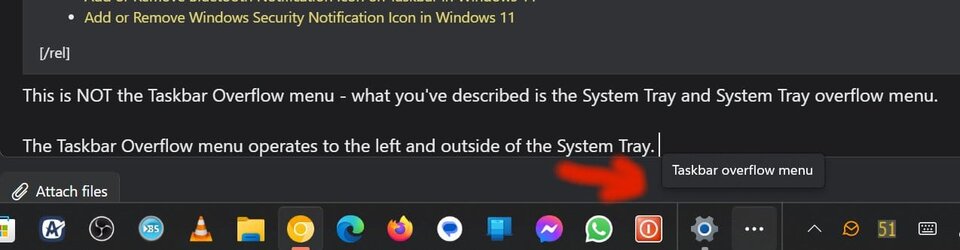
This is NOT the Taskbar Overflow menu - what you've described is the System Tray and System Tray overflow menu.

The Taskbar Overflow menu operates to the left and outside of the System Tray.
 

Attachments

  • SystemTrayIcons.jpg
    SystemTrayIcons.jpg
    90.2 KB · Views: 206
  • TaskbarOverflow.jpg
    TaskbarOverflow.jpg
    38.3 KB · Views: 183

My Computer My Computer

At a glance

Windows 11 Prox6416GB
OS
Windows 11 Pro
Computer type
Laptop
Manufacturer/Model
Lenovo
CPU
x64
Memory
16GB
Yeah, I've always known it as either the "System Tray" or the "Service Tray" using earlier versions of Windows. I find it invaluable letting me know what's running in the background like a program processing files or whether a VPN that's either been turned on or turned off.

I need to pin some of them to the taskbar (VPN) and I want others to appear in the ^ menu at all times, like the way it behaved in Windows 7, for example.
 

My Computers My Computers

  • At a glance

    Windows 11 Pro 25H2 build: (26200.7623)32GB
    OS
    Windows 11 Pro 25H2 build: (26200.7623)
    Computer type
    Laptop
    Manufacturer/Model
    Microsoft Surface Pro
    Memory
    32GB
  • At a glance

    Microsoft 25H2 ProIntel Core Ultra 764GBIntel Integrated Graphics
    Operating System
    Microsoft 25H2 Pro
    Computer type
    Laptop
    Manufacturer/Model
    Dell Pro 14 - PC14250
    CPU
    Intel Core Ultra 7
    Memory
    64GB
    Graphics card(s)
    Intel Integrated Graphics
    Hard Drives
    Micron 1TB SSD
This is NOT the Taskbar Overflow menu - what you've described is the System Tray and System Tray overflow menu.

The Taskbar Overflow menu operates to the left and outside of the System Tray.

Hello, :-)

Please do note the difference between taskbar corner overflow menu and taskbar overflow menu.

Originally, this was called "taskbar corner overflow" in settings before it was renamed to "Other system tray icons".

It was most likely renamed since the "taskbar overflow menu" name is now used for the the actual taskbar icons instead of system tray icons (aka: notification icons) to avoid this type of confusion between them.

I've updated the wording in the tutorial to help.

Copy of old "taskbar corner" name used in settings:

taskbar_corner_overflow_icons-after_reset-png.1323
 
Last edited:

My Computers My Computers

  • At a glance

    Windows 11 Pro for WorkstationsIntel i7-8700K 5 GHz64 GB (4x16GB) G.SKILL TridentZ RGB DDR4 3600...ASUS ROG-STRIX-GTX1080TI-O11G-GAMING (11GB GD...
    OS
    Windows 11 Pro for Workstations
    Computer type
    PC/Desktop
    Manufacturer/Model
    Custom self build
    CPU
    Intel i7-8700K 5 GHz
    Motherboard
    ASUS ROG Maximus XI Formula Z390
    Memory
    64 GB (4x16GB) G.SKILL TridentZ RGB DDR4 3600 MHz (F4-3600C18D-32GTZR)
    Graphics Card(s)
    ASUS ROG-STRIX-GTX1080TI-O11G-GAMING (11GB GDDR5X)
    Sound Card
    Integrated Digital Audio (S/PDIF)
    Monitor(s) Displays
    2 x Samsung Odyssey G75 27"
    Screen Resolution
    2560x1440
    Hard Drives
    1TB Samsung 990 PRO M.2,
    4TB Samsung 990 PRO M.2,
    TerraMaster F8 SSD Plus NAS
    PSU
    Seasonic Prime Titanium 850W
    Case
    Thermaltake Core P3 wall mounted
    Cooling
    Corsair Hydro H115i
    Keyboard
    Amazon Basics Wired Full Keyboard MD005
    Mouse
    Logitech MX Master 4
    Internet Speed
    2 Gbps Download and 100 Mbps Upload
    Browser
    Chrome and Edge
    Antivirus
    Microsoft Defender
    Other Info
    Logitech Z625 speaker system,
    Logitech BRIO 4K Pro webcam,
    HP Color LaserJet Pro MFP M477fdn,
    CyberPower CP1500PFCLCD
    Galaxy S23 Plus phone
  • At a glance

    Windows 11 ProSnapdragon X Elite (12 core) 3.42 GHz16 GB LPDDR5x-7467 MHz
    Operating System
    Windows 11 Pro
    Computer type
    Laptop
    Manufacturer/Model
    Surface Laptop 7 Copilot+ PC
    CPU
    Snapdragon X Elite (12 core) 3.42 GHz
    Memory
    16 GB LPDDR5x-7467 MHz
    Monitor(s) Displays
    15" HDR
    Screen Resolution
    2496 x 1664
    Hard Drives
    1 TB SSD
    Internet Speed
    Wi-Fi 7 and Bluetooth 5.4
    Browser
    Chrome and Edge
    Antivirus
    Microsoft Defender
I haven't had an opportunity to experiment with the Taskbar Overflow Menu, but...,
... if you have Taskbar Alignment set to Centered, does the Start Orb and icons move dynamically to the left as the Taskbar fills up?
 

My Computers My Computers

  • At a glance

    Windows 11 Pro
    OS
    Windows 11 Pro
    Computer type
    PC/Desktop
    Manufacturer/Model
    ASUS ROG Strix
  • At a glance

    Windows 11 Pro
    Operating System
    Windows 11 Pro
    Computer type
    Laptop
    Manufacturer/Model
    ASUS VivoBook
  • ASUS VivoBook 'Lite' ~ Windows 11 Home
I haven't had an opportunity to experiment with the Taskbar Overflow Menu, but...,
... if you have Taskbar Alignment set to Centered, does the Start Orb and icons move dynamically to the left as the Taskbar fills up?

Hello Edwin, :alien:

The taskbar icons when centered expand out on the taskbar while remaining centered until the taskbar fills up, then they expand into the "taskbar overflow menu".
 

My Computers My Computers

  • At a glance

    Windows 11 Pro for WorkstationsIntel i7-8700K 5 GHz64 GB (4x16GB) G.SKILL TridentZ RGB DDR4 3600...ASUS ROG-STRIX-GTX1080TI-O11G-GAMING (11GB GD...
    OS
    Windows 11 Pro for Workstations
    Computer type
    PC/Desktop
    Manufacturer/Model
    Custom self build
    CPU
    Intel i7-8700K 5 GHz
    Motherboard
    ASUS ROG Maximus XI Formula Z390
    Memory
    64 GB (4x16GB) G.SKILL TridentZ RGB DDR4 3600 MHz (F4-3600C18D-32GTZR)
    Graphics Card(s)
    ASUS ROG-STRIX-GTX1080TI-O11G-GAMING (11GB GDDR5X)
    Sound Card
    Integrated Digital Audio (S/PDIF)
    Monitor(s) Displays
    2 x Samsung Odyssey G75 27"
    Screen Resolution
    2560x1440
    Hard Drives
    1TB Samsung 990 PRO M.2,
    4TB Samsung 990 PRO M.2,
    TerraMaster F8 SSD Plus NAS
    PSU
    Seasonic Prime Titanium 850W
    Case
    Thermaltake Core P3 wall mounted
    Cooling
    Corsair Hydro H115i
    Keyboard
    Amazon Basics Wired Full Keyboard MD005
    Mouse
    Logitech MX Master 4
    Internet Speed
    2 Gbps Download and 100 Mbps Upload
    Browser
    Chrome and Edge
    Antivirus
    Microsoft Defender
    Other Info
    Logitech Z625 speaker system,
    Logitech BRIO 4K Pro webcam,
    HP Color LaserJet Pro MFP M477fdn,
    CyberPower CP1500PFCLCD
    Galaxy S23 Plus phone
  • At a glance

    Windows 11 ProSnapdragon X Elite (12 core) 3.42 GHz16 GB LPDDR5x-7467 MHz
    Operating System
    Windows 11 Pro
    Computer type
    Laptop
    Manufacturer/Model
    Surface Laptop 7 Copilot+ PC
    CPU
    Snapdragon X Elite (12 core) 3.42 GHz
    Memory
    16 GB LPDDR5x-7467 MHz
    Monitor(s) Displays
    15" HDR
    Screen Resolution
    2496 x 1664
    Hard Drives
    1 TB SSD
    Internet Speed
    Wi-Fi 7 and Bluetooth 5.4
    Browser
    Chrome and Edge
    Antivirus
    Microsoft Defender
The taskbar icons when centered expand out on the taskbar while remaining centered until the taskbar fills up, then they expand into the "taskbar overflow menu".
(y)
Kinda makes me wonder though, why anyone would want the Taskbar Alignment set to Centered when it makes the Taskbar icons overflow all the more quickly!?!?!? 🤷‍♂️
 

My Computers My Computers

  • At a glance

    Windows 11 Pro
    OS
    Windows 11 Pro
    Computer type
    PC/Desktop
    Manufacturer/Model
    ASUS ROG Strix
  • At a glance

    Windows 11 Pro
    Operating System
    Windows 11 Pro
    Computer type
    Laptop
    Manufacturer/Model
    ASUS VivoBook
  • ASUS VivoBook 'Lite' ~ Windows 11 Home
(y)
Kinda makes me wonder though, why anyone would want the Taskbar Alignment set to Centered when it makes the Taskbar icons overflow all the more quickly!?!?!? 🤷‍♂️
It should be about the same since it all depends on when the taskbar is full (left or center) before the icons expand into the "taskbar overflow menu".
 

My Computers My Computers

  • At a glance

    Windows 11 Pro for WorkstationsIntel i7-8700K 5 GHz64 GB (4x16GB) G.SKILL TridentZ RGB DDR4 3600...ASUS ROG-STRIX-GTX1080TI-O11G-GAMING (11GB GD...
    OS
    Windows 11 Pro for Workstations
    Computer type
    PC/Desktop
    Manufacturer/Model
    Custom self build
    CPU
    Intel i7-8700K 5 GHz
    Motherboard
    ASUS ROG Maximus XI Formula Z390
    Memory
    64 GB (4x16GB) G.SKILL TridentZ RGB DDR4 3600 MHz (F4-3600C18D-32GTZR)
    Graphics Card(s)
    ASUS ROG-STRIX-GTX1080TI-O11G-GAMING (11GB GDDR5X)
    Sound Card
    Integrated Digital Audio (S/PDIF)
    Monitor(s) Displays
    2 x Samsung Odyssey G75 27"
    Screen Resolution
    2560x1440
    Hard Drives
    1TB Samsung 990 PRO M.2,
    4TB Samsung 990 PRO M.2,
    TerraMaster F8 SSD Plus NAS
    PSU
    Seasonic Prime Titanium 850W
    Case
    Thermaltake Core P3 wall mounted
    Cooling
    Corsair Hydro H115i
    Keyboard
    Amazon Basics Wired Full Keyboard MD005
    Mouse
    Logitech MX Master 4
    Internet Speed
    2 Gbps Download and 100 Mbps Upload
    Browser
    Chrome and Edge
    Antivirus
    Microsoft Defender
    Other Info
    Logitech Z625 speaker system,
    Logitech BRIO 4K Pro webcam,
    HP Color LaserJet Pro MFP M477fdn,
    CyberPower CP1500PFCLCD
    Galaxy S23 Plus phone
  • At a glance

    Windows 11 ProSnapdragon X Elite (12 core) 3.42 GHz16 GB LPDDR5x-7467 MHz
    Operating System
    Windows 11 Pro
    Computer type
    Laptop
    Manufacturer/Model
    Surface Laptop 7 Copilot+ PC
    CPU
    Snapdragon X Elite (12 core) 3.42 GHz
    Memory
    16 GB LPDDR5x-7467 MHz
    Monitor(s) Displays
    15" HDR
    Screen Resolution
    2496 x 1664
    Hard Drives
    1 TB SSD
    Internet Speed
    Wi-Fi 7 and Bluetooth 5.4
    Browser
    Chrome and Edge
    Antivirus
    Microsoft Defender
Why doesn't the setting persist after reboot (restart)? Is this a bug, or am I wrong? DnD (Drag & Drop) misses after restart (Dragging an icon to unhide it from the overflow arrow).


ss.png
 

My Computer My Computer

At a glance

Win 11 Enterprisei7
OS
Win 11 Enterprise
Computer type
Laptop
CPU
i7
Hard Drives
SSD
Hello @atinfo, :alien:

The Hidden icon menu setting only affects if the taskbar corner menu shows or not.

If Hidden icon menu is turned off, you can still turn on/off apps to show in it or not. If you turn off an app or drag and drop it above the taskbar, it will be hidden in this menu which is also hidden.

If Hidden icon menu is turned on, then you will be able to see and open this menu to see all the apps you have turned off to show in it only and not on the system tray.
 

My Computers My Computers

  • At a glance

    Windows 11 Pro for WorkstationsIntel i7-8700K 5 GHz64 GB (4x16GB) G.SKILL TridentZ RGB DDR4 3600...ASUS ROG-STRIX-GTX1080TI-O11G-GAMING (11GB GD...
    OS
    Windows 11 Pro for Workstations
    Computer type
    PC/Desktop
    Manufacturer/Model
    Custom self build
    CPU
    Intel i7-8700K 5 GHz
    Motherboard
    ASUS ROG Maximus XI Formula Z390
    Memory
    64 GB (4x16GB) G.SKILL TridentZ RGB DDR4 3600 MHz (F4-3600C18D-32GTZR)
    Graphics Card(s)
    ASUS ROG-STRIX-GTX1080TI-O11G-GAMING (11GB GDDR5X)
    Sound Card
    Integrated Digital Audio (S/PDIF)
    Monitor(s) Displays
    2 x Samsung Odyssey G75 27"
    Screen Resolution
    2560x1440
    Hard Drives
    1TB Samsung 990 PRO M.2,
    4TB Samsung 990 PRO M.2,
    TerraMaster F8 SSD Plus NAS
    PSU
    Seasonic Prime Titanium 850W
    Case
    Thermaltake Core P3 wall mounted
    Cooling
    Corsair Hydro H115i
    Keyboard
    Amazon Basics Wired Full Keyboard MD005
    Mouse
    Logitech MX Master 4
    Internet Speed
    2 Gbps Download and 100 Mbps Upload
    Browser
    Chrome and Edge
    Antivirus
    Microsoft Defender
    Other Info
    Logitech Z625 speaker system,
    Logitech BRIO 4K Pro webcam,
    HP Color LaserJet Pro MFP M477fdn,
    CyberPower CP1500PFCLCD
    Galaxy S23 Plus phone
  • At a glance

    Windows 11 ProSnapdragon X Elite (12 core) 3.42 GHz16 GB LPDDR5x-7467 MHz
    Operating System
    Windows 11 Pro
    Computer type
    Laptop
    Manufacturer/Model
    Surface Laptop 7 Copilot+ PC
    CPU
    Snapdragon X Elite (12 core) 3.42 GHz
    Memory
    16 GB LPDDR5x-7467 MHz
    Monitor(s) Displays
    15" HDR
    Screen Resolution
    2496 x 1664
    Hard Drives
    1 TB SSD
    Internet Speed
    Wi-Fi 7 and Bluetooth 5.4
    Browser
    Chrome and Edge
    Antivirus
    Microsoft Defender
Hello Mr @Brink,
Thanks, but I didn't understand! What a complicated option for such a simple behaviour! I'll try to solve it. I realized that's MY wrong.
I've had this problem since M2 (moment) update and it's a headache because after every restart the icons go hidden, I mean are showing on the overflow tray arrow (If I minimize them to the tray).
Many thanks. :shawn:
 

My Computer My Computer

At a glance

Win 11 Enterprisei7
OS
Win 11 Enterprise
Computer type
Laptop
CPU
i7
Hard Drives
SSD
Hello Mr @Brink,
Thanks, but I didn't understand! What a complicated option for such a simple behaviour! I'll try to solve it. I realized that's MY wrong.
I've had this problem since M2 (moment) update and it's a headache because after every restart the icons go hidden, I mean are showing on the overflow tray arrow (If I minimize them to the tray).
Many thanks. :shawn:

I'm not sure why NP++ gets turned off like that. You might check to see if NP++ may have its own setting overriding this.
 

My Computers My Computers

  • At a glance

    Windows 11 Pro for WorkstationsIntel i7-8700K 5 GHz64 GB (4x16GB) G.SKILL TridentZ RGB DDR4 3600...ASUS ROG-STRIX-GTX1080TI-O11G-GAMING (11GB GD...
    OS
    Windows 11 Pro for Workstations
    Computer type
    PC/Desktop
    Manufacturer/Model
    Custom self build
    CPU
    Intel i7-8700K 5 GHz
    Motherboard
    ASUS ROG Maximus XI Formula Z390
    Memory
    64 GB (4x16GB) G.SKILL TridentZ RGB DDR4 3600 MHz (F4-3600C18D-32GTZR)
    Graphics Card(s)
    ASUS ROG-STRIX-GTX1080TI-O11G-GAMING (11GB GDDR5X)
    Sound Card
    Integrated Digital Audio (S/PDIF)
    Monitor(s) Displays
    2 x Samsung Odyssey G75 27"
    Screen Resolution
    2560x1440
    Hard Drives
    1TB Samsung 990 PRO M.2,
    4TB Samsung 990 PRO M.2,
    TerraMaster F8 SSD Plus NAS
    PSU
    Seasonic Prime Titanium 850W
    Case
    Thermaltake Core P3 wall mounted
    Cooling
    Corsair Hydro H115i
    Keyboard
    Amazon Basics Wired Full Keyboard MD005
    Mouse
    Logitech MX Master 4
    Internet Speed
    2 Gbps Download and 100 Mbps Upload
    Browser
    Chrome and Edge
    Antivirus
    Microsoft Defender
    Other Info
    Logitech Z625 speaker system,
    Logitech BRIO 4K Pro webcam,
    HP Color LaserJet Pro MFP M477fdn,
    CyberPower CP1500PFCLCD
    Galaxy S23 Plus phone
  • At a glance

    Windows 11 ProSnapdragon X Elite (12 core) 3.42 GHz16 GB LPDDR5x-7467 MHz
    Operating System
    Windows 11 Pro
    Computer type
    Laptop
    Manufacturer/Model
    Surface Laptop 7 Copilot+ PC
    CPU
    Snapdragon X Elite (12 core) 3.42 GHz
    Memory
    16 GB LPDDR5x-7467 MHz
    Monitor(s) Displays
    15" HDR
    Screen Resolution
    2496 x 1664
    Hard Drives
    1 TB SSD
    Internet Speed
    Wi-Fi 7 and Bluetooth 5.4
    Browser
    Chrome and Edge
    Antivirus
    Microsoft Defender
Back
Top Bottom