Solved Holy Cow! Unable to search files in File Explorer!


RDG

Active member
Member
Local time
5:23 AM
Posts
176
OS
B0rn2luz!
Win11 Home: Rebooted and still cannot search files. It finds nothing, no matter what. Any idea what could have caused this or what I should do? Thanks.
 
Windows Build/Version
Version 10.0.26100 Build 26100

My Computer

System One

  • OS
    B0rn2luz!
    Computer type
    PC/Desktop
    Manufacturer/Model
    Lenovo ThinkCentre M920S SFF
    CPU
    Intel(R) Core(TM) i5-8500 CPU @ 3.00GHz
    Memory
    Storage: 4.6 TB, Installed RAM: 32 GB (31.9 GB usable)
    Cooling
    No fan
    Internet Speed
    Fiber optics 600-700 download and upload
    Browser
    Firefox
    Antivirus
    Avast
    Other Info
    Product Number: 10ST008NUS

My Computers

System One System Two

  • OS
    Windows 11 Pro 25H2
    Computer type
    PC/Desktop
    Manufacturer/Model
    Dell Optiplex 7080
    CPU
    i9-10900 10 core 20 threads
    Motherboard
    DELL 0J37VM
    Memory
    32 gb
    Graphics Card(s)
    none-Intel UHD Graphics 630
    Sound Card
    Integrated Realtek
    Monitor(s) Displays
    Benq 27
    Screen Resolution
    2560x1440
    Hard Drives
    2x1tb Solidigm m.2 nvme /External drives 512gb Samsung m.2 sata+2tb Kingston m2.nvme
    PSU
    500w
    Case
    MT
    Cooling
    Dell Premium
    Keyboard
    Logitech wired
    Mouse
    Logitech wireless
    Internet Speed
    so slow I'm too embarrassed to tell
    Browser
    #1 Edge #2 Firefox
    Antivirus
    Defender+MWB Premium
  • Operating System
    Windows 11 Pro 24H2 26200.8457
    Computer type
    PC/Desktop
    Manufacturer/Model
    Beelink Mini PC SER5
    CPU
    AMD Ryzen 7 6800U
    Memory
    32 gb
    Graphics card(s)
    integrated
    Sound Card
    integrated
    Monitor(s) Displays
    Benq 27
    Screen Resolution
    2560x1440
    Hard Drives
    1TB Crucial nvme
    Keyboard
    Logitech wired
    Mouse
    Logitech wireless
    Internet Speed
    still too embarrassed to tell
    Browser
    Firefox
    Antivirus
    Defender
    Other Info
    System 3 is non compliant Dell 9020 i7-4770/24gb ram Win11 PRO 26200.8457
And this. Do this one first then the one above
 

My Computers

System One System Two

  • OS
    Windows 11 Pro 25H2
    Computer type
    PC/Desktop
    Manufacturer/Model
    Dell Optiplex 7080
    CPU
    i9-10900 10 core 20 threads
    Motherboard
    DELL 0J37VM
    Memory
    32 gb
    Graphics Card(s)
    none-Intel UHD Graphics 630
    Sound Card
    Integrated Realtek
    Monitor(s) Displays
    Benq 27
    Screen Resolution
    2560x1440
    Hard Drives
    2x1tb Solidigm m.2 nvme /External drives 512gb Samsung m.2 sata+2tb Kingston m2.nvme
    PSU
    500w
    Case
    MT
    Cooling
    Dell Premium
    Keyboard
    Logitech wired
    Mouse
    Logitech wireless
    Internet Speed
    so slow I'm too embarrassed to tell
    Browser
    #1 Edge #2 Firefox
    Antivirus
    Defender+MWB Premium
  • Operating System
    Windows 11 Pro 24H2 26200.8457
    Computer type
    PC/Desktop
    Manufacturer/Model
    Beelink Mini PC SER5
    CPU
    AMD Ryzen 7 6800U
    Memory
    32 gb
    Graphics card(s)
    integrated
    Sound Card
    integrated
    Monitor(s) Displays
    Benq 27
    Screen Resolution
    2560x1440
    Hard Drives
    1TB Crucial nvme
    Keyboard
    Logitech wired
    Mouse
    Logitech wireless
    Internet Speed
    still too embarrassed to tell
    Browser
    Firefox
    Antivirus
    Defender
    Other Info
    System 3 is non compliant Dell 9020 i7-4770/24gb ram Win11 PRO 26200.8457
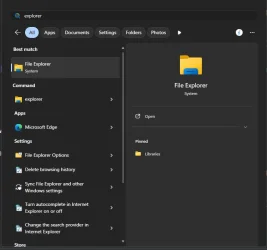
Does it find nothing or is search not functioning? Open start menu and search for “explorer”. Post a screenshot of what it looks like please
 

My Computer

System One

  • OS
    Windows 11 Pro
  • Like
Reactions: RDG
still cannot search files
"search files" (as in content search) or "search FOR files"??

In any case, built-in Explorer search has been flawed for so long - inaccurate, unreliable, unsustainable. It could never be relied upon for any sort of complete search

Far superior 3rd party freeware options
- Everything
- Ultrasearch
- Agent ransack
- et al. Your search engine would be your friend
 

My Computers

System One System Two

  • OS
    Windows 11 2xH2 (latest update ... forever anal)
    Computer type
    PC/Desktop
    Manufacturer/Model
    HP Slim S01
    CPU
    Intel i5-12400
    Memory
    8GB
    Graphics Card(s)
    NVIDIA GeForce GT730
    Sound Card
    OOBE
    Monitor(s) Displays
    Acer 32"
    Screen Resolution
    1920x1080
    Hard Drives
    512GB KIOXIA NVMe
    1TB SATA SSD
    PSU
    OOBE
    Case
    OOBE
    Cooling
    OOBE
    Keyboard
    BT
    Mouse
    BT
    Browser
    Brave FFox Chrome Opera
    Antivirus
    KIS
  • Operating System
    Windows 11 Pro 2xH2 (latest update ... 4ever anal)
    Computer type
    Laptop
    Manufacturer/Model
    HP Pavillion 15
    CPU
    i7-1165G7 @ 2.80GHz
    Graphics card(s)
    Intel Iris Xe Graphics
    Hard Drives
    Samsung NVMe 512GB
    + numerous/multiple SSD Type C USB enclosures
    Internet Speed
    NBN FTTN 50
    Browser
    Brave
    Antivirus
    KIS
Does it find nothing or is search not functioning? Open start menu and search for “explorer”. Post a screenshot of what it looks like please
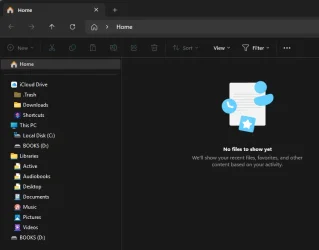
Is this what you mean?
 

Attachments

  • Shot2.webp
    Shot2.webp
    18.2 KB · Views: 2
  • Shot3.webp
    Shot3.webp
    19.7 KB · Views: 2

My Computer

System One

  • OS
    B0rn2luz!
    Computer type
    PC/Desktop
    Manufacturer/Model
    Lenovo ThinkCentre M920S SFF
    CPU
    Intel(R) Core(TM) i5-8500 CPU @ 3.00GHz
    Memory
    Storage: 4.6 TB, Installed RAM: 32 GB (31.9 GB usable)
    Cooling
    No fan
    Internet Speed
    Fiber optics 600-700 download and upload
    Browser
    Firefox
    Antivirus
    Avast
    Other Info
    Product Number: 10ST008NUS
your search looks to be working based on the start menu image. what is not working? FE? have you tried from a folder aside from Home?
 

My Computer

System One

  • OS
    Windows 11 Pro
  • Love
Reactions: RDG
"search files" (as in content search) or "search FOR files"??

In any case, built-in Explorer search has been flawed for so long - inaccurate, unreliable, unsustainable. It could never be relied upon for any sort of complete search

Far superior 3rd party freeware options
- Everything
- Ultrasearch
- Agent ransack
- et al. Your search engine would be your friend
I stayed with Win7 for eons and would still be kicking and screaming with Win11 if not for the wonderful help I got in "taming" it from this forum. What they could not fix, however, was File Explorer. With some tweaks and a few apps, I had been enduring it. Maybe it is time to try something else (just watched the "Everything" video above), but I sure want to know how I managed to break search.
 

My Computer

System One

  • OS
    B0rn2luz!
    Computer type
    PC/Desktop
    Manufacturer/Model
    Lenovo ThinkCentre M920S SFF
    CPU
    Intel(R) Core(TM) i5-8500 CPU @ 3.00GHz
    Memory
    Storage: 4.6 TB, Installed RAM: 32 GB (31.9 GB usable)
    Cooling
    No fan
    Internet Speed
    Fiber optics 600-700 download and upload
    Browser
    Firefox
    Antivirus
    Avast
    Other Info
    Product Number: 10ST008NUS
your search looks to be working based on the start menu image. what is not working? FE? have you tried from a folder aside from Home?
When you said search seemed to be working I recalled that all my files and folders are on an external drive. So I searched while in the C drive; no problem. Initially, through steps in a tutorial likely from here, I linked the remote location of the libraries. That is where the problem lies. If I access a folder through the library then searching fails. If I go directly to the folder on the external drive, search works.
 

My Computer

System One

  • OS
    B0rn2luz!
    Computer type
    PC/Desktop
    Manufacturer/Model
    Lenovo ThinkCentre M920S SFF
    CPU
    Intel(R) Core(TM) i5-8500 CPU @ 3.00GHz
    Memory
    Storage: 4.6 TB, Installed RAM: 32 GB (31.9 GB usable)
    Cooling
    No fan
    Internet Speed
    Fiber optics 600-700 download and upload
    Browser
    Firefox
    Antivirus
    Avast
    Other Info
    Product Number: 10ST008NUS

sounds like an indexing issue then. you can reindex and see if that helps it
 

My Computer

System One

  • OS
    Windows 11 Pro
  • Love
Reactions: RDG
sounds like an indexing issue then. you can reindex and see if that helps it
I'm unsure of what to do. One to the troubleshooting steps I took early on was to change the search settings to default, which did not help, then I reset my search options with all the boxes checked like before. Indexing was among them. That changed nothing
 

My Computer

System One

  • OS
    B0rn2luz!
    Computer type
    PC/Desktop
    Manufacturer/Model
    Lenovo ThinkCentre M920S SFF
    CPU
    Intel(R) Core(TM) i5-8500 CPU @ 3.00GHz
    Memory
    Storage: 4.6 TB, Installed RAM: 32 GB (31.9 GB usable)
    Cooling
    No fan
    Internet Speed
    Fiber optics 600-700 download and upload
    Browser
    Firefox
    Antivirus
    Avast
    Other Info
    Product Number: 10ST008NUS

All my files are on external drive as well and search works fine(and fast) when searching from This PC or the drive itself. However I do not use libraries.
 

My Computers

System One System Two

  • OS
    Windows 11 Pro 25H2
    Computer type
    PC/Desktop
    Manufacturer/Model
    Dell Optiplex 7080
    CPU
    i9-10900 10 core 20 threads
    Motherboard
    DELL 0J37VM
    Memory
    32 gb
    Graphics Card(s)
    none-Intel UHD Graphics 630
    Sound Card
    Integrated Realtek
    Monitor(s) Displays
    Benq 27
    Screen Resolution
    2560x1440
    Hard Drives
    2x1tb Solidigm m.2 nvme /External drives 512gb Samsung m.2 sata+2tb Kingston m2.nvme
    PSU
    500w
    Case
    MT
    Cooling
    Dell Premium
    Keyboard
    Logitech wired
    Mouse
    Logitech wireless
    Internet Speed
    so slow I'm too embarrassed to tell
    Browser
    #1 Edge #2 Firefox
    Antivirus
    Defender+MWB Premium
  • Operating System
    Windows 11 Pro 24H2 26200.8457
    Computer type
    PC/Desktop
    Manufacturer/Model
    Beelink Mini PC SER5
    CPU
    AMD Ryzen 7 6800U
    Memory
    32 gb
    Graphics card(s)
    integrated
    Sound Card
    integrated
    Monitor(s) Displays
    Benq 27
    Screen Resolution
    2560x1440
    Hard Drives
    1TB Crucial nvme
    Keyboard
    Logitech wired
    Mouse
    Logitech wireless
    Internet Speed
    still too embarrassed to tell
    Browser
    Firefox
    Antivirus
    Defender
    Other Info
    System 3 is non compliant Dell 9020 i7-4770/24gb ram Win11 PRO 26200.8457
Indexing Options > Modify > Drive > Advanced > Rebuild
 

My Computer

System One

  • OS
    Windows 11 Pro
  • Like
Reactions: RDG
Indexing Options > Modify > Drive > Advanced > Rebuild
I kept waiting for a reply to my reply above, only to discover I had not clicked on "Post reply". I found info on where in Setting to go and stumbled on the right thing to do. I opted for modify because none of the libraries and folders I use were showing. I was able to add them and indexing is still working. I may have to leave my pc on when I go to bed. Thanks so much for seeing the forest hidden among the trees. The second I read your comment that search was actually working, I had a better idea of how to try to "see" what you saw and understood. Well, not really, but I believed you and proved your point! Best wishes for the holidays
 

My Computer

System One

  • OS
    B0rn2luz!
    Computer type
    PC/Desktop
    Manufacturer/Model
    Lenovo ThinkCentre M920S SFF
    CPU
    Intel(R) Core(TM) i5-8500 CPU @ 3.00GHz
    Memory
    Storage: 4.6 TB, Installed RAM: 32 GB (31.9 GB usable)
    Cooling
    No fan
    Internet Speed
    Fiber optics 600-700 download and upload
    Browser
    Firefox
    Antivirus
    Avast
    Other Info
    Product Number: 10ST008NUS

Back
Top Bottom