How can I add a second recovery email for MICROSOFT ACCOUNT ?


firas465

Banned
Local time
10:16 AM
Posts
384
Location
Germany
OS
Windows 11
How can I add a second recovery email for MICROSOFT ACCOUT ?

Ok so for some add reason i cant find any where on the settings for my microsoft account that i am loged in with

i have an email recovery account

BUT i am unable to remove it or add

can u guys help

Bitte
 

My Computer My Computer

At a glance

Windows 11i-7 10700k 3.832gb DDR4 3200RX 580
OS
Windows 11
Computer type
PC/Desktop
Manufacturer/Model
Asus
CPU
i-7 10700k 3.8
Motherboard
PRIME Z-490 A
Memory
32gb DDR4 3200
Graphics Card(s)
RX 580
Monitor(s) Displays
1
Screen Resolution
2560x1440
PSU
750
Keyboard
Corsair K95 RGB PLATINUM XT Mechanical Gaming Keyboard
Mouse
G502 HERO
How can I add a second recovery email for MICROSOFT ACCOUT ?

Ok so for some add reason i cant find any where on the settings for my microsoft account that i am loged in with

i have an email recovery account

BUT i am unable to remove it or add

can u guys help

Bitte


Hi, Firas.

I'm not sure this is what you're looking for, but thought you might be interested....

Add a recovery email to you Microsoft account.
 

My Computer My Computer

At a glance

Windows 10 Pro 64-bit 22H2 19045.4046Intel i7-3770 @ 3.40GHz8 GBAMD 7500 Radeon HD Series
OS
Windows 10 Pro 64-bit 22H2 19045.4046
Computer type
PC/Desktop
Manufacturer/Model
Dell/Vostro 470 (Year 2012)
CPU
Intel i7-3770 @ 3.40GHz
Memory
8 GB
Graphics Card(s)
AMD 7500 Radeon HD Series
Sound Card
Realtek Hi-Def Audio
Monitor(s) Displays
Dell U2412M
Hard Drives
1 TB 7200 HDD
Keyboard
Dell/USB
Mouse
Dell/USB
Internet Speed
100/10
Browser
Edge
Antivirus
Windows Security/MalwareBytes Premium
How can I add a second recovery email for MICROSOFT ACCOUT ?
Use your browser to log in to your Outlook account online then paste this into the browser address bar
https://account.live.com/proofs/manage/additional
to get to the page where you'll be able to add new verification methods and delete obsolete ones.
Check OC verification details - my post #3 - ElevenForum.png


Denis
 
Last edited:

My Computer My Computer

At a glance

Windows 11 Home x64 Version 25H2 Build 26200....
OS
Windows 11 Home x64 Version 25H2 Build 26200.8037
Log in to your Outlook account online then paste this into the browser address bar
https://account.live.com/proofs/manage/additional
to get to the page where you'll be able to add new verification methods and delete obsolete ones.


Denis
I will give it a shot
many thanks :-) (y)
 

My Computer My Computer

At a glance

Windows 11i-7 10700k 3.832gb DDR4 3200RX 580
OS
Windows 11
Computer type
PC/Desktop
Manufacturer/Model
Asus
CPU
i-7 10700k 3.8
Motherboard
PRIME Z-490 A
Memory
32gb DDR4 3200
Graphics Card(s)
RX 580
Monitor(s) Displays
1
Screen Resolution
2560x1440
PSU
750
Keyboard
Corsair K95 RGB PLATINUM XT Mechanical Gaming Keyboard
Mouse
G502 HERO

My Computer My Computer

At a glance

Windows 11i-7 10700k 3.832gb DDR4 3200RX 580
OS
Windows 11
Computer type
PC/Desktop
Manufacturer/Model
Asus
CPU
i-7 10700k 3.8
Motherboard
PRIME Z-490 A
Memory
32gb DDR4 3200
Graphics Card(s)
RX 580
Monitor(s) Displays
1
Screen Resolution
2560x1440
PSU
750
Keyboard
Corsair K95 RGB PLATINUM XT Mechanical Gaming Keyboard
Mouse
G502 HERO
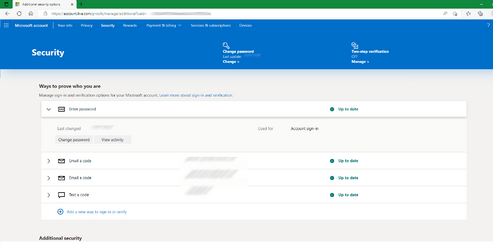
That looks, to me, to be a Windows 10 screenshot not one taken in your browser after having logged into your MSAccount online then pasted in that address.
But perhaps it is.
It does show the Add new way to sign-in or verify link and that's what you need.
I think I was a bit thrown by the lack of the details I see but that might just have been because you hid personal data in a different way from me. Your long blank area with Up to date at the end looks like your existing entry blanked out.

This is what I see.
Check OC verification details - my post #3 - ElevenForum.png

All the best,
Denis
 
Last edited:

My Computer My Computer

At a glance

Windows 11 Home x64 Version 25H2 Build 26200....
OS
Windows 11 Home x64 Version 25H2 Build 26200.8037
That looks, to me, to be a Windows 10 screenshot not one taken in your browser after having logged into your MSAccount online then pasted in that address.
But perhaps it is.
It does show the Add new way to sign-in or verify link and that's what you need.
I think I was a bit thrown by the lack of the details I see but that might just have been because you hid personal data in a different way from me. Your long blank area with Up to date at the end looks like your existing entry blanked out.

This is what I see.
View attachment 39185

All the best,
Denis
Did not UNDERSTAND Please explain
 

My Computer My Computer

At a glance

Windows 11i-7 10700k 3.832gb DDR4 3200RX 580
OS
Windows 11
Computer type
PC/Desktop
Manufacturer/Model
Asus
CPU
i-7 10700k 3.8
Motherboard
PRIME Z-490 A
Memory
32gb DDR4 3200
Graphics Card(s)
RX 580
Monitor(s) Displays
1
Screen Resolution
2560x1440
PSU
750
Keyboard
Corsair K95 RGB PLATINUM XT Mechanical Gaming Keyboard
Mouse
G502 HERO
To remove*** existing entries, click on the > symbol on their left-hand sides.
To add new entries click on Add new way to sign-in or verify

*** There is no facility for editing existing entries.

Denis
 
Last edited:

My Computer My Computer

At a glance

Windows 11 Home x64 Version 25H2 Build 26200....
OS
Windows 11 Home x64 Version 25H2 Build 26200.8037
To edit existing entries, click on the > symbol on their left-hand sides.
To add new entries click on Add new way to sign-in or verify

Denis
Still no luck
its ok i can live with or without it
Capture.PNG
 

My Computer My Computer

At a glance

Windows 11i-7 10700k 3.832gb DDR4 3200RX 580
OS
Windows 11
Computer type
PC/Desktop
Manufacturer/Model
Asus
CPU
i-7 10700k 3.8
Motherboard
PRIME Z-490 A
Memory
32gb DDR4 3200
Graphics Card(s)
RX 580
Monitor(s) Displays
1
Screen Resolution
2560x1440
PSU
750
Keyboard
Corsair K95 RGB PLATINUM XT Mechanical Gaming Keyboard
Mouse
G502 HERO
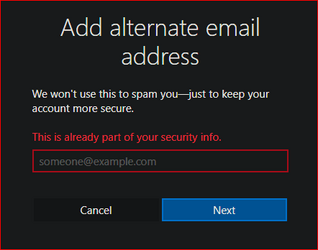
That's the response you'll see if you enter an email address that you have already set up as a verification method.

Denis
 

My Computer My Computer

At a glance

Windows 11 Home x64 Version 25H2 Build 26200....
OS
Windows 11 Home x64 Version 25H2 Build 26200.8037
I've just worked through removing an existing verification method then adding a new one.
It all seems to work correctly.

I included deliberately trying to add one that already existed and I got the response you posted in #9.
I also tried deliberately adding the account's own email address as a verification email address for itself and, rather than tell me I'm an idiot, it said that something had gone wrong and invited me to try again later. This, I speculate, might be a deliberately misleading response as an anti-hacking measure. I was certainly able to add a sensible one only a few moments later.

All the best,
Denis
 

My Computer My Computer

At a glance

Windows 11 Home x64 Version 25H2 Build 26200....
OS
Windows 11 Home x64 Version 25H2 Build 26200.8037
Make sure to backup recovery code, listed at the Advanced Security page.
You can also add an authenticator, either on android or on desktop.

Note that SMS should not be used as it decreases overall security.
Enabling 2FA on the other hand would improve it significantly.
 

My Computer My Computer

At a glance

Home26H2CanAMD Ryzen 5 8600G (07/24)2x32GB Kingston FURY DDR5 5600 MHz CL36 @5200...ASROCK Radeon RX 6600 Challenger D 8G @48FPS ...
OS
Home26H2Can
Computer type
PC/Desktop
CPU
AMD Ryzen 5 8600G (07/24)
Motherboard
ASROCK B650M-HDV/M.2 (07/24) BIOS 4.21 AGESA ComboAM5 1.3.0.1 (04/26)
Memory
2x32GB Kingston FURY DDR5 5600 MHz CL36 @5200 CL36 (07/24)
Graphics Card(s)
ASROCK Radeon RX 6600 Challenger D 8G @48FPS (08/24)
Sound Card
Creative Sound BlasterX AE-5 Plus (05/24)
Monitor(s) Displays
24" Philips 24M1N3200ZS/00 (05/24)
Screen Resolution
1920×1080@165Hz via DP1.4
Hard Drives
Kingston KC3000 NVMe 2TB (05/24)
ADATA XPG GAMMIX S11 Pro 512GB (07/19)
PSU
Seasonic Core GM 550 Gold (04/24)
Case
Fractal Design Define 7 Mini with 3x Noctua NF-P14s/12@555rpm (04/24)
Cooling
Noctua NH-U12S with Noctua NF-P12 (04/24)
Keyboard
HP Pavilion Wired Keyboard 300 (07/24) + Rabalux 76017 Parker (01/24)
Mouse
Logitech M330 Silent Plus (01/26)
Internet Speed
500/100 Mbps via RouterOS (05/21) & TCP Optimizer
Browser
Edge, Brave for YouTube, LibreWolf for FB
Antivirus
NextDNS blocking 1/3 Traffic
Other Info
Phone: Motorola Moto G86 (02/26)
Backup: Hasleo Backup Suite (PreOS)
Headphones: Sennheiser RS170 (09/10)
Chair: Huzaro Force 4.4 Grey Mesh (05/24)
Notifier: Xiaomi Mi Band 9 Milanese (10/24)
FlexCore USB-C 3.2 Gen 1 (M) to LAN (F) (08/25)
Back
Top Bottom