how can I create bootable Macrium rescue on 5TB GPT drive w/o destroying existing partitions


DocDJ

Well-known member
Local time
1:01 AM
Posts
19
OS
Win 11 Pro
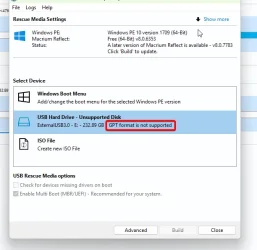
So I'm a bit paranoid. I have 8 physical internal drives (4 HDD & 4 SSD) on my UEFI system (MSI Z390). My C: drive is a GPT 1TB SSD with an EFI System partition. I use Macrium 8 to backup my partitions onto a 5TB USB drive which is formatted as GPT. I'm assuming that the USB drive AND any of my internal drives, will not BOTH have failures at the same time. The backup drive has 2 partitions: 1GB FAT32 followed by a 4.5 TB NTFS partition for all the backups and other data. Macrium tells me I cannot boot their rescue program from the GPT drive, so they have no way to install it there. So, for now, I have a separate bootable USB stick with the rescue program on it to use with the 5TB drive for the data. From discussions I saw in tenforum.com it seems to me I should be able to install a bootable Macrium program on the GPT drive. I just am not sure of the details of how to proceed without destroying my existing GPT partitions. I have a couple of partitioning programs: Minitool Partition Wizard and Easus Partition Master, if I need to do any partitioning. Can someone provide instructions for me?
 

My Computer My Computer

At a glance

Win 11 ProI7-9700K32GBEVGA GTX 1660 Ti SC Ultra
OS
Win 11 Pro
Computer type
PC/Desktop
Manufacturer/Model
MSI
CPU
I7-9700K
Motherboard
MSI MEG Z390 ACE
Memory
32GB
Graphics Card(s)
EVGA GTX 1660 Ti SC Ultra
Monitor(s) Displays
LG E2241, ASUS VS229
Screen Resolution
1920x1080
Hard Drives
4 SSD, Samsung 840 PRO, 860 PRO-512GB, 870 EVO 2TB, WD SN750 M.2 nVME-1TB, 4 500 GB HDDs
PSU
EVGA Supernova G3 850 80+ gold
Case
Phanteks 600S
Cooling
Noctua NF-A15
Keyboard
Corsair K95 RGB XT silver
Mouse
Glorious O
Internet Speed
117.62 DL, 11.77 UL
Browser
Edge, FF, Chrome
Antivirus
Windows Defender
GPT is not supported. It is what it is.

1750006908894.webp
 

My Computers My Computers

  • At a glance

    Windows 11 ProAMD Ryzen 7 9800X3D32GB DDR5 CL30 Kingston FuryASUS Prime Radeon RX 9060 XT OC Edition 16GB
    OS
    Windows 11 Pro
    Computer type
    PC/Desktop
    CPU
    AMD Ryzen 7 9800X3D
    Motherboard
    MSI PRO B850-P Wifi
    Memory
    32GB DDR5 CL30 Kingston Fury
    Graphics Card(s)
    ASUS Prime Radeon RX 9060 XT OC Edition 16GB
    Monitor(s) Displays
    LG Ultrawide 34" 1440p+ MSI 27" 4K UHD
    Screen Resolution
    3440x1440
    Hard Drives
    Main Boot Drive : 512GB Adata XPG RGB Gen3x4 NVMe M.2 SSD
    PSU
    EVGA 750 Watts 80+ Gold
    Case
    Deepcool Genome II
    Cooling
    Thermalright Burst Assassin 120
    Internet Speed
    FTTH 3Gbps
    Browser
    Chrome
    Antivirus
    "Moderna"
  • At a glance

    Windows 11 Proi7-4790K16GB Corsair Vengeance ProMSI R9 290
    Operating System
    Windows 11 Pro
    Computer type
    PC/Desktop
    CPU
    i7-4790K
    Motherboard
    ASRock Xtreme6 Z97
    Memory
    16GB Corsair Vengeance Pro
    Graphics card(s)
    MSI R9 290
    Monitor(s) Displays
    LG Ultrawide 34"
    Screen Resolution
    3440x1440
    Hard Drives
    500GB Adata SSD (OS Only)
    PSU
    Thermaltake 475 Watts 80 Bronze
    Case
    Thermaltake Commander I Snow Edition
    Cooling
    Deep Cool Archer Air Cooler
    Keyboard
    Armageddon MKA-5R RGB-Hornet
    Mouse
    Logitech G402
    Internet Speed
    1Gbps
    Browser
    Chrome
    Antivirus
    Moderna :)
Just use the Reflect Gui to create a boot entry - it will not affect existing partitions.
 

My Computer My Computer

At a glance

Windows 11 Pro + Win11 Canary VM.I9 13th gen i9-13900H 2.60 GHZ16 GB solderedIntegrated Intel Iris XE
OS
Windows 11 Pro + Win11 Canary VM.
Computer type
Laptop
Manufacturer/Model
ASUS Zenbook 14
CPU
I9 13th gen i9-13900H 2.60 GHZ
Motherboard
Yep, Laptop has one.
Memory
16 GB soldered
Graphics Card(s)
Integrated Intel Iris XE
Sound Card
Realtek built in
Monitor(s) Displays
laptop OLED screen
Screen Resolution
2880x1800 touchscreen
Hard Drives
1 TB NVME SSD (only weakness is only one slot)
PSU
Internal + 65W thunderbolt USB4 charger
Case
Yep, got one
Cooling
Stella Artois (UK pint cans - 568 ml) - extra cost.
Keyboard
Built in UK keybd
Mouse
Bluetooth , wireless dongled, wired
Internet Speed
900 mbs (ethernet), wifi 6 typical 350-450 mb/s both up and down
Browser
Edge
Antivirus
Defender
Other Info
TPM 2.0, 2xUSB4 thunderbolt, 1xUsb3 (usb a), 1xUsb-c, hdmi out, 3.5 mm audio out/in combo, ASUS backlit trackpad (inc. switchable number pad)

Macrium Reflect Home V8
Office 365 Family (6 users each 1TB onedrive space)
Hyper-V (a vm runs almost as fast as my older laptop)
I use Macrium and have the rescue disk installed as a part of my boot menu so a if windows throws a wobbler i can boot to that and revert to a Macrium image (taken daily to another computer disk and also to a NAS).
If my C drive should fail which prevents booting from that recovery drive on my computer i also have a prepared Marcium USB stick.
Why not just create a seperate recovery USB?
 

Attachments

  • Macrium.webp
    Macrium.webp
    39.1 KB · Views: 1

My Computer My Computer

At a glance

Win 11 ProAMD Ryzen 7 9700XG.Skill Trident Z5 Neo RGB 64GB Kit (2x32GB) ...PowerColor Radeon RX 9060 XT Reaper GDDR6 16GB
OS
Win 11 Pro
Computer type
PC/Desktop
Manufacturer/Model
N/A
CPU
AMD Ryzen 7 9700X
Motherboard
Asrock 870E Nova WiFi
Memory
G.Skill Trident Z5 Neo RGB 64GB Kit (2x32GB) DDR5-6000 C30
Graphics Card(s)
PowerColor Radeon RX 9060 XT Reaper GDDR6 16GB
Sound Card
USB Out NAD M51 DAC with Adams A8 powered speakers
Monitor(s) Displays
Dell 3219Q
Screen Resolution
3840 x 2160
Hard Drives
5 x WD_BLACK SN850x PCIe Gen4 NVMe M.2 SSD - 4TB
PSU
be quiet! DARK POWER 13 1000W Titanium PCIe 5.0 ATX Modular PSU
Case
Fractal Design Define 7 Full Tower Case (Black)
Cooling
Noctua NH-D15 G2 LBC - High Performance Multi-Socket PWM CPU Cooler
Keyboard
Razer Huntsman V2
Mouse
Razer Viper Ultimate
Internet Speed
Starlink 94Mbps down 20Mbps up
Browser
Brave
Antivirus
ESET
Macrium can create media in %systemdrive%\boot folder to which you can add a boot menu entry

typically

C:\boot\macrium\WinREFiles\media\sources\boot.wim

you could include other programs yourself.

After selecting the macrium recovery from the boot menu other useful stuff is in there

WDO-MENU-Captured.webp
 
Last edited:

My Computers My Computers

  • At a glance

    Win7,Win11i7-97002x16gb 3600mhz
    OS
    Win7,Win11
    Computer type
    PC/Desktop
    CPU
    i7-9700
    Motherboard
    gigabyte b365m ds3h
    Memory
    2x16gb 3600mhz
    Monitor(s) Displays
    benq gw2480
    PSU
    bequiet pure power 11 400CM
    Cooling
    cryorig m9i
  • At a glance

    win7,win11i5-84002x8gb 3200
    Operating System
    win7,win11
    Computer type
    PC/Desktop
    CPU
    i5-8400
    Motherboard
    gigabyte b365m ds3h
    Memory
    2x8gb 3200
    PSU
    xfx pro 450
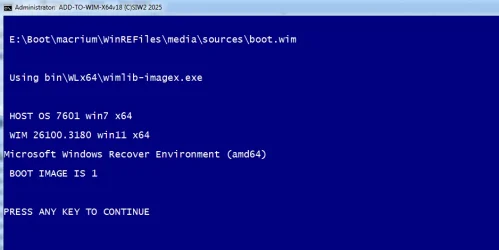
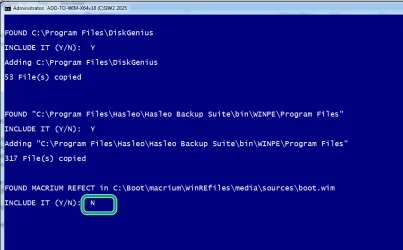
I made little batch file that can do it either from scratch using winre.wim OR by selecting any other bootable wim

if macrium boot.wim has already been created, browsing to it will do the job
 

My Computers My Computers

  • At a glance

    Win7,Win11i7-97002x16gb 3600mhz
    OS
    Win7,Win11
    Computer type
    PC/Desktop
    CPU
    i7-9700
    Motherboard
    gigabyte b365m ds3h
    Memory
    2x16gb 3600mhz
    Monitor(s) Displays
    benq gw2480
    PSU
    bequiet pure power 11 400CM
    Cooling
    cryorig m9i
  • At a glance

    win7,win11i5-84002x8gb 3200
    Operating System
    win7,win11
    Computer type
    PC/Desktop
    CPU
    i5-8400
    Motherboard
    gigabyte b365m ds3h
    Memory
    2x8gb 3200
    PSU
    xfx pro 450
addd-to-wim2.webp

browse to macrium boot.wim

Typically C:\boot\macrium\WinREFiles\media\sources\boot.wim

( mine is in a different place dont worry about that)

addd-to-wim3.webp


It tells you what it is . If you have selected the intended wim file press enter

addd-to-wim4.webp

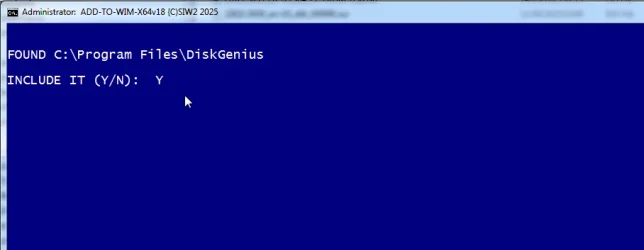
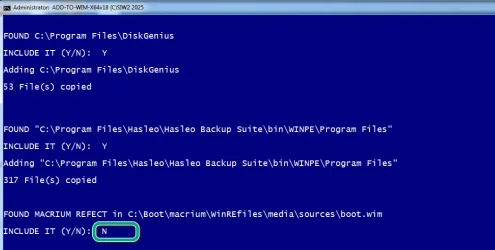
If it finds some of the popular programs it offers to include them

addd-to-wim5.webp

addd-to-wim6.webp


If you selected macrium boot.wim answer N to including macrium because it is already included in the wim

addd-to-wim7.webp

It then adds everything into the wim which takes 2 or 3 seconds

Choose to optimize it to reduce size if desired

OPTIMIZ.webp


Not neccessary to create usb structure ( next question would be to create iso ) because you are just using the macrium wim already on disk

NO-EXIT.webp

It is a bit bigger now because of the added stuff

FINISHED-WIM.webp
 

Attachments

  • addd-to-wim-MACRIM-N.webp
    addd-to-wim-MACRIM-N.webp
    41.2 KB · Views: 1
Last edited:

My Computers My Computers

  • At a glance

    Win7,Win11i7-97002x16gb 3600mhz
    OS
    Win7,Win11
    Computer type
    PC/Desktop
    CPU
    i7-9700
    Motherboard
    gigabyte b365m ds3h
    Memory
    2x16gb 3600mhz
    Monitor(s) Displays
    benq gw2480
    PSU
    bequiet pure power 11 400CM
    Cooling
    cryorig m9i
  • At a glance

    win7,win11i5-84002x8gb 3200
    Operating System
    win7,win11
    Computer type
    PC/Desktop
    CPU
    i5-8400
    Motherboard
    gigabyte b365m ds3h
    Memory
    2x8gb 3200
    PSU
    xfx pro 450
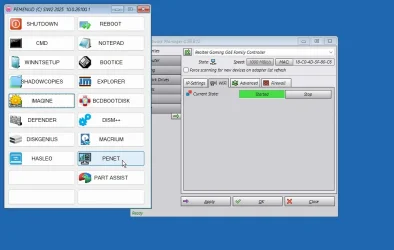
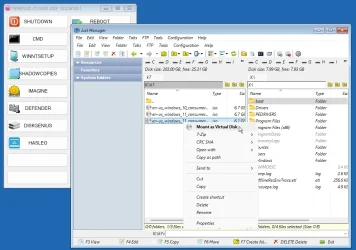
Having a little play


Captured-penet.webp

Captured-part-assist.webp


Captured-defender.webp


Captured-mountasvirtualdisk.webp
 

My Computers My Computers

  • At a glance

    Win7,Win11i7-97002x16gb 3600mhz
    OS
    Win7,Win11
    Computer type
    PC/Desktop
    CPU
    i7-9700
    Motherboard
    gigabyte b365m ds3h
    Memory
    2x16gb 3600mhz
    Monitor(s) Displays
    benq gw2480
    PSU
    bequiet pure power 11 400CM
    Cooling
    cryorig m9i
  • At a glance

    win7,win11i5-84002x8gb 3200
    Operating System
    win7,win11
    Computer type
    PC/Desktop
    CPU
    i5-8400
    Motherboard
    gigabyte b365m ds3h
    Memory
    2x8gb 3200
    PSU
    xfx pro 450
When you create Macrium Boot Menu. By default it will create a C:\boot folder and under
C:\boot\macrium\WA11KFiles\media, it stores the exact same files and folders as on
bootable USB stick and create an entry in BCD for dual boot.
To store this Boot folder on another drive:
1. Run Macrium, Click on Defaults Icon->advance Settings, select Macrium Reflect PE Files then put a tick mark
on whatever drive you want it to move to.
a.webp
 

My Computers My Computers

  • At a glance

    Windows 11 Pro 25H2, Linux Mint 21.3Intel Core i9-14900K @5.8GHZ64GB (2XG Skill F5-6400J3239G32G) @6800Radeon (TM) RX 480 Graphics (8 GB)
    OS
    Windows 11 Pro 25H2, Linux Mint 21.3
    Computer type
    PC/Desktop
    Manufacturer/Model
    Self Build Feb.2024
    CPU
    Intel Core i9-14900K @5.8GHZ
    Motherboard
    MSI MAG Z790 Tomahawk Max WiFi 7
    Memory
    64GB (2XG Skill F5-6400J3239G32G) @6800
    Graphics Card(s)
    Radeon (TM) RX 480 Graphics (8 GB)
    Sound Card
    Intergrated Realtek
    Monitor(s) Displays
    Samsung
    Screen Resolution
    3840x2160
    Hard Drives
    1 - Crucial 705 1TB GEN5
    1 - Crucial 705 2TB GEN5
    2 - Crucial T500 2TB Gen4
    PSU
    750W EVGA-G3
    Case
    Antec NX410
    Cooling
    H2O Thermalright
    Keyboard
    Logitech K800
    Mouse
    Logitech Master 2S
    Internet Speed
    600 Mbps
    Browser
    Chrome
    Antivirus
    WD
  • At a glance

    Windows 11 Pro & Linux Mint X64Intel(R) Core(TM) i7-3770K CPU @ 4.20 GHz32.0GB Dual-Channel CMY16GX3M2A1600C9NVIDIA GeForce GT 740
    Operating System
    Windows 11 Pro & Linux Mint X64
    Computer type
    PC/Desktop
    Manufacturer/Model
    MSI Z77 MPower (MS-7751)
    CPU
    Intel(R) Core(TM) i7-3770K CPU @ 4.20 GHz
    Motherboard
    Z77 MPower (MS-7751)
    Memory
    32.0GB Dual-Channel CMY16GX3M2A1600C9
    Graphics card(s)
    NVIDIA GeForce GT 740
    Monitor(s) Displays
    40" Samsung
    Screen Resolution
    1920X1080
    Hard Drives
    WIN10 - 111GB Samsung SSD 840 Series
    WIN11 - 223GB Crucial CT240BX500SSD
    2X931GB Crucial CT1000BX500SSD1
    PSU
    Antec 850W
    Case
    Antec 900
    Cooling
    H20
    Keyboard
    Logitech K800 Wireless
    Mouse
    Logitech MX Master 2S
    Internet Speed
    100 Mbps
    Browser
    Chrome
    Antivirus
    Windows Defender
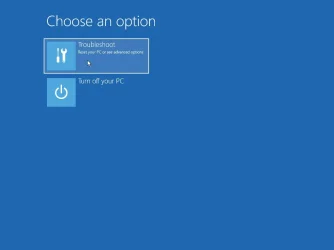
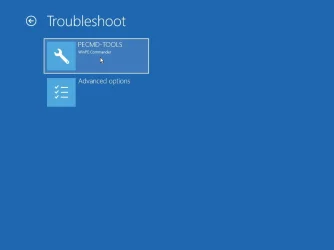
C:\boot\macrium\WA11KFiles\media
only if you downloaded WADK or whatever it is called now
if using winre the default path is %systemdrive%\boot\macrium\WinREFiles\media\sources\boot.wim

macrium-buildjpg.webp

If you did the wadk thing, the winpe.wim that comes down does not include srt as I recall

That is taken care of by pecmd.ini

IFEX X:\sources\recovery\recenv.exe,
{
SHEL X:\sources\recovery\recenv.exe
}!
{
SHEL PECMD.EXE LOAD %CURDIR%\PEMENUD.WCS
}

If the wim does include srt you can get to it by clicking the red X at top rt of the menu
to get back to the menu

Captured_000.webp

Captured_001.webp


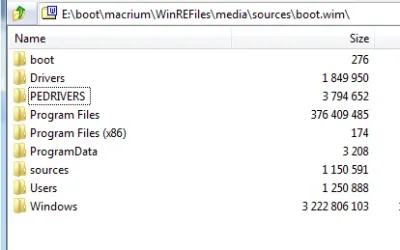
I dont know if this bit below works, I haven't got a machine that needs vmd drivers

EXEC !PNPUTIL /add-driver "%systemdrive%\pedrivers\*.inf" /subdirs /install

be handy if pnputil had a log switch

pedrivers1.webp

pedrivers2.webp
 
Last edited:

My Computers My Computers

  • At a glance

    Win7,Win11i7-97002x16gb 3600mhz
    OS
    Win7,Win11
    Computer type
    PC/Desktop
    CPU
    i7-9700
    Motherboard
    gigabyte b365m ds3h
    Memory
    2x16gb 3600mhz
    Monitor(s) Displays
    benq gw2480
    PSU
    bequiet pure power 11 400CM
    Cooling
    cryorig m9i
  • At a glance

    win7,win11i5-84002x8gb 3200
    Operating System
    win7,win11
    Computer type
    PC/Desktop
    CPU
    i5-8400
    Motherboard
    gigabyte b365m ds3h
    Memory
    2x8gb 3200
    PSU
    xfx pro 450
C:\boot\macrium\WA11KFiles\media
only if you downloaded wadk or whatever it is called now
if using winre the default path is %systemdrive%\boot\macrium\WinREFiles\media\sources\boot.wim


If you did the wadk thing, the winpe.wim that comes down does not include srt as I recall

That is taken of by pecmd.ini

IFEX X:\sources\recovery\recenv.exe,
{
SHEL X:\sources\recovery\recenv.exe
}!
{
SHEL PECMD.EXE LOAD %CURDIR%\PEMENUD.WCS
}
I only answer the OP via a normal creation of Macrium Rescue Boot Menu.
However I don't even use the dual Boot Menu since it is a nuisance to wait for the Boot Menu time out before booting into Windows.
I prefer to boot whatever I want via boot menu using Function Key (F11 for MSI MB)
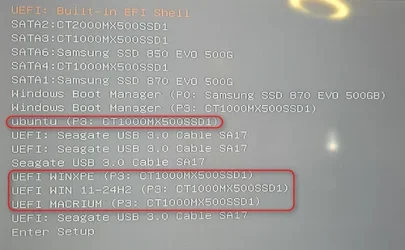
as shown below:
2025-06-15_022549.webp
I know people use Ventoy to set up multiple boot which is slow. I just manually create the partitions. Extract the ISO to the root of each drive
then select from the BOOT menu to boot from.
2025-06-15_150707.webp
 
Last edited:

My Computers My Computers

  • At a glance

    Windows 11 Pro 25H2, Linux Mint 21.3Intel Core i9-14900K @5.8GHZ64GB (2XG Skill F5-6400J3239G32G) @6800Radeon (TM) RX 480 Graphics (8 GB)
    OS
    Windows 11 Pro 25H2, Linux Mint 21.3
    Computer type
    PC/Desktop
    Manufacturer/Model
    Self Build Feb.2024
    CPU
    Intel Core i9-14900K @5.8GHZ
    Motherboard
    MSI MAG Z790 Tomahawk Max WiFi 7
    Memory
    64GB (2XG Skill F5-6400J3239G32G) @6800
    Graphics Card(s)
    Radeon (TM) RX 480 Graphics (8 GB)
    Sound Card
    Intergrated Realtek
    Monitor(s) Displays
    Samsung
    Screen Resolution
    3840x2160
    Hard Drives
    1 - Crucial 705 1TB GEN5
    1 - Crucial 705 2TB GEN5
    2 - Crucial T500 2TB Gen4
    PSU
    750W EVGA-G3
    Case
    Antec NX410
    Cooling
    H2O Thermalright
    Keyboard
    Logitech K800
    Mouse
    Logitech Master 2S
    Internet Speed
    600 Mbps
    Browser
    Chrome
    Antivirus
    WD
  • At a glance

    Windows 11 Pro & Linux Mint X64Intel(R) Core(TM) i7-3770K CPU @ 4.20 GHz32.0GB Dual-Channel CMY16GX3M2A1600C9NVIDIA GeForce GT 740
    Operating System
    Windows 11 Pro & Linux Mint X64
    Computer type
    PC/Desktop
    Manufacturer/Model
    MSI Z77 MPower (MS-7751)
    CPU
    Intel(R) Core(TM) i7-3770K CPU @ 4.20 GHz
    Motherboard
    Z77 MPower (MS-7751)
    Memory
    32.0GB Dual-Channel CMY16GX3M2A1600C9
    Graphics card(s)
    NVIDIA GeForce GT 740
    Monitor(s) Displays
    40" Samsung
    Screen Resolution
    1920X1080
    Hard Drives
    WIN10 - 111GB Samsung SSD 840 Series
    WIN11 - 223GB Crucial CT240BX500SSD
    2X931GB Crucial CT1000BX500SSD1
    PSU
    Antec 850W
    Case
    Antec 900
    Cooling
    H20
    Keyboard
    Logitech K800 Wireless
    Mouse
    Logitech MX Master 2S
    Internet Speed
    100 Mbps
    Browser
    Chrome
    Antivirus
    Windows Defender
it is a nuisance to wait for the Boot Menu time out

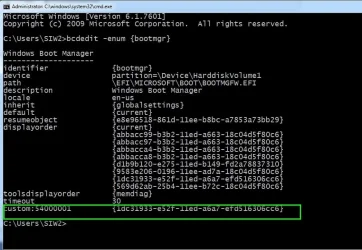
If you prefer you could use a scankey instead of displaying the entry

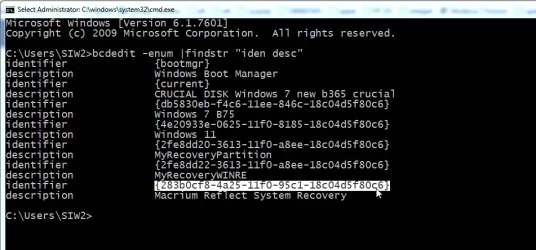
can find the macrium guid easily
bcdedit -enum |findstr "iden desc"


find-macrium-guid.webp


scancode for F9 is 4300
check if 0x54000001 is already in use. If it is just use the next one 0x54000002

bcdedit.exe -SET {BOOTMGR} custom:0x54000001 {macrium-guid}
bcdedit.exe -SET {BOOTMGR} customactions 0x1000043000001 0x54000001
bcdedit.exe -displayorder {macrium-guid} /remove

oems do it

backup the bcd store before trying if you are new to this kind of thing

bcdedit -enum {bootmgr} should reveal if a custom is already there

bcdedit-enum-bootmgr-customaction.webp

that custom thingy has been around since bcd started.
 
Last edited:

My Computers My Computers

  • At a glance

    Win7,Win11i7-97002x16gb 3600mhz
    OS
    Win7,Win11
    Computer type
    PC/Desktop
    CPU
    i7-9700
    Motherboard
    gigabyte b365m ds3h
    Memory
    2x16gb 3600mhz
    Monitor(s) Displays
    benq gw2480
    PSU
    bequiet pure power 11 400CM
    Cooling
    cryorig m9i
  • At a glance

    win7,win11i5-84002x8gb 3200
    Operating System
    win7,win11
    Computer type
    PC/Desktop
    CPU
    i5-8400
    Motherboard
    gigabyte b365m ds3h
    Memory
    2x8gb 3200
    PSU
    xfx pro 450
@SIW2
Yes, I have used Custom Key in the past.
I seldom boot into Macrium unless when needed.
However, I am just offering different way to boot into different environment without messing around with BCD, without having dual boot menu, without using Ventoy and also without having to carry around USB stick for Macrium rescue which is slow.
 

My Computers My Computers

  • At a glance

    Windows 11 Pro 25H2, Linux Mint 21.3Intel Core i9-14900K @5.8GHZ64GB (2XG Skill F5-6400J3239G32G) @6800Radeon (TM) RX 480 Graphics (8 GB)
    OS
    Windows 11 Pro 25H2, Linux Mint 21.3
    Computer type
    PC/Desktop
    Manufacturer/Model
    Self Build Feb.2024
    CPU
    Intel Core i9-14900K @5.8GHZ
    Motherboard
    MSI MAG Z790 Tomahawk Max WiFi 7
    Memory
    64GB (2XG Skill F5-6400J3239G32G) @6800
    Graphics Card(s)
    Radeon (TM) RX 480 Graphics (8 GB)
    Sound Card
    Intergrated Realtek
    Monitor(s) Displays
    Samsung
    Screen Resolution
    3840x2160
    Hard Drives
    1 - Crucial 705 1TB GEN5
    1 - Crucial 705 2TB GEN5
    2 - Crucial T500 2TB Gen4
    PSU
    750W EVGA-G3
    Case
    Antec NX410
    Cooling
    H2O Thermalright
    Keyboard
    Logitech K800
    Mouse
    Logitech Master 2S
    Internet Speed
    600 Mbps
    Browser
    Chrome
    Antivirus
    WD
  • At a glance

    Windows 11 Pro & Linux Mint X64Intel(R) Core(TM) i7-3770K CPU @ 4.20 GHz32.0GB Dual-Channel CMY16GX3M2A1600C9NVIDIA GeForce GT 740
    Operating System
    Windows 11 Pro & Linux Mint X64
    Computer type
    PC/Desktop
    Manufacturer/Model
    MSI Z77 MPower (MS-7751)
    CPU
    Intel(R) Core(TM) i7-3770K CPU @ 4.20 GHz
    Motherboard
    Z77 MPower (MS-7751)
    Memory
    32.0GB Dual-Channel CMY16GX3M2A1600C9
    Graphics card(s)
    NVIDIA GeForce GT 740
    Monitor(s) Displays
    40" Samsung
    Screen Resolution
    1920X1080
    Hard Drives
    WIN10 - 111GB Samsung SSD 840 Series
    WIN11 - 223GB Crucial CT240BX500SSD
    2X931GB Crucial CT1000BX500SSD1
    PSU
    Antec 850W
    Case
    Antec 900
    Cooling
    H20
    Keyboard
    Logitech K800 Wireless
    Mouse
    Logitech MX Master 2S
    Internet Speed
    100 Mbps
    Browser
    Chrome
    Antivirus
    Windows Defender
Macrium can create media in %systemdrive%\boot folder to which you can add a boot menu entry

typically

C:\boot\macrium\WinREFiles\media\sources\boot.wim

you could include other programs yourself.

After selecting the macrium recovery from the boot menu other useful stuff is in there

View attachment 136935
Interesting idea. Can you make available the utility used to do that?
 

My Computer My Computer

At a glance

Windows 11 ProCore i7-13700K64 GB Kingston Fury Beast DDR5Gigabyte GeForce RTX 2060 Super Gaming OC 8G
OS
Windows 11 Pro
Computer type
PC/Desktop
Manufacturer/Model
Self build
CPU
Core i7-13700K
Motherboard
Asus TUF Gaming Plus WiFi Z790
Memory
64 GB Kingston Fury Beast DDR5
Graphics Card(s)
Gigabyte GeForce RTX 2060 Super Gaming OC 8G
Sound Card
Realtek S1200A
Monitor(s) Displays
Viewsonic VP2770 & Dell (secondary)
Screen Resolution
2560 x 1440
Hard Drives
Kingston KC3000 2TB NVME SSD & SATA HDDs & SSD
PSU
EVGA SuperNova G2 850W
Case
Nanoxia Deep Silence 1
Cooling
Noctua NH-D14
Keyboard
Microsoft Digital Media Pro
Mouse
Logitech Wireless
Internet Speed
80 Mb / s
Browser
Chrome
Antivirus
Defender, Malwarebytes Free & AdwCleaner
check your pm
 

My Computers My Computers

  • At a glance

    Win7,Win11i7-97002x16gb 3600mhz
    OS
    Win7,Win11
    Computer type
    PC/Desktop
    CPU
    i7-9700
    Motherboard
    gigabyte b365m ds3h
    Memory
    2x16gb 3600mhz
    Monitor(s) Displays
    benq gw2480
    PSU
    bequiet pure power 11 400CM
    Cooling
    cryorig m9i
  • At a glance

    win7,win11i5-84002x8gb 3200
    Operating System
    win7,win11
    Computer type
    PC/Desktop
    CPU
    i5-8400
    Motherboard
    gigabyte b365m ds3h
    Memory
    2x8gb 3200
    PSU
    xfx pro 450
GPT is not supported. It is what it is.

View attachment 136933
"Unsupported" does not mean it won't work properly. It just means they won't answer any questions, offer help or handle any problems if it fails. This same statement occurs for all kinds of programs in every operating system. It's just a limit of liability. It just means "buyer beware". As seen below, MANY smart people have gotten it to work. Macrium programming just hasn't added the capability. Macrium does a great job of backing up, but their rescue facilities are behind the times.
 

My Computer My Computer

At a glance

Win 11 ProI7-9700K32GBEVGA GTX 1660 Ti SC Ultra
OS
Win 11 Pro
Computer type
PC/Desktop
Manufacturer/Model
MSI
CPU
I7-9700K
Motherboard
MSI MEG Z390 ACE
Memory
32GB
Graphics Card(s)
EVGA GTX 1660 Ti SC Ultra
Monitor(s) Displays
LG E2241, ASUS VS229
Screen Resolution
1920x1080
Hard Drives
4 SSD, Samsung 840 PRO, 860 PRO-512GB, 870 EVO 2TB, WD SN750 M.2 nVME-1TB, 4 500 GB HDDs
PSU
EVGA Supernova G3 850 80+ gold
Case
Phanteks 600S
Cooling
Noctua NF-A15
Keyboard
Corsair K95 RGB XT silver
Mouse
Glorious O
Internet Speed
117.62 DL, 11.77 UL
Browser
Edge, FF, Chrome
Antivirus
Windows Defender
"Unsupported" does not mean it won't work properly. It just means they won't answer any questions, offer help or handle any problems if it fails. This same statement occurs for all kinds of programs in every operating system. It's just a limit of liability. It just means "buyer beware". As seen below, MANY smart people have gotten it to work. Macrium programming just hasn't added the capability. Macrium does a great job of backing up, but their rescue facilities are behind the times.
I find the best way to do this is to simply to use physical vhdx files and then use dism /Apply-Image to the boot.wim from the macrium file and then run bcdboot.exe on your normal boot disk -- you should then see the Macrium boot as well as your Windows boot when booting up the system.

Note - when creating the vhdx file - -- attach it (in diskpart via select vdisk) and then selelect disk (the attached vdisk will show as a disk) create a primary partition on it (no EFI etc needed) and then use dism to apply the image to it. Plenty of instructions on these forums on creating, using and booting from physical vhdx files.

Cheers
jimbo
 

My Computer My Computer

At a glance

Windows XP,11 Linux Fedora Rawhide pre-releas...2 X Intel i7
OS
Windows XP,11 Linux Fedora Rawhide pre-release 45
Computer type
PC/Desktop
CPU
2 X Intel i7
Screen Resolution
4KUHD X 2
So, if I understand correctly, if I want my GPT USB Rescue drive to be bootable and NOT have a boot menu on my system I just have to copy the Macrium\WA11KFiles\media\sources\boot.wim to the FAT32 partition on my Rescue drive and ONLY WHEN I want to boot from that drive, modify the boot order in UEFI to make the USB Rescue drive appear ahead of my "normal" C: drive. Is that correct? (Sorry for the long sentence.) Otherwise that drive is just like any other drive.
 

My Computer My Computer

At a glance

Win 11 ProI7-9700K32GBEVGA GTX 1660 Ti SC Ultra
OS
Win 11 Pro
Computer type
PC/Desktop
Manufacturer/Model
MSI
CPU
I7-9700K
Motherboard
MSI MEG Z390 ACE
Memory
32GB
Graphics Card(s)
EVGA GTX 1660 Ti SC Ultra
Monitor(s) Displays
LG E2241, ASUS VS229
Screen Resolution
1920x1080
Hard Drives
4 SSD, Samsung 840 PRO, 860 PRO-512GB, 870 EVO 2TB, WD SN750 M.2 nVME-1TB, 4 500 GB HDDs
PSU
EVGA Supernova G3 850 80+ gold
Case
Phanteks 600S
Cooling
Noctua NF-A15
Keyboard
Corsair K95 RGB XT silver
Mouse
Glorious O
Internet Speed
117.62 DL, 11.77 UL
Browser
Edge, FF, Chrome
Antivirus
Windows Defender
"Unsupported" does not mean it won't work properly. It just means they won't answer any questions, offer help or handle any problems if it fails. This same statement occurs for all kinds of programs in every operating system. It's just a limit of liability. It just means "buyer beware". As seen below, MANY smart people have gotten it to work. Macrium programming just hasn't added the capability. Macrium does a great job of backing up, but their rescue facilities are behind
that's exactly what I said. Unsupported.
I personally prefer booting up Macrium from USB flashdrive.
 

My Computers My Computers

  • At a glance

    Windows 11 ProAMD Ryzen 7 9800X3D32GB DDR5 CL30 Kingston FuryASUS Prime Radeon RX 9060 XT OC Edition 16GB
    OS
    Windows 11 Pro
    Computer type
    PC/Desktop
    CPU
    AMD Ryzen 7 9800X3D
    Motherboard
    MSI PRO B850-P Wifi
    Memory
    32GB DDR5 CL30 Kingston Fury
    Graphics Card(s)
    ASUS Prime Radeon RX 9060 XT OC Edition 16GB
    Monitor(s) Displays
    LG Ultrawide 34" 1440p+ MSI 27" 4K UHD
    Screen Resolution
    3440x1440
    Hard Drives
    Main Boot Drive : 512GB Adata XPG RGB Gen3x4 NVMe M.2 SSD
    PSU
    EVGA 750 Watts 80+ Gold
    Case
    Deepcool Genome II
    Cooling
    Thermalright Burst Assassin 120
    Internet Speed
    FTTH 3Gbps
    Browser
    Chrome
    Antivirus
    "Moderna"
  • At a glance

    Windows 11 Proi7-4790K16GB Corsair Vengeance ProMSI R9 290
    Operating System
    Windows 11 Pro
    Computer type
    PC/Desktop
    CPU
    i7-4790K
    Motherboard
    ASRock Xtreme6 Z97
    Memory
    16GB Corsair Vengeance Pro
    Graphics card(s)
    MSI R9 290
    Monitor(s) Displays
    LG Ultrawide 34"
    Screen Resolution
    3440x1440
    Hard Drives
    500GB Adata SSD (OS Only)
    PSU
    Thermaltake 475 Watts 80 Bronze
    Case
    Thermaltake Commander I Snow Edition
    Cooling
    Deep Cool Archer Air Cooler
    Keyboard
    Armageddon MKA-5R RGB-Hornet
    Mouse
    Logitech G402
    Internet Speed
    1Gbps
    Browser
    Chrome
    Antivirus
    Moderna :)
that's exactly what I said. Unsupported.
I personally prefer booting up Macrium from USB flashdrive.
Admittedly, building a flash drive is easier, but if you have a fire and have to leave the house fast, grabbing the disk and running is the best bet (other than having an off-site backup/restore you can trust). And if you have as many USB sticks as I do, it's problematic to keep the 2 devices with each other, but away from everything else. I am also paranoid about ransomware, so I have a USB switch to keep my Rescue files offline and not have to fiddlle with plugs every time i do a backup.
 

My Computer My Computer

At a glance

Win 11 ProI7-9700K32GBEVGA GTX 1660 Ti SC Ultra
OS
Win 11 Pro
Computer type
PC/Desktop
Manufacturer/Model
MSI
CPU
I7-9700K
Motherboard
MSI MEG Z390 ACE
Memory
32GB
Graphics Card(s)
EVGA GTX 1660 Ti SC Ultra
Monitor(s) Displays
LG E2241, ASUS VS229
Screen Resolution
1920x1080
Hard Drives
4 SSD, Samsung 840 PRO, 860 PRO-512GB, 870 EVO 2TB, WD SN750 M.2 nVME-1TB, 4 500 GB HDDs
PSU
EVGA Supernova G3 850 80+ gold
Case
Phanteks 600S
Cooling
Noctua NF-A15
Keyboard
Corsair K95 RGB XT silver
Mouse
Glorious O
Internet Speed
117.62 DL, 11.77 UL
Browser
Edge, FF, Chrome
Antivirus
Windows Defender
Back
Top Bottom