How do i change the jpg 'Icon' to a Image of my choice


Wabbit999

New member
Local time
1:07 PM
Posts
25
OS
Windows 11
Hi, I just installed Windows 11 ..I want to make a Jpg icon of my choice, Not the standard White Background , with a Blue foreground ( W11) ..I used to use FileTypesMan program , that lets me change file associations ( and a .ico of my choice ) etc . but wont let me change a Jpg, to a 'ico of my choice ( I can change OTHER File Types .Just wont let me change a Jpg ..I dont think its possible in Windows 11 ?? or is it ? (Ps I use Windows Photo Viewer to view pics in case this is causing issue ? ) Thanks in Advance ..I REALLY NEED TO CHANGE THE DEFAULT ICON IMAGE OF A JPG !!!!!!!C Hellppppppppppppppppppppppppppp :mad:
 
Windows Build/Version
24H2
Last edited:

My Computer

System One

  • OS
    Windows 11
    Computer type
    PC/Desktop
    Manufacturer/Model
    Lenovo
I use Windows Photo Viewer to view pics in case this is causing issue ?
Yes. When you have a Store (or UWP) App as the default app for a file type, then Windows will ignore any icon changes. The icon will be the same as Photo Viewer's app icon, until you go into Settings and remove Photos as the default app for JPEG.

The UWP app has higher priority than the Windows registry setting.
 

My Computer

System One

  • OS
    Windows 7
Yes. When you have a Store (or UWP) App as the default app for a file type, then Windows will ignore any icon changes. The icon will be the same as Photo Viewer's app icon, until you go into Settings and remove Photos as the default app for JPEG.

The UWP app has higher priority than the Windows registry setting.
Hi, I have just tried making 'Paint' as Default, and a few others, none lets me change 'Icon'Image ( to one of my saved .ico ..also all these programs, i cannot see a RIGHT and LEFT arrow to look at say 4 different photos .. ( Like in Older Windows Photo Viewer, I can scroll left or right to see different photos ?? )
 

My Computer

System One

  • OS
    Windows 11
    Computer type
    PC/Desktop
    Manufacturer/Model
    Lenovo
1. Paint & Photo Viewer are two different apps. Paint is designed to edit one image at a time, it's not for browsing multiple images.

2. Both apps are UWP (not Win32), so you cannot pick your own file icon.

3. You can follow @Brink's tutorial for Restoring the Classic Windows Photo Viewer. The classic viewer is a Win32 app, so you can finally use FileTypesMan to change the .JPG icon to anything you want.
 

My Computer

System One

  • OS
    Windows 7
1. Paint & Photo Viewer are two different apps. Paint is designed to edit one image at a time, it's not for browsing multiple images.

2. Both apps are UWP (not Win32), so you cannot pick your own file icon.

3. You can follow @Brink's tutorial for Restoring the Classic Windows Photo Viewer. The classic viewer is a Win32 app, so you can finally use FileTypesMan to change the .JPG icon to anything you want.
I just downloaded the .reg , clicked. it made Windows Photo Viewer , i have set association for jpg .. all good, but still cannot make an ico in it any way, or via FileTypesMan prog it keeps the Default windows Image :sneaky: ( Im starting to think its Not possible in Windows 11 to change the Icon )

 

My Computer

System One

  • OS
    Windows 11
    Computer type
    PC/Desktop
    Manufacturer/Model
    Lenovo
Hi,

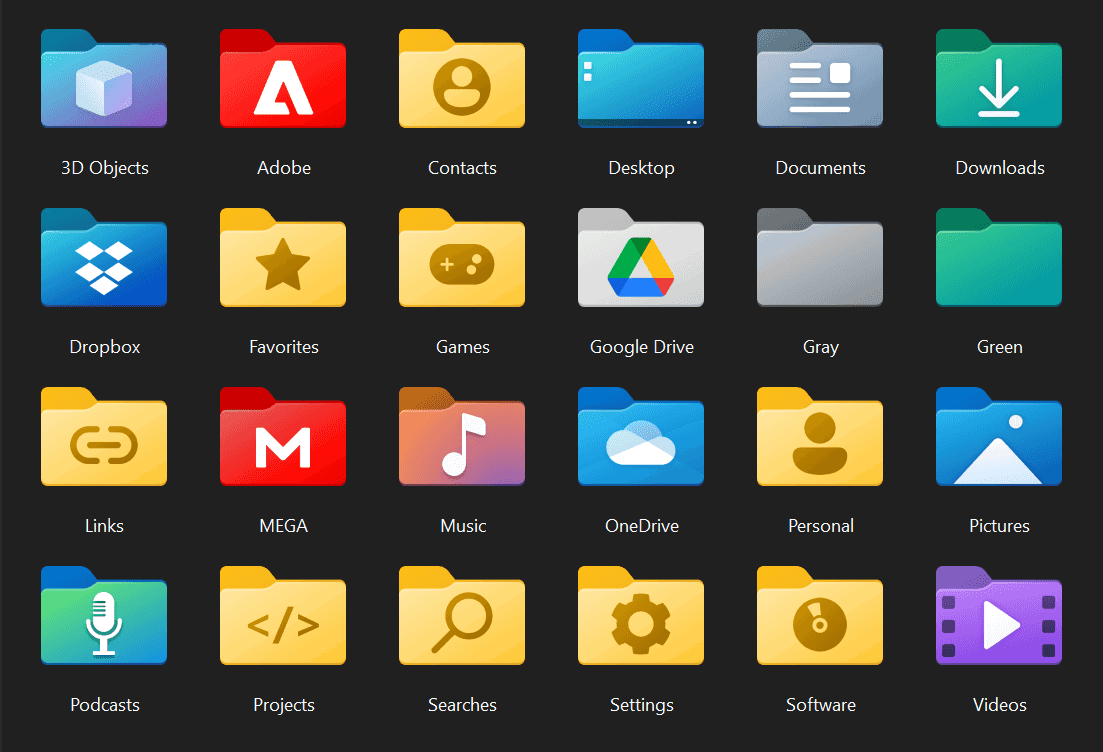
Are you talking about this kind of thing ?

1632945568.png


My Computers

System One System Two

  • OS
    Windows 10 & 11 LTSC 3xBoot 1809 21H2 24H2
    Computer type
    PC/Desktop
    Manufacturer/Model
    Self-made 2013
    CPU
    Intel Core i5-2550K
    Motherboard
    Intel DH67CL
    Memory
    8 GB
    Graphics Card(s)
    NVIDIA GeForce GTS 450
    Sound Card
    EmuPMX
    Monitor(s) Displays
    16/9 Samsung + 4/3 iiyama
    Screen Resolution
    1360 x 768 + 1024 x 768
    Hard Drives
    Main SSD: Samsung 250 Gb
    Secondary HDDs: Western Digital
    (Purple 4 Tb + Blue 2 Tb) x2
    + Green 0.5 Tb
    Case
    Antec
    Keyboard
    Dell
    Mouse
    Advance
    Browser
    Brave
    Antivirus
    Windows Security
    Other Info
    + Portable Cleanup Utilities :

    AdwCleaner
    ZHP Cleaner (+Diag)
    Kaspersky Virus Removal Tool
    CCleaner
  • Operating System
    Windows 11 Home
    Computer type
    Laptop
    Manufacturer/Model
    HP
    Other Info
    Using W11 OS on customers' computers more and more often, and sometimes on my mum's new laptop.
Hi,

Are you talking about this kind of thing ?

1632945568.png

No, I can change a 'Folder' Icon ..Its the jpg Image i want changed ( Which is proving impossible to do ! ) Attached is the current jpg 'Image' i have to use, as can't be changed
 

Attachments

  • Desktop 003.webp
    Desktop 003.webp
    1.2 KB · Views: 1

My Computer

System One

  • OS
    Windows 11
    Computer type
    PC/Desktop
    Manufacturer/Model
    Lenovo

My Computers

System One System Two

  • OS
    Win 11 Pro 25H2, Build 26200.8655
    Computer type
    PC/Desktop
    Manufacturer/Model
    Home Brew
    CPU
    Intel Core i5 14500
    Motherboard
    Gigabyte B760M G P WIFI
    Memory
    64GB DDR4
    Graphics Card(s)
    GeForce RTX 4060
    Sound Card
    Chipset Realtek
    Monitor(s) Displays
    LG 45" Ultragear, Acer 24" 1080p
    Screen Resolution
    5120x1440, 1920x1080
    Hard Drives
    Crucial P310 2TB 2280 PCIe Gen4 3D NAND NVMe M.2 SSD (O/S)
    Silicon Power 2TB US75 NVMe PCIe Gen4 M.2 2280 SSD (backup)
    Crucial BX500 2TB 3D NAND (2nd backup)
    Seagate 4TB Ironwolf, rotating HDD archive files
    External off-line backup Drives: 2 NVMe 4TB drives in external enclosures
    PSU
    Thermaltake Toughpower GF3 750W
    Case
    LIAN LI LANCOOL 216 E-ATX PC Case
    Cooling
    Lots of fans!
    Keyboard
    Microsoft Comfort Curve 2000
    Mouse
    Logitech G305
    Internet Speed
    Verizon FiOS 1GB
    Browser
    Firefox
    Antivirus
    Malware Bytes & Windows Defender Security
  • Operating System
    Win 11 Pro 25H2, Build 26200.8524
    Computer type
    PC/Desktop
    Manufacturer/Model
    Home Brew
    CPU
    Intel Core i5 14400
    Motherboard
    Gigabyte B760M DS3H AX
    Memory
    32GB DDR5
    Graphics card(s)
    Intel 700 Embedded GPU
    Sound Card
    Realtek Embedded
    Monitor(s) Displays
    27" HP 1080p
    Screen Resolution
    1920x1080
    Hard Drives
    Crucial P310 2TB 2280 PCIe Gen4 eD NAND PCIe SSD
    Samsung EVO 990 2TB NVMe Gen4 SSD
    Samsung 2TB SATA SSD
    PSU
    Thermaltake Smart BM3 650W
    Case
    Okinos Micro ATX Case
    Cooling
    Fans
    Keyboard
    Microsoft Comfort Curve 2000
    Mouse
    Logitech G305
    Internet Speed
    Verizon FiOS 1GB
    Browser
    Firefox
    Antivirus
    Malware Bytes & Windows Defender Security
No, I can change a 'Folder' Icon ..Its the jpg Image i want changed ( Which is proving impossible to do ! ) Attached is the current jpg 'Image' i have to use, as can't be changed
Picture file.webp
Still not sure I understand your request.

Is this the icon which appears as a "file type"(instead of your picture itself) ?

or else is it just the basic library shell (folder) icon for "Pictures"

You would prefer the "Photo App" icon rather than the library one ?

Pictures.webpPhotos.webp
 

My Computers

System One System Two

  • OS
    Windows 10 & 11 LTSC 3xBoot 1809 21H2 24H2
    Computer type
    PC/Desktop
    Manufacturer/Model
    Self-made 2013
    CPU
    Intel Core i5-2550K
    Motherboard
    Intel DH67CL
    Memory
    8 GB
    Graphics Card(s)
    NVIDIA GeForce GTS 450
    Sound Card
    EmuPMX
    Monitor(s) Displays
    16/9 Samsung + 4/3 iiyama
    Screen Resolution
    1360 x 768 + 1024 x 768
    Hard Drives
    Main SSD: Samsung 250 Gb
    Secondary HDDs: Western Digital
    (Purple 4 Tb + Blue 2 Tb) x2
    + Green 0.5 Tb
    Case
    Antec
    Keyboard
    Dell
    Mouse
    Advance
    Browser
    Brave
    Antivirus
    Windows Security
    Other Info
    + Portable Cleanup Utilities :

    AdwCleaner
    ZHP Cleaner (+Diag)
    Kaspersky Virus Removal Tool
    CCleaner
  • Operating System
    Windows 11 Home
    Computer type
    Laptop
    Manufacturer/Model
    HP
    Other Info
    Using W11 OS on customers' computers more and more often, and sometimes on my mum's new laptop.
View attachment 143698
Still not sure I understand your request.

Is this the icon which appears as a "file type"(instead of your picture itself) ?

or else is it just the basic library shell (folder) icon for "Pictures"

You would prefer the "Photo App" icon rather than the library one ?

View attachment 143699View attachment 143700
I just want to change the White / Blue icon to another of my choice .. But so far had eluded me ..I read its NOT possible in W11 to change the jpg icon ( As could be done in all earlier Versions of Windows )
 

My Computer

System One

  • OS
    Windows 11
    Computer type
    PC/Desktop
    Manufacturer/Model
    Lenovo
I just want to change the White / Blue icon to another of my choice .. But so far had eluded me ..I read its NOT possible in W11 to change the jpg icon ( As could be done in all earlier Versions of Windows )

There's always a way, it just may be a bit tweaky, but I think I got what you want.

Looks like you want the "W11 picture logo" replaced in each type of "icon".
This means customizing the "file type" icons, and replace them in the system (imageres.dll +.mun)

Picture file 1.webp Picture file 2.webp


imageres 132, 70 - 71 - 72 - 83 - 122, 21 (on on previous post)


Other icons use this logo too, such as the shell (folder) icon, library, and a few others.


If this is whats you want, me and other members can help you out in the
 

My Computers

System One System Two

  • OS
    Windows 10 & 11 LTSC 3xBoot 1809 21H2 24H2
    Computer type
    PC/Desktop
    Manufacturer/Model
    Self-made 2013
    CPU
    Intel Core i5-2550K
    Motherboard
    Intel DH67CL
    Memory
    8 GB
    Graphics Card(s)
    NVIDIA GeForce GTS 450
    Sound Card
    EmuPMX
    Monitor(s) Displays
    16/9 Samsung + 4/3 iiyama
    Screen Resolution
    1360 x 768 + 1024 x 768
    Hard Drives
    Main SSD: Samsung 250 Gb
    Secondary HDDs: Western Digital
    (Purple 4 Tb + Blue 2 Tb) x2
    + Green 0.5 Tb
    Case
    Antec
    Keyboard
    Dell
    Mouse
    Advance
    Browser
    Brave
    Antivirus
    Windows Security
    Other Info
    + Portable Cleanup Utilities :

    AdwCleaner
    ZHP Cleaner (+Diag)
    Kaspersky Virus Removal Tool
    CCleaner
  • Operating System
    Windows 11 Home
    Computer type
    Laptop
    Manufacturer/Model
    HP
    Other Info
    Using W11 OS on customers' computers more and more often, and sometimes on my mum's new laptop.
There's always a way, it just may be a bit tweaky, but I think I got what you want.

Looks like you want the "W11 picture logo" replaced in each type of "icon".
This means customizing the "file type" icons, and replace them in the system (imageres.dll +.mun)

View attachment 143713 View attachment 143714


imageres 132, 70 - 71 - 72 - 83 - 122, 21 (on on previous post)


Other icons use this logo too, such as the shell (folder) icon, library, and a few others.


If this is whats you want, me and other members can help you out in the
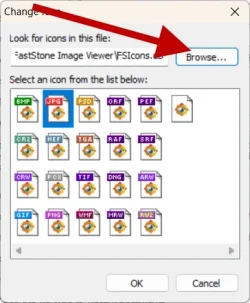
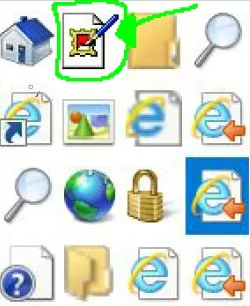
Hi, Im not sure if this is what i want, but maybe !, I ONLY want a Jpg icon on my desktop to be a different colour or made a .ico of my choice ( I have saved some .ico ) or i dont mind using a Windows icon, as long as it stands out to my liking ! ( Just NOT the hard to see White / Blue colour ) ive always used this out of interest, which i used to insert the 'link' in the 'Browse' section C:\PROGRA~1\INTERN~1\iexplore.exe ( and i used one from the selection offered ..been using the Red colour one for 20 years , so i instantly know its a jpg ! ) ** I just found an Image of what i have used ..I think its a Windows XP icon ! .. anyway im not bothered what i can get, as long as i can change the icon somehow !**
 

Attachments

  • qqq.webp
    qqq.webp
    61.1 KB · Views: 1
Last edited:

My Computer

System One

  • OS
    Windows 11
    Computer type
    PC/Desktop
    Manufacturer/Model
    Lenovo
Ok, just tell me if I got everything clear :
> you have a "jpeg file" which looks like this on your desktop, so the system is set to display the icon and not the picture thumbnail, right ?
picture-file-2-webp.143714
(imageres 132)

If you change this icon in the system, it'll be applied to all the same file types of all File Explorer.
(and I think I will include all other types, such as PNG...)
You can only easily customize Folders, or app shortcuts.
 

My Computers

System One System Two

  • OS
    Windows 10 & 11 LTSC 3xBoot 1809 21H2 24H2
    Computer type
    PC/Desktop
    Manufacturer/Model
    Self-made 2013
    CPU
    Intel Core i5-2550K
    Motherboard
    Intel DH67CL
    Memory
    8 GB
    Graphics Card(s)
    NVIDIA GeForce GTS 450
    Sound Card
    EmuPMX
    Monitor(s) Displays
    16/9 Samsung + 4/3 iiyama
    Screen Resolution
    1360 x 768 + 1024 x 768
    Hard Drives
    Main SSD: Samsung 250 Gb
    Secondary HDDs: Western Digital
    (Purple 4 Tb + Blue 2 Tb) x2
    + Green 0.5 Tb
    Case
    Antec
    Keyboard
    Dell
    Mouse
    Advance
    Browser
    Brave
    Antivirus
    Windows Security
    Other Info
    + Portable Cleanup Utilities :

    AdwCleaner
    ZHP Cleaner (+Diag)
    Kaspersky Virus Removal Tool
    CCleaner
  • Operating System
    Windows 11 Home
    Computer type
    Laptop
    Manufacturer/Model
    HP
    Other Info
    Using W11 OS on customers' computers more and more often, and sometimes on my mum's new laptop.
Ok, just tell me if I got everything clear :
> you have a "jpeg file" which looks like this on your desktop, so the is system set to display the icon and not the picture thumbnail, right ?
picture-file-2-webp.143714
(imageres 132)

If you change this icon in the system, it'll be applied to all the same file type of all File Explorer.
You can only easily customize Folders, or app shortcuts.
It makes this icon for a jpg .. I want to change this icon to my own choice, like i been doing since Windows 95 ! ( Im not talking about switching between icon or Thumbnail view ..I just want the Icon to be different to the White Pyramid / Blue Background colouring ...
 

My Computer

System One

  • OS
    Windows 11
    Computer type
    PC/Desktop
    Manufacturer/Model
    Lenovo
The only way I can think of is replacing the icons in imageres.dll.mun,
and as I edited in the previous post, it may be applied to all kind of image file type.

But maybe someone knows a trick for the file association with the registry.
 

My Computers

System One System Two

  • OS
    Windows 10 & 11 LTSC 3xBoot 1809 21H2 24H2
    Computer type
    PC/Desktop
    Manufacturer/Model
    Self-made 2013
    CPU
    Intel Core i5-2550K
    Motherboard
    Intel DH67CL
    Memory
    8 GB
    Graphics Card(s)
    NVIDIA GeForce GTS 450
    Sound Card
    EmuPMX
    Monitor(s) Displays
    16/9 Samsung + 4/3 iiyama
    Screen Resolution
    1360 x 768 + 1024 x 768
    Hard Drives
    Main SSD: Samsung 250 Gb
    Secondary HDDs: Western Digital
    (Purple 4 Tb + Blue 2 Tb) x2
    + Green 0.5 Tb
    Case
    Antec
    Keyboard
    Dell
    Mouse
    Advance
    Browser
    Brave
    Antivirus
    Windows Security
    Other Info
    + Portable Cleanup Utilities :

    AdwCleaner
    ZHP Cleaner (+Diag)
    Kaspersky Virus Removal Tool
    CCleaner
  • Operating System
    Windows 11 Home
    Computer type
    Laptop
    Manufacturer/Model
    HP
    Other Info
    Using W11 OS on customers' computers more and more often, and sometimes on my mum's new laptop.
The only way I can think of is replacing the icons in imageres.dll.mun,
and as I edited in the previous post, it may be applied to all kind of image file type.

But maybe someone knows a trick for the file association with the registry.
imageres.dll is only used by Win32 apps, it's ignored by UWP apps which provided their own self-contained icons.
 

My Computer

System One

  • OS
    Windows 7
imageres.dll is only used by Win32 apps, it's ignored by UWP apps which provided their own self-contained icons.
The file icon @Wabbit999 showed (in post #7) is imageres 70/.../122 used by the Windows Photo Viewer (he sais in post #1), so no UWP.


I remember a tweak to change one kind of file type icon (pdf) read by an app (browser), by adding the icon in the "program files" folder app and apply a quick reg file.


So there might be a similar way for the Windows Photo Viewer.
 
Last edited:

My Computers

System One System Two

  • OS
    Windows 10 & 11 LTSC 3xBoot 1809 21H2 24H2
    Computer type
    PC/Desktop
    Manufacturer/Model
    Self-made 2013
    CPU
    Intel Core i5-2550K
    Motherboard
    Intel DH67CL
    Memory
    8 GB
    Graphics Card(s)
    NVIDIA GeForce GTS 450
    Sound Card
    EmuPMX
    Monitor(s) Displays
    16/9 Samsung + 4/3 iiyama
    Screen Resolution
    1360 x 768 + 1024 x 768
    Hard Drives
    Main SSD: Samsung 250 Gb
    Secondary HDDs: Western Digital
    (Purple 4 Tb + Blue 2 Tb) x2
    + Green 0.5 Tb
    Case
    Antec
    Keyboard
    Dell
    Mouse
    Advance
    Browser
    Brave
    Antivirus
    Windows Security
    Other Info
    + Portable Cleanup Utilities :

    AdwCleaner
    ZHP Cleaner (+Diag)
    Kaspersky Virus Removal Tool
    CCleaner
  • Operating System
    Windows 11 Home
    Computer type
    Laptop
    Manufacturer/Model
    HP
    Other Info
    Using W11 OS on customers' computers more and more often, and sometimes on my mum's new laptop.
SOLVED .. I now have my fav .jpg icon back ! FilesTypeMan was the problem ..I had to do a lot of deleting and 'Detach File' etc etc .. but now i have my JPG icon image as i want ! Hoooraaayyyyyyyyyyyyy ! ( STill cannot get a jpg to view in 'Preview Pane' but can view a .mp4 in preview pane )
 

Attachments

  • explorer Jpgs.webp
    explorer Jpgs.webp
    7.1 KB · Views: 1

My Computer

System One

  • OS
    Windows 11
    Computer type
    PC/Desktop
    Manufacturer/Model
    Lenovo
SOLVED .. I now have my fav .jpg icon back ! FilesTypeMan was the problem ..I had to do a lot of deleting and 'Detach File' etc etc .. but now i have my JPG icon image as i want ! Hoooraaayyyyyyyyyyyyy !

Good. 👍
Windows' often buggy when applying new icons, specially with files more than folders.
And in some occasion, it's not instantaneous.
Clearing and rebuilding the icon cache really does the job most of the time, when registry is properly set.


( STill cannot get a jpg to view in 'Preview Pane' but can view a .mp4 in preview pane )

Hope you can fix that. Preview's very useful for pics.
Saw a few solutions on the web.
Good luck.


> You can now mark this thread as "Solved" (in the 1st message, I think)
 

My Computers

System One System Two

  • OS
    Windows 10 & 11 LTSC 3xBoot 1809 21H2 24H2
    Computer type
    PC/Desktop
    Manufacturer/Model
    Self-made 2013
    CPU
    Intel Core i5-2550K
    Motherboard
    Intel DH67CL
    Memory
    8 GB
    Graphics Card(s)
    NVIDIA GeForce GTS 450
    Sound Card
    EmuPMX
    Monitor(s) Displays
    16/9 Samsung + 4/3 iiyama
    Screen Resolution
    1360 x 768 + 1024 x 768
    Hard Drives
    Main SSD: Samsung 250 Gb
    Secondary HDDs: Western Digital
    (Purple 4 Tb + Blue 2 Tb) x2
    + Green 0.5 Tb
    Case
    Antec
    Keyboard
    Dell
    Mouse
    Advance
    Browser
    Brave
    Antivirus
    Windows Security
    Other Info
    + Portable Cleanup Utilities :

    AdwCleaner
    ZHP Cleaner (+Diag)
    Kaspersky Virus Removal Tool
    CCleaner
  • Operating System
    Windows 11 Home
    Computer type
    Laptop
    Manufacturer/Model
    HP
    Other Info
    Using W11 OS on customers' computers more and more often, and sometimes on my mum's new laptop.

Latest Support Threads

Back
Top Bottom