Solved How do I delete this Thunderbird option


cheaterslick

Well-known member
Power User
Local time
12:09 PM
Posts
1,686
Location
Virginia, USA
OS
Windows 11 Pro 25H2 build: (26200.7623)
Hello,

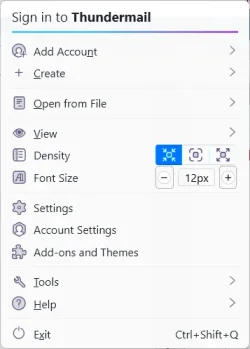
Maybe this is a small point to some, but I notice with the new Meadow variant, this menu option appeared.
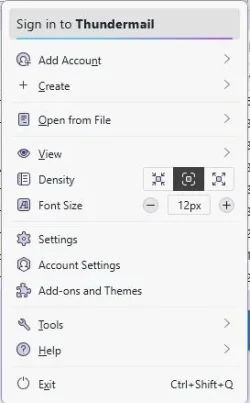

thundermail.webp


Is there any way to delete this "Sign in to Thundermail" menu option at the top? I find it very distracting.

Thank you
 

My Computers My Computers

  • At a glance

    Windows 11 Pro 25H2 build: (26200.7623)32GB
    OS
    Windows 11 Pro 25H2 build: (26200.7623)
    Computer type
    Laptop
    Manufacturer/Model
    Microsoft Surface Pro
    Memory
    32GB
  • At a glance

    Microsoft 25H2 ProIntel Core Ultra 764GBIntel Integrated Graphics
    Operating System
    Microsoft 25H2 Pro
    Computer type
    Laptop
    Manufacturer/Model
    Dell Pro 14 - PC14250
    CPU
    Intel Core Ultra 7
    Memory
    64GB
    Graphics card(s)
    Intel Integrated Graphics
    Hard Drives
    Micron 1TB SSD

My Computer My Computer

At a glance

Windows 11AMD Ryzen 7 5700GMicron Technology DDR4-3200 16GBNVIDIA GeForce RTX 3060
OS
Windows 11
Computer type
PC/Desktop
Manufacturer/Model
HP Pavilion
CPU
AMD Ryzen 7 5700G
Motherboard
Erica6
Memory
Micron Technology DDR4-3200 16GB
Graphics Card(s)
NVIDIA GeForce RTX 3060
Sound Card
Realtek ALC671
Monitor(s) Displays
Samsung SyncMaster U28E590
Screen Resolution
3840 x 2160
Hard Drives
SAMSUNG MZVLQ1T0HALB-000H1
That is a ESR channel release not normal channel.
 

My Computer My Computer

At a glance

Windows 11 Pro
OS
Windows 11 Pro
Waste of my time.
 

My Computer My Computer

At a glance

Windows 11AMD Ryzen 7 5700GMicron Technology DDR4-3200 16GBNVIDIA GeForce RTX 3060
OS
Windows 11
Computer type
PC/Desktop
Manufacturer/Model
HP Pavilion
CPU
AMD Ryzen 7 5700G
Motherboard
Erica6
Memory
Micron Technology DDR4-3200 16GB
Graphics Card(s)
NVIDIA GeForce RTX 3060
Sound Card
Realtek ALC671
Monitor(s) Displays
Samsung SyncMaster U28E590
Screen Resolution
3840 x 2160
Hard Drives
SAMSUNG MZVLQ1T0HALB-000H1

My Computers My Computers

  • At a glance

    Windows 11 Pro 25H2 build: (26200.7623)32GB
    OS
    Windows 11 Pro 25H2 build: (26200.7623)
    Computer type
    Laptop
    Manufacturer/Model
    Microsoft Surface Pro
    Memory
    32GB
  • At a glance

    Microsoft 25H2 ProIntel Core Ultra 764GBIntel Integrated Graphics
    Operating System
    Microsoft 25H2 Pro
    Computer type
    Laptop
    Manufacturer/Model
    Dell Pro 14 - PC14250
    CPU
    Intel Core Ultra 7
    Memory
    64GB
    Graphics card(s)
    Intel Integrated Graphics
    Hard Drives
    Micron 1TB SSD

My Computer My Computer

At a glance

Windows 11AMD Ryzen 7 5700GMicron Technology DDR4-3200 16GBNVIDIA GeForce RTX 3060
OS
Windows 11
Computer type
PC/Desktop
Manufacturer/Model
HP Pavilion
CPU
AMD Ryzen 7 5700G
Motherboard
Erica6
Memory
Micron Technology DDR4-3200 16GB
Graphics Card(s)
NVIDIA GeForce RTX 3060
Sound Card
Realtek ALC671
Monitor(s) Displays
Samsung SyncMaster U28E590
Screen Resolution
3840 x 2160
Hard Drives
SAMSUNG MZVLQ1T0HALB-000H1
I just ignore it as I do not open up options that often.

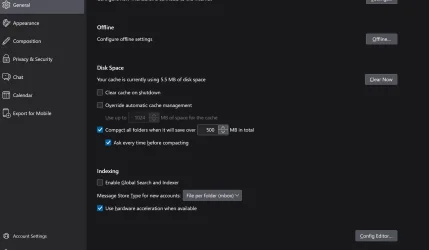
If you go into the general section all the way down is an option to open Config Editor. There may be an entry there-Similar to About:Config in Firefox

Screenshot 2026-08-06 133836.webp
 
Last edited:

My Computers My Computers

  • At a glance

    Windows11 Pro 26300.9550Intel Core i9 14900F (24 -Core, 68 MB Total C...32GB DDR5RTX 4080 Super w/610..88
    OS
    Windows11 Pro 26300.9550
    Computer type
    PC/Desktop
    Manufacturer/Model
    Dell Alienware Aurora R16
    CPU
    Intel Core i9 14900F (24 -Core, 68 MB Total Cache)
    Motherboard
    Dell Alienware
    Memory
    32GB DDR5
    Graphics Card(s)
    RTX 4080 Super w/610..88
    Sound Card
    Realtec
    Monitor(s) Displays
    Corsair XENEON 32QHD165
    Screen Resolution
    2560 X 1440
    Hard Drives
    1-2TB Samsung 990 Pro PCIe NVMe M2 SSD
    1-4TB Samsung 990 Pro PCIe NVMe M2 SSD
    PSU
    1000 Watt Platinum Dell
    Case
    Alienware
    Cooling
    Liquid Closed Loop
    Keyboard
    Corsair Strafe RGB
    Mouse
    Logitech MK270 Wireless
    Internet Speed
    100Gb's Down-20 Up
    Browser
    Firefox 157.0
    Antivirus
    Defender
    Other Info
    Very Quiet And Fast
    CyberPower UPS CP1500PFCLCD
  • At a glance

    MX-Linux13th Gen Inter(R) Core(TM) i3-1315U64 GB DDR4 @3200 MHz.Internal
    Operating System
    MX-Linux
    Computer type
    PC/Desktop
    Manufacturer/Model
    Intel
    CPU
    13th Gen Inter(R) Core(TM) i3-1315U
    Motherboard
    Intel
    Memory
    64 GB DDR4 @3200 MHz.
    Graphics card(s)
    Internal
    Sound Card
    None
    Monitor(s) Displays
    Dell 2419HGCF
    Screen Resolution
    1920 X 1080
    Hard Drives
    SAMSUNG 980 PRO SSD 2TB, PCIe 4.0 M.2 2280
    PSU
    Chicony 30 Watt
    Case
    Small
    Keyboard
    Dell
    Mouse
    Razor
    Internet Speed
    1GB
    Browser
    Slimjet
I can't see any about:config entry regarding that Thunderbird Pro login, but if you use userChrome.css, you can remove it from that menu:
userChrome.css
Code:
/* remove Thunderbird PRO entry in App menu */
.tbpro-header-button {display: none !important;}
TCapture1.webpTCapture2.webp
 

My Computer My Computer

At a glance

Win 11 25H2intel i7-870032GbIntel iGPU
OS
Win 11 25H2
Computer type
PC/Desktop
Manufacturer/Model
custom
CPU
intel i7-8700
Motherboard
Asus Z370 TUF Gaming
Memory
32Gb
Graphics Card(s)
Intel iGPU
Sound Card
Realtek
Hard Drives
Samsung
PSU
Corsair
Cooling
Fans
I can't see any about:config entry regarding that Thunderbird Pro login, but if you use userChrome.css, you can remove it from that menu:
userChrome.css
Code:
/* remove Thunderbird PRO entry in App menu */
.tbpro-header-button {display: none !important;}

Never used css before. I see your code. How do I install it?
 

My Computers My Computers

  • At a glance

    Windows 11 Pro 25H2 build: (26200.7623)32GB
    OS
    Windows 11 Pro 25H2 build: (26200.7623)
    Computer type
    Laptop
    Manufacturer/Model
    Microsoft Surface Pro
    Memory
    32GB
  • At a glance

    Microsoft 25H2 ProIntel Core Ultra 764GBIntel Integrated Graphics
    Operating System
    Microsoft 25H2 Pro
    Computer type
    Laptop
    Manufacturer/Model
    Dell Pro 14 - PC14250
    CPU
    Intel Core Ultra 7
    Memory
    64GB
    Graphics card(s)
    Intel Integrated Graphics
    Hard Drives
    Micron 1TB SSD

My Computers My Computers

  • At a glance

    Windows 11 Pro 25H2 build: (26200.7623)32GB
    OS
    Windows 11 Pro 25H2 build: (26200.7623)
    Computer type
    Laptop
    Manufacturer/Model
    Microsoft Surface Pro
    Memory
    32GB
  • At a glance

    Microsoft 25H2 ProIntel Core Ultra 764GBIntel Integrated Graphics
    Operating System
    Microsoft 25H2 Pro
    Computer type
    Laptop
    Manufacturer/Model
    Dell Pro 14 - PC14250
    CPU
    Intel Core Ultra 7
    Memory
    64GB
    Graphics card(s)
    Intel Integrated Graphics
    Hard Drives
    Micron 1TB SSD
If you want to try a userChrome.css file, try this:

1: Enable the use of stylesheets by going to about:config and toggle this setting to true (In case you didn't know, the about:config is at the bottom of the General settings in the Settings Panel (called Config editor right at the bottom.)

toolkit.legacyUserProfileCustomizations.stylesheets >> Toggle to True

2: Find your User Profile folder for Thunderbird, using Menu > Help > Troubleshooting Information and search for Profile Folder. Open your Profile folder by clicking the button shown next to it. The Profile folder should then open in Explorer.

3: In the Profile folder, create a new folder called Chrome, and inside it, create a blank text file, copy the code shown above into it, save it, and rename it to userChrome.css (make sure the whole file name is exactly as shown without any .txt extension).

4: Restart Thunderbird.

(btw: I am testing Version 153.0.2 (Release Version), and that Appmenu entry is showing in it as well).
 

My Computer My Computer

At a glance

Win 11 25H2intel i7-870032GbIntel iGPU
OS
Win 11 25H2
Computer type
PC/Desktop
Manufacturer/Model
custom
CPU
intel i7-8700
Motherboard
Asus Z370 TUF Gaming
Memory
32Gb
Graphics Card(s)
Intel iGPU
Sound Card
Realtek
Hard Drives
Samsung
PSU
Corsair
Cooling
Fans
I don't even know where that menu might appear, so it hasn't bothered me at all! 🤣
 

My Computers My Computers

  • At a glance

    Win 11 Pro 25H2, Build 26200.9550.Intel Core i5 14500, 14th Generation64GB DDR4GeForce RTX 4060
    OS
    Win 11 Pro 25H2, Build 26200.9550.
    Computer type
    PC/Desktop
    Manufacturer/Model
    Home Brew
    CPU
    Intel Core i5 14500, 14th Generation
    Motherboard
    Gigabyte B760M G P WIFI
    Memory
    64GB DDR4
    Graphics Card(s)
    GeForce RTX 4060
    Sound Card
    Chipset Realtek
    Monitor(s) Displays
    LG 45" Ultragear & Acer 24" 1080p
    Screen Resolution
    5120x1440 & 1920x1080
    Hard Drives
    Crucial P310 2TB 2280 PCIe Gen4 3D NAND NVMe M.2 SSD (O/S)
    Silicon Power 2TB US75 NVMe PCIe Gen4 M.2 2280 SSD (backup)
    Crucial BX500 2TB 3D NAND (2nd backup)
    Seagate 4TB Ironwolf, rotating HDD secondary backup
    External off-line backup Drives: 2 NVMe 4TB drives in external enclosures
    PSU
    Thermaltake Toughpower GF3 750W
    Case
    LIAN LI LANCOOL 216 E-ATX PC Case
    Cooling
    Lots of fans!
    Keyboard
    Microsoft Comfort Curve 2000
    Mouse
    Logitech G305
    Internet Speed
    Verizon FiOS 1GB
    Browser
    Firefox
    Antivirus
    Malware Bytes & Windows Defender Security
  • At a glance

    Win 11 Pro 25H2, Build 26200.9550.Intel Core i5 1440032GB DDR5Intel 700 Embedded GPU
    Operating System
    Win 11 Pro 25H2, Build 26200.9550.
    Computer type
    PC/Desktop
    Manufacturer/Model
    Home Brew
    CPU
    Intel Core i5 14400
    Motherboard
    Gigabyte B760M DS3H AX
    Memory
    32GB DDR5
    Graphics card(s)
    Intel 700 Embedded GPU
    Sound Card
    Realtek Embedded
    Monitor(s) Displays
    27" HP 1080p
    Screen Resolution
    1920x1080
    Hard Drives
    Crucial P310 2TB NVMe Gen4 SSD
    Samsung EVO 990 2TB NVMe Gen4 SSD
    Samsung 2TB SATA SSD
    Seagate 4TB Ironwolf, rotating HDD secondary backup
    PSU
    Thermaltake Smart BM3 650W
    Case
    Okinos Micro ATX Case
    Cooling
    Fans
    Keyboard
    Microsoft Comfort Curve 2000
    Mouse
    Logitech G305
    Internet Speed
    Verizon FiOS 1GB
    Browser
    Firefox
    Antivirus
    Malware Bytes & Windows Defender Security
  • Nimo N171 17" Laptop, (Intel i3-1215U, 16GB RAM, 2TB NVMe, Win11 Pro)
    Acemagic Vista Mini PC V1 (Intel N150, 16GB RAM, 1TB NVMe, Win11 Pro)
    HP ENVY h8-1540t, (24GB RAM, 2TB SSD, 2TB HDD, Win11 Pro)

My Computers My Computers

  • At a glance

    Windows 11 Pro 25H2 build: (26200.7623)32GB
    OS
    Windows 11 Pro 25H2 build: (26200.7623)
    Computer type
    Laptop
    Manufacturer/Model
    Microsoft Surface Pro
    Memory
    32GB
  • At a glance

    Microsoft 25H2 ProIntel Core Ultra 764GBIntel Integrated Graphics
    Operating System
    Microsoft 25H2 Pro
    Computer type
    Laptop
    Manufacturer/Model
    Dell Pro 14 - PC14250
    CPU
    Intel Core Ultra 7
    Memory
    64GB
    Graphics card(s)
    Intel Integrated Graphics
    Hard Drives
    Micron 1TB SSD
If you want to try a userChrome.css file, try this:

1: Enable the use of stylesheets by going to about:config and toggle this setting to true (In case you didn't know, the about:config is at the bottom of the General settings in the Settings Panel (called Config editor right at the bottom.)

toolkit.legacyUserProfileCustomizations.stylesheets >> Toggle to True

2: Find your User Profile folder for Thunderbird, using Menu > Help > Troubleshooting Information and search for Profile Folder. Open your Profile folder by clicking the button shown next to it. The Profile folder should then open in Explorer.

3: In the Profile folder, create a new folder called Chrome, and inside it, create a blank text file, copy the code shown above into it, save it, and rename it to userChrome.css (make sure the whole file name is exactly as shown without any .txt extension).

4: Restart Thunderbird.

(btw: I am testing Version 153.0.2 (Release Version), and that Appmenu entry is showing in it as well).

Yup, it worked!

~

Should I ever have to add more modification code to that css file, how would I do that?

Would I leave a space between each new and separate modification I would add?

Or join them together in some way, or what? How does that work?
 

My Computers My Computers

  • At a glance

    Windows 11 Pro 25H2 build: (26200.7623)32GB
    OS
    Windows 11 Pro 25H2 build: (26200.7623)
    Computer type
    Laptop
    Manufacturer/Model
    Microsoft Surface Pro
    Memory
    32GB
  • At a glance

    Microsoft 25H2 ProIntel Core Ultra 764GBIntel Integrated Graphics
    Operating System
    Microsoft 25H2 Pro
    Computer type
    Laptop
    Manufacturer/Model
    Dell Pro 14 - PC14250
    CPU
    Intel Core Ultra 7
    Memory
    64GB
    Graphics card(s)
    Intel Integrated Graphics
    Hard Drives
    Micron 1TB SSD
To add more modifications, ideally (from a readability & maintenance point of view), you would just edit the userChrome.css file in say Notepad, and add each new piece of formatted code on separate lines together with brief comments accompanying each style. eg:

Code:
/* remove Thunderbird PRO entry in App menu */
.tbpro-header-button {display: none !important;}

/* Eg: to alter the color & font style of "Add Account" label in App menu */ 
#appmenu_new label {color: red !important; font-style: italic !important;}

or better still, use formatted code blocks (makes it much easier to read & debug):
Code:
/* remove Thunderbird PRO entry in App menu */
.tbpro-header-button {
  display: none !important;
}

/* Eg: to alter the color & font style of "Add Account" label in App menu */  
#appmenu_new label {
  color: red !important; 
  font-style: italic !important;
}
 

My Computer My Computer

At a glance

Win 11 25H2intel i7-870032GbIntel iGPU
OS
Win 11 25H2
Computer type
PC/Desktop
Manufacturer/Model
custom
CPU
intel i7-8700
Motherboard
Asus Z370 TUF Gaming
Memory
32Gb
Graphics Card(s)
Intel iGPU
Sound Card
Realtek
Hard Drives
Samsung
PSU
Corsair
Cooling
Fans
Again, thanks for your responses

or better still, use formatted code blocks (makes it much easier to read & debug):

And how would you do that yourself, if the code you received weren't pre-formatted?
 

My Computers My Computers

  • At a glance

    Windows 11 Pro 25H2 build: (26200.7623)32GB
    OS
    Windows 11 Pro 25H2 build: (26200.7623)
    Computer type
    Laptop
    Manufacturer/Model
    Microsoft Surface Pro
    Memory
    32GB
  • At a glance

    Microsoft 25H2 ProIntel Core Ultra 764GBIntel Integrated Graphics
    Operating System
    Microsoft 25H2 Pro
    Computer type
    Laptop
    Manufacturer/Model
    Dell Pro 14 - PC14250
    CPU
    Intel Core Ultra 7
    Memory
    64GB
    Graphics card(s)
    Intel Integrated Graphics
    Hard Drives
    Micron 1TB SSD
Usually you would receive CSS code which is formatted as in the example above. But in case you receive any code which is unformatted, you can make it more readable using either an online CSS formatter, or follow some simple rules as shown on various online sites (see example below).

Online CSS formatter.

Different ways to format CSS
 

My Computer My Computer

At a glance

Win 11 25H2intel i7-870032GbIntel iGPU
OS
Win 11 25H2
Computer type
PC/Desktop
Manufacturer/Model
custom
CPU
intel i7-8700
Motherboard
Asus Z370 TUF Gaming
Memory
32Gb
Graphics Card(s)
Intel iGPU
Sound Card
Realtek
Hard Drives
Samsung
PSU
Corsair
Cooling
Fans
Ok well thanks to everybody for their help, and especially @das10

I will mark this as solved. :-)
 

My Computers My Computers

  • At a glance

    Windows 11 Pro 25H2 build: (26200.7623)32GB
    OS
    Windows 11 Pro 25H2 build: (26200.7623)
    Computer type
    Laptop
    Manufacturer/Model
    Microsoft Surface Pro
    Memory
    32GB
  • At a glance

    Microsoft 25H2 ProIntel Core Ultra 764GBIntel Integrated Graphics
    Operating System
    Microsoft 25H2 Pro
    Computer type
    Laptop
    Manufacturer/Model
    Dell Pro 14 - PC14250
    CPU
    Intel Core Ultra 7
    Memory
    64GB
    Graphics card(s)
    Intel Integrated Graphics
    Hard Drives
    Micron 1TB SSD
Back
Top Bottom