Solved How do I increase Windows' generated text so I can read it?


therealsimpsons

Active member
Member
Local time
8:47 AM
Posts
66
OS
Win 11 64-Bit Home
Hello, if this post is in the wrong place, please feel free to move it, and let me know. Thank you

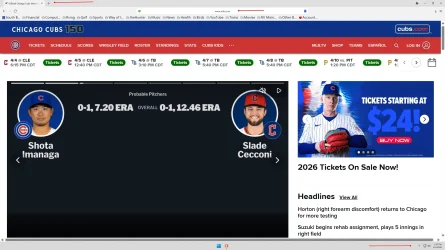
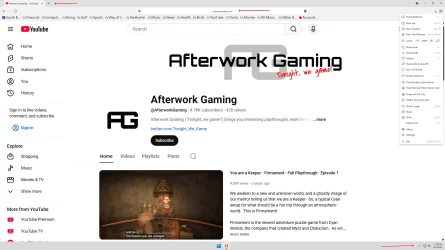
Since the beginning of Win 11, with a 2560 x 1440 27 in display, everything generated from the Windows system is almost impossible to read because it is so small. Everything from the internet, including mail, pictures and any other application is at normal size, easily readable, with ability to increase the font size.

Here are two pictures of my screen showing what I mean. See the read arrow pointing to Windows generated content (not part of the website). My screen is less than 3 feet from my face and I can't read it without heavy strain.

Does anyone else have this issue, and is there a solution?

Thank you.

TRS
 
Windows Build/Version
25H2

Attachments

  • Screenshot 2026-04-04 130821.webp
    Screenshot 2026-04-04 130821.webp
    175.2 KB · Views: 1
  • Screenshot 2026-04-04 131054.webp
    Screenshot 2026-04-04 131054.webp
    164.7 KB · Views: 1

My Computer

System One

  • OS
    Win 11 64-Bit Home
    Computer type
    PC/Desktop
    Manufacturer/Model
    Custom Build
    CPU
    12 Gen Intel i7-12700K 360 GHz
    Motherboard
    Gigabyte B760M
    Memory
    32 GB
    Graphics Card(s)
    EVGA Nividia GeForce RTX 3060 12GB
    Sound Card
    None
    Monitor(s) Displays
    Dell 32in curved
    Screen Resolution
    2560 x 1440
    Hard Drives
    Samsung 1 TB SSD M.2 970 EVO Nvme PicIe 3.0 x 4
    Seagate 2 TB SATA 7200 RPM 64MB
    PSU
    Apevia 800W GOLD
    Case
    Apevia ENZO
    Cooling
    2 Case Fans, ZeroTherm ZT100 Thermal Grease
    Keyboard
    Logitech K360
    Mouse
    Logitech GS 502 Hero
    Internet Speed
    650 mbps
    Browser
    Duck Duck Go
    Antivirus
    Webroot Anywhere
Hello, :alien:

You can increase the display DPI scaling level to a higher percentage like in the tutorial below to make everything appear larger.


My Computers

System One System Two

  • OS
    Windows 11 Pro for Workstations
    Computer type
    PC/Desktop
    Manufacturer/Model
    Custom self build
    CPU
    Intel i7-8700K 5 GHz
    Motherboard
    ASUS ROG Maximus XI Formula Z390
    Memory
    64 GB (4x16GB) G.SKILL TridentZ RGB DDR4 3600 MHz (F4-3600C18D-32GTZR)
    Graphics Card(s)
    ASUS ROG-STRIX-GTX1080TI-O11G-GAMING (11GB GDDR5X)
    Sound Card
    Integrated Digital Audio (S/PDIF)
    Monitor(s) Displays
    2 x Samsung Odyssey G75 27"
    Screen Resolution
    2560x1440
    Hard Drives
    1TB Samsung 990 PRO M.2,
    4TB Samsung 990 PRO M.2,
    TerraMaster F8 SSD Plus NAS
    PSU
    Seasonic Prime Titanium 850W
    Case
    Thermaltake Core P3 wall mounted
    Cooling
    Corsair Hydro H115i
    Keyboard
    Amazon Basics Wired Full Keyboard MD005
    Mouse
    Logitech MX Master 4
    Internet Speed
    2 Gbps Download and 100 Mbps Upload
    Browser
    Chrome and Edge
    Antivirus
    Microsoft Defender
    Other Info
    Logitech Z625 speaker system,
    Logitech BRIO 4K Pro webcam,
    HP Color LaserJet Pro MFP M477fdn,
    CyberPower CP1500PFCLCD
    Galaxy S23 Plus phone
  • Operating System
    Windows 11 Pro
    Computer type
    Laptop
    Manufacturer/Model
    Surface Laptop 7 Copilot+ PC
    CPU
    Snapdragon X Elite (12 core) 3.42 GHz
    Memory
    16 GB LPDDR5x-7467 MHz
    Monitor(s) Displays
    15" HDR
    Screen Resolution
    2496 x 1664
    Hard Drives
    1 TB SSD
    Internet Speed
    Wi-Fi 7 and Bluetooth 5.4
    Browser
    Chrome and Edge
    Antivirus
    Microsoft Defender
Or hold the control key (Ctrl) and press plus. To reduce, press control and minus. To reset, press control and zero.
 

My Computers

System One System Two

  • OS
    Windows 11 Pro 25H2 26200.8655
    Computer type
    Laptop
    Manufacturer/Model
    Acemagic LX15PRO
    CPU
    AMD Ryzen 7 5825U with Radeon Graphics
    Memory
    16GB
    Screen Resolution
    1920 x 1080
    Hard Drives
    SSD 2TB
    Internet Speed
    30 Mbps
    Browser
    Brave
    Antivirus
    Webroot Secure Anywhere
    Other Info
    System 3

    Acer Swift SF114-34 laptop
    OS Windows 11 Pro 26200.8524
    CPU Pentium Silver N6000
    RAM 4GB
    SSD Samsung 970 EVO Plus SSD 2TB (an upgrade)
  • Operating System
    Windows 11 Pro 23H2 22631.2506
    Computer type
    Laptop
    Manufacturer/Model
    HP Mini 210-1090NR PC (bought in late 2009!)
    CPU
    Atom N450 1.66GHz
    Memory
    2GB
    Browser
    Brave
    Antivirus
    Webroot
Both of those solutions make all the text on the screen change sizes. I believe he's looking just for the text indicated to be enlarged. I can't even figure out how he got that text so small! :unsure:

What browser is this?
 

My Computers

System One System Two

  • OS
    Win 11 Pro 25H2, Build 26200.8655
    Computer type
    PC/Desktop
    Manufacturer/Model
    Home Brew
    CPU
    Intel Core i5 14500
    Motherboard
    Gigabyte B760M G P WIFI
    Memory
    64GB DDR4
    Graphics Card(s)
    GeForce RTX 4060
    Sound Card
    Chipset Realtek
    Monitor(s) Displays
    LG 45" Ultragear, Acer 24" 1080p
    Screen Resolution
    5120x1440, 1920x1080
    Hard Drives
    Crucial P310 2TB 2280 PCIe Gen4 3D NAND NVMe M.2 SSD (O/S)
    Silicon Power 2TB US75 NVMe PCIe Gen4 M.2 2280 SSD (backup)
    Crucial BX500 2TB 3D NAND (2nd backup)
    Seagate 4TB Ironwolf, rotating HDD archive files
    External off-line backup Drives: 2 NVMe 4TB drives in external enclosures
    PSU
    Thermaltake Toughpower GF3 750W
    Case
    LIAN LI LANCOOL 216 E-ATX PC Case
    Cooling
    Lots of fans!
    Keyboard
    Microsoft Comfort Curve 2000
    Mouse
    Logitech G305
    Internet Speed
    Verizon FiOS 1GB
    Browser
    Firefox
    Antivirus
    Malware Bytes & Windows Defender Security
  • Operating System
    Win 11 Pro 25H2, Build 26200.8524
    Computer type
    PC/Desktop
    Manufacturer/Model
    Home Brew
    CPU
    Intel Core i5 14400
    Motherboard
    Gigabyte B760M DS3H AX
    Memory
    32GB DDR5
    Graphics card(s)
    Intel 700 Embedded GPU
    Sound Card
    Realtek Embedded
    Monitor(s) Displays
    27" HP 1080p
    Screen Resolution
    1920x1080
    Hard Drives
    Crucial P310 2TB 2280 PCIe Gen4 eD NAND PCIe SSD
    Samsung EVO 990 2TB NVMe Gen4 SSD
    Samsung 2TB SATA SSD
    PSU
    Thermaltake Smart BM3 650W
    Case
    Okinos Micro ATX Case
    Cooling
    Fans
    Keyboard
    Microsoft Comfort Curve 2000
    Mouse
    Logitech G305
    Internet Speed
    Verizon FiOS 1GB
    Browser
    Firefox
    Antivirus
    Malware Bytes & Windows Defender Security
My screen defaults to 2560x1440 resolution. I change it to 1920x1080 and the size makes everything much easier to read and interact with. Just go to display in settings and change the resolution to what you prefer.
 

My Computer

System One

  • Computer type
    PC/Desktop
    Manufacturer/Model
    MSI
    CPU
    Ryzen 5800X
    Motherboard
    MSI X570S Carbon Pro
    Memory
    64GB GSkill DDR4
    Graphics Card(s)
    MSI RX6750 XT OC
    Monitor(s) Displays
    Dell U2711
    Screen Resolution
    1920 x 1080
    Hard Drives
    Nexstorage NN4LE 2TB2C
    PSU
    850 watt
    Cooling
    Corsair H100i
It's a Duckduckgo browser. One of the picture has the icon on the bottom of the page
 

My Computer

System One

  • OS
    Windows 11 & Zorin Pro
    Computer type
    Laptop
    Manufacturer/Model
    Asus Rog Strix G16
    CPU
    Intel® Core™ Ultra 9 Processor 275HX 2.7 GHz
    Motherboard
    AsusteK Computer
    Memory
    32 gb
    Graphics Card(s)
    NVIDIA® GeForce RTX™ 5060 Laptop GPU
    Sound Card
    Realtek High Definition Audio
    Monitor(s) Displays
    Laptop 16 inch
    Screen Resolution
    2560 X 1600
    Hard Drives
    Boot: Samsung 9100 NVME 2 TB Microsoft Storage Controller: Standard NVM Express Driver: Microsoft 6/21/2006. No SATA/AHCI on my motherboard or in bios
    Mouse
    Pad
    Browser
    Google Chrome
    Antivirus
    Microsoft
    Other Info
    Printer: HP Color LaserJet MFP M477dw
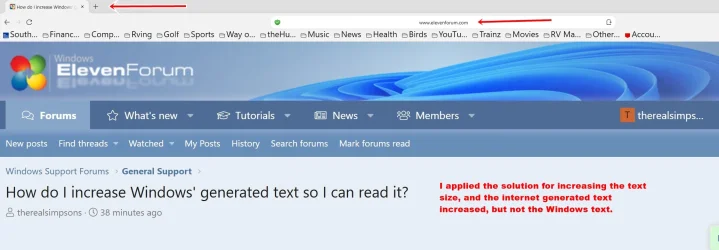
Gunrunnerjohn is correct regarding the font I want to change. Here is a picture of what happened after I increased the default font size. My browser is Duck Duck Go powered by Edge.
 

Attachments

  • Screenshot 2026-04-04 140856.webp
    Screenshot 2026-04-04 140856.webp
    90.7 KB · Views: 1

My Computer

System One

  • OS
    Win 11 64-Bit Home
    Computer type
    PC/Desktop
    Manufacturer/Model
    Custom Build
    CPU
    12 Gen Intel i7-12700K 360 GHz
    Motherboard
    Gigabyte B760M
    Memory
    32 GB
    Graphics Card(s)
    EVGA Nividia GeForce RTX 3060 12GB
    Sound Card
    None
    Monitor(s) Displays
    Dell 32in curved
    Screen Resolution
    2560 x 1440
    Hard Drives
    Samsung 1 TB SSD M.2 970 EVO Nvme PicIe 3.0 x 4
    Seagate 2 TB SATA 7200 RPM 64MB
    PSU
    Apevia 800W GOLD
    Case
    Apevia ENZO
    Cooling
    2 Case Fans, ZeroTherm ZT100 Thermal Grease
    Keyboard
    Logitech K360
    Mouse
    Logitech GS 502 Hero
    Internet Speed
    650 mbps
    Browser
    Duck Duck Go
    Antivirus
    Webroot Anywhere
My screen defaults to 2560x1440 resolution. I change it to 1920x1080 and the size makes everything much easier to read and interact with. Just go to display in settings and change the resolution to what you prefer.
I will try that, thank you.
 

My Computer

System One

  • OS
    Win 11 64-Bit Home
    Computer type
    PC/Desktop
    Manufacturer/Model
    Custom Build
    CPU
    12 Gen Intel i7-12700K 360 GHz
    Motherboard
    Gigabyte B760M
    Memory
    32 GB
    Graphics Card(s)
    EVGA Nividia GeForce RTX 3060 12GB
    Sound Card
    None
    Monitor(s) Displays
    Dell 32in curved
    Screen Resolution
    2560 x 1440
    Hard Drives
    Samsung 1 TB SSD M.2 970 EVO Nvme PicIe 3.0 x 4
    Seagate 2 TB SATA 7200 RPM 64MB
    PSU
    Apevia 800W GOLD
    Case
    Apevia ENZO
    Cooling
    2 Case Fans, ZeroTherm ZT100 Thermal Grease
    Keyboard
    Logitech K360
    Mouse
    Logitech GS 502 Hero
    Internet Speed
    650 mbps
    Browser
    Duck Duck Go
    Antivirus
    Webroot Anywhere
Solved. I tried Graybeard's suggestion and it works well enough that I can now see what was the itty bitty print from Windows. Thanks all for the responses. This is an awesome site.
 

My Computer

System One

  • OS
    Win 11 64-Bit Home
    Computer type
    PC/Desktop
    Manufacturer/Model
    Custom Build
    CPU
    12 Gen Intel i7-12700K 360 GHz
    Motherboard
    Gigabyte B760M
    Memory
    32 GB
    Graphics Card(s)
    EVGA Nividia GeForce RTX 3060 12GB
    Sound Card
    None
    Monitor(s) Displays
    Dell 32in curved
    Screen Resolution
    2560 x 1440
    Hard Drives
    Samsung 1 TB SSD M.2 970 EVO Nvme PicIe 3.0 x 4
    Seagate 2 TB SATA 7200 RPM 64MB
    PSU
    Apevia 800W GOLD
    Case
    Apevia ENZO
    Cooling
    2 Case Fans, ZeroTherm ZT100 Thermal Grease
    Keyboard
    Logitech K360
    Mouse
    Logitech GS 502 Hero
    Internet Speed
    650 mbps
    Browser
    Duck Duck Go
    Antivirus
    Webroot Anywhere
It's really odd what is happening there. Is it only your browser that has the tiny font issue? I ask because I run at the native resolution of my monitor, 5120x1440, and I don't have any problem with the URL text size using Firefox.

1775336420772.webp

So I fired up EDGE and looked at the same page, looks fine there as well. I don't use EDGE other than when I want to see if a website is having a problem with Firefox, so I didn't do anything special to fix it.

1775336525902.webp
 

My Computers

System One System Two

  • OS
    Win 11 Pro 25H2, Build 26200.8655
    Computer type
    PC/Desktop
    Manufacturer/Model
    Home Brew
    CPU
    Intel Core i5 14500
    Motherboard
    Gigabyte B760M G P WIFI
    Memory
    64GB DDR4
    Graphics Card(s)
    GeForce RTX 4060
    Sound Card
    Chipset Realtek
    Monitor(s) Displays
    LG 45" Ultragear, Acer 24" 1080p
    Screen Resolution
    5120x1440, 1920x1080
    Hard Drives
    Crucial P310 2TB 2280 PCIe Gen4 3D NAND NVMe M.2 SSD (O/S)
    Silicon Power 2TB US75 NVMe PCIe Gen4 M.2 2280 SSD (backup)
    Crucial BX500 2TB 3D NAND (2nd backup)
    Seagate 4TB Ironwolf, rotating HDD archive files
    External off-line backup Drives: 2 NVMe 4TB drives in external enclosures
    PSU
    Thermaltake Toughpower GF3 750W
    Case
    LIAN LI LANCOOL 216 E-ATX PC Case
    Cooling
    Lots of fans!
    Keyboard
    Microsoft Comfort Curve 2000
    Mouse
    Logitech G305
    Internet Speed
    Verizon FiOS 1GB
    Browser
    Firefox
    Antivirus
    Malware Bytes & Windows Defender Security
  • Operating System
    Win 11 Pro 25H2, Build 26200.8524
    Computer type
    PC/Desktop
    Manufacturer/Model
    Home Brew
    CPU
    Intel Core i5 14400
    Motherboard
    Gigabyte B760M DS3H AX
    Memory
    32GB DDR5
    Graphics card(s)
    Intel 700 Embedded GPU
    Sound Card
    Realtek Embedded
    Monitor(s) Displays
    27" HP 1080p
    Screen Resolution
    1920x1080
    Hard Drives
    Crucial P310 2TB 2280 PCIe Gen4 eD NAND PCIe SSD
    Samsung EVO 990 2TB NVMe Gen4 SSD
    Samsung 2TB SATA SSD
    PSU
    Thermaltake Smart BM3 650W
    Case
    Okinos Micro ATX Case
    Cooling
    Fans
    Keyboard
    Microsoft Comfort Curve 2000
    Mouse
    Logitech G305
    Internet Speed
    Verizon FiOS 1GB
    Browser
    Firefox
    Antivirus
    Malware Bytes & Windows Defender Security

Latest Support Threads

Back
Top Bottom