Solved how do i merge 2 partitions into one?


3gsd's

Well-known member
Local time
8:03 AM
Posts
38
OS
win 10 pro 64 bit
Windows Build/Version
windows 11 home v 23h2

My Computer My Computer

At a glance

win 10 pro 64 bitamd ryzen 5 3400gcorsair vengence16gb lpx@3200 mt/snone
OS
win 10 pro 64 bit
Computer type
PC/Desktop
Manufacturer/Model
home build
CPU
amd ryzen 5 3400g
Motherboard
asrock b450m-hdv r4.0 am4 amd promontory b450 sata 6Gb/s micro atx amd motherboad
Memory
corsair vengence16gb lpx@3200 mt/s
Graphics Card(s)
none
Sound Card
none
Monitor(s) Displays
lg
Hard Drives
crucial P5 1TB 3D nand nvme internal ssd, 3400 mb/s - CT1000P5SSD8
PSU
evga 600w 100-w1-0600-k1 80+
Case
phanteks eclipse p300 tg
Short story made long. I changed the 1tb ssd to a 2tb ssd in my Dell 5625 laptop using Macrium reflect. Everything works as it did. What I have now is OS (C:) and New Volume (E:) each with 1tb. What do I use to merge E into C to make a 2tb C? Would something like this work? Best Free Partition Manager for Windows | MiniTool Partition Wizard Free
Yes but for simplicity of use, some might prefer:


My Computers My Computers

  • At a glance

    All Branches but ReleaseAMD Ryzen 7 7735HS 3200-4500 Mhz 8 cores x 232 GB DDR5Radeon Graphic / NVIDIA GeForce RTX 4060 8 GB...
    OS
    All Branches but Release
    Computer type
    Laptop
    Manufacturer/Model
    Acer Nitro ANV15-51
    CPU
    AMD Ryzen 7 7735HS 3200-4500 Mhz 8 cores x 2
    Motherboard
    Sportage_RBH
    Memory
    32 GB DDR5
    Graphics Card(s)
    Radeon Graphic / NVIDIA GeForce RTX 4060 8 GB GDDR6
    Sound Card
    AMD/Realtek(R) Audio
    Monitor(s) Displays
    Integrated Monitor (15.3"vis)
    Screen Resolution
    FHD 1920X1080 16:9 144Hz
    Hard Drives
    KINGSTON OM8SEP4512Q-AA 1TB
    Western Digital 256GB
    PSU
    19V DC 6.32 A 120 W
    Cooling
    Dual Fans
    Mouse
    MS Bluetooth
    Internet Speed
    Fiber 1GB Cox -us & 1GB Orange-fr
    Browser
    Edge Canary- Firefox Nightly-Chrome Dev-Chrome Dev
    Antivirus
    Windows Defender
  • At a glance

    Windows 11 BetaAMD A9-94208 GB of DDR4AMD Radeon R5
    Operating System
    Windows 11 Beta
    Computer type
    Laptop
    Manufacturer/Model
    Asus X751BP
    CPU
    AMD A9-9420
    Memory
    8 GB of DDR4
    Graphics card(s)
    AMD Radeon R5
    Screen Resolution
    1600x900
    Hard Drives
    Seagate 1 TB
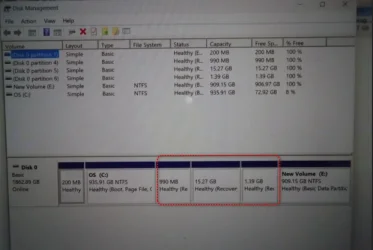
Thanks. I tried the program but I can't merge (E) with 900gb into (C) with 936gb. How do I increase (C) to 2tb? Do I delete (E)? If so, how do I increase (C)?

DSC08669 [320x200].webp
 

My Computer My Computer

At a glance

win 10 pro 64 bitamd ryzen 5 3400gcorsair vengence16gb lpx@3200 mt/snone
OS
win 10 pro 64 bit
Computer type
PC/Desktop
Manufacturer/Model
home build
CPU
amd ryzen 5 3400g
Motherboard
asrock b450m-hdv r4.0 am4 amd promontory b450 sata 6Gb/s micro atx amd motherboad
Memory
corsair vengence16gb lpx@3200 mt/s
Graphics Card(s)
none
Sound Card
none
Monitor(s) Displays
lg
Hard Drives
crucial P5 1TB 3D nand nvme internal ssd, 3400 mb/s - CT1000P5SSD8
PSU
evga 600w 100-w1-0600-k1 80+
Case
phanteks eclipse p300 tg
Thanks. I tried the program but I can't merge (E) with 900gb into (C) with 936gb. How do I increase (C) to 2tb? Do I delete (E)? If so, how do I increase (C)?

View attachment 127805
Sorry I can't read something that small.
Did you right click on the partition and find the Merge option?
You can then select which volumes to merge.

merge.webp
 

My Computers My Computers

  • At a glance

    All Branches but ReleaseAMD Ryzen 7 7735HS 3200-4500 Mhz 8 cores x 232 GB DDR5Radeon Graphic / NVIDIA GeForce RTX 4060 8 GB...
    OS
    All Branches but Release
    Computer type
    Laptop
    Manufacturer/Model
    Acer Nitro ANV15-51
    CPU
    AMD Ryzen 7 7735HS 3200-4500 Mhz 8 cores x 2
    Motherboard
    Sportage_RBH
    Memory
    32 GB DDR5
    Graphics Card(s)
    Radeon Graphic / NVIDIA GeForce RTX 4060 8 GB GDDR6
    Sound Card
    AMD/Realtek(R) Audio
    Monitor(s) Displays
    Integrated Monitor (15.3"vis)
    Screen Resolution
    FHD 1920X1080 16:9 144Hz
    Hard Drives
    KINGSTON OM8SEP4512Q-AA 1TB
    Western Digital 256GB
    PSU
    19V DC 6.32 A 120 W
    Cooling
    Dual Fans
    Mouse
    MS Bluetooth
    Internet Speed
    Fiber 1GB Cox -us & 1GB Orange-fr
    Browser
    Edge Canary- Firefox Nightly-Chrome Dev-Chrome Dev
    Antivirus
    Windows Defender
  • At a glance

    Windows 11 BetaAMD A9-94208 GB of DDR4AMD Radeon R5
    Operating System
    Windows 11 Beta
    Computer type
    Laptop
    Manufacturer/Model
    Asus X751BP
    CPU
    AMD A9-9420
    Memory
    8 GB of DDR4
    Graphics card(s)
    AMD Radeon R5
    Screen Resolution
    1600x900
    Hard Drives
    Seagate 1 TB

My Computers My Computers

  • At a glance

    Windows 11 26200.8728Amd Threadripper 7970X128GB (4 X 32) G.Skill DDR5 6400 (RDIMM)Gigabyte RTX 4090 OC
    OS
    Windows 11 26200.8728
    Computer type
    PC/Desktop
    Manufacturer/Model
    homebuilt
    CPU
    Amd Threadripper 7970X
    Motherboard
    Gigabyte TRX50 Aero D Rev. 1.0
    Memory
    128GB (4 X 32) G.Skill DDR5 6400 (RDIMM)
    Graphics Card(s)
    Gigabyte RTX 4090 OC
    Sound Card
    none (USB to speakers), Realtek
    Monitor(s) Displays
    Innocn 32" OLED
    Screen Resolution
    3840 X 2160 @ 60Hz
    Hard Drives
    Crucial T700 2TB M.2 NVME SSD
    WD 4TB Blue SATA SSD
    Seagate 18TB IronWolf Pro
    PSU
    BeQuiet! Straight Power 12 1500W
    Case
    Lian Li 011 Dynamic Evo XL
    Cooling
    SilverStone Technology XE360-TR5, with 3 Phanteks T30 fans
    Keyboard
    Cherry KC 500 MX LP (mechanical)
    Mouse
    Logitech M500s (wired)
    Internet Speed
    2000/250 Mbps (down/up)
    Other Info
    xFinity gateway
  • At a glance

    windows 11 26200.8728Intel I9-13900K64GB G.Skill DDR5-6000Gigabyte RTX 3090 ti
    Operating System
    windows 11 26200.8728
    Computer type
    PC/Desktop
    Manufacturer/Model
    homebuilt
    CPU
    Intel I9-13900K
    Motherboard
    Asus RoG Strix Z690-E
    Memory
    64GB G.Skill DDR5-6000
    Graphics card(s)
    Gigabyte RTX 3090 ti
    Sound Card
    built in Realtek
    Monitor(s) Displays
    Philips 27E1N8900 27" OLED
    Screen Resolution
    3840 X 2160 @60Hz
    Hard Drives
    WDC SN850 1TB
    8TB Seagate Ironwolf
    4TB Seagate Ironwolf
    PSU
    eVGA SuperNOVA 1300 GT
    Case
    Lian Li 011 Dynamic Evo
    Cooling
    Corsair iCUE H150i ELITE CAPELLIX Liquid CPU Cooler
    Keyboard
    Cherry Streaming (wired)
    Mouse
    Logitech M500s (wired)
hopefully this is better

DSC08669 [800x600].webp
 

My Computer My Computer

At a glance

win 10 pro 64 bitamd ryzen 5 3400gcorsair vengence16gb lpx@3200 mt/snone
OS
win 10 pro 64 bit
Computer type
PC/Desktop
Manufacturer/Model
home build
CPU
amd ryzen 5 3400g
Motherboard
asrock b450m-hdv r4.0 am4 amd promontory b450 sata 6Gb/s micro atx amd motherboad
Memory
corsair vengence16gb lpx@3200 mt/s
Graphics Card(s)
none
Sound Card
none
Monitor(s) Displays
lg
Hard Drives
crucial P5 1TB 3D nand nvme internal ssd, 3400 mb/s - CT1000P5SSD8
PSU
evga 600w 100-w1-0600-k1 80+
Case
phanteks eclipse p300 tg
Sorry I can't read something that small.
Did you right click on the partition and find the Merge option?
You can then select which volumes to merge.

View attachment 127807I did click on it, but the program only allows merging 2 adjacent partitions. I want to merge E into C. If I delete volumes 4,5, and 6, 2 is not large enough to merge E into it. Do I delete E? Then how would I expand C to 2tb +/-?
 

My Computer My Computer

At a glance

win 10 pro 64 bitamd ryzen 5 3400gcorsair vengence16gb lpx@3200 mt/snone
OS
win 10 pro 64 bit
Computer type
PC/Desktop
Manufacturer/Model
home build
CPU
amd ryzen 5 3400g
Motherboard
asrock b450m-hdv r4.0 am4 amd promontory b450 sata 6Gb/s micro atx amd motherboad
Memory
corsair vengence16gb lpx@3200 mt/s
Graphics Card(s)
none
Sound Card
none
Monitor(s) Displays
lg
Hard Drives
crucial P5 1TB 3D nand nvme internal ssd, 3400 mb/s - CT1000P5SSD8
PSU
evga 600w 100-w1-0600-k1 80+
Case
phanteks eclipse p300 tg
hopefully this is better

View attachment 127824
Thanks. It's better.

Disk Management cannot, as far as I know, merge partitions that aren't adjacent.

I don't know whether a third-party utility could manage it, especially with only one drive in the PC.

I wonder what the partitions on the original 1TB drive looked like? I suspect that the cloning didn't go quite right. If memory serves, Macrium Reflect has the capability to clone to a larger destination drive, expanding the main partition to use all the available space. I think that the same applies to restoring an image to a larger drive, rather than a direct cloning.
 

My Computers My Computers

  • At a glance

    Windows 11 26200.8728Amd Threadripper 7970X128GB (4 X 32) G.Skill DDR5 6400 (RDIMM)Gigabyte RTX 4090 OC
    OS
    Windows 11 26200.8728
    Computer type
    PC/Desktop
    Manufacturer/Model
    homebuilt
    CPU
    Amd Threadripper 7970X
    Motherboard
    Gigabyte TRX50 Aero D Rev. 1.0
    Memory
    128GB (4 X 32) G.Skill DDR5 6400 (RDIMM)
    Graphics Card(s)
    Gigabyte RTX 4090 OC
    Sound Card
    none (USB to speakers), Realtek
    Monitor(s) Displays
    Innocn 32" OLED
    Screen Resolution
    3840 X 2160 @ 60Hz
    Hard Drives
    Crucial T700 2TB M.2 NVME SSD
    WD 4TB Blue SATA SSD
    Seagate 18TB IronWolf Pro
    PSU
    BeQuiet! Straight Power 12 1500W
    Case
    Lian Li 011 Dynamic Evo XL
    Cooling
    SilverStone Technology XE360-TR5, with 3 Phanteks T30 fans
    Keyboard
    Cherry KC 500 MX LP (mechanical)
    Mouse
    Logitech M500s (wired)
    Internet Speed
    2000/250 Mbps (down/up)
    Other Info
    xFinity gateway
  • At a glance

    windows 11 26200.8728Intel I9-13900K64GB G.Skill DDR5-6000Gigabyte RTX 3090 ti
    Operating System
    windows 11 26200.8728
    Computer type
    PC/Desktop
    Manufacturer/Model
    homebuilt
    CPU
    Intel I9-13900K
    Motherboard
    Asus RoG Strix Z690-E
    Memory
    64GB G.Skill DDR5-6000
    Graphics card(s)
    Gigabyte RTX 3090 ti
    Sound Card
    built in Realtek
    Monitor(s) Displays
    Philips 27E1N8900 27" OLED
    Screen Resolution
    3840 X 2160 @60Hz
    Hard Drives
    WDC SN850 1TB
    8TB Seagate Ironwolf
    4TB Seagate Ironwolf
    PSU
    eVGA SuperNOVA 1300 GT
    Case
    Lian Li 011 Dynamic Evo
    Cooling
    Corsair iCUE H150i ELITE CAPELLIX Liquid CPU Cooler
    Keyboard
    Cherry Streaming (wired)
    Mouse
    Logitech M500s (wired)
Disk Management cannot, as far as I know, merge partitions that aren't adjacent

As far as I know, disk managament can't merge partitions at all

The third party program in the screenshot claims it can merge adjacent partitions
 

My Computers My Computers

  • At a glance

    Win7,Win11i7-97002x16gb 3600mhz
    OS
    Win7,Win11
    Computer type
    PC/Desktop
    CPU
    i7-9700
    Motherboard
    gigabyte b365m ds3h
    Memory
    2x16gb 3600mhz
    Monitor(s) Displays
    benq gw2480
    PSU
    bequiet pure power 11 400CM
    Cooling
    cryorig m9i
  • At a glance

    win7,win11i5-84002x8gb 3200
    Operating System
    win7,win11
    Computer type
    PC/Desktop
    CPU
    i5-8400
    Motherboard
    gigabyte b365m ds3h
    Memory
    2x8gb 3200
    PSU
    xfx pro 450
Thanks. It's better.

Disk Management cannot, as far as I know, merge partitions that aren't adjacent.

I don't know whether a third-party utility could manage it, especially with only one drive in the PC.

I wonder what the partitions on the original 1TB drive looked like? I suspect that the cloning didn't go quite right. If memory serves, Macrium Reflect has the capability to clone to a larger destination drive, expanding the main partition to use all the available space. I think that the same applies to restoring an image to a larger drive, rather than a direct cloning.
I don't have the original ssd available right now. If I format one of the cloned ssd's and use Macrium again, how do I know if Macrium sees the new ssd as a 2tb and clones it as 1 partition and not 2? This will be next weekends project.
 

My Computer My Computer

At a glance

win 10 pro 64 bitamd ryzen 5 3400gcorsair vengence16gb lpx@3200 mt/snone
OS
win 10 pro 64 bit
Computer type
PC/Desktop
Manufacturer/Model
home build
CPU
amd ryzen 5 3400g
Motherboard
asrock b450m-hdv r4.0 am4 amd promontory b450 sata 6Gb/s micro atx amd motherboad
Memory
corsair vengence16gb lpx@3200 mt/s
Graphics Card(s)
none
Sound Card
none
Monitor(s) Displays
lg
Hard Drives
crucial P5 1TB 3D nand nvme internal ssd, 3400 mb/s - CT1000P5SSD8
PSU
evga 600w 100-w1-0600-k1 80+
Case
phanteks eclipse p300 tg
It's been a while since I've played around with partitions but always used Minitools Partition Wizard.

This is how I would go about it.
First job is to create an image of the whole disk. If any data on the E: partition then backup to an external drive.

Delete the E: partition so it becomes unallocated. Apply.

Move 1.39 GB partition to end of unallocated space. Apply

Move 15.27 GB partition next to 1.39 GB partition and apply.

Move 990 MB partition next to15.27 GB partition and apply.
This should leave the unallocated space to the right of the C: partition now.

Expand the C: partition to the right.

If anything is borked then you'll have an image to restore.
 
Last edited:

My Computers My Computers

  • At a glance

    Win 11 ProAMD Ryzen™ 7 7730U24GB Dual-Channel DDR4 @ 1596MHz (22-22-22-52)512MB ATI AMD Radeon Graphics (ASUStek Comput...
    OS
    Win 11 Pro
    Computer type
    Laptop
    Manufacturer/Model
    ASUS Vivobook
    CPU
    AMD Ryzen™ 7 7730U
    Motherboard
    M1605YA
    Memory
    24GB Dual-Channel DDR4 @ 1596MHz (22-22-22-52)
    Graphics Card(s)
    512MB ATI AMD Radeon Graphics (ASUStek Computer Inc)
    Monitor(s) Displays
    Generic PnP Monitor (1920x1200@60Hz) - P1 PLUS (1920x1080@59Hz)
    Screen Resolution
    1920 X 1200
    Hard Drives
    953GB Western Digital WD
    PSU
    45 Watts
    Mouse
    Lenovo Bluetooth.
    Internet Speed
    500 Mbps
    Browser
    Edge
    Antivirus
    Defender
  • At a glance

    Windows 11AMD Ryzen 7 5800H / 3.2 GHz32 GB DDR4 SDRAM 3200 MHzNVIDIA GeForce RTX 3060 6 GB GDDR6 SDRAM
    Operating System
    Windows 11
    Computer type
    Laptop
    Manufacturer/Model
    ACER NITRO
    CPU
    AMD Ryzen 7 5800H / 3.2 GHz
    Motherboard
    CZ Scala_CAS (FP6)
    Memory
    32 GB DDR4 SDRAM 3200 MHz
    Graphics card(s)
    NVIDIA GeForce RTX 3060 6 GB GDDR6 SDRAM
    Sound Card
    Realtek Audio. NVIDIA High Definition Audio
    Monitor(s) Displays
    15.6" LED backlight 1920 x 1080 (Full HD) 144 Hz
    Screen Resolution
    1920 x 1080 (Full HD)
    Hard Drives
    Samsung 970 Evo Plus 2TB NVMe M.2
    PSU
    180 Watt, 19.5 V
    Mouse
    Lenovo Bluetooth
    Internet Speed
    500 Mbps
    Browser
    Edge
    Antivirus
    Defender
MiniTool Partition Wizard is the way to go with this IMO.
 

My Computer My Computer

At a glance

WIN 11, WIN 10, WIN 8.1, WIN 7 U, WIN 7 PRO, ...Intel i7 6900K and i9-7960X / AMD 3800X (8 core)128 GB CORSAIR DOMINATOR PLATINUM (B DIE)NVIDIA 1070 and RTX 3070
OS
WIN 11, WIN 10, WIN 8.1, WIN 7 U, WIN 7 PRO, WIN 7 HOME (32 Bit), LINUX MINT
Computer type
PC/Desktop
Manufacturer/Model
DIY, ASUS, and DELL
CPU
Intel i7 6900K and i9-7960X / AMD 3800X (8 core)
Motherboard
ASUS X99E-WS USB 3.1 and ASUS X299 SAGE
Memory
128 GB CORSAIR DOMINATOR PLATINUM (B DIE)
Graphics Card(s)
NVIDIA 1070 and RTX 3070
Sound Card
Crystal Sound (onboard)
Monitor(s) Displays
single Samsung 30" 4K and 8" aux monitor
Screen Resolution
4K and something equally attrocious. I'll be working on this.
Hard Drives
A, B, C, D, E, F, G, H, I, J, K, L, M, N, O, P, Q, R, S, T, U, V, W

Ports X, Y, and Z are reserved for USB access and removable drives.

Drive types consist of the following: Various mechanical hard drives bearing the brand names, Seagate, Toshiba, and Western Digital. Various NVMe drives bearing the brand names Kingston, Intel, Silicon Power, Crucial, Western Digital, and Team Group. Various SATA SSDs bearing various different brand names.

RAID arrays included:

LSI RAID 10 (WD Velociraptors) 1115.72 GB
LSI RAID 10 (WD SSDS) 463.80 GB

INTEL RAID 0 (KINGSTON HYPER X) System 447.14 GB
INTEL RAID 1 TOSHIBA ENTERPRIZE class Data 2794.52 GB
INTEL RAID 1 SEAGATE HYBRID 931.51 GB
PSU
SEVERAL. I prefer my Corsair Platinum HX1000i but I also like EVGA power supplies
Case
ThermalTake Level 10 GT (among others)
Cooling
Noctua is my favorite and I use it in my main. I also own various other coolers.
Keyboard
all kinds.
Mouse
all kinds
Internet Speed
360 mbps - 1 gbps (depending)
Browser
FIREFOX
Antivirus
KASPERSKY (no apologies)
Other Info
Gave Dell touch screen with Windows 11 to daughter and got me an OTVOC. Being a PC builder I own many desktop PCs as well. I am a father of five providing PCs, laptops, and tablets for all my family, most of which I have modified, rebuilt, or simply built from scratch. I do not own a cell phone, never have, never will.
Possible solution to merge the partitions:

See if you can backup files in the 15.27 GB recovery partition.
Convert this partition to unallocated
E: looks empty > convert to unallocated
Run reagentc /disable
Delete the 990 MB and 1.39 Recovery partitions > convert to unallocated
Extend C: to the end of the disk drive.
Make new partitions for Windows RE and the factory recovery partition
Restore the backed up files to the new factory recovery partition
Run reagentc /enable
 

My Computer My Computer

At a glance

Windows 10Intel(R) Core(TM) i7-4800MQ CPU @ 2.70GHz16 GB Total: Manufacturer : Samsung MemoryTyp...NVIDIA Quadro K3100M; Intel(R) HD Graphics 4600
OS
Windows 10
Computer type
Laptop
Manufacturer/Model
HP
CPU
Intel(R) Core(TM) i7-4800MQ CPU @ 2.70GHz
Motherboard
Product : 190A Version : KBC Version 94.56
Memory
16 GB Total: Manufacturer : Samsung MemoryType : DDR3 FormFactor : SODIMM Capacity : 8GB Speed : 1600
Graphics Card(s)
NVIDIA Quadro K3100M; Intel(R) HD Graphics 4600
Sound Card
IDT High Definition Audio CODEC; PNP Device ID HDAUDIO\FUNC_01&VEN_111D&DEV_76E0
Hard Drives
Model Hitachi HTS727575A9E364
Antivirus
Microsoft Defender
Other Info
Mobile Workstation
That is the way to do it.

1. disable winre

at admin cmd prompt:
reagentc -disable

2. In case you want something from the 15.7gb partition in the future, Make an image of the 15.7gb and store it somewhere.

3. Delete the three partitions in the red box. That should leave about 17.5gb Unallocated space where those partitions used to be.

4. Extend C to incorporate the 17.5gb unallocated space

5. Now you can merge C and E

6. shrink the now bigger C from the right by about 1.5gb

7. Create a MS recovery partition from 1.5gb unallocated space

dmgmt1.webp
 

My Computers My Computers

  • At a glance

    Win7,Win11i7-97002x16gb 3600mhz
    OS
    Win7,Win11
    Computer type
    PC/Desktop
    CPU
    i7-9700
    Motherboard
    gigabyte b365m ds3h
    Memory
    2x16gb 3600mhz
    Monitor(s) Displays
    benq gw2480
    PSU
    bequiet pure power 11 400CM
    Cooling
    cryorig m9i
  • At a glance

    win7,win11i5-84002x8gb 3200
    Operating System
    win7,win11
    Computer type
    PC/Desktop
    CPU
    i5-8400
    Motherboard
    gigabyte b365m ds3h
    Memory
    2x8gb 3200
    PSU
    xfx pro 450
thanks again!!!! I'll get to it on Saturday and I'll update on my progress.
 

My Computer My Computer

At a glance

win 10 pro 64 bitamd ryzen 5 3400gcorsair vengence16gb lpx@3200 mt/snone
OS
win 10 pro 64 bit
Computer type
PC/Desktop
Manufacturer/Model
home build
CPU
amd ryzen 5 3400g
Motherboard
asrock b450m-hdv r4.0 am4 amd promontory b450 sata 6Gb/s micro atx amd motherboad
Memory
corsair vengence16gb lpx@3200 mt/s
Graphics Card(s)
none
Sound Card
none
Monitor(s) Displays
lg
Hard Drives
crucial P5 1TB 3D nand nvme internal ssd, 3400 mb/s - CT1000P5SSD8
PSU
evga 600w 100-w1-0600-k1 80+
Case
phanteks eclipse p300 tg
Possible solution to merge the partitions:

See if you can backup files in the 15.27 GB recovery partition.
Convert this partition to unallocated
E: looks empty > convert to unallocated
Run reagentc /disable
Delete the 990 MB and 1.39 Recovery partitions > convert to unallocated
Extend C: to the end of the disk drive.
Make new partitions for Windows RE and the factory recovery partition
Restore the backed up files to the new factory recovery partition
Run reagentc /enable
I ran reagentc /disable and converted E to unallocated. How do I delete the 99mb and 1.39 mb's? If I right click on either of them, the message box that appears only has "help" listed. How do I move them to the end of E?
 

My Computer My Computer

At a glance

win 10 pro 64 bitamd ryzen 5 3400gcorsair vengence16gb lpx@3200 mt/snone
OS
win 10 pro 64 bit
Computer type
PC/Desktop
Manufacturer/Model
home build
CPU
amd ryzen 5 3400g
Motherboard
asrock b450m-hdv r4.0 am4 amd promontory b450 sata 6Gb/s micro atx amd motherboad
Memory
corsair vengence16gb lpx@3200 mt/s
Graphics Card(s)
none
Sound Card
none
Monitor(s) Displays
lg
Hard Drives
crucial P5 1TB 3D nand nvme internal ssd, 3400 mb/s - CT1000P5SSD8
PSU
evga 600w 100-w1-0600-k1 80+
Case
phanteks eclipse p300 tg
Please post new disk management and disk partition information share links:


My Computer My Computer

At a glance

Windows 10Intel(R) Core(TM) i7-4800MQ CPU @ 2.70GHz16 GB Total: Manufacturer : Samsung MemoryTyp...NVIDIA Quadro K3100M; Intel(R) HD Graphics 4600
OS
Windows 10
Computer type
Laptop
Manufacturer/Model
HP
CPU
Intel(R) Core(TM) i7-4800MQ CPU @ 2.70GHz
Motherboard
Product : 190A Version : KBC Version 94.56
Memory
16 GB Total: Manufacturer : Samsung MemoryType : DDR3 FormFactor : SODIMM Capacity : 8GB Speed : 1600
Graphics Card(s)
NVIDIA Quadro K3100M; Intel(R) HD Graphics 4600
Sound Card
IDT High Definition Audio CODEC; PNP Device ID HDAUDIO\FUNC_01&VEN_111D&DEV_76E0
Hard Drives
Model Hitachi HTS727575A9E364
Antivirus
Microsoft Defender
Other Info
Mobile Workstation
I tried the win+shift+S. Screen grays out although I can still see disk manager. It didn't save to the desktop. Her eis a picture of it. I'm on another computer doing this.DSC08670 [800x600].webp
 

My Computer My Computer

At a glance

win 10 pro 64 bitamd ryzen 5 3400gcorsair vengence16gb lpx@3200 mt/snone
OS
win 10 pro 64 bit
Computer type
PC/Desktop
Manufacturer/Model
home build
CPU
amd ryzen 5 3400g
Motherboard
asrock b450m-hdv r4.0 am4 amd promontory b450 sata 6Gb/s micro atx amd motherboad
Memory
corsair vengence16gb lpx@3200 mt/s
Graphics Card(s)
none
Sound Card
none
Monitor(s) Displays
lg
Hard Drives
crucial P5 1TB 3D nand nvme internal ssd, 3400 mb/s - CT1000P5SSD8
PSU
evga 600w 100-w1-0600-k1 80+
Case
phanteks eclipse p300 tg
Please open administrative command prompt and copy and paste: (all commands at one time)(these are all diagnostic commands)

Code:
reagentc /info
diskpart
sel dis 0
lis vol
lis par
sel par 1
det par
sel par 2
det par
sel par 3
det par
sel par 4
det par
sel par 5
det par
sel par 6
det par
sel par 7
det par


Post a share link.
 

My Computer My Computer

At a glance

Windows 10Intel(R) Core(TM) i7-4800MQ CPU @ 2.70GHz16 GB Total: Manufacturer : Samsung MemoryTyp...NVIDIA Quadro K3100M; Intel(R) HD Graphics 4600
OS
Windows 10
Computer type
Laptop
Manufacturer/Model
HP
CPU
Intel(R) Core(TM) i7-4800MQ CPU @ 2.70GHz
Motherboard
Product : 190A Version : KBC Version 94.56
Memory
16 GB Total: Manufacturer : Samsung MemoryType : DDR3 FormFactor : SODIMM Capacity : 8GB Speed : 1600
Graphics Card(s)
NVIDIA Quadro K3100M; Intel(R) HD Graphics 4600
Sound Card
IDT High Definition Audio CODEC; PNP Device ID HDAUDIO\FUNC_01&VEN_111D&DEV_76E0
Hard Drives
Model Hitachi HTS727575A9E364
Antivirus
Microsoft Defender
Other Info
Mobile Workstation
BTW, there also exists a portable edition of MiniTool Partition Wizard Free. Both the portable and the non-portable edition are at version 12.9 currently it seems. Besides being portable of course, the portable edition is 100% ad-free. After you unzipped the folder from the downloaded .zip file, look for the file partitionwizard.exe to run. The official download link can be found under 2. How Can You Get MiniTool Portable Partition Magic? on this page:
 

My Computers My Computers

  • At a glance

    11 Homei7 13650HX16GB DDR5GeForce RTX 4060 Mobile
    OS
    11 Home
    Computer type
    Laptop
    Manufacturer/Model
    Asus TUF Gaming F16 (2024)
    CPU
    i7 13650HX
    Memory
    16GB DDR5
    Graphics Card(s)
    GeForce RTX 4060 Mobile
    Sound Card
    Eastern Electric MiniMax DAC Supreme; Emotiva UMC-200; Astell & Kern AK240
    Monitor(s) Displays
    Sony Bravia XR-55X90J
    Screen Resolution
    3840×2160
    Hard Drives
    512GB SSD internal
    37TB external
    PSU
    Li-ion
    Cooling
    2× Arc Flow Fans, 4× exhaust vents, 5× heatpipes
    Keyboard
    Logitech K800
    Mouse
    Logitech G402
    Internet Speed
    30Mbit/s up, 500Mbit/s down
    Browser
    FF
    Antivirus
    What's an antivirus?
  • At a glance

    11 Homei5 1135G716GB DDR4Intel Iris Xe
    Operating System
    11 Home
    Computer type
    Laptop
    Manufacturer/Model
    Medion S15450
    CPU
    i5 1135G7
    Memory
    16GB DDR4
    Graphics card(s)
    Intel Iris Xe
    Sound Card
    Eastern Electric MiniMax DAC Supreme; Emotiva UMC-200; Astell & Kern AK240
    Monitor(s) Displays
    Sony Bravia XR-55X90J
    Screen Resolution
    3840×2160
    Hard Drives
    2TB SSD internal
    37TB external
    PSU
    Li-ion
    Keyboard
    Logitech K800
    Mouse
    Logitech G402
    Internet Speed
    30Mbit/s up, 500Mbit/s down
    Browser
    FF

Latest Support Threads

Back
Top Bottom