How do I play a 1080p.AAC2.0.AV1.mkv video file?


tinutuva

Member
Member
Local time
4:58 PM
Posts
15
OS
Windows 11 Version 24H2 build 26100.4061 May 2025
I usually use MPC-HC for video files, currently updated with K-Lite_Codec_Pack_1890_Mega. When that didn't work I tried Movies & TV and Media Player.

I searched for a solution which said to install the free AV1 Video Extension from the Microsoft Store. I already had it installed so I tried another suggestion of installing the latest VLC.

The beginning of the file plays for about 2 min then the video gets distorted, the audio is fine. It looks like a rendering error.
 
Windows Build/Version
Windows 11 Version 24H2 build 26100.4061 May 2025. My complete system specs are in my profile.

My Computer

System One

  • OS
    Windows 11 Version 24H2 build 26100.4061 May 2025
    Computer type
    PC/Desktop
    Manufacturer/Model
    Custom build
    CPU
    Intel(R) Core(TM) Ultra 7 265K 3.90 GHz
    Motherboard
    Asus PRIME B860-PLUS
    Memory
    64 GB
    Graphics Card(s)
    XFX GTS XXX Edition RX 580 8GB OC+
    Sound Card
    On board
    Monitor(s) Displays
    LG Ultragear
    Screen Resolution
    1920 x 1080
    Hard Drives
    HP EX920 512GB,
    WD Black 4TB WD4005FZBX
    PSU
    Thermaltake Toughpower GF A3 1200W
    Case
    Zalman T6 ATX Mid-Tower
    Cooling
    CORSAIR - RS120
    Internet Speed
    40 Gb
    Browser
    Firefox, Chrome, Edge

My Computers

System One System Two

  • OS
    Windows 11 Pro 25H2
    Computer type
    PC/Desktop
    Manufacturer/Model
    Dell Optiplex 7080
    CPU
    i9-10900 10 core 20 threads
    Motherboard
    DELL 0J37VM
    Memory
    32 gb
    Graphics Card(s)
    none-Intel UHD Graphics 630
    Sound Card
    Integrated Realtek
    Monitor(s) Displays
    Benq 27
    Screen Resolution
    2560x1440
    Hard Drives
    2x1tb Solidigm m.2 nvme /External drives 512gb Samsung m.2 sata+2tb Kingston m2.nvme
    PSU
    500w
    Case
    MT
    Cooling
    Dell Premium
    Keyboard
    Logitech wired
    Mouse
    Logitech wireless
    Internet Speed
    so slow I'm too embarrassed to tell
    Browser
    #1 Edge #2 Firefox
    Antivirus
    Defender+MWB Premium
  • Operating System
    Windows 11 Pro 24H2 26200.8457
    Computer type
    PC/Desktop
    Manufacturer/Model
    Beelink Mini PC SER5
    CPU
    AMD Ryzen 7 6800U
    Memory
    32 gb
    Graphics card(s)
    integrated
    Sound Card
    integrated
    Monitor(s) Displays
    Benq 27
    Screen Resolution
    2560x1440
    Hard Drives
    1TB Crucial nvme
    Keyboard
    Logitech wired
    Mouse
    Logitech wireless
    Internet Speed
    still too embarrassed to tell
    Browser
    Firefox
    Antivirus
    Defender
    Other Info
    System 3 is non compliant Dell 9020 i7-4770/24gb ram Win11 PRO 26200.8457
I installed the latest VLC and the same thing happened.
 

My Computer

System One

  • OS
    Windows 11 Version 24H2 build 26100.4061 May 2025
    Computer type
    PC/Desktop
    Manufacturer/Model
    Custom build
    CPU
    Intel(R) Core(TM) Ultra 7 265K 3.90 GHz
    Motherboard
    Asus PRIME B860-PLUS
    Memory
    64 GB
    Graphics Card(s)
    XFX GTS XXX Edition RX 580 8GB OC+
    Sound Card
    On board
    Monitor(s) Displays
    LG Ultragear
    Screen Resolution
    1920 x 1080
    Hard Drives
    HP EX920 512GB,
    WD Black 4TB WD4005FZBX
    PSU
    Thermaltake Toughpower GF A3 1200W
    Case
    Zalman T6 ATX Mid-Tower
    Cooling
    CORSAIR - RS120
    Internet Speed
    40 Gb
    Browser
    Firefox, Chrome, Edge
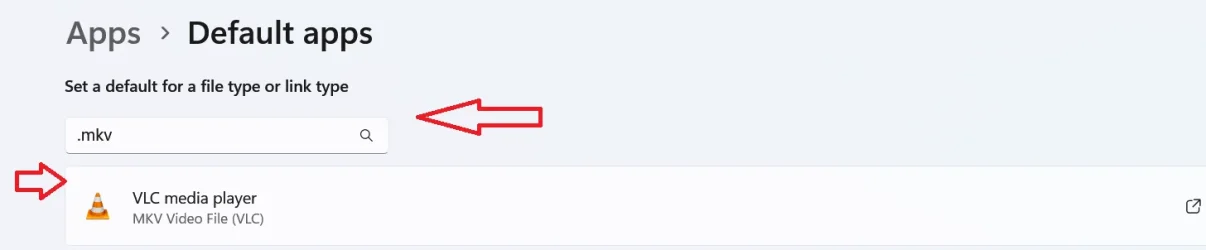
When installing VLC, If you did not select VLC to be your default media player for all file types it can open, you will have to change the default player for that file type.
Right click on the .mkv file, select "open with" (you may find this under more options if you use the new context menu) I do not use the new context menu.
a list of apps will popup. select VLC from the list. It will ask if "just once" or "every time" select every time.

Alternately, you can go to Settings>apps>default apps> type MKV into the search box and change it to open with VLC

Capture.webp
 

My Computers

System One System Two

  • OS
    Windows 11 Pro 25H2
    Computer type
    PC/Desktop
    Manufacturer/Model
    Dell Optiplex 7080
    CPU
    i9-10900 10 core 20 threads
    Motherboard
    DELL 0J37VM
    Memory
    32 gb
    Graphics Card(s)
    none-Intel UHD Graphics 630
    Sound Card
    Integrated Realtek
    Monitor(s) Displays
    Benq 27
    Screen Resolution
    2560x1440
    Hard Drives
    2x1tb Solidigm m.2 nvme /External drives 512gb Samsung m.2 sata+2tb Kingston m2.nvme
    PSU
    500w
    Case
    MT
    Cooling
    Dell Premium
    Keyboard
    Logitech wired
    Mouse
    Logitech wireless
    Internet Speed
    so slow I'm too embarrassed to tell
    Browser
    #1 Edge #2 Firefox
    Antivirus
    Defender+MWB Premium
  • Operating System
    Windows 11 Pro 24H2 26200.8457
    Computer type
    PC/Desktop
    Manufacturer/Model
    Beelink Mini PC SER5
    CPU
    AMD Ryzen 7 6800U
    Memory
    32 gb
    Graphics card(s)
    integrated
    Sound Card
    integrated
    Monitor(s) Displays
    Benq 27
    Screen Resolution
    2560x1440
    Hard Drives
    1TB Crucial nvme
    Keyboard
    Logitech wired
    Mouse
    Logitech wireless
    Internet Speed
    still too embarrassed to tell
    Browser
    Firefox
    Antivirus
    Defender
    Other Info
    System 3 is non compliant Dell 9020 i7-4770/24gb ram Win11 PRO 26200.8457
If it happens with all the players, the file may be corrupt ?
 

My Computer

System One

  • OS
    Windows 11 23H2
    Computer type
    PC/Desktop
    Manufacturer/Model
    Assembled
    CPU
    Intel i7-7700k
    Motherboard
    Asrock Z270 Taichi
    Memory
    16 GB
    Graphics Card(s)
    Intel 630 onboard
    Sound Card
    Onboard
    Monitor(s) Displays
    Benq 1080p
    Screen Resolution
    1920*1080
    Hard Drives
    NVMe, SSD and HDD
    Case
    Cooler Master
    Keyboard
    Asus wireless
    Mouse
    Asus Wireless
    Internet Speed
    75 Mbps
    Browser
    Chrome, Edge, Arc
    Antivirus
    Windows Defender
@glasskuter I tried that, no change. It must be the files.

@cineman195 It's about 10 files all from the same source so I was hoping this wasn't it, but I think you're right.
 

My Computer

System One

  • OS
    Windows 11 Version 24H2 build 26100.4061 May 2025
    Computer type
    PC/Desktop
    Manufacturer/Model
    Custom build
    CPU
    Intel(R) Core(TM) Ultra 7 265K 3.90 GHz
    Motherboard
    Asus PRIME B860-PLUS
    Memory
    64 GB
    Graphics Card(s)
    XFX GTS XXX Edition RX 580 8GB OC+
    Sound Card
    On board
    Monitor(s) Displays
    LG Ultragear
    Screen Resolution
    1920 x 1080
    Hard Drives
    HP EX920 512GB,
    WD Black 4TB WD4005FZBX
    PSU
    Thermaltake Toughpower GF A3 1200W
    Case
    Zalman T6 ATX Mid-Tower
    Cooling
    CORSAIR - RS120
    Internet Speed
    40 Gb
    Browser
    Firefox, Chrome, Edge
Maybe rename the file with a single . before mkv to end up looking like:

1080p_AAC2_0_AV1.mkv​


Just a thought!
 

My Computer

System One

  • OS
    W11 24H2
    Computer type
    Laptop
    Manufacturer/Model
    ASUS A 14
    CPU
    Ryzen 7
    Memory
    16Gb
    Graphics Card(s)
    AMD Radeon & NVIDIA GeForce RTX 3050
    Hard Drives
    500GB SSD & 2 TB portable
    Browser
    Edge
    Antivirus
    Defender
Try converting them using Handbreak.
It may correct them.
 

My Computers

System One System Two

  • OS
    Windows 11 Pro 25H2 Build 26200.8524
    Computer type
    PC/Desktop
    Manufacturer/Model
    Sin-built 2013
    CPU
    Intel(R) Core(TM) i7-4770K CPU @ 3.50GHz
    Motherboard
    ASUS ROG Maximus VI Formula
    Memory
    32.0 GB of I forget and the box is in storage.
    Graphics Card(s)
    Gigabyte nVidia GeForce GTX 1660 Super OC 6GB
    Sound Card
    Onboard thingy
    Monitor(s) Displays
    5 x LG 25MS500-B - 1 x 24MK430H-B - 1 x Wacom Pro 22" Touch Screen Tablet
    Screen Resolution
    All over the place
    Hard Drives
    Too many to list.
    OS on Samsung 1TB 870 QVO SATA
    PSU
    Silverstone 1500
    Case
    NZXT Phantom 820 Full-Tower Case
    Cooling
    Noctua NH-D15 Elite Class Dual Tower CPU Cooler / 6 x EziDIY 120mm / 2 x Corsair 140mm somethings / 1 x 140mm Thermaltake something / 2 x 200mm Corsair.
    Keyboard
    Corsair K95 / Logitech diNovo Edge Wireless
    Mouse
    Logitech: G402 / G502 / Mx Masters / Mx Air Cordless
    Internet Speed
    2000/500Mbps
    Browser
    All sorts
    Antivirus
    Kaspersky Premium
    Other Info
    ㅤㅤㅤㅤㅤㅤㅤㅤㅤㅤㅤㅤㅤㅤㅤㅤㅤㅤㅤㅤㅤㅤㅤㅤㅤㅤㅤㅤㅤㅤㅤㅤㅤㅤㅤㅤㅤㅤㅤㅤ⠀⠀⠀⠀⠀⠀⠀⠀⠀⠀
    TP-Link BE9300 WiFi 7 Bluetooth 5.4 (Archer TBE550E)
    TP-Link TX201 V1 2.5GB Lan

    Grandstream HT812 - VoIP
    ASUS DSL-AX82U - Mesh
    ASUS RT-AC68U - Mesh
    ASUS RT-BE88U Router

    Brother MFC-L2880DW Printer

    I’m on a horse.
  • Operating System
    Windows 11 Pro 25H2 Build 26200.8524
    Computer type
    Laptop
    Manufacturer/Model
    LENOVO Yoga 7 14IRL8 - 7i EVO OLED 14" Touchscreen i5 12 Core 16GB/512GB
    CPU
    Intel Core 12th Gen i5-1240P Processor (1.7 - 4.4GHz)
    Memory
    16GB LPDDR5 RAM
    Graphics card(s)
    Intel Iris Xe Graphics Processor
    Sound Card
    Optimized with Dolby Atmos®
    Screen Resolution
    QHD 2880 x 1800 OLED
    Hard Drives
    M.2 512GB
    Antivirus
    Defender / Malwarebytes
    Other Info
    …still on a horse.
I usually use MPC-HC for video files, currently updated with K-Lite_Codec_Pack_1890_Mega.
Too many codecs can actually cause issues. I install no codecs and I use MPC-BE, thus far it was able to play everything, even videos that failed to play in MPC-HC with codecs. I would suggest to uninstall everything, then try portable players like VLC, MPC-BE, PotPlayer.
 

My Computer

System One

  • OS
    Home26H2Can
    Computer type
    PC/Desktop
    CPU
    AMD Ryzen 5 8600G (07/24)
    Motherboard
    ASROCK B650M-HDV/M.2 (07/24) BIOS 4.21 AGESA ComboAM5 1.3.0.1 (04/26)
    Memory
    2x32GB Kingston FURY DDR5 5600 MHz CL36 @5200 CL36 (07/24)
    Graphics Card(s)
    ASROCK Radeon RX 6600 Challenger D 8G @48FPS (08/24)
    Sound Card
    Creative Sound BlasterX AE-5 Plus (05/24)
    Monitor(s) Displays
    24" Philips 24M1N3200ZS/00 (05/24)
    Screen Resolution
    1920×1080@165Hz via DP1.4
    Hard Drives
    Kingston KC3000 NVMe 2TB (05/24)
    ADATA XPG GAMMIX S11 Pro 512GB (07/19)
    PSU
    Seasonic Core GM 550 Gold (04/24)
    Case
    Fractal Design Define 7 Mini with 3x Noctua NF-P14s/12@555rpm (04/24)
    Cooling
    Noctua NH-U12S with Noctua NF-P12 (04/24)
    Keyboard
    HP Pavilion Wired Keyboard 300 (07/24) + Rabalux 76017 Parker (01/24)
    Mouse
    Logitech M330 Silent Plus (01/26)
    Internet Speed
    500/100 Mbps via RouterOS (05/21) & TCP Optimizer
    Browser
    Edge, Brave for YouTube, LibreWolf for FB
    Antivirus
    NextDNS blocking 1/3 Traffic
    Other Info
    Phone: Motorola Moto G86 (02/26)
    Backup: Hasleo Backup Suite (PreOS)
    Headphones: Sennheiser RS170 (09/10)
    Chair: Huzaro Force 4.4 Grey Mesh (05/24)
    Notifier: Xiaomi Mi Band 9 Milanese (10/24)
    FlexCore USB-C 3.2 Gen 1 (M) to LAN (F) (08/25)
I usually use MPC-HC for video files, currently updated with K-Lite_Codec_Pack_1890_Mega. When that didn't work I tried Movies & TV and Media Player.

I searched for a solution which said to install the free AV1 Video Extension from the Microsoft Store. I already had it installed so I tried another suggestion of installing the latest VLC.

The beginning of the file plays for about 2 min then the video gets distorted, the audio is fine. It looks like a rendering error.
Can you post a sample of this type of file so I can test it -- just a couple of minutes worth should be enough.
.
VLC hasn't failed yet on anything I've tried playing with it - however if you play commercial / drm protected stuff you might need to add the libdvdcss libraries (not sure if those work on Windows though) or "de-drm" the source before playing.

cheers
jimbo
 

My Computer

System One

  • OS
    Windows XP,11 Linux Fedora Rawhide pre-release 45
    Computer type
    PC/Desktop
    CPU
    2 X Intel i7
    Screen Resolution
    4KUHD X 2
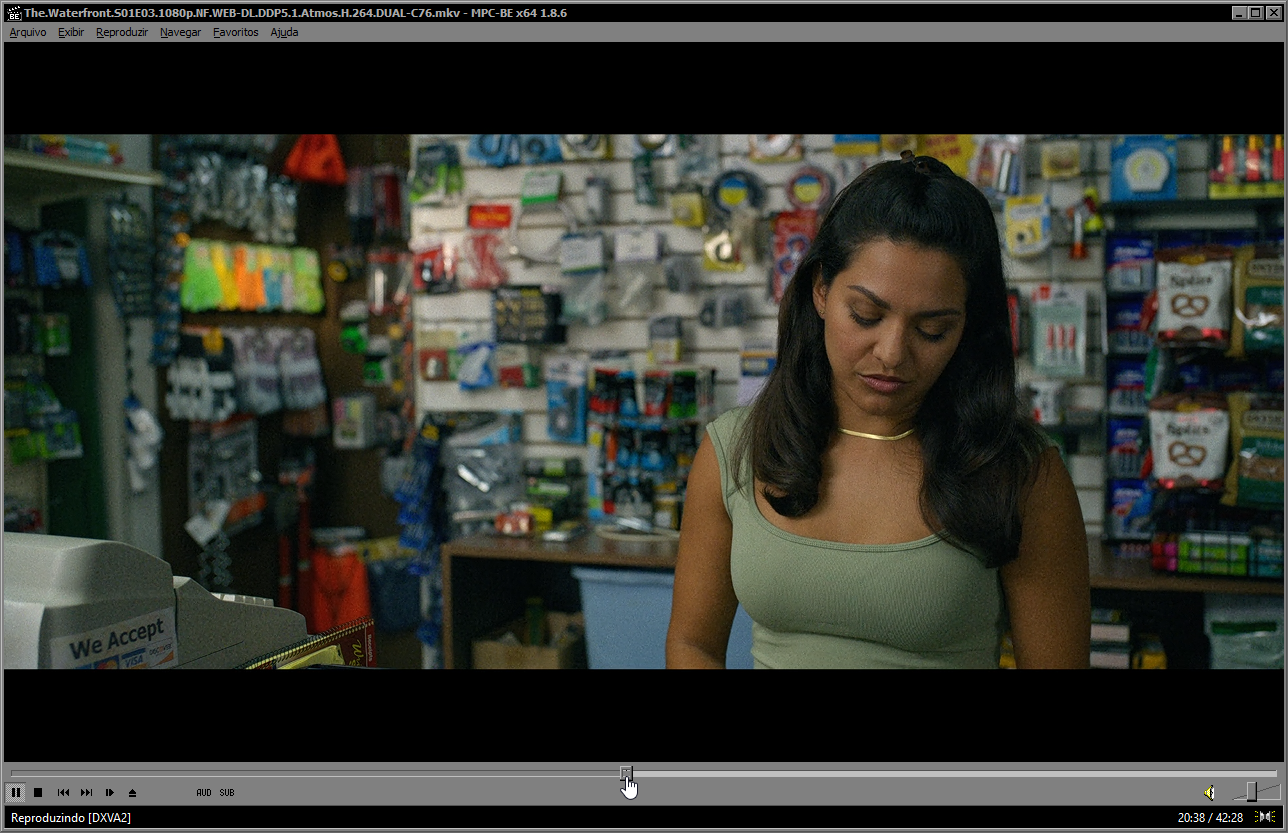
try mpc-be

6LwtTPZ.png
 

My Computer

System One

  • OS
    Windows 11 Iot Enterprise 21h2 22000.3260
    Computer type
    PC/Desktop
    Manufacturer/Model
    Asus
    CPU
    xeon E5-2697v2
    Motherboard
    rampage iv extreme
    Memory
    32gb 8x4gb ddr3 1333 mhz
    Graphics Card(s)
    gtx 570 poit of view
    Sound Card
    realtek HD (ALC898)
    Monitor(s) Displays
    samsung b2030
    Screen Resolution
    1600x900
    Hard Drives
    2tb hd 5400 rpm
    3tb hd 5400 rpm
    1tb nvme pcie 3.0
    PSU
    hx850w
    Keyboard
    mtek
    Internet Speed
    500/250 gpon
    Browser
    r3dfox 146.0
    Antivirus
    none
MPC-BE or Foobar...
(I use foobar mostly for concert videos)

10509.webp
 

My Computers

System One System Two

  • OS
    Windows 11 Pro
    Computer type
    PC/Desktop
    Manufacturer/Model
    ASUS ROG Strix
  • Operating System
    Windows 11 Pro
    Computer type
    Laptop
    Manufacturer/Model
    ASUS VivoBook
Check if the content of the video file has corruptions:
  1. Get the latest ffmpeg.exe if you haven't done that already.
  2. Extract the file ffprobe.exe from the bin folder (that's in the downloaded .7z archive) to the folder where your video file is stored.
  3. Open a command prompt or Windows Terminal, and navigate to the folder where your video file and ffprobe.exe are stored.
  4. Run ffprobe -v error video.mkv (Substitute video.mkv with the name of the file, and wrap the name in doublequotes if the name contains space characters.)
K-Like Codec Pack (Basic/Standard/Full/Mega) is solid. I have been using it for almost 16 years, it's one of the first things that get installed after I buy a new laptop. The installer has the ability to detect codec installations that are outdated/broken/misconfigured, and, whenever it detects any such problems, it asks for your consent before it fixes them, then fixes them reliably. To add/remove features, you can always simply run the installer again anytime you like.

To get the best video playback results, I generally recommend—in the installer of the K-Lite Codec Pack (Full/Mega)—to choose MPC-HC as the player with madVR as the renderer. Besides codecs and a few included tools, K-Lite Codec Pack adds the benefit of easily setting it all up plus knowing that clsid2 has gone through rigorous testing each time before he decides to publish a new stable release or update package.

That said, for music listening, foobar2000 has its merits, as it does gapless playback among several other things that, for music listening, I find compulsory. However, for concert videos you don't normally need to add multiple individual tracks to a playlist for the purpose of gapless playback. Instead, you just want to play the whole concert as one track only, from start to finish without interruptions. Otherwise it will be heresy. IMO anyway.

Also IMO, MPC-BE is overhyped. MPC-HC has fewer features I call bloat, I want to watch the effing movie instead of watch the "more modern" UI of MPC-BE, and MPC-HC is more lightweight and IME it generally runs more stable across many different systems and hardware configurations. Use MPC-HC with WASAPI exclusive mode (or audio bitstreaming over HDMI if you must have surround sound through HDMI, BUT... I don't know too many music albums in surround sound that 1/ don't make my ears puke and 2/ weren't made by Steven Wilson).
 
Last edited:

My Computers

System One System Two

  • OS
    11 Home
    Computer type
    Laptop
    Manufacturer/Model
    Asus TUF Gaming F16 (2024)
    CPU
    i7 13650HX
    Memory
    16GB DDR5
    Graphics Card(s)
    GeForce RTX 4060 Mobile
    Sound Card
    Eastern Electric MiniMax DAC Supreme; Emotiva UMC-200; Astell & Kern AK240
    Monitor(s) Displays
    Sony Bravia XR-55X90J
    Screen Resolution
    3840×2160
    Hard Drives
    512GB SSD internal
    37TB external
    PSU
    Li-ion
    Cooling
    2× Arc Flow Fans, 4× exhaust vents, 5× heatpipes
    Keyboard
    Logitech K800
    Mouse
    Logitech G402
    Internet Speed
    30Mbit/s up, 500Mbit/s down
    Browser
    FF
    Antivirus
    What's an antivirus?
  • Operating System
    11 Home
    Computer type
    Laptop
    Manufacturer/Model
    Medion S15450
    CPU
    i5 1135G7
    Memory
    16GB DDR4
    Graphics card(s)
    Intel Iris Xe
    Sound Card
    Eastern Electric MiniMax DAC Supreme; Emotiva UMC-200; Astell & Kern AK240
    Monitor(s) Displays
    Sony Bravia XR-55X90J
    Screen Resolution
    3840×2160
    Hard Drives
    2TB SSD internal
    37TB external
    PSU
    Li-ion
    Keyboard
    Logitech K800
    Mouse
    Logitech G402
    Internet Speed
    30Mbit/s up, 500Mbit/s down
    Browser
    FF
I just got back to this, thank you to everyone for your ideas.

I checked all 10 files and saw that they all played normal for 2 minutes, then the video became distorted. That doesn't look like a corrupt file, it looks like their encoding software was not fully activated and only allowed them 2 minutes before intentionally distorting the video while leaving the audio clear.

Right after I posted #6 I went back to the source and I saw a post that said the files couldn't be played. There were a lot of versions of the set with different encodings and they didn't say which version they tried. I've gone through 10,000s of video and audio files over the years so I know it was a single poster and not the source. I had the same issue with one file earlier this year so I just got a different version then. This post was old so I found a different source for the files and they all checked out fine.

The issue had nothing to do with codecs, either not the right one or too many, I've dealt with both issues before. It also had nothing to do with which player(s) I used.

The files would probably not show corruptions since it appears to be an intentional distortion. Whatever program they used would probably fix it with a fully enabled version. Without knowing this no reencoding or conversion would help.
 

My Computer

System One

  • OS
    Windows 11 Version 24H2 build 26100.4061 May 2025
    Computer type
    PC/Desktop
    Manufacturer/Model
    Custom build
    CPU
    Intel(R) Core(TM) Ultra 7 265K 3.90 GHz
    Motherboard
    Asus PRIME B860-PLUS
    Memory
    64 GB
    Graphics Card(s)
    XFX GTS XXX Edition RX 580 8GB OC+
    Sound Card
    On board
    Monitor(s) Displays
    LG Ultragear
    Screen Resolution
    1920 x 1080
    Hard Drives
    HP EX920 512GB,
    WD Black 4TB WD4005FZBX
    PSU
    Thermaltake Toughpower GF A3 1200W
    Case
    Zalman T6 ATX Mid-Tower
    Cooling
    CORSAIR - RS120
    Internet Speed
    40 Gb
    Browser
    Firefox, Chrome, Edge
Back
Top Bottom