How do I remove the Ask Anything box in Google searches?


Update:

Microsoft Edge just updated and now shows the Ask Anything in Google search results. Firefox now shows this Ask anything.

I'm tired of trying to figuring this out, Google AI has infiltrated the browsers.
 

My Computer

System One

  • OS
    Windows 11 Pro
    Computer type
    Laptop
    Manufacturer/Model
    Dell 16 Plus DB16255
    CPU
    AMD Ryzen AI 7 350 w/ Radeon 860M 50 TOPS
    Motherboard
    Dell 0PKMHG
    Memory
    32GB LPDDR5X 7500 MT/s
    Graphics Card(s)
    AMD Radeon 860M integrated (shared memory)
    Sound Card
    Stereo speakers (2.5 W x 2 = 5 W total peak)/Realtek SounzReal/Dolby Atmos
    Monitor(s) Displays
    Displays: 16" 1920 x 1200 (Full HD+/WUXGA) 300 nits 60Hz *** Samsung - 27” Odyssey FHD IPS 240Hz G-Sync Gaming Monitor
    Screen Resolution
    1920x1080 @ 60Hz
    Hard Drives
    EG6 KIOXIA 1TB NVME
    Case
    Ice Blue
    Cooling
    "dual-fan" or "enhanced" air-cooling system
    Mouse
    Logitech M650 Wireless/Bluetooth
    Internet Speed
    800/600 Fiber
If you would 'install' the extension Stylus (that's an extension to change the UI of a site, I use it rather intensively) in any of those browsers and make just one 'script' as I wrote, you would get rid of it.

Google AI has infiltrated the browsers.
You decided by yourself that you want to use that AI facility in Google! It's very easy to avoid the AI in Google, just do as I told in #12.
 

My Computer

System One

  • OS
    Windows 11 Pro 25H2 26200.8457
    Computer type
    PC/Desktop
    Manufacturer/Model
    Build by vendor to my specs
    CPU
    AMD Ryzen 7 5700G
    Motherboard
    MSI PRO B550M-P Gen3
    Memory
    Kingston FURY Beast 2x16GB DIMM DDR4 2666 CL16
    Graphics Card(s)
    MSI GeForce GT 730 2GB LP V1
    Sound Card
    Creative Sound Blaster Audigy FX
    Monitor(s) Displays
    Samsung S24E450F 24"
    Screen Resolution
    1920 x 1080
    Hard Drives
    1. SSD Crucial P5 Plus 500GB PCIe M.2
    2. SSD-SATA Crucial MX500-2TB
    PSU
    Corsair CV650W
    Case
    Cooler Master Silencio S400
    Cooling
    Cooler Master Hyper H412R with Be Quiet Pure Wings 2 PWM BL038 fan
    Keyboard
    Cherry Stream (wired, scissor keys)
    Mouse
    Asus WT465 (wireless)
    Internet Speed
    70 Mbps down / 80 Mbps up
    Browser
    Firefox 130.0
    Antivirus
    F-Secure (Internetprovider version)
    Other Info
    Router: FRITZBox 7490
    Oracle VirtualBox 7 for testing software on Win 10 or 11
If you would 'install' the extension Stylus (that's an extension to change the UI of a site, I use it rather intensively) in any of those browsers and make just one 'script' as I wrote, you would get rid of it.


You decided by yourself that you want to use that AI facility in Google! It's very easy to avoid the AI in Google, just do as I told in #12.
This search if web only and I'm just trying to remove the Ask anything window:

Installing Stylus and editing that parameter on many computers is not an easy solution. I installed Sylus (beta), but not sure how to make the edit yet.
 

My Computer

System One

  • OS
    Windows 11 Pro
    Computer type
    Laptop
    Manufacturer/Model
    Dell 16 Plus DB16255
    CPU
    AMD Ryzen AI 7 350 w/ Radeon 860M 50 TOPS
    Motherboard
    Dell 0PKMHG
    Memory
    32GB LPDDR5X 7500 MT/s
    Graphics Card(s)
    AMD Radeon 860M integrated (shared memory)
    Sound Card
    Stereo speakers (2.5 W x 2 = 5 W total peak)/Realtek SounzReal/Dolby Atmos
    Monitor(s) Displays
    Displays: 16" 1920 x 1200 (Full HD+/WUXGA) 300 nits 60Hz *** Samsung - 27” Odyssey FHD IPS 240Hz G-Sync Gaming Monitor
    Screen Resolution
    1920x1080 @ 60Hz
    Hard Drives
    EG6 KIOXIA 1TB NVME
    Case
    Ice Blue
    Cooling
    "dual-fan" or "enhanced" air-cooling system
    Mouse
    Logitech M650 Wireless/Bluetooth
    Internet Speed
    800/600 Fiber
Yep... method 1, step 3 mentions AI Features.
I'm tired of trying to figuring this out


I just updated to FF 150.0.3, and still no "Ask Anything".
I only use FF, and in the default file associations in Window's Settings, I set everything to Firefox.
And... as I mentioned, I completely removed Copilot.


I also do all the stuff in the first post of this topic... it may be one of these about: config settings, or Ari's Chrome folder (css files)


My Computers

System One System Two

  • OS
    Win 11 Home ♦♦♦26200.8457 ♦♦♦♦♦♦♦25H2
    Computer type
    PC/Desktop
    Manufacturer/Model
    Built by Ghot® [May 2020]
    CPU
    AMD Ryzen 7 3700X
    Motherboard
    Asus Pro WS X570-ACE (BIOS 5302)
    Memory
    G.Skill (F4-3200C14D-16GTZKW)
    Graphics Card(s)
    EVGA RTX 2070 (08G-P4-2171-KR)
    Sound Card
    Realtek ALC1220P / ALC S1220A
    Monitor(s) Displays
    Dell U3011 30"
    Screen Resolution
    2560 x 1600
    Hard Drives
    2x Samsung 860 EVO 500GB,
    WD 4TB Black FZBX - SATA III,
    WD 8TB Black FZBX - SATA III,
    DRW-24B1ST CD/DVD Burner
    PSU
    PC Power & Cooling 750W Quad EPS12V
    Case
    Cooler Master ATCS 840 Tower
    Cooling
    CM Hyper 212 EVO (push/pull)
    Keyboard
    Ducky DK9008 Shine II Blue LED
    Mouse
    Logitech Optical M-100
    Internet Speed
    300/300
    Browser
    Firefox (latest)
    Antivirus
    Bitdefender Total Security
    Other Info
    Speakers: Klipsch Pro Media 2.1
  • Operating System
    Windows XP Pro 32bit w/SP3
    Computer type
    PC/Desktop
    Manufacturer/Model
    Built by Ghot® (not in use)
    CPU
    AMD Athlon 64 X2 5000+ (OC'd @ 3.2Ghz)
    Motherboard
    ASUS M2N32-SLI Deluxe Wireless Edition
    Memory
    TWIN2X2048-6400C4DHX (2 x 1GB, DDR2 800)
    Graphics card(s)
    EVGA 256-P2-N758-TR GeForce 8600GT SSC
    Sound Card
    Onboard
    Monitor(s) Displays
    ViewSonic G90FB Black 19" Professional (CRT)
    Screen Resolution
    up to 2048 x 1536
    Hard Drives
    WD 36GB 10,000rpm Raptor SATA
    Seagate 80GB 7200rpm SATA
    Lite-On LTR-52246S CD/RW
    Lite-On LH-18A1P CD/DVD Burner
    PSU
    PC Power & Cooling Silencer 750 Quad EPS12V
    Case
    Generic Beige case, 80mm fans
    Cooling
    ZALMAN 9500A 92mm CPU Cooler
    Keyboard
    Logitech Classic Keybooard 200
    Mouse
    Logitech Optical M-BT96a
    Internet Speed
    300/300
    Browser
    Firefox 3.x ??
    Antivirus
    Symantec (Norton)
    Other Info
    Still assembled, still runs. Haven't turned it on for 15 years?
This search if web only and I'm just trying to remove the Ask anything window:
https://www.google.com/search?q=%s&newwindow=1&ie=utf-8&oe=utf-8&hl=en&udm=14
You will have to make a search enigine to use that. With the extension Search Engine Helper i do that in a very short time, but because I don't use Chrome I can't help you on that any further.

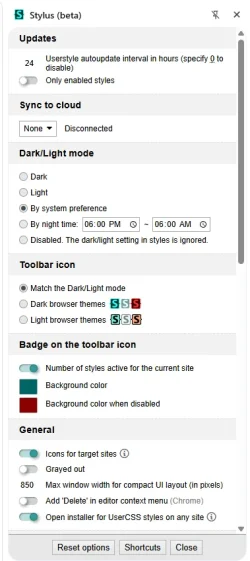
I installed Sylus (beta), but not sure how to make the edit yet.
Please post a screenshot of the window you are seeing when you click the button of Stylus.
Possibly I can lead you from there, by comparing it with the installed Stylus on Edge.
 

My Computer

System One

  • OS
    Windows 11 Pro 25H2 26200.8457
    Computer type
    PC/Desktop
    Manufacturer/Model
    Build by vendor to my specs
    CPU
    AMD Ryzen 7 5700G
    Motherboard
    MSI PRO B550M-P Gen3
    Memory
    Kingston FURY Beast 2x16GB DIMM DDR4 2666 CL16
    Graphics Card(s)
    MSI GeForce GT 730 2GB LP V1
    Sound Card
    Creative Sound Blaster Audigy FX
    Monitor(s) Displays
    Samsung S24E450F 24"
    Screen Resolution
    1920 x 1080
    Hard Drives
    1. SSD Crucial P5 Plus 500GB PCIe M.2
    2. SSD-SATA Crucial MX500-2TB
    PSU
    Corsair CV650W
    Case
    Cooler Master Silencio S400
    Cooling
    Cooler Master Hyper H412R with Be Quiet Pure Wings 2 PWM BL038 fan
    Keyboard
    Cherry Stream (wired, scissor keys)
    Mouse
    Asus WT465 (wireless)
    Internet Speed
    70 Mbps down / 80 Mbps up
    Browser
    Firefox 130.0
    Antivirus
    F-Secure (Internetprovider version)
    Other Info
    Router: FRITZBox 7490
    Oracle VirtualBox 7 for testing software on Win 10 or 11
Please post a screenshot of the window you are seeing when you click the button of Stylus.
Possibly I can lead you from there, by comparing it with the installed Stylus on Edge.

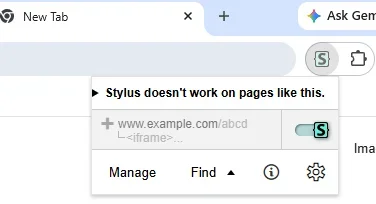
This is what shows in the plug-in options when I click on Stylus. Then I click on the gear icon. I am lost for now.

1778597847451.webp
1778597898828.webp
 

My Computer

System One

  • OS
    Windows 11 Pro
    Computer type
    Laptop
    Manufacturer/Model
    Dell 16 Plus DB16255
    CPU
    AMD Ryzen AI 7 350 w/ Radeon 860M 50 TOPS
    Motherboard
    Dell 0PKMHG
    Memory
    32GB LPDDR5X 7500 MT/s
    Graphics Card(s)
    AMD Radeon 860M integrated (shared memory)
    Sound Card
    Stereo speakers (2.5 W x 2 = 5 W total peak)/Realtek SounzReal/Dolby Atmos
    Monitor(s) Displays
    Displays: 16" 1920 x 1200 (Full HD+/WUXGA) 300 nits 60Hz *** Samsung - 27” Odyssey FHD IPS 240Hz G-Sync Gaming Monitor
    Screen Resolution
    1920x1080 @ 60Hz
    Hard Drives
    EG6 KIOXIA 1TB NVME
    Case
    Ice Blue
    Cooling
    "dual-fan" or "enhanced" air-cooling system
    Mouse
    Logitech M650 Wireless/Bluetooth
    Internet Speed
    800/600 Fiber
That window is exactly the same as shown in Edge.
I will try to describe how to make a 'CSS style' (CSS is the name for the commands that are used for this).

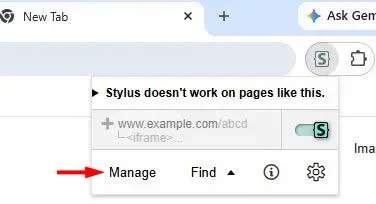
1. Click manage

1. Stylus main page.webp

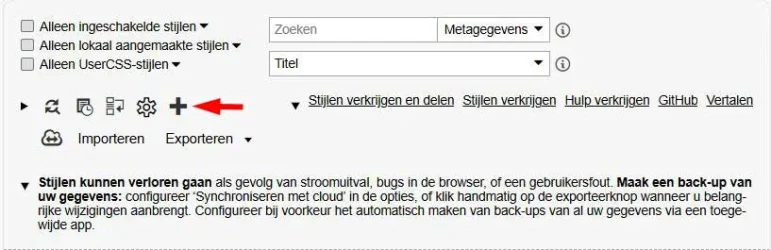
2. You get this window (It will be in English language):

2. Overview before creating style.webp

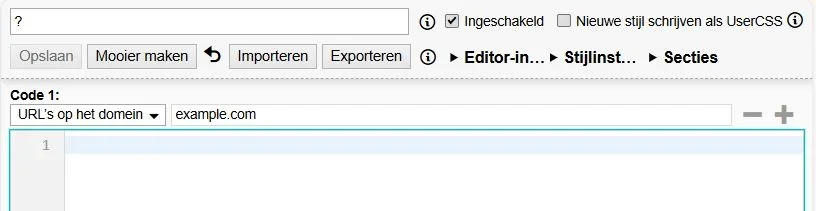
3. Click + (left of the arrow), this window appears:

3. Empty style.webp

In the upper space with the question mark you type the title of the style, I took "Google Search".
Directly under "Code 1" you have to tell the style where it is active. It will be on the domain "google.com".
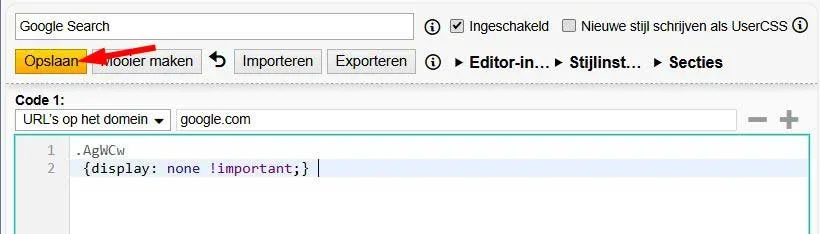
The code itself will be written in the window behind 1.
There you type (code can be copied from here, so that you don't make mistakes):
.AgWCw
{display: none !important;}

4. Style for google.com now showing:

4. Style for Google Search.webp

Click "Save" (at the yellow location where my window shows: Opslaan).
As soon as when you have saved the style, the yellow changes in light grey.
As soon as you change anything, that button will become yellow again, as a sign that youb did not yet save it.

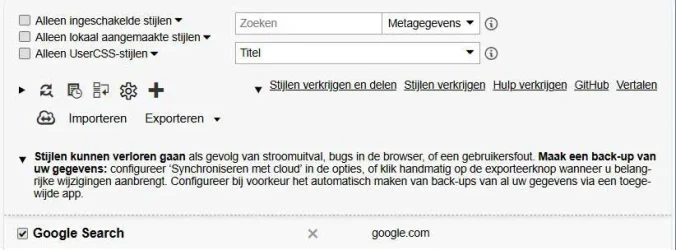
5. Click the backwards button of your browser, you get this window again, but now with one style:

5. Overview after creating style.webp

Now your Google AI search should be without that "Ask anything" window.
It will only do it in sites that are on the domain "google.com", it does not function on domains like "google.de" or "google.nl".
If you would want to do something like that, you would have to add domains. Then please tell me, I'd make an example for that.

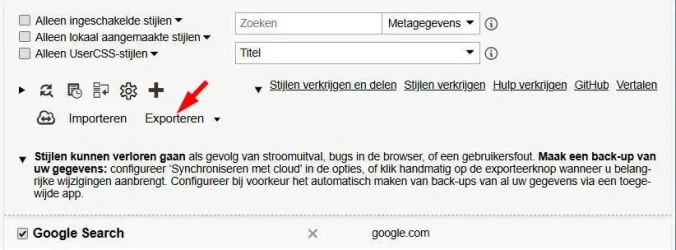
6. You can save all styles you have to a file somewhere on your system, by clicking "Export":

6. Export.webp
So that you don't loose them if you remove the extension or if you want to transfer the style(s) to another system.
It even functions if you import it in Stylus for Edge, Vivaldi or Firefox!

I hope I described it in a way you could follow.
If any questions, please ask.
 

My Computer

System One

  • OS
    Windows 11 Pro 25H2 26200.8457
    Computer type
    PC/Desktop
    Manufacturer/Model
    Build by vendor to my specs
    CPU
    AMD Ryzen 7 5700G
    Motherboard
    MSI PRO B550M-P Gen3
    Memory
    Kingston FURY Beast 2x16GB DIMM DDR4 2666 CL16
    Graphics Card(s)
    MSI GeForce GT 730 2GB LP V1
    Sound Card
    Creative Sound Blaster Audigy FX
    Monitor(s) Displays
    Samsung S24E450F 24"
    Screen Resolution
    1920 x 1080
    Hard Drives
    1. SSD Crucial P5 Plus 500GB PCIe M.2
    2. SSD-SATA Crucial MX500-2TB
    PSU
    Corsair CV650W
    Case
    Cooler Master Silencio S400
    Cooling
    Cooler Master Hyper H412R with Be Quiet Pure Wings 2 PWM BL038 fan
    Keyboard
    Cherry Stream (wired, scissor keys)
    Mouse
    Asus WT465 (wireless)
    Internet Speed
    70 Mbps down / 80 Mbps up
    Browser
    Firefox 130.0
    Antivirus
    F-Secure (Internetprovider version)
    Other Info
    Router: FRITZBox 7490
    Oracle VirtualBox 7 for testing software on Win 10 or 11
That window is exactly the same as shown in Edge.
I will try to describe how to make a 'CSS style' (CSS is the name for the commands that are used for this).

1. Click manage

View attachment 171269

2. You get this window (It will be in English language):

View attachment 171270

3. Click + (left of the arrow), this window appears:

View attachment 171273

In the upper space with the question mark you type the title of the style, I took "Google Search".
Directly under "Code 1" you have to tell the style where it is active. It will be on the domain "google.com".
The code itself will be written in the window behind 1.
There you type (code can be copied from here, so that you don't make mistakes):
.AgWCw
{display: none !important;}

4. Style for google.com now showing:

View attachment 171275

Click "Save" (at the yellow location where my window shows: Opslaan).
As soon as when you have saved the style, the yellow changes in light grey.
As soon as you change anything, that button will become yellow again, as a sign that youb did not yet save it.

5. Click the backwards button of your browser, you get this window again, but now with one style:

View attachment 171276

Now your Google AI search should be without that "Ask anything" window.
It will only do it in sites that are on the domain "google.com", it does not function on domains like "google.de" or "google.nl".
If you would want to do something like that, you would have to add domains. Then please tell me, I'd make an example for that.

6. You can save all styles you have to a file somewhere on your system, by clicking "Export":

View attachment 171277
So that you don't loose them if you remove the extension or if you want to transfer the style(s) to another system.
It even functions if you import it in Stylus for Edge, Vivaldi or Firefox!

I hope I described it in a way you could follow.
If any questions, please ask.
It works! Thank you.
 

My Computer

System One

  • OS
    Windows 11 Pro
    Computer type
    Laptop
    Manufacturer/Model
    Dell 16 Plus DB16255
    CPU
    AMD Ryzen AI 7 350 w/ Radeon 860M 50 TOPS
    Motherboard
    Dell 0PKMHG
    Memory
    32GB LPDDR5X 7500 MT/s
    Graphics Card(s)
    AMD Radeon 860M integrated (shared memory)
    Sound Card
    Stereo speakers (2.5 W x 2 = 5 W total peak)/Realtek SounzReal/Dolby Atmos
    Monitor(s) Displays
    Displays: 16" 1920 x 1200 (Full HD+/WUXGA) 300 nits 60Hz *** Samsung - 27” Odyssey FHD IPS 240Hz G-Sync Gaming Monitor
    Screen Resolution
    1920x1080 @ 60Hz
    Hard Drives
    EG6 KIOXIA 1TB NVME
    Case
    Ice Blue
    Cooling
    "dual-fan" or "enhanced" air-cooling system
    Mouse
    Logitech M650 Wireless/Bluetooth
    Internet Speed
    800/600 Fiber
Thanks for the confirmation.

I must say: Google tends to change the way the string is specified in the source of the site.
What I mean by that, is that this .AgWCw may change in future. It does not happen very often, but it sometimes happens with some strings. So if at some moment this solution suddenly does not work anymore, it may be caused by such a change, not by the extension itself.

In that case you could search for the right string again, using the inspect function of the browser (Edge has it and Chrome will certainly have it too). The way to reach that is too complicated to explain here, so if you are interested, try to use Google AI to find out how you have to do that. Or visit the Stylus or Stylish sites. I (hopefully) could again look up the right string for you, but as I am rather old I cannot promise you I still will be able to.
 

My Computer

System One

  • OS
    Windows 11 Pro 25H2 26200.8457
    Computer type
    PC/Desktop
    Manufacturer/Model
    Build by vendor to my specs
    CPU
    AMD Ryzen 7 5700G
    Motherboard
    MSI PRO B550M-P Gen3
    Memory
    Kingston FURY Beast 2x16GB DIMM DDR4 2666 CL16
    Graphics Card(s)
    MSI GeForce GT 730 2GB LP V1
    Sound Card
    Creative Sound Blaster Audigy FX
    Monitor(s) Displays
    Samsung S24E450F 24"
    Screen Resolution
    1920 x 1080
    Hard Drives
    1. SSD Crucial P5 Plus 500GB PCIe M.2
    2. SSD-SATA Crucial MX500-2TB
    PSU
    Corsair CV650W
    Case
    Cooler Master Silencio S400
    Cooling
    Cooler Master Hyper H412R with Be Quiet Pure Wings 2 PWM BL038 fan
    Keyboard
    Cherry Stream (wired, scissor keys)
    Mouse
    Asus WT465 (wireless)
    Internet Speed
    70 Mbps down / 80 Mbps up
    Browser
    Firefox 130.0
    Antivirus
    F-Secure (Internetprovider version)
    Other Info
    Router: FRITZBox 7490
    Oracle VirtualBox 7 for testing software on Win 10 or 11

Latest Support Threads

Back
Top Bottom