Components of a SMART attribute:
Identifier: A number that defines the attribute, such as 5 for reallocated sectors or 194 for temperature.or 202 for Percentage of Rated Lifetime Used
Data (Raw): The raw, measured value from a sensor or counter, like a temperature reading or a count of errors.
Threshold: The failure limit for that attribute, set by the drive manufacturer.
Value: The current relative "health" of the attribute, calculated by the manufacturer's algorithm from the raw data.
Worst: The smallest (worst) "Value" ever recorded in the drive's lifetime.
To know more about to SMART attributes, you may google "SMART attributes explained " "SMART attributes for SSD" "SMART attributes list" etc. ( You will almost certainly give up

)
Note 1: For a normal user, it wil be difficult to understand what various attributes mean and its impact on the disk's health. Reason why we fall back upon reputed and proven programs written by experts, which do all the interpretation and present the status of its health and performance. We use both CrystalDiskInfo and Hard Disk Sentinel to cross-check that the SMART data presented are the same. Hard Disk Sentinel is much more elaborate in that it logs the data and by clicking on each attribute/parameter one gets a graphical view of how the parameter has been changing with time - its progression.
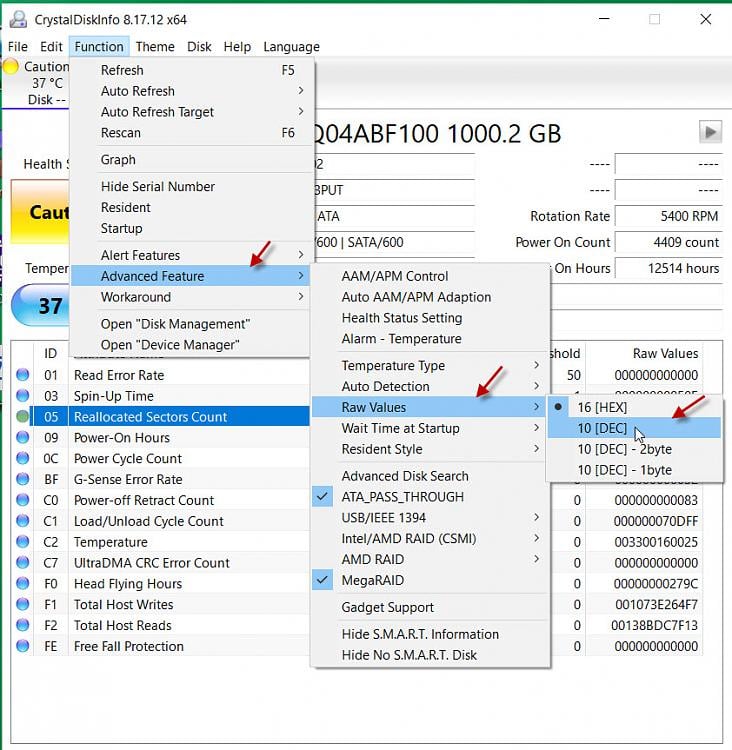
Note 2: For an effective comparison, one should change the settings in CrystalDiiskInfo to present the value in Decimal rather than the default Hexa Decimal
To convert the RAW value being shown in hexadecimal to decimal in CrystalDiskInfo, go to Function > Advanced Features > Raw Values > select 10[Dec]







 Apple 13" Macbook Pro 2020






