Surface IT Pro Blog:
A field employee might hold a Surface Pro to review information at a customer site, set it flat to annotate a document, then open the kickstand and attach a keyboard to finish a report. Each task asks something different of the device, and the available network may change along the way. For people working across customer locations, healthcare environments, warehouses and shared spaces, access to an organization’s Wi-Fi cannot always be assumed.
Surface Pro for Business with optional 5G gives those employees another way to connect, alongside the touch, pen, voice and keyboard experiences of a compact 12-inch device. Bringing that capability into Surface Pro meant working through a set of closely related design questions. Where could antennas fit within the enclosure? How would hands, accessories and the kickstand affect them? And how could the connectivity modules, firmware and Windows work together across the many positions a Surface Pro takes throughout the day?
Why connectivity choice matters
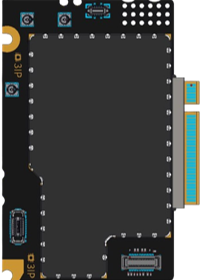
Purpose-built 5G and Wi-Fi modules, tuned for Surface, are designed to deliver strong wireless performance and a scalable platform.
For businesses, the value of another connection path extends beyond finding an available network. In its analysis of CaptiveCrunch, a campaign involving traffic manipulation on hospitality networks, Microsoft Threat Intelligence described how affected traffic was redirected through attacker-controlled infrastructure for phishing and malware delivery. Its guidance advises travelers to treat hotel, conference, airport and other guest wireless networks as untrustworthy and to prefer private connectivity, including mobile hotspots and eSIM-based cellular data, whenever practical. Read the Microsoft Security Blog analysis.
Optional integrated 5G gives employees with carrier coverage a way to connect when organizational Wi-Fi is unavailable, reducing the need to depend on an unfamiliar guest network. That choice remains part of an organization’s broader security approach, alongside endpoint protections, identity controls and network policies.
Engineering for the way a Pro moves
Move from typing with the kickstand open to holding Surface Pro in portrait orientation, and the physical conditions around the antennas change. Your hands move, the keyboard may be detached, and the device sits at a different angle relative to your body and nearby surfaces. These ordinary changes affect radio-frequency (RF) engineering because hands, accessories and nearby surfaces can affect a cellular signal.On this Surface Pro, engineers placed the primary transmit antennas along the top edge, away from common interaction zones involving hands, the kickstand, keyboard and covers. The placement is designed to support consistent 5G performance across common 2-in-1 modes. It reflects the physical architecture of this particular device, including the space available for antennas and the ways its components move in relation to one another.
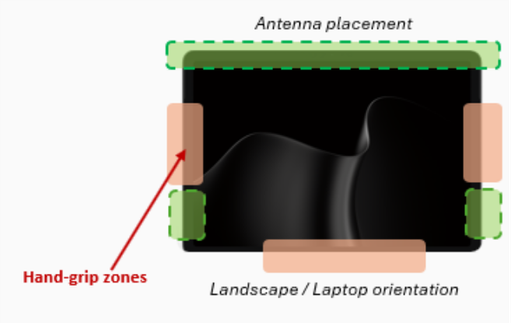
Primary transmit antennas sit along the top edge, clear of hands and accessories, supporting consistent 5G across common 2-in-1 modes.
The kickstand adds another consideration because its position changes as Surface Pro moves between uses. With it fully closed and the device lying flat, signal performance can be affected. Addressing that condition brought the team to a small, familiar feature: the finger scoop used to open the kickstand.
Finding signal in an unexpected place
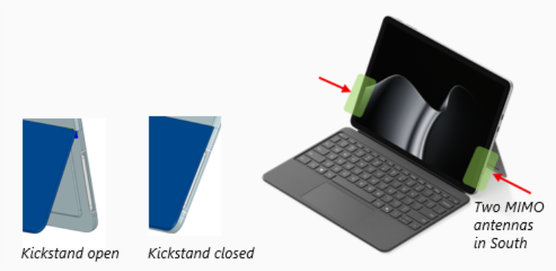
Two additional finger-scoop antennas help maintain 5G connectivity across usage modes, even with the kickstand fully closed.
The finger scoop is the small recess that gives you room to open the kickstand. It is a modest detail, but engineers found that its location could also contribute to the cellular antenna design. They incorporated two additional antennas into the finger-scoop region to supplement reception in the closed-kickstand configuration.
That gives the space two jobs within the same design. From the outside, it remains the place where you reach to open the kickstand; inside, it accommodates antennas intended to help maintain 5G connectivity when the kickstand is closed. The approach uses an existing Surface feature to address the antenna-placement challenge created by the closed kickstand.
The design connects mechanical and wireless engineering within the same constrained space. The recess must remain accessible to a fingertip, the kickstand must move through its full range, and the antennas must function within the materials and dimensions of the finished device.
Tuning connectivity as a system
Finding suitable antenna locations is only part of that work. The antennas operate with connectivity modules, firmware and Windows, and their performance depends on how those elements are integrated. Surface engineers work across the RF front end, antenna architecture and physical enclosure, accounting for the space available inside the device and the materials surrounding the antennas. The top-edge placement and finger-scoop antennas are visible examples of those decisions, but they belong to a larger wireless design.For the 5G design, the Surface RF team customized the RF front end around the antenna architecture. The 12-inch Pro’s antenna architecture was mapped to the same RF front-end architecture used by the 5G module in another Surface form factor, allowing the module to be reused across laptop and 2-in-1 designs.
That reuse still leaves substantial engineering work specific to each device. A laptop and a Surface Pro provide different spaces for antennas, and people hold and position them differently. Engineers could retain the common module while optimizing each product’s antenna system for its mechanical and industrial-design requirements. In the 12-inch Pro, those requirements include accommodating the changing positions of the kickstand and the ways people use the device as a tablet.
Common foundations, configuration flexibility
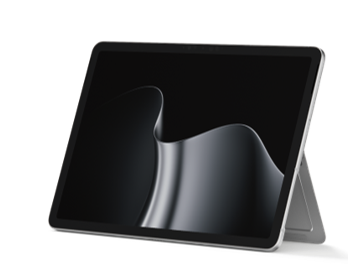
Cross-SKU Wi-Fi and NFC antenna locations enable motherboard commonality, supporting a design approach intended to reduce complexity.
A related design decision helped support both cellular and Wi-Fi-only configurations of the 12-inch Surface Pro. Adding cellular connectivity changes the antenna requirements, so the two configurations do not have identical antenna designs. Engineers aligned the Wi-Fi antenna locations across the configurations so both could use the same motherboard design, while accommodating the additional antenna requirements of optional 5G.
Engineers applied reuse at different levels: a 5G module shared across form factors and a motherboard shared across configurations of this Surface Pro. Each provides a common foundation while leaving room for the antenna design each device requires.
Connectivity choice for business deployments
For IT teams, the practical starting point is where employees need to work and what connections are available there. Optional 5G provides direct carrier connectivity when organizational Wi-Fi is unavailable, and support for both nano-SIM and eSIM offers flexibility in how cellular service is activated. Hotspot functionality also provides an option for connecting other devices when supported by the carrier and plan.IT teams can evaluate these options against the places employees work. Public and compatible private 5G environments have different network, application and management requirements, while carrier coverage and available plans vary by location. Availability and performance also vary by market, carrier, network, plan and configuration, so deployment planning should reflect the conditions in which employees will use the device.
Security beyond the connection
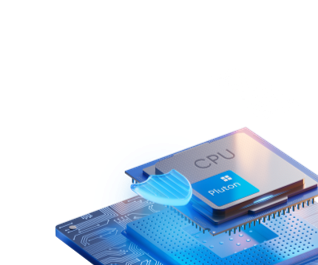
Surface Pro 12-inch with 5G features Microsoft security technologies: Secured-core protections and the Pluton security processor.
Once a device leaves the office, the choice of network is only one of the decisions IT needs to account for. The device also needs protections for startup, authentication and data, together with the ability to apply organizational policies. Surface Pro for Business combines its connectivity options with hardware, firmware, identity, encryption and management capabilities designed for commercial environments.
Windows 11 Secured-core PC protections, Microsoft Pluton with TPM 2.0, and Surface UEFI with Patina and Rust-based firmware, together with Secure Boot, protect the startup process and establish a hardware-backed basis for device security. BitLocker protects data through encryption, while Windows Hello facial recognition with Enhanced Sign-in Security handles authentication. DFCI and Microsoft Intune let IT teams apply device and firmware policies. Cellular connectivity serves a separate role by giving employees another way to reach the network.
Connectivity engineered into the experience
The next time you open a Surface Pro 12-inch kickstand, the finger scoop will probably receive little attention. It is a small, familiar part of getting the device into position. Inside Surface Pro, it carries part of the engineering required to maintain 5G connectivity across the ways people use the device.The same thinking runs through the antenna layout and the wireless architecture behind it. Surface engineers designed the connectivity system around a computer that changes position throughout the day, down to finding a second purpose for the small recess where a fingertip opens the kickstand.
Every Surface experience is the product of deliberate engineering, from the components you see to the technologies working behind the scenes. These stories are designed to shed light on the innovation that makes modern computing possible. In case you missed it, visit Engineering touch into modern computing: The evolution of haptics on Surface and From optics to AI: diving into Surface camera innovation from this series. More technical deep dives and engineering perspectives are on the way.
Source:

Engineering for work in motion: How Surface designed 5G for a 12-inch Pro | Microsoft Community Hub
A behind-the-scenes look at how Surface engineers designed the 12-inch Surface Pro's 5G system to support connectivity across the many ways people work.
 techcommunity.microsoft.com