pchandy Member Local time 9:19 AM Posts 6 Location Cary, Illinois OS Windows 11 Feb 16, 2026 #1 Does anyone know how to backup the StartAllBack settings from one computer and then restore them to another computer? My Computer My Computer At a glance Windows 11OSWindows 11Computer typePC/DesktopManufacturer/ModelThainkserver
Does anyone know how to backup the StartAllBack settings from one computer and then restore them to another computer?
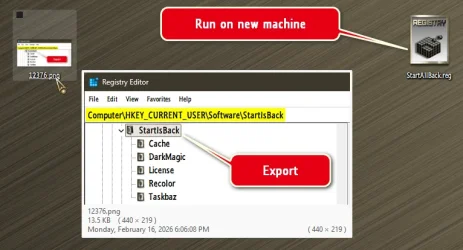
Edwin ♦ ♦ Guru VIP Local time 10:19 AM Posts 18,450 OS Windows 11 Pro Feb 16, 2026 #2 pchandy said: Does anyone know how to backup the StartAllBack settings from one computer and then restore them to another computer? Click to expand... Export folder from Registry. Completely uninstall from the old machine, run the reg on the new machine, after install..., make sure you've got your license key handy anyway! Last edited: Feb 16, 2026 My Computers My Computers System One System Two Other systems At a glance Windows 11 Pro OSWindows 11 ProComputer typePC/DesktopManufacturer/ModelASUS ROG Strix At a glance Windows 11 Pro Operating SystemWindows 11 ProComputer typeLaptopManufacturer/ModelASUS VivoBook ASUS VivoBook 'Lite' ~ Windows 11 Home
pchandy said: Does anyone know how to backup the StartAllBack settings from one computer and then restore them to another computer? Click to expand... Export folder from Registry. Completely uninstall from the old machine, run the reg on the new machine, after install..., make sure you've got your license key handy anyway!
pchandy Member Thread Starter Local time 9:19 AM Posts 6 Location Cary, Illinois OS Windows 11 Feb 17, 2026 #3 Thank you very much! My Computer My Computer At a glance Windows 11OSWindows 11Computer typePC/DesktopManufacturer/ModelThainkserver
steveg Well-known member Member Local time 9:19 AM Posts 286 OS 11 Pro 25H2 Feb 17, 2026 #4 Thanks Edwin, I'm new to using StartAllBack and that's a good trick to know. My Computer My Computer At a glance 11 Pro 25H2i7-10750H16GB Samsung DDR4 3200Intel + Nvidia RTX3060 LaptopOS11 Pro 25H2Computer typeLaptopManufacturer/ModelMSICPUi7-10750HMotherboardMSI MS-17F5Memory16GB Samsung DDR4 3200Graphics Card(s)Intel + Nvidia RTX3060 LaptopSound CardRealtekMonitor(s) DisplaysSamsung 24" Curved (HDMI)Screen Resolution1920x1080Hard DrivesSabrent Rocket Gen3 1Tb Smasung EVO 870 1TBAntivirusBitdefender