How to change a disk GUID


johnpd

Well-known member
Member
VIP
Local time
11:44 AM
Posts
117
Location
Green Valley, AZ
OS
Windows 10
I went through the process of expanding the EFI partition on my system. However it appears that the new EFI partition got its own GUID. Is there way to assign it back to what everything else on the drive is assigned?

JohnD
 

My Computer My Computer

At a glance

Windows 10
OS
Windows 10
I went through the process of expanding the EFI partition

Exactly how and what program did you use to do that.
Please post a screenshot of disk management.
 

My Computers My Computers

  • At a glance

    Windows 11 Pro 25H2 26200.8655i9-10900 10 core 20 threads32 gbnone-Intel UHD Graphics 630
    OS
    Windows 11 Pro 25H2 26200.8655
    Computer type
    PC/Desktop
    Manufacturer/Model
    Dell Optiplex 7080
    CPU
    i9-10900 10 core 20 threads
    Motherboard
    DELL 0J37VM
    Memory
    32 gb
    Graphics Card(s)
    none-Intel UHD Graphics 630
    Sound Card
    Integrated Realtek
    Monitor(s) Displays
    Benq 27
    Screen Resolution
    2560x1440
    Hard Drives
    2x1tb Solidigm m.2 nvme /External drives 512gb Samsung m.2 sata+2tb Kingston m2.nvme
    PSU
    500w
    Case
    MT
    Cooling
    Dell Premium
    Keyboard
    Logitech wired
    Mouse
    Logitech wireless
    Internet Speed
    so slow I'm too embarrassed to tell
    Browser
    #1 Edge #2 Firefox
    Antivirus
    Defender+MWB Premium
  • At a glance

    Windows 11 Pro 24H2 26200.8457AMD Ryzen 7 6800U32 gbintegrated
    Operating System
    Windows 11 Pro 24H2 26200.8457
    Computer type
    PC/Desktop
    Manufacturer/Model
    Beelink Mini PC SER5
    CPU
    AMD Ryzen 7 6800U
    Memory
    32 gb
    Graphics card(s)
    integrated
    Sound Card
    integrated
    Monitor(s) Displays
    Benq 27
    Screen Resolution
    2560x1440
    Hard Drives
    1TB Crucial nvme
    Keyboard
    Logitech wired
    Mouse
    Logitech wireless
    Internet Speed
    still too embarrassed to tell
    Browser
    Firefox
    Antivirus
    Defender
    Other Info
    System 3 is non compliant Dell 9020 i7-4770/24gb ram Win11 PRO 26200.8457
I used Disk Management to shrink the C: drive, then diskpart to format that shrunk area as new EFI and deleted the old EFI.
 

My Computer My Computer

At a glance

Windows 10
OS
Windows 10
Run diskpart:
Code:
select disk 0
select part [N]
set id=c12a7328-f81f-11d2-ba4b-00a0c93ec93b

Should I be afraid of asking how you copied the old EFI's contents over?
 

My Computer My Computer

At a glance

Windows 7
OS
Windows 7
You can not move the efi partition to another location on the disk nor can you resize it in disk management. You have to use 3d party tool like Minitool Partition Wizard, Aoemi Partition Assistant, or Disk Genius to resize each partition to the right until there is unallocated space directly adjacent to the EFI patition. You then extend the EFI partition into the unallocated space. Am I right on that @garlin?
 

My Computers My Computers

  • At a glance

    Windows 11 Pro 25H2 26200.8655i9-10900 10 core 20 threads32 gbnone-Intel UHD Graphics 630
    OS
    Windows 11 Pro 25H2 26200.8655
    Computer type
    PC/Desktop
    Manufacturer/Model
    Dell Optiplex 7080
    CPU
    i9-10900 10 core 20 threads
    Motherboard
    DELL 0J37VM
    Memory
    32 gb
    Graphics Card(s)
    none-Intel UHD Graphics 630
    Sound Card
    Integrated Realtek
    Monitor(s) Displays
    Benq 27
    Screen Resolution
    2560x1440
    Hard Drives
    2x1tb Solidigm m.2 nvme /External drives 512gb Samsung m.2 sata+2tb Kingston m2.nvme
    PSU
    500w
    Case
    MT
    Cooling
    Dell Premium
    Keyboard
    Logitech wired
    Mouse
    Logitech wireless
    Internet Speed
    so slow I'm too embarrassed to tell
    Browser
    #1 Edge #2 Firefox
    Antivirus
    Defender+MWB Premium
  • At a glance

    Windows 11 Pro 24H2 26200.8457AMD Ryzen 7 6800U32 gbintegrated
    Operating System
    Windows 11 Pro 24H2 26200.8457
    Computer type
    PC/Desktop
    Manufacturer/Model
    Beelink Mini PC SER5
    CPU
    AMD Ryzen 7 6800U
    Memory
    32 gb
    Graphics card(s)
    integrated
    Sound Card
    integrated
    Monitor(s) Displays
    Benq 27
    Screen Resolution
    2560x1440
    Hard Drives
    1TB Crucial nvme
    Keyboard
    Logitech wired
    Mouse
    Logitech wireless
    Internet Speed
    still too embarrassed to tell
    Browser
    Firefox
    Antivirus
    Defender
    Other Info
    System 3 is non compliant Dell 9020 i7-4770/24gb ram Win11 PRO 26200.8457
bcdboot C:\Windows /s T: where T was the letter I assigned to it.

The problem I am running into is that Macrium Reflect is failing when it hits the EFI partition saying it does not exist. The backup copies the entire disk. The Windows partition, EFI partition, and recovery partition all had the same GUID. Now the EFI has a different GUID, but on other systems I have, that is not a problem. The script is using the new GUID. Let me check with Macrium to see what might be messed up.
 

My Computer My Computer

At a glance

Windows 10
OS
Windows 10
You can not move the efi partition to another location on the disk nor can you resize it in disk management. You have to use 3d party tool like Minitool Partition Wizard, Aoemi Partition Assistant, or Disk Genius to resize each partition to the right until there is unallocated space directly adjacent to the EFI patition. You then extend the EFI partition into the unallocated space. Am I right on that @garlin?
I am not resizing it in Disk Management. I took a small piece of the Windows partition using Disk Management and then used diskpart to reassign the EFI to that new partition and deleted the old EFI.
 

My Computer My Computer

At a glance

Windows 10
OS
Windows 10
I took a small piece of the Windows partition using Disk Management and then used diskpart to reassign the EFI to that new partition and deleted the old EFI.
But as Garlin asked , how did you get the data from the original EFI partition into the new partition you created? If I am not mistaken I believe the EFI partition is supposed to be the first partition on the drive.

Sure would like to see a screenshot of disk management with the columns expanded so we can see everything
 

My Computers My Computers

  • At a glance

    Windows 11 Pro 25H2 26200.8655i9-10900 10 core 20 threads32 gbnone-Intel UHD Graphics 630
    OS
    Windows 11 Pro 25H2 26200.8655
    Computer type
    PC/Desktop
    Manufacturer/Model
    Dell Optiplex 7080
    CPU
    i9-10900 10 core 20 threads
    Motherboard
    DELL 0J37VM
    Memory
    32 gb
    Graphics Card(s)
    none-Intel UHD Graphics 630
    Sound Card
    Integrated Realtek
    Monitor(s) Displays
    Benq 27
    Screen Resolution
    2560x1440
    Hard Drives
    2x1tb Solidigm m.2 nvme /External drives 512gb Samsung m.2 sata+2tb Kingston m2.nvme
    PSU
    500w
    Case
    MT
    Cooling
    Dell Premium
    Keyboard
    Logitech wired
    Mouse
    Logitech wireless
    Internet Speed
    so slow I'm too embarrassed to tell
    Browser
    #1 Edge #2 Firefox
    Antivirus
    Defender+MWB Premium
  • At a glance

    Windows 11 Pro 24H2 26200.8457AMD Ryzen 7 6800U32 gbintegrated
    Operating System
    Windows 11 Pro 24H2 26200.8457
    Computer type
    PC/Desktop
    Manufacturer/Model
    Beelink Mini PC SER5
    CPU
    AMD Ryzen 7 6800U
    Memory
    32 gb
    Graphics card(s)
    integrated
    Sound Card
    integrated
    Monitor(s) Displays
    Benq 27
    Screen Resolution
    2560x1440
    Hard Drives
    1TB Crucial nvme
    Keyboard
    Logitech wired
    Mouse
    Logitech wireless
    Internet Speed
    still too embarrassed to tell
    Browser
    Firefox
    Antivirus
    Defender
    Other Info
    System 3 is non compliant Dell 9020 i7-4770/24gb ram Win11 PRO 26200.8457
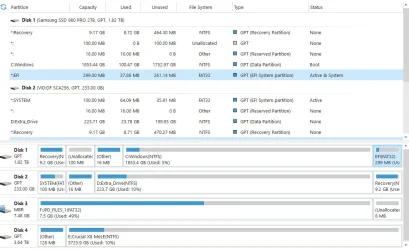
Here are Disk Mgmt and Partition Wizard displays. I have an older drive with the original Windows installation on it (256GB). The one I am currently using is 2TB.
 

Attachments

  • Disk Mgmt.webp
    Disk Mgmt.webp
    81.3 KB · Views: 1
  • Partition_Wizard_Free.webp
    Partition_Wizard_Free.webp
    62.7 KB · Views: 1

My Computer My Computer

At a glance

Windows 10
OS
Windows 10
See if the computer is or is not able to boot with each bootable drive after detaching other drives with EFI partitions.


Run: diskparinfo > post a share link


My Computer My Computer

At a glance

Windows 10Intel(R) Core(TM) i7-4800MQ CPU @ 2.70GHz16 GB Total: Manufacturer : Samsung MemoryTyp...NVIDIA Quadro K3100M; Intel(R) HD Graphics 4600
OS
Windows 10
Computer type
Laptop
Manufacturer/Model
HP
CPU
Intel(R) Core(TM) i7-4800MQ CPU @ 2.70GHz
Motherboard
Product : 190A Version : KBC Version 94.56
Memory
16 GB Total: Manufacturer : Samsung MemoryType : DDR3 FormFactor : SODIMM Capacity : 8GB Speed : 1600
Graphics Card(s)
NVIDIA Quadro K3100M; Intel(R) HD Graphics 4600
Sound Card
IDT High Definition Audio CODEC; PNP Device ID HDAUDIO\FUNC_01&VEN_111D&DEV_76E0
Hard Drives
Model Hitachi HTS727575A9E364
Antivirus
Microsoft Defender
Other Info
Mobile Workstation
Never mind. I got it to run, but now I have a worse problem. When I get to the Desktop, it displays for a few seconds then disappears. I will start another thread.

JohnD
 

My Computer My Computer

At a glance

Windows 10
OS
Windows 10
@johnpd

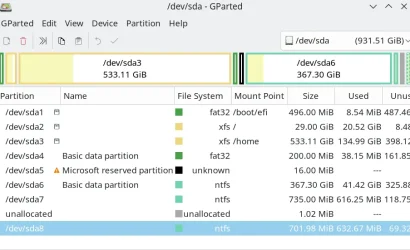
Run a stand alone bootable version of Gparted. In the GUI there's an option to change the GUUID or assign one manually). If you want to re-set the GUUID back to what it was you will need to know it though. You could get that if you have an old image -- restore that, note the partition GUUID's, then restore the failing imge, boot Gparted and re-assign the Guuid's.

Note though in Gparted the partitions in the GUI will appear as /dev/xxx but the file type etc are shown clearly so the Windows partitions are easily seen.

E.g : On a dual boot disk (Linux and Windows) :

Screenshot_20251027_121757.webp

Cheers
jimbo
 

My Computer My Computer

At a glance

Windows XP,11 Linux Fedora Rawhide pre-releas...2 X Intel i7
OS
Windows XP,11 Linux Fedora Rawhide pre-release 45
Computer type
PC/Desktop
CPU
2 X Intel i7
Screen Resolution
4KUHD X 2
bcdboot C:\Windows /s T: where T was the letter I assigned to it.

The problem I am running into is that Macrium Reflect is failing when it hits the EFI partition saying it does not exist. The backup copies the entire disk. The Windows partition, EFI partition, and recovery partition all had the same GUID. Now the EFI has a different GUID, but on other systems I have, that is not a problem. The script is using the new GUID. Let me check with Macrium to see what might be messed up.
bcdboot /s will copy the required boot files.

The reason for asking the question, in case there was other files tucked inside EFI that were installed by your OEM (firmware) or another tool.

It's not always the case. When any partition is designated EFI, the GUID is c12a7328-f81f-11d2-ba4b-00a0c93ec93b. Obviously you can only have one of that GUID per disk.
 

My Computer My Computer

At a glance

Windows 7
OS
Windows 7
I have resolved all my issues. The blank Desktop was caused by a bum program which apparently crashed Windows Explorer. I updated it and now the system is operating normally. Thanks to all who helped.
 

My Computer My Computer

At a glance

Windows 10
OS
Windows 10
You can not move the efi partition to another location on the disk nor can you resize it in disk management. You have to use 3d party tool like Minitool Partition Wizard, Aoemi Partition Assistant, or Disk Genius to resize each partition to the right until there is unallocated space directly adjacent to the EFI patition. You then extend the EFI partition into the unallocated space. Am I right on that @garlin?
I just make a backup of EFI with Macrium Reflect and restore to new location having freed up some space as required.
 

My Computer My Computer

At a glance

Windows 11 Pro + Win11 Canary VM.I9 13th gen i9-13900H 2.60 GHZ16 GB solderedIntegrated Intel Iris XE
OS
Windows 11 Pro + Win11 Canary VM.
Computer type
Laptop
Manufacturer/Model
ASUS Zenbook 14
CPU
I9 13th gen i9-13900H 2.60 GHZ
Motherboard
Yep, Laptop has one.
Memory
16 GB soldered
Graphics Card(s)
Integrated Intel Iris XE
Sound Card
Realtek built in
Monitor(s) Displays
laptop OLED screen
Screen Resolution
2880x1800 touchscreen
Hard Drives
1 TB NVME SSD (only weakness is only one slot)
PSU
Internal + 65W thunderbolt USB4 charger
Case
Yep, got one
Cooling
Stella Artois (UK pint cans - 568 ml) - extra cost.
Keyboard
Built in UK keybd
Mouse
Bluetooth , wireless dongled, wired
Internet Speed
900 mbs (ethernet), wifi 6 typical 350-450 mb/s both up and down
Browser
Edge
Antivirus
Defender
Other Info
TPM 2.0, 2xUSB4 thunderbolt, 1xUsb3 (usb a), 1xUsb-c, hdmi out, 3.5 mm audio out/in combo, ASUS backlit trackpad (inc. switchable number pad)

Macrium Reflect Home V8
Office 365 Family (6 users each 1TB onedrive space)
Hyper-V (a vm runs almost as fast as my older laptop)
The EFI partition is just a "normal" partition and can be anywhere on the disk. UEFI booting just reads the efi partition which is just a file.

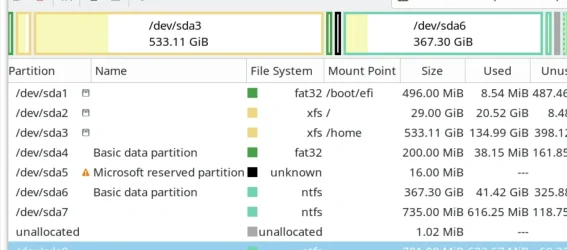
Here I have 2 efi partitions - ome for grub for linux boot and the other (about 50% of the way through the disk) for Windows native boot. It's customary (but not mandatory) to have the efi partitions at the front of the rest of the data for the OS.

Here /dev/sda1 and /dev/sda4 are efi partitions -- /dev/sda1 for Linux Grub and /dev/sda4 for a Windows system.

Screenshot_20251027_222011.webp

Cheers
jimbo
 

My Computer My Computer

At a glance

Windows XP,11 Linux Fedora Rawhide pre-releas...2 X Intel i7
OS
Windows XP,11 Linux Fedora Rawhide pre-release 45
Computer type
PC/Desktop
CPU
2 X Intel i7
Screen Resolution
4KUHD X 2

Latest Support Threads

Back
Top Bottom