How to define boot parameters ?


sfleury

Well-known member
Member
Local time
12:02 AM
Posts
55
OS
Windows 11 Professional
Hello
After some problems and bott fixes, it seems I came up with an "unclear" situation
I cannot let the boot process run automatically and I am oblige to select the boot unit each time I start my computer
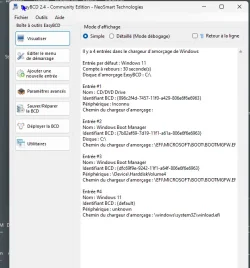
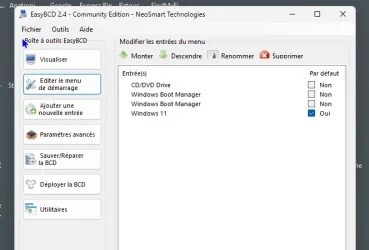
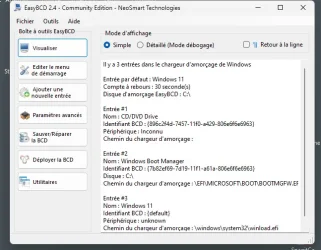
Do, I bought and installed EasyBCD to see how my boot was organized
I believe there some unwnted entry I could remove ... but I don't know which one !
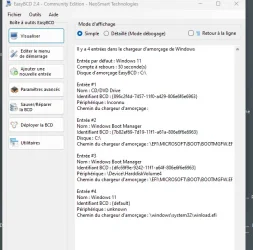
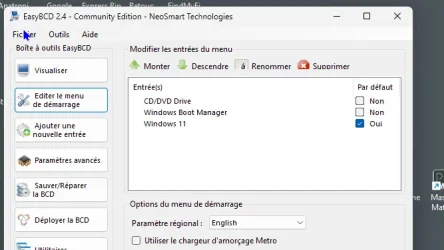
I attach some screen captures of EasyyBCD information
Thanks for any help or recommendation you could provide
Have a good week-end

PS : As you can notice from the screen captures, english is not my native language ... I'm sorry
 

Attachments
  • E asyBCD 02.webp
    E asyBCD 02.webp
    52.6 KB · Views: 1
  • EasyBCD 01.webp
    EasyBCD 01.webp
    54.4 KB · Views: 2
  • EasyBCD 03.webp
    EasyBCD 03.webp
    23.9 KB · Views: 2

My Computer My Computer

At a glance

Windows 11 ProfessionalIntel Core i5-8600K CPU @ 3.60GHz FamilleDDR4 32768 MoNVIDIA GeForce GTX 1050 Ti
OS
Windows 11 Professional
Computer type
PC/Desktop
Manufacturer/Model
Custom built
CPU
Intel Core i5-8600K CPU @ 3.60GHz Famille
Motherboard
ASUSTeK COMPUTER INC. ROG STRIX Z370-E GAMING (LGA1151)
Memory
DDR4 32768 Mo
Graphics Card(s)
NVIDIA GeForce GTX 1050 Ti
Sound Card
None
Monitor(s) Displays
NEC X223HQ on NVIDIA GeForce GTX 1050 Ti and ACER EA243WM on NVIDIA GeForce GTX 1050 Ti
Screen Resolution
1920x1080
Hard Drives
System on EMTEC X150 960GB (SSD) and additional HDD
I don't know much about EasyyBCD, but you want to delete unwanted boot entries from Boot tap of msconfig (System Configuration) tool.
 

My Computer My Computer

At a glance

Windows 11AMD Ryzen 7 5700GMicron Technology DDR4-3200 16GBNVIDIA GeForce RTX 3060
OS
Windows 11
Computer type
PC/Desktop
Manufacturer/Model
HP Pavilion
CPU
AMD Ryzen 7 5700G
Motherboard
Erica6
Memory
Micron Technology DDR4-3200 16GB
Graphics Card(s)
NVIDIA GeForce RTX 3060
Sound Card
Realtek ALC671
Monitor(s) Displays
Samsung SyncMaster U28E590
Screen Resolution
3840 x 2160
Hard Drives
SAMSUNG MZVLQ1T0HALB-000H1
From the screenshots I see you have Entry #1 is some CD-ROM, Entry #2 which is the UEFI mode option to boot Windows 11 from C:. Entry #3 is the UEFI boot option to boot Windows from another drive, and Entry #4 is the respective Legacy BIOS mode for booting Windows 11 from C: which is the current default. Change default to Entry #2 and see of that works. If it does, you can safely remove the other entries, unless you dual boot Windows 11 from C: with some other Windows version on another disk.
 

My Computers My Computers

  • At a glance

    Windows 11 Pro 23H2 (5699), 25H2 (9168)Mobile DualCore Intel Core 2 Duo T7250, 2000 MHz4GBMobile Intel(R) GMA 4500M (Mobile 4 series)
    OS
    Windows 11 Pro 23H2 (5699), 25H2 (9168)
    Computer type
    Laptop
    Manufacturer/Model
    Acer Extensa 5630EZ
    CPU
    Mobile DualCore Intel Core 2 Duo T7250, 2000 MHz
    Motherboard
    Acer Extensa 5630
    Memory
    4GB
    Graphics Card(s)
    Mobile Intel(R) GMA 4500M (Mobile 4 series)
    Sound Card
    Realtek ALC268 @ Intel 82801IB ICH9 - High Definition Audio Controller
    Monitor(s) Displays
    1
    Screen Resolution
    1280x800
    Hard Drives
    Samsung SSD 850 EVO 250GB SATA Device (250 GB, SATA-III)
    Internet Speed
    802.11g wireless 54 Mbps
    Browser
    MICROSOFT EDGE
    Antivirus
    WINDOWS DEFENDER
    Other Info
    Legacy MBR installation, no TPM, no Secure Boot, no WDDM 2.0 graphics drivers, no SSE4.2, cannot get more unsupported ;) This is only my test laptop. I had installed Windows 11 here before upgrading my main PC. For my main PC I use everyday see my 2nd system specs.
  • At a glance

    Windows 11 Pro v25H2 (build 26200.9168)Intel Core-i7 3770 3.40GHz s1155 (3rd generat...2x Kingston Hyper-X Blu 8GB DDR3-1600GIGABYTE GeForce RTX 3050 WINDFORCE OC V2 6GB...
    Operating System
    Windows 11 Pro v25H2 (build 26200.9168)
    Computer type
    PC/Desktop
    Manufacturer/Model
    Custom-built PC
    CPU
    Intel Core-i7 3770 3.40GHz s1155 (3rd generation)
    Motherboard
    Asus P8H61 s1155 ATX
    Memory
    2x Kingston Hyper-X Blu 8GB DDR3-1600
    Graphics card(s)
    GIGABYTE GeForce RTX 3050 WINDFORCE OC V2 6GB (GV-N3050WF2OCV2-6GD)
    Sound Card
    Realtek HD audio (ALC887)
    Monitor(s) Displays
    Sony Bravia KDL-19L4000 19" LCD TV via VGA
    Screen Resolution
    1440x900 32-bit 60Hz
    Hard Drives
    WD Blue SA510 2.5 1000GB SSD as system disk, Western Digital Caviar Purple 4TB SATA III (WD40PURZ) as second
    PSU
    Thermaltake Litepower RGB 550W Full Wired
    Case
    SUPERCASE MIDI-TOWER
    Cooling
    Deepcool Gamma Archer CPU cooler, 1x 8cm fan at the back
    Keyboard
    Mitsumi 101-key PS/2
    Mouse
    Microsoft Compact Optical Mouse
    Internet Speed
    802.11ac 5GHz wireless 260Mpbs
    Browser
    Microsoft Edge, Mozilla Firefox
    Antivirus
    Microsoft Windows Defender
    Other Info
    Legacy BIOS (MBR) installation, no TPM, no Secure Boot, WDDM 3.0 graphics drivers, WEI score 7.4
Thank you very much ! It seems you are busy with my posts !!!!!
Will try you recommendations
Another detail : I have a "full backup" of my system disk on an external SSD I can plug in an USB port just in case (I've done it with EASEUS Partition Manager "Clone" option) - Would it be possible to "include" this external device in the boot process ?

Have a good week-end
 

My Computer My Computer

At a glance

Windows 11 ProfessionalIntel Core i5-8600K CPU @ 3.60GHz FamilleDDR4 32768 MoNVIDIA GeForce GTX 1050 Ti
OS
Windows 11 Professional
Computer type
PC/Desktop
Manufacturer/Model
Custom built
CPU
Intel Core i5-8600K CPU @ 3.60GHz Famille
Motherboard
ASUSTeK COMPUTER INC. ROG STRIX Z370-E GAMING (LGA1151)
Memory
DDR4 32768 Mo
Graphics Card(s)
NVIDIA GeForce GTX 1050 Ti
Sound Card
None
Monitor(s) Displays
NEC X223HQ on NVIDIA GeForce GTX 1050 Ti and ACER EA243WM on NVIDIA GeForce GTX 1050 Ti
Screen Resolution
1920x1080
Hard Drives
System on EMTEC X150 960GB (SSD) and additional HDD
Hello again
I removed Entry # 2 and rebooted my computer
1) There is no "automatic correct boot" and I'm obliged to manually select in the BIOS boot menu to get a correct boot
2) Some entry have been removed in Easy BCD

Is there a way to "force" the Boot at startup, so I would not have to select it manually every time I start my computer ?

Thanks
 

Attachments

  • Easy BCD 05.webp
    Easy BCD 05.webp
    27.3 KB · Views: 2
  • Easy BCD 04.webp
    Easy BCD 04.webp
    44.4 KB · Views: 2

My Computer My Computer

At a glance

Windows 11 ProfessionalIntel Core i5-8600K CPU @ 3.60GHz FamilleDDR4 32768 MoNVIDIA GeForce GTX 1050 Ti
OS
Windows 11 Professional
Computer type
PC/Desktop
Manufacturer/Model
Custom built
CPU
Intel Core i5-8600K CPU @ 3.60GHz Famille
Motherboard
ASUSTeK COMPUTER INC. ROG STRIX Z370-E GAMING (LGA1151)
Memory
DDR4 32768 Mo
Graphics Card(s)
NVIDIA GeForce GTX 1050 Ti
Sound Card
None
Monitor(s) Displays
NEC X223HQ on NVIDIA GeForce GTX 1050 Ti and ACER EA243WM on NVIDIA GeForce GTX 1050 Ti
Screen Resolution
1920x1080
Hard Drives
System on EMTEC X150 960GB (SSD) and additional HDD
Is there a way to "force" the Boot at startup, so I would not have to select it manually every time I start my computer ?
Go into your Bios and set the boot option that you want.


Denis
 

My Computer My Computer

At a glance

Windows 11 Home x64 Version 25H2 Build 26200....
OS
Windows 11 Home x64 Version 25H2 Build 26200.9168
  • Like
Reactions: Gas
Thank you very much ! It seems you are busy with my posts !!!!!
Will try you recommendations
Another detail : I have a "full backup" of my system disk on an external SSD I can plug in an USB port just in case (I've done it with EASEUS Partition Manager "Clone" option) - Would it be possible to "include" this external device in the boot process ?

Have a good week-end
If you mean an exact copy (clone) on an external USB hard disk, no Windows is not allowed to boot from USB unless you change one value in Registry to change type from standard system to Windows-to-Go system. I don't remember which value that is. If you do that you can boot from USB and have all your data and applications, but you cannot upgrade to a newer version. To upgrade you must change the value again from Windows-to-Go to standard system. Of course this would work if you could remove the disk from the USB enclosure and put it inside the computer to boot it as standard system. An alternative is to create a virtual machine, connect the USB disk and configure it as the virtual machine's hard disk (advanced settings, instead of virtual disk use a physical disk). This would allow you to boot it so you can change the Registry value as required.
 

My Computers My Computers

  • At a glance

    Windows 11 Pro 23H2 (5699), 25H2 (9168)Mobile DualCore Intel Core 2 Duo T7250, 2000 MHz4GBMobile Intel(R) GMA 4500M (Mobile 4 series)
    OS
    Windows 11 Pro 23H2 (5699), 25H2 (9168)
    Computer type
    Laptop
    Manufacturer/Model
    Acer Extensa 5630EZ
    CPU
    Mobile DualCore Intel Core 2 Duo T7250, 2000 MHz
    Motherboard
    Acer Extensa 5630
    Memory
    4GB
    Graphics Card(s)
    Mobile Intel(R) GMA 4500M (Mobile 4 series)
    Sound Card
    Realtek ALC268 @ Intel 82801IB ICH9 - High Definition Audio Controller
    Monitor(s) Displays
    1
    Screen Resolution
    1280x800
    Hard Drives
    Samsung SSD 850 EVO 250GB SATA Device (250 GB, SATA-III)
    Internet Speed
    802.11g wireless 54 Mbps
    Browser
    MICROSOFT EDGE
    Antivirus
    WINDOWS DEFENDER
    Other Info
    Legacy MBR installation, no TPM, no Secure Boot, no WDDM 2.0 graphics drivers, no SSE4.2, cannot get more unsupported ;) This is only my test laptop. I had installed Windows 11 here before upgrading my main PC. For my main PC I use everyday see my 2nd system specs.
  • At a glance

    Windows 11 Pro v25H2 (build 26200.9168)Intel Core-i7 3770 3.40GHz s1155 (3rd generat...2x Kingston Hyper-X Blu 8GB DDR3-1600GIGABYTE GeForce RTX 3050 WINDFORCE OC V2 6GB...
    Operating System
    Windows 11 Pro v25H2 (build 26200.9168)
    Computer type
    PC/Desktop
    Manufacturer/Model
    Custom-built PC
    CPU
    Intel Core-i7 3770 3.40GHz s1155 (3rd generation)
    Motherboard
    Asus P8H61 s1155 ATX
    Memory
    2x Kingston Hyper-X Blu 8GB DDR3-1600
    Graphics card(s)
    GIGABYTE GeForce RTX 3050 WINDFORCE OC V2 6GB (GV-N3050WF2OCV2-6GD)
    Sound Card
    Realtek HD audio (ALC887)
    Monitor(s) Displays
    Sony Bravia KDL-19L4000 19" LCD TV via VGA
    Screen Resolution
    1440x900 32-bit 60Hz
    Hard Drives
    WD Blue SA510 2.5 1000GB SSD as system disk, Western Digital Caviar Purple 4TB SATA III (WD40PURZ) as second
    PSU
    Thermaltake Litepower RGB 550W Full Wired
    Case
    SUPERCASE MIDI-TOWER
    Cooling
    Deepcool Gamma Archer CPU cooler, 1x 8cm fan at the back
    Keyboard
    Mitsumi 101-key PS/2
    Mouse
    Microsoft Compact Optical Mouse
    Internet Speed
    802.11ac 5GHz wireless 260Mpbs
    Browser
    Microsoft Edge, Mozilla Firefox
    Antivirus
    Microsoft Windows Defender
    Other Info
    Legacy BIOS (MBR) installation, no TPM, no Secure Boot, WDDM 3.0 graphics drivers, WEI score 7.4
Go into your Bios and set the boot option that you want.

Set the Windows Boot Manager associated with the drive containing Windows 11 as Boot Option #1.

Strix_Z370-E_Gaming_bios032.webp
 

My Computers My Computers

  • At a glance

    Windows 11 ProAMD Ryzen 9 9950X3DKingston FURY Beast 64GB (2x32GB) DDR5 6000MT/sASUS TUF Gaming Radeon RX 9070 OC Edition 16G...
    OS
    Windows 11 Pro
    Computer type
    PC/Desktop
    CPU
    AMD Ryzen 9 9950X3D
    Motherboard
    ASRock B650E Taichi Lite
    Memory
    Kingston FURY Beast 64GB (2x32GB) DDR5 6000MT/s
    Graphics Card(s)
    ASUS TUF Gaming Radeon RX 9070 OC Edition 16GB GDDR6
    Hard Drives
    Solidigm P44 Pro 2TB M.2 NVMe SSD
  • At a glance

    Windows 11 HomeIntel Core Ultra 9 275HX64GB (2x 32GB) DDR5-6400NVIDIA GeForce RTX 5080 16GB GDDR7 Laptop GPU
    Operating System
    Windows 11 Home
    Computer type
    Laptop
    Manufacturer/Model
    Lenovo Legion Pro 7i Gen 10 16"
    CPU
    Intel Core Ultra 9 275HX
    Memory
    64GB (2x 32GB) DDR5-6400
    Graphics card(s)
    NVIDIA GeForce RTX 5080 16GB GDDR7 Laptop GPU
    Hard Drives
    2x 1TB M.2 NVMe SSD (SK Hynix)
Please take no offense from this post. It is just my observation from reading all your threads regarding going from from 10 to 11 ( and trying to keep up with the chain of events as they took place). https://www.elevenforum.com/search/1251537/?c[users]=sfleury&o=relevance

Admittedly it has not all been clear to me but I do feel some of your choices to have been imprudent. If I'm reading it right, I can see how your bootloader got messed up and I don't think anyone here can be certain of the state of your system. It is well known that a clone of the system drive attached at the same time as is the system drive can confuse the system's firmware and lead to unexpected boot behavior.
 

My Computers My Computers

  • At a glance

    Windows 11 Pro 25H2 26200.9168i9-10900 10 core 20 threads32 gbnone-Intel UHD Graphics 630
    OS
    Windows 11 Pro 25H2 26200.9168
    Computer type
    PC/Desktop
    Manufacturer/Model
    Dell Optiplex 7080
    CPU
    i9-10900 10 core 20 threads
    Motherboard
    DELL 0J37VM
    Memory
    32 gb
    Graphics Card(s)
    none-Intel UHD Graphics 630
    Sound Card
    Integrated Realtek
    Monitor(s) Displays
    Benq 27
    Screen Resolution
    2560x1440
    Hard Drives
    2x1tb Solidigm m.2 nvme /External drives 512gb Samsung m.2 sata+2tb Kingston m2.nvme
    PSU
    500w
    Case
    MT
    Cooling
    Dell Premium
    Keyboard
    Logitech wired
    Mouse
    Logitech wireless
    Internet Speed
    so slow I'm too embarrassed to tell
    Browser
    #1 Edge #2 Firefox
    Antivirus
    Defender+MWB Premium
  • At a glance

    Windows 11 Pro 24H2 26200.9168AMD Ryzen 7 6800U32 gbintegrated
    Operating System
    Windows 11 Pro 24H2 26200.9168
    Computer type
    PC/Desktop
    Manufacturer/Model
    Beelink Mini PC SER5
    CPU
    AMD Ryzen 7 6800U
    Memory
    32 gb
    Graphics card(s)
    integrated
    Sound Card
    integrated
    Monitor(s) Displays
    Benq 27
    Screen Resolution
    2560x1440
    Hard Drives
    1TB Crucial nvme
    Keyboard
    Logitech wired
    Mouse
    Logitech wireless
    Internet Speed
    still too embarrassed to tell
    Browser
    Firefox
    Antivirus
    Defender
  • System 3 is non compliant Dell 9020 i7-4770/24gb ram Win11 PRO 26200.9168
  • Like
Reactions: Gas
If you cloned your hard disk to an external USB disk, you cannot just swap disks and resume working, that would be the case if you cloned to an internal SATA or NVMe disk, matching your original disk. With an external USB hard disk you have to either remove it from the USB enclosure and put it inside the computer, or change a Registry setting to switch from standard Windows system to Windows-to-Go, like I said in my previous reply. If you booted in Windows with both disks connected, chances are that one of the disks has different drive letter than the appropriate C, so Windows can't boot anyway until you change it back to C. To do that, better leave only the specific disk connected, you need a WinPE live USB that is a USB flash drive that you can boot into Windows environment. If you choose to create one using Sergei Strelec WinPE ISO which contains Windows 10/11 environment with many diagnostic tools, there is a specific utility to fix drive letters.


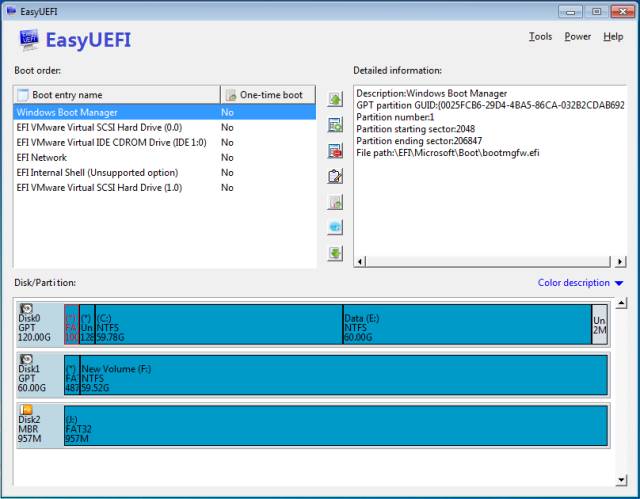
If you are lucky enough and the drive letters haven't changed, but only the default boot entry changed, you can load UEFI firmware (aka BIOS) and make sure you set higher boot priority to the desired disk, as others suggested. If you also want to change the order of the UEFI boot entries or rename them to something more convenient, such as "Windows 11 on WD", then you can use the EasyUEFI utiility. You can even select the default boot entry and delete unwanted entries.


My Computers My Computers

  • At a glance

    Windows 11 Pro 23H2 (5699), 25H2 (9168)Mobile DualCore Intel Core 2 Duo T7250, 2000 MHz4GBMobile Intel(R) GMA 4500M (Mobile 4 series)
    OS
    Windows 11 Pro 23H2 (5699), 25H2 (9168)
    Computer type
    Laptop
    Manufacturer/Model
    Acer Extensa 5630EZ
    CPU
    Mobile DualCore Intel Core 2 Duo T7250, 2000 MHz
    Motherboard
    Acer Extensa 5630
    Memory
    4GB
    Graphics Card(s)
    Mobile Intel(R) GMA 4500M (Mobile 4 series)
    Sound Card
    Realtek ALC268 @ Intel 82801IB ICH9 - High Definition Audio Controller
    Monitor(s) Displays
    1
    Screen Resolution
    1280x800
    Hard Drives
    Samsung SSD 850 EVO 250GB SATA Device (250 GB, SATA-III)
    Internet Speed
    802.11g wireless 54 Mbps
    Browser
    MICROSOFT EDGE
    Antivirus
    WINDOWS DEFENDER
    Other Info
    Legacy MBR installation, no TPM, no Secure Boot, no WDDM 2.0 graphics drivers, no SSE4.2, cannot get more unsupported ;) This is only my test laptop. I had installed Windows 11 here before upgrading my main PC. For my main PC I use everyday see my 2nd system specs.
  • At a glance

    Windows 11 Pro v25H2 (build 26200.9168)Intel Core-i7 3770 3.40GHz s1155 (3rd generat...2x Kingston Hyper-X Blu 8GB DDR3-1600GIGABYTE GeForce RTX 3050 WINDFORCE OC V2 6GB...
    Operating System
    Windows 11 Pro v25H2 (build 26200.9168)
    Computer type
    PC/Desktop
    Manufacturer/Model
    Custom-built PC
    CPU
    Intel Core-i7 3770 3.40GHz s1155 (3rd generation)
    Motherboard
    Asus P8H61 s1155 ATX
    Memory
    2x Kingston Hyper-X Blu 8GB DDR3-1600
    Graphics card(s)
    GIGABYTE GeForce RTX 3050 WINDFORCE OC V2 6GB (GV-N3050WF2OCV2-6GD)
    Sound Card
    Realtek HD audio (ALC887)
    Monitor(s) Displays
    Sony Bravia KDL-19L4000 19" LCD TV via VGA
    Screen Resolution
    1440x900 32-bit 60Hz
    Hard Drives
    WD Blue SA510 2.5 1000GB SSD as system disk, Western Digital Caviar Purple 4TB SATA III (WD40PURZ) as second
    PSU
    Thermaltake Litepower RGB 550W Full Wired
    Case
    SUPERCASE MIDI-TOWER
    Cooling
    Deepcool Gamma Archer CPU cooler, 1x 8cm fan at the back
    Keyboard
    Mitsumi 101-key PS/2
    Mouse
    Microsoft Compact Optical Mouse
    Internet Speed
    802.11ac 5GHz wireless 260Mpbs
    Browser
    Microsoft Edge, Mozilla Firefox
    Antivirus
    Microsoft Windows Defender
    Other Info
    Legacy BIOS (MBR) installation, no TPM, no Secure Boot, WDDM 3.0 graphics drivers, WEI score 7.4
Does "easy bcd" even work with UEFI? I was thinking it doesn't ... only works with old legacy stuff.

Anyway, last time I tried to use it, it made a real mess, But I had a recent macrium reflect image so I could restore everything
 

My Computers My Computers

  • At a glance

    win 11 pro, 25H2i5-240032 GB DDR-3Intel HD Graphics 2000 (on-board)
    OS
    win 11 pro, 25H2
    Computer type
    PC/Desktop
    Manufacturer/Model
    Dell 790 (Mt)
    CPU
    i5-2400
    Motherboard
    Dell
    Memory
    32 GB DDR-3
    Graphics Card(s)
    Intel HD Graphics 2000 (on-board)
    Sound Card
    Intel Cougar Point PCH [B2] (On-Board)
    Monitor(s) Displays
    LG 27MN60T
  • At a glance

    Windows 11 home, 25H2Intel I7-3630QM16GB DDR3
    Operating System
    Windows 11 home, 25H2
    Computer type
    Laptop
    Manufacturer/Model
    Dell Inspiron 17R SE 7720
    CPU
    Intel I7-3630QM
    Memory
    16GB DDR3
    Hard Drives
    Samsung 500GB SSD
No, Easy BCD doesn't work with UEFI boot entries l. I was experimenting with some alternative operating systems including Mac OS X 10.8 Mountain Lion on my main PC (see 2nd system specs) which was booting in UEFI mode and created a Mac OS X boot entry in my BIOS. When I was done, I tried to delete that boot entry but my BIOS didn't have a delete function. So I used Easy BCD, but this only works with Legacy BIOS boot entries, not UEFI. After some Googling I discovered Easy UEFI that works with both UEFI and Legacy boot entries, but would not load in my Legacy BIOS Windows installation. I had to create a Sergei Strelec WinPE USB flash drive in GPT with Rufus so I could boot in UEFI mode and load a live Windows environment from which I used Easy UEFI to delete the unwanted boot entries. You shouldn't have any issues because you run UEFI mode Windows installation, so you only need to get Easy UEFI. Don't buy it, see if you can do it with the trial version.


My Computers My Computers

  • At a glance

    Windows 11 Pro 23H2 (5699), 25H2 (9168)Mobile DualCore Intel Core 2 Duo T7250, 2000 MHz4GBMobile Intel(R) GMA 4500M (Mobile 4 series)
    OS
    Windows 11 Pro 23H2 (5699), 25H2 (9168)
    Computer type
    Laptop
    Manufacturer/Model
    Acer Extensa 5630EZ
    CPU
    Mobile DualCore Intel Core 2 Duo T7250, 2000 MHz
    Motherboard
    Acer Extensa 5630
    Memory
    4GB
    Graphics Card(s)
    Mobile Intel(R) GMA 4500M (Mobile 4 series)
    Sound Card
    Realtek ALC268 @ Intel 82801IB ICH9 - High Definition Audio Controller
    Monitor(s) Displays
    1
    Screen Resolution
    1280x800
    Hard Drives
    Samsung SSD 850 EVO 250GB SATA Device (250 GB, SATA-III)
    Internet Speed
    802.11g wireless 54 Mbps
    Browser
    MICROSOFT EDGE
    Antivirus
    WINDOWS DEFENDER
    Other Info
    Legacy MBR installation, no TPM, no Secure Boot, no WDDM 2.0 graphics drivers, no SSE4.2, cannot get more unsupported ;) This is only my test laptop. I had installed Windows 11 here before upgrading my main PC. For my main PC I use everyday see my 2nd system specs.
  • At a glance

    Windows 11 Pro v25H2 (build 26200.9168)Intel Core-i7 3770 3.40GHz s1155 (3rd generat...2x Kingston Hyper-X Blu 8GB DDR3-1600GIGABYTE GeForce RTX 3050 WINDFORCE OC V2 6GB...
    Operating System
    Windows 11 Pro v25H2 (build 26200.9168)
    Computer type
    PC/Desktop
    Manufacturer/Model
    Custom-built PC
    CPU
    Intel Core-i7 3770 3.40GHz s1155 (3rd generation)
    Motherboard
    Asus P8H61 s1155 ATX
    Memory
    2x Kingston Hyper-X Blu 8GB DDR3-1600
    Graphics card(s)
    GIGABYTE GeForce RTX 3050 WINDFORCE OC V2 6GB (GV-N3050WF2OCV2-6GD)
    Sound Card
    Realtek HD audio (ALC887)
    Monitor(s) Displays
    Sony Bravia KDL-19L4000 19" LCD TV via VGA
    Screen Resolution
    1440x900 32-bit 60Hz
    Hard Drives
    WD Blue SA510 2.5 1000GB SSD as system disk, Western Digital Caviar Purple 4TB SATA III (WD40PURZ) as second
    PSU
    Thermaltake Litepower RGB 550W Full Wired
    Case
    SUPERCASE MIDI-TOWER
    Cooling
    Deepcool Gamma Archer CPU cooler, 1x 8cm fan at the back
    Keyboard
    Mitsumi 101-key PS/2
    Mouse
    Microsoft Compact Optical Mouse
    Internet Speed
    802.11ac 5GHz wireless 260Mpbs
    Browser
    Microsoft Edge, Mozilla Firefox
    Antivirus
    Microsoft Windows Defender
    Other Info
    Legacy BIOS (MBR) installation, no TPM, no Secure Boot, WDDM 3.0 graphics drivers, WEI score 7.4
Does "easy bcd" even work with UEFI? I was thinking it doesn't ... only works with old legacy stuff.

I haven't used EasyBCD or EasyUEFI before, so I tested both in a virtual machine with Windows 11 installed in UEFI/GPT mode.


EasyBCD does work to some extent on UEFI systems. It allows you to edit boot entries in the Windows BCD store (see images below), but many of its other multiboot functions are unavailable in UEFI mode.

EasyBCD itself displays this warning:

"EasyBCD has detected that your machine is currently booting in EFI mode. Due to limitations set by Microsoft, many of EasyBCD's multi-booting features cannot be used in EFI mode and have been disabled."

EasyBCD - 1.webp

EasyBCD - 2.webp

On a UEFI Windows installation, the system BCD store is located on the EFI system partition. Boot Configuration Data (BCD) is a firmware-independent database that stores Windows boot-time configuration data. Among other things, it tells Windows Boot Manager which Windows boot loader entries are available and how they should be started.

If you only need basic management of Windows boot-menu entries, EasyBCD may be unnecessary because Windows already provides the System Configuration (msconfig) tool. Deleting a boot entry from the Boot tab in msconfig does not delete the corresponding Windows installation or its files; it removes the boot entry from the BCD store.

You can also edit BCD boot entries using EasyUEFI.


Image below: EasyUEFI: Manage BCD Boot Option

EasyUEFI - 1.webp

EasyUEFI additionally allows you to manage UEFI firmware boot entries stored in NVRAM (Non-Volatile Random-Access Memory). These are separate from the Windows OS-loader entries in the BCD store.

Image below: EasyUEFI: Manage EFI Boot Option

EasyUEFI - 2.webp

Normally, Windows Setup creates a Windows Boot Manager firmware entry in NVRAM that points to \EFI\Microsoft\Boot\bootmgfw.efi on the EFI system partition.

UEFI NVRAM entry → bootmgfw.efi → BCD store → winload.efi (the OS loader for UEFI-based systems)

\EFI\Microsoft\Boot\bootmgfw.efi is launched via a firmware boot entry stored in NVRAM.

\EFI\Boot\bootx64.efi is the default fallback boot path defined by the UEFI specification and is used when no valid NVRAM boot entry is found.
 

My Computers My Computers

  • At a glance

    Windows 11 ProAMD Ryzen 9 9950X3DKingston FURY Beast 64GB (2x32GB) DDR5 6000MT/sASUS TUF Gaming Radeon RX 9070 OC Edition 16G...
    OS
    Windows 11 Pro
    Computer type
    PC/Desktop
    CPU
    AMD Ryzen 9 9950X3D
    Motherboard
    ASRock B650E Taichi Lite
    Memory
    Kingston FURY Beast 64GB (2x32GB) DDR5 6000MT/s
    Graphics Card(s)
    ASUS TUF Gaming Radeon RX 9070 OC Edition 16GB GDDR6
    Hard Drives
    Solidigm P44 Pro 2TB M.2 NVMe SSD
  • At a glance

    Windows 11 HomeIntel Core Ultra 9 275HX64GB (2x 32GB) DDR5-6400NVIDIA GeForce RTX 5080 16GB GDDR7 Laptop GPU
    Operating System
    Windows 11 Home
    Computer type
    Laptop
    Manufacturer/Model
    Lenovo Legion Pro 7i Gen 10 16"
    CPU
    Intel Core Ultra 9 275HX
    Memory
    64GB (2x 32GB) DDR5-6400
    Graphics card(s)
    NVIDIA GeForce RTX 5080 16GB GDDR7 Laptop GPU
    Hard Drives
    2x 1TB M.2 NVMe SSD (SK Hynix)
Or bootice

select easy mode if you are new to this stuff

2026-08-09_133819.webp

2026-08-09_134158.webp
 

Attachments

My Computers My Computers

  • At a glance

    Win7,Win11i7-97002x16gb 3600mhz
    OS
    Win7,Win11
    Computer type
    PC/Desktop
    CPU
    i7-9700
    Motherboard
    gigabyte b365m ds3h
    Memory
    2x16gb 3600mhz
    Monitor(s) Displays
    benq gw2480
    PSU
    bequiet pure power 11 400CM
    Cooling
    cryorig m9i
  • At a glance

    win7,win11i5-84002x8gb 3200
    Operating System
    win7,win11
    Computer type
    PC/Desktop
    CPU
    i5-8400
    Motherboard
    gigabyte b365m ds3h
    Memory
    2x8gb 3200
    PSU
    xfx pro 450
My favourite...

Boot Entries.webp
 

My Computer My Computer

At a glance

Windows 11 Pro 25H2Intel Alder lake i7 12700K32 Gb Corsair Vengeance LPX DDR4 3200 XMP2EVGA 3070ti FTW3 Ultra Gaming & Intel Arc
OS
Windows 11 Pro 25H2
Computer type
PC/Desktop
Manufacturer/Model
My Self
CPU
Intel Alder lake i7 12700K
Motherboard
Asus z690 Gaming WiFi D4, Bios Ver 4505
Memory
32 Gb Corsair Vengeance LPX DDR4 3200 XMP2
Graphics Card(s)
EVGA 3070ti FTW3 Ultra Gaming & Intel Arc
Sound Card
Via Display port
Monitor(s) Displays
Dell AW2723DF
Screen Resolution
2560 x 1440 @ 280Hz G-Sync mode
Hard Drives
WD Black SN850 1Tb NVME (Boot Drive)
WD BLACK SN850X + Heatsink 1Tb NVME
Samsung 870 Qvo 1Tb SSD,
Pioneer DVD-RW DVR-219L
WD Black SN850x NVME 2Tb x3
PSU
Corsair RM850
Case
Phanteks Enthoo Pro M Tempered Glass
Cooling
Be Quiet Shadow Rock 3
Keyboard
Logitech G Pro
Mouse
Logitech G903, Lightspeed + Powerplay Mat
Internet Speed
900Mb/900Mb Fritz!Box 7590ax v2
Browser
Firefox
Antivirus
MS Defender
Other Info
Logitech C930e webcam
Synology DS218 play 2 x 4Tb Synology HAT3300-4T
Yes diskgenius is excellent for many things. It does not include a bcd editor

bootice does
 

My Computers My Computers

  • At a glance

    Win7,Win11i7-97002x16gb 3600mhz
    OS
    Win7,Win11
    Computer type
    PC/Desktop
    CPU
    i7-9700
    Motherboard
    gigabyte b365m ds3h
    Memory
    2x16gb 3600mhz
    Monitor(s) Displays
    benq gw2480
    PSU
    bequiet pure power 11 400CM
    Cooling
    cryorig m9i
  • At a glance

    win7,win11i5-84002x8gb 3200
    Operating System
    win7,win11
    Computer type
    PC/Desktop
    CPU
    i5-8400
    Motherboard
    gigabyte b365m ds3h
    Memory
    2x8gb 3200
    PSU
    xfx pro 450
Easy BCD 05.webp

ChatGPT:

One correction to our earlier simplified diagram​

Our earlier:
UEFI NVRAM boot entry → bootmgfw.efi → BCD store → winload.efi
is fine for explaining the normal boot path.

But it shouldn't be used to infer that every item called “Windows Boot Manager” displayed by EasyBCD represents the first element in that sequence.

The name Windows Boot Manager isn't sufficient to establish what kind of object it is. The identifier and other BCD properties matter.

If the OP had posted the output of:

bcdedit /enum all /v

and:

bcdedit /enum firmware /v

we could have mapped those EasyBCD GUIDs precisely and determined what type of BCD objects they were. Unfortunately, the screenshots don't contain enough of their underlying properties to do that with certainty.

So your original statement remains essentially correct:
EasyBCD manages the Windows BCD store located on the EFI system partition; it does not manage the UEFI firmware boot entries stored in NVRAM.
The “Windows Boot Manager” seen under Edit Boot Menu does not contradict that. In these screenshots, it appears to be a BCD entry named Windows Boot Manager, not the firmware's NVRAM Windows Boot Manager boot entry.


The two commands answer somewhat different questions:
  • bcdedit /enum all /v — enumerates all BCD objects in the system BCD store, with their full identifiers.
  • bcdedit /enum firmware /v — enumerates firmware applications/UEFI-related entries, which is useful for comparing the BCD configuration with the firmware boot configuration.
 

My Computers My Computers

  • At a glance

    Windows 11 ProAMD Ryzen 9 9950X3DKingston FURY Beast 64GB (2x32GB) DDR5 6000MT/sASUS TUF Gaming Radeon RX 9070 OC Edition 16G...
    OS
    Windows 11 Pro
    Computer type
    PC/Desktop
    CPU
    AMD Ryzen 9 9950X3D
    Motherboard
    ASRock B650E Taichi Lite
    Memory
    Kingston FURY Beast 64GB (2x32GB) DDR5 6000MT/s
    Graphics Card(s)
    ASUS TUF Gaming Radeon RX 9070 OC Edition 16GB GDDR6
    Hard Drives
    Solidigm P44 Pro 2TB M.2 NVMe SSD
  • At a glance

    Windows 11 HomeIntel Core Ultra 9 275HX64GB (2x 32GB) DDR5-6400NVIDIA GeForce RTX 5080 16GB GDDR7 Laptop GPU
    Operating System
    Windows 11 Home
    Computer type
    Laptop
    Manufacturer/Model
    Lenovo Legion Pro 7i Gen 10 16"
    CPU
    Intel Core Ultra 9 275HX
    Memory
    64GB (2x 32GB) DDR5-6400
    Graphics card(s)
    NVIDIA GeForce RTX 5080 16GB GDDR7 Laptop GPU
    Hard Drives
    2x 1TB M.2 NVMe SSD (SK Hynix)

Latest Support Threads

Back
Top Bottom