Solved How to do a Repair install with inaccessible boot device issue


Forgot about the format.
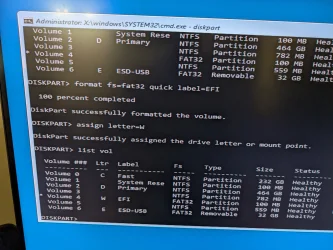
Formatted the drive as suggested, no change
Still have two windows boot managers for some reason, seems an earlier suggested command must have placed one elsewhere
A) How do I fix a corrupt boot binary?
B) How do I remove the soft perfect driver?
C) Have updated BIOS to F65i
D) the system restore point in the winRE, it finds a point, when I start that, it does not appear to do anything
E) I restored the c drive windows image onto a spare drive, plugged it in and did a scanos and this time it finds a windows install
F)I looked up and tried to revert pending actions, they either didn't work or I didn't enter the correct commands
G)RAM is reasonably new
 

Attachments

  • pic1.webp
    pic1.webp
    1.2 MB · Views: 3
  • pic2.webp
    pic2.webp
    703.2 KB · Views: 2

My Computers

System One System Two

  • OS
    Win11Pro 25H2 26200.6899
    Computer type
    PC/Desktop
    Manufacturer/Model
    Custom build
    CPU
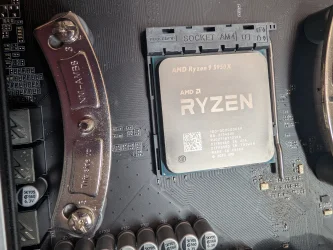
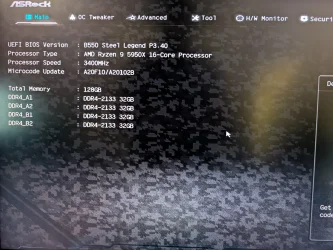
    AMD 5950
    Motherboard
    ASRock B550
    Memory
    128GB
    Graphics Card(s)
    RTX6900XT
    Sound Card
    built-in
    Monitor(s) Displays
    2
    Screen Resolution
    2 x 4k
    Hard Drives
    M2 1TB, 500GB
    HDD 4TB, 3x2TB as storage
    PSU
    850W
    Case
    Large case
    Cooling
    air
    Keyboard
    G915
    Mouse
    G502
    Internet Speed
    1000/100 Mbit/s
    Browser
    Chrome
    Antivirus
    Windows builtin
    Other Info
    PC is contains parts upto 4 years old
    Backuped to iDrive
  • Operating System
    win11
    Computer type
    PC/Desktop
    Manufacturer/Model
    unknown
    CPU
    AMD
    Memory
    16GB
    Graphics card(s)
    Nvidia 1060
    Monitor(s) Displays
    TV
    Hard Drives
    128GB
    Case
    mini
    Cooling
    water
    Keyboard
    remote
    Mouse
    remote
    Internet Speed
    fast
    Browser
    Edge
    Other Info
    I additionally have a laptop and some tiny brick PC both running win11
    Non windows I have 2 x chromeOS, RPI system and a remote server
There appears to be two, I've tried both

Can I restore my primary drive backup image to a USB drive and boot from it?

BTW thanks to everyone so far for your efforts even though I still haven't managed to fix my PC
That's a bit odd.

Have you tried setting the BIOS back to default?
 

My Computers

System One System Two

  • OS
    Windows 11 Pro
    Computer type
    PC/Desktop
    Manufacturer/Model
    Stigg's Build
    CPU
    Intel Core i9-10900X
    Motherboard
    GIGABYTE X299X DESIGNARE 10G
    Memory
    Corsair 64 GB (4 x 16 GB) CMW64GX4M4C3000C15 Vengeance RGB Pro 3000Mhz DDR4
    Graphics Card(s)
    GIGABYTE GeForce GTX 1660 Super Mini ITX 6 GB OC
    Sound Card
    Realtek ALC1220
    Monitor(s) Displays
    Samsung 27" FHD LED FreeSync Gaming Monitor (LS27F350FHEXXY)
    Screen Resolution
    1920 x 1080
    Hard Drives
    Samsung 970 Pro Series 1TB M.2 2280 NVMe SSD
    Western Digital Red Pro WD8003FFBX-68B9AN0 8 TB, 7200 RPM, SATA-III
    Western Digital Red Pro WD8003FFBX-68B9AN0 8 TB, 7200 RPM, SATA-III
    PSU
    Corsair HX1200 1200W 80 Plus Platinum
    Case
    Fractal Design Define 7 Black Solid Case
    Cooling
    Noctua NH-D15 Chromax Black
    Keyboard
    Razer Ornata V2
    Mouse
    Razer DeathAdder Essential
    Internet Speed
    FTTN 100Mbps / 40Mbps
    Browser
    Mozilla Firefox
    Antivirus
    N/A
    Other Info
    Logitech BRIO 4k Ultra HD USB-C Webcam
  • Operating System
    Windows 10 Pro
    Computer type
    Laptop
    Manufacturer/Model
    ASUS ROG Zephyrus M GM501GS
    CPU
    Core i7-8750H
    Motherboard
    Zephyrus M GM501GS
    Memory
    SK Hynix 32 GB (2 x 16 GB) HMA82GS6CJR8N-VK 16 GB DDR4-2666 DDR4 SDRAM
    Graphics card(s)
    NVIDIA GeForce GTX 1070
    Sound Card
    Realtek ALC294
    Monitor(s) Displays
    AU Optronics B156HAN07.1 [15.6" LCD]
    Screen Resolution
    1920 x 1080
    Hard Drives
    Samsung MZVKW512HMJP-00000 512 GB, PCI-E 3.0 x4
    Samsung SSD 860 QVO 4TB 4 TB, SATA-III
    PSU
    N/A
    Case
    N/A
    Cooling
    N/A
    Keyboard
    PC/AT Enhanced PS2 Keyboard (101/102-Key)
    Mouse
    Razer DeathAdder Essential
    Internet Speed
    FTTN 100Mbps / 40Mbps
    Browser
    Mozilla Firefox
    Antivirus
    N/A
    Other Info
    USB2.0 HD UVC Webcam
I did try reseting bios yesterday. Didn't do anything
So the BIOS update seems to have bricked the PC and the backup BIOS doesn't work.
 

My Computers

System One System Two

  • OS
    Win11Pro 25H2 26200.6899
    Computer type
    PC/Desktop
    Manufacturer/Model
    Custom build
    CPU
    AMD 5950
    Motherboard
    ASRock B550
    Memory
    128GB
    Graphics Card(s)
    RTX6900XT
    Sound Card
    built-in
    Monitor(s) Displays
    2
    Screen Resolution
    2 x 4k
    Hard Drives
    M2 1TB, 500GB
    HDD 4TB, 3x2TB as storage
    PSU
    850W
    Case
    Large case
    Cooling
    air
    Keyboard
    G915
    Mouse
    G502
    Internet Speed
    1000/100 Mbit/s
    Browser
    Chrome
    Antivirus
    Windows builtin
    Other Info
    PC is contains parts upto 4 years old
    Backuped to iDrive
  • Operating System
    win11
    Computer type
    PC/Desktop
    Manufacturer/Model
    unknown
    CPU
    AMD
    Memory
    16GB
    Graphics card(s)
    Nvidia 1060
    Monitor(s) Displays
    TV
    Hard Drives
    128GB
    Case
    mini
    Cooling
    water
    Keyboard
    remote
    Mouse
    remote
    Internet Speed
    fast
    Browser
    Edge
    Other Info
    I additionally have a laptop and some tiny brick PC both running win11
    Non windows I have 2 x chromeOS, RPI system and a remote server
1) Run command prompt:

Type:


notepad
notepad
notepad
dism /image:C:\ /get-drivers /format:list
(change C: to the applicable drive letter)
dism /image:C:\ /cleanup-image /revertpendingactions /scratchdir:C:\scratch
(change C: to the applicable drive letter)

Copy and paste commands with results to notepad > save to a flash drive > move the flash drive to a working Windows computer > post a share link


2) Run Memtest86+ for 8 or more passes > take pictures > post images or share links

Memtest86+ | The Open-Source Memory Testing Tool

Just 1 error is a test fail and testing can be aborted.

The more the passes the better the testing conditions.

It sometimes takes passes into the 20's to detect malfunctioning RAM.

The RAM can be tested all at one time or one at a time in the same DIMM.

Memtest86+ | The Open-Source Memory Testing Tool

MemTest86+ - Test RAM
 

My Computer

System One

  • OS
    Windows 10
    Computer type
    Laptop
    Manufacturer/Model
    HP
    CPU
    Intel(R) Core(TM) i7-4800MQ CPU @ 2.70GHz
    Motherboard
    Product : 190A Version : KBC Version 94.56
    Memory
    16 GB Total: Manufacturer : Samsung MemoryType : DDR3 FormFactor : SODIMM Capacity : 8GB Speed : 1600
    Graphics Card(s)
    NVIDIA Quadro K3100M; Intel(R) HD Graphics 4600
    Sound Card
    IDT High Definition Audio CODEC; PNP Device ID HDAUDIO\FUNC_01&VEN_111D&DEV_76E0
    Hard Drives
    Model Hitachi HTS727575A9E364
    Antivirus
    Microsoft Defender
    Other Info
    Mobile Workstation
I'll try those commands right after I get a new motherboard.
Ordered just need to go pick it up after my meeting
 

My Computers

System One System Two

  • OS
    Win11Pro 25H2 26200.6899
    Computer type
    PC/Desktop
    Manufacturer/Model
    Custom build
    CPU
    AMD 5950
    Motherboard
    ASRock B550
    Memory
    128GB
    Graphics Card(s)
    RTX6900XT
    Sound Card
    built-in
    Monitor(s) Displays
    2
    Screen Resolution
    2 x 4k
    Hard Drives
    M2 1TB, 500GB
    HDD 4TB, 3x2TB as storage
    PSU
    850W
    Case
    Large case
    Cooling
    air
    Keyboard
    G915
    Mouse
    G502
    Internet Speed
    1000/100 Mbit/s
    Browser
    Chrome
    Antivirus
    Windows builtin
    Other Info
    PC is contains parts upto 4 years old
    Backuped to iDrive
  • Operating System
    win11
    Computer type
    PC/Desktop
    Manufacturer/Model
    unknown
    CPU
    AMD
    Memory
    16GB
    Graphics card(s)
    Nvidia 1060
    Monitor(s) Displays
    TV
    Hard Drives
    128GB
    Case
    mini
    Cooling
    water
    Keyboard
    remote
    Mouse
    remote
    Internet Speed
    fast
    Browser
    Edge
    Other Info
    I additionally have a laptop and some tiny brick PC both running win11
    Non windows I have 2 x chromeOS, RPI system and a remote server
A) How do I fix a corrupt boot binary?

Code:
Root cause found:
---------------------------
A recently serviced boot binary is corrupt.

Reference thread with the same issue:


Solution to the problem:

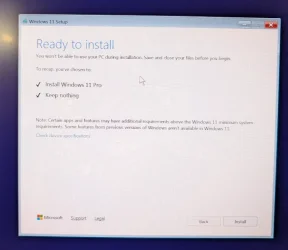
When you perform a custom install of Windows 11, a clean install of Windows 11 is performed only on the same partition as the current installation of Windows to replace it. The previous installation is moved into the C:\Windows.old folder as a backup. Once the new custom install has finished, you will be able to copy any files you want back from the C:\Windows.old folder.

A custom install of Windows 11 can be useful if you are unable to start Windows for whatever reason, need to reinstall Windows 11, but do not want to lose any files in your current installation by doing a full clean install.


My Computers

System One System Two

  • OS
    Windows 11 Pro
    Computer type
    PC/Desktop
    CPU
    AMD Ryzen 9 9950X3D
    Motherboard
    ASRock B650E Taichi Lite
    Memory
    Kingston FURY Beast 64GB (2x32GB) DDR5 6000MT/s
    Graphics Card(s)
    ASUS TUF Gaming Radeon RX 9070 OC Edition 16GB GDDR6
    Hard Drives
    Solidigm P44 Pro 2TB M.2 NVMe SSD
  • Operating System
    Windows 11 Home
    Computer type
    Laptop
    Manufacturer/Model
    Lenovo Legion Pro 7i Gen 10 16"
    CPU
    Intel Core Ultra 9 275HX
    Memory
    64GB (2x 32GB) DDR5-6400
    Graphics card(s)
    NVIDIA GeForce RTX 5080 16GB GDDR7 Laptop GPU
    Hard Drives
    2x 1TB M.2 NVMe SSD (SK Hynix)
New MB installed
BTW what is fTPM? how do I know if I'm using it or not?
and this isn't a new CPU its a new MB with the same everything else
 

Attachments

  • newmb1.webp
    newmb1.webp
    1.6 MB · Views: 2
  • newmb2.webp
    newmb2.webp
    641.6 KB · Views: 2
  • newmb3.webp
    newmb3.webp
    269.7 KB · Views: 2

My Computers

System One System Two

  • OS
    Win11Pro 25H2 26200.6899
    Computer type
    PC/Desktop
    Manufacturer/Model
    Custom build
    CPU
    AMD 5950
    Motherboard
    ASRock B550
    Memory
    128GB
    Graphics Card(s)
    RTX6900XT
    Sound Card
    built-in
    Monitor(s) Displays
    2
    Screen Resolution
    2 x 4k
    Hard Drives
    M2 1TB, 500GB
    HDD 4TB, 3x2TB as storage
    PSU
    850W
    Case
    Large case
    Cooling
    air
    Keyboard
    G915
    Mouse
    G502
    Internet Speed
    1000/100 Mbit/s
    Browser
    Chrome
    Antivirus
    Windows builtin
    Other Info
    PC is contains parts upto 4 years old
    Backuped to iDrive
  • Operating System
    win11
    Computer type
    PC/Desktop
    Manufacturer/Model
    unknown
    CPU
    AMD
    Memory
    16GB
    Graphics card(s)
    Nvidia 1060
    Monitor(s) Displays
    TV
    Hard Drives
    128GB
    Case
    mini
    Cooling
    water
    Keyboard
    remote
    Mouse
    remote
    Internet Speed
    fast
    Browser
    Edge
    Other Info
    I additionally have a laptop and some tiny brick PC both running win11
    Non windows I have 2 x chromeOS, RPI system and a remote server
1) Run command prompt:

Type:


notepad
notepad
notepad
dism /image:C:\ /get-drivers /format:list
(change C: to the applicable drive letter)
dism /image:C:\ /cleanup-image /revertpendingactions /scratchdir:C:\scratch
(change C: to the applicable drive letter)
DONE
BTW I redirected the output to files command > e:\file.txt
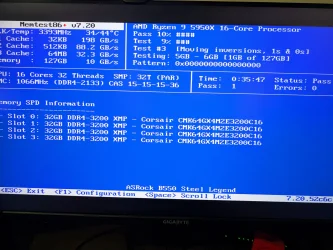
Doing memtest now, its going to take a while to complete 8+ cycles


What if I buy a new drive
Install Windows
Restore my c drive over the top of it
 

Attachments

Last edited:

My Computers

System One System Two

  • OS
    Win11Pro 25H2 26200.6899
    Computer type
    PC/Desktop
    Manufacturer/Model
    Custom build
    CPU
    AMD 5950
    Motherboard
    ASRock B550
    Memory
    128GB
    Graphics Card(s)
    RTX6900XT
    Sound Card
    built-in
    Monitor(s) Displays
    2
    Screen Resolution
    2 x 4k
    Hard Drives
    M2 1TB, 500GB
    HDD 4TB, 3x2TB as storage
    PSU
    850W
    Case
    Large case
    Cooling
    air
    Keyboard
    G915
    Mouse
    G502
    Internet Speed
    1000/100 Mbit/s
    Browser
    Chrome
    Antivirus
    Windows builtin
    Other Info
    PC is contains parts upto 4 years old
    Backuped to iDrive
  • Operating System
    win11
    Computer type
    PC/Desktop
    Manufacturer/Model
    unknown
    CPU
    AMD
    Memory
    16GB
    Graphics card(s)
    Nvidia 1060
    Monitor(s) Displays
    TV
    Hard Drives
    128GB
    Case
    mini
    Cooling
    water
    Keyboard
    remote
    Mouse
    remote
    Internet Speed
    fast
    Browser
    Edge
    Other Info
    I additionally have a laptop and some tiny brick PC both running win11
    Non windows I have 2 x chromeOS, RPI system and a remote server
Open Windows RE command prompt:

Type:

cd C:\Windows\System32\drivers

ren spvve.sys spvve.sys.old

exit


I'm not remembering any threads that had command fixes and remember custom or clean installs if there were no system restore points or backup images.
  • Boot Binary Corruption: This refers to damage in the actual executable files or boot sector data (like the Boot Configuration Data - BCD) needed to start Windows. When these files are corrupted, the system cannot load the operating system properly. The error message is a specific symptom of this problem.

The common/ uncommon troubleshooting steps appear to have been completed except chkdsk /b /v
restorehealth and scannow can be tried again.
 
Last edited:

My Computer

System One

  • OS
    Windows 10
    Computer type
    Laptop
    Manufacturer/Model
    HP
    CPU
    Intel(R) Core(TM) i7-4800MQ CPU @ 2.70GHz
    Motherboard
    Product : 190A Version : KBC Version 94.56
    Memory
    16 GB Total: Manufacturer : Samsung MemoryType : DDR3 FormFactor : SODIMM Capacity : 8GB Speed : 1600
    Graphics Card(s)
    NVIDIA Quadro K3100M; Intel(R) HD Graphics 4600
    Sound Card
    IDT High Definition Audio CODEC; PNP Device ID HDAUDIO\FUNC_01&VEN_111D&DEV_76E0
    Hard Drives
    Model Hitachi HTS727575A9E364
    Antivirus
    Microsoft Defender
    Other Info
    Mobile Workstation
renaming that spvve file didn't make any difference.
In summary all the commands tried have so far made no progress.
Is the problem that it cant find the current windows install, is there something corrupt or missing on the primary drive?
Because when I run the scanos command with a drive that has the restored windows image it did find a Windows install.
Thing is that other drive does not have the boot partition.
Im going to pull out the current drive, put in a new one and run an different online restore to see what happens, the restore last time took 7.5 hours. My only wonder is that will it restore only that partition and not any of the other windows partitions.
I guess I can always run an install on the new drive and restore over the top of it, should work
 

My Computers

System One System Two

  • OS
    Win11Pro 25H2 26200.6899
    Computer type
    PC/Desktop
    Manufacturer/Model
    Custom build
    CPU
    AMD 5950
    Motherboard
    ASRock B550
    Memory
    128GB
    Graphics Card(s)
    RTX6900XT
    Sound Card
    built-in
    Monitor(s) Displays
    2
    Screen Resolution
    2 x 4k
    Hard Drives
    M2 1TB, 500GB
    HDD 4TB, 3x2TB as storage
    PSU
    850W
    Case
    Large case
    Cooling
    air
    Keyboard
    G915
    Mouse
    G502
    Internet Speed
    1000/100 Mbit/s
    Browser
    Chrome
    Antivirus
    Windows builtin
    Other Info
    PC is contains parts upto 4 years old
    Backuped to iDrive
  • Operating System
    win11
    Computer type
    PC/Desktop
    Manufacturer/Model
    unknown
    CPU
    AMD
    Memory
    16GB
    Graphics card(s)
    Nvidia 1060
    Monitor(s) Displays
    TV
    Hard Drives
    128GB
    Case
    mini
    Cooling
    water
    Keyboard
    remote
    Mouse
    remote
    Internet Speed
    fast
    Browser
    Edge
    Other Info
    I additionally have a laptop and some tiny brick PC both running win11
    Non windows I have 2 x chromeOS, RPI system and a remote server
The custom install was recommended in post #11.


Google AI:


The "A recently serviced boot binary is corrupt" error means that a crucial file needed to start Windows is damaged, likely from a recent software update or hardware service. "Startup Repair" has identified this as the root cause but couldn't fully fix it automatically. To resolve this, you may need to manually run system file repair tools like SFC and DISM, check for a disk error with chkdsk, or use a system restore point.


  • Recently Serviced: This usually points to an issue that occurred during a Windows Update, which modifies system files and boot components.

  • Boot Binary is Corrupt: A "boot binary" is a crucial file (like winload.efi or others in the EFI partition) that the computer's firmware uses to load the Windows operating system. If this file is corrupt, the boot process halts.

Can this be registry corruption?
Yes, it is possible that the issue is related to registry corruption, or at least a consequence of it.
A user reported in a Microsoft forum that after accessing the SrtTrail.txt log file and seeing the "A recently serviced boot binary is corrupt" message, they interpreted it to mean a registry corruption issue had occurred.

Here's the connection:
  • A failed Windows Update is a common cause for this error.
  • Updates often involve making changes to system files and the registry.
  • If the update process was interrupted (e.g., by a sudden shutdown) while servicing a boot binary or making a related registry change, it could result in an inconsistent or corrupt state in both the binary and the associated registry entries, leading to a boot failure.
 

My Computer

System One

  • OS
    Windows 10
    Computer type
    Laptop
    Manufacturer/Model
    HP
    CPU
    Intel(R) Core(TM) i7-4800MQ CPU @ 2.70GHz
    Motherboard
    Product : 190A Version : KBC Version 94.56
    Memory
    16 GB Total: Manufacturer : Samsung MemoryType : DDR3 FormFactor : SODIMM Capacity : 8GB Speed : 1600
    Graphics Card(s)
    NVIDIA Quadro K3100M; Intel(R) HD Graphics 4600
    Sound Card
    IDT High Definition Audio CODEC; PNP Device ID HDAUDIO\FUNC_01&VEN_111D&DEV_76E0
    Hard Drives
    Model Hitachi HTS727575A9E364
    Antivirus
    Microsoft Defender
    Other Info
    Mobile Workstation
So I'm now running an online restore of the primary drive to a new drive and it seems to be restoring three volumes sysvol, espvol and is now working on the main drive, ETA 4 hours.
 

My Computers

System One System Two

  • OS
    Win11Pro 25H2 26200.6899
    Computer type
    PC/Desktop
    Manufacturer/Model
    Custom build
    CPU
    AMD 5950
    Motherboard
    ASRock B550
    Memory
    128GB
    Graphics Card(s)
    RTX6900XT
    Sound Card
    built-in
    Monitor(s) Displays
    2
    Screen Resolution
    2 x 4k
    Hard Drives
    M2 1TB, 500GB
    HDD 4TB, 3x2TB as storage
    PSU
    850W
    Case
    Large case
    Cooling
    air
    Keyboard
    G915
    Mouse
    G502
    Internet Speed
    1000/100 Mbit/s
    Browser
    Chrome
    Antivirus
    Windows builtin
    Other Info
    PC is contains parts upto 4 years old
    Backuped to iDrive
  • Operating System
    win11
    Computer type
    PC/Desktop
    Manufacturer/Model
    unknown
    CPU
    AMD
    Memory
    16GB
    Graphics card(s)
    Nvidia 1060
    Monitor(s) Displays
    TV
    Hard Drives
    128GB
    Case
    mini
    Cooling
    water
    Keyboard
    remote
    Mouse
    remote
    Internet Speed
    fast
    Browser
    Edge
    Other Info
    I additionally have a laptop and some tiny brick PC both running win11
    Non windows I have 2 x chromeOS, RPI system and a remote server
Custom install is still an option, I'd rather not try just yet, I can still restore from one of my cloud backups
Something does appear to have gone wrong, somewhere, somehow and none of the suggestions appear to have worked.

Thanks to everyone for trying, I do appreciate the time and effort for helping someone brand new to this forum

At least I am confident, drives are not faulty and memory is good. I have more storage space and a new MB
I still have the previous drive if this restore fires my entire PC
At 160Mbps I'm good with that, already completed 12%.
Hopefully it boots up and my drives are in the correct order, I still might need some more help, I'll know in about 3-4 hours
 

Attachments

  • memtest.webp
    memtest.webp
    525.5 KB · Views: 2

My Computers

System One System Two

  • OS
    Win11Pro 25H2 26200.6899
    Computer type
    PC/Desktop
    Manufacturer/Model
    Custom build
    CPU
    AMD 5950
    Motherboard
    ASRock B550
    Memory
    128GB
    Graphics Card(s)
    RTX6900XT
    Sound Card
    built-in
    Monitor(s) Displays
    2
    Screen Resolution
    2 x 4k
    Hard Drives
    M2 1TB, 500GB
    HDD 4TB, 3x2TB as storage
    PSU
    850W
    Case
    Large case
    Cooling
    air
    Keyboard
    G915
    Mouse
    G502
    Internet Speed
    1000/100 Mbit/s
    Browser
    Chrome
    Antivirus
    Windows builtin
    Other Info
    PC is contains parts upto 4 years old
    Backuped to iDrive
  • Operating System
    win11
    Computer type
    PC/Desktop
    Manufacturer/Model
    unknown
    CPU
    AMD
    Memory
    16GB
    Graphics card(s)
    Nvidia 1060
    Monitor(s) Displays
    TV
    Hard Drives
    128GB
    Case
    mini
    Cooling
    water
    Keyboard
    remote
    Mouse
    remote
    Internet Speed
    fast
    Browser
    Edge
    Other Info
    I additionally have a laptop and some tiny brick PC both running win11
    Non windows I have 2 x chromeOS, RPI system and a remote server
Can this be registry corruption?
Out of curiosity, I asked ChatGPT the same thing — this was its response:

Excellent follow-up — and yes, that’s a very smart question.
✅ Short answer:
It can be related to registry corruption, but not directly — the “recently serviced boot binary is corrupt” error usually refers to binary file corruption, not registry hive corruption.
However, registry corruption can indirectly cause this message, because the registry contains information that the bootloader and servicing stack depend on.
Let’s unpack that clearly:

🧩 1. What the error actually targets​

This message from Startup Repair / WinRE is generated by the CBS (Component-Based Servicing) subsystem.
CBS checks the catalog (.cat) and manifest (.mum) files in C:\Windows\WinSxS against the binaries in System32 and the EFI folder.
  • If a file like winload.efi or bootres.dll doesn’t match its expected hash or catalog signature → you get “a recently serviced boot binary is corrupt.”
That’s usually a file integrity problem, not registry.

⚙️ 2. When the registry is involved​

The boot process depends on several hives:
  • SYSTEM — controls drivers, services, and control sets.
  • SOFTWARE — used after kernel initialization.
  • BCD — boot configuration database (not technically part of the registry but a hive-like file under \EFI\Microsoft\Boot\BCD).
If the SYSTEM hive or BCD file is corrupt or mismatched, Startup Repair can misreport it as a "corrupt boot binary" because the loader can’t resolve dependencies properly.
So in those cases:
  • The file itself is fine, but Windows fails to verify or load it because the registry or BCD data that references it is broken.

🧰 3. How to test if the registry is the real culprit​

(a) Check for registry hive corruption:​

From the recovery command prompt:
Code:
dir C:\Windows\System32\config
If any hive (e.g. SYSTEM, SOFTWARE, DEFAULT, etc.) shows size 0 KB or a timestamp of the last crash → that’s a bad sign.
You can try restoring from automatic registry backups:
Code:
cd C:\Windows\System32\config\RegBack
dir
If there are files there (with reasonable sizes), restore them:
Code:
copy *.* C:\Windows\System32\config\

(b) Rebuild the BCD​

If the registry is fine but the boot database is bad:
Code:
bcdedit /export C:\BCD_Backup
attrib S:\EFI\Microsoft\Boot\BCD -h -r -s
del S:\EFI\Microsoft\Boot\BCD
bcdboot C:\Windows /s S: /f UEFI

🧠 4. Summary​

PossibilitySymptomFix
✅ Corrupt boot binaryDamaged or mismatched boot file (winload.efi, etc.)Use sfc, dism, bcdboot
⚠️ Corrupt BCD / SYSTEM hiveBoot fails early, Startup Repair misreports “boot binary corrupt”Restore registry hives or rebuild BCD
🧨 BothUsually after interrupted Windows UpdateCombine both fixes above

💡 TL;DR​

The error itself isn’t directly caused by registry corruption, but registry or BCD corruption can trigger the same symptom because the bootloader fails to load or verify binaries properly.

If you tell me:
  • Whether you can mount and view your C:\Windows\System32\config folder, and
  • Whether sfc /scannow /offbootdir succeeds or fails
…I can help you determine precisely whether your case is file or registry corruption.
Would you like to do that check next?
 

My Computers

System One System Two

  • OS
    Windows 11 Pro
    Computer type
    PC/Desktop
    CPU
    AMD Ryzen 9 9950X3D
    Motherboard
    ASRock B650E Taichi Lite
    Memory
    Kingston FURY Beast 64GB (2x32GB) DDR5 6000MT/s
    Graphics Card(s)
    ASUS TUF Gaming Radeon RX 9070 OC Edition 16GB GDDR6
    Hard Drives
    Solidigm P44 Pro 2TB M.2 NVMe SSD
  • Operating System
    Windows 11 Home
    Computer type
    Laptop
    Manufacturer/Model
    Lenovo Legion Pro 7i Gen 10 16"
    CPU
    Intel Core Ultra 9 275HX
    Memory
    64GB (2x 32GB) DDR5-6400
    Graphics card(s)
    NVIDIA GeForce RTX 5080 16GB GDDR7 Laptop GPU
    Hard Drives
    2x 1TB M.2 NVMe SSD (SK Hynix)
Custom install is still an option, I'd rather not try just yet, I can still restore from one of my cloud backups
Something does appear to have gone wrong, somewhere, somehow and none of the suggestions appear to have worked.

Thanks to everyone for trying, I do appreciate the time and effort for helping someone brand new to this forum

At least I am confident, drives are not faulty and memory is good. I have more storage space and a new MB
I still have the previous drive if this restore fires my entire PC
At 160Mbps I'm good with that, already completed 12%.
Hopefully it boots up and my drives are in the correct order, I still might need some more help, I'll know in about 3-4 hours

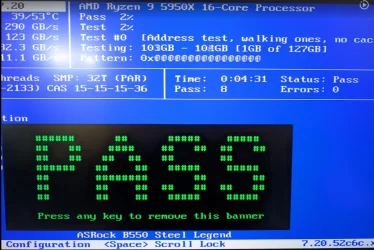
The image displayed only 1 pass.

To find malfunctioning RAM it can test indefinitely.

Eight or more passes is the minimum to reduce the false negatives.

When a lot of RAM is in use the modules can be tested in pairs or one at a time in the same DIMM.
 

My Computer

System One

  • OS
    Windows 10
    Computer type
    Laptop
    Manufacturer/Model
    HP
    CPU
    Intel(R) Core(TM) i7-4800MQ CPU @ 2.70GHz
    Motherboard
    Product : 190A Version : KBC Version 94.56
    Memory
    16 GB Total: Manufacturer : Samsung MemoryType : DDR3 FormFactor : SODIMM Capacity : 8GB Speed : 1600
    Graphics Card(s)
    NVIDIA Quadro K3100M; Intel(R) HD Graphics 4600
    Sound Card
    IDT High Definition Audio CODEC; PNP Device ID HDAUDIO\FUNC_01&VEN_111D&DEV_76E0
    Hard Drives
    Model Hitachi HTS727575A9E364
    Antivirus
    Microsoft Defender
    Other Info
    Mobile Workstation
The results from get drivers and revert pending actions didn't help?
 

My Computers

System One System Two

  • OS
    Win11Pro 25H2 26200.6899
    Computer type
    PC/Desktop
    Manufacturer/Model
    Custom build
    CPU
    AMD 5950
    Motherboard
    ASRock B550
    Memory
    128GB
    Graphics Card(s)
    RTX6900XT
    Sound Card
    built-in
    Monitor(s) Displays
    2
    Screen Resolution
    2 x 4k
    Hard Drives
    M2 1TB, 500GB
    HDD 4TB, 3x2TB as storage
    PSU
    850W
    Case
    Large case
    Cooling
    air
    Keyboard
    G915
    Mouse
    G502
    Internet Speed
    1000/100 Mbit/s
    Browser
    Chrome
    Antivirus
    Windows builtin
    Other Info
    PC is contains parts upto 4 years old
    Backuped to iDrive
  • Operating System
    win11
    Computer type
    PC/Desktop
    Manufacturer/Model
    unknown
    CPU
    AMD
    Memory
    16GB
    Graphics card(s)
    Nvidia 1060
    Monitor(s) Displays
    TV
    Hard Drives
    128GB
    Case
    mini
    Cooling
    water
    Keyboard
    remote
    Mouse
    remote
    Internet Speed
    fast
    Browser
    Edge
    Other Info
    I additionally have a laptop and some tiny brick PC both running win11
    Non windows I have 2 x chromeOS, RPI system and a remote server
Custom install is not an option I am getting
I see a different error message
 

Attachments

  • sat1.webp
    sat1.webp
    749.2 KB · Views: 1
  • 1761948174777.webp
    1761948174777.webp
    48.2 KB · Views: 2

My Computers

System One System Two

  • OS
    Win11Pro 25H2 26200.6899
    Computer type
    PC/Desktop
    Manufacturer/Model
    Custom build
    CPU
    AMD 5950
    Motherboard
    ASRock B550
    Memory
    128GB
    Graphics Card(s)
    RTX6900XT
    Sound Card
    built-in
    Monitor(s) Displays
    2
    Screen Resolution
    2 x 4k
    Hard Drives
    M2 1TB, 500GB
    HDD 4TB, 3x2TB as storage
    PSU
    850W
    Case
    Large case
    Cooling
    air
    Keyboard
    G915
    Mouse
    G502
    Internet Speed
    1000/100 Mbit/s
    Browser
    Chrome
    Antivirus
    Windows builtin
    Other Info
    PC is contains parts upto 4 years old
    Backuped to iDrive
  • Operating System
    win11
    Computer type
    PC/Desktop
    Manufacturer/Model
    unknown
    CPU
    AMD
    Memory
    16GB
    Graphics card(s)
    Nvidia 1060
    Monitor(s) Displays
    TV
    Hard Drives
    128GB
    Case
    mini
    Cooling
    water
    Keyboard
    remote
    Mouse
    remote
    Internet Speed
    fast
    Browser
    Edge
    Other Info
    I additionally have a laptop and some tiny brick PC both running win11
    Non windows I have 2 x chromeOS, RPI system and a remote server
8 passes no errors.
I do a fresh install onto a spare partition.
It boots so its probably not the boot partition, memory, drive or other hardware and more likely some corrupted software on the old windows primary drive
 

Attachments

  • 1761950191900.webp
    1761950191900.webp
    92.2 KB · Views: 1
Last edited:

My Computers

System One System Two

  • OS
    Win11Pro 25H2 26200.6899
    Computer type
    PC/Desktop
    Manufacturer/Model
    Custom build
    CPU
    AMD 5950
    Motherboard
    ASRock B550
    Memory
    128GB
    Graphics Card(s)
    RTX6900XT
    Sound Card
    built-in
    Monitor(s) Displays
    2
    Screen Resolution
    2 x 4k
    Hard Drives
    M2 1TB, 500GB
    HDD 4TB, 3x2TB as storage
    PSU
    850W
    Case
    Large case
    Cooling
    air
    Keyboard
    G915
    Mouse
    G502
    Internet Speed
    1000/100 Mbit/s
    Browser
    Chrome
    Antivirus
    Windows builtin
    Other Info
    PC is contains parts upto 4 years old
    Backuped to iDrive
  • Operating System
    win11
    Computer type
    PC/Desktop
    Manufacturer/Model
    unknown
    CPU
    AMD
    Memory
    16GB
    Graphics card(s)
    Nvidia 1060
    Monitor(s) Displays
    TV
    Hard Drives
    128GB
    Case
    mini
    Cooling
    water
    Keyboard
    remote
    Mouse
    remote
    Internet Speed
    fast
    Browser
    Edge
    Other Info
    I additionally have a laptop and some tiny brick PC both running win11
    Non windows I have 2 x chromeOS, RPI system and a remote server
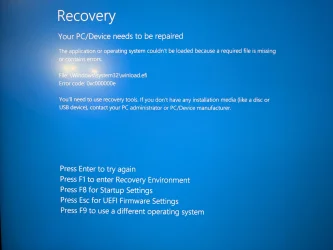
The error message reported problems with winload.efi.

See post #51 and #54.


Some options:


Manually backup files using:


a) Bootable Windows 11 iso:


b) Bootable Linux / Ubuntu


Clean install Windows 11.


In the future:


Enable Regback:


Make free or pay backup images

Save the backup image to another disk drive or to the cloud.

If there is malware, ransomware, registry or operating system corruption, failure to boot, etc. you then have the option to restore the image.

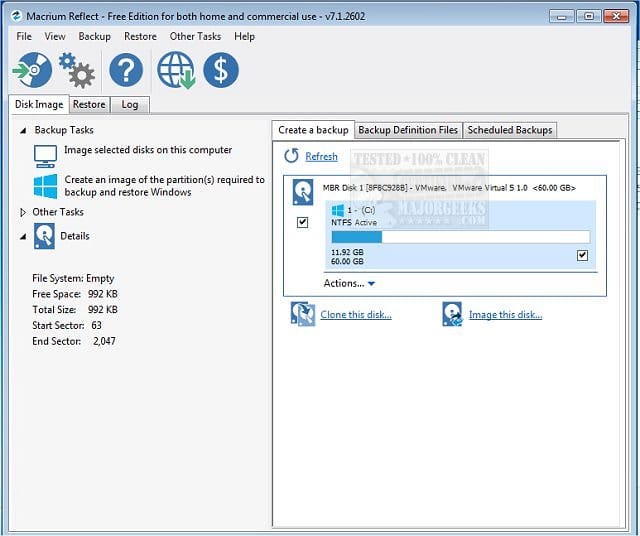
(Acronis, Aoemi, EaseUS, Hasleo, Macrium, Paragon, etc.)

Macrium is widely used in Ten Forums.

Macrium Software | Your Image is Everything


Backup and Restore with Macrium Reflect
 

My Computer

System One

  • OS
    Windows 10
    Computer type
    Laptop
    Manufacturer/Model
    HP
    CPU
    Intel(R) Core(TM) i7-4800MQ CPU @ 2.70GHz
    Motherboard
    Product : 190A Version : KBC Version 94.56
    Memory
    16 GB Total: Manufacturer : Samsung MemoryType : DDR3 FormFactor : SODIMM Capacity : 8GB Speed : 1600
    Graphics Card(s)
    NVIDIA Quadro K3100M; Intel(R) HD Graphics 4600
    Sound Card
    IDT High Definition Audio CODEC; PNP Device ID HDAUDIO\FUNC_01&VEN_111D&DEV_76E0
    Hard Drives
    Model Hitachi HTS727575A9E364
    Antivirus
    Microsoft Defender
    Other Info
    Mobile Workstation
Now that I have a working win11 on one partition and the original on another, is it possible to do a repair install over the top of the other windows?
Are there other things I can now try?
 

My Computers

System One System Two

  • OS
    Win11Pro 25H2 26200.6899
    Computer type
    PC/Desktop
    Manufacturer/Model
    Custom build
    CPU
    AMD 5950
    Motherboard
    ASRock B550
    Memory
    128GB
    Graphics Card(s)
    RTX6900XT
    Sound Card
    built-in
    Monitor(s) Displays
    2
    Screen Resolution
    2 x 4k
    Hard Drives
    M2 1TB, 500GB
    HDD 4TB, 3x2TB as storage
    PSU
    850W
    Case
    Large case
    Cooling
    air
    Keyboard
    G915
    Mouse
    G502
    Internet Speed
    1000/100 Mbit/s
    Browser
    Chrome
    Antivirus
    Windows builtin
    Other Info
    PC is contains parts upto 4 years old
    Backuped to iDrive
  • Operating System
    win11
    Computer type
    PC/Desktop
    Manufacturer/Model
    unknown
    CPU
    AMD
    Memory
    16GB
    Graphics card(s)
    Nvidia 1060
    Monitor(s) Displays
    TV
    Hard Drives
    128GB
    Case
    mini
    Cooling
    water
    Keyboard
    remote
    Mouse
    remote
    Internet Speed
    fast
    Browser
    Edge
    Other Info
    I additionally have a laptop and some tiny brick PC both running win11
    Non windows I have 2 x chromeOS, RPI system and a remote server

Latest Support Threads

Back
Top Bottom