Solved How to do a Repair install with inaccessible boot device issue


the DISM revert pending actions didn't fail this time
time to try other dism commands
 

My Computers

System One System Two

  • OS
    Win11Pro 25H2 26200.6899
    Computer type
    PC/Desktop
    Manufacturer/Model
    Custom build
    CPU
    AMD 5950
    Motherboard
    ASRock B550
    Memory
    128GB
    Graphics Card(s)
    RTX6900XT
    Sound Card
    built-in
    Monitor(s) Displays
    2
    Screen Resolution
    2 x 4k
    Hard Drives
    M2 1TB, 500GB
    HDD 4TB, 3x2TB as storage
    PSU
    850W
    Case
    Large case
    Cooling
    air
    Keyboard
    G915
    Mouse
    G502
    Internet Speed
    1000/100 Mbit/s
    Browser
    Chrome
    Antivirus
    Windows builtin
    Other Info
    PC is contains parts upto 4 years old
    Backuped to iDrive
  • Operating System
    win11
    Computer type
    PC/Desktop
    Manufacturer/Model
    unknown
    CPU
    AMD
    Memory
    16GB
    Graphics card(s)
    Nvidia 1060
    Monitor(s) Displays
    TV
    Hard Drives
    128GB
    Case
    mini
    Cooling
    water
    Keyboard
    remote
    Mouse
    remote
    Internet Speed
    fast
    Browser
    Edge
    Other Info
    I additionally have a laptop and some tiny brick PC both running win11
    Non windows I have 2 x chromeOS, RPI system and a remote server
Now that I have a working win11 on one partition and the original on another, is it possible to do a repair install over the top of the other windows?


In order to perform an in place upgrade repair the operating system must boot. Then an iso is mounted.

If you were able to identify the file(s) that the startup found corrupt then theoretically they could be replaced.


Are there other things I can now try?
Maybe @Maxstar may have some ideas.
 

My Computer

System One

  • OS
    Windows 10
    Computer type
    Laptop
    Manufacturer/Model
    HP
    CPU
    Intel(R) Core(TM) i7-4800MQ CPU @ 2.70GHz
    Motherboard
    Product : 190A Version : KBC Version 94.56
    Memory
    16 GB Total: Manufacturer : Samsung MemoryType : DDR3 FormFactor : SODIMM Capacity : 8GB Speed : 1600
    Graphics Card(s)
    NVIDIA Quadro K3100M; Intel(R) HD Graphics 4600
    Sound Card
    IDT High Definition Audio CODEC; PNP Device ID HDAUDIO\FUNC_01&VEN_111D&DEV_76E0
    Hard Drives
    Model Hitachi HTS727575A9E364
    Antivirus
    Microsoft Defender
    Other Info
    Mobile Workstation
dir C:\Windows\System32\config
SYSTEM, SOFTWARE, DEFAULT
These files are not empty
the sfc scannow says it found and successfully repaired files
 

My Computers

System One System Two

  • OS
    Win11Pro 25H2 26200.6899
    Computer type
    PC/Desktop
    Manufacturer/Model
    Custom build
    CPU
    AMD 5950
    Motherboard
    ASRock B550
    Memory
    128GB
    Graphics Card(s)
    RTX6900XT
    Sound Card
    built-in
    Monitor(s) Displays
    2
    Screen Resolution
    2 x 4k
    Hard Drives
    M2 1TB, 500GB
    HDD 4TB, 3x2TB as storage
    PSU
    850W
    Case
    Large case
    Cooling
    air
    Keyboard
    G915
    Mouse
    G502
    Internet Speed
    1000/100 Mbit/s
    Browser
    Chrome
    Antivirus
    Windows builtin
    Other Info
    PC is contains parts upto 4 years old
    Backuped to iDrive
  • Operating System
    win11
    Computer type
    PC/Desktop
    Manufacturer/Model
    unknown
    CPU
    AMD
    Memory
    16GB
    Graphics card(s)
    Nvidia 1060
    Monitor(s) Displays
    TV
    Hard Drives
    128GB
    Case
    mini
    Cooling
    water
    Keyboard
    remote
    Mouse
    remote
    Internet Speed
    fast
    Browser
    Edge
    Other Info
    I additionally have a laptop and some tiny brick PC both running win11
    Non windows I have 2 x chromeOS, RPI system and a remote server
Search for > zip > post share links

C:\windows\logs\CBS\CBS.log
C:\windows\logs\CBS\CbsPersist
 

My Computer

System One

  • OS
    Windows 10
    Computer type
    Laptop
    Manufacturer/Model
    HP
    CPU
    Intel(R) Core(TM) i7-4800MQ CPU @ 2.70GHz
    Motherboard
    Product : 190A Version : KBC Version 94.56
    Memory
    16 GB Total: Manufacturer : Samsung MemoryType : DDR3 FormFactor : SODIMM Capacity : 8GB Speed : 1600
    Graphics Card(s)
    NVIDIA Quadro K3100M; Intel(R) HD Graphics 4600
    Sound Card
    IDT High Definition Audio CODEC; PNP Device ID HDAUDIO\FUNC_01&VEN_111D&DEV_76E0
    Hard Drives
    Model Hitachi HTS727575A9E364
    Antivirus
    Microsoft Defender
    Other Info
    Mobile Workstation
Uploaded to the same share folder as I provided earlier, new files requested are in 01NOV25 folder


My Computers

System One System Two

  • OS
    Win11Pro 25H2 26200.6899
    Computer type
    PC/Desktop
    Manufacturer/Model
    Custom build
    CPU
    AMD 5950
    Motherboard
    ASRock B550
    Memory
    128GB
    Graphics Card(s)
    RTX6900XT
    Sound Card
    built-in
    Monitor(s) Displays
    2
    Screen Resolution
    2 x 4k
    Hard Drives
    M2 1TB, 500GB
    HDD 4TB, 3x2TB as storage
    PSU
    850W
    Case
    Large case
    Cooling
    air
    Keyboard
    G915
    Mouse
    G502
    Internet Speed
    1000/100 Mbit/s
    Browser
    Chrome
    Antivirus
    Windows builtin
    Other Info
    PC is contains parts upto 4 years old
    Backuped to iDrive
  • Operating System
    win11
    Computer type
    PC/Desktop
    Manufacturer/Model
    unknown
    CPU
    AMD
    Memory
    16GB
    Graphics card(s)
    Nvidia 1060
    Monitor(s) Displays
    TV
    Hard Drives
    128GB
    Case
    mini
    Cooling
    water
    Keyboard
    remote
    Mouse
    remote
    Internet Speed
    fast
    Browser
    Edge
    Other Info
    I additionally have a laptop and some tiny brick PC both running win11
    Non windows I have 2 x chromeOS, RPI system and a remote server
The newest file date was 10/24/25


If possible post images or share links as you follow the custom install steps leading to the error.


I'm out of ideas except backing up files followed by a clean install.
 

My Computer

System One

  • OS
    Windows 10
    Computer type
    Laptop
    Manufacturer/Model
    HP
    CPU
    Intel(R) Core(TM) i7-4800MQ CPU @ 2.70GHz
    Motherboard
    Product : 190A Version : KBC Version 94.56
    Memory
    16 GB Total: Manufacturer : Samsung MemoryType : DDR3 FormFactor : SODIMM Capacity : 8GB Speed : 1600
    Graphics Card(s)
    NVIDIA Quadro K3100M; Intel(R) HD Graphics 4600
    Sound Card
    IDT High Definition Audio CODEC; PNP Device ID HDAUDIO\FUNC_01&VEN_111D&DEV_76E0
    Hard Drives
    Model Hitachi HTS727575A9E364
    Antivirus
    Microsoft Defender
    Other Info
    Mobile Workstation
Files are backed up.
I send my computer to sleep, maybe the corruption has been in the system for a while, so my last 3 backups have corrupted windows files. I'll try my other backup set and use that
October 23 and 24 don't work, I'll go back to 1st, restore windows folder and see what happens
 

My Computers

System One System Two

  • OS
    Win11Pro 25H2 26200.6899
    Computer type
    PC/Desktop
    Manufacturer/Model
    Custom build
    CPU
    AMD 5950
    Motherboard
    ASRock B550
    Memory
    128GB
    Graphics Card(s)
    RTX6900XT
    Sound Card
    built-in
    Monitor(s) Displays
    2
    Screen Resolution
    2 x 4k
    Hard Drives
    M2 1TB, 500GB
    HDD 4TB, 3x2TB as storage
    PSU
    850W
    Case
    Large case
    Cooling
    air
    Keyboard
    G915
    Mouse
    G502
    Internet Speed
    1000/100 Mbit/s
    Browser
    Chrome
    Antivirus
    Windows builtin
    Other Info
    PC is contains parts upto 4 years old
    Backuped to iDrive
  • Operating System
    win11
    Computer type
    PC/Desktop
    Manufacturer/Model
    unknown
    CPU
    AMD
    Memory
    16GB
    Graphics card(s)
    Nvidia 1060
    Monitor(s) Displays
    TV
    Hard Drives
    128GB
    Case
    mini
    Cooling
    water
    Keyboard
    remote
    Mouse
    remote
    Internet Speed
    fast
    Browser
    Edge
    Other Info
    I additionally have a laptop and some tiny brick PC both running win11
    Non windows I have 2 x chromeOS, RPI system and a remote server
This was from your other thread:

Ran sfc /scannow it completes 20% and returns the following:
Windows Resource Protection found corrupt files but was unable to fix some of them.
I had a look at the CBS.log files it mentions, but that is a huge file with no obvious indication of an error

This all started after an update performed yesterday.
I tried to uninstall the recent update from the winRE prompts but both failed
 

My Computer

System One

  • OS
    Windows 10
    Computer type
    Laptop
    Manufacturer/Model
    HP
    CPU
    Intel(R) Core(TM) i7-4800MQ CPU @ 2.70GHz
    Motherboard
    Product : 190A Version : KBC Version 94.56
    Memory
    16 GB Total: Manufacturer : Samsung MemoryType : DDR3 FormFactor : SODIMM Capacity : 8GB Speed : 1600
    Graphics Card(s)
    NVIDIA Quadro K3100M; Intel(R) HD Graphics 4600
    Sound Card
    IDT High Definition Audio CODEC; PNP Device ID HDAUDIO\FUNC_01&VEN_111D&DEV_76E0
    Hard Drives
    Model Hitachi HTS727575A9E364
    Antivirus
    Microsoft Defender
    Other Info
    Mobile Workstation
Now when I run sfc /scannow
It completes 100% and says found corrupted files and successfully fixed them.
However I still get the same error

There is this command I found in another thread I'd like to try again, but I cant find the install.wim file
dism /image:C:\ /cleanup-image /restorehealth /source:J:\sources\install.wim:6 /ScratchDir:E: /limitaccess


My Computers

System One System Two

  • OS
    Win11Pro 25H2 26200.6899
    Computer type
    PC/Desktop
    Manufacturer/Model
    Custom build
    CPU
    AMD 5950
    Motherboard
    ASRock B550
    Memory
    128GB
    Graphics Card(s)
    RTX6900XT
    Sound Card
    built-in
    Monitor(s) Displays
    2
    Screen Resolution
    2 x 4k
    Hard Drives
    M2 1TB, 500GB
    HDD 4TB, 3x2TB as storage
    PSU
    850W
    Case
    Large case
    Cooling
    air
    Keyboard
    G915
    Mouse
    G502
    Internet Speed
    1000/100 Mbit/s
    Browser
    Chrome
    Antivirus
    Windows builtin
    Other Info
    PC is contains parts upto 4 years old
    Backuped to iDrive
  • Operating System
    win11
    Computer type
    PC/Desktop
    Manufacturer/Model
    unknown
    CPU
    AMD
    Memory
    16GB
    Graphics card(s)
    Nvidia 1060
    Monitor(s) Displays
    TV
    Hard Drives
    128GB
    Case
    mini
    Cooling
    water
    Keyboard
    remote
    Mouse
    remote
    Internet Speed
    fast
    Browser
    Edge
    Other Info
    I additionally have a laptop and some tiny brick PC both running win11
    Non windows I have 2 x chromeOS, RPI system and a remote server
There is this command I found in another thread I'd like to try again, but I cant find the install.wim file
dism /image:C:\ /cleanup-image /restorehealth /source:J:\sources\install.wim:6 /ScratchDir:E: /limitaccess

did you find out the build


My Computers

System One System Two

  • OS
    Win7,Win11
    Computer type
    PC/Desktop
    CPU
    i7-9700
    Motherboard
    gigabyte b365m ds3h
    Memory
    2x16gb 3600mhz
    Monitor(s) Displays
    benq gw2480
    PSU
    bequiet pure power 11 400CM
    Cooling
    cryorig m9i
  • Operating System
    win7,win11
    Computer type
    PC/Desktop
    CPU
    i5-8400
    Motherboard
    gigabyte b365m ds3h
    Memory
    2x8gb 3200
    PSU
    xfx pro 450
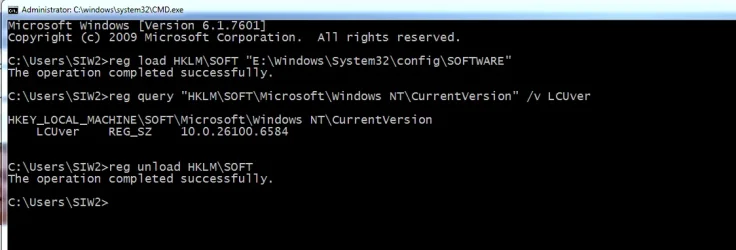
or you can do it with commands for example

in this example win11 is installed on partition E

1. load the software hive from E:\windows\system32\config

reg load HKLM\SOFT "E:\Windows\System32\config\SOFTWARE"

2. query the value LCUver

reg query "HKLM\SOFT\Microsoft\Windows NT\CurrentVersion" /v LCUver


3. unload the hive

reg unload HKLM\SOFT


CMD-QUERY-LOADED-HIVE.webp
 

My Computers

System One System Two

  • OS
    Win7,Win11
    Computer type
    PC/Desktop
    CPU
    i7-9700
    Motherboard
    gigabyte b365m ds3h
    Memory
    2x16gb 3600mhz
    Monitor(s) Displays
    benq gw2480
    PSU
    bequiet pure power 11 400CM
    Cooling
    cryorig m9i
  • Operating System
    win7,win11
    Computer type
    PC/Desktop
    CPU
    i5-8400
    Motherboard
    gigabyte b365m ds3h
    Memory
    2x8gb 3200
    PSU
    xfx pro 450
Not yet, can only do 1 thing at a time, currently restoring an older copy of the windows folder. It appears my recent backups have backuped corrupted files
 

My Computers

System One System Two

  • OS
    Win11Pro 25H2 26200.6899
    Computer type
    PC/Desktop
    Manufacturer/Model
    Custom build
    CPU
    AMD 5950
    Motherboard
    ASRock B550
    Memory
    128GB
    Graphics Card(s)
    RTX6900XT
    Sound Card
    built-in
    Monitor(s) Displays
    2
    Screen Resolution
    2 x 4k
    Hard Drives
    M2 1TB, 500GB
    HDD 4TB, 3x2TB as storage
    PSU
    850W
    Case
    Large case
    Cooling
    air
    Keyboard
    G915
    Mouse
    G502
    Internet Speed
    1000/100 Mbit/s
    Browser
    Chrome
    Antivirus
    Windows builtin
    Other Info
    PC is contains parts upto 4 years old
    Backuped to iDrive
  • Operating System
    win11
    Computer type
    PC/Desktop
    Manufacturer/Model
    unknown
    CPU
    AMD
    Memory
    16GB
    Graphics card(s)
    Nvidia 1060
    Monitor(s) Displays
    TV
    Hard Drives
    128GB
    Case
    mini
    Cooling
    water
    Keyboard
    remote
    Mouse
    remote
    Internet Speed
    fast
    Browser
    Edge
    Other Info
    I additionally have a laptop and some tiny brick PC both running win11
    Non windows I have 2 x chromeOS, RPI system and a remote server
I followed the custom install thread and I don't get that option, it always wants to wipe everything and install
Also the repair install that's done from within windows, the difference is I want to repair a different drive, not the one I'm currently one as its a fresh install.

I'm going down two threads at the moment:
Try DISM commands on the restore where scannow didn't fail.
And see if I can boot into an even older restore
 

My Computers

System One System Two

  • OS
    Win11Pro 25H2 26200.6899
    Computer type
    PC/Desktop
    Manufacturer/Model
    Custom build
    CPU
    AMD 5950
    Motherboard
    ASRock B550
    Memory
    128GB
    Graphics Card(s)
    RTX6900XT
    Sound Card
    built-in
    Monitor(s) Displays
    2
    Screen Resolution
    2 x 4k
    Hard Drives
    M2 1TB, 500GB
    HDD 4TB, 3x2TB as storage
    PSU
    850W
    Case
    Large case
    Cooling
    air
    Keyboard
    G915
    Mouse
    G502
    Internet Speed
    1000/100 Mbit/s
    Browser
    Chrome
    Antivirus
    Windows builtin
    Other Info
    PC is contains parts upto 4 years old
    Backuped to iDrive
  • Operating System
    win11
    Computer type
    PC/Desktop
    Manufacturer/Model
    unknown
    CPU
    AMD
    Memory
    16GB
    Graphics card(s)
    Nvidia 1060
    Monitor(s) Displays
    TV
    Hard Drives
    128GB
    Case
    mini
    Cooling
    water
    Keyboard
    remote
    Mouse
    remote
    Internet Speed
    fast
    Browser
    Edge
    Other Info
    I additionally have a laptop and some tiny brick PC both running win11
    Non windows I have 2 x chromeOS, RPI system and a remote server
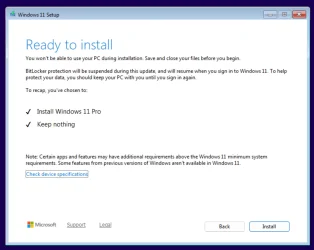
I followed the custom install thread and I don't get that option, it always wants to wipe everything and install

This tutorial will show you how to do a custom clean install of Windows 11 on your PC.

When you perform a custom install of Windows 11, a clean install of Windows 11 is performed only on the same partition as the current installation of Windows to replace it. The previous installation is moved into the C:\Windows.old folder as a backup. Once the new custom install has finished, you will be able to copy any files you want back from the C:\Windows.old folder.

A custom install of Windows 11 can be useful if you are unable to start Windows for whatever reason, need to reinstall Windows 11, but do not want to lose any files in your current installation by doing a full clean install.

Select the Primary partition Windows is currently installed on, and click/tap on Next. (see screenshot below)

This Primary partition is what will be replaced by the new custom install of Windows 11.

Also the repair install that's done from within windows, the difference is I want to repair a different drive, not the one I'm currently one as its a fresh install.

You cannot repair a different drive.
 

My Computers

System One System Two

  • OS
    Windows 11 Pro
    Computer type
    PC/Desktop
    CPU
    AMD Ryzen 9 9950X3D
    Motherboard
    ASRock B650E Taichi Lite
    Memory
    Kingston FURY Beast 64GB (2x32GB) DDR5 6000MT/s
    Graphics Card(s)
    ASUS TUF Gaming Radeon RX 9070 OC Edition 16GB GDDR6
    Hard Drives
    Solidigm P44 Pro 2TB M.2 NVMe SSD
  • Operating System
    Windows 11 Home
    Computer type
    Laptop
    Manufacturer/Model
    Lenovo Legion Pro 7i Gen 10 16"
    CPU
    Intel Core Ultra 9 275HX
    Memory
    64GB (2x 32GB) DDR5-6400
    Graphics card(s)
    NVIDIA GeForce RTX 5080 16GB GDDR7 Laptop GPU
    Hard Drives
    2x 1TB M.2 NVMe SSD (SK Hynix)
This clean install tutorial?
Following the steps, I enter my key,
I accept the conditions
Then Step 10, there is no custom install option, there is only a statement saying it will wipe everything and to continue
But now that I have a fresh windows install on one partition and the old one on the other
I should try this again, it might give me the option of a custom install and I can just select the old windows partition
 

My Computers

System One System Two

  • OS
    Win11Pro 25H2 26200.6899
    Computer type
    PC/Desktop
    Manufacturer/Model
    Custom build
    CPU
    AMD 5950
    Motherboard
    ASRock B550
    Memory
    128GB
    Graphics Card(s)
    RTX6900XT
    Sound Card
    built-in
    Monitor(s) Displays
    2
    Screen Resolution
    2 x 4k
    Hard Drives
    M2 1TB, 500GB
    HDD 4TB, 3x2TB as storage
    PSU
    850W
    Case
    Large case
    Cooling
    air
    Keyboard
    G915
    Mouse
    G502
    Internet Speed
    1000/100 Mbit/s
    Browser
    Chrome
    Antivirus
    Windows builtin
    Other Info
    PC is contains parts upto 4 years old
    Backuped to iDrive
  • Operating System
    win11
    Computer type
    PC/Desktop
    Manufacturer/Model
    unknown
    CPU
    AMD
    Memory
    16GB
    Graphics card(s)
    Nvidia 1060
    Monitor(s) Displays
    TV
    Hard Drives
    128GB
    Case
    mini
    Cooling
    water
    Keyboard
    remote
    Mouse
    remote
    Internet Speed
    fast
    Browser
    Edge
    Other Info
    I additionally have a laptop and some tiny brick PC both running win11
    Non windows I have 2 x chromeOS, RPI system and a remote server
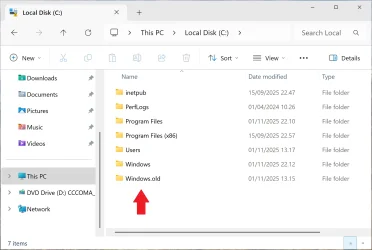
 

My Computers

System One System Two

  • OS
    Windows 11 Pro
    Computer type
    PC/Desktop
    CPU
    AMD Ryzen 9 9950X3D
    Motherboard
    ASRock B650E Taichi Lite
    Memory
    Kingston FURY Beast 64GB (2x32GB) DDR5 6000MT/s
    Graphics Card(s)
    ASUS TUF Gaming Radeon RX 9070 OC Edition 16GB GDDR6
    Hard Drives
    Solidigm P44 Pro 2TB M.2 NVMe SSD
  • Operating System
    Windows 11 Home
    Computer type
    Laptop
    Manufacturer/Model
    Lenovo Legion Pro 7i Gen 10 16"
    CPU
    Intel Core Ultra 9 275HX
    Memory
    64GB (2x 32GB) DDR5-6400
    Graphics card(s)
    NVIDIA GeForce RTX 5080 16GB GDDR7 Laptop GPU
    Hard Drives
    2x 1TB M.2 NVMe SSD (SK Hynix)
That's the tutorial I followed.
I did create a fresh install USB drive from the current media creation tool
The install does look different, maybe there has been a windows update recently
 

My Computers

System One System Two

  • OS
    Win11Pro 25H2 26200.6899
    Computer type
    PC/Desktop
    Manufacturer/Model
    Custom build
    CPU
    AMD 5950
    Motherboard
    ASRock B550
    Memory
    128GB
    Graphics Card(s)
    RTX6900XT
    Sound Card
    built-in
    Monitor(s) Displays
    2
    Screen Resolution
    2 x 4k
    Hard Drives
    M2 1TB, 500GB
    HDD 4TB, 3x2TB as storage
    PSU
    850W
    Case
    Large case
    Cooling
    air
    Keyboard
    G915
    Mouse
    G502
    Internet Speed
    1000/100 Mbit/s
    Browser
    Chrome
    Antivirus
    Windows builtin
    Other Info
    PC is contains parts upto 4 years old
    Backuped to iDrive
  • Operating System
    win11
    Computer type
    PC/Desktop
    Manufacturer/Model
    unknown
    CPU
    AMD
    Memory
    16GB
    Graphics card(s)
    Nvidia 1060
    Monitor(s) Displays
    TV
    Hard Drives
    128GB
    Case
    mini
    Cooling
    water
    Keyboard
    remote
    Mouse
    remote
    Internet Speed
    fast
    Browser
    Edge
    Other Info
    I additionally have a laptop and some tiny brick PC both running win11
    Non windows I have 2 x chromeOS, RPI system and a remote server
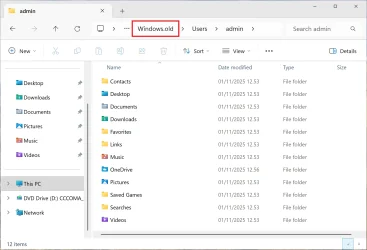
The install does look different, maybe there has been a windows update recently
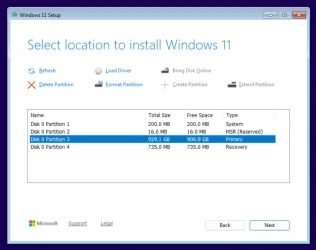
The tutorial on the forum is based on an older version of Windows Setup. Here are screenshots from the new version.

1.webp

2.webp

3.webp

4.webp
 
Last edited:

My Computers

System One System Two

  • OS
    Windows 11 Pro
    Computer type
    PC/Desktop
    CPU
    AMD Ryzen 9 9950X3D
    Motherboard
    ASRock B650E Taichi Lite
    Memory
    Kingston FURY Beast 64GB (2x32GB) DDR5 6000MT/s
    Graphics Card(s)
    ASUS TUF Gaming Radeon RX 9070 OC Edition 16GB GDDR6
    Hard Drives
    Solidigm P44 Pro 2TB M.2 NVMe SSD
  • Operating System
    Windows 11 Home
    Computer type
    Laptop
    Manufacturer/Model
    Lenovo Legion Pro 7i Gen 10 16"
    CPU
    Intel Core Ultra 9 275HX
    Memory
    64GB (2x 32GB) DDR5-6400
    Graphics card(s)
    NVIDIA GeForce RTX 5080 16GB GDDR7 Laptop GPU
    Hard Drives
    2x 1TB M.2 NVMe SSD (SK Hynix)
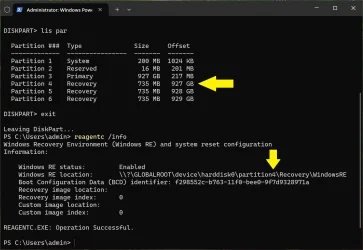
I tested the custom installation twice in a virtual machine, and now there are three recovery partitions.

Custom Install Windows 11.webp

reagentc info.webp
 
Last edited:

My Computers

System One System Two

  • OS
    Windows 11 Pro
    Computer type
    PC/Desktop
    CPU
    AMD Ryzen 9 9950X3D
    Motherboard
    ASRock B650E Taichi Lite
    Memory
    Kingston FURY Beast 64GB (2x32GB) DDR5 6000MT/s
    Graphics Card(s)
    ASUS TUF Gaming Radeon RX 9070 OC Edition 16GB GDDR6
    Hard Drives
    Solidigm P44 Pro 2TB M.2 NVMe SSD
  • Operating System
    Windows 11 Home
    Computer type
    Laptop
    Manufacturer/Model
    Lenovo Legion Pro 7i Gen 10 16"
    CPU
    Intel Core Ultra 9 275HX
    Memory
    64GB (2x 32GB) DDR5-6400
    Graphics card(s)
    NVIDIA GeForce RTX 5080 16GB GDDR7 Laptop GPU
    Hard Drives
    2x 1TB M.2 NVMe SSD (SK Hynix)
So I tried the DISM cleanup image restore health command, it previously always failed at 60.2%. This time it went to 100% then complained about a missing image. So I'm creating one from another windows install


My Computers

System One System Two

  • OS
    Win11Pro 25H2 26200.6899
    Computer type
    PC/Desktop
    Manufacturer/Model
    Custom build
    CPU
    AMD 5950
    Motherboard
    ASRock B550
    Memory
    128GB
    Graphics Card(s)
    RTX6900XT
    Sound Card
    built-in
    Monitor(s) Displays
    2
    Screen Resolution
    2 x 4k
    Hard Drives
    M2 1TB, 500GB
    HDD 4TB, 3x2TB as storage
    PSU
    850W
    Case
    Large case
    Cooling
    air
    Keyboard
    G915
    Mouse
    G502
    Internet Speed
    1000/100 Mbit/s
    Browser
    Chrome
    Antivirus
    Windows builtin
    Other Info
    PC is contains parts upto 4 years old
    Backuped to iDrive
  • Operating System
    win11
    Computer type
    PC/Desktop
    Manufacturer/Model
    unknown
    CPU
    AMD
    Memory
    16GB
    Graphics card(s)
    Nvidia 1060
    Monitor(s) Displays
    TV
    Hard Drives
    128GB
    Case
    mini
    Cooling
    water
    Keyboard
    remote
    Mouse
    remote
    Internet Speed
    fast
    Browser
    Edge
    Other Info
    I additionally have a laptop and some tiny brick PC both running win11
    Non windows I have 2 x chromeOS, RPI system and a remote server

Latest Support Threads

Back
Top Bottom