
Solved How to dual boot? bitlocker encrypted.


honeyd

New member
Local time
8:48 PM
Posts
5
OS
Windows 11
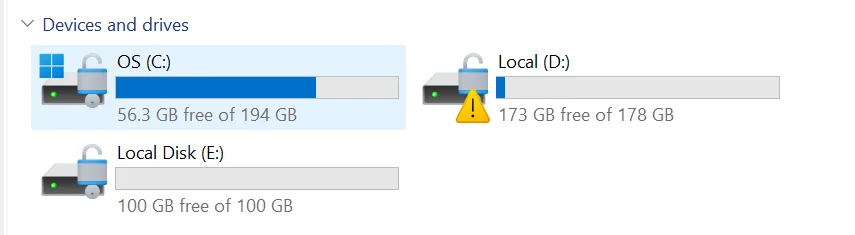
As you can see in the screenshot, Windows 11 is already installed on the C: drive.
I want to install another OS. Where can I install it without having to take BitLocker into account?

1789392840675.webp
 

My Computer My Computer

At a glance

Windows 11
OS
Windows 11
Computer type
Laptop
If you have another drive or partition such as the D in the screenshot, you should be able to install there. Only the partition the Windows partition is encrypted. An alternative would be to run your second OS as a VM. Less hassle and less opportunity to break things.
 

My Computer My Computer

At a glance

Linux Mint
OS
Linux Mint
Computer type
Laptop
Manufacturer/Model
System76 Lemur Pro
@neemobeer So, can I safely install it on the D: drive without having to worry about BitLocker?
 

My Computer My Computer

At a glance

Windows 11
OS
Windows 11
Computer type
Laptop
Yes, the boot volume doesn't get encrypted so your bootloader will be fine. Plus Bitlocker is per volume encryption so only the C volume is encrypted
 

My Computer My Computer

At a glance

Linux Mint
OS
Linux Mint
Computer type
Laptop
Manufacturer/Model
System76 Lemur Pro
Thanks @neemobeer . And what about installing it on E:?
 

My Computer My Computer

At a glance

Windows 11
OS
Windows 11
Computer type
Laptop
Actually, this is my personal laptop. However, to do my work, IT team installed MDM, VPN, and other work-related softwares on this. don’t have admin acc details, so I can’t add another user account either.

I want to get away from this environment, which is why I’m trying to install another OS.
 

My Computer My Computer

At a glance

Windows 11
OS
Windows 11
Computer type
Laptop
You could install it on either, you'll want to remove Bitlocker encryption.

Open an elevated Powershell prompt or terminal


Powershell:
# List current Bitlocker encrypted volumes
Get-BitlockerVolume

# If your target volume for the dual boot is listed
# You can remove Bitlocker with the following command (Example: drive E:)
Disable-Bitlocker -MountPoint "E:"
 

My Computer My Computer

At a glance

Linux Mint
OS
Linux Mint
Computer type
Laptop
Manufacturer/Model
System76 Lemur Pro
If this computer is for work, then I do not recommend adding another OS without your IT teams permission.
 

My Computer My Computer

At a glance

Linux Mint
OS
Linux Mint
Computer type
Laptop
Manufacturer/Model
System76 Lemur Pro
If this computer is for work, then I do not recommend adding another OS without your IT teams permission.
Thanks @neemobeer Appreciated your support.
With this, I think we can close this thread.
 

My Computer My Computer

At a glance

Windows 11
OS
Windows 11
Computer type
Laptop
I agree. It is a bad idea to add another OS on a machine managed by IT. Dependent on the policies that are enforced your attempt to dual boot could well lock you out of the machine. Why not just ask management?
 

My Computers My Computers

  • At a glance

    Windows 11 Pro 25H2 26200.9457i9-10900 10 core 20 threads32 gbnone-Intel UHD Graphics 630
    OS
    Windows 11 Pro 25H2 26200.9457
    Computer type
    PC/Desktop
    Manufacturer/Model
    Dell Optiplex 7080
    CPU
    i9-10900 10 core 20 threads
    Motherboard
    DELL 0J37VM
    Memory
    32 gb
    Graphics Card(s)
    none-Intel UHD Graphics 630
    Sound Card
    Integrated Realtek
    Monitor(s) Displays
    Benq 27
    Screen Resolution
    2560x1440
    Hard Drives
    2x1tb Solidigm m.2 nvme /External drives 512gb Samsung m.2 sata+2tb Kingston m2.nvme
    PSU
    500w
    Case
    MT
    Cooling
    Dell Premium
    Keyboard
    Logitech wired
    Mouse
    Logitech wireless
    Internet Speed
    so slow I'm too embarrassed to tell
    Browser
    #1 Edge #2 Firefox
    Antivirus
    Defender+MWB Premium
  • At a glance

    Windows 11 Pro 24H2 26200.9457AMD Ryzen 7 6800U32 gbintegrated
    Operating System
    Windows 11 Pro 24H2 26200.9457
    Computer type
    PC/Desktop
    Manufacturer/Model
    Beelink Mini PC SER5
    CPU
    AMD Ryzen 7 6800U
    Memory
    32 gb
    Graphics card(s)
    integrated
    Sound Card
    integrated
    Monitor(s) Displays
    Benq 27
    Screen Resolution
    2560x1440
    Hard Drives
    1TB Crucial nvme
    Keyboard
    Logitech wired
    Mouse
    Logitech wireless
    Internet Speed
    still too embarrassed to tell
    Browser
    Firefox
    Antivirus
    Defender
  • System 3 is non compliant Dell 9020 i7-4770/24gb ram Win11 PRO 26200.9457
If this computer is for work, then I do not recommend adding another OS without your IT teams permission.
If this is his own personal computer as he stated above, that he bought and paid for , I do not see an issue with anything. If his company installed proprietary software on his personal computer instead of providing him with a bitlocker encrypted laptop with restrictions then that is their problem, it's still his personal property to with what he chooses, regardless of what they installed on it.
The company laptop that I was issued for work, I cannot install anything personal on it or even plug a flash drive into it, it will not allow it. It has just enough hard drive space for me to do what is required for work. If I need anything installed on it I have to bring it to IT and they handle it.
 

My Computer My Computer

At a glance

Windows 11 Pro 25H2Intel i9-12900KCorsair Vengeance 64 GB
OS
Windows 11 Pro 25H2
Computer type
PC/Desktop
Manufacturer/Model
self built
CPU
Intel i9-12900K
Motherboard
Gigabyte Z790 Gaming Plus AX
Memory
Corsair Vengeance 64 GB
Screen Resolution
1920x1080
Browser
Firefox
Antivirus
Eset Smart Secuirty
If this is his own personal computer as he stated above, that he bought and paid for , I do not see an issue with anything
You miss the point. It's not a question of whether he bought the device or not. Maybe he did or maybe he didn't. There is nothing keeping him from wiping all drives (which removes bitlocker, but also removes all data) and installing any OS he wants. But with an IT managed system, he is limited to what he can and can not do regarding the existing volumes by whatever policies IT put in place.

If this is legitimately his own device, then his IT department can give him control over it.
 

My Computers My Computers

  • At a glance

    Windows 11 Pro 25H2 26200.9457i9-10900 10 core 20 threads32 gbnone-Intel UHD Graphics 630
    OS
    Windows 11 Pro 25H2 26200.9457
    Computer type
    PC/Desktop
    Manufacturer/Model
    Dell Optiplex 7080
    CPU
    i9-10900 10 core 20 threads
    Motherboard
    DELL 0J37VM
    Memory
    32 gb
    Graphics Card(s)
    none-Intel UHD Graphics 630
    Sound Card
    Integrated Realtek
    Monitor(s) Displays
    Benq 27
    Screen Resolution
    2560x1440
    Hard Drives
    2x1tb Solidigm m.2 nvme /External drives 512gb Samsung m.2 sata+2tb Kingston m2.nvme
    PSU
    500w
    Case
    MT
    Cooling
    Dell Premium
    Keyboard
    Logitech wired
    Mouse
    Logitech wireless
    Internet Speed
    so slow I'm too embarrassed to tell
    Browser
    #1 Edge #2 Firefox
    Antivirus
    Defender+MWB Premium
  • At a glance

    Windows 11 Pro 24H2 26200.9457AMD Ryzen 7 6800U32 gbintegrated
    Operating System
    Windows 11 Pro 24H2 26200.9457
    Computer type
    PC/Desktop
    Manufacturer/Model
    Beelink Mini PC SER5
    CPU
    AMD Ryzen 7 6800U
    Memory
    32 gb
    Graphics card(s)
    integrated
    Sound Card
    integrated
    Monitor(s) Displays
    Benq 27
    Screen Resolution
    2560x1440
    Hard Drives
    1TB Crucial nvme
    Keyboard
    Logitech wired
    Mouse
    Logitech wireless
    Internet Speed
    still too embarrassed to tell
    Browser
    Firefox
    Antivirus
    Defender
  • System 3 is non compliant Dell 9020 i7-4770/24gb ram Win11 PRO 26200.9457
  • Like
Reactions: OAT
Actually, this is my personal laptop. However, to do my work, IT team installed MDM, VPN, and other work-related softwares on this. don’t have admin acc details, so I can’t add another user account either.

I want to get away from this environment, which is why I’m trying to install another OS.
I will actually encourage you to take a conversation with your IT team about dualbooting

Why..... You say it is your personal laptop you then most likely use for personal stuff... right or wrong?
From a security perspective.... it would actually be a higher security of you have one OS for work and another OS for personal stuff.

When VPN in to your work from a computer used for personal use is bad security, as you then can infect your workplace with malware if you by accident managed to get a malware when you used your computer for casual web-browsing.

So from a security perspective, i will actually encourage you to have a discussion about dualboot with your IT team if you are using the computer for personal usage.
 

My Computers My Computers

  • At a glance

    Linux: Debian, Kali-linux, Alma, Win:7,10IoT,...i3, i5 and i7 From 2gen to 9th gen... Server ...
    OS
    Linux: Debian, Kali-linux, Alma, Win:7,10IoT,2012R
    Manufacturer/Model
    HP Elitebook 840, AsusX53, Aspire E1-572. AsusUX32A, HP Pro3130mt+3010mt, HP Proliant ML150, 3xCustom-PC, i3, i5, i7
    CPU
    i3, i5 and i7 From 2gen to 9th gen... Server dual Xenon
    Hard Drives
    Sata, M.2, SAS
  • At a glance

    Retro: 2003server.XPpro, Win2000, Win98SE, Wi...Oldest intel 8088 up to P4 dual core
    Operating System
    Retro: 2003server.XPpro, Win2000, Win98SE, Win95, Win3.11, MS-DOS, IBM-DOS
    Manufacturer/Model
    Commodore, AST, Fujitsu, Compaq, etc etc. etc Around 15 desktops and 20 laptops in the collection
    CPU
    Oldest intel 8088 up to P4 dual core
    Hard Drives
    MFM, IDE, SCSI
Back
Top Bottom




