How to fix IP addresses.


sydh

Well-known member
Member
Local time
7:03 PM
Posts
147
Location
Eastleigh, Hampshire, UK
OS
W11
I have 2 security cameras which send their recordings to an NAS. Every so often the cams stop recording. When I check for the reason I find the IP address of either the cam or the NAS has changed. I am using a Netgear Orbi router. Is there any way to stop this happening? Why are the IP addresses changing? All my other network devices, of which there are 12, never change. I'm sure this has something to do with dynamic DNS but that is a subject that confuses me. Any help would be appreciated.
 

My Computer My Computer

At a glance

W113.80 gigahertz AMD Ryzen 9 3900XT 12-Core32684 MegabytesNVIDIA GeForce RTX 3060 Ti
OS
W11
Computer type
PC/Desktop
Manufacturer/Model
PC Specialist
CPU
3.80 gigahertz AMD Ryzen 9 3900XT 12-Core
Motherboard
ASUSTeK COMPUTER INC. TUF GAMING X570-PLUS Rev X.0x
Memory
32684 Megabytes
Graphics Card(s)
NVIDIA GeForce RTX 3060 Ti
Monitor(s) Displays
ViewSonic VX3276-QHD (x2)
Hard Drives
1TB PCS PCIe M.2 SSD
ST8000DM004-2CX188 (8001.56 GB)
WDC WD30EZRX-00DC0B0 (3000.59 GB)
WDC WD30EZRX-00SPEB0 (3000.59 GB)
Cooling
Water cooled
Keyboard
Logitech
Mouse
Logitech
Internet Speed
56
Disable DHCP and assign static IP addresses.
I would think it would solve it.
 

My Computers My Computers

  • At a glance

    All Branches but StableAMD Ryzen 7 7735HS 3200-4500 Mhz 8 cores x 232 GB DDR5Radeon Graphic / NVIDIA GeForce RTX 4060 8 GB...
    OS
    All Branches but Stable
    Computer type
    Laptop
    Manufacturer/Model
    Acer Nitro ANV15-51
    CPU
    AMD Ryzen 7 7735HS 3200-4500 Mhz 8 cores x 2
    Motherboard
    Sportage_RBH
    Memory
    32 GB DDR5
    Graphics Card(s)
    Radeon Graphic / NVIDIA GeForce RTX 4060 8 GB GDDR6
    Sound Card
    AMD/Realtek(R) Audio
    Monitor(s) Displays
    Integrated Monitor (15.3"vis)
    Screen Resolution
    FHD 1920X1080 16:9 144Hz
    Hard Drives
    KINGSTON OM8SEP4512Q-AA 1TB
    Western Digital 256GB
    PSU
    19V DC 6.32 A 120 W
    Cooling
    Dual Fans
    Mouse
    MS Bluetooth
    Internet Speed
    Fiber 1GB Cox -us & 1GB Orange-fr
    Browser
    Edge Canary- Firefox Nightly-Chrome Dev-Chrome Dev
    Antivirus
    Windows Defender
  • At a glance

    Windows 11 BetaAMD A9-94208 GB of DDR4AMD Radeon R5
    Operating System
    Windows 11 Beta
    Computer type
    Laptop
    Manufacturer/Model
    Asus X751BP
    CPU
    AMD A9-9420
    Memory
    8 GB of DDR4
    Graphics card(s)
    AMD Radeon R5
    Screen Resolution
    1600x900
    Hard Drives
    Seagate 1 TB
Don't disable DHCP, but on your router, under Advanced -> Setup -> LAN Setup -> Address Reservation-section assign IPs to your devices that are preferrably outside of the DHCP range but under same SUBNET. (eg. as an example DHCP range 192.168.0.1-127/255.255.255.0, Static range 192.168.0.128-254/255.255.255.0. This could be something else but you get the drift)

Click Apply and reboot both the router and all your devices. They should all get the IP you assigned manually.

Also now you should write a network map of your devices and their IPs. It helps tremendously when troubleshooting if you know which device should have which IP. Especially if using a lot of devices in large networks.
 

My Computers My Computers

  • At a glance

    Win 11 Pro 25H2 26200.9550 / Linux Mint 22.3Ryzen 7 2700U Pro32GBiGPU Vega 10
    OS
    Win 11 Pro 25H2 26200.9550 / Linux Mint 22.3
    Computer type
    Laptop
    Manufacturer/Model
    Lenovo A485
    CPU
    Ryzen 7 2700U Pro
    Motherboard
    Lenovo (WiFi/BT module upgraded to Intel Wireless-AC-9260)
    Memory
    32GB
    Graphics Card(s)
    iGPU Vega 10
    Sound Card
    Realtek
    Monitor(s) Displays
    14" FHD (built-in) + 14" Lenovo Thinkvision M14t (touch+pen) + 32" Asus PB328
    Screen Resolution
    FHD + FHD + 1440p
    Hard Drives
    Intel 660p m.2 nVME PCIe3.0 x2 512GB
    PSU
    125W(Dock)/65W(Travel Adapter)
    Keyboard
    Thinkpad / Logitech MX Keys
    Mouse
    Logitech MX Master 2S
    Internet Speed
    1/1Gbit
    Browser
    Firefox
    Antivirus
    Windows Defender
    Other Info
    SecureBoot: Enabled
    TPM2.0: Enabled
    AMD-V: Enabled
  • At a glance

    Win 11 Pro 25H2 26200.9550(RP)i7-7700k @4.8GHz32GB 2x16GB 2133MHz CL15EVGA GTX1080Ti FTW 11GB
    Operating System
    Win 11 Pro 25H2 26200.9550(RP)
    Computer type
    PC/Desktop
    Manufacturer/Model
    Custom
    CPU
    i7-7700k @4.8GHz
    Motherboard
    Asus PRIME Z270-A
    Memory
    32GB 2x16GB 2133MHz CL15
    Graphics card(s)
    EVGA GTX1080Ti FTW 11GB
    Sound Card
    Integrated
    Monitor(s) Displays
    32" 10-bit Asus PB328Q
    Screen Resolution
    WQHD 2560x1440
    Hard Drives
    512GB ADATA SX8000NP NVMe PCIe Gen 3 x4
    PSU
    850W
    Case
    Fractal Design Define 7
    Cooling
    Noctua NH-D15 chromax.black
    Keyboard
    Logitech MX Keys
    Mouse
    Logitech MX Master 2S
    Internet Speed
    1/1Gbit
    Browser
    Firefox
    Antivirus
    Windows Defender
    Other Info
    AC WiFi Card
  • Asus U46SV (laptop), i5-2410M, 8GB RAM, 500GB SSD, 750GB HDD, Windows 10. (used as a local Minecraft server and data dump)
Thank you @SlicEnDicE.
Because of you I learned something new today.
My network knowledge is weak. (n)
 

My Computers My Computers

  • At a glance

    All Branches but StableAMD Ryzen 7 7735HS 3200-4500 Mhz 8 cores x 232 GB DDR5Radeon Graphic / NVIDIA GeForce RTX 4060 8 GB...
    OS
    All Branches but Stable
    Computer type
    Laptop
    Manufacturer/Model
    Acer Nitro ANV15-51
    CPU
    AMD Ryzen 7 7735HS 3200-4500 Mhz 8 cores x 2
    Motherboard
    Sportage_RBH
    Memory
    32 GB DDR5
    Graphics Card(s)
    Radeon Graphic / NVIDIA GeForce RTX 4060 8 GB GDDR6
    Sound Card
    AMD/Realtek(R) Audio
    Monitor(s) Displays
    Integrated Monitor (15.3"vis)
    Screen Resolution
    FHD 1920X1080 16:9 144Hz
    Hard Drives
    KINGSTON OM8SEP4512Q-AA 1TB
    Western Digital 256GB
    PSU
    19V DC 6.32 A 120 W
    Cooling
    Dual Fans
    Mouse
    MS Bluetooth
    Internet Speed
    Fiber 1GB Cox -us & 1GB Orange-fr
    Browser
    Edge Canary- Firefox Nightly-Chrome Dev-Chrome Dev
    Antivirus
    Windows Defender
  • At a glance

    Windows 11 BetaAMD A9-94208 GB of DDR4AMD Radeon R5
    Operating System
    Windows 11 Beta
    Computer type
    Laptop
    Manufacturer/Model
    Asus X751BP
    CPU
    AMD A9-9420
    Memory
    8 GB of DDR4
    Graphics card(s)
    AMD Radeon R5
    Screen Resolution
    1600x900
    Hard Drives
    Seagate 1 TB
Thank you @SlicEnDicE.
Because of you I learned something new today.
My network knowledge is weak. (n)
We all learn something new each day. There was a time when I had no clue what an IP adress is. :wink:
 

My Computers My Computers

  • At a glance

    Win 11 Pro 25H2 26200.9550 / Linux Mint 22.3Ryzen 7 2700U Pro32GBiGPU Vega 10
    OS
    Win 11 Pro 25H2 26200.9550 / Linux Mint 22.3
    Computer type
    Laptop
    Manufacturer/Model
    Lenovo A485
    CPU
    Ryzen 7 2700U Pro
    Motherboard
    Lenovo (WiFi/BT module upgraded to Intel Wireless-AC-9260)
    Memory
    32GB
    Graphics Card(s)
    iGPU Vega 10
    Sound Card
    Realtek
    Monitor(s) Displays
    14" FHD (built-in) + 14" Lenovo Thinkvision M14t (touch+pen) + 32" Asus PB328
    Screen Resolution
    FHD + FHD + 1440p
    Hard Drives
    Intel 660p m.2 nVME PCIe3.0 x2 512GB
    PSU
    125W(Dock)/65W(Travel Adapter)
    Keyboard
    Thinkpad / Logitech MX Keys
    Mouse
    Logitech MX Master 2S
    Internet Speed
    1/1Gbit
    Browser
    Firefox
    Antivirus
    Windows Defender
    Other Info
    SecureBoot: Enabled
    TPM2.0: Enabled
    AMD-V: Enabled
  • At a glance

    Win 11 Pro 25H2 26200.9550(RP)i7-7700k @4.8GHz32GB 2x16GB 2133MHz CL15EVGA GTX1080Ti FTW 11GB
    Operating System
    Win 11 Pro 25H2 26200.9550(RP)
    Computer type
    PC/Desktop
    Manufacturer/Model
    Custom
    CPU
    i7-7700k @4.8GHz
    Motherboard
    Asus PRIME Z270-A
    Memory
    32GB 2x16GB 2133MHz CL15
    Graphics card(s)
    EVGA GTX1080Ti FTW 11GB
    Sound Card
    Integrated
    Monitor(s) Displays
    32" 10-bit Asus PB328Q
    Screen Resolution
    WQHD 2560x1440
    Hard Drives
    512GB ADATA SX8000NP NVMe PCIe Gen 3 x4
    PSU
    850W
    Case
    Fractal Design Define 7
    Cooling
    Noctua NH-D15 chromax.black
    Keyboard
    Logitech MX Keys
    Mouse
    Logitech MX Master 2S
    Internet Speed
    1/1Gbit
    Browser
    Firefox
    Antivirus
    Windows Defender
    Other Info
    AC WiFi Card
  • Asus U46SV (laptop), i5-2410M, 8GB RAM, 500GB SSD, 750GB HDD, Windows 10. (used as a local Minecraft server and data dump)
Don't disable DHCP, but on your router, under Advanced -> Setup -> LAN Setup -> Address Reservation-section assign IPs to your devices that are preferrably outside of the DHCP range but under same SUBNET. (eg. as an example DHCP range 192.168.0.1-127/255.255.255.0, Static range 192.168.0.128-254/255.255.255.0. This could be something else but you get the drift)

Click Apply and reboot both the router and all your devices. They should all get the IP you assigned manually.

Also now you should write a network map of your devices and their IPs. It helps tremendously when troubleshooting if you know which device should have which IP. Especially if using a lot of devices in large networks.
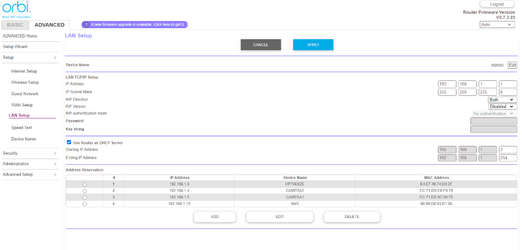
Thanks @SlicEnDicE . I have attached a screenshot of the setup. As you can see, there was just a single range shown, not a DHCP range and static range. I added .4, .5 and .15 to the address reservation. I assume this is the same thing as you were suggesting. Or am I wrong? Also after clicking APPLY, it took around 1 minute to save the changes before the screen you see reappeared so I assume from that a reboot is not required.
 

Attachments

  • Screenshot 2023-03-01 103030.png
    Screenshot 2023-03-01 103030.png
    29.7 KB · Views: 2

My Computer My Computer

At a glance

W113.80 gigahertz AMD Ryzen 9 3900XT 12-Core32684 MegabytesNVIDIA GeForce RTX 3060 Ti
OS
W11
Computer type
PC/Desktop
Manufacturer/Model
PC Specialist
CPU
3.80 gigahertz AMD Ryzen 9 3900XT 12-Core
Motherboard
ASUSTeK COMPUTER INC. TUF GAMING X570-PLUS Rev X.0x
Memory
32684 Megabytes
Graphics Card(s)
NVIDIA GeForce RTX 3060 Ti
Monitor(s) Displays
ViewSonic VX3276-QHD (x2)
Hard Drives
1TB PCS PCIe M.2 SSD
ST8000DM004-2CX188 (8001.56 GB)
WDC WD30EZRX-00DC0B0 (3000.59 GB)
WDC WD30EZRX-00SPEB0 (3000.59 GB)
Cooling
Water cooled
Keyboard
Logitech
Mouse
Logitech
Internet Speed
56
Thanks @SlicEnDicE . I have attached a screenshot of the setup. As you can see, there was just a single range shown, not a DHCP range and static range. I added .4, .5 and .15 to the address reservation. I assume this is the same thing as you were suggesting. Or am I wrong? Also after clicking APPLY, it took around 1 minute to save the changes before the screen you see reappeared so I assume from that a reboot is not required.
Yes, this will work. The devices will get the reserved addresses and DHCP will assign all the rest of the adresses in range .1 - .254 to new devices.

If everything works now, you're all good. If you get communication errors, do the reboot cycle for all devices to fix it.
 

My Computers My Computers

  • At a glance

    Win 11 Pro 25H2 26200.9550 / Linux Mint 22.3Ryzen 7 2700U Pro32GBiGPU Vega 10
    OS
    Win 11 Pro 25H2 26200.9550 / Linux Mint 22.3
    Computer type
    Laptop
    Manufacturer/Model
    Lenovo A485
    CPU
    Ryzen 7 2700U Pro
    Motherboard
    Lenovo (WiFi/BT module upgraded to Intel Wireless-AC-9260)
    Memory
    32GB
    Graphics Card(s)
    iGPU Vega 10
    Sound Card
    Realtek
    Monitor(s) Displays
    14" FHD (built-in) + 14" Lenovo Thinkvision M14t (touch+pen) + 32" Asus PB328
    Screen Resolution
    FHD + FHD + 1440p
    Hard Drives
    Intel 660p m.2 nVME PCIe3.0 x2 512GB
    PSU
    125W(Dock)/65W(Travel Adapter)
    Keyboard
    Thinkpad / Logitech MX Keys
    Mouse
    Logitech MX Master 2S
    Internet Speed
    1/1Gbit
    Browser
    Firefox
    Antivirus
    Windows Defender
    Other Info
    SecureBoot: Enabled
    TPM2.0: Enabled
    AMD-V: Enabled
  • At a glance

    Win 11 Pro 25H2 26200.9550(RP)i7-7700k @4.8GHz32GB 2x16GB 2133MHz CL15EVGA GTX1080Ti FTW 11GB
    Operating System
    Win 11 Pro 25H2 26200.9550(RP)
    Computer type
    PC/Desktop
    Manufacturer/Model
    Custom
    CPU
    i7-7700k @4.8GHz
    Motherboard
    Asus PRIME Z270-A
    Memory
    32GB 2x16GB 2133MHz CL15
    Graphics card(s)
    EVGA GTX1080Ti FTW 11GB
    Sound Card
    Integrated
    Monitor(s) Displays
    32" 10-bit Asus PB328Q
    Screen Resolution
    WQHD 2560x1440
    Hard Drives
    512GB ADATA SX8000NP NVMe PCIe Gen 3 x4
    PSU
    850W
    Case
    Fractal Design Define 7
    Cooling
    Noctua NH-D15 chromax.black
    Keyboard
    Logitech MX Keys
    Mouse
    Logitech MX Master 2S
    Internet Speed
    1/1Gbit
    Browser
    Firefox
    Antivirus
    Windows Defender
    Other Info
    AC WiFi Card
  • Asus U46SV (laptop), i5-2410M, 8GB RAM, 500GB SSD, 750GB HDD, Windows 10. (used as a local Minecraft server and data dump)

My Computer My Computer

At a glance

W113.80 gigahertz AMD Ryzen 9 3900XT 12-Core32684 MegabytesNVIDIA GeForce RTX 3060 Ti
OS
W11
Computer type
PC/Desktop
Manufacturer/Model
PC Specialist
CPU
3.80 gigahertz AMD Ryzen 9 3900XT 12-Core
Motherboard
ASUSTeK COMPUTER INC. TUF GAMING X570-PLUS Rev X.0x
Memory
32684 Megabytes
Graphics Card(s)
NVIDIA GeForce RTX 3060 Ti
Monitor(s) Displays
ViewSonic VX3276-QHD (x2)
Hard Drives
1TB PCS PCIe M.2 SSD
ST8000DM004-2CX188 (8001.56 GB)
WDC WD30EZRX-00DC0B0 (3000.59 GB)
WDC WD30EZRX-00SPEB0 (3000.59 GB)
Cooling
Water cooled
Keyboard
Logitech
Mouse
Logitech
Internet Speed
56

Latest Support Threads

Back
Top Bottom