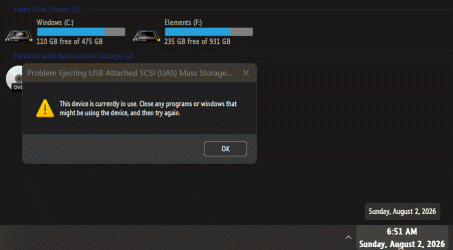
How to force stop an external hard drive for easily safe ejection/removal?


archz2

Well-known member
Local time
7:23 AM
Posts
39
OS
Windows 11
This has been a recurring annoyance for years regardless of what windows 11 version I use.

When I plug in my external hard drive ( NOT USB stick), and right click on the icon in 'This PC', there is no option to eject the drive. I only get format option.

Doing right click on USB icon in the system tray near the clock, then choosing safely remove option tells me that the drive cannot be stopped right now .

I tried a workaround by typing the following in run command but I still get failure. My drive isn't using any files on it.
RunDll32.exe shell32.dll,Control_RunDLL hotplug.dll

Here's a screen recording of what I encounter

Is there any free utility that allows me to "force stop" the drive so I can remove it easily? Or any registry hack that adds the option of 'eject' on the right click menu for external hard drives?
 
Windows Build/Version
25H2, 26200.8894
Last edited:

My Computer My Computer

At a glance

Windows 11
OS
Windows 11
I don't know a fix for this but I agree with you and I believe it is a common problem but not on all devices. Maybe it is a difference in the Windows OS type. Home vs Pro? Just guessing but I notice it happens on my ASUS laptop running Windows 11 Home but not on my GMKtec running Windows 11 Pro. Both are local account sign-in. On the ASUS I have to sign out, remove the drive and sign back in. On my GMKtec it ejects every time no problem (except when I forget to close File Explorer, which is using it but that's down to me).

I usually eject using the eject icon in the system tray area rather than go via file explorer/This PC etc.
Eject icon in sys tray.webp
 
Last edited:

My Computers My Computers

  • At a glance

    Windows 11 ProAMD Ryzen 9 8945HS32GB DDR5 SO-DIMMIntegrated AMD Radeon 780M (4.00 GHz)
    OS
    Windows 11 Pro
    Computer type
    PC/Desktop
    Manufacturer/Model
    GMKtec K11
    CPU
    AMD Ryzen 9 8945HS
    Memory
    32GB DDR5 SO-DIMM
    Graphics Card(s)
    Integrated AMD Radeon 780M (4.00 GHz)
    Monitor(s) Displays
    Benq 2250HM
    Screen Resolution
    1920 x 1080
    Hard Drives
    1 TB PCIe 4.0 NVMe M.2 SSD
  • At a glance

    Windows 11 HomeIntel® Core™ Ultra 7 - 255H processor16 GB LPDDR5 SDRAMIntel Arc 140T onboard graphics
    Operating System
    Windows 11 Home
    Computer type
    Laptop
    Manufacturer/Model
    ASUS Zenbook 14 OLED 14" Laptop - UX3405CA-QL192W
    CPU
    Intel® Core™ Ultra 7 - 255H processor
    Memory
    16 GB LPDDR5 SDRAM
    Graphics card(s)
    Intel Arc 140T onboard graphics
    Screen Resolution
    1920 x 1200 (16:10 WUXGA resolution) OLED Touchscreen
    Hard Drives
    1TB SSD
After trying to "safely remove an external HDD " ( taskbar-button) , I get very often " the drive is in use " .
So HOW( ??) to fix this , while the writing-cache of the drive is disabled.................??
 

My Computers My Computers

  • At a glance

    Windows11 Pro 25H2i732GBnVidia
    OS
    Windows11 Pro 25H2
    Computer type
    PC/Desktop
    Manufacturer/Model
    Asus
    CPU
    i7
    Motherboard
    z97k
    Memory
    32GB
    Graphics Card(s)
    nVidia
    Sound Card
    Realtek
    Hard Drives
    3
    Cooling
    air
    Browser
    Edge
    Antivirus
    ESET
  • At a glance

    Windows11 ProIntel i516GBIntel
    Operating System
    Windows11 Pro
    Computer type
    PC/Desktop
    Manufacturer/Model
    ASUS
    CPU
    Intel i5
    Motherboard
    ASUS Basic
    Memory
    16GB
    Graphics card(s)
    Intel
    Sound Card
    Realtek
    Monitor(s) Displays
    Samsung
    Hard Drives
    one intern , 0ne extern, OS on SSD
    Cooling
    air
    Keyboard
    wireless Logitech
    Mouse
    wireless Logitech
    Internet Speed
    1GB
    Browser
    Edge
    Antivirus
    ESET
I usually eject using the eject icon in the system tray area rather than go via file explorer/This PC etc.
I forgot to mention that. I've updated the op.

I get an error that the drive is busy
 

My Computer My Computer

At a glance

Windows 11
OS
Windows 11
So HOW( ??) to fix this , while the writing-cache of the drive is disabled.................??
What do you mean? I don't understand.
 

My Computer My Computer

At a glance

Windows 11
OS
Windows 11
Like I said ; " the drive is in use" , so cant " safely remove the drive".................!!
Often reboot , during the reboot I switch the drive off .
 

My Computers My Computers

  • At a glance

    Windows11 Pro 25H2i732GBnVidia
    OS
    Windows11 Pro 25H2
    Computer type
    PC/Desktop
    Manufacturer/Model
    Asus
    CPU
    i7
    Motherboard
    z97k
    Memory
    32GB
    Graphics Card(s)
    nVidia
    Sound Card
    Realtek
    Hard Drives
    3
    Cooling
    air
    Browser
    Edge
    Antivirus
    ESET
  • At a glance

    Windows11 ProIntel i516GBIntel
    Operating System
    Windows11 Pro
    Computer type
    PC/Desktop
    Manufacturer/Model
    ASUS
    CPU
    Intel i5
    Motherboard
    ASUS Basic
    Memory
    16GB
    Graphics card(s)
    Intel
    Sound Card
    Realtek
    Monitor(s) Displays
    Samsung
    Hard Drives
    one intern , 0ne extern, OS on SSD
    Cooling
    air
    Keyboard
    wireless Logitech
    Mouse
    wireless Logitech
    Internet Speed
    1GB
    Browser
    Edge
    Antivirus
    ESET
I use a program called USB Disk Ejector. Frequently works when Windows Safely Remove doesn't

HOWEVER .... it can also depend on the program that has still got hold of the external device, in which case ain't nuffink gonna work until the program is ready to let go.
 

My Computers My Computers

  • At a glance

    Windows 11 2xH2 (latest update ... forever anal)Intel i5-124008GBNVIDIA GeForce GT730
    OS
    Windows 11 2xH2 (latest update ... forever anal)
    Computer type
    PC/Desktop
    Manufacturer/Model
    HP Slim S01
    CPU
    Intel i5-12400
    Memory
    8GB
    Graphics Card(s)
    NVIDIA GeForce GT730
    Sound Card
    OOBE
    Monitor(s) Displays
    Acer 32"
    Screen Resolution
    1920x1080
    Hard Drives
    512GB KIOXIA NVMe
    1TB SATA SSD
    PSU
    OOBE
    Case
    OOBE
    Cooling
    OOBE
    Keyboard
    BT
    Mouse
    BT
    Browser
    Brave FFox Chrome Opera
    Antivirus
    KIS
  • At a glance

    Windows 11 Pro 2xH2 (latest update ... 4ever ...i7-1165G7 @ 2.80GHzIntel Iris Xe Graphics
    Operating System
    Windows 11 Pro 2xH2 (latest update ... 4ever anal)
    Computer type
    Laptop
    Manufacturer/Model
    HP Pavillion 15
    CPU
    i7-1165G7 @ 2.80GHz
    Graphics card(s)
    Intel Iris Xe Graphics
    Hard Drives
    Samsung NVMe 512GB
    + numerous/multiple SSD Type C USB enclosures
    Internet Speed
    NBN FTTN 50
    Browser
    Brave
    Antivirus
    KIS
I use a program called USB Disk Ejector. Frequently works when Windows Safely Remove doesn't

HOWEVER .... it can also depend on the program that has still got hold of the external device, in which case ain't nuffink gonna work until the program is ready to let go.
Wonder if it will work when you restart explorer...........( will try) !
 

My Computers My Computers

  • At a glance

    Windows11 Pro 25H2i732GBnVidia
    OS
    Windows11 Pro 25H2
    Computer type
    PC/Desktop
    Manufacturer/Model
    Asus
    CPU
    i7
    Motherboard
    z97k
    Memory
    32GB
    Graphics Card(s)
    nVidia
    Sound Card
    Realtek
    Hard Drives
    3
    Cooling
    air
    Browser
    Edge
    Antivirus
    ESET
  • At a glance

    Windows11 ProIntel i516GBIntel
    Operating System
    Windows11 Pro
    Computer type
    PC/Desktop
    Manufacturer/Model
    ASUS
    CPU
    Intel i5
    Motherboard
    ASUS Basic
    Memory
    16GB
    Graphics card(s)
    Intel
    Sound Card
    Realtek
    Monitor(s) Displays
    Samsung
    Hard Drives
    one intern , 0ne extern, OS on SSD
    Cooling
    air
    Keyboard
    wireless Logitech
    Mouse
    wireless Logitech
    Internet Speed
    1GB
    Browser
    Edge
    Antivirus
    ESET
After trying to "safely remove an external HDD " ( taskbar-button) , I get very often " the drive is in use " .
So HOW( ??) to fix this , while the writing-cache of the drive is disabled.................??
If you click the button several times, you WILL eventually get the notification 'Safe to remove hardware'
 

My Computer My Computer

At a glance

Windows 11 Pro 25H2 (Build 26200.9267)Intel Core Ultra 9 285 5.6 GHz32.00 GBIntel Integrated Graphics (128 MB)
OS
Windows 11 Pro 25H2 (Build 26200.9267)
Computer type
PC/Desktop
Manufacturer/Model
Dell Pro Max Tower T2 FCT2250
CPU
Intel Core Ultra 9 285 5.6 GHz
Motherboard
64-bit operating system, x64-based processor
Memory
32.00 GB
Graphics Card(s)
Intel Integrated Graphics (128 MB)
Sound Card
Realtek Audio
Monitor(s) Displays
Dell P2714H Monitor
Screen Resolution
1920 x 1080
Hard Drives
1 x 512GB M.2 XG10d SED KIOXIA PCIe solid state drive (Internal)
1 x 2TB Seagate ST2000DM008-2UB102 HDD (Internal)
1 x 4TB Seagate STGX4000400 External HDD
1 x 6TB WD Elements AE 2689 External HDD
PSU
500 Watts
Cooling
Air
Keyboard
Microsoft Wired Keyboard 600
Mouse
Microsoft USB Basic Optical Mouse v2.0
Browser
Firefox
Antivirus
Windows Defender + Malwarebytes Premium
Other Info
BaseBoard Manufacturer Dell Inc.
BaseBoard Product 022RY57
BaseBoard Version A01
Will try ......... 🛠️
 

My Computers My Computers

  • At a glance

    Windows11 Pro 25H2i732GBnVidia
    OS
    Windows11 Pro 25H2
    Computer type
    PC/Desktop
    Manufacturer/Model
    Asus
    CPU
    i7
    Motherboard
    z97k
    Memory
    32GB
    Graphics Card(s)
    nVidia
    Sound Card
    Realtek
    Hard Drives
    3
    Cooling
    air
    Browser
    Edge
    Antivirus
    ESET
  • At a glance

    Windows11 ProIntel i516GBIntel
    Operating System
    Windows11 Pro
    Computer type
    PC/Desktop
    Manufacturer/Model
    ASUS
    CPU
    Intel i5
    Motherboard
    ASUS Basic
    Memory
    16GB
    Graphics card(s)
    Intel
    Sound Card
    Realtek
    Monitor(s) Displays
    Samsung
    Hard Drives
    one intern , 0ne extern, OS on SSD
    Cooling
    air
    Keyboard
    wireless Logitech
    Mouse
    wireless Logitech
    Internet Speed
    1GB
    Browser
    Edge
    Antivirus
    ESET
I get an error that the drive is busy
Is there WD Utilities running in the background? Check Task Manager.
Defender could be scanning the drive too.
 

My Computers My Computers

  • At a glance

    Windows 11 Pro
    OS
    Windows 11 Pro
    Computer type
    PC/Desktop
    Manufacturer/Model
    ASUS ROG Strix
  • At a glance

    Windows 11 Pro
    Operating System
    Windows 11 Pro
    Computer type
    Laptop
    Manufacturer/Model
    ASUS VivoBook
  • ASUS VivoBook 'Lite' ~ Windows 11 Home
Is there WD Utilities running in the background? Check Task Manager.
Defender could be scanning the drive too.
I have two internal WD HDDs running in Win11 , together with a Samsung SSD with the OS on it .
Im using three external Seagate HDDs , writing cash disabled , very hard to switch them off with the " safely remove button " .
Just tried again , I get " in use " , so rebooted and switched all three externals off.............
These drives are not scanned by Defender .
 

My Computers My Computers

  • At a glance

    Windows11 Pro 25H2i732GBnVidia
    OS
    Windows11 Pro 25H2
    Computer type
    PC/Desktop
    Manufacturer/Model
    Asus
    CPU
    i7
    Motherboard
    z97k
    Memory
    32GB
    Graphics Card(s)
    nVidia
    Sound Card
    Realtek
    Hard Drives
    3
    Cooling
    air
    Browser
    Edge
    Antivirus
    ESET
  • At a glance

    Windows11 ProIntel i516GBIntel
    Operating System
    Windows11 Pro
    Computer type
    PC/Desktop
    Manufacturer/Model
    ASUS
    CPU
    Intel i5
    Motherboard
    ASUS Basic
    Memory
    16GB
    Graphics card(s)
    Intel
    Sound Card
    Realtek
    Monitor(s) Displays
    Samsung
    Hard Drives
    one intern , 0ne extern, OS on SSD
    Cooling
    air
    Keyboard
    wireless Logitech
    Mouse
    wireless Logitech
    Internet Speed
    1GB
    Browser
    Edge
    Antivirus
    ESET
Beats me, man! 🤷‍♂️ Works here!

Try as @IanMosley said, click Eject again...

giff.gif
 

My Computers My Computers

  • At a glance

    Windows 11 Pro
    OS
    Windows 11 Pro
    Computer type
    PC/Desktop
    Manufacturer/Model
    ASUS ROG Strix
  • At a glance

    Windows 11 Pro
    Operating System
    Windows 11 Pro
    Computer type
    Laptop
    Manufacturer/Model
    ASUS VivoBook
  • ASUS VivoBook 'Lite' ~ Windows 11 Home

My Computers My Computers

  • At a glance

    Windows 11 (25H2)Core(TM) i5-12400T12.0 GB (11.7 GB usable)Intel(R) UHD Graphics 730
    OS
    Windows 11 (25H2)
    Computer type
    PC/Desktop
    Manufacturer/Model
    HP Pavilion 577B5AA#ABA
    CPU
    Core(TM) i5-12400T
    Motherboard
    HP 89E9
    Memory
    12.0 GB (11.7 GB usable)
    Graphics Card(s)
    Intel(R) UHD Graphics 730
    Sound Card
    DFX Audio
    Monitor(s) Displays
    HO Generic PnP Monitor
    Screen Resolution
    1920 x 1080
    Hard Drives
    SAMSUNG MZVLQ10HBLB00BH1 SSD 1TB
    PSU
    HP Std. for this product
    Case
    All-in-One
    Cooling
    Fan
    Keyboard
    HP Wireless / Bluetooth
    Mouse
    HP Wireless / Bluetooth
    Internet Speed
    Link speed (Receive/Transmit): 1000/1000 (Mbps)
    Browser
    Firefox
    Antivirus
    Malwarebytes Pro / Windows Security
    Other Info
    Retired IT professional.
  • At a glance

    Windows 11 (25H2)Intel I-7-1165G78 GB DDR4-3200 SDRAMIntel Iris Xe Graphics
    Operating System
    Windows 11 (25H2)
    Computer type
    Laptop
    Manufacturer/Model
    HP 15tegooo [HP Pavilion Laptop Intel I-7]
    CPU
    Intel I-7-1165G7
    Motherboard
    HP
    Memory
    8 GB DDR4-3200 SDRAM
    Graphics card(s)
    Intel Iris Xe Graphics
    Sound Card
    Realtek
    Monitor(s) Displays
    HP HD micro edge, Bright View, 250 nits
    Screen Resolution
    1366 x768
    Hard Drives
    256 GB DD4-3200 SDRAM
    PSU
    HP
    Case
    Std HP Laptop
    Cooling
    Fan
    Keyboard
    std
    Mouse
    Logi M585
    Browser
    Edge
    Antivirus
    Windows Security
If you click the button several times, you WILL eventually get the notification 'Safe to remove hardware'
I am really not in the mood to deploy persistence and perseverance for such menial one click job. 🥲
 

My Computer My Computer

At a glance

Windows 11
OS
Windows 11
You may want to check out:OpenCloseDriveEject 3.55 Safely remove drives and open close DVD, USB Works reasonably well for me. Good Luck.
Thanks! Just installed it. Does the job. Although I have woken up my machine from hibernation which fixes the issue temporarily anyways.Hopefully this issue gets resolved with this tool.

I am also seeking a solution where a utility force closes anything that is randomly making the external hard drive busy without our explicit consent and is creating a hurdle in normal safe removal activity of Windows.
 

My Computer My Computer

At a glance

Windows 11
OS
Windows 11
If you click the button several times, you WILL eventually get the notification 'Safe to remove hardware'
After 10+ attempts it's still being used :(
 

My Computers My Computers

  • At a glance

    Win 11 Home 25H2 (OS Build 26200.7019)Intel Core i7 1470032GB Corsair VengeanceBuilt in
    OS
    Win 11 Home 25H2 (OS Build 26200.7019)
    Computer type
    PC/Desktop
    Manufacturer/Model
    Custom build
    CPU
    Intel Core i7 14700
    Motherboard
    ASUS PRIME B760M-K D4 (LGA1700)
    Memory
    32GB Corsair Vengeance
    Graphics Card(s)
    Built in
    Sound Card
    Built in
    Monitor(s) Displays
    Benq G2222HDL 21.5"
    Screen Resolution
    1920 x 1080
    Hard Drives
    512Gb SSD
    1Tb SSD
    PSU
    Vida
    Case
    Fractal Pop Air
    Keyboard
    Standard PS/2 wired keyboard
    Mouse
    Microsoft USB wired wheel mouse
    Internet Speed
    500Mbps
    Browser
    Chrome
    Antivirus
    Defender
  • At a glance

    Win 11 Home 24H2 (OS Build 26100.4202)12th Gen Intel Core i5-1150H16GbBuilt in
    Operating System
    Win 11 Home 24H2 (OS Build 26100.4202)
    Computer type
    Laptop
    Manufacturer/Model
    HP Zbook Fury
    CPU
    12th Gen Intel Core i5-1150H
    Motherboard
    HP 8AA1 KBC
    Memory
    16Gb
    Graphics card(s)
    Built in
    Sound Card
    Built in
    Hard Drives
    1Tb SSD
    Internet Speed
    500Mbps
    Browser
    Chrome
    Antivirus
    Defender
It is to many years i dive into it... But if i remember right i think is was volume shadow copy to the NTFS file system that is the bad guy so the disk is busy.
So if you can use exFat instead it should stop be a problem.
 

My Computers My Computers

  • At a glance

    Linux: Debian, Kali-linux, Alma, Win:7,10IoT,...i3, i5 and i7 From 2gen to 9th gen... Server ...
    OS
    Linux: Debian, Kali-linux, Alma, Win:7,10IoT,2012R
    Manufacturer/Model
    HP Elitebook 840, AsusX53, Aspire E1-572. AsusUX32A, HP Pro3130mt+3010mt, HP Proliant ML150, 3xCustom-PC, i3, i5, i7
    CPU
    i3, i5 and i7 From 2gen to 9th gen... Server dual Xenon
    Hard Drives
    Sata, M.2, SAS
  • At a glance

    Retro: 2003server.XPpro, Win2000, Win98SE, Wi...Oldest intel 8088 up to P4 dual core
    Operating System
    Retro: 2003server.XPpro, Win2000, Win98SE, Win95, Win3.11, MS-DOS, IBM-DOS
    Manufacturer/Model
    Commodore, AST, Fujitsu, Compaq, etc etc. etc Around 15 desktops and 20 laptops in the collection
    CPU
    Oldest intel 8088 up to P4 dual core
    Hard Drives
    MFM, IDE, SCSI
It is to many years i dive into it... But if i remember right i think is was volume shadow copy to the NTFS file system that is the bad guy so the disk is busy.
So if you can use exFat instead it should stop be a problem.
Not a good idea. Arranging another hard drive, and then spending hours to emptying my entire 90 percent filled 5TB exernal hard drive to reformat it as exfat, then copying everything back just to solve a 2 minute irritation isn't a good solution.

btw, your signature is so hilarious!! "so I'm total neutral and impartial in my haterage" 😂🤣🤣🤣
 

My Computer My Computer

At a glance

Windows 11
OS
Windows 11
It is to many years i dive into it... But if i remember right i think is was volume shadow copy to the NTFS file system that is the bad guy so the disk is busy.
So if you can use exFat instead it should stop be a problem.
Had a look in Services to look for Volume Shadow Copy - Status is blank (not running) and Startup Type is Manual.
 

My Computers My Computers

  • At a glance

    Win 11 Home 25H2 (OS Build 26200.7019)Intel Core i7 1470032GB Corsair VengeanceBuilt in
    OS
    Win 11 Home 25H2 (OS Build 26200.7019)
    Computer type
    PC/Desktop
    Manufacturer/Model
    Custom build
    CPU
    Intel Core i7 14700
    Motherboard
    ASUS PRIME B760M-K D4 (LGA1700)
    Memory
    32GB Corsair Vengeance
    Graphics Card(s)
    Built in
    Sound Card
    Built in
    Monitor(s) Displays
    Benq G2222HDL 21.5"
    Screen Resolution
    1920 x 1080
    Hard Drives
    512Gb SSD
    1Tb SSD
    PSU
    Vida
    Case
    Fractal Pop Air
    Keyboard
    Standard PS/2 wired keyboard
    Mouse
    Microsoft USB wired wheel mouse
    Internet Speed
    500Mbps
    Browser
    Chrome
    Antivirus
    Defender
  • At a glance

    Win 11 Home 24H2 (OS Build 26100.4202)12th Gen Intel Core i5-1150H16GbBuilt in
    Operating System
    Win 11 Home 24H2 (OS Build 26100.4202)
    Computer type
    Laptop
    Manufacturer/Model
    HP Zbook Fury
    CPU
    12th Gen Intel Core i5-1150H
    Motherboard
    HP 8AA1 KBC
    Memory
    16Gb
    Graphics card(s)
    Built in
    Sound Card
    Built in
    Hard Drives
    1Tb SSD
    Internet Speed
    500Mbps
    Browser
    Chrome
    Antivirus
    Defender

Latest Support Threads

Back
Top Bottom