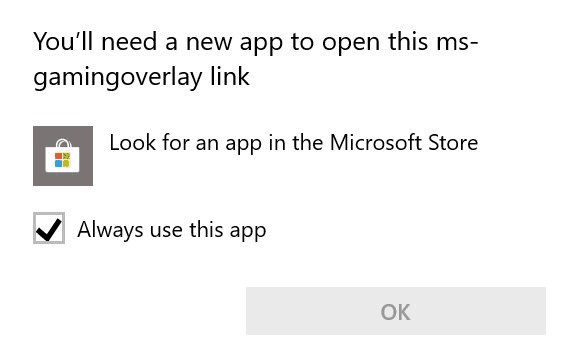
Solved How To Get Rid of "You need a new app to open this ms-gamingoverlay link" WITHOUT installing the Xbox Game Bar App?


Od1sseas

Well-known member
Member
Local time
10:20 PM
Posts
52
OS
Windows 11
273497d1586282066t-what-ms-gamingoverlay-image.png
 
Windows Build/Version
Latest Windows 11 Beta

My Computer My Computer

At a glance

Windows 11Core i5 13600KF2x16GB 7200Mhz C34 TunedRadeon RX 6700 XT
OS
Windows 11
Computer type
PC/Desktop
Manufacturer/Model
Custom
CPU
Core i5 13600KF
Motherboard
Asrock Z790 PG Lightning
Memory
2x16GB 7200Mhz C34 Tuned
Graphics Card(s)
Radeon RX 6700 XT
Monitor(s) Displays
Philips 24M1N3200ZA (165Hz IPS)
Screen Resolution
1080p
Hard Drives
1TB NVMe (3GB/s)
PSU
Aerocool VX 550W
Case
Aerocool Hive v3
Cooling
Xilence M705D
Browser
Edge
Antivirus
Malwarebytes
I hope a solution for this occurs. I've been dealing with this pop-up as well, which is annoying.
 

My Computers My Computers

  • At a glance

    Windows 11 ProRyzen 7 3700x32 GBNVIDA GeForce GTX 1050 Ti
    OS
    Windows 11 Pro
    Computer type
    PC/Desktop
    Manufacturer/Model
    Personal Build
    CPU
    Ryzen 7 3700x
    Motherboard
    ASUS ROG Crosshair VI AMD X370
    Memory
    32 GB
    Graphics Card(s)
    NVIDA GeForce GTX 1050 Ti
    Sound Card
    On board
    Monitor(s) Displays
    (2) AOC E2752Vh 27-inch
    Screen Resolution
    1920 x 1080
    Hard Drives
    SSD M.2 and SATA
    Cooling
    Air cooling
    Keyboard
    Logitech K800 Wireless
    Mouse
    Logitech M705 Wireless
    Internet Speed
    100 Mbps Download | 10 Mbps Upload
    Browser
    Firefox Beta
    Antivirus
    Windows Security???
    Other Info
    Microsoft 365 Family
    Macrium Reflect (Paid)
    eM Client
    Adobe Acrobat DC (Subscription)
  • At a glance

    Windows 11 ProIntel Core i7 10510U @1.80GHz16GB DDR4
    Operating System
    Windows 11 Pro
    Computer type
    Laptop
    Manufacturer/Model
    Lenovo ThinkPad 20U1001UUS
    CPU
    Intel Core i7 10510U @1.80GHz
    Memory
    16GB DDR4
    Screen Resolution
    1920 x 1080
    Browser
    Firefox Beta
I hope a solution for this occurs. I've been dealing with this pop-up as well, which is annoying.
Maybe removing those files might help because every time you open a game "gamebarpresencewriter.exe" opens automatically
Screenshot 2022-07-28 154955.png
Of course i didn't do it (yet) because im scared im gonna f@@k up my fresh Windows install

Edit: Without GameInput.dll and GameMode.dll
 
Last edited:

My Computer My Computer

At a glance

Windows 11Core i5 13600KF2x16GB 7200Mhz C34 TunedRadeon RX 6700 XT
OS
Windows 11
Computer type
PC/Desktop
Manufacturer/Model
Custom
CPU
Core i5 13600KF
Motherboard
Asrock Z790 PG Lightning
Memory
2x16GB 7200Mhz C34 Tuned
Graphics Card(s)
Radeon RX 6700 XT
Monitor(s) Displays
Philips 24M1N3200ZA (165Hz IPS)
Screen Resolution
1080p
Hard Drives
1TB NVMe (3GB/s)
PSU
Aerocool VX 550W
Case
Aerocool Hive v3
Cooling
Xilence M705D
Browser
Edge
Antivirus
Malwarebytes
Maybe removing those files might help because every time you open a game "gamebarpresencewriter.exe" opens automatically
View attachment 35129
Of course i didn't do it (yet) because im scared im gonna f@@k up my fresh Windows install

Edit: Without GameInput.dll and GameMode.dll
I'll experiment this evening after work and give it a try.
 

My Computers My Computers

  • At a glance

    Windows 11 ProRyzen 7 3700x32 GBNVIDA GeForce GTX 1050 Ti
    OS
    Windows 11 Pro
    Computer type
    PC/Desktop
    Manufacturer/Model
    Personal Build
    CPU
    Ryzen 7 3700x
    Motherboard
    ASUS ROG Crosshair VI AMD X370
    Memory
    32 GB
    Graphics Card(s)
    NVIDA GeForce GTX 1050 Ti
    Sound Card
    On board
    Monitor(s) Displays
    (2) AOC E2752Vh 27-inch
    Screen Resolution
    1920 x 1080
    Hard Drives
    SSD M.2 and SATA
    Cooling
    Air cooling
    Keyboard
    Logitech K800 Wireless
    Mouse
    Logitech M705 Wireless
    Internet Speed
    100 Mbps Download | 10 Mbps Upload
    Browser
    Firefox Beta
    Antivirus
    Windows Security???
    Other Info
    Microsoft 365 Family
    Macrium Reflect (Paid)
    eM Client
    Adobe Acrobat DC (Subscription)
  • At a glance

    Windows 11 ProIntel Core i7 10510U @1.80GHz16GB DDR4
    Operating System
    Windows 11 Pro
    Computer type
    Laptop
    Manufacturer/Model
    Lenovo ThinkPad 20U1001UUS
    CPU
    Intel Core i7 10510U @1.80GHz
    Memory
    16GB DDR4
    Screen Resolution
    1920 x 1080
    Browser
    Firefox Beta
This happens with other things to on this build -- New install -- try going into security dashboard etc. Seems not to be a problem if you update to this build though.

Cheers
jimbo
 

My Computer My Computer

At a glance

Windows XP,11 Linux Fedora Rawhide pre-releas...2 X Intel i7
OS
Windows XP,11 Linux Fedora Rawhide pre-release 46
Computer type
PC/Desktop
CPU
2 X Intel i7
Screen Resolution
4KUHD X 2
Why can't Microsoft just build an OS with nothing added and let people install apps IF they need them? When I become King....
 

My Computers My Computers

  • At a glance

    Windows 11 ProRyzen 7 3700x32 GBNVIDA GeForce GTX 1050 Ti
    OS
    Windows 11 Pro
    Computer type
    PC/Desktop
    Manufacturer/Model
    Personal Build
    CPU
    Ryzen 7 3700x
    Motherboard
    ASUS ROG Crosshair VI AMD X370
    Memory
    32 GB
    Graphics Card(s)
    NVIDA GeForce GTX 1050 Ti
    Sound Card
    On board
    Monitor(s) Displays
    (2) AOC E2752Vh 27-inch
    Screen Resolution
    1920 x 1080
    Hard Drives
    SSD M.2 and SATA
    Cooling
    Air cooling
    Keyboard
    Logitech K800 Wireless
    Mouse
    Logitech M705 Wireless
    Internet Speed
    100 Mbps Download | 10 Mbps Upload
    Browser
    Firefox Beta
    Antivirus
    Windows Security???
    Other Info
    Microsoft 365 Family
    Macrium Reflect (Paid)
    eM Client
    Adobe Acrobat DC (Subscription)
  • At a glance

    Windows 11 ProIntel Core i7 10510U @1.80GHz16GB DDR4
    Operating System
    Windows 11 Pro
    Computer type
    Laptop
    Manufacturer/Model
    Lenovo ThinkPad 20U1001UUS
    CPU
    Intel Core i7 10510U @1.80GHz
    Memory
    16GB DDR4
    Screen Resolution
    1920 x 1080
    Browser
    Firefox Beta
At last, I found a registry hack that fix the problem for me.

Here is the site: https://thegeekpage.com/youll-need-a-new-app-to-open-this-ms-gaming/

Method 3: Disable Key Binding Through Windows Registry Editor


Also, in my System Settings --> Gaming, I had previously turned off everything. I also, following a YouTube video, had uninstall 'stuff' dealing with xBox, using PowerShell. After these action is when I started getting the little pop up box. But now no pop up box.

Let me know if this works for you @Od1sseas
 

My Computers My Computers

  • At a glance

    Windows 11 ProRyzen 7 3700x32 GBNVIDA GeForce GTX 1050 Ti
    OS
    Windows 11 Pro
    Computer type
    PC/Desktop
    Manufacturer/Model
    Personal Build
    CPU
    Ryzen 7 3700x
    Motherboard
    ASUS ROG Crosshair VI AMD X370
    Memory
    32 GB
    Graphics Card(s)
    NVIDA GeForce GTX 1050 Ti
    Sound Card
    On board
    Monitor(s) Displays
    (2) AOC E2752Vh 27-inch
    Screen Resolution
    1920 x 1080
    Hard Drives
    SSD M.2 and SATA
    Cooling
    Air cooling
    Keyboard
    Logitech K800 Wireless
    Mouse
    Logitech M705 Wireless
    Internet Speed
    100 Mbps Download | 10 Mbps Upload
    Browser
    Firefox Beta
    Antivirus
    Windows Security???
    Other Info
    Microsoft 365 Family
    Macrium Reflect (Paid)
    eM Client
    Adobe Acrobat DC (Subscription)
  • At a glance

    Windows 11 ProIntel Core i7 10510U @1.80GHz16GB DDR4
    Operating System
    Windows 11 Pro
    Computer type
    Laptop
    Manufacturer/Model
    Lenovo ThinkPad 20U1001UUS
    CPU
    Intel Core i7 10510U @1.80GHz
    Memory
    16GB DDR4
    Screen Resolution
    1920 x 1080
    Browser
    Firefox Beta
At last, I found a registry hack that fix the problem for me.

Here is the site: https://thegeekpage.com/youll-need-a-new-app-to-open-this-ms-gaming/

Method 3: Disable Key Binding Through Windows Registry Editor


Also, in my System Settings --> Gaming, I had previously turned off everything. I also, following a YouTube video, had uninstall 'stuff' dealing with xBox, using PowerShell. After these action is when I started getting the little pop up box. But now no pop up box.

Let me know if this works for you @Od1sseas
It worked thanks!
 

My Computer My Computer

At a glance

Windows 11Core i5 13600KF2x16GB 7200Mhz C34 TunedRadeon RX 6700 XT
OS
Windows 11
Computer type
PC/Desktop
Manufacturer/Model
Custom
CPU
Core i5 13600KF
Motherboard
Asrock Z790 PG Lightning
Memory
2x16GB 7200Mhz C34 Tuned
Graphics Card(s)
Radeon RX 6700 XT
Monitor(s) Displays
Philips 24M1N3200ZA (165Hz IPS)
Screen Resolution
1080p
Hard Drives
1TB NVMe (3GB/s)
PSU
Aerocool VX 550W
Case
Aerocool Hive v3
Cooling
Xilence M705D
Browser
Edge
Antivirus
Malwarebytes

My Computers My Computers

  • At a glance

    Windows 11 ProRyzen 7 3700x32 GBNVIDA GeForce GTX 1050 Ti
    OS
    Windows 11 Pro
    Computer type
    PC/Desktop
    Manufacturer/Model
    Personal Build
    CPU
    Ryzen 7 3700x
    Motherboard
    ASUS ROG Crosshair VI AMD X370
    Memory
    32 GB
    Graphics Card(s)
    NVIDA GeForce GTX 1050 Ti
    Sound Card
    On board
    Monitor(s) Displays
    (2) AOC E2752Vh 27-inch
    Screen Resolution
    1920 x 1080
    Hard Drives
    SSD M.2 and SATA
    Cooling
    Air cooling
    Keyboard
    Logitech K800 Wireless
    Mouse
    Logitech M705 Wireless
    Internet Speed
    100 Mbps Download | 10 Mbps Upload
    Browser
    Firefox Beta
    Antivirus
    Windows Security???
    Other Info
    Microsoft 365 Family
    Macrium Reflect (Paid)
    eM Client
    Adobe Acrobat DC (Subscription)
  • At a glance

    Windows 11 ProIntel Core i7 10510U @1.80GHz16GB DDR4
    Operating System
    Windows 11 Pro
    Computer type
    Laptop
    Manufacturer/Model
    Lenovo ThinkPad 20U1001UUS
    CPU
    Intel Core i7 10510U @1.80GHz
    Memory
    16GB DDR4
    Screen Resolution
    1920 x 1080
    Browser
    Firefox Beta

Method 3: Disable Key Binding Through Windows Registry Editor


Also, in my System Settings --> Gaming, I had previously turned off everything. I also, following a YouTube video, had uninstall 'stuff' dealing with xBox, using PowerShell. After these action is when I started getting the little pop up box. But now no pop up box.

Let me know if this works for you @Od1sseas

Thank you so much, Method 3 worked like a charm. This is especially relevant now, as Microsoft forces you to use Xbox Game Bar in 2025 on Windows 11. Which even Control Panel doesn't allow you to fully uninstall. If you use something like Revo Installer, it's fully gone but you are greeted with the prompt telling you to open Microsoft store every time you open a game. So, this is super helpful even 3 years later.
 

My Computer My Computer

At a glance

Windows 11
OS
Windows 11
Back
Top Bottom