How to get the Windows 11 2025 version 25H2 Update


 Windows Experience Blog:

Windows is essential for more than a billion people to connect, learn, play and work, and today we are announcing the availability of the Windows 11 2025 Update (also known as Windows 11, version 25H2). This year’s annual feature update (version 25H2) will continue the recent Windows feature update trend of being delivered in an optimized way using servicing technology. So, let me share details on version 25H2, explain how to get it, and provide information for commercial and education customers.

Current status as of May 15, 2026

Windows 11, version 25H2 is now available for all eligible devices. Devices running Home and Pro editions of Windows 11 that are not managed by IT departments will receive the update to Windows 11, version 25H2 through the machine learning-based intelligent rollout.

Updates are delivered when devices are ready, helping keep devices running smoothly and securely while ensuring they stay up to date with the latest protections. You can choose when to restart or postpone the update, and no action is required to receive it.

If you have an eligible Windows 10 or Windows 11 device, and you don’t want to wait for the intelligent rollout, go to Settings > Windows Update and select Check for updates. If your device is ready for the update, you’ll see the option to Download and install Windows 11, version 25H2.

For more information, see the How to get the Windows 11 2025 Update video.

A streamlined, lean and security-focused update

Windows 11, version 25H2 will be delivered as an enablement package (eKB). This means that it contains all the recently announced features in Windows 11, version 24H2. Both versions use a shared code base and servicing branch, streamlining the update. It also means that you’ll continue to see new features released to Windows via monthly updates as part of our continuous innovation model.


26100.xxxx 24H2 to 26200.xxxx 25H2 Enablement Package MSU Download:


windows11.0-kb5054156-x64_a0c1638cbcf4cf33dbe9a5bef69db374b4786974.msu (166 KB)​


OR​

windows11.0-kb5054156-arm64_3d5c91aaeb08a87e0717f263ad4a61186746e465.msu (170 KB)​


As part of the Microsoft Secure Future Initiative commitment, Windows continues iterating and improving its security features and posture to help protect customers from security threats in our software and services. Version 25H2 includes significant advancements in build and runtime vulnerability detection, coupled with AI assisted secure coding. We’ve designed version 25H2 to address and mitigate security threats in adherence to a robust security development lifecycle (SDL) policy and requirements.

Version 25H2 is also leaner due to removed legacy features such as PowerShell 2.0 and Windows Management Instrumentation command-line (WMIC).

How to get it

Windows 11, version 25H2 will be delivered using servicing technology (like that used for the monthly update process), providing a fast and reliable installation experience. Availability begins today via a controlled feature rollout for eligible devices running Windows 11, version 24H2 for users who have already turned on the “Get the latest updates as soon as they’re available” toggle. If we detect that your device may have an issue, such as an application or driver incompatibility, we may put a safeguard hold in place and not offer the update until that issue is resolved. We will expand the rollout breadth over the next few months and share more information on the Windows release health hub. For more information on ways to get the update, watch this video.



Information for commercial and education customers

Version 25H2 is now available via Windows Autopatch and the Microsoft 365 admin center. We recommend that commercial organizations begin targeted deployments to validate that their apps, devices and infrastructure work as expected with the new release.

New Windows 11, version 25H2 commercial functionality includes Wi-Fi 7 for enterprise connectivity. It also offers IT admins the ability to remove select pre-installed Microsoft Store apps via Microsoft Intune or Group Policy on Enterprise and Education devices. See how to get ready for Windows 11, version 25H2.

This update continues the annual Windows 11 feature update cadence, with new feature updates released in the second half of the calendar year. This new version resets the 24 months of support for Home and Pro editions and 36 months of support for Enterprise and Education editions. Note that select features and enhancements initially released disabled by default in version 24H2 will be enabled by default in version 25H2. You can find more information on IT tools (including policies) to support version 25H2 in the Windows IT Pro Blog.

Staying protected and productive

As always, I recommend that you update your devices to this latest version of Windows 11, which provides you with the latest features, security improvements and control. We will closely monitor the update and share timely information on the rollout status and any known issues (open and resolved) across both feature and monthly updates via the Windows release health hub and @WindowsUpdate. Please continue to tell us about your experience by providing comments or suggestions via Feedback Hub.

1 Feature parity begins with the November 2025 security update. Windows 11 eligible devices on Windows 11, version 23H2 (and earlier versions) require a full operating system (OS) swap to update to Windows 11, version 25H2.

2 More information on:
Delivering continuous innovation in Windows 11 and Controlled Feature Rollouts.

3 Downloads in the Microsoft 365 admin center and similar channels may be delayed.

4 Windows 11, version 25H2 will become available via Windows Server Update Services (WSUS) on Oct. 14, 2025, with the October security update.


 Source:

 
Last edited:
Do anyone have the same issue?

Are you talking about the missing white line on the left side of the bar? I see that too, in fact, four of my drives display that way.

1759887454724.webp
 

My Computers My Computers

  • At a glance

    Win 11 Pro 25H2 26200.8737Intel® Core™ i7-14700KG.SKILL Ripjaws S5 Series 64GB (2 x 32GB) DDR5ASUS GeForce RTX 4070 Super 12GB
    OS
    Win 11 Pro 25H2 26200.8737
    Computer type
    PC/Desktop
    Manufacturer/Model
    Self Built
    CPU
    Intel® Core™ i7-14700K
    Motherboard
    ASUS TUF Z690-PLUS WIFI BIOS 4505 11/29/25
    Memory
    G.SKILL Ripjaws S5 Series 64GB (2 x 32GB) DDR5
    Graphics Card(s)
    ASUS GeForce RTX 4070 Super 12GB
    Sound Card
    Sound Blaster AE-5 Plus
    Monitor(s) Displays
    ASUS TUF Gaming 27" 2K HDR Gaming
    Screen Resolution
    2560 x 1440
    Hard Drives
    Samsung 990 Pro 1TB NVMe (Win 11 25H2)
    SK hynix P41 500GB NVMe
    SK hynix P41 2TB NVMe (x3)
    Crucial P3 Plus 4TB
    PSU
    Corsair RM850x Shift
    Case
    Antec Dark Phantom DP502 FLUX
    Cooling
    Corsair Nautilus 360 RS AIO
    Keyboard
    Logitech MK 320
    Mouse
    Razer Basilisk V3
    Internet Speed
    750Mbs
    Browser
    Firefox
    Antivirus
    Winows Security
    Other Info
    MR 8.1 Home
  • At a glance

    Win 11 Pro 25H2 26200.8737Intel Core i5-1140064 GB DDR4MSI GeForce RTX 3060 Ventus 2X 12GB
    Operating System
    Win 11 Pro 25H2 26200.8737
    Computer type
    PC/Desktop
    Manufacturer/Model
    Self Built
    CPU
    Intel Core i5-11400
    Motherboard
    Asus TUF Gaming Z590 Plus WiFi (BIOS 2803)
    Memory
    64 GB DDR4
    Graphics card(s)
    MSI GeForce RTX 3060 Ventus 2X 12GB
    Sound Card
    SoundBlaster Audigy Fx V2
    Monitor(s) Displays
    Samsung F27T350
    Screen Resolution
    1920x1080
    Hard Drives
    Samsung 980 Pro 1TB
    Samsung 970 EVO Plus 2TB
    Samsung 870 EVO 500GB SSD
    PSU
    Corsair HX750
    Case
    Cougar MX330-G Window
    Cooling
    Thermalright Frozen Edge 240 Black AIO
    Internet Speed
    350Mbps
    Browser
    Firefox
    Antivirus
    Windows Security
  • System Three
    Win 11 Pro 25H2 26200.8737
    ASUS PRIME Z370-P II BIOS 3004 7/12/21
    Intel Core i7-8700 CPU @ 3.20GHz
    32GB DDR4 RAM (4x8)
    iGPU Intel UHD Graphics 630
    Mid-Tower Desktop
47205210,49221331,49381526,49402389,49820095,55495322,48433719 in .reg file format:
Great, it works, thank you very much (y):D
But needed 26200.6725 Build
 

My Computer My Computer

At a glance

Windows 11 Pro 25H2Intel Core i5 12th generation16GB
OS
Windows 11 Pro 25H2
Computer type
PC/Desktop
CPU
Intel Core i5 12th generation
Motherboard
GIGABYTE
Memory
16GB
PSU
750W
Great, it works, thank you very much (y):D
But needed 26200.6725 Build
This is what I have on my public Build and on R.P. channel. 🤷‍♂️

Edition Windows 11 Pro
Version 25H2
Installed on ‎8/‎29/‎2025
OS build 26200.6725
Experience Windows Feature Experience Pack 1000.26100.253.0

Edit:
On my Laptop Lenovo Yoga 920, I did not need to enable anything manually, it was all done by Microsoft.
I have the new Start Menu without doing anything. 😂🤷‍♂️
Same Build 26200.6725.
 
Last edited:

My Computer My Computer

At a glance

Windows 11 Pro 25H2Intel I9-9900K64GBNVIDIA RTX 2060
OS
Windows 11 Pro 25H2
Computer type
PC/Desktop
Manufacturer/Model
Dell XPS 8930
CPU
Intel I9-9900K
Memory
64GB
Graphics Card(s)
NVIDIA RTX 2060
Sound Card
NVIDIA High Definition Audio
Monitor(s) Displays
4k Samsung
Screen Resolution
3840 x 2160
Hard Drives
512GB NVMe, ADATA SU 800, 2TB HDD
This is what I have on my public Build and on R.P. channel. 🤷‍♂️

Edition Windows 11 Pro
Version 25H2
Installed on ‎8/‎29/‎2025
OS build 26200.6725
Experience Windows Feature Experience Pack 1000.26100.253.0
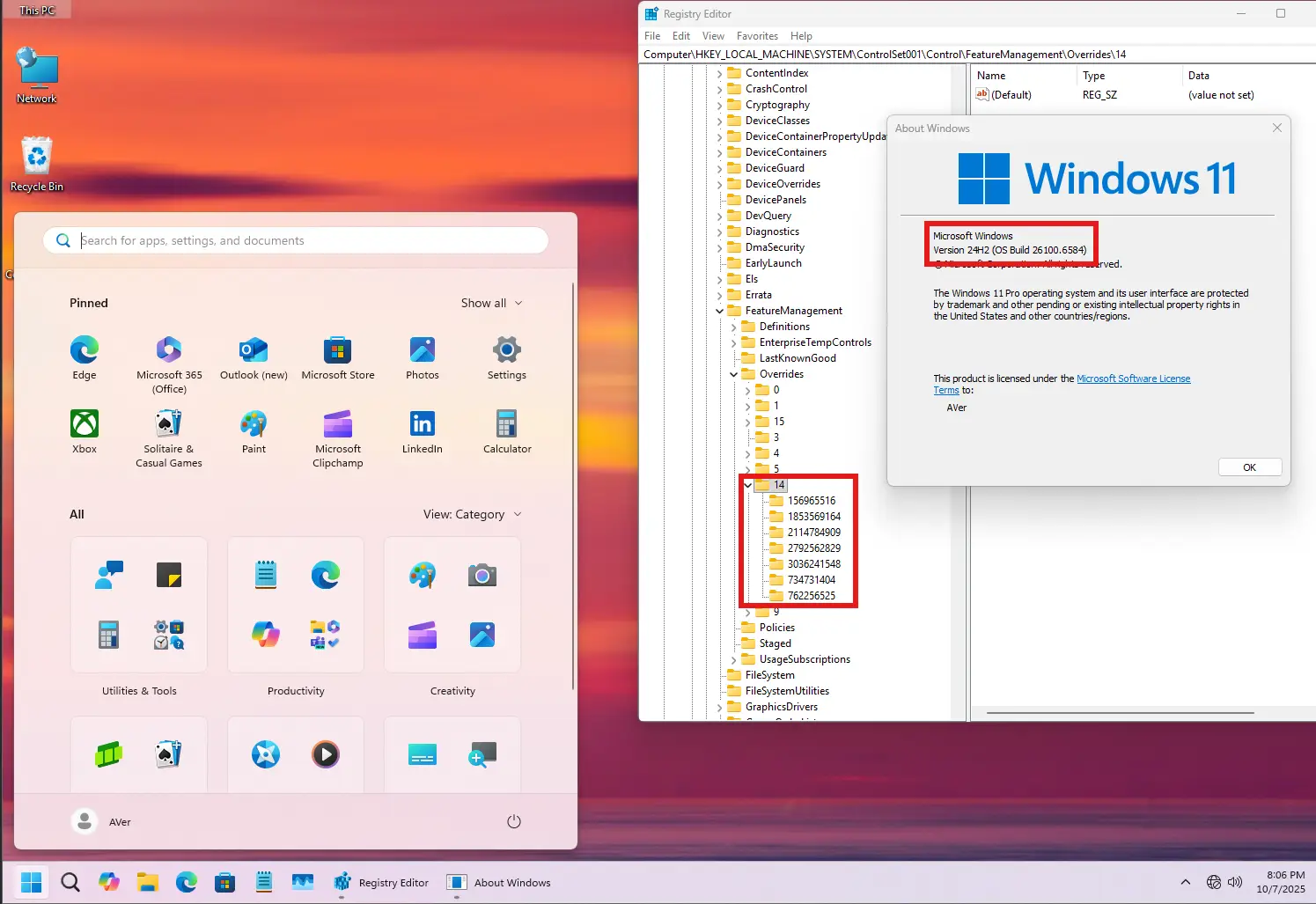
Yes, I have the same thing now, but I was on Build 26200.6584 and the registry file didn't work.

Screenshot 2025-10-08 051227.webp
 

My Computer My Computer

At a glance

Windows 11 Pro 25H2Intel Core i5 12th generation16GB
OS
Windows 11 Pro 25H2
Computer type
PC/Desktop
CPU
Intel Core i5 12th generation
Motherboard
GIGABYTE
Memory
16GB
PSU
750W
Yes, I have the same thing now, but I was on Build 26200.6584 and the registry file didn't work.

View attachment 148137
Then you are all set.

Anyway, I prefer using vivetool instead of messing with the registry.
There is never a clear explanation of what those registry keys actually enable. 😵‍💫🤷‍♂️
 

My Computer My Computer

At a glance

Windows 11 Pro 25H2Intel I9-9900K64GBNVIDIA RTX 2060
OS
Windows 11 Pro 25H2
Computer type
PC/Desktop
Manufacturer/Model
Dell XPS 8930
CPU
Intel I9-9900K
Memory
64GB
Graphics Card(s)
NVIDIA RTX 2060
Sound Card
NVIDIA High Definition Audio
Monitor(s) Displays
4k Samsung
Screen Resolution
3840 x 2160
Hard Drives
512GB NVMe, ADATA SU 800, 2TB HDD
Then you are all set.

Anyway, I prefer using vivetool instead of messing with the registry.
There is never a clear explanation of what those registry keys actually enable. 😵‍💫🤷‍♂️
If you read the source code for ViveTool, he provides the secret decoder ring for translating Feature ID's <--> reg keys.

MS deliberately obfuscated them, by using some math transformations so you can't just create your own reg files. I know it's correct because I did some registry captures with ViveTool running, and confirmed what it does and the end result in the registry.

The difference is you may have to reboot to get the reg files to take effect.
 

My Computer My Computer

At a glance

Windows 7
OS
Windows 7
If you read the source code for ViveTool, he provides the secret decoder ring for translating Feature ID's <--> reg keys.


The difference is you may have to reboot to get the reg files to take effect.
The same with vivetool, you have to reboot. They change the registry anyway.
I've checked that by setting them with /priority:test and then checked the registry keys chages on 12. 😎
 

My Computer My Computer

At a glance

Windows 11 Pro 25H2Intel I9-9900K64GBNVIDIA RTX 2060
OS
Windows 11 Pro 25H2
Computer type
PC/Desktop
Manufacturer/Model
Dell XPS 8930
CPU
Intel I9-9900K
Memory
64GB
Graphics Card(s)
NVIDIA RTX 2060
Sound Card
NVIDIA High Definition Audio
Monitor(s) Displays
4k Samsung
Screen Resolution
3840 x 2160
Hard Drives
512GB NVMe, ADATA SU 800, 2TB HDD
Anyway, I prefer using vivetool instead of messing with the registry.
There is never a clear explanation of what those registry keys actually enable. 😵‍💫🤷‍♂️
I don't feel comfortable using an external tool. It's not about doubt or trust, but that's just me.🤷‍♂️
The difference is you may have to reboot to get the reg files to take effect.
Yes, I needed to reboot.
 

My Computer My Computer

At a glance

Windows 11 Pro 25H2Intel Core i5 12th generation16GB
OS
Windows 11 Pro 25H2
Computer type
PC/Desktop
CPU
Intel Core i5 12th generation
Motherboard
GIGABYTE
Memory
16GB
PSU
750W
Then you are all set.

Anyway, I prefer using vivetool instead of messing with the registry.
There is never a clear explanation of what those registry keys actually enable. 😵‍💫🤷‍♂️

ViveTool only accesses the Overrides\8 registry key, it will not mess up your registry keys. It also does not have permission to modify protected registry entries(0, 9, 15).
 

My Computer My Computer

At a glance

Windows 11, version 25H2 (26200)AMD Ryzen 9 9950X 16-Core ProcessorDDR5-6000 (CL36) 64.0 GBNVIDIA GeForce RTX 4090
OS
Windows 11, version 25H2 (26200)
Computer type
PC/Desktop
CPU
AMD Ryzen 9 9950X 16-Core Processor
Motherboard
ASRock B650M PG Riptide
Memory
DDR5-6000 (CL36) 64.0 GB
Graphics Card(s)
NVIDIA GeForce RTX 4090
PSU
1200W
Case
Phanteks Enthoo Pro 2
Cooling
Noctua NH-D12L
ViveTool only accesses the Overrides\8 registry key, it will not mess up your registry keys. It also does not have permission to modify protected registry entries(0, 9, 15).
I use vivetool with /priority:test that changes registry Overrides \12 instead of 8. Easier to keep them separate. 😎🤷‍♂️
 

My Computer My Computer

At a glance

Windows 11 Pro 25H2Intel I9-9900K64GBNVIDIA RTX 2060
OS
Windows 11 Pro 25H2
Computer type
PC/Desktop
Manufacturer/Model
Dell XPS 8930
CPU
Intel I9-9900K
Memory
64GB
Graphics Card(s)
NVIDIA RTX 2060
Sound Card
NVIDIA High Definition Audio
Monitor(s) Displays
4k Samsung
Screen Resolution
3840 x 2160
Hard Drives
512GB NVMe, ADATA SU 800, 2TB HDD
If you want to restore all changes made by ViveTool, just delete the registry key "HKEY_LOCAL_MACHINE\SYSTEM\ControlSet001\Control\FeatureManagement\Overrides\8".
Yes, I have the same thing now, but I was on Build 26200.6584 and the registry file didn't work.

View attachment 148137

If the new start menu does not work, please add this CFR registry key.
Code:
Windows Registry Editor Version 5.00

[HKEY_LOCAL_MACHINE\SYSTEM\ControlSet001\Control\FeatureManagement\Overrides\8]

[HKEY_LOCAL_MACHINE\SYSTEM\ControlSet001\Control\FeatureManagement\Overrides\8\156965516]
"EnabledState"=dword:00000002
"EnabledStateOptions"=dword:00000000

SQ7EoOL.png
 
Last edited:

My Computer My Computer

At a glance

Windows 11, version 25H2 (26200)AMD Ryzen 9 9950X 16-Core ProcessorDDR5-6000 (CL36) 64.0 GBNVIDIA GeForce RTX 4090
OS
Windows 11, version 25H2 (26200)
Computer type
PC/Desktop
CPU
AMD Ryzen 9 9950X 16-Core Processor
Motherboard
ASRock B650M PG Riptide
Memory
DDR5-6000 (CL36) 64.0 GB
Graphics Card(s)
NVIDIA GeForce RTX 4090
PSU
1200W
Case
Phanteks Enthoo Pro 2
Cooling
Noctua NH-D12L
OK. Didn't play with "/priority:test"
The same with vivetool, you have to reboot. They change the registry anyway.
I've checked that by setting them with /priority:test and then checked the registry keys chages on 12. 😎
I never used priorities. Guess I'm back to rewriting my script...
 

My Computer My Computer

At a glance

Windows 7
OS
Windows 7
I use vivetool with /priority:test that changes registry Overrides \12 instead of 8. Easier to keep them separate. 😎🤷‍♂️

8 and 12 did not have a registry key with default. you can delete Overrides\8 and Overrides\12 to restore.
 

My Computer My Computer

At a glance

Windows 11, version 25H2 (26200)AMD Ryzen 9 9950X 16-Core ProcessorDDR5-6000 (CL36) 64.0 GBNVIDIA GeForce RTX 4090
OS
Windows 11, version 25H2 (26200)
Computer type
PC/Desktop
CPU
AMD Ryzen 9 9950X 16-Core Processor
Motherboard
ASRock B650M PG Riptide
Memory
DDR5-6000 (CL36) 64.0 GB
Graphics Card(s)
NVIDIA GeForce RTX 4090
PSU
1200W
Case
Phanteks Enthoo Pro 2
Cooling
Noctua NH-D12L

My Computer My Computer

At a glance

Windows 11 Pro 25H2Intel I9-9900K64GBNVIDIA RTX 2060
OS
Windows 11 Pro 25H2
Computer type
PC/Desktop
Manufacturer/Model
Dell XPS 8930
CPU
Intel I9-9900K
Memory
64GB
Graphics Card(s)
NVIDIA RTX 2060
Sound Card
NVIDIA High Definition Audio
Monitor(s) Displays
4k Samsung
Screen Resolution
3840 x 2160
Hard Drives
512GB NVMe, ADATA SU 800, 2TB HDD
I have been using CFR registry keys to enable the features I want. If you know how to dism install.wim, you can enable/disable CFR before deploying Windows.
 

My Computer My Computer

At a glance

Windows 11, version 25H2 (26200)AMD Ryzen 9 9950X 16-Core ProcessorDDR5-6000 (CL36) 64.0 GBNVIDIA GeForce RTX 4090
OS
Windows 11, version 25H2 (26200)
Computer type
PC/Desktop
CPU
AMD Ryzen 9 9950X 16-Core Processor
Motherboard
ASRock B650M PG Riptide
Memory
DDR5-6000 (CL36) 64.0 GB
Graphics Card(s)
NVIDIA GeForce RTX 4090
PSU
1200W
Case
Phanteks Enthoo Pro 2
Cooling
Noctua NH-D12L
I have been using CFR registry keys to enable the features I want. If you know how to dism install.wim, you can enable/disable CFR before deploying Windows.
I don't really care to mess with that. No thanks. 😂🤷‍♂️
 

My Computer My Computer

At a glance

Windows 11 Pro 25H2Intel I9-9900K64GBNVIDIA RTX 2060
OS
Windows 11 Pro 25H2
Computer type
PC/Desktop
Manufacturer/Model
Dell XPS 8930
CPU
Intel I9-9900K
Memory
64GB
Graphics Card(s)
NVIDIA RTX 2060
Sound Card
NVIDIA High Definition Audio
Monitor(s) Displays
4k Samsung
Screen Resolution
3840 x 2160
Hard Drives
512GB NVMe, ADATA SU 800, 2TB HDD
Last edited:

My Computer My Computer

At a glance

Windows 11, version 25H2 (26200)AMD Ryzen 9 9950X 16-Core ProcessorDDR5-6000 (CL36) 64.0 GBNVIDIA GeForce RTX 4090
OS
Windows 11, version 25H2 (26200)
Computer type
PC/Desktop
CPU
AMD Ryzen 9 9950X 16-Core Processor
Motherboard
ASRock B650M PG Riptide
Memory
DDR5-6000 (CL36) 64.0 GB
Graphics Card(s)
NVIDIA GeForce RTX 4090
PSU
1200W
Case
Phanteks Enthoo Pro 2
Cooling
Noctua NH-D12L
/priority:test
(with automatic cleanup of any overlapping priorities for the same ID).
Code:
Windows Registry Editor Version 5.00

[-HKEY_LOCAL_MACHINE\SYSTEM\ControlSet001\Control\FeatureManagement\Overrides\2\3036241548]
[-HKEY_LOCAL_MACHINE\SYSTEM\ControlSet001\Control\FeatureManagement\Overrides\4\3036241548]
[-HKEY_LOCAL_MACHINE\SYSTEM\ControlSet001\Control\FeatureManagement\Overrides\6\3036241548]
[-HKEY_LOCAL_MACHINE\SYSTEM\ControlSet001\Control\FeatureManagement\Overrides\8\3036241548]
[-HKEY_LOCAL_MACHINE\SYSTEM\ControlSet001\Control\FeatureManagement\Overrides\10\3036241548]

[-HKEY_LOCAL_MACHINE\SYSTEM\ControlSet001\Control\FeatureManagement\Overrides\2\1853569164]
[-HKEY_LOCAL_MACHINE\SYSTEM\ControlSet001\Control\FeatureManagement\Overrides\4\1853569164]
[-HKEY_LOCAL_MACHINE\SYSTEM\ControlSet001\Control\FeatureManagement\Overrides\6\1853569164]
[-HKEY_LOCAL_MACHINE\SYSTEM\ControlSet001\Control\FeatureManagement\Overrides\8\1853569164]
[-HKEY_LOCAL_MACHINE\SYSTEM\ControlSet001\Control\FeatureManagement\Overrides\10\1853569164]

[-HKEY_LOCAL_MACHINE\SYSTEM\ControlSet001\Control\FeatureManagement\Overrides\2\2792562829]
[-HKEY_LOCAL_MACHINE\SYSTEM\ControlSet001\Control\FeatureManagement\Overrides\4\2792562829]
[-HKEY_LOCAL_MACHINE\SYSTEM\ControlSet001\Control\FeatureManagement\Overrides\6\2792562829]
[-HKEY_LOCAL_MACHINE\SYSTEM\ControlSet001\Control\FeatureManagement\Overrides\8\2792562829]
[-HKEY_LOCAL_MACHINE\SYSTEM\ControlSet001\Control\FeatureManagement\Overrides\10\2792562829]

[-HKEY_LOCAL_MACHINE\SYSTEM\ControlSet001\Control\FeatureManagement\Overrides\2\762256525]
[-HKEY_LOCAL_MACHINE\SYSTEM\ControlSet001\Control\FeatureManagement\Overrides\4\762256525]
[-HKEY_LOCAL_MACHINE\SYSTEM\ControlSet001\Control\FeatureManagement\Overrides\6\762256525]
[-HKEY_LOCAL_MACHINE\SYSTEM\ControlSet001\Control\FeatureManagement\Overrides\8\762256525]
[-HKEY_LOCAL_MACHINE\SYSTEM\ControlSet001\Control\FeatureManagement\Overrides\10\762256525]

[-HKEY_LOCAL_MACHINE\SYSTEM\ControlSet001\Control\FeatureManagement\Overrides\2\734731404]
[-HKEY_LOCAL_MACHINE\SYSTEM\ControlSet001\Control\FeatureManagement\Overrides\4\734731404]
[-HKEY_LOCAL_MACHINE\SYSTEM\ControlSet001\Control\FeatureManagement\Overrides\6\734731404]
[-HKEY_LOCAL_MACHINE\SYSTEM\ControlSet001\Control\FeatureManagement\Overrides\8\734731404]
[-HKEY_LOCAL_MACHINE\SYSTEM\ControlSet001\Control\FeatureManagement\Overrides\10\734731404]

[-HKEY_LOCAL_MACHINE\SYSTEM\ControlSet001\Control\FeatureManagement\Overrides\2\2114784909]
[-HKEY_LOCAL_MACHINE\SYSTEM\ControlSet001\Control\FeatureManagement\Overrides\4\2114784909]
[-HKEY_LOCAL_MACHINE\SYSTEM\ControlSet001\Control\FeatureManagement\Overrides\6\2114784909]
[-HKEY_LOCAL_MACHINE\SYSTEM\ControlSet001\Control\FeatureManagement\Overrides\8\2114784909]
[-HKEY_LOCAL_MACHINE\SYSTEM\ControlSet001\Control\FeatureManagement\Overrides\10\2114784909]

[-HKEY_LOCAL_MACHINE\SYSTEM\ControlSet001\Control\FeatureManagement\Overrides\2\905601679]
[-HKEY_LOCAL_MACHINE\SYSTEM\ControlSet001\Control\FeatureManagement\Overrides\4\905601679]
[-HKEY_LOCAL_MACHINE\SYSTEM\ControlSet001\Control\FeatureManagement\Overrides\6\905601679]
[-HKEY_LOCAL_MACHINE\SYSTEM\ControlSet001\Control\FeatureManagement\Overrides\8\905601679]
[-HKEY_LOCAL_MACHINE\SYSTEM\ControlSet001\Control\FeatureManagement\Overrides\10\905601679]

[HKEY_LOCAL_MACHINE\SYSTEM\ControlSet001\Control\FeatureManagement\Overrides\12]

[HKEY_LOCAL_MACHINE\SYSTEM\ControlSet001\Control\FeatureManagement\Overrides\12\3036241548]
"EnabledState"=dword:00000002
"EnabledStateOptions"=dword:00000000
"Variant"=dword:00000000
"VariantPayload"=dword:00000000
"VariantPayloadKind"=dword:00000000

[HKEY_LOCAL_MACHINE\SYSTEM\ControlSet001\Control\FeatureManagement\Overrides\12\1853569164]
"EnabledState"=dword:00000002
"EnabledStateOptions"=dword:00000000
"Variant"=dword:00000000
"VariantPayload"=dword:00000000
"VariantPayloadKind"=dword:00000000

[HKEY_LOCAL_MACHINE\SYSTEM\ControlSet001\Control\FeatureManagement\Overrides\12\2792562829]
"EnabledState"=dword:00000002
"EnabledStateOptions"=dword:00000000
"Variant"=dword:00000000
"VariantPayload"=dword:00000000
"VariantPayloadKind"=dword:00000000

[HKEY_LOCAL_MACHINE\SYSTEM\ControlSet001\Control\FeatureManagement\Overrides\12\762256525]
"EnabledState"=dword:00000002
"EnabledStateOptions"=dword:00000000
"Variant"=dword:00000000
"VariantPayload"=dword:00000000
"VariantPayloadKind"=dword:00000000

[HKEY_LOCAL_MACHINE\SYSTEM\ControlSet001\Control\FeatureManagement\Overrides\12\734731404]
"EnabledState"=dword:00000002
"EnabledStateOptions"=dword:00000000
"Variant"=dword:00000000
"VariantPayload"=dword:00000000
"VariantPayloadKind"=dword:00000000

[HKEY_LOCAL_MACHINE\SYSTEM\ControlSet001\Control\FeatureManagement\Overrides\12\2114784909]
"EnabledState"=dword:00000002
"EnabledStateOptions"=dword:00000000
"Variant"=dword:00000000
"VariantPayload"=dword:00000000
"VariantPayloadKind"=dword:00000000

[HKEY_LOCAL_MACHINE\SYSTEM\ControlSet001\Control\FeatureManagement\Overrides\12\905601679]
"EnabledState"=dword:00000002
"EnabledStateOptions"=dword:00000000
"Variant"=dword:00000000
"VariantPayload"=dword:00000000
"VariantPayloadKind"=dword:00000000
 

My Computer My Computer

At a glance

Windows 7
OS
Windows 7
My computer's been on all afternoon, and when I came in to shut down, it wanted to restart.

I now have Version 25H2 (Build 26200.6725)! I didn't hafta do anything! Other than restart, that is . . .
 

My Computers My Computers

  • At a glance

    Windows 11 23H2 22631.2861Intel(R) Core(TM) i7-10700 CPU @ 2.90GHz 2.90...16384 MBytesIntel UHD Graphics 630
    OS
    Windows 11 23H2 22631.2861
    Computer type
    PC/Desktop
    Manufacturer/Model
    HP Envy TE01-1xxx
    CPU
    Intel(R) Core(TM) i7-10700 CPU @ 2.90GHz 2.90 GHz
    Motherboard
    16.0GB Dual-Channel Unknown @ 1463MHz (21-21-21-47)
    Memory
    16384 MBytes
    Graphics Card(s)
    Intel UHD Graphics 630
    Sound Card
    Realtek High Definition Audio
    Monitor(s) Displays
    Monitor 1 - Acer 27" Monitor 2 - Acer 27"
    Screen Resolution
    1920 x 1080
    Hard Drives
    WDC PC SN530 SDBPNPZ-512G-1006 (SSD)
    Seagate ST1000DM003-1SB102
    Seagate BUP Slim SCSI Disk Device (SSD)
    PSU
    HP
    Case
    HP
    Cooling
    Standard
    Keyboard
    Logitech Wave K350
    Mouse
    Logitech M705
    Internet Speed
    500 mbps
    Browser
    Firefox
    Antivirus
    Windows Defender
    Other Info
    That's all Folks!
  • At a glance

    Windows 11Intel Core i7 (10th gen) 1070016 GBIntel UHD Graphics 630
    Operating System
    Windows 11
    Computer type
    PC/Desktop
    Manufacturer/Model
    HP
    CPU
    Intel Core i7 (10th gen) 10700
    Motherboard
    Intel
    Memory
    16 GB
    Graphics card(s)
    Intel UHD Graphics 630
    Sound Card
    Built-in
    Monitor(s) Displays
    Acer 27" & Samsung 24"
    Screen Resolution
    1920 x
    Hard Drives
    SSD (512 GB)
    HDD (1 TB)
    Seagate
    PSU
    Intel i7 10th Generation
    Case
    HP
    Cooling
    HP/Intel?
    Keyboard
    Logitech Wave K350
    Mouse
    Logitech M705
    Internet Speed
    50 mbps
    Browser
    Firefox 90.2
    Antivirus
    Windows Defender
    Other Info
    Headphone/Microphone Combo
    SuperSpeed USB Type-A (4 on front)
    HP 3-in-One Card Readr
    SuperSpeed USB Type-C
    DVD Writer
My computer's been on all afternoon, and when I came in to shut down, it wanted to restart.

I now have Version 25H2 (Build 26200.6725)! I didn't hafta do anything! Other than restart, that is . . .
Did you get suggestion in WU for 25H2 ?
 

My Computer My Computer

At a glance

26200.8037i5-11400F32GBGeforce GT-1030
OS
26200.8037
Computer type
PC/Desktop
CPU
i5-11400F
Motherboard
Gigabyte
Memory
32GB
Graphics Card(s)
Geforce GT-1030
Keyboard
Logitech K400
Mouse
Logitech M720
Internet Speed
600 Mb
Browser
Edge
Back
Top Bottom