How to get the Windows 11 2025 version 25H2 Update


 Windows Experience Blog:

Windows is essential for more than a billion people to connect, learn, play and work, and today we are announcing the availability of the Windows 11 2025 Update (also known as Windows 11, version 25H2). This year’s annual feature update (version 25H2) will continue the recent Windows feature update trend of being delivered in an optimized way using servicing technology. So, let me share details on version 25H2, explain how to get it, and provide information for commercial and education customers.

Current status as of May 15, 2026

Windows 11, version 25H2 is now available for all eligible devices. Devices running Home and Pro editions of Windows 11 that are not managed by IT departments will receive the update to Windows 11, version 25H2 through the machine learning-based intelligent rollout.

Updates are delivered when devices are ready, helping keep devices running smoothly and securely while ensuring they stay up to date with the latest protections. You can choose when to restart or postpone the update, and no action is required to receive it.

If you have an eligible Windows 10 or Windows 11 device, and you don’t want to wait for the intelligent rollout, go to Settings > Windows Update and select Check for updates. If your device is ready for the update, you’ll see the option to Download and install Windows 11, version 25H2.

For more information, see the How to get the Windows 11 2025 Update video.

A streamlined, lean and security-focused update

Windows 11, version 25H2 will be delivered as an enablement package (eKB). This means that it contains all the recently announced features in Windows 11, version 24H2. Both versions use a shared code base and servicing branch, streamlining the update. It also means that you’ll continue to see new features released to Windows via monthly updates as part of our continuous innovation model.


26100.xxxx 24H2 to 26200.xxxx 25H2 Enablement Package MSU Download:


windows11.0-kb5054156-x64_a0c1638cbcf4cf33dbe9a5bef69db374b4786974.msu (166 KB)​


OR​

windows11.0-kb5054156-arm64_3d5c91aaeb08a87e0717f263ad4a61186746e465.msu (170 KB)​


As part of the Microsoft Secure Future Initiative commitment, Windows continues iterating and improving its security features and posture to help protect customers from security threats in our software and services. Version 25H2 includes significant advancements in build and runtime vulnerability detection, coupled with AI assisted secure coding. We’ve designed version 25H2 to address and mitigate security threats in adherence to a robust security development lifecycle (SDL) policy and requirements.

Version 25H2 is also leaner due to removed legacy features such as PowerShell 2.0 and Windows Management Instrumentation command-line (WMIC).

How to get it

Windows 11, version 25H2 will be delivered using servicing technology (like that used for the monthly update process), providing a fast and reliable installation experience. Availability begins today via a controlled feature rollout for eligible devices running Windows 11, version 24H2 for users who have already turned on the “Get the latest updates as soon as they’re available” toggle. If we detect that your device may have an issue, such as an application or driver incompatibility, we may put a safeguard hold in place and not offer the update until that issue is resolved. We will expand the rollout breadth over the next few months and share more information on the Windows release health hub. For more information on ways to get the update, watch this video.



Information for commercial and education customers

Version 25H2 is now available via Windows Autopatch and the Microsoft 365 admin center. We recommend that commercial organizations begin targeted deployments to validate that their apps, devices and infrastructure work as expected with the new release.

New Windows 11, version 25H2 commercial functionality includes Wi-Fi 7 for enterprise connectivity. It also offers IT admins the ability to remove select pre-installed Microsoft Store apps via Microsoft Intune or Group Policy on Enterprise and Education devices. See how to get ready for Windows 11, version 25H2.

This update continues the annual Windows 11 feature update cadence, with new feature updates released in the second half of the calendar year. This new version resets the 24 months of support for Home and Pro editions and 36 months of support for Enterprise and Education editions. Note that select features and enhancements initially released disabled by default in version 24H2 will be enabled by default in version 25H2. You can find more information on IT tools (including policies) to support version 25H2 in the Windows IT Pro Blog.

Staying protected and productive

As always, I recommend that you update your devices to this latest version of Windows 11, which provides you with the latest features, security improvements and control. We will closely monitor the update and share timely information on the rollout status and any known issues (open and resolved) across both feature and monthly updates via the Windows release health hub and @WindowsUpdate. Please continue to tell us about your experience by providing comments or suggestions via Feedback Hub.

1 Feature parity begins with the November 2025 security update. Windows 11 eligible devices on Windows 11, version 23H2 (and earlier versions) require a full operating system (OS) swap to update to Windows 11, version 25H2.

2 More information on:
Delivering continuous innovation in Windows 11 and Controlled Feature Rollouts.

3 Downloads in the Microsoft 365 admin center and similar channels may be delayed.

4 Windows 11, version 25H2 will become available via Windows Server Update Services (WSUS) on Oct. 14, 2025, with the October security update.


 Source:

 
Last edited:
dont see any of the new features on it i will have to wait and see just wanted to the catagory in start which i dont have yet lol
 

My Computer My Computer

At a glance

11amd ryzen 5 5600xddr4nvidia
OS
11
Computer type
PC/Desktop
Manufacturer/Model
to be filled by o.e.m
CPU
amd ryzen 5 5600x
Motherboard
asrock
Memory
ddr4
Graphics Card(s)
nvidia
Monitor(s) Displays
lg
Screen Resolution
1920x1080
Hard Drives
wd blue sa510 2.5 2tb
wd blue sa510 2.5 1tb
Keyboard
razor
Antivirus
windows defender
I got rid of Vivetool a while back.
No one seemed to be keeping a list of tweaks, and the Vivetool GUI version seems to be in Micro-speak. :/
Who is no one in this context?

Put the commands you use in a batch file - list sorted.
 

My Computer My Computer

At a glance

Windows 11 Pro + Win11 Canary VM.I9 13th gen i9-13900H 2.60 GHZ16 GB solderedIntegrated Intel Iris XE
OS
Windows 11 Pro + Win11 Canary VM.
Computer type
Laptop
Manufacturer/Model
ASUS Zenbook 14
CPU
I9 13th gen i9-13900H 2.60 GHZ
Motherboard
Yep, Laptop has one.
Memory
16 GB soldered
Graphics Card(s)
Integrated Intel Iris XE
Sound Card
Realtek built in
Monitor(s) Displays
laptop OLED screen
Screen Resolution
2880x1800 touchscreen
Hard Drives
1 TB NVME SSD (only weakness is only one slot)
PSU
Internal + 65W thunderbolt USB4 charger
Case
Yep, got one
Cooling
Stella Artois (UK pint cans - 568 ml) - extra cost.
Keyboard
Built in UK keybd
Mouse
Bluetooth , wireless dongled, wired
Internet Speed
900 mbs (ethernet), wifi 6 typical 350-450 mb/s both up and down
Browser
Edge
Antivirus
Defender
Other Info
TPM 2.0, 2xUSB4 thunderbolt, 1xUsb3 (usb a), 1xUsb-c, hdmi out, 3.5 mm audio out/in combo, ASUS backlit trackpad (inc. switchable number pad)

Macrium Reflect Home V8
Office 365 Family (6 users each 1TB onedrive space)
Hyper-V (a vm runs almost as fast as my older laptop)
Updated to 6899.
 

My Computers My Computers

  • At a glance

    Windows 11 Education For 25H2Intel® Core i7 5500u8 GBIntel HD Family Graphics 5500 AMD Firepro 4150M
    OS
    Windows 11 Education For 25H2
    Computer type
    Laptop
    Manufacturer/Model
    HP ZBook G2
    CPU
    Intel® Core i7 5500u
    Motherboard
    HP
    Memory
    8 GB
    Graphics Card(s)
    Intel HD Family Graphics 5500 AMD Firepro 4150M
    Sound Card
    Realtek High Audio
    Hard Drives
    1 TB SSD
    Mouse
    HP USB Mouse
    Antivirus
    Windows Defender
  • At a glance

    Windows 11 Pro For Workstations 25H2Xeon 1535m v632 GBAMD Quadro Pro 4100
    Operating System
    Windows 11 Pro For Workstations 25H2
    Computer type
    Laptop
    Manufacturer/Model
    HP Zbook G4
    CPU
    Xeon 1535m v6
    Motherboard
    HP
    Memory
    32 GB
    Graphics card(s)
    AMD Quadro Pro 4100
    Sound Card
    Bang and Olufson Audio
    Hard Drives
    1TB SSD
    Mouse
    HP USB Mouse
    Antivirus
    Windows Defender
Microsoft is still working on some issues with the New Start Menu layout. So this feature is still dormant in the public version. But to be honest I prefer the current Start Menu layout.:-)

If you prefer the new Start Menu layout, you can enable this feature using ViVetool or a registry key.
If the new start menu is enabled with the .reg file will it cause any problems when MS officially releases it? Thanks.
 

My Computer My Computer

At a glance

Windows 11 25H212th Gen i9 -12900K64GBIntel UHD Graphics
OS
Windows 11 25H2
Computer type
PC/Desktop
Manufacturer/Model
Dell
CPU
12th Gen i9 -12900K
Memory
64GB
Graphics Card(s)
Intel UHD Graphics
Monitor(s) Displays
Dual Dell U2717D
Screen Resolution
2560x1440
Hard Drives
2TB Lexar SSD, 2TB Crucial SSD, 2TB Kingston SSD
If the new start menu is enabled with the .reg file will it cause any problems when MS officially releases it? Thanks.
No should.
 

My Computer My Computer

At a glance

26200.8037i5-11400F32GBGeforce GT-1030
OS
26200.8037
Computer type
PC/Desktop
CPU
i5-11400F
Motherboard
Gigabyte
Memory
32GB
Graphics Card(s)
Geforce GT-1030
Keyboard
Logitech K400
Mouse
Logitech M720
Internet Speed
600 Mb
Browser
Edge
  • Like
Reactions: HTA
Well, I wasn't offered 25H2 when I did this month's Windows Updates so I've used the Enablement Package to 'force' it. Now I'm on 25H2.

I've just tried out the .reg file posted in this thread and I now also have the new Start Menu which is definitely a lot better.

One thing I have noticed is the new Start Menu has put those annoying 'System' labels back which I removed with ViVeTool a long time ago and they haven't come back again until now.

I ran ViVeTool again (vivetool /disable /id:44571814,44573982) but this doesn't work anymore. After I ran it and rebooted the PC the 'System' labels are still there. I guess MS either deliberately or unintentionally stopped that from working.

I'll wait and see if anyone comes up with a new workaround.
 

My Computer My Computer

At a glance

Windows 11 Professional 25H212th Gen Intel(R) Core(TM) i5-12400F 2.50 GHz32GB (4x8GB) Kingston Fury RGB DDR4NVIDIA GeForce GTX 1650
OS
Windows 11 Professional 25H2
Computer type
PC/Desktop
Manufacturer/Model
Home Built
CPU
12th Gen Intel(R) Core(TM) i5-12400F 2.50 GHz
Motherboard
Gigabyte B760 DS3H AX DDR4
Memory
32GB (4x8GB) Kingston Fury RGB DDR4
Graphics Card(s)
NVIDIA GeForce GTX 1650
Sound Card
Onboard Sound
Monitor(s) Displays
BenQ GL2460 (24 inch - oldie but a goodie)
Screen Resolution
1920x1080
Hard Drives
Samsung SSD 870 EVO x 2 (250GB and 500GB) plus several external Samsung SSD's.
PSU
Corsair HX 750
Case
DeepCool
Cooling
Stock CPU cooler. 5 case fans (2 front, 2 top and 1 rear)
Keyboard
Logitech
Mouse
Logitech
Internet Speed
500/40 Fibre
Browser
Mozilla Firefox and Microsoft Edge
Antivirus
Windows Security
I ran ViVeTool again (vivetool /disable /id:44571814,44573982) but this doesn't work anymore


A while back, I removed Vivetool completely, but I still don't have the "System" labels on the Start Menu.

I looked in HKEY_LOCAL_MACHINE\SYSTEM\ControlSet001\Control\FeatureManagement\Overrides ...and I don't have either of those Vivetool ID numbers anywhere in any of the Keys in Override.
 

My Computers My Computers

  • At a glance

    Win 11 Home ♦♦♦26200.8737 ♦♦♦♦♦♦♦25H2AMD Ryzen 7 3700XG.Skill (F4-3200C14D-16GTZKW)EVGA RTX 2070 (08G-P4-2171-KR)
    OS
    Win 11 Home ♦♦♦26200.8737 ♦♦♦♦♦♦♦25H2
    Computer type
    PC/Desktop
    Manufacturer/Model
    Built by Ghot® [May 2020]
    CPU
    AMD Ryzen 7 3700X
    Motherboard
    Asus Pro WS X570-ACE (BIOS 5302)
    Memory
    G.Skill (F4-3200C14D-16GTZKW)
    Graphics Card(s)
    EVGA RTX 2070 (08G-P4-2171-KR)
    Sound Card
    Realtek ALC1220P / ALC S1220A
    Monitor(s) Displays
    Dell U3011 30"
    Screen Resolution
    2560 x 1600
    Hard Drives
    2x Samsung 860 EVO 500GB,
    WD 4TB Black FZBX - SATA III,
    WD 8TB Black FZBX - SATA III,
    DRW-24B1ST CD/DVD Burner
    PSU
    PC Power & Cooling 750W Quad EPS12V
    Case
    Cooler Master ATCS 840 Tower
    Cooling
    CM Hyper 212 EVO (push/pull)
    Keyboard
    Ducky DK9008 Shine II Blue LED
    Mouse
    Logitech Optical M-100
    Internet Speed
    300/300
    Browser
    Firefox (latest)
    Antivirus
    Bitdefender Total Security
    Other Info
    Speakers: Klipsch Pro Media 2.1
  • At a glance

    Windows XP Pro 32bit w/SP3AMD Athlon 64 X2 5000+ (OC'd @ 3.2Ghz)TWIN2X2048-6400C4DHX (2 x 1GB, DDR2 800)EVGA 256-P2-N758-TR GeForce 8600GT SSC
    Operating System
    Windows XP Pro 32bit w/SP3
    Computer type
    PC/Desktop
    Manufacturer/Model
    Built by Ghot® (not in use)
    CPU
    AMD Athlon 64 X2 5000+ (OC'd @ 3.2Ghz)
    Motherboard
    ASUS M2N32-SLI Deluxe Wireless Edition
    Memory
    TWIN2X2048-6400C4DHX (2 x 1GB, DDR2 800)
    Graphics card(s)
    EVGA 256-P2-N758-TR GeForce 8600GT SSC
    Sound Card
    Onboard
    Monitor(s) Displays
    ViewSonic G90FB Black 19" Professional (CRT)
    Screen Resolution
    up to 2048 x 1536
    Hard Drives
    WD 36GB 10,000rpm Raptor SATA
    Seagate 80GB 7200rpm SATA
    Lite-On LTR-52246S CD/RW
    Lite-On LH-18A1P CD/DVD Burner
    PSU
    PC Power & Cooling Silencer 750 Quad EPS12V
    Case
    Generic Beige case, 80mm fans
    Cooling
    ZALMAN 9500A 92mm CPU Cooler
    Keyboard
    Logitech Classic Keybooard 200
    Mouse
    Logitech Optical M-BT96a
    Internet Speed
    300/300
    Browser
    Firefox 3.x ??
    Antivirus
    Symantec (Norton)
    Other Info
    Still assembled, still runs. Haven't turned it on for 15 years?
A while back, I removed Vivetool completely, but I still don't have the "System" labels on the Start Menu.

I looked in HKEY_LOCAL_MACHINE\SYSTEM\ControlSet001\Control\FeatureManagement\Overrides ...and I don't have either of those Vivetool ID numbers anywhere in any of the Keys in Override.

ViVetool ID is not a real registry key. You will not find the same ID in the registry.
 

My Computer My Computer

At a glance

Windows 11, version 25H2 (26200)AMD Ryzen 9 9950X 16-Core ProcessorDDR5-6000 (CL36) 64.0 GBNVIDIA GeForce RTX 4090
OS
Windows 11, version 25H2 (26200)
Computer type
PC/Desktop
CPU
AMD Ryzen 9 9950X 16-Core Processor
Motherboard
ASRock B650M PG Riptide
Memory
DDR5-6000 (CL36) 64.0 GB
Graphics Card(s)
NVIDIA GeForce RTX 4090
PSU
1200W
Case
Phanteks Enthoo Pro 2
Cooling
Noctua NH-D12L
ViVetool ID is not a real registry key. You will not find the same ID in the registry.


Oh.. OK :-)

I still can't find any other tweak that removes the System labels. Weird.
 

My Computers My Computers

  • At a glance

    Win 11 Home ♦♦♦26200.8737 ♦♦♦♦♦♦♦25H2AMD Ryzen 7 3700XG.Skill (F4-3200C14D-16GTZKW)EVGA RTX 2070 (08G-P4-2171-KR)
    OS
    Win 11 Home ♦♦♦26200.8737 ♦♦♦♦♦♦♦25H2
    Computer type
    PC/Desktop
    Manufacturer/Model
    Built by Ghot® [May 2020]
    CPU
    AMD Ryzen 7 3700X
    Motherboard
    Asus Pro WS X570-ACE (BIOS 5302)
    Memory
    G.Skill (F4-3200C14D-16GTZKW)
    Graphics Card(s)
    EVGA RTX 2070 (08G-P4-2171-KR)
    Sound Card
    Realtek ALC1220P / ALC S1220A
    Monitor(s) Displays
    Dell U3011 30"
    Screen Resolution
    2560 x 1600
    Hard Drives
    2x Samsung 860 EVO 500GB,
    WD 4TB Black FZBX - SATA III,
    WD 8TB Black FZBX - SATA III,
    DRW-24B1ST CD/DVD Burner
    PSU
    PC Power & Cooling 750W Quad EPS12V
    Case
    Cooler Master ATCS 840 Tower
    Cooling
    CM Hyper 212 EVO (push/pull)
    Keyboard
    Ducky DK9008 Shine II Blue LED
    Mouse
    Logitech Optical M-100
    Internet Speed
    300/300
    Browser
    Firefox (latest)
    Antivirus
    Bitdefender Total Security
    Other Info
    Speakers: Klipsch Pro Media 2.1
  • At a glance

    Windows XP Pro 32bit w/SP3AMD Athlon 64 X2 5000+ (OC'd @ 3.2Ghz)TWIN2X2048-6400C4DHX (2 x 1GB, DDR2 800)EVGA 256-P2-N758-TR GeForce 8600GT SSC
    Operating System
    Windows XP Pro 32bit w/SP3
    Computer type
    PC/Desktop
    Manufacturer/Model
    Built by Ghot® (not in use)
    CPU
    AMD Athlon 64 X2 5000+ (OC'd @ 3.2Ghz)
    Motherboard
    ASUS M2N32-SLI Deluxe Wireless Edition
    Memory
    TWIN2X2048-6400C4DHX (2 x 1GB, DDR2 800)
    Graphics card(s)
    EVGA 256-P2-N758-TR GeForce 8600GT SSC
    Sound Card
    Onboard
    Monitor(s) Displays
    ViewSonic G90FB Black 19" Professional (CRT)
    Screen Resolution
    up to 2048 x 1536
    Hard Drives
    WD 36GB 10,000rpm Raptor SATA
    Seagate 80GB 7200rpm SATA
    Lite-On LTR-52246S CD/RW
    Lite-On LH-18A1P CD/DVD Burner
    PSU
    PC Power & Cooling Silencer 750 Quad EPS12V
    Case
    Generic Beige case, 80mm fans
    Cooling
    ZALMAN 9500A 92mm CPU Cooler
    Keyboard
    Logitech Classic Keybooard 200
    Mouse
    Logitech Optical M-BT96a
    Internet Speed
    300/300
    Browser
    Firefox 3.x ??
    Antivirus
    Symantec (Norton)
    Other Info
    Still assembled, still runs. Haven't turned it on for 15 years?
If you really want a feature, you can enable it manually. I've collected all the CFR keys from version 26100.1742 ~ 26200.6899 onwards to enable these dormant features. Microsoft can telemetry changes to the \FeatureManagement\Overrides registry key, I just need to filter for the enabled keys and collect them. I use it in the public version without any problems.

You can use this registry to enable them Enablement Package of features for Windows 11 24H2 and 25H2.

If you want to restore it, it is also very simple, just delete the HKEY_LOCAL_MACHINE\SYSTEM\ControlSet001\Control\FeatureManagement\Overrides\14 registry.
 

My Computer My Computer

At a glance

Windows 11, version 25H2 (26200)AMD Ryzen 9 9950X 16-Core ProcessorDDR5-6000 (CL36) 64.0 GBNVIDIA GeForce RTX 4090
OS
Windows 11, version 25H2 (26200)
Computer type
PC/Desktop
CPU
AMD Ryzen 9 9950X 16-Core Processor
Motherboard
ASRock B650M PG Riptide
Memory
DDR5-6000 (CL36) 64.0 GB
Graphics Card(s)
NVIDIA GeForce RTX 4090
PSU
1200W
Case
Phanteks Enthoo Pro 2
Cooling
Noctua NH-D12L

My Computer My Computer

At a glance

Windows 7
OS
Windows 7

My Computer My Computer

At a glance

Windows 11 Pro 25H2Intel Core i5 12th generation16GB
OS
Windows 11 Pro 25H2
Computer type
PC/Desktop
CPU
Intel Core i5 12th generation
Motherboard
GIGABYTE
Memory
16GB
PSU
750W
Amazing work, now all the new features are enabled. Thank you.
But what is the difference between 8 and 14 ? Should I delete 8 or keep them?

To better categorize these registry keys, I use 14. you can delete 8 is OK.
 

My Computer My Computer

At a glance

Windows 11, version 25H2 (26200)AMD Ryzen 9 9950X 16-Core ProcessorDDR5-6000 (CL36) 64.0 GBNVIDIA GeForce RTX 4090
OS
Windows 11, version 25H2 (26200)
Computer type
PC/Desktop
CPU
AMD Ryzen 9 9950X 16-Core Processor
Motherboard
ASRock B650M PG Riptide
Memory
DDR5-6000 (CL36) 64.0 GB
Graphics Card(s)
NVIDIA GeForce RTX 4090
PSU
1200W
Case
Phanteks Enthoo Pro 2
Cooling
Noctua NH-D12L
A while back, I removed Vivetool completely, but I still don't have the "System" labels on the Start Menu.

I looked in HKEY_LOCAL_MACHINE\SYSTEM\ControlSet001\Control\FeatureManagement\Overrides ...and I don't have either of those Vivetool ID numbers anywhere in any of the Keys in Override.

Actually, this is where I got the original instructions for removing the 'System' labels:


And they haven't reappeared in the 2 years since then. I was expecting them to reappear with the monthly updates but they didn't. Until now with the activation of the new Start Menu.

Might have to just learn to ignore it or live with it I guess?
 

My Computer My Computer

At a glance

Windows 11 Professional 25H212th Gen Intel(R) Core(TM) i5-12400F 2.50 GHz32GB (4x8GB) Kingston Fury RGB DDR4NVIDIA GeForce GTX 1650
OS
Windows 11 Professional 25H2
Computer type
PC/Desktop
Manufacturer/Model
Home Built
CPU
12th Gen Intel(R) Core(TM) i5-12400F 2.50 GHz
Motherboard
Gigabyte B760 DS3H AX DDR4
Memory
32GB (4x8GB) Kingston Fury RGB DDR4
Graphics Card(s)
NVIDIA GeForce GTX 1650
Sound Card
Onboard Sound
Monitor(s) Displays
BenQ GL2460 (24 inch - oldie but a goodie)
Screen Resolution
1920x1080
Hard Drives
Samsung SSD 870 EVO x 2 (250GB and 500GB) plus several external Samsung SSD's.
PSU
Corsair HX 750
Case
DeepCool
Cooling
Stock CPU cooler. 5 case fans (2 front, 2 top and 1 rear)
Keyboard
Logitech
Mouse
Logitech
Internet Speed
500/40 Fibre
Browser
Mozilla Firefox and Microsoft Edge
Antivirus
Windows Security
To better categorize these registry keys, I use 14. you can delete 8 is OK.
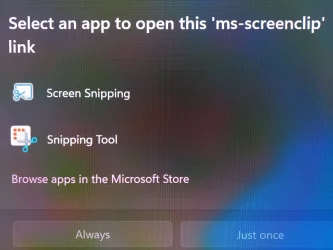
When I use the Print Screen button to take a screenshot, this window appeared. This happened after using the registry file. What is Screen Snapping? This is the first time I've seen it.
"This image was taken taken using a mobile phone"

Screenshot 2025-10-16 113923.webp

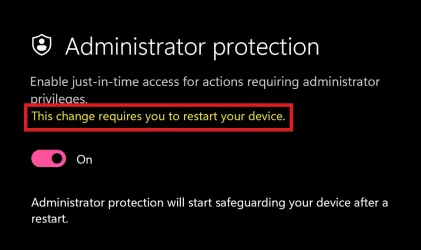
Also, when activating the new Administrator Protection feature, it keeps requesting a restart even after restarting several times..

Screenshot 2025-10-16 114206.webp
 

My Computer My Computer

At a glance

Windows 11 Pro 25H2Intel Core i5 12th generation16GB
OS
Windows 11 Pro 25H2
Computer type
PC/Desktop
CPU
Intel Core i5 12th generation
Motherboard
GIGABYTE
Memory
16GB
PSU
750W
I wrote a Gradual Rollout list. Some features are enabled by default in the latest security updates. However, there are still some features that Microsoft does not seem to plan to rollout in the public version immediately. I really like the new features of the snipping tool. Fast text extractor and annotation is very useful features.

Code:
⌈Gradual Rollout⌋👌 [Taskbar] New! Show jump list when hovering on inactive taskbar apps.
⌈Gradual Rollout⌋👌 [File Explorer] New! New Open Files in a New Tab in the same Window.
⌈Gradual Rollout⌋👌 [File Explorer] New! Improvements to the dark mode experience in File Explorer starting with key actions like copy, move, and delete dialogs.
⌈Gradual Rollout⌋👌 [Desktop] New! You can now move the hardware indicators for brightness, volume, airplane mode, and virtual desktops to different positions on your screen. To change their position, go to Settings > System > Notifications, and then pick from the options in the Position of the onscreen pop-up in the dropdown list.
⌈Gradual Rollout⌋👌 [Snap] New! We are introducing an improvement to Snap in Windows 11 aimed at driving contextual learning and discovery of the feature. Inline messaging will now appear when you accidentally invoke the Snap Bar when dragging an app to the top middle of your desktop or Snap Flyout when hovering over the Minimize or Maximize button of an app. This messaging is designed to provide guidance on snapping app windows and educating users on the keyboard shortcuts for quickly snapping app windows in the future. We are trying several variants of this experience out.
⌈Gradual Rollout⌋👌 [Administrator Protection Preview] New! Administrator protection aims to protect free floating admin rights for administrator users allowing them to still perform all admin functions with just-in-time admin privileges. This feature is off by default and needs to be enabled via OMA-URI in Intune or via group policy.
⌈Gradual Rollout⌋👌 [Drag Tray] New! Drag Tray is a flyout that appears at the top edge of the screen with different options for sharing a file.
⌈Gradual Rollout⌋👌 [Drag Tray] New! Drag Tray now supports multi-file sharing, intelligently surfaces more relevant apps, and enables seamless file movement to a chosen folder.
⌈Gradual Rollout⌋👌 [Windows Share] New! You can find apps installed on your PC or apps available in the Microsoft Store directly within the Windows share window using “Find Apps” under the “Share using” section.
⌈Gradual Rollout⌋👌 [Start menu] New! Introducing the new Start menu for Windows 11. Updated Start menu shows pinned apps on the top, recommended apps and files in the middle, and installed apps which are grouped by a new category UI on the bottom.
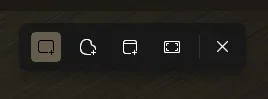
⌈Gradual Rollout⌋👌 [Snipping Tool] New! Snipping tool capture toolbar with the cursor hovering over the new【Text Extractor】tool. We are adding text extractor in the Snipping Tool capture bar – designed to minimize the number of steps it takes to copy text to your clipboard without having to take a screenshot of your screen.
⌈Gradual Rollout⌋👌 [Snipping Tool] New! The Win + Shift + T shortcut activates the Snipping Tool's text extractor in Windows 11, which allows you to select and copy text directly from the screen without taking a full screenshot.
⌈Gradual Rollout⌋👌 [Snipping Tool] New! Snipping Tool's screen capture and perfect screenshot capturing a specific area of the screen. We're introducing two new features to Snipping Tool - perfect screenshot and color picker.
⌈Gradual Rollout⌋👌 [Snipping Tool] New! Snipping Tool playback app window toolbar with the cursor hovering over the new【Export GIF】tool. We are adding GIF export for screen recordings – designed to boost your productivity and turn quick captures into shareable moments.
⌈Gradual Rollout⌋👌 [Snipping Tool] New! Snipping Tool Capture Toolbar with the cursor hovering over the new Quick markup tool. We're introducing Quick markup – a faster way to annotate your screenshots and streamline your workflow!
⌈Gradual Rollout⌋👌 [Windows] Improvements and features rolled out gradually in the security cumulative updates from KB5043080 (26100.1742) to KB5066835 (26100.6899).


Some features may not be listed. because there are some gradually rolling out features that default by enabled in the latest update.

Enablement Package of features for Windows 11 24H2 and 25H2

:-)
 

My Computer My Computer

At a glance

Windows 11, version 25H2 (26200)AMD Ryzen 9 9950X 16-Core ProcessorDDR5-6000 (CL36) 64.0 GBNVIDIA GeForce RTX 4090
OS
Windows 11, version 25H2 (26200)
Computer type
PC/Desktop
CPU
AMD Ryzen 9 9950X 16-Core Processor
Motherboard
ASRock B650M PG Riptide
Memory
DDR5-6000 (CL36) 64.0 GB
Graphics Card(s)
NVIDIA GeForce RTX 4090
PSU
1200W
Case
Phanteks Enthoo Pro 2
Cooling
Noctua NH-D12L
I wrote a Gradual Rollout list. Some features are enabled by default in the latest security updates. However, there are still some features that Microsoft does not seem to plan to rollout in the public version immediately. I really like the new features of the snipping tool. Fast text extractor and annotation is very useful features.

Code:
⌈Gradual Rollout⌋👌 [Taskbar] New! Show jump list when hovering on inactive taskbar apps.
⌈Gradual Rollout⌋👌 [File Explorer] New! New Open Files in a New Tab in the same Window.
⌈Gradual Rollout⌋👌 [File Explorer] New! Improvements to the dark mode experience in File Explorer starting with key actions like copy, move, and delete dialogs.
⌈Gradual Rollout⌋👌 [Desktop] New! You can now move the hardware indicators for brightness, volume, airplane mode, and virtual desktops to different positions on your screen. To change their position, go to Settings > System > Notifications, and then pick from the options in the Position of the onscreen pop-up in the dropdown list.
⌈Gradual Rollout⌋👌 [Snap] New! We are introducing an improvement to Snap in Windows 11 aimed at driving contextual learning and discovery of the feature. Inline messaging will now appear when you accidentally invoke the Snap Bar when dragging an app to the top middle of your desktop or Snap Flyout when hovering over the Minimize or Maximize button of an app. This messaging is designed to provide guidance on snapping app windows and educating users on the keyboard shortcuts for quickly snapping app windows in the future. We are trying several variants of this experience out.
⌈Gradual Rollout⌋👌 [Administrator Protection Preview] New! Administrator protection aims to protect free floating admin rights for administrator users allowing them to still perform all admin functions with just-in-time admin privileges. This feature is off by default and needs to be enabled via OMA-URI in Intune or via group policy.
⌈Gradual Rollout⌋👌 [Drag Tray] New! Drag Tray is a flyout that appears at the top edge of the screen with different options for sharing a file.
⌈Gradual Rollout⌋👌 [Drag Tray] New! Drag Tray now supports multi-file sharing, intelligently surfaces more relevant apps, and enables seamless file movement to a chosen folder.
⌈Gradual Rollout⌋👌 [Windows Share] New! You can find apps installed on your PC or apps available in the Microsoft Store directly within the Windows share window using “Find Apps” under the “Share using” section.
⌈Gradual Rollout⌋👌 [Start menu] New! Introducing the new Start menu for Windows 11. Updated Start menu shows pinned apps on the top, recommended apps and files in the middle, and installed apps which are grouped by a new category UI on the bottom.
⌈Gradual Rollout⌋👌 [Snipping Tool] New! Snipping tool capture toolbar with the cursor hovering over the new【Text Extractor】tool. We are adding text extractor in the Snipping Tool capture bar – designed to minimize the number of steps it takes to copy text to your clipboard without having to take a screenshot of your screen.
⌈Gradual Rollout⌋👌 [Snipping Tool] New! The Win + Shift + T shortcut activates the Snipping Tool's text extractor in Windows 11, which allows you to select and copy text directly from the screen without taking a full screenshot.
⌈Gradual Rollout⌋👌 [Snipping Tool] New! Snipping Tool's screen capture and perfect screenshot capturing a specific area of the screen. We're introducing two new features to Snipping Tool - perfect screenshot and color picker.
⌈Gradual Rollout⌋👌 [Snipping Tool] New! Snipping Tool playback app window toolbar with the cursor hovering over the new【Export GIF】tool. We are adding GIF export for screen recordings – designed to boost your productivity and turn quick captures into shareable moments.
⌈Gradual Rollout⌋👌 [Snipping Tool] New! Snipping Tool Capture Toolbar with the cursor hovering over the new Quick markup tool. We're introducing Quick markup – a faster way to annotate your screenshots and streamline your workflow!
⌈Gradual Rollout⌋👌 [Windows] Improvements and features rolled out gradually in the security cumulative updates from KB5043080 (26100.1742) to KB5066835 (26100.6899).


Some features may not be listed. because there are some gradually rolling out features that default by enabled in the latest update.

Enablement Package of features for Windows 11 24H2 and 25H2

:-)
[Taskbar] New! Show jump list when hovering on inactive taskbar apps. not working for me in 26200.6899.
[File Explorer] New! Improvements to the dark mode experience in File Explorer starting with key actions like copy, move, and delete dialogs. not working.
[Snap] New! We are introducing an improvement to Snap in Windows 11 aimed at driving contextual learning and discovery of the feature. not working.
Administrator Protection Preview is canceled in 26100/200.6725.
[Drag Tray] New! Drag Tray is a flyout that appears at the top edge of the screen with different options for sharing a file. not working.
 

My Computer My Computer

At a glance

26200.8037i5-11400F32GBGeforce GT-1030
OS
26200.8037
Computer type
PC/Desktop
CPU
i5-11400F
Motherboard
Gigabyte
Memory
32GB
Graphics Card(s)
Geforce GT-1030
Keyboard
Logitech K400
Mouse
Logitech M720
Internet Speed
600 Mb
Browser
Edge
[Taskbar] New! Show jump list when hovering on inactive taskbar apps. not working for me in 26200.6899.
[File Explorer] New! Improvements to the dark mode experience in File Explorer starting with key actions like copy, move, and delete dialogs. not working.
[Snap] New! We are introducing an improvement to Snap in Windows 11 aimed at driving contextual learning and discovery of the feature. not working.

It work on 2 PC and VMs in 26200.6899. If it doesn't work for you please check the software installed on your system.
 

My Computer My Computer

At a glance

Windows 11, version 25H2 (26200)AMD Ryzen 9 9950X 16-Core ProcessorDDR5-6000 (CL36) 64.0 GBNVIDIA GeForce RTX 4090
OS
Windows 11, version 25H2 (26200)
Computer type
PC/Desktop
CPU
AMD Ryzen 9 9950X 16-Core Processor
Motherboard
ASRock B650M PG Riptide
Memory
DDR5-6000 (CL36) 64.0 GB
Graphics Card(s)
NVIDIA GeForce RTX 4090
PSU
1200W
Case
Phanteks Enthoo Pro 2
Cooling
Noctua NH-D12L
Back
Top Bottom