How to install individual standalone apps in sysprep mode


DMD

Well-known member
Member
Local time
7:12 PM
Posts
218
OS
W11
Good evening
I ask how to install single stand alone apps in sysprep mode, as I get the error message.
Translated message:
"Installation of this app package with App Installer is not supported as it uses some restricted functionality"
Thank you
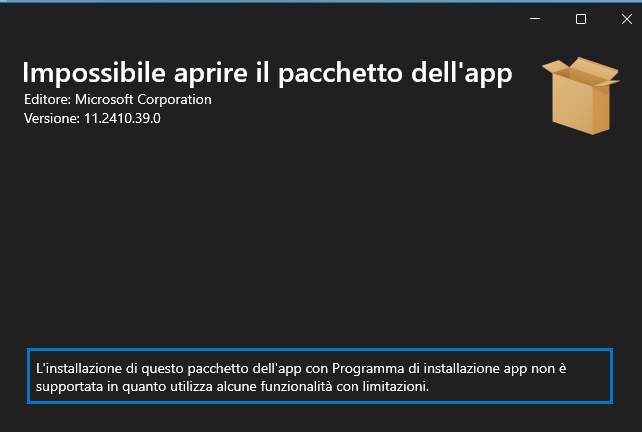
Immagine-2024-12-15-184355.png
 

My Computer

System One

  • OS
    W11
    Computer type
    PC/Desktop
    CPU
    CPU AMD Ryzen 9 7950X
    Motherboard
    ASUS ROG Strix X670E-F Gaming WiFi
    Memory
    G.Skill Flare X5 32GB Kit DDR5-6000 CL32 (F5-6000J3238F16GX2-FX5)
    Monitor(s) Displays
    LG E2381VR
    Screen Resolution
    1920x1080
    Hard Drives
    1x Samsung Memorie MZ-V8P1T0B 980 PRO SSD 1TB
    2x Western Digital WD Red Nas 4TB
    PSU
    SEASONIC FOCUS PX-850 Plus Platinum
    Case
    Corsair 4000D Airflow
    Cooling
    ARCTIC Liquid Freezer II 280 A-RGB
    Keyboard
    Logitech G510
    Mouse
    Logitech G502 HERO
    Browser
    Firefox
    Antivirus
    Avg free
    Other Info
    Download: 90 Mbps
    Upload: 20Mbps
I beg your pardon , I had forgotten
"Microsoft.Paint_11.2410.39.0_neutral_~_8wekyb3d8bbwe.Msixbundle"
 

My Computer

System One

  • OS
    W11
    Computer type
    PC/Desktop
    CPU
    CPU AMD Ryzen 9 7950X
    Motherboard
    ASUS ROG Strix X670E-F Gaming WiFi
    Memory
    G.Skill Flare X5 32GB Kit DDR5-6000 CL32 (F5-6000J3238F16GX2-FX5)
    Monitor(s) Displays
    LG E2381VR
    Screen Resolution
    1920x1080
    Hard Drives
    1x Samsung Memorie MZ-V8P1T0B 980 PRO SSD 1TB
    2x Western Digital WD Red Nas 4TB
    PSU
    SEASONIC FOCUS PX-850 Plus Platinum
    Case
    Corsair 4000D Airflow
    Cooling
    ARCTIC Liquid Freezer II 280 A-RGB
    Keyboard
    Logitech G510
    Mouse
    Logitech G502 HERO
    Browser
    Firefox
    Antivirus
    Avg free
    Other Info
    Download: 90 Mbps
    Upload: 20Mbps

is this of any help.

best of luck, Steve ..
 

My Computers

System One System Two

  • OS
    Debian 13 KDE .. Windows 11 Home
    Computer type
    PC/Desktop
    Manufacturer/Model
    HP 24" AiO
    CPU
    Ryzen 7 5825u
    Motherboard
    HP
    Memory
    64GB DDR4 3200
    Graphics Card(s)
    Ryzen 7 5825u
    Sound Card
    RealTek
    Monitor(s) Displays
    24" HP AiO
    Screen Resolution
    1920 x 1080 @60 Hz
    Hard Drives
    1TB WD Blue SN580 M2 SSD Partitioned.
    2x 1TB USB HDD External Backup/Storage.
    PSU
    90W external power brick
    Case
    24" All in One
    Cooling
    Default Air Cooling
    Keyboard
    HP WiFi UK extended
    Mouse
    HP WiFi 3 Button
    Internet Speed
    1GB full fibre
    Browser
    Edge & Firefox
    Antivirus
    AVG Internet Security/Windows Defender
    Other Info
    Mainly Open Source Software
  • Operating System
    Ubuntu 22.04.5 LTS
    Computer type
    Laptop
    Manufacturer/Model
    Dell 13" Latitude 2017
    CPU
    i5 7200u
    Motherboard
    Dell
    Memory
    16GB DDR4
    Graphics card(s)
    Intel
    Sound Card
    Intel
    Monitor(s) Displays
    13" Dell Laptop
    Hard Drives
    250GB Crucial 2.5" SSD
    Mouse
    Generic WiFi 3 button
    Internet Speed
    WiFi only
    Browser
    Firefox
    Antivirus
    ClamAV TK
    Other Info
    Mainly Open Source Software
  • Like
Reactions: DMD
I think you're repeating the same sysprep mistakes as before. AppInstaller will try to install Paint for the current user profile. Which is something you're supposed to avoid during sysprep.

Why aren't you adding Paint using DISM /Add-ProvisionedAppxPackage or PS's Add-AppxProvisionedPackage?
 

My Computer

System One

  • OS
    Windows 7
  • Like
Reactions: DMD
Thanks
@garlin
@XxXxX

I ran the powershell command
dism /online /add-provisionedappxpackage /packagepath:"C:\Microsoft.Paint_11.2410.39.0_neutral_~_8wekyb3d8bbwe.Msixbundle" /Skiplicense

and it was successful with no errors.
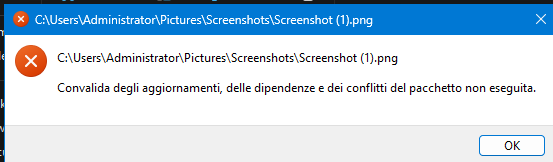
But paint won't open and if I try to open an image it returns the message
“Validation of package updates, dependencies, and conflicts not performed.”
Evidently in admin mode I think you can't install app executable packages.

Immagine-2024-12-15-222948.png
 
Last edited:

My Computer

System One

  • OS
    W11
    Computer type
    PC/Desktop
    CPU
    CPU AMD Ryzen 9 7950X
    Motherboard
    ASUS ROG Strix X670E-F Gaming WiFi
    Memory
    G.Skill Flare X5 32GB Kit DDR5-6000 CL32 (F5-6000J3238F16GX2-FX5)
    Monitor(s) Displays
    LG E2381VR
    Screen Resolution
    1920x1080
    Hard Drives
    1x Samsung Memorie MZ-V8P1T0B 980 PRO SSD 1TB
    2x Western Digital WD Red Nas 4TB
    PSU
    SEASONIC FOCUS PX-850 Plus Platinum
    Case
    Corsair 4000D Airflow
    Cooling
    ARCTIC Liquid Freezer II 280 A-RGB
    Keyboard
    Logitech G510
    Mouse
    Logitech G502 HERO
    Browser
    Firefox
    Antivirus
    Avg free
    Other Info
    Download: 90 Mbps
    Upload: 20Mbps
You didn't specify the dependent packages, which DesktopAppInstaller silently does for you.

Paint 11.2410.39.0 requires 3 dependencies:
<PackageDependency Name="Microsoft.VCLibs.140.00" MinVersion="14.0.33519.0" Publisher="CN=Microsoft Corporation, O=Microsoft Corporation, L=Redmond, S=Washington, C=US"/>
<PackageDependency Name="Microsoft.VCLibs.140.00.UWPDesktop" MinVersion="14.0.33728.0" Publisher="CN=Microsoft Corporation, O=Microsoft Corporation, L=Redmond, S=Washington, C=US"/>
<PackageDependency Name="Microsoft.UI.Xaml.2.8" MinVersion="8.2310.30001.0" Publisher="CN=Microsoft Corporation, O=Microsoft Corporation, L=Redmond, S=Washington, C=US"/>


This is a DISM command (PS has a separate set of DISM commands which mostly duplicate the external DISM commands):
Code:
dism /online /add-provisionedappxpackage /packagepath:"C:\Microsoft.Paint_11.2410.39.0_neutral_~_8wekyb3d8bbwe.Msixbundle" /Skiplicense

Find the latest framework packages, and register everything in one pass:
Code:
dism /online /add-provisionedappxpackage /packagepath:"C:\Microsoft.Paint_11.2410.39.0_neutral_~_8wekyb3d8bbwe.Msixbundle" /Skiplicense /DependencyPackagePath:\path\VCLibs.appx \path\VCLibs.UWPDesktop.appx \path\UI.Xaml.appx
 

My Computer

System One

  • OS
    Windows 7
  • Like
Reactions: DMD
Good morning.
I am reopening this discussion to ask if it is possible to install certain apps in silent mode.
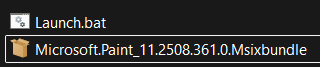
For example, I tried inserting the PowerShell command into a batch script and then creating a self-extracting file with WinRAR to create a single exe file, but it didn't work.

Immagine-2025-09-25-081949.png


This is the sample script I used "Launch.bat":

Code:
<# : batch script
@echo off

@chcp 28591 > nul
::@mode con cols=101 lines=20
@Title Run in ADMINISTRATOR mode
:: We are running the commands with administrator permissions.
::------------------------------------------
:: --> Verifying permissions
>nul 2>&1 "%SYSTEMROOT%\system32\cacls.exe" "%SYSTEMROOT%\system32\config\system"
:: --> Error: you do not have administrator rights.
if '%errorlevel%' NEQ '0' (
echo     Request for administrator privileges
goto UACPrompt
) else ( goto gotAdmin )
:UACPrompt
@echo Set UAC = CreateObject^("Shell.Application"^) > "%temp%\getadmin.vbs"
set params = %*:"="
echo UAC.ShellExecute "%~s0", "%params%", "", "runas", 1 >> "%temp%\getadmin.vbs"
"%temp%\getadmin.vbs"
exit /B
:gotAdmin
if exist "%temp%\getadmin.vbs" ( del "%temp%\getadmin.vbs" )
pushd "%CD%"
CD /D "%~dp0"

cls
Color 1f
echo ==========================================
echo.
echo               App Paint
echo.
echo ==========================================
echo.
echo             Please wait...

powershell Add-AppxPackage "Microsoft.Paint_11.2508.361.0.Msixbundle" > NUL 2>&1

exit
 

My Computer

System One

  • OS
    W11
    Computer type
    PC/Desktop
    CPU
    CPU AMD Ryzen 9 7950X
    Motherboard
    ASUS ROG Strix X670E-F Gaming WiFi
    Memory
    G.Skill Flare X5 32GB Kit DDR5-6000 CL32 (F5-6000J3238F16GX2-FX5)
    Monitor(s) Displays
    LG E2381VR
    Screen Resolution
    1920x1080
    Hard Drives
    1x Samsung Memorie MZ-V8P1T0B 980 PRO SSD 1TB
    2x Western Digital WD Red Nas 4TB
    PSU
    SEASONIC FOCUS PX-850 Plus Platinum
    Case
    Corsair 4000D Airflow
    Cooling
    ARCTIC Liquid Freezer II 280 A-RGB
    Keyboard
    Logitech G510
    Mouse
    Logitech G502 HERO
    Browser
    Firefox
    Antivirus
    Avg free
    Other Info
    Download: 90 Mbps
    Upload: 20Mbps
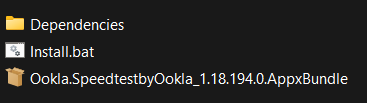
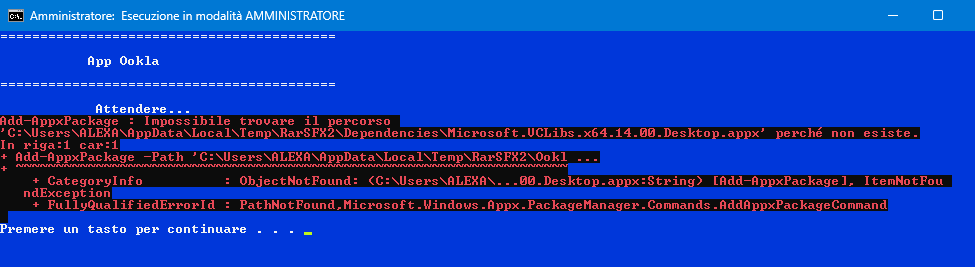
I ran another test with a different app, downloading the dependencies from the same link Microsoft Store - Generation Project (v1.2.3) [by @rgadguard & mkuba50]
and modifying the script.

Immagine-2025-09-25-104211.png


Darn, it can't find the path.
Screenshot-293.png


Code:
<# : batch script
@echo off

@chcp 28591 > nul
::@mode con cols=101 lines=20
@Title Esecuzione in modalità AMMINISTRATORE
:: Eseguiamo i comandi con i permessi di amministratore
::------------------------------------------
:: --> Verifica delle autorizzazioni
>nul 2>&1 "%SYSTEMROOT%\system32\cacls.exe" "%SYSTEMROOT%\system32\config\system"
:: --> Errore non hai i diritti di amministratore
if '%errorlevel%' NEQ '0' (
echo     Richiesta dei privilegi di amministratore
goto UACPrompt
) else ( goto gotAdmin )
:UACPrompt
@echo Set UAC = CreateObject^("Shell.Application"^) > "%temp%\getadmin.vbs"
set params = %*:"="
echo UAC.ShellExecute "%~s0", "%params%", "", "runas", 1 >> "%temp%\getadmin.vbs"
"%temp%\getadmin.vbs"
exit /B
:gotAdmin
if exist "%temp%\getadmin.vbs" ( del "%temp%\getadmin.vbs" )
pushd "%CD%"
CD /D "%~dp0"

cls
Color 1f
echo ==========================================
echo.
echo            App Ookla
echo.
echo ==========================================
echo.
echo             Please wait...


set "APP_PATH=%~dp0Ookla.SpeedtestbyOokla_1.18.194.0.AppxBundle"
set "DEPENDENCY_PATH=%~dp0Dependencies"

PowerShell.exe -NoProfile -ExecutionPolicy Bypass -Command "Add-AppxPackage -Path '%APP_PATH%' -DependencyPath '%DEPENDENCY_PATH%\Microsoft.VCLibs.140.00_14.0.33519.0_x64__8wekyb3d8bbwe.Appx', '%DEPENDENCY_PATH%\Microsoft.VCLibs.140.00_14.0.33519.0_x64__8wekyb3d8bbwe.Appx'"

exit
 

My Computer

System One

  • OS
    W11
    Computer type
    PC/Desktop
    CPU
    CPU AMD Ryzen 9 7950X
    Motherboard
    ASUS ROG Strix X670E-F Gaming WiFi
    Memory
    G.Skill Flare X5 32GB Kit DDR5-6000 CL32 (F5-6000J3238F16GX2-FX5)
    Monitor(s) Displays
    LG E2381VR
    Screen Resolution
    1920x1080
    Hard Drives
    1x Samsung Memorie MZ-V8P1T0B 980 PRO SSD 1TB
    2x Western Digital WD Red Nas 4TB
    PSU
    SEASONIC FOCUS PX-850 Plus Platinum
    Case
    Corsair 4000D Airflow
    Cooling
    ARCTIC Liquid Freezer II 280 A-RGB
    Keyboard
    Logitech G510
    Mouse
    Logitech G502 HERO
    Browser
    Firefox
    Antivirus
    Avg free
    Other Info
    Download: 90 Mbps
    Upload: 20Mbps
If you're interested, I finally managed to install the app I wanted in Audit Mode, and I assume the same process can be replicated for other apps.

It took me a couple of days to figure it out, being an ignoramus, but the AI helped me and, after several tests, produced an advanced script in PowerShell.

With a single command, you can install the app with all its dependencies, delete it for the Audit user, and verify the provisioning.

Code:
# Script per Provisioning AppxBundle e Dipendenze
# Eseguire questo script in PowerShell (come Amministratore) in Modalità Audit.

# --- 1. Definizione dei Percorsi (Verificare che tutti i file siano presenti in C:\) ---

# Appx Bundle principale
$AppxBundlePath = "C:\Ookla.SpeedtestbyOokla_1.18.194.0_neutral_~_43tkc6nmykmb6.AppxBundle"

# Dipendenze x64 (Framework, Runtime, VCLibs)
$DependencyPath1_x64 = "C:\Microsoft.NET.Native.Framework.1.7_1.7.27413.0_x64__8wekyb3d8bbwe.Appx"
$DependencyPath2_x64 = "C:\Microsoft.NET.Native.Runtime.1.7_1.7.27422.0_x64__8wekyb3d8bbwe.Appx"
$DependencyPath3_x64 = "C:\Microsoft.VCLibs.140.00_14.0.33519.0_x64__8wekyb3d8bbwe.Appx"

# Dipendenze x86 (Framework, Runtime, VCLibs)
$DependencyPath4_x86 = "C:\Microsoft.NET.Native.Framework.1.7_1.7.27413.0_x86__8wekyb3d8bbwe.Appx"
$DependencyPath5_x86 = "C:\Microsoft.NET.Native.Runtime.1.7_1.7.27422.0_x86__8wekyb3d8bbwe.Appx"
$DependencyPath6_x86 = "C:\Microsoft.VCLibs.140.00_14.0.33519.0_x86__8wekyb3d8bbwe.Appx"


# --- 2. Esecuzione del Provisioning DISM ---

Write-Host "Inizio Provisioning DISM per Ookla Speedtest..."

# Il comando è ora su una riga singola e usa le virgolette per espandere le variabili in modo sicuro.
$DismCommand = "DISM.EXE /Online /Add-ProvisionedAppxPackage /PackagePath:`"$AppxBundlePath`" /SkipLicense /Region:all /DependencyPackagePath:`"$DependencyPath1_x64`" /DependencyPackagePath:`"$DependencyPath2_x64`" /DependencyPackagePath:`"$DependencyPath3_x64`" /DependencyPackagePath:`"$DependencyPath4_x86`" /DependencyPackagePath:`"$DependencyPath5_x86`" /DependencyPackagePath:`"$DependencyPath6_x86`""

# Esegui il comando DISM
Invoke-Expression $DismCommand

if ($LASTEXITCODE -eq 0) {
    Write-Host "Provisioning DISM completato con successo."
} else {
    Write-Error "Errore critico durante il provisioning DISM. Codice di uscita: $LASTEXITCODE"
    Write-Error "Controllare i log di DISM e i percorsi dei file."
    Exit 1
}


# --- 3. Pulizia Installazione Utente Audit ---

Write-Host "Rimozione di eventuali installazioni precedenti dall'utente Audit..."
Get-AppxPackage -AllUsers | Where-Object {$_.Name -like "*Ookla*"} | Remove-AppxPackage -ErrorAction SilentlyContinue


# --- 4. Verifica Finale del Provisioning ---

Write-Host "Verifica del pacchetto aggiunto all'immagine..."
$Check = Get-AppxProvisionedPackage -Online | Where-Object {$_.PackageName -like "*Ookla*"}

if ($Check) {
    Write-Host "=== VERIFICA COMPLETATA: Il pacchetto Ookla Speedtest è provisionato correttamente. ==="
    $Check | Format-List DisplayName, PackageName, Architecture
} else {
    Write-Error "!!! ERRORE: Il pacchetto Ookla non risulta provisionato. Controllare i log di DISM. !!!"
    Exit 1
}

Write-Host "PROCEDURA COMPLETATA. Ora è possibile eseguire Sysprep."
 

My Computer

System One

  • OS
    W11
    Computer type
    PC/Desktop
    CPU
    CPU AMD Ryzen 9 7950X
    Motherboard
    ASUS ROG Strix X670E-F Gaming WiFi
    Memory
    G.Skill Flare X5 32GB Kit DDR5-6000 CL32 (F5-6000J3238F16GX2-FX5)
    Monitor(s) Displays
    LG E2381VR
    Screen Resolution
    1920x1080
    Hard Drives
    1x Samsung Memorie MZ-V8P1T0B 980 PRO SSD 1TB
    2x Western Digital WD Red Nas 4TB
    PSU
    SEASONIC FOCUS PX-850 Plus Platinum
    Case
    Corsair 4000D Airflow
    Cooling
    ARCTIC Liquid Freezer II 280 A-RGB
    Keyboard
    Logitech G510
    Mouse
    Logitech G502 HERO
    Browser
    Firefox
    Antivirus
    Avg free
    Other Info
    Download: 90 Mbps
    Upload: 20Mbps
Here is the complete procedure I performed, using Advanced PowerShell scripts:
In my example, it was Ookla.SpeedtestbyOokla, but it can be done for any other app or multiple apps at the same time.

I followed this procedure:

In the virtual machine in Audit Mode, I copied all the files related to the app in question, plus all the files related to x64 and x86 dependencies, to the main C directory.

Along with the files, the app installation file with all dependencies must be present, which is the file in PowerShell (Install-Ookla.ps1).

All files must be removed when the entire procedure is complete.


This can be launched via a DOS command.

PowerShell.exe -ExecutionPolicy Bypass -File C:\Install-Ookla.ps1

If we need to install multiple apps, for which there are multiple .ps1 installation files, we can use a single batch command to launch them all in sequence.

Below, I have included the two sample scripts.


PS1 installation file (Ookla.SpeedtestbyOokla)
Unified batch script for multiple apps (personal example)
 

My Computer

System One

  • OS
    W11
    Computer type
    PC/Desktop
    CPU
    CPU AMD Ryzen 9 7950X
    Motherboard
    ASUS ROG Strix X670E-F Gaming WiFi
    Memory
    G.Skill Flare X5 32GB Kit DDR5-6000 CL32 (F5-6000J3238F16GX2-FX5)
    Monitor(s) Displays
    LG E2381VR
    Screen Resolution
    1920x1080
    Hard Drives
    1x Samsung Memorie MZ-V8P1T0B 980 PRO SSD 1TB
    2x Western Digital WD Red Nas 4TB
    PSU
    SEASONIC FOCUS PX-850 Plus Platinum
    Case
    Corsair 4000D Airflow
    Cooling
    ARCTIC Liquid Freezer II 280 A-RGB
    Keyboard
    Logitech G510
    Mouse
    Logitech G502 HERO
    Browser
    Firefox
    Antivirus
    Avg free
    Other Info
    Download: 90 Mbps
    Upload: 20Mbps

Just as a reminder, some users prefer to install Appx packages from sysprep. But you can integrate them into a mounted image using DISM. Or NTLite does it for you with less work (even in the free edition).
 

My Computer

System One

  • OS
    Windows 7
Good to know.
In my ignorance about using NTLite, I tried to open a post about it, but since I didn't receive a reply, I thought the procedure wasn't possible.
If you kindly have any reference links, I would be grateful.
I would also like to know the procedure with NTLite.

Thank you.
 
Last edited:

My Computer

System One

  • OS
    W11
    Computer type
    PC/Desktop
    CPU
    CPU AMD Ryzen 9 7950X
    Motherboard
    ASUS ROG Strix X670E-F Gaming WiFi
    Memory
    G.Skill Flare X5 32GB Kit DDR5-6000 CL32 (F5-6000J3238F16GX2-FX5)
    Monitor(s) Displays
    LG E2381VR
    Screen Resolution
    1920x1080
    Hard Drives
    1x Samsung Memorie MZ-V8P1T0B 980 PRO SSD 1TB
    2x Western Digital WD Red Nas 4TB
    PSU
    SEASONIC FOCUS PX-850 Plus Platinum
    Case
    Corsair 4000D Airflow
    Cooling
    ARCTIC Liquid Freezer II 280 A-RGB
    Keyboard
    Logitech G510
    Mouse
    Logitech G502 HERO
    Browser
    Firefox
    Antivirus
    Avg free
    Other Info
    Download: 90 Mbps
    Upload: 20Mbps
From NTLite's Updates screen, add the folder which contains your downloaded .appxbundle or .msixbundle packages and dependencies. NTLite will add them as provisioned packages in the install image, without needing you to script anything.

This feature is available on the free edition.
 

My Computer

System One

  • OS
    Windows 7
  • Like
Reactions: DMD
Thank you very much for the information.
 

My Computer

System One

  • OS
    W11
    Computer type
    PC/Desktop
    CPU
    CPU AMD Ryzen 9 7950X
    Motherboard
    ASUS ROG Strix X670E-F Gaming WiFi
    Memory
    G.Skill Flare X5 32GB Kit DDR5-6000 CL32 (F5-6000J3238F16GX2-FX5)
    Monitor(s) Displays
    LG E2381VR
    Screen Resolution
    1920x1080
    Hard Drives
    1x Samsung Memorie MZ-V8P1T0B 980 PRO SSD 1TB
    2x Western Digital WD Red Nas 4TB
    PSU
    SEASONIC FOCUS PX-850 Plus Platinum
    Case
    Corsair 4000D Airflow
    Cooling
    ARCTIC Liquid Freezer II 280 A-RGB
    Keyboard
    Logitech G510
    Mouse
    Logitech G502 HERO
    Browser
    Firefox
    Antivirus
    Avg free
    Other Info
    Download: 90 Mbps
    Upload: 20Mbps
Thanks for the advice.
You're right, I tested it with NLTlite and it's much easier.
However, I also learned an alternative procedure with PowerShell, even though I didn't want to.
 

My Computer

System One

  • OS
    W11
    Computer type
    PC/Desktop
    CPU
    CPU AMD Ryzen 9 7950X
    Motherboard
    ASUS ROG Strix X670E-F Gaming WiFi
    Memory
    G.Skill Flare X5 32GB Kit DDR5-6000 CL32 (F5-6000J3238F16GX2-FX5)
    Monitor(s) Displays
    LG E2381VR
    Screen Resolution
    1920x1080
    Hard Drives
    1x Samsung Memorie MZ-V8P1T0B 980 PRO SSD 1TB
    2x Western Digital WD Red Nas 4TB
    PSU
    SEASONIC FOCUS PX-850 Plus Platinum
    Case
    Corsair 4000D Airflow
    Cooling
    ARCTIC Liquid Freezer II 280 A-RGB
    Keyboard
    Logitech G510
    Mouse
    Logitech G502 HERO
    Browser
    Firefox
    Antivirus
    Avg free
    Other Info
    Download: 90 Mbps
    Upload: 20Mbps

Back
Top Bottom