Solved How To Make Windows 11 Taskbar Uncombined and Unlocked


Not sure if that was ever released by the OP but here are some other options for rainmeter


I am addicted to Rainmeter since it's beta release. Now you're poisoning me with some other seasoning... Yummy..
 

My Computer My Computer

At a glance

Windows 11AMD Phenom(tm) II X2 555 Processor 3.20 GHzKingston 16GB DDR3NVidia GeForce GTX 650
OS
Windows 11
Computer type
PC/Desktop
Manufacturer/Model
Unbranded
CPU
AMD Phenom(tm) II X2 555 Processor 3.20 GHz
Motherboard
Asus M4A785T-M
Memory
Kingston 16GB DDR3
Graphics Card(s)
NVidia GeForce GTX 650
Sound Card
VIA HD Audio
Monitor(s) Displays
2x LG 20" Display
Screen Resolution
1600 x 900 60MHz
Hard Drives
WD Blue 1TB HDD
ADATA 500GB SSD
Midas Force 500GB SSD
PSU
Enermax 500W
Case
Unbranded
Cooling
Unbranded
Keyboard
Logitech Wired K120
Mouse
Logitech Wired B100
Internet Speed
20MB Download 1,5MB Upload
Browser
Firefox
Antivirus
McAffee, Malwarebytes, Windows Defender
Other Info
Are you sneaking?

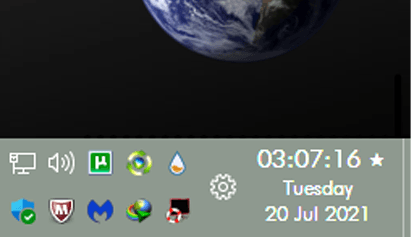
Found something interesting for anyone using the reghack without replacing explorer.exe
YTrayClock

Fully customizable
1626725284692.png
 

My Computer My Computer

At a glance

Windows 11AMD Phenom(tm) II X2 555 Processor 3.20 GHzKingston 16GB DDR3NVidia GeForce GTX 650
OS
Windows 11
Computer type
PC/Desktop
Manufacturer/Model
Unbranded
CPU
AMD Phenom(tm) II X2 555 Processor 3.20 GHz
Motherboard
Asus M4A785T-M
Memory
Kingston 16GB DDR3
Graphics Card(s)
NVidia GeForce GTX 650
Sound Card
VIA HD Audio
Monitor(s) Displays
2x LG 20" Display
Screen Resolution
1600 x 900 60MHz
Hard Drives
WD Blue 1TB HDD
ADATA 500GB SSD
Midas Force 500GB SSD
PSU
Enermax 500W
Case
Unbranded
Cooling
Unbranded
Keyboard
Logitech Wired K120
Mouse
Logitech Wired B100
Internet Speed
20MB Download 1,5MB Upload
Browser
Firefox
Antivirus
McAffee, Malwarebytes, Windows Defender
Other Info
Are you sneaking?

My Computer My Computer

At a glance

Windows 11 Pro
OS
Windows 11 Pro

My Computers My Computers

  • At a glance

    Windows 11 Pro
    OS
    Windows 11 Pro
    Computer type
    PC/Desktop
    Manufacturer/Model
    ASUS ROG Strix
  • At a glance

    Windows 11 Pro
    Operating System
    Windows 11 Pro
    Computer type
    Laptop
    Manufacturer/Model
    ASUS VivoBook
  • ASUS VivoBook 'Lite' ~ Windows 11 Home

My Computer My Computer

At a glance

Windows 11 Pro
OS
Windows 11 Pro

My Computers My Computers

  • At a glance

    Windows 11 Pro
    OS
    Windows 11 Pro
    Computer type
    PC/Desktop
    Manufacturer/Model
    ASUS ROG Strix
  • At a glance

    Windows 11 Pro
    Operating System
    Windows 11 Pro
    Computer type
    Laptop
    Manufacturer/Model
    ASUS VivoBook
  • ASUS VivoBook 'Lite' ~ Windows 11 Home
so this says "can't replace tray clock" when attempting to launch... anything in particular you did to run it? thanks.
Didn't happens on mine. I just turn off the original Windows 11 clock and installed this one. Running really smooth..
 

My Computer My Computer

At a glance

Windows 11AMD Phenom(tm) II X2 555 Processor 3.20 GHzKingston 16GB DDR3NVidia GeForce GTX 650
OS
Windows 11
Computer type
PC/Desktop
Manufacturer/Model
Unbranded
CPU
AMD Phenom(tm) II X2 555 Processor 3.20 GHz
Motherboard
Asus M4A785T-M
Memory
Kingston 16GB DDR3
Graphics Card(s)
NVidia GeForce GTX 650
Sound Card
VIA HD Audio
Monitor(s) Displays
2x LG 20" Display
Screen Resolution
1600 x 900 60MHz
Hard Drives
WD Blue 1TB HDD
ADATA 500GB SSD
Midas Force 500GB SSD
PSU
Enermax 500W
Case
Unbranded
Cooling
Unbranded
Keyboard
Logitech Wired K120
Mouse
Logitech Wired B100
Internet Speed
20MB Download 1,5MB Upload
Browser
Firefox
Antivirus
McAffee, Malwarebytes, Windows Defender
Other Info
Are you sneaking?

Santa is coming again. I wonder what he wraps now..

1626896383402.png
 

My Computer My Computer

At a glance

Windows 11AMD Phenom(tm) II X2 555 Processor 3.20 GHzKingston 16GB DDR3NVidia GeForce GTX 650
OS
Windows 11
Computer type
PC/Desktop
Manufacturer/Model
Unbranded
CPU
AMD Phenom(tm) II X2 555 Processor 3.20 GHz
Motherboard
Asus M4A785T-M
Memory
Kingston 16GB DDR3
Graphics Card(s)
NVidia GeForce GTX 650
Sound Card
VIA HD Audio
Monitor(s) Displays
2x LG 20" Display
Screen Resolution
1600 x 900 60MHz
Hard Drives
WD Blue 1TB HDD
ADATA 500GB SSD
Midas Force 500GB SSD
PSU
Enermax 500W
Case
Unbranded
Cooling
Unbranded
Keyboard
Logitech Wired K120
Mouse
Logitech Wired B100
Internet Speed
20MB Download 1,5MB Upload
Browser
Firefox
Antivirus
McAffee, Malwarebytes, Windows Defender
Other Info
Are you sneaking?

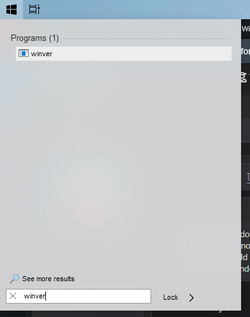
Does Windows Search Work after replacing the explorer?
 

My Computer My Computer

At a glance

Windows 11Intel Core i5 7200u8gb DDR4Intel hd 620+Nvidia 940MX 2gb Gddr5
OS
Windows 11
Computer type
Laptop
Manufacturer/Model
Acer
CPU
Intel Core i5 7200u
Memory
8gb DDR4
Graphics Card(s)
Intel hd 620+Nvidia 940MX 2gb Gddr5
Sound Card
Realtek
Monitor(s) Displays
Laptop Inner Display
Screen Resolution
1366x768
Hard Drives
1000GB
Browser
Chrome
Does Windows Search Work after replacing the explorer?
Yes it works.
Except if you apply the reghack to "undocking disabled," the button on the Taskbar usually doesn't work.
I installed StartIsBack++ to replace the Start Menu, and the search works again.
The "undocking disabled" reghack also makes Win + X, Win + S, and Win + Q shortcuts failed.

This reghack is to block the new right-click menu. If you only need the old taskbar and just happy with
the new right-click menus, don't apply this one.
 

My Computer My Computer

At a glance

Windows 11AMD Phenom(tm) II X2 555 Processor 3.20 GHzKingston 16GB DDR3NVidia GeForce GTX 650
OS
Windows 11
Computer type
PC/Desktop
Manufacturer/Model
Unbranded
CPU
AMD Phenom(tm) II X2 555 Processor 3.20 GHz
Motherboard
Asus M4A785T-M
Memory
Kingston 16GB DDR3
Graphics Card(s)
NVidia GeForce GTX 650
Sound Card
VIA HD Audio
Monitor(s) Displays
2x LG 20" Display
Screen Resolution
1600 x 900 60MHz
Hard Drives
WD Blue 1TB HDD
ADATA 500GB SSD
Midas Force 500GB SSD
PSU
Enermax 500W
Case
Unbranded
Cooling
Unbranded
Keyboard
Logitech Wired K120
Mouse
Logitech Wired B100
Internet Speed
20MB Download 1,5MB Upload
Browser
Firefox
Antivirus
McAffee, Malwarebytes, Windows Defender
Other Info
Are you sneaking?

Yes it works.
Except if you apply the reghack to "undocking disabled," the button on the Taskbar usually doesn't work.
I installed StartIsBack++ to replace the Start Menu, and the search works again.
The "undocking disabled" reghack also makes Win + X, Win + S, and Win + Q shortcuts failed.

This reghack is to block the new right-click menu. If you only need the old taskbar and just happy with
the new right-click menus, don't apply this one.
I need the old windows 10 taskbar with search functioning. I am still on leaked build 21996.1. The main reason i like this build because you can only get windows defender updates no big cummulative update which hangs during background update because i am on Laptop spinning HDD I will move to rtm when i purchase SSD. I find this build lot stable. Using undocking disabled not only breaks the search but also breaks the windows explorer search. Is there a registry hack to fix search with old windows 10 taskbar enabled. I just dont like the spacing between icons of windows 11 taskbar when small taskbar is enabled.
 

My Computer My Computer

At a glance

Windows 11Intel Core i5 7200u8gb DDR4Intel hd 620+Nvidia 940MX 2gb Gddr5
OS
Windows 11
Computer type
Laptop
Manufacturer/Model
Acer
CPU
Intel Core i5 7200u
Memory
8gb DDR4
Graphics Card(s)
Intel hd 620+Nvidia 940MX 2gb Gddr5
Sound Card
Realtek
Monitor(s) Displays
Laptop Inner Display
Screen Resolution
1366x768
Hard Drives
1000GB
Browser
Chrome
I need the old windows 10 taskbar with search functioning. I am still on leaked build 21996.1. The main reason i like this build because you can only get windows defender updates no big cummulative update which hangs during background update because i am on Laptop spinning HDD I will move to rtm when i purchase SSD. I find this build lot stable. Using undocking disabled not only breaks the search but also breaks the windows explorer search. Is there a registry hack to fix search with old windows 10 taskbar enabled. I just dont like the spacing between icons of windows 11 taskbar when small taskbar is enabled.

no other way.

you can install startisback and use its search.

1627008361354.png
 

My Computer My Computer

At a glance

Windows 11 x64 v23H2 Build 22631.3958
OS
Windows 11 x64 v23H2 Build 22631.3958
Computer type
PC/Desktop
Manufacturer/Model
Acer
no other way.

you can install startisback and use its search.

View attachment 3855
After replacing windows 10 21h1 explorer.exe to windows 11 search is working but its on the center of screen even i enabled windows 10 start menu(because i am on build 21996.1) which is not a big deal for me but right click on startmenu button doesnot work is there a way to enable right click on start button.
 

My Computer My Computer

At a glance

Windows 11Intel Core i5 7200u8gb DDR4Intel hd 620+Nvidia 940MX 2gb Gddr5
OS
Windows 11
Computer type
Laptop
Manufacturer/Model
Acer
CPU
Intel Core i5 7200u
Memory
8gb DDR4
Graphics Card(s)
Intel hd 620+Nvidia 940MX 2gb Gddr5
Sound Card
Realtek
Monitor(s) Displays
Laptop Inner Display
Screen Resolution
1366x768
Hard Drives
1000GB
Browser
Chrome
After replacing windows 10 21h1 explorer.exe to windows 11 search is working but its on the center of screen even i enabled windows 10 start menu(because i am on build 21996.1) and right click on startmenu button doesnot work is there a way to enable right click on start button.

just remove the UndockingDisabled or set it to 0
 

My Computer My Computer

At a glance

Windows 11 x64 v23H2 Build 22631.3958
OS
Windows 11 x64 v23H2 Build 22631.3958
Computer type
PC/Desktop
Manufacturer/Model
Acer
just remove the UndockingDisabled or set it to 0
I haven't use the UndockingDisable in registry i just replaced the explore.exe from windows 10 but right click on start button not working but in rest of taskbar area it is working. Even i installed startisback it is still not working.
 

My Computer My Computer

At a glance

Windows 11Intel Core i5 7200u8gb DDR4Intel hd 620+Nvidia 940MX 2gb Gddr5
OS
Windows 11
Computer type
Laptop
Manufacturer/Model
Acer
CPU
Intel Core i5 7200u
Memory
8gb DDR4
Graphics Card(s)
Intel hd 620+Nvidia 940MX 2gb Gddr5
Sound Card
Realtek
Monitor(s) Displays
Laptop Inner Display
Screen Resolution
1366x768
Hard Drives
1000GB
Browser
Chrome
I haven't use the UndockingDisable in registry i just replaced the explore.exe from windows 10 but right click on start button not working but in rest of taskbar area it is working. Even i installed startisback it is still not working.

it doesnt work on mine either.

what are the functions you want to get from it?

you can still access them from start menu >> all programs >> Windows Tools/Windows System
 

My Computer My Computer

At a glance

Windows 11 x64 v23H2 Build 22631.3958
OS
Windows 11 x64 v23H2 Build 22631.3958
Computer type
PC/Desktop
Manufacturer/Model
Acer
I'm sorry, guys. I can't check so details about these because there are too many registry hacks that I've been used and I don't really remember what. I am now on the latest build (22000.100), didn't use the replacing method, and only apply the "undocking." Installed StartIsBack++ version 2.9.15, and because I'm using multi monitors, I installed Actual Multiple Monitors, so each screen have different customizable taskbar, and we can pin anything to each Taskbar.

I am waiting to install a fresh copy on other PC and will see the results of each hack, you'll be inform.
 

My Computer My Computer

At a glance

Windows 11AMD Phenom(tm) II X2 555 Processor 3.20 GHzKingston 16GB DDR3NVidia GeForce GTX 650
OS
Windows 11
Computer type
PC/Desktop
Manufacturer/Model
Unbranded
CPU
AMD Phenom(tm) II X2 555 Processor 3.20 GHz
Motherboard
Asus M4A785T-M
Memory
Kingston 16GB DDR3
Graphics Card(s)
NVidia GeForce GTX 650
Sound Card
VIA HD Audio
Monitor(s) Displays
2x LG 20" Display
Screen Resolution
1600 x 900 60MHz
Hard Drives
WD Blue 1TB HDD
ADATA 500GB SSD
Midas Force 500GB SSD
PSU
Enermax 500W
Case
Unbranded
Cooling
Unbranded
Keyboard
Logitech Wired K120
Mouse
Logitech Wired B100
Internet Speed
20MB Download 1,5MB Upload
Browser
Firefox
Antivirus
McAffee, Malwarebytes, Windows Defender
Other Info
Are you sneaking?
Third update in a row, didn't touch any of my tweaks! (y)
 

My Computers My Computers

  • At a glance

    Windows 11 Pro
    OS
    Windows 11 Pro
    Computer type
    PC/Desktop
    Manufacturer/Model
    ASUS ROG Strix
  • At a glance

    Windows 11 Pro
    Operating System
    Windows 11 Pro
    Computer type
    Laptop
    Manufacturer/Model
    ASUS VivoBook
  • ASUS VivoBook 'Lite' ~ Windows 11 Home

My Computer My Computer

At a glance

Windows 11AMD Phenom(tm) II X2 555 Processor 3.20 GHzKingston 16GB DDR3NVidia GeForce GTX 650
OS
Windows 11
Computer type
PC/Desktop
Manufacturer/Model
Unbranded
CPU
AMD Phenom(tm) II X2 555 Processor 3.20 GHz
Motherboard
Asus M4A785T-M
Memory
Kingston 16GB DDR3
Graphics Card(s)
NVidia GeForce GTX 650
Sound Card
VIA HD Audio
Monitor(s) Displays
2x LG 20" Display
Screen Resolution
1600 x 900 60MHz
Hard Drives
WD Blue 1TB HDD
ADATA 500GB SSD
Midas Force 500GB SSD
PSU
Enermax 500W
Case
Unbranded
Cooling
Unbranded
Keyboard
Logitech Wired K120
Mouse
Logitech Wired B100
Internet Speed
20MB Download 1,5MB Upload
Browser
Firefox
Antivirus
McAffee, Malwarebytes, Windows Defender
Other Info
Are you sneaking?
Well now I've done it. I followed the instructions from te top most post in this thread. I renamed Explorer to Exploder.exe. I copied explorer.exe from windows 10. That didn't work out well at all so I went back in to delete Explorer.exe and rename the Exploder.exe back to Explorer.exe.
I had a finger twitch ( yeah a likely story) and suddenly Exploder.exe is gone and there is no Explorer.exe either. I found Exploder.exe in Recycle bin and now it wont restore. I get a "required privilege is not held by the client" error.

I am accessing the Windows 11 drive from the Windows 10 drive I have on the same computer. I need the Explorer.exe file from a Windows 11
install or anywhere else I can obtain it. Does anyone have any ideas how I can recover this? Thanks

(gettin older sucks)

Never mind!!! I got it. I ran cmd.exe from taskmanager. I then ran c:\sfc /scannow. I recovered the explorer.exe file nicely.

(gettin older still sucks)

On another note. When I replaced the Explorer.exe file from windows 10 all I got was a black screen and I could not run Explorer.exe from taskmanager. I may try it again. 😁
 
Last edited:

My Computer My Computer

At a glance

Windows 11I7 870016gbMSI 1050t
OS
Windows 11
Computer type
PC/Desktop
Manufacturer/Model
HP Pavilion Gaming 790-0077c
CPU
I7 8700
Motherboard
Berks Form factor: ATX, 36.45 x 24.88 cm (15.35 x 9.79 in)
Memory
16gb
Graphics Card(s)
MSI 1050t
Sound Card
Creative SoundBlaster AE-9
Monitor(s) Displays
Twin Samsung 27" curved
Screen Resolution
1920 x 1080
Hard Drives
512Gb and 1Tb
Back
Top Bottom