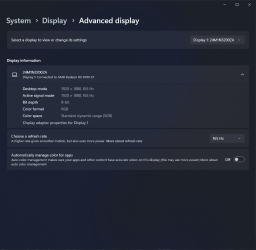
How to permanently disable "Auto Color Management for Apps" in Windows 11?


Od1sseas

Well-known member
Member
Local time
11:47 AM
Posts
52
OS
Windows 11
Disabling the setting from the settings app works, but only temporarily. Powering Off/On or Restarting the PC will enable this setting again which is really annoying. Is there a way to permanently disable it?
 

Attachments

  • Screenshot 2024-03-06 115239.png
    Screenshot 2024-03-06 115239.png
    79.1 KB · Views: 11

My Computer My Computer

At a glance

Windows 11Core i5 13600KF2x16GB 7200Mhz C34 TunedRadeon RX 6700 XT
OS
Windows 11
Computer type
PC/Desktop
Manufacturer/Model
Custom
CPU
Core i5 13600KF
Motherboard
Asrock Z790 PG Lightning
Memory
2x16GB 7200Mhz C34 Tuned
Graphics Card(s)
Radeon RX 6700 XT
Monitor(s) Displays
Philips 24M1N3200ZA (165Hz IPS)
Screen Resolution
1080p
Hard Drives
1TB NVMe (3GB/s)
PSU
Aerocool VX 550W
Case
Aerocool Hive v3
Cooling
Xilence M705D
Browser
Edge
Antivirus
Malwarebytes
I don't know if it's still relevant :

Find the GraphicsDrivers global registry key (HKEY_LOCAL_MACHINE\SYSTEM\CurrentControlSet\Control\GraphicsDrivers) in the registry

Name: EnableAcmSupportDeveloperPreview

value: 0

If the monitor is already connected, it should be disconnected and reconnected. In case of an internal panel, restart the laptop.

Maybe this will be useful
 
Last edited:

My Computer My Computer

At a glance

Microsoft Windows 11 HomeIntel Core i5-13490F2 x 16 Patriot Memory (PDP Systems) PSD516G56...GIGABYTE GeForce RTX 4070 WINDFORCE OC 12G (G...
OS
Microsoft Windows 11 Home
Computer type
PC/Desktop
Manufacturer/Model
MSI MS-7D98
CPU
Intel Core i5-13490F
Motherboard
MSI B760 GAMING PLUS WIFI
Memory
2 x 16 Patriot Memory (PDP Systems) PSD516G560081 6400MT (32-37-37-74); 1.35V)
Graphics Card(s)
GIGABYTE GeForce RTX 4070 WINDFORCE OC 12G (GV-N4070WF3OC-12GD)
Sound Card
Bluetooth Аудио
Monitor(s) Displays
INNOCN 15K1F
Screen Resolution
1920 x 1080
Hard Drives
WD_BLACK SN770 250GB
KINGSTON SNV2S1000G (ELFK0S.6)
PSU
Thermaltake Toughpower GF3 1000W
Case
CG560 - DeepCool
Cooling
ID-COOLING SE-224-XTS / 2 x 140Mm Fan - rear and top; 3 x 120Mm - front
Keyboard
Corsair K70 RGB TKL
Mouse
Corsair KATAR PRO XT
Internet Speed
100 Mbps
Browser
Firefox
Antivirus
Microsoft Defender Antivirus
Other Info
https://www.userbenchmark.com/UserRun/66553205

My Computers My Computers

  • At a glance

    Windows 11 Pro 26H2 26300.9457i9-10900 10 core 20 threads32 gbnone-Intel UHD Graphics 630
    OS
    Windows 11 Pro 26H2 26300.9457
    Computer type
    PC/Desktop
    Manufacturer/Model
    Dell Optiplex 7080
    CPU
    i9-10900 10 core 20 threads
    Motherboard
    DELL 0J37VM
    Memory
    32 gb
    Graphics Card(s)
    none-Intel UHD Graphics 630
    Sound Card
    Integrated Realtek
    Monitor(s) Displays
    Benq 27
    Screen Resolution
    2560x1440
    Hard Drives
    2x1tb Solidigm m.2 nvme /External drives 512gb Samsung m.2 sata+2tb Kingston m2.nvme
    PSU
    500w
    Case
    MT
    Cooling
    Dell Premium
    Keyboard
    Logitech wired
    Mouse
    Logitech wireless
    Internet Speed
    so slow I'm too embarrassed to tell
    Browser
    #1 Edge #2 Firefox
    Antivirus
    Defender+MWB Premium
  • At a glance

    Windows 11 Pro 24H2 26200.9457AMD Ryzen 7 6800U32 gbintegrated
    Operating System
    Windows 11 Pro 24H2 26200.9457
    Computer type
    PC/Desktop
    Manufacturer/Model
    Beelink Mini PC SER5
    CPU
    AMD Ryzen 7 6800U
    Memory
    32 gb
    Graphics card(s)
    integrated
    Sound Card
    integrated
    Monitor(s) Displays
    Benq 27
    Screen Resolution
    2560x1440
    Hard Drives
    1TB Crucial nvme
    Keyboard
    Logitech wired
    Mouse
    Logitech wireless
    Internet Speed
    still too embarrassed to tell
    Browser
    Firefox
    Antivirus
    Defender
  • System 3 is non compliant Dell 9020 i7-4770/24gb ram Win11 PRO 26200.9457
Back
Top Bottom