
I inadvertently re-enrolled in the Insider Preview program the other day. My intention was to download an .ISO and install it on a VMware virtual machine, which I successfully did.
I forgot about re-enrolling in the Insider Preview program, and today, when I checked for Windows updates, I now see:
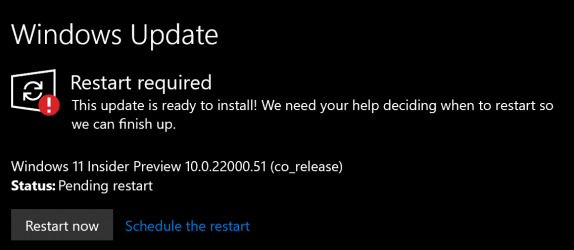
I assume that on my next reboot, my Windows 10 configuration will be replaced with Windows 11. Is there any way to abort the Windows 11 installation at this point?
I forgot about re-enrolling in the Insider Preview program, and today, when I checked for Windows updates, I now see:
I assume that on my next reboot, my Windows 10 configuration will be replaced with Windows 11. Is there any way to abort the Windows 11 installation at this point?
Last edited by a moderator:
My Computers
-
At a glance
Windows 11 Pro 25H2 (OS Build 26200.8524)AMD Ryzen AI 9 HX 370 w/Radeon 890M32GBNVIDIA GeForce RTX 4050 (and IGP Radeon 890M)- OS
- Windows 11 Pro 25H2 (OS Build 26200.8524)
- Computer type
- Laptop
- Manufacturer/Model
- ASUS - ProArt PX13
- CPU
- AMD Ryzen AI 9 HX 370 w/Radeon 890M
- Motherboard
- AMI HN7306WU
- Memory
- 32GB
- Graphics Card(s)
- NVIDIA GeForce RTX 4050 (and IGP Radeon 890M)
- Monitor(s) Displays
- external 24" Dell P2415Q
- Screen Resolution
- 3840 x 2160 on external Dell, 2880 x 1800 on laptop screen
- Hard Drives
- 1TB WD SSD
- Browser
- Vivaldi, Brave, Edge
- Antivirus
- Avast (free version)
-
At a glance
Windows 11 Pro, 21H2 (Build 22000.376)i7-8650U16 GBiGPU (Intel® UHD Graphics 620)- Operating System
- Windows 11 Pro, 21H2 (Build 22000.376)
- Computer type
- Tablet
- Manufacturer/Model
- Surface Pro 6
- CPU
- i7-8650U
- Memory
- 16 GB
- Graphics card(s)
- iGPU (Intel® UHD Graphics 620)
- Monitor(s) Displays
- Dell P2415Q
- Screen Resolution
- 3840 x 2160 on external Dell, 2736 x 1824 on SP6 screen
- Hard Drives
- 512GB PCIe Gen 3 x2 SSD
- Browser
- Vivaldi, Comodo Dragon, Edge
- Antivirus
- Avast (free edition)






