How to reduce ram below what is physically installed


martik777

Well-known member
Local time
7:05 AM
Posts
100
OS
W11 Pro
I have 32GB ddr4 (2x16) and want to make only 8GB available to the O/S. Is this possible? I want to see how well win11 performs with only 8GB
 

My Computers My Computers

  • At a glance

    W11 Pro12100F64GBrx580
    OS
    W11 Pro
    Computer type
    PC/Desktop
    Manufacturer/Model
    Self built
    CPU
    12100F
    Motherboard
    MSI B660M-a wifi pro
    Memory
    64GB
    Graphics Card(s)
    rx580
    Monitor(s) Displays
    2 x 27" 4k
    Screen Resolution
    4k standard
    Hard Drives
    None, SSD and Nvme
  • At a glance

    win10 and 11i7 2600k, i7 4790k, AMD 1100t, i7 8650u (thin...16GB minimumRX480/580's
    Operating System
    win10 and 11
    Computer type
    PC/Desktop
    Manufacturer/Model
    4 DIY desktops + one thinkpad
    CPU
    i7 2600k, i7 4790k, AMD 1100t, i7 8650u (thinkpad laptop)
    Memory
    16GB minimum
    Graphics card(s)
    RX480/580's
If you're not doing that inside a VM, you have to physically remove all but the 8GB you want to test. You can't tell the OS, ignore some.

I would advise setting up a VM of Windows 11 and set that to 8GB and you'll be able to run your tests.
 

My Computers My Computers

  • At a glance

    Windows 11 Pro βIntel® Core™ i7-1165G732 GB DDR4-3200 SDRAMIntel® Iris® Xᵉ Graphics
    OS
    Windows 11 Pro β
    Computer type
    Laptop
    Manufacturer/Model
    HP Pavilion Laptop 15-eg0070wm
    CPU
    Intel® Core™ i7-1165G7
    Memory
    32 GB DDR4-3200 SDRAM
    Graphics Card(s)
    Intel® Iris® Xᵉ Graphics
    Screen Resolution
    1920x1080
    Hard Drives
    2TB PCIe® NVMe™ M.2 SSD
  • At a glance

    macOS Ventura3.4 GHz Quad-Core Intel Core i540 GB 2400 MHz DDR4Radeon Pro 570 4 GB
    Operating System
    macOS Ventura
    Computer type
    PC/Desktop
    Manufacturer/Model
    Apple iMac 27" 5K (2017)
    CPU
    3.4 GHz Quad-Core Intel Core i5
    Memory
    40 GB 2400 MHz DDR4
    Graphics card(s)
    Radeon Pro 570 4 GB
    Monitor(s) Displays
    27" 5K, 34" UW
    Screen Resolution
    Mon 1: 5120 × 2880 Mon 2: 2560 x 1080
    Hard Drives
    32GB NVME, 1TB SSD
If you're not doing that inside a VM, you have to physically remove all but the 8GB you want to test. You can't tell the OS, ignore some.

I would advise setting up a VM of Windows 11 and set that to 8GB and you'll be able to run your tests.
Wouldn't the overhead of the VM distort the results?
 

My Computers My Computers

  • At a glance

    W11 Pro12100F64GBrx580
    OS
    W11 Pro
    Computer type
    PC/Desktop
    Manufacturer/Model
    Self built
    CPU
    12100F
    Motherboard
    MSI B660M-a wifi pro
    Memory
    64GB
    Graphics Card(s)
    rx580
    Monitor(s) Displays
    2 x 27" 4k
    Screen Resolution
    4k standard
    Hard Drives
    None, SSD and Nvme
  • At a glance

    win10 and 11i7 2600k, i7 4790k, AMD 1100t, i7 8650u (thin...16GB minimumRX480/580's
    Operating System
    win10 and 11
    Computer type
    PC/Desktop
    Manufacturer/Model
    4 DIY desktops + one thinkpad
    CPU
    i7 2600k, i7 4790k, AMD 1100t, i7 8650u (thinkpad laptop)
    Memory
    16GB minimum
    Graphics card(s)
    RX480/580's
No, because the overhead would affect the host system, not the client (which would have the 8GB limit)
 

My Computers My Computers

  • At a glance

    Windows 11 Pro βIntel® Core™ i7-1165G732 GB DDR4-3200 SDRAMIntel® Iris® Xᵉ Graphics
    OS
    Windows 11 Pro β
    Computer type
    Laptop
    Manufacturer/Model
    HP Pavilion Laptop 15-eg0070wm
    CPU
    Intel® Core™ i7-1165G7
    Memory
    32 GB DDR4-3200 SDRAM
    Graphics Card(s)
    Intel® Iris® Xᵉ Graphics
    Screen Resolution
    1920x1080
    Hard Drives
    2TB PCIe® NVMe™ M.2 SSD
  • At a glance

    macOS Ventura3.4 GHz Quad-Core Intel Core i540 GB 2400 MHz DDR4Radeon Pro 570 4 GB
    Operating System
    macOS Ventura
    Computer type
    PC/Desktop
    Manufacturer/Model
    Apple iMac 27" 5K (2017)
    CPU
    3.4 GHz Quad-Core Intel Core i5
    Memory
    40 GB 2400 MHz DDR4
    Graphics card(s)
    Radeon Pro 570 4 GB
    Monitor(s) Displays
    27" 5K, 34" UW
    Screen Resolution
    Mon 1: 5120 × 2880 Mon 2: 2560 x 1080
    Hard Drives
    32GB NVME, 1TB SSD

My Computers My Computers

  • At a glance

    Windows 11 Pro βIntel® Core™ i7-1165G732 GB DDR4-3200 SDRAMIntel® Iris® Xᵉ Graphics
    OS
    Windows 11 Pro β
    Computer type
    Laptop
    Manufacturer/Model
    HP Pavilion Laptop 15-eg0070wm
    CPU
    Intel® Core™ i7-1165G7
    Memory
    32 GB DDR4-3200 SDRAM
    Graphics Card(s)
    Intel® Iris® Xᵉ Graphics
    Screen Resolution
    1920x1080
    Hard Drives
    2TB PCIe® NVMe™ M.2 SSD
  • At a glance

    macOS Ventura3.4 GHz Quad-Core Intel Core i540 GB 2400 MHz DDR4Radeon Pro 570 4 GB
    Operating System
    macOS Ventura
    Computer type
    PC/Desktop
    Manufacturer/Model
    Apple iMac 27" 5K (2017)
    CPU
    3.4 GHz Quad-Core Intel Core i5
    Memory
    40 GB 2400 MHz DDR4
    Graphics card(s)
    Radeon Pro 570 4 GB
    Monitor(s) Displays
    27" 5K, 34" UW
    Screen Resolution
    Mon 1: 5120 × 2880 Mon 2: 2560 x 1080
    Hard Drives
    32GB NVME, 1TB SSD
pro

When I used to run VM's the O/S was always slower than a physically installed version so I don't think it would simulate an 8GB system accurately.
 

My Computers My Computers

  • At a glance

    W11 Pro12100F64GBrx580
    OS
    W11 Pro
    Computer type
    PC/Desktop
    Manufacturer/Model
    Self built
    CPU
    12100F
    Motherboard
    MSI B660M-a wifi pro
    Memory
    64GB
    Graphics Card(s)
    rx580
    Monitor(s) Displays
    2 x 27" 4k
    Screen Resolution
    4k standard
    Hard Drives
    None, SSD and Nvme
  • At a glance

    win10 and 11i7 2600k, i7 4790k, AMD 1100t, i7 8650u (thin...16GB minimumRX480/580's
    Operating System
    win10 and 11
    Computer type
    PC/Desktop
    Manufacturer/Model
    4 DIY desktops + one thinkpad
    CPU
    i7 2600k, i7 4790k, AMD 1100t, i7 8650u (thinkpad laptop)
    Memory
    16GB minimum
    Graphics card(s)
    RX480/580's
The system I have now started with 8GB, I did end up upgrading to 16GB, then 32GB later... but the Windows 11 Pro installs I run in Hyper-V with 8GB actually run FASTER than the system did when it was a true 8GB system.
 

My Computers My Computers

  • At a glance

    Windows 11 Pro βIntel® Core™ i7-1165G732 GB DDR4-3200 SDRAMIntel® Iris® Xᵉ Graphics
    OS
    Windows 11 Pro β
    Computer type
    Laptop
    Manufacturer/Model
    HP Pavilion Laptop 15-eg0070wm
    CPU
    Intel® Core™ i7-1165G7
    Memory
    32 GB DDR4-3200 SDRAM
    Graphics Card(s)
    Intel® Iris® Xᵉ Graphics
    Screen Resolution
    1920x1080
    Hard Drives
    2TB PCIe® NVMe™ M.2 SSD
  • At a glance

    macOS Ventura3.4 GHz Quad-Core Intel Core i540 GB 2400 MHz DDR4Radeon Pro 570 4 GB
    Operating System
    macOS Ventura
    Computer type
    PC/Desktop
    Manufacturer/Model
    Apple iMac 27" 5K (2017)
    CPU
    3.4 GHz Quad-Core Intel Core i5
    Memory
    40 GB 2400 MHz DDR4
    Graphics card(s)
    Radeon Pro 570 4 GB
    Monitor(s) Displays
    27" 5K, 34" UW
    Screen Resolution
    Mon 1: 5120 × 2880 Mon 2: 2560 x 1080
    Hard Drives
    32GB NVME, 1TB SSD
Hmmm, I never tried Hyper-v, just vbox and Oracle. Will give it a shot. Thanks!

When did you 8GB install start slowing down?
 

My Computers My Computers

  • At a glance

    W11 Pro12100F64GBrx580
    OS
    W11 Pro
    Computer type
    PC/Desktop
    Manufacturer/Model
    Self built
    CPU
    12100F
    Motherboard
    MSI B660M-a wifi pro
    Memory
    64GB
    Graphics Card(s)
    rx580
    Monitor(s) Displays
    2 x 27" 4k
    Screen Resolution
    4k standard
    Hard Drives
    None, SSD and Nvme
  • At a glance

    win10 and 11i7 2600k, i7 4790k, AMD 1100t, i7 8650u (thin...16GB minimumRX480/580's
    Operating System
    win10 and 11
    Computer type
    PC/Desktop
    Manufacturer/Model
    4 DIY desktops + one thinkpad
    CPU
    i7 2600k, i7 4790k, AMD 1100t, i7 8650u (thinkpad laptop)
    Memory
    16GB minimum
    Graphics card(s)
    RX480/580's
No problem
 

My Computers My Computers

  • At a glance

    Windows 11 Pro βIntel® Core™ i7-1165G732 GB DDR4-3200 SDRAMIntel® Iris® Xᵉ Graphics
    OS
    Windows 11 Pro β
    Computer type
    Laptop
    Manufacturer/Model
    HP Pavilion Laptop 15-eg0070wm
    CPU
    Intel® Core™ i7-1165G7
    Memory
    32 GB DDR4-3200 SDRAM
    Graphics Card(s)
    Intel® Iris® Xᵉ Graphics
    Screen Resolution
    1920x1080
    Hard Drives
    2TB PCIe® NVMe™ M.2 SSD
  • At a glance

    macOS Ventura3.4 GHz Quad-Core Intel Core i540 GB 2400 MHz DDR4Radeon Pro 570 4 GB
    Operating System
    macOS Ventura
    Computer type
    PC/Desktop
    Manufacturer/Model
    Apple iMac 27" 5K (2017)
    CPU
    3.4 GHz Quad-Core Intel Core i5
    Memory
    40 GB 2400 MHz DDR4
    Graphics card(s)
    Radeon Pro 570 4 GB
    Monitor(s) Displays
    27" 5K, 34" UW
    Screen Resolution
    Mon 1: 5120 × 2880 Mon 2: 2560 x 1080
    Hard Drives
    32GB NVME, 1TB SSD
The easiest way is to set up a RAMDisk of 24 GB but do not use it.
See @garlin method.

Using VMs is over complicated and will not give you meaningful results.

However, it is difficult to assess performance with 8 GB unless you are doing something that does a lot of pagefiling.

With 32 GB, you are probably hardly using RAM.

As a sort of rule of thing with average sort of use:

2 GB RAM - Windows will be very slow pagefiling a lot
4 GB RAM - Windows will run slowly, pagefiling fairly often.
8 GB RAM - Windows will run quite well, with occasional pagefiling
16 GB RAM - Windows will run well, with very occasional pagefiling (if any)
32 GB RAM - it will hardy run better than 16 GB RAM.

Where lots of RAM helps if you are running memory hungry apps (or zillions of open tabs in a browser)
Another use is if you are running multiple virtual machines i.e, more RAM, the more you can have open at the same time.

With 8 GB, you can really only run one VM say 4GB RAM.
With 16 GB, you can have 2 or 3.

If you are not using memory hungry apps or VMs, then you may not detect any major reduction in performance with 8 GB.

If you do a lot of pagefiling, performance will be more affected by the type of drive you are using e.g. an old slow HDD will be affected by pagefiling much more than modern fast nvme drive.

So more RAM does not generally improve performance that much but allows more efficient multi-tasking. Ultimately, performance is still CPU limited.

In other words, you can get results from "virtually no impact" to "running like a dog" depending on your hardware set up and what apps you are running.

 
Last edited:

My Computer My Computer

At a glance

Windows 11 Pro + Win11 Canary VM.I9 13th gen i9-13900H 2.60 GHZ16 GB solderedIntegrated Intel Iris XE
OS
Windows 11 Pro + Win11 Canary VM.
Computer type
Laptop
Manufacturer/Model
ASUS Zenbook 14
CPU
I9 13th gen i9-13900H 2.60 GHZ
Motherboard
Yep, Laptop has one.
Memory
16 GB soldered
Graphics Card(s)
Integrated Intel Iris XE
Sound Card
Realtek built in
Monitor(s) Displays
laptop OLED screen
Screen Resolution
2880x1800 touchscreen
Hard Drives
1 TB NVME SSD (only weakness is only one slot)
PSU
Internal + 65W thunderbolt USB4 charger
Case
Yep, got one
Cooling
Stella Artois (UK pint cans - 568 ml) - extra cost.
Keyboard
Built in UK keybd
Mouse
Bluetooth , wireless dongled, wired
Internet Speed
900 mbs (ethernet), wifi 6 typical 350-450 mb/s both up and down
Browser
Edge
Antivirus
Defender
Other Info
TPM 2.0, 2xUSB4 thunderbolt, 1xUsb3 (usb a), 1xUsb-c, hdmi out, 3.5 mm audio out/in combo, ASUS backlit trackpad (inc. switchable number pad)

Macrium Reflect Home V8
Office 365 Family (6 users each 1TB onedrive space)
Hyper-V (a vm runs almost as fast as my older laptop)
Subtract 4 GB from physical memory:
bcdedit /set {current} removememory 4096
Reboot.

Restore all physical memory:
bcdedit /deletevalue {current} removememory
Reboot.
 

Attachments

  • NEW.png
    NEW.png
    31.6 KB · Views: 3

My Computer My Computer

At a glance

Windows 7
OS
Windows 7
Subtract 4 GB from physical memory:
bcdedit /set {current} removememory 4096
Reboot.

Restore all physical memory:
bcdedit /deletevalue {current} removememory
Reboot.
Yeah that is better than my RAMDisk idea.
 

My Computer My Computer

At a glance

Windows 11 Pro + Win11 Canary VM.I9 13th gen i9-13900H 2.60 GHZ16 GB solderedIntegrated Intel Iris XE
OS
Windows 11 Pro + Win11 Canary VM.
Computer type
Laptop
Manufacturer/Model
ASUS Zenbook 14
CPU
I9 13th gen i9-13900H 2.60 GHZ
Motherboard
Yep, Laptop has one.
Memory
16 GB soldered
Graphics Card(s)
Integrated Intel Iris XE
Sound Card
Realtek built in
Monitor(s) Displays
laptop OLED screen
Screen Resolution
2880x1800 touchscreen
Hard Drives
1 TB NVME SSD (only weakness is only one slot)
PSU
Internal + 65W thunderbolt USB4 charger
Case
Yep, got one
Cooling
Stella Artois (UK pint cans - 568 ml) - extra cost.
Keyboard
Built in UK keybd
Mouse
Bluetooth , wireless dongled, wired
Internet Speed
900 mbs (ethernet), wifi 6 typical 350-450 mb/s both up and down
Browser
Edge
Antivirus
Defender
Other Info
TPM 2.0, 2xUSB4 thunderbolt, 1xUsb3 (usb a), 1xUsb-c, hdmi out, 3.5 mm audio out/in combo, ASUS backlit trackpad (inc. switchable number pad)

Macrium Reflect Home V8
Office 365 Family (6 users each 1TB onedrive space)
Hyper-V (a vm runs almost as fast as my older laptop)
I'm helping a friend select a basic desktop but they all start at 8GB. Sounds like it will be plenty for him, I doubt he ever has more than 3 tabs open lol. Easy to add another 8GB dimm too.

I generally have 3-4 browsers open with 300+ tabs and 2-4 4k monitors active which lagged terribly with 16GB on an old X6 1100t, all SSD's. Upgrading to to 32GB, and a 12th gen i3 solved everything - memory in use is < 18gb and cpu is <10% most of the time.
 

My Computers My Computers

  • At a glance

    W11 Pro12100F64GBrx580
    OS
    W11 Pro
    Computer type
    PC/Desktop
    Manufacturer/Model
    Self built
    CPU
    12100F
    Motherboard
    MSI B660M-a wifi pro
    Memory
    64GB
    Graphics Card(s)
    rx580
    Monitor(s) Displays
    2 x 27" 4k
    Screen Resolution
    4k standard
    Hard Drives
    None, SSD and Nvme
  • At a glance

    win10 and 11i7 2600k, i7 4790k, AMD 1100t, i7 8650u (thin...16GB minimumRX480/580's
    Operating System
    win10 and 11
    Computer type
    PC/Desktop
    Manufacturer/Model
    4 DIY desktops + one thinkpad
    CPU
    i7 2600k, i7 4790k, AMD 1100t, i7 8650u (thinkpad laptop)
    Memory
    16GB minimum
    Graphics card(s)
    RX480/580's
For some reason, msconfig doesn't work correctly in W11. Which is the expected way to stress test Windows with lower RAM.
 

My Computer My Computer

At a glance

Windows 7
OS
Windows 7
I'm helping a friend select a basic desktop but they all start at 8GB. Sounds like it will be plenty for him, I doubt he ever has more than 3 tabs open lol. Easy to add another 8GB dimm too.

I generally have 3-4 browsers open with 300+ tabs and 2-4 4k monitors active which lagged terribly with 16GB on an old X6 1100t, all SSD's. Upgrading to to 32GB, and a 12th gen i3 solved everything - memory in use is < 18gb and cpu is <10% most of the time.
So you are only going to prove what we already know.

Be careful and check your friend can add RAM - a lot of laptops for example come with soldered RAM and no expansion capability. I did not know this when I bought my current laptop with 16 GB RAM!

Probably less of an issue for a desktop.

For most average users 8 GB is a good entry point - add RAM later if needed. Very few need more than 16 GB.
What is probably more important is storage type - use SSDs or NVMEs - HDDs are obscolescent technology.


PS just tested @garlin's method - works perfectly. You need to reboot after doing bcdedit for it to take effect.
 

My Computer My Computer

At a glance

Windows 11 Pro + Win11 Canary VM.I9 13th gen i9-13900H 2.60 GHZ16 GB solderedIntegrated Intel Iris XE
OS
Windows 11 Pro + Win11 Canary VM.
Computer type
Laptop
Manufacturer/Model
ASUS Zenbook 14
CPU
I9 13th gen i9-13900H 2.60 GHZ
Motherboard
Yep, Laptop has one.
Memory
16 GB soldered
Graphics Card(s)
Integrated Intel Iris XE
Sound Card
Realtek built in
Monitor(s) Displays
laptop OLED screen
Screen Resolution
2880x1800 touchscreen
Hard Drives
1 TB NVME SSD (only weakness is only one slot)
PSU
Internal + 65W thunderbolt USB4 charger
Case
Yep, got one
Cooling
Stella Artois (UK pint cans - 568 ml) - extra cost.
Keyboard
Built in UK keybd
Mouse
Bluetooth , wireless dongled, wired
Internet Speed
900 mbs (ethernet), wifi 6 typical 350-450 mb/s both up and down
Browser
Edge
Antivirus
Defender
Other Info
TPM 2.0, 2xUSB4 thunderbolt, 1xUsb3 (usb a), 1xUsb-c, hdmi out, 3.5 mm audio out/in combo, ASUS backlit trackpad (inc. switchable number pad)

Macrium Reflect Home V8
Office 365 Family (6 users each 1TB onedrive space)
Hyper-V (a vm runs almost as fast as my older laptop)
For some reason, msconfig doesn't work correctly in W11. Which is the expected way to stress test Windows with lower RAM.
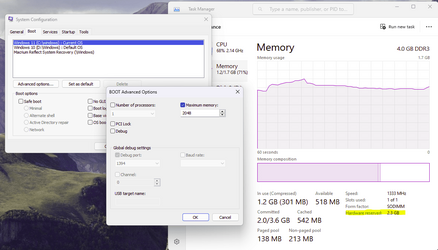
Seems to work for me. Here I have set a W11 machine with 4GB installed RAM to only use 2GB of it. The unused 2GB (plus a little bit more) is now shown as Hardware reserved. Just 1.7GB is available to Windows. Rather surprisingly, it still runs quite well.

1677803321629.png
 

My Computers My Computers

  • At a glance

    Windows 11 HomeAMD Athlon Silver 3050U8GBRadeon Graphics
    OS
    Windows 11 Home
    Computer type
    Laptop
    Manufacturer/Model
    Acer Aspire 3 A315-23-R9VY
    CPU
    AMD Athlon Silver 3050U
    Memory
    8GB
    Graphics Card(s)
    Radeon Graphics
    Monitor(s) Displays
    laptop screen
    Screen Resolution
    1366x768 native resolution, up to 2560x1440 with Radeon Virtual Super Resolution
    Hard Drives
    1TB Samsung EVO 870 SSD (from April 2026: 250GB EVO 850)
    Internet Speed
    150 Mbps
    Browser
    Edge, Firefox
    Antivirus
    Defender
    Other Info
    fully 'Windows 11 ready' laptop. Windows 10 C: partition migrated from my old unsupported 'main machine' then upgraded to 11. A test migration ran Insider builds for 2 months. When 11 was released on 5th October 2021 it was re-imaged back to 10 and was offered the upgrade in Windows Update on 20th October. Windows Update offered the 22H2 Feature Update on 20th September 2022. It got the 23H2 Feature Update on 4th November 2023 through Windows Update, 24H2 on 3rd October 2024 through Windows Update by setting the Target Release Version for 24H2, and 25H2 on 30th September 2025 through Windows Update by setting the Target Release Version for 25H2.

    UPDATE - 11 April 2026: due to mechanical deterioration this PC has been retired from active duty. The OS with all software and files has been migrated to my System Seven in 'Other systems' to carry on as my general purpose 'main machine'.
  • At a glance

    Windows 11 ProIntel® Core™ i5-520M8GB(integrated graphics) Intel HD Graphics
    Operating System
    Windows 11 Pro
    Computer type
    Laptop
    Manufacturer/Model
    Dell Latitude E4310
    CPU
    Intel® Core™ i5-520M
    Motherboard
    0T6M8G
    Memory
    8GB
    Graphics card(s)
    (integrated graphics) Intel HD Graphics
    Screen Resolution
    1366x768
    Hard Drives
    500GB Crucial MX500 SSD
    Browser
    Firefox, Edge
    Antivirus
    Defender
    Other Info
    unsupported machine: Legacy bios, MBR, TPM 1.2, upgraded from W10 to W11 using W10/W11 hybrid install media workaround.

    In-place upgrade to 22H2 using ISO and a workaround.
    Feature Update to 23H2 by manually installing the Enablement Package.
    In-place upgrade to 24H2 using hybrid 23H2/24H2 install media.
    Upgraded to 25H2 by Enablement Package.

    Also running Insider Dev, and Canary builds and Windows 10 as native boot .vhdx.
  • My SYSTEM THREE is a Dell Latitude 5410, i7-10610U, 32GB RAM, 512GB NVMe ssd, supported device running Windows 11 Pro.

    My SYSTEM FOUR is a 2-in-1 convertible Lenovo Yoga 11e 20DA, Celeron N2930, 8GB RAM, 256GB ssd. Unsupported device: currently running Win10 Pro, plus Win11 Pro RTM and Insider Dev, Beta, and RP 24H2 as native boot vhdx.

    My SYSTEM FIVE is a Dell Latitude 3190 2-in-1, Pentium Silver N5030, 8GB RAM, 1TB NVMe ssd, supported device running Windows 11 Pro, plus Insider Beta, Dev, and Canary builds (and a few others) as a native boot .vhdx.

    My SYSTEM SIX is a Dell Latitude 5550, Core Ultra 7 165H, 64GB RAM, 1TB NVMe SSD, supported device, Windows 11 Pro 24H2, Hyper-V host machine. Updated to 25H2 on 30th September 2025.

    My SYSTEM SEVEN is a Lenovo Thinkpad T580, Intel Core i7-8650U, 16GB RAM, 512GB NVMe SSD + 2nd 512GB NVMe SSD, a supported device for Windows 11. This is my current general purpose 'main machine'. The installed Windows 11 Home from my System One has been migrated to this machine.
I have the problem (which is backed by other online complaints), that Maximum memory is ignored on boot, and the value is blanked.
But bcdedit works just fine. That's why I didn't suggest msconfig.
 

My Computer My Computer

At a glance

Windows 7
OS
Windows 7
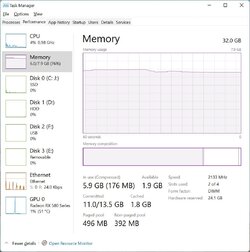
Tested with 8gb ram - zero lag with 5 tabs and office open with 4 sheets.

Opened canary with +80 tabs and it even ran well, albeit some lag switching between tabs but no more than 2 secs.

8gbram.jpg
 

My Computers My Computers

  • At a glance

    W11 Pro12100F64GBrx580
    OS
    W11 Pro
    Computer type
    PC/Desktop
    Manufacturer/Model
    Self built
    CPU
    12100F
    Motherboard
    MSI B660M-a wifi pro
    Memory
    64GB
    Graphics Card(s)
    rx580
    Monitor(s) Displays
    2 x 27" 4k
    Screen Resolution
    4k standard
    Hard Drives
    None, SSD and Nvme
  • At a glance

    win10 and 11i7 2600k, i7 4790k, AMD 1100t, i7 8650u (thin...16GB minimumRX480/580's
    Operating System
    win10 and 11
    Computer type
    PC/Desktop
    Manufacturer/Model
    4 DIY desktops + one thinkpad
    CPU
    i7 2600k, i7 4790k, AMD 1100t, i7 8650u (thinkpad laptop)
    Memory
    16GB minimum
    Graphics card(s)
    RX480/580's
Tested with 8gb ram - zero lag with 5 tabs and office open with 4 sheets.

Opened canary with +80 tabs and it even ran well, albeit some lag switching between tabs but no more than 2 secs.

View attachment 54097
Which pretty much confirms what we all already know.

8 GB is a reasonable amount of RAM for average user.

I just tested my pc with 8 GB - performance was fine.

At 4 GB still pretty good.

At 2 GB it was like swimming in molasses but it still ran.

Absolutely no surprises there.
 

My Computer My Computer

At a glance

Windows 11 Pro + Win11 Canary VM.I9 13th gen i9-13900H 2.60 GHZ16 GB solderedIntegrated Intel Iris XE
OS
Windows 11 Pro + Win11 Canary VM.
Computer type
Laptop
Manufacturer/Model
ASUS Zenbook 14
CPU
I9 13th gen i9-13900H 2.60 GHZ
Motherboard
Yep, Laptop has one.
Memory
16 GB soldered
Graphics Card(s)
Integrated Intel Iris XE
Sound Card
Realtek built in
Monitor(s) Displays
laptop OLED screen
Screen Resolution
2880x1800 touchscreen
Hard Drives
1 TB NVME SSD (only weakness is only one slot)
PSU
Internal + 65W thunderbolt USB4 charger
Case
Yep, got one
Cooling
Stella Artois (UK pint cans - 568 ml) - extra cost.
Keyboard
Built in UK keybd
Mouse
Bluetooth , wireless dongled, wired
Internet Speed
900 mbs (ethernet), wifi 6 typical 350-450 mb/s both up and down
Browser
Edge
Antivirus
Defender
Other Info
TPM 2.0, 2xUSB4 thunderbolt, 1xUsb3 (usb a), 1xUsb-c, hdmi out, 3.5 mm audio out/in combo, ASUS backlit trackpad (inc. switchable number pad)

Macrium Reflect Home V8
Office 365 Family (6 users each 1TB onedrive space)
Hyper-V (a vm runs almost as fast as my older laptop)
I have the problem (which is backed by other online complaints), that Maximum memory is ignored on boot, and the value is blanked.
But bcdedit works just fine. That's why I didn't suggest msconfig.
I've just tried on another machine with more RAM to play with (32GB). You're right, msconfig doesn't work properly. First secure boot has to be turned off in the bios. Then msconfig could be set. It was not so much that it ignored the settings, more that it got them wrong. Setting 4GB ended up with 1.7GB being used by Windows, setting it at 8GB made 5.6GB available.
 

My Computers My Computers

  • At a glance

    Windows 11 HomeAMD Athlon Silver 3050U8GBRadeon Graphics
    OS
    Windows 11 Home
    Computer type
    Laptop
    Manufacturer/Model
    Acer Aspire 3 A315-23-R9VY
    CPU
    AMD Athlon Silver 3050U
    Memory
    8GB
    Graphics Card(s)
    Radeon Graphics
    Monitor(s) Displays
    laptop screen
    Screen Resolution
    1366x768 native resolution, up to 2560x1440 with Radeon Virtual Super Resolution
    Hard Drives
    1TB Samsung EVO 870 SSD (from April 2026: 250GB EVO 850)
    Internet Speed
    150 Mbps
    Browser
    Edge, Firefox
    Antivirus
    Defender
    Other Info
    fully 'Windows 11 ready' laptop. Windows 10 C: partition migrated from my old unsupported 'main machine' then upgraded to 11. A test migration ran Insider builds for 2 months. When 11 was released on 5th October 2021 it was re-imaged back to 10 and was offered the upgrade in Windows Update on 20th October. Windows Update offered the 22H2 Feature Update on 20th September 2022. It got the 23H2 Feature Update on 4th November 2023 through Windows Update, 24H2 on 3rd October 2024 through Windows Update by setting the Target Release Version for 24H2, and 25H2 on 30th September 2025 through Windows Update by setting the Target Release Version for 25H2.

    UPDATE - 11 April 2026: due to mechanical deterioration this PC has been retired from active duty. The OS with all software and files has been migrated to my System Seven in 'Other systems' to carry on as my general purpose 'main machine'.
  • At a glance

    Windows 11 ProIntel® Core™ i5-520M8GB(integrated graphics) Intel HD Graphics
    Operating System
    Windows 11 Pro
    Computer type
    Laptop
    Manufacturer/Model
    Dell Latitude E4310
    CPU
    Intel® Core™ i5-520M
    Motherboard
    0T6M8G
    Memory
    8GB
    Graphics card(s)
    (integrated graphics) Intel HD Graphics
    Screen Resolution
    1366x768
    Hard Drives
    500GB Crucial MX500 SSD
    Browser
    Firefox, Edge
    Antivirus
    Defender
    Other Info
    unsupported machine: Legacy bios, MBR, TPM 1.2, upgraded from W10 to W11 using W10/W11 hybrid install media workaround.

    In-place upgrade to 22H2 using ISO and a workaround.
    Feature Update to 23H2 by manually installing the Enablement Package.
    In-place upgrade to 24H2 using hybrid 23H2/24H2 install media.
    Upgraded to 25H2 by Enablement Package.

    Also running Insider Dev, and Canary builds and Windows 10 as native boot .vhdx.
  • My SYSTEM THREE is a Dell Latitude 5410, i7-10610U, 32GB RAM, 512GB NVMe ssd, supported device running Windows 11 Pro.

    My SYSTEM FOUR is a 2-in-1 convertible Lenovo Yoga 11e 20DA, Celeron N2930, 8GB RAM, 256GB ssd. Unsupported device: currently running Win10 Pro, plus Win11 Pro RTM and Insider Dev, Beta, and RP 24H2 as native boot vhdx.

    My SYSTEM FIVE is a Dell Latitude 3190 2-in-1, Pentium Silver N5030, 8GB RAM, 1TB NVMe ssd, supported device running Windows 11 Pro, plus Insider Beta, Dev, and Canary builds (and a few others) as a native boot .vhdx.

    My SYSTEM SIX is a Dell Latitude 5550, Core Ultra 7 165H, 64GB RAM, 1TB NVMe SSD, supported device, Windows 11 Pro 24H2, Hyper-V host machine. Updated to 25H2 on 30th September 2025.

    My SYSTEM SEVEN is a Lenovo Thinkpad T580, Intel Core i7-8650U, 16GB RAM, 512GB NVMe SSD + 2nd 512GB NVMe SSD, a supported device for Windows 11. This is my current general purpose 'main machine'. The installed Windows 11 Home from my System One has been migrated to this machine.
Back
Top Bottom