Silencious
Well-known member
- Local time
- 7:31 AM
- Posts
- 22
- OS
- windows 11
Follow along with the video below to see how to install our site as a web app on your home screen.
Note: This feature may not be available in some browsers.
www.elevenforum.com
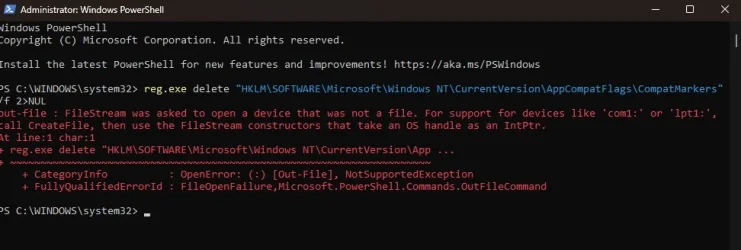
Unfortunately the first command in CMD gave me this errorHello,
To perform a repair install on a system that doesn't meet Windows 11 system requirements, you will need to perform option three here first, then do the steps in an option in this tutorial below.
![]()
Repair Install Windows 11 with an In-place Upgrade
This tutorial will show you how to do a repair install of Windows 11 by performing an in-place upgrade without losing anything. If you need to repair or create a new recovery partition or having problems with the Windows 11 operating system on your PC, and the usual solutions will not fix it...www.elevenforum.com

Same for both as adminBe sure to run the commands in a Command Prompt instead of PowerShell.
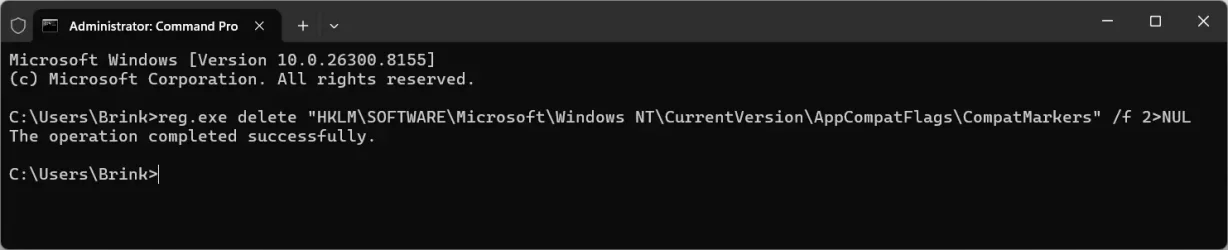
I tried for the 4th time and the commands did not produce any errors as shown. Thank you for that. After the commands have been completed, what do I do now?Double check to make sure you didn't have any extra spaces in the command.
www.elevenforum.com
I will do that now. fingers crossedAfter all the command have been successfully ran, you can do the repair install. The commands were to let you do the repair install on an unsupported system.
![]()
Repair Install Windows 11 with an In-place Upgrade
This tutorial will show you how to do a repair install of Windows 11 by performing an in-place upgrade without losing anything. If you need to repair or create a new recovery partition or having problems with the Windows 11 operating system on your PC, and the usual solutions will not fix it...www.elevenforum.com
do I need to reboot the pc first before I do DISM /Online /Cleanup-Image /RestoreHealthI hope it goes smoothly.
Many, many thanks, Brink. Thank you for your responses and patienceNo need to run the DISM command since you're doing a repair install that should hopefully fix it.
You should probably remove the "2>NUL" from the other tutorial, then it'll work for either CMD or PS.Be sure to run the commands in a Command Prompt instead of PowerShell.