How to remove File Explorer from suffix on Windows Taskbar?


wazer

Member
Local time
2:38 PM
Posts
7
OS
11
Recent update's they have added File Explorer behind the folder name on windows taskbar, its annoying and cuts out from the path name.

Has anybody figured out a way to disable this "annoying feature" by regedit or some way?

Obvious this is in Danish but translate to File Explorer

So assuming you have a folder on D drive with bin it would normally look like this on taskbar.

[IMG]


Now this is the new standard
[IMG]


help
:)
 

My Computer My Computer

At a glance

11
OS
11
Haven't had any updates since 9/19. This what mine on Home shows, hadn't paid any attention to it as doesn't seem to be causing any issues and it hasn't changed on my Pro version yet:

1727721234465.png
 

My Computers My Computers

  • At a glance

    Win11 Pro RTM Version 24H2 Build 26100.4202Intel Core i5 11th Gen. 2.40GHz12GB
    OS
    Win11 Pro RTM Version 24H2 Build 26100.4202
    Computer type
    Laptop
    Manufacturer/Model
    Dell Vostro 3400
    CPU
    Intel Core i5 11th Gen. 2.40GHz
    Memory
    12GB
    Hard Drives
    256GB SSD NVMe M.2
  • At a glance

    Win11 Pro RTM Version 24H2 Build 26100.4202Intel Core i5 10th Gen. 2.90GHz16GBOnboard, no VGA, using a DisplayPort-to-VGA a...
    Operating System
    Win11 Pro RTM Version 24H2 Build 26100.4202
    Computer type
    PC/Desktop
    Manufacturer/Model
    Dell Vostro 5890
    CPU
    Intel Core i5 10th Gen. 2.90GHz
    Memory
    16GB
    Graphics card(s)
    Onboard, no VGA, using a DisplayPort-to-VGA adapter
    Monitor(s) Displays
    24" Dell
    Hard Drives
    512GB SSD NVMe, 4TB Seagate HDD
    Browser
    Firefox, Edge
    Antivirus
    Windows Defender/Microsoft Security
Open Explorer via Control Panel...
Control Panel>double click>double click again.

8074.jpg vs 8075.jpg
 

My Computers My Computers

  • At a glance

    Windows 11 Pro
    OS
    Windows 11 Pro
    Computer type
    PC/Desktop
    Manufacturer/Model
    ASUS ROG Strix
  • At a glance

    Windows 11 Pro
    Operating System
    Windows 11 Pro
    Computer type
    Laptop
    Manufacturer/Model
    ASUS VivoBook
  • ASUS VivoBook 'Lite' ~ Windows 11 Home
Haven't had any updates since 9/19. This what mine on Home shows, hadn't paid any attention to it as doesn't seem to be causing any issues and it hasn't changed on my Pro version yet:

View attachment 110573

It casues problems and cuts out folder names

Open Explorer via Control Panel...
Control Panel>double click>double click again.

View attachment 110584 vs View attachment 110585
I dont understand, are you referring to another way to open file explorer were they also forgot to include the File explorer suffix into it, and should be used as an alternative until a regedit is found for it?

I still dont understand how you do it tho.
 

My Computer My Computer

At a glance

11
OS
11
are you launching the default tabbed 11 explorer? or the 10 ribbon explorer?
 

My Computer My Computer

At a glance

Windows 11 Pro
OS
Windows 11 Pro
I still dont understand how you do it tho.
Open Control Panel, double click an empty space, double click an empty space again..., will land you at Desktop.
 

My Computers My Computers

  • At a glance

    Windows 11 Pro
    OS
    Windows 11 Pro
    Computer type
    PC/Desktop
    Manufacturer/Model
    ASUS ROG Strix
  • At a glance

    Windows 11 Pro
    Operating System
    Windows 11 Pro
    Computer type
    Laptop
    Manufacturer/Model
    ASUS VivoBook
  • ASUS VivoBook 'Lite' ~ Windows 11 Home
just create a shortcut to the location you want (if you're talking about the windows 10 ribbon explorer style)

explorer shell:::{26EE0668-A00A-44D7-9371-BEB064C98683}\5\::{59031A47-3F72-44A7-89C5-5595FE6B30EE} < User Profile Folder
explorer shell:::{26EE0668-A00A-44D7-9371-BEB064C98683}\5\::{374DE290-123F-4565-9164-39C4925E467B} < Downloads
explorer shell:::{26EE0668-A00A-44D7-9371-BEB064C98683}\5\::{A0953C92-50DC-43BF-BE83-3742FED03C9C} < Videos
explorer shell:::{26EE0668-A00A-44D7-9371-BEB064C98683}\5\::{A8CDFF1C-4878-43BE-B5FD-F8091C1C60D0} < Documents
explorer shell:::{26EE0668-A00A-44D7-9371-BEB064C98683}\5\::{B4BFCC3A-DB2C-424C-B029-7FE99A87C641} < Desktop
explorer shell:::{26EE0668-A00A-44D7-9371-BEB064C98683}\5\::{BB06C0E4-D293-4f75-8A90-CB05B6477EEE} < System (Classic)
explorer shell:::{26EE0668-A00A-44D7-9371-BEB064C98683}\5\::{031E4825-7B94-4DC3-B131-E946B44C8DD5} < Libraries
explorer shell:::{26EE0668-A00A-44D7-9371-BEB064C98683}\5\::{3DFDF296-DBEC-4FB4-81D1-6A3438BCF4DE} < Music
explorer shell:::{26EE0668-A00A-44D7-9371-BEB064C98683}\5\::{1CF1260C-4DD0-4EBB-811F-33C572699FDE} < Music
explorer shell:::{26EE0668-A00A-44D7-9371-BEB064C98683}\5\::{4336a54d-038b-4685-ab02-99bb52d3fb8b} < Public Folder
explorer shell:::{26EE0668-A00A-44D7-9371-BEB064C98683}\5\::{645FF040-5081-101B-9F08-00AA002F954E} < Recycle Bin
explorer shell:::{26EE0668-A00A-44D7-9371-BEB064C98683}\5\::{1f3427c8-5c10-4210-aa03-2ee45287d668} < User Pinned (Taskbar)
 

My Computer My Computer

At a glance

Windows 11 Pro
OS
Windows 11 Pro
are you launching the default tabbed 11 explorer? or the 10 ribbon explorer?
Does not matter where I do it from

Open Control Panel, double click an empty space, double click an empty space again..., will land you at Desktop.
Yeah thanks I understood, but tedious to do that every time, I guess we will have to wait and see if somebody sniffs the value out from policy or regedit at some point.
 

My Computer My Computer

At a glance

11
OS
11
Yeah thanks I understood, but tedious to do that every time, I guess we will have to wait and see if somebody sniffs the value out from policy or regedit at some point.
Check out this thread, starting here...
 

My Computers My Computers

  • At a glance

    Windows 11 Pro
    OS
    Windows 11 Pro
    Computer type
    PC/Desktop
    Manufacturer/Model
    ASUS ROG Strix
  • At a glance

    Windows 11 Pro
    Operating System
    Windows 11 Pro
    Computer type
    Laptop
    Manufacturer/Model
    ASUS VivoBook
  • ASUS VivoBook 'Lite' ~ Windows 11 Home
Check out this thread, starting here...
Thanks ill pass on that and wait to see if any discover a command to disable, trying to run most native besides startallback, I do not want any external mods or hacked stuff on this machine :)
 

My Computer My Computer

At a glance

11
OS
11
1) what happens if you launch it via run command? still shows "file explorer" after the path?

2) you can natively generate a CLSID (per the linked topic/discussion) and have that CLSID open directly to that path.
 

My Computer My Computer

At a glance

Windows 11 Pro
OS
Windows 11 Pro
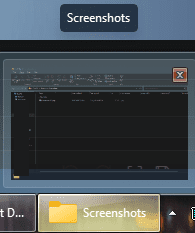
nvm. tested myself. works with clsid

1727740991399.png

that is C:\ME\Pictures\Screenshots and thats all the tooltip and taskbar shows.
 

My Computer My Computer

At a glance

Windows 11 Pro
OS
Windows 11 Pro
I dont see the relevance but yeah, startisback on 10 and startallback on 11.
It's relevant in regards to the questions about which flavor of Explorer you're running. StartallBack will let you select "Windows 10 Ribbon UI" which runs the Windows 10 Explorer (the one anyone can launch by simply opening the Control Panel and clicking the up arrow icon). Which flavor of Explorer you're running is obviously an important variable when it comes to questions about Explorer behavior (and possible workarounds).
 

My Computer My Computer

At a glance

Windows 10/11
OS
Windows 10/11
Computer type
Laptop
Manufacturer/Model
Acer
I dont see the relevance but yeah...

If you want members to assist you in this forum, we have questions. They may not seem relevant but to us they might help search for causes to an issue. We have your back 🙏
 

My Computers My Computers

  • At a glance

    Windows 11 Pro 25H2 Build 26200.8655Intel(R) Core(TM) i7-4770K CPU @ 3.50GHz32.0 GB of I forget and the box is in storage.Gigabyte nVidia GeForce GTX 1660 Super OC 6GB
    OS
    Windows 11 Pro 25H2 Build 26200.8655
    Computer type
    PC/Desktop
    Manufacturer/Model
    Sin-built 2013
    CPU
    Intel(R) Core(TM) i7-4770K CPU @ 3.50GHz
    Motherboard
    ASUS ROG Maximus VI Formula
    Memory
    32.0 GB of I forget and the box is in storage.
    Graphics Card(s)
    Gigabyte nVidia GeForce GTX 1660 Super OC 6GB
    Sound Card
    ROG SupremeFX Formula 8-Channel High Definition Audio
    Monitor(s) Displays
    5 x LG 25MS500-B - 1 x 24MK430H-B - 1 x Wacom Pro 22" Touch Screen Tablet
    Screen Resolution
    All over the place
    Hard Drives
    Too many to list. OS on Samsung 1TB 870 QVO SATA
    PSU
    Silverstone 1500
    Case
    NZXT Phantom 820 Full-Tower Case
    Cooling
    Noctua NH-D15 Elite Class Dual Tower CPU Cooler / 6 x EziDIY 120mm / 2 x Corsair 140mm somethings / 1 x 140mm Thermaltake something / 2 x 200mm Corsair.
    Keyboard
    Corsair K95 / Logitech diNovo Edge Wireless
    Mouse
    Logitech: G402 / G502 / Mx Masters / Mx Air Cordless
    Internet Speed
    2000/500Mbps
    Browser
    All sorts
    Antivirus
    Kaspersky Premium
    Other Info
    ㅤㅤㅤㅤㅤㅤㅤㅤㅤㅤㅤㅤㅤㅤㅤㅤㅤㅤㅤㅤㅤㅤㅤㅤㅤㅤㅤㅤㅤㅤㅤㅤㅤㅤㅤㅤㅤㅤㅤㅤ⠀⠀⠀⠀⠀⠀⠀⠀⠀⠀
    TP-Link BE9300 WiFi 7 Bluetooth 5.4 (Archer TBE550E)
    TP-Link TX201 V1 2.5GB Lan

    Grandstream HT812 - VoIP
    ASUS DSL-AX82U - Mesh
    ASUS RT-AC68U - Mesh
    ASUS RT-BE88U Router

    Brother MFC-L2880DW Printer

    I’m on a horse.
  • At a glance

    Windows 11 Pro 25H2 Build 26200.8655 (Wifes)13th Generation Intel® Core™ i5-1340P Process...16GB LPDDR5-52001x Intel® Iris® Xe Graphics
    Operating System
    Windows 11 Pro 25H2 Build 26200.8655 (Wifes)
    Computer type
    Laptop
    Manufacturer/Model
    LENOVO Yoga 7 14IRL8 - Type 82YL
    CPU
    13th Generation Intel® Core™ i5-1340P Processor(Core™ i5-1340P)
    Memory
    16GB LPDDR5-5200
    Graphics card(s)
    1x Intel® Iris® Xe Graphics
    Sound Card
    Optimized with Dolby Atmos®
    Screen Resolution
    QHD 2880 x 1800 OLED
    Hard Drives
    M.2 512 GB SSD PCIe
    Mouse
    Logiteck MX Master 3S
    Internet Speed
    2000/500
    Antivirus
    Defender / Malwarebytes
    Other Info
    …still on a horse.


    Wireless Network: Wi-Fi 6E 2x2 AX; Bluetooth® 5.1 or above
    Ports: 1x 1 Novo button; 2 in 1 Audio Combo jack; Micro SD Card Reader; HDMI 1.4b; 2 x USB Type-C (TBT4)
    USB 3.2 Gen 2 DP 1.4a
    PD 3.0); 1 x USB 3.2 Gen1 Type A
    Camera
    1x 1080P FHD IR/RGB Hybrid with Privacy Shutter and Dual Array Microphone
    Graphics
    1x Intel® Iris® Xe Graphics
    Monitor
    14" WUXGA
    Form Factor
    Convertible Notebook
  • Windows 11 Pro 25H2 Build 26200.8655 (Wifes)

    Yoga 7 2-in-1 14IML9 - Type 83DJ

    Processor: Intel® Core™ Ultra 7 155H Processor(Core™ Ultra 7 155H)

    Memory: 32GB LPD5X-7467

    Hard Drive: 1 TB SSD PCIe

    Wireless Network: 1x Wi-Fi 6E 2x2 AX; Bluetooth® 5.1 or above

    Ports: 1 x HDMI 2.1 TMDS; 1 x Novo Button; 1 x Combo Audio Jack
    2 x USB-C (USB 4.0)
    1 x USB-A 3.2 Gen 1

    Camera: 1080P FHD IR Hybrid with Dual Microphone

    Graphics: Intel® Arc™ Graphics

    Monitor: 14" 2.8K

    ...Where's my horse?
The relevance of mentioning StartAllBack is that it is a third-party software useful for changing things in Windows which in turn makes Windows no longer the default install, changes things in Windows that sometimes can cause issues. It's also contrary to the statement of "I do not want any external mods or hacked stuff on this machine" in post #10 of this thread.
 

My Computers My Computers

  • At a glance

    Win11 Pro RTM Version 24H2 Build 26100.4202Intel Core i5 11th Gen. 2.40GHz12GB
    OS
    Win11 Pro RTM Version 24H2 Build 26100.4202
    Computer type
    Laptop
    Manufacturer/Model
    Dell Vostro 3400
    CPU
    Intel Core i5 11th Gen. 2.40GHz
    Memory
    12GB
    Hard Drives
    256GB SSD NVMe M.2
  • At a glance

    Win11 Pro RTM Version 24H2 Build 26100.4202Intel Core i5 10th Gen. 2.90GHz16GBOnboard, no VGA, using a DisplayPort-to-VGA a...
    Operating System
    Win11 Pro RTM Version 24H2 Build 26100.4202
    Computer type
    PC/Desktop
    Manufacturer/Model
    Dell Vostro 5890
    CPU
    Intel Core i5 10th Gen. 2.90GHz
    Memory
    16GB
    Graphics card(s)
    Onboard, no VGA, using a DisplayPort-to-VGA adapter
    Monitor(s) Displays
    24" Dell
    Hard Drives
    512GB SSD NVMe, 4TB Seagate HDD
    Browser
    Firefox, Edge
    Antivirus
    Windows Defender/Microsoft Security

My Computers My Computers

  • At a glance

    Windows 11 Pro 25H2 Build 26200.8655Intel(R) Core(TM) i7-4770K CPU @ 3.50GHz32.0 GB of I forget and the box is in storage.Gigabyte nVidia GeForce GTX 1660 Super OC 6GB
    OS
    Windows 11 Pro 25H2 Build 26200.8655
    Computer type
    PC/Desktop
    Manufacturer/Model
    Sin-built 2013
    CPU
    Intel(R) Core(TM) i7-4770K CPU @ 3.50GHz
    Motherboard
    ASUS ROG Maximus VI Formula
    Memory
    32.0 GB of I forget and the box is in storage.
    Graphics Card(s)
    Gigabyte nVidia GeForce GTX 1660 Super OC 6GB
    Sound Card
    ROG SupremeFX Formula 8-Channel High Definition Audio
    Monitor(s) Displays
    5 x LG 25MS500-B - 1 x 24MK430H-B - 1 x Wacom Pro 22" Touch Screen Tablet
    Screen Resolution
    All over the place
    Hard Drives
    Too many to list. OS on Samsung 1TB 870 QVO SATA
    PSU
    Silverstone 1500
    Case
    NZXT Phantom 820 Full-Tower Case
    Cooling
    Noctua NH-D15 Elite Class Dual Tower CPU Cooler / 6 x EziDIY 120mm / 2 x Corsair 140mm somethings / 1 x 140mm Thermaltake something / 2 x 200mm Corsair.
    Keyboard
    Corsair K95 / Logitech diNovo Edge Wireless
    Mouse
    Logitech: G402 / G502 / Mx Masters / Mx Air Cordless
    Internet Speed
    2000/500Mbps
    Browser
    All sorts
    Antivirus
    Kaspersky Premium
    Other Info
    ㅤㅤㅤㅤㅤㅤㅤㅤㅤㅤㅤㅤㅤㅤㅤㅤㅤㅤㅤㅤㅤㅤㅤㅤㅤㅤㅤㅤㅤㅤㅤㅤㅤㅤㅤㅤㅤㅤㅤㅤ⠀⠀⠀⠀⠀⠀⠀⠀⠀⠀
    TP-Link BE9300 WiFi 7 Bluetooth 5.4 (Archer TBE550E)
    TP-Link TX201 V1 2.5GB Lan

    Grandstream HT812 - VoIP
    ASUS DSL-AX82U - Mesh
    ASUS RT-AC68U - Mesh
    ASUS RT-BE88U Router

    Brother MFC-L2880DW Printer

    I’m on a horse.
  • At a glance

    Windows 11 Pro 25H2 Build 26200.8655 (Wifes)13th Generation Intel® Core™ i5-1340P Process...16GB LPDDR5-52001x Intel® Iris® Xe Graphics
    Operating System
    Windows 11 Pro 25H2 Build 26200.8655 (Wifes)
    Computer type
    Laptop
    Manufacturer/Model
    LENOVO Yoga 7 14IRL8 - Type 82YL
    CPU
    13th Generation Intel® Core™ i5-1340P Processor(Core™ i5-1340P)
    Memory
    16GB LPDDR5-5200
    Graphics card(s)
    1x Intel® Iris® Xe Graphics
    Sound Card
    Optimized with Dolby Atmos®
    Screen Resolution
    QHD 2880 x 1800 OLED
    Hard Drives
    M.2 512 GB SSD PCIe
    Mouse
    Logiteck MX Master 3S
    Internet Speed
    2000/500
    Antivirus
    Defender / Malwarebytes
    Other Info
    …still on a horse.


    Wireless Network: Wi-Fi 6E 2x2 AX; Bluetooth® 5.1 or above
    Ports: 1x 1 Novo button; 2 in 1 Audio Combo jack; Micro SD Card Reader; HDMI 1.4b; 2 x USB Type-C (TBT4)
    USB 3.2 Gen 2 DP 1.4a
    PD 3.0); 1 x USB 3.2 Gen1 Type A
    Camera
    1x 1080P FHD IR/RGB Hybrid with Privacy Shutter and Dual Array Microphone
    Graphics
    1x Intel® Iris® Xe Graphics
    Monitor
    14" WUXGA
    Form Factor
    Convertible Notebook
  • Windows 11 Pro 25H2 Build 26200.8655 (Wifes)

    Yoga 7 2-in-1 14IML9 - Type 83DJ

    Processor: Intel® Core™ Ultra 7 155H Processor(Core™ Ultra 7 155H)

    Memory: 32GB LPD5X-7467

    Hard Drive: 1 TB SSD PCIe

    Wireless Network: 1x Wi-Fi 6E 2x2 AX; Bluetooth® 5.1 or above

    Ports: 1 x HDMI 2.1 TMDS; 1 x Novo Button; 1 x Combo Audio Jack
    2 x USB-C (USB 4.0)
    1 x USB-A 3.2 Gen 1

    Camera: 1080P FHD IR Hybrid with Dual Microphone

    Graphics: Intel® Arc™ Graphics

    Monitor: 14" 2.8K

    ...Where's my horse?
its the tabbed explorer that they appended it to. doesnt show on win10 ribbon explorer
 

My Computer My Computer

At a glance

Windows 11 Pro
OS
Windows 11 Pro
The relevance of mentioning StartAllBack is that it is a third-party software useful for changing things in Windows which in turn makes Windows no longer the default install, changes things in Windows that sometimes can cause issues. It's also contrary to the statement of "I do not want any external mods or hacked stuff on this machine" in post #10 of this thread.
Hey I also mentioned that I used SIB and SAB before that in the very same line so I cannot see the contrary in that, which you btw. did not copy (trying to run most native besides startallback)

It's all good, it has nothing todo with sib or sab, its an update from windows that has caused this annoying tooltip feature.
If you want members to assist you in this forum, we have questions. They may not seem relevant but to us they might help search for causes to an issue. We have your back
🙏
All good, its not an issue or a bug, its something Microsoft has implemented.
It's relevant in regards to the questions about which flavor of Explorer you're running. StartallBack will let you select "Windows 10 Ribbon UI" which runs the Windows 10 Explorer (the one anyone can launch by simply opening the Control Panel and clicking the up arrow icon). Which flavor of Explorer you're running is obviously an important variable when it comes to questions about Explorer behavior (and possible workarounds).
It's ok, I'm running normal look of windows 11 with quick launch classic that is native in windows with normal programs also fully expanded on taskbar, which is also fully native.
 

My Computer My Computer

At a glance

11
OS
11

Latest Support Threads

Back
Top Bottom