How to remove Windows start button?


QuicktellPro

Active member
Member
Local time
5:18 PM
Posts
292
OS
Windows 11
Hi,
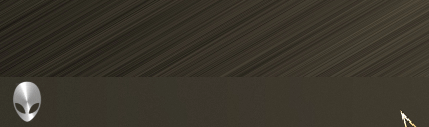
I use the latest version of OpenShell. Because my PC is an Alienware, I use OpenShell's option to change the start menu button to the Alienware version. This worked fine in Windows 10, but since updating to Windows 11 24H2 the Alienware button is merely superimposed over the original blue Windows button. How can I remove it, please?

start_button.webp
 
Windows Build/Version
24H2

My Computer

System One

  • OS
    Windows 11
    Computer type
    Laptop
    Manufacturer/Model
    Alienware A51M R2
    CPU
    Intel(R) Core(TM) i9-10900K CPU @ 3.70GHz
    Memory
    32,0 GB
    Graphics Card(s)
    Nvidia GeForce RTX2080 Super
    Sound Card
    Realtek
    Screen Resolution
    4K
    Hard Drives
    2TB (2x 1TB PCle M.2 SSD) RAID 0 [Boot] + 2TB (2x 1TB
    PCle M.2 SSD) Non-Raid [Storage]
Do you have the latest version?


Seems they were aware and looked to have fixed the issue long ago?


A Guy
 

My Computers

System One System Two

  • OS
    Windows 10 Home x64
    Computer type
    PC/Desktop
    Manufacturer/Model
    Custom
    CPU
    INTEL Core i5-11400
    Motherboard
    ASUS PRIME H570-PLUS
    Memory
    KINGSTON HyperX Fury Black DDR4 16GB (2 x 8GB) 3200MHz, CL16
    Graphics Card(s)
    EVGA GeForce GTX 750 Superclocked 1GB 128-Bit GDDR5
    Monitor(s) Displays
    LG 32MA68HY 32" IPS
    Screen Resolution
    1920 x 1080
    Hard Drives
    SAMSUNG 250GB 970 EVO Plus NVMe, M.2 SSD, Crucial 250GB MX500, SEAGATE 500GB Barracuda® 7200.12, SATA 3 Gb/s, 7200 RPM, 16MB cache
    PSU
    CORSAIR RM550x 80 PLUS Gold 550W
    Case
    ANTEC P10 FLUX
    Cooling
    be quiet! Pure Rock 2, 5 x 120 mm Case Fans
    Internet Speed
    480 + Mbps Up/ 12+ Mbps Down
    Browser
    Vivaldi Snapshot
    Antivirus
    Avast
  • Operating System
    Windows 10 Home x64
    Computer type
    PC/Desktop
    Manufacturer/Model
    Custom
    CPU
    Intel Core i5-750
    Motherboard
    ASUS P7P55D
    Memory
    Kingston HyperX Fury Black 8GB (2x4GB) DDR3-1600MHz CL8
    Graphics card(s)
    MSI GeForce GT 240 N240GT-MD1G/D5 1 GB DDR5
    Monitor(s) Displays
    LG 32MA68HY 32" IPS
    Screen Resolution
    1980x1040
    Hard Drives
    Samsung Electronics 840 EVO 120GB, SEAGATE 500GB Barracuda® 7200.12, SATA 3 Gb/s, 7200 RPM, 16MB cache
    PSU
    Antec TruePower New TP-550 550W
    Case
    Antec 300
    Cooling
    Cooler Master Hyper 212+, 4 Noctua NF-P12 120mm, 1 Noctua NF-P14 FLX
    Internet Speed
    480+ Mbps Down/12+Mbps Up
    Browser
    Vivaldi Snapshot
    Antivirus
    Avast
Yes, I have the current version which is 4.4.196 and the issue clearly has not been fixed. 🥺

OpenShell.v4.4.196.webp
 

My Computer

System One

  • OS
    Windows 11
    Computer type
    Laptop
    Manufacturer/Model
    Alienware A51M R2
    CPU
    Intel(R) Core(TM) i9-10900K CPU @ 3.70GHz
    Memory
    32,0 GB
    Graphics Card(s)
    Nvidia GeForce RTX2080 Super
    Sound Card
    Realtek
    Screen Resolution
    4K
    Hard Drives
    2TB (2x 1TB PCle M.2 SSD) RAID 0 [Boot] + 2TB (2x 1TB
    PCle M.2 SSD) Non-Raid [Storage]
Install Windows Taskbar Styler using Windhawk and enter:
Taskbar.ExperienceToggleButton#LaunchListButton[AutomationProperties.AutomationId=StartButton] in Target
Opacity=0 in Styles.
Screenshot (9).webp
 

My Computer

System One

  • OS
    Windows 10.1 Ultimate (Custom OS)
    Computer type
    Laptop
    Manufacturer/Model
    Gigabyte
Wouldn't this conflict with Open Shell?
Ditto Nexus Ultimate?
 

My Computer

System One

  • OS
    Windows 11
    Computer type
    Laptop
    Manufacturer/Model
    Alienware A51M R2
    CPU
    Intel(R) Core(TM) i9-10900K CPU @ 3.70GHz
    Memory
    32,0 GB
    Graphics Card(s)
    Nvidia GeForce RTX2080 Super
    Sound Card
    Realtek
    Screen Resolution
    4K
    Hard Drives
    2TB (2x 1TB PCle M.2 SSD) RAID 0 [Boot] + 2TB (2x 1TB
    PCle M.2 SSD) Non-Raid [Storage]
Wouldn't this conflict with Open Shell?
No it does not, but possibly your startbutton is too small or too large so you would have to adjust the width of the original (invisible) button.
My settings for that part of the Windhawk Taskbar Styler are:

1. Startbutton: remove original button, but leave the space to be used by the startbutton of OpenShell
Target: Microsoft.UI.Xaml.Controls.AnimatedVisualPlayer
Height=0
alternative:
Opacity=0
You could replace that command by the command that @Nius posted in #4

2. Startbutton: adjust width / padding so it fits the space for the OpenShell Startbutton
Target: taskbar:TaskListButtonPanel#ExperienceToggleButtonRootPanel
Style: Margin=-8,0,0,0

Order of the Margin parameters: left margin, top margin, right margin, bottom margin
 

My Computer

System One

  • OS
    Windows 11 Pro 25H2 26200.8457
    Computer type
    PC/Desktop
    Manufacturer/Model
    Build by vendor to my specs
    CPU
    AMD Ryzen 7 5700G
    Motherboard
    MSI PRO B550M-P Gen3
    Memory
    Kingston FURY Beast 2x16GB DIMM DDR4 2666 CL16
    Graphics Card(s)
    MSI GeForce GT 730 2GB LP V1
    Sound Card
    Creative Sound Blaster Audigy FX
    Monitor(s) Displays
    Samsung S24E450F 24"
    Screen Resolution
    1920 x 1080
    Hard Drives
    1. SSD Crucial P5 Plus 500GB PCIe M.2
    2. SSD-SATA Crucial MX500-2TB
    PSU
    Corsair CV650W
    Case
    Cooler Master Silencio S400
    Cooling
    Cooler Master Hyper H412R with Be Quiet Pure Wings 2 PWM BL038 fan
    Keyboard
    Cherry Stream (wired, scissor keys)
    Mouse
    Asus WT465 (wireless)
    Internet Speed
    70 Mbps down / 80 Mbps up
    Browser
    Firefox 130.0
    Antivirus
    F-Secure (Internetprovider version)
    Other Info
    Router: FRITZBox 7490
    Oracle VirtualBox 7 for testing software on Win 10 or 11
I also have this from time to time.
1. Try to repair Open-shell (re-run the installer or download Open-Shell again and run the installer again). It will ask you whether you want to repair teh existing installation or re-install completely. Chose "Repair". This does it for me most of the time.
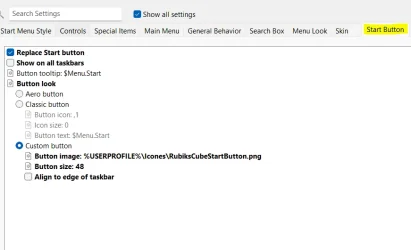
2. You could also change the Start button in Open-Shell and then change it back (see screenshot 1).
3. Or you can tweak (resize) the start-button and see what happens (see screenshot 2).

Change.webpChange2.webp
 

My Computer

System One

  • OS
    Windows 11
    Computer type
    PC/Desktop
    Manufacturer/Model
    Gigabyte H610M H V2 DDR4 (Rev. 1.0)
    CPU
    Intel Core i3 12 100 12th generation
    Motherboard
    American Megatrend F34
    Memory
    Kingston DDR4-3200 16 GBytes
    Graphics Card(s)
    Intel UHD 730
Same thing with StartAllBack, if you don't use the proper size, it's dickered.

12852.gif
 

My Computers

System One System Two

  • OS
    Windows 11 Pro
    Computer type
    PC/Desktop
    Manufacturer/Model
    ASUS ROG Strix
  • Operating System
    Windows 11 Pro
    Computer type
    Laptop
    Manufacturer/Model
    ASUS VivoBook
Works perfectly for me with v4.4.196 - I have a Win 7 orb (with glow effect) that I 'stole' from a skin pack.

As Edwin says, needs to be an appropriate icon.
 

My Computer

System One

  • OS
    Windows 11 Pro
    Computer type
    Laptop
    Manufacturer/Model
    Lenovo t480s
    CPU
    i7-8650U
    Memory
    16GB
    Graphics Card(s)
    Intel UHD 620
    Screen Resolution
    1920x1080
    Hard Drives
    C SN810 SDCPNRY-512G-1006
    Browser
    Edge, Firefox
    Antivirus
    Defender
I also have this from time to time.
1. Try to repair Open-shell (re-run the installer or download Open-Shell again and run the installer again). It will ask you whether you want to repair teh existing installation or re-install completely. Chose "Repair". This does it for me most of the time.
2. You could also change the Start button in Open-Shell and then change it back (see screenshot 1).
3. Or you can tweak (resize) the start-button and see what happens (see screenshot 2).

View attachment 167676View attachment 167677

I tried repair and it made no difference. According to the Github discussion on this issue, there is no fix for this.
 

My Computer

System One

  • OS
    Windows 11
    Computer type
    Laptop
    Manufacturer/Model
    Alienware A51M R2
    CPU
    Intel(R) Core(TM) i9-10900K CPU @ 3.70GHz
    Memory
    32,0 GB
    Graphics Card(s)
    Nvidia GeForce RTX2080 Super
    Sound Card
    Realtek
    Screen Resolution
    4K
    Hard Drives
    2TB (2x 1TB PCle M.2 SSD) RAID 0 [Boot] + 2TB (2x 1TB
    PCle M.2 SSD) Non-Raid [Storage]
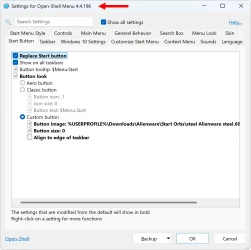
I fixed it!
I resized the width of my icon from 81 to 120 px and changed the background colour from transparent to the same colour as my taskbar. Looks perfect now. 😁
 

My Computer

System One

  • OS
    Windows 11
    Computer type
    Laptop
    Manufacturer/Model
    Alienware A51M R2
    CPU
    Intel(R) Core(TM) i9-10900K CPU @ 3.70GHz
    Memory
    32,0 GB
    Graphics Card(s)
    Nvidia GeForce RTX2080 Super
    Sound Card
    Realtek
    Screen Resolution
    4K
    Hard Drives
    2TB (2x 1TB PCle M.2 SSD) RAID 0 [Boot] + 2TB (2x 1TB
    PCle M.2 SSD) Non-Raid [Storage]
I tried repair and it made no difference. According to the Github discussion on this issue, there is no fix for this.
I think you're misreading that discussion. It comes down to using a correctly formatted icon as you've found and as we've said here.
 

My Computer

System One

  • OS
    Windows 11 Pro
    Computer type
    Laptop
    Manufacturer/Model
    Lenovo t480s
    CPU
    i7-8650U
    Memory
    16GB
    Graphics Card(s)
    Intel UHD 620
    Screen Resolution
    1920x1080
    Hard Drives
    C SN810 SDCPNRY-512G-1006
    Browser
    Edge, Firefox
    Antivirus
    Defender
I think you're misreading that discussion. It comes down to using a correctly formatted icon as you've found and as we've said here.
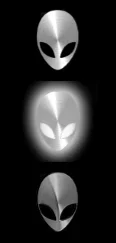
As with Edwin's post, I use a 3 icon bitmap on my Alienware. Here's a png copy of the now working icon.

steel Alienware steel.6803.6807.6813.webp
 

My Computer

System One

  • OS
    Windows 11
    Computer type
    Laptop
    Manufacturer/Model
    Alienware A51M R2
    CPU
    Intel(R) Core(TM) i9-10900K CPU @ 3.70GHz
    Memory
    32,0 GB
    Graphics Card(s)
    Nvidia GeForce RTX2080 Super
    Sound Card
    Realtek
    Screen Resolution
    4K
    Hard Drives
    2TB (2x 1TB PCle M.2 SSD) RAID 0 [Boot] + 2TB (2x 1TB
    PCle M.2 SSD) Non-Raid [Storage]
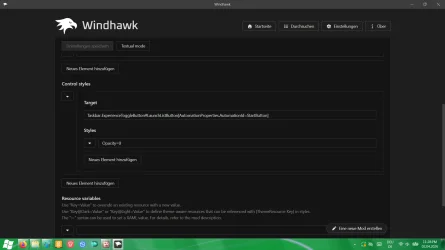
  1. Download and install Windhawk
  2. In Windhawk, install the Windows 11 Taskbar Styler mod
  3. In the mod's Settings, switch to Textual mode
  4. Replace the code in the box with this:
    theme: '' styleConstants: - '' controlStyles: - target: Taskbar.TaskListButtonPanel#ExperienceToggleButtonRootPanel > Microsoft.UI.Xaml.Controls.AnimatedVisualPlayer#Icon styles: - Visibility=Collapsed themeResourceVariables: - '' xamlDiagnosticsHandling: alert
  5. Click on Save settings
  6. Done!
 

My Computers

System One System Two

  • OS
    11 Home
    Computer type
    Laptop
    Manufacturer/Model
    Asus TUF Gaming F16 (2024)
    CPU
    i7 13650HX
    Memory
    16GB DDR5
    Graphics Card(s)
    GeForce RTX 4060 Mobile
    Sound Card
    Eastern Electric MiniMax DAC Supreme; Emotiva UMC-200; Astell & Kern AK240
    Monitor(s) Displays
    Sony Bravia XR-55X90J
    Screen Resolution
    3840×2160
    Hard Drives
    512GB SSD internal
    37TB external
    PSU
    Li-ion
    Cooling
    2× Arc Flow Fans, 4× exhaust vents, 5× heatpipes
    Keyboard
    Logitech K800
    Mouse
    Logitech G402
    Internet Speed
    30Mbit/s up, 500Mbit/s down
    Browser
    FF
    Antivirus
    What's an antivirus?
  • Operating System
    11 Home
    Computer type
    Laptop
    Manufacturer/Model
    Medion S15450
    CPU
    i5 1135G7
    Memory
    16GB DDR4
    Graphics card(s)
    Intel Iris Xe
    Sound Card
    Eastern Electric MiniMax DAC Supreme; Emotiva UMC-200; Astell & Kern AK240
    Monitor(s) Displays
    Sony Bravia XR-55X90J
    Screen Resolution
    3840×2160
    Hard Drives
    2TB SSD internal
    37TB external
    PSU
    Li-ion
    Keyboard
    Logitech K800
    Mouse
    Logitech G402
    Internet Speed
    30Mbit/s up, 500Mbit/s down
    Browser
    FF

My Computer

System One

  • OS
    Windows 11
    Computer type
    Laptop
    Manufacturer/Model
    Lenovo LOQ 15IRH8
    CPU
    i512450H
    Memory
    8+8GB DDR4
    Graphics Card(s)
    RTX 4060 Mobile 8GB VRAM
    Screen Resolution
    1920*1080
    Hard Drives
    512+512GB PCIe 4.0 NVMe M.2 SSD
I already fixed mine by covering the Windows button with my Alienware button. Nonetheless, if I had removed the button altogether via your Windhawk option, would that not have removed the option to click on my replacement button?

OpenShell has the option to replace the start button with the image of your choice, however, Win 11 keeps the original underneath which looks terrible.
 

My Computer

System One

  • OS
    Windows 11
    Computer type
    Laptop
    Manufacturer/Model
    Alienware A51M R2
    CPU
    Intel(R) Core(TM) i9-10900K CPU @ 3.70GHz
    Memory
    32,0 GB
    Graphics Card(s)
    Nvidia GeForce RTX2080 Super
    Sound Card
    Realtek
    Screen Resolution
    4K
    Hard Drives
    2TB (2x 1TB PCle M.2 SSD) RAID 0 [Boot] + 2TB (2x 1TB
    PCle M.2 SSD) Non-Raid [Storage]
I already fixed mine by covering the Windows button with my Alienware button. Nonetheless, if I had removed the button altogether via your Windhawk option, would that not have removed the option to click on my replacement button?

OpenShell has the option to replace the start button with the image of your choice, however, Win 11 keeps the original underneath which looks terrible.
Congrats For Your Successful Workaround, I Get It Now As Disabling/Removing It Was Not The Solution
 

My Computer

System One

  • OS
    Windows 11
    Computer type
    Laptop
    Manufacturer/Model
    Lenovo LOQ 15IRH8
    CPU
    i512450H
    Memory
    8+8GB DDR4
    Graphics Card(s)
    RTX 4060 Mobile 8GB VRAM
    Screen Resolution
    1920*1080
    Hard Drives
    512+512GB PCIe 4.0 NVMe M.2 SSD
, if I had removed the button altogether via your Windhawk option, would that not have removed the option to click on my replacement button?
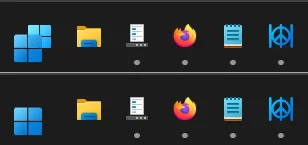
The method that I described only removes the Windows 11 icon that would otherwise be hidden only partly behind Open-Shell's icon under certain circumstances (when partial overlap occurs). The actual button itself is left untouched.

overlap.webp
 
Last edited:

My Computers

System One System Two

  • OS
    11 Home
    Computer type
    Laptop
    Manufacturer/Model
    Asus TUF Gaming F16 (2024)
    CPU
    i7 13650HX
    Memory
    16GB DDR5
    Graphics Card(s)
    GeForce RTX 4060 Mobile
    Sound Card
    Eastern Electric MiniMax DAC Supreme; Emotiva UMC-200; Astell & Kern AK240
    Monitor(s) Displays
    Sony Bravia XR-55X90J
    Screen Resolution
    3840×2160
    Hard Drives
    512GB SSD internal
    37TB external
    PSU
    Li-ion
    Cooling
    2× Arc Flow Fans, 4× exhaust vents, 5× heatpipes
    Keyboard
    Logitech K800
    Mouse
    Logitech G402
    Internet Speed
    30Mbit/s up, 500Mbit/s down
    Browser
    FF
    Antivirus
    What's an antivirus?
  • Operating System
    11 Home
    Computer type
    Laptop
    Manufacturer/Model
    Medion S15450
    CPU
    i5 1135G7
    Memory
    16GB DDR4
    Graphics card(s)
    Intel Iris Xe
    Sound Card
    Eastern Electric MiniMax DAC Supreme; Emotiva UMC-200; Astell & Kern AK240
    Monitor(s) Displays
    Sony Bravia XR-55X90J
    Screen Resolution
    3840×2160
    Hard Drives
    2TB SSD internal
    37TB external
    PSU
    Li-ion
    Keyboard
    Logitech K800
    Mouse
    Logitech G402
    Internet Speed
    30Mbit/s up, 500Mbit/s down
    Browser
    FF
The method that I described only removes the Windows 11 icon that would otherwise be hidden only partly behind Open-Shell's icon under certain circumstances (when partial overlap occurs). The actual button itself is left untouched.

View attachment 168391
Good to know, although my workaround basically provided a similar result.

win11-start.webp
 

My Computer

System One

  • OS
    Windows 11
    Computer type
    Laptop
    Manufacturer/Model
    Alienware A51M R2
    CPU
    Intel(R) Core(TM) i9-10900K CPU @ 3.70GHz
    Memory
    32,0 GB
    Graphics Card(s)
    Nvidia GeForce RTX2080 Super
    Sound Card
    Realtek
    Screen Resolution
    4K
    Hard Drives
    2TB (2x 1TB PCle M.2 SSD) RAID 0 [Boot] + 2TB (2x 1TB
    PCle M.2 SSD) Non-Raid [Storage]
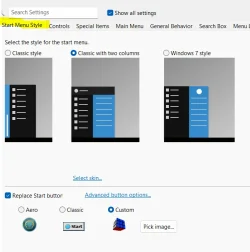
Good to know, although my workaround basically provided a similar result.

View attachment 168396
That's only because your taskbar background uses no texture nor uses an opacity level smaller than 1 so it matches. Otherwise the difference between the taskbar background and the solid background in your .png image would destroy the look.
 

My Computers

System One System Two

  • OS
    11 Home
    Computer type
    Laptop
    Manufacturer/Model
    Asus TUF Gaming F16 (2024)
    CPU
    i7 13650HX
    Memory
    16GB DDR5
    Graphics Card(s)
    GeForce RTX 4060 Mobile
    Sound Card
    Eastern Electric MiniMax DAC Supreme; Emotiva UMC-200; Astell & Kern AK240
    Monitor(s) Displays
    Sony Bravia XR-55X90J
    Screen Resolution
    3840×2160
    Hard Drives
    512GB SSD internal
    37TB external
    PSU
    Li-ion
    Cooling
    2× Arc Flow Fans, 4× exhaust vents, 5× heatpipes
    Keyboard
    Logitech K800
    Mouse
    Logitech G402
    Internet Speed
    30Mbit/s up, 500Mbit/s down
    Browser
    FF
    Antivirus
    What's an antivirus?
  • Operating System
    11 Home
    Computer type
    Laptop
    Manufacturer/Model
    Medion S15450
    CPU
    i5 1135G7
    Memory
    16GB DDR4
    Graphics card(s)
    Intel Iris Xe
    Sound Card
    Eastern Electric MiniMax DAC Supreme; Emotiva UMC-200; Astell & Kern AK240
    Monitor(s) Displays
    Sony Bravia XR-55X90J
    Screen Resolution
    3840×2160
    Hard Drives
    2TB SSD internal
    37TB external
    PSU
    Li-ion
    Keyboard
    Logitech K800
    Mouse
    Logitech G402
    Internet Speed
    30Mbit/s up, 500Mbit/s down
    Browser
    FF

Latest Support Threads

Back
Top Bottom