How to stop downloading/installing updates?


pcpartpicker

Active member
Local time
3:44 AM
Posts
35
OS
Windows 10
Hi guys.
How do I stop permanently Win 11 from downloading and installing updates?
My laptop downloaded updates and pending for install.
I don't want and need them.
I know the way on Windows 10, but seems on 11 is differently.
 

My Computer

System One

  • OS
    Windows 10
Windows Update Blocker v1.8 - It works on Windows 11
 

My Computer

System One

  • OS
    Windows 11
    Computer type
    PC/Desktop
 

My Computers

System One System Two

  • OS
    Windows 11 Pro - Windows 7 HP 64 - Lubuntu
    Computer type
    PC/Desktop
    Manufacturer/Model
    custom build
    CPU
    i5 6600K - 800MHz to 4400MHz
    Motherboard
    GA-Z170-HD3P
    Memory
    4+4G GSkill DDR4 3000
    Graphics Card(s)
    IG - Intel 530
    Monitor(s) Displays
    Samsung 226BW
    Screen Resolution
    1680x1050
    Hard Drives
    (1) -1 SM951 – 128GB M.2 AHCI PCIe SSD drive for Win 11
    (2) -1 WD SATA 3 - 1T for Data
    (3) -1 WD SATA 3 - 1T for backup
    (4) -1 BX500 SSD - 256G for Windows 7 and Lubuntu
    PSU
    Thermaltake 450W TR2 gold
    Keyboard
    Old and good Chicony mechanical keyboard
    Mouse
    Logitech mX performance - 9 buttons (had to disable some)
    Internet Speed
    500 Mb/s
    Browser
    Firefox 64
  • Operating System
    Windows 11 Pro
    Computer type
    Laptop
    Manufacturer/Model
    Asus Q550LF
    CPU
    i7-4500U 800- 3000MHz
    Motherboard
    Asus Q550LF
    Memory
    (4+4)G DDR3 1600
    Graphics card(s)
    IG intel 4400 + NVIDIA GeForce GT 745M
    Sound Card
    Realtek
    Monitor(s) Displays
    LG Display LP156WF4-SPH1
    Screen Resolution
    1920 x 1080
    Hard Drives
    BX500 120G SSD for Windows and programs
    & 1T HDD for data
    Internet Speed
    500 Mb/s
    Browser
    Firefox 64
I recently saw from a Reddit post that a user got a BSOD after running Windows Update Blocker.

He posted a lot of info about it on the Windows Update Blocker Github, including how he figured out what caused the BSOD, as well as posting a power shell script to help prevent this from happening to others.

The developer posted a hostile reply.

Given that, I would not recommend using Windows Update Blocker.

Instead, use group policies, which should work and be much safer:

Run: gpedit.msc

Computer Configuration > Administrative Templates > Windows Components > Windows Update

Configure Automatic Updates = Disabled
Do not connect to any Windows Update Internet locations = Enabled
Remove access to use all Windows Update features = Enabled

You can easily undo these (set back to "Not configured") if you want to run Windows Update at any future time.
 

My Computer

System One

  • OS
    Windows 10
    Computer type
    PC/Desktop
You really shouldn't disable updates. Your machine will become part of a botnet before you know it. If you ever end up knowing that is.

Disabling updates does not affect just you.

If your worried about the updates causing issues, use the pause updates feature for a week or so and then manually search and install.
 

My Computers

System One System Two

  • OS
    Windows 11 Pro
    Computer type
    PC/Desktop
    Manufacturer/Model
    Custom Built
    CPU
    Ryzen 7 5700 X3D
    Motherboard
    MSI MPG B550 GAMING PLUS
    Memory
    64 GB DDR4 3600mhz Gskill Ripjaws V
    Graphics Card(s)
    RTX 4070 Super , 12GB VRAM Asus EVO Overclock
    Monitor(s) Displays
    Gigabyte M27Q (rev. 2.0) 2560 x 1440 @ 170hz HDR
    Hard Drives
    2TB Samsung nvme ssd
    4TB Western Digital nvme ssd
    PSU
    CORSAIR RMx SHIFT Series™ RM750x 80 PLUS Gold Fully Modular ATX Power Supply
    Case
    CORSAIR 3500X ARGB Mid-Tower ATX PC Case – Black
    Cooling
    ID-COOLING FROSTFLOW X 240 CPU Water Cooler
    Keyboard
    Logitech G213
    Mouse
    Logitech G203
    Internet Speed
    1.2gbps Fiber 😎
  • Operating System
    Chrome OS
    Computer type
    Laptop
    Manufacturer/Model
    HP Chromebook
    CPU
    Intel Pentium Quad Core
    Memory
    4GB LPDDR4
    Monitor(s) Displays
    14 Inch HD SVA anti glare micro edge display
    Hard Drives
    64 GB emmc
@Ceelix Hostile replies are never good, especially when the user was identifying even a possible issue. That would turn me off completely.
 

My Computer

System One

  • OS
    11 Pro 25H2
    Computer type
    Laptop
    Manufacturer/Model
    MSI
    CPU
    i7-10750H
    Motherboard
    MSI MS-17F5
    Memory
    16GB Samsung DDR4 3200
    Graphics Card(s)
    Intel + Nvidia RTX3060 Laptop
    Sound Card
    Realtek
    Monitor(s) Displays
    Samsung 24" Curved (HDMI)
    Screen Resolution
    1920x1080
    Hard Drives
    Sabrent Rocket Gen3 1Tb Smasung EVO 870 1TB
    Antivirus
    Bitdefender
Never go directly for WU services and tasks, it can cause unprecedented issues, get creative, options are unlimited.

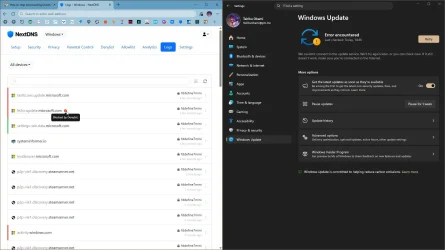
If policies do not work, you can use DNS or HOSTS.
Code:
update.microsoft.com

capture_04292026_151139.webp

You could block svchost in the firewall (80/443), temporarily, since is also used to update certificates used by browsers.

DENY WRITE permissions or create a nonexistent symlink:
Code:
rd "%WINDIR%\SoftwareDistribution\Download" /s /q
mklink /d "%WINDIR%\SoftwareDistribution\Download" "X:\Download"
 

My Computer

System One

  • OS
    Home26H2Can
    Computer type
    PC/Desktop
    CPU
    AMD Ryzen 5 8600G (07/24)
    Motherboard
    ASROCK B650M-HDV/M.2 (07/24) BIOS 4.21 AGESA ComboAM5 1.3.0.1 (04/26)
    Memory
    2x32GB Kingston FURY DDR5 5600 MHz CL36 @5200 CL36 (07/24)
    Graphics Card(s)
    ASROCK Radeon RX 6600 Challenger D 8G @48FPS (08/24)
    Sound Card
    Creative Sound BlasterX AE-5 Plus (05/24)
    Monitor(s) Displays
    24" Philips 24M1N3200ZS/00 (05/24)
    Screen Resolution
    1920×1080@165Hz via DP1.4
    Hard Drives
    Kingston KC3000 NVMe 2TB (05/24)
    ADATA XPG GAMMIX S11 Pro 512GB (07/19)
    PSU
    Seasonic Core GM 550 Gold (04/24)
    Case
    Fractal Design Define 7 Mini with 3x Noctua NF-P14s/12@555rpm (04/24)
    Cooling
    Noctua NH-U12S with Noctua NF-P12 (04/24)
    Keyboard
    HP Pavilion Wired Keyboard 300 (07/24) + Rabalux 76017 Parker (01/24)
    Mouse
    Logitech M330 Silent Plus (01/26)
    Internet Speed
    500/100 Mbps via RouterOS (05/21) & TCP Optimizer
    Browser
    Edge, Brave for YouTube, LibreWolf for FB
    Antivirus
    NextDNS blocking 1/3 Traffic
    Other Info
    Phone: Motorola Moto G86 (02/26)
    Backup: Hasleo Backup Suite (PreOS)
    Headphones: Sennheiser RS170 (09/10)
    Chair: Huzaro Force 4.4 Grey Mesh (05/24)
    Notifier: Xiaomi Mi Band 9 Milanese (10/24)
    FlexCore USB-C 3.2 Gen 1 (M) to LAN (F) (08/25)

- does that not work?

My personal preference (ok I have Pro) is to set group policy to 'Notify' should I not want updates downloaded for some reason.
Not an option if you have Home.
 

My Computer

System One

  • OS
    Windows 11 Pro
    Computer type
    Laptop
    Manufacturer/Model
    Lenovo t480s
    CPU
    i7-8650U
    Memory
    16GB
    Graphics Card(s)
    Intel UHD 620
    Screen Resolution
    1920x1080
    Hard Drives
    C SN810 SDCPNRY-512G-1006
    Browser
    Edge, Firefox
    Antivirus
    Defender

Latest Support Threads

Back
Top Bottom