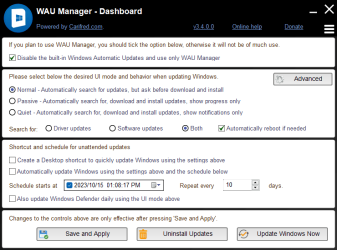
I have successfully installed Win11 24H2 - 26100.1742 except for KB5044284. When the Cumulative Update KB5044284 downloaded, the install stopped at 40% and the system rolled back to the initial installed 24H2. I have set the "Get updates as soon as available" to No. However, I do not want KB5044265 raising its ugly head again. Is there a way that I can stop this update appearing?
My Computers
-
At a glance
Windows 11 Pro 25H2 26200 current releasei7 11700KF32g DDR4 @3200Gigabyte RTX3060ti- OS
- Windows 11 Pro 25H2 26200 current release
- Computer type
- PC/Desktop
- Manufacturer/Model
- Home DIY
- CPU
- i7 11700KF
- Motherboard
- Gigabyte Z590 Aorus Elite AX
- Memory
- 32g DDR4 @3200
- Graphics Card(s)
- Gigabyte RTX3060ti
- Sound Card
- 0
- Monitor(s) Displays
- Samsung Syncmaster B2430HD
- Screen Resolution
- 1920 x 1080
- Hard Drives
- Samsung EVO 980 500G M.2
- PSU
- 600w EVGA
- Case
- Antec P280
- Cooling
- Coolmaster V6 GT
- Keyboard
- Logitech wireless K520r
- Mouse
- Logitech wirless M705
- Internet Speed
- Starlink 100mbps
- Browser
- Antivirus
- ESET
- Other Info
- Starlink
-
- Computer type
- PC/Desktop